Verbessern Sie Ihre Anweisungen mit Wissensgraph-Ontologie-Experten
Dies ist ein Internal Wiki, AI RAG-Bereich Automatisierungsworkflow mit 7 Nodes. Hauptsächlich werden HttpRequest, ChatTrigger und andere Nodes verwendet. KI-Chatbot-Antworten durch InfraNodus-Wissensgraph-Schlussfolgerung und GraphRAG verbessern
- •Möglicherweise sind Ziel-API-Anmeldedaten erforderlich
Verwendete Nodes (7)
Kategorie
{
"id": "MqHZXsobgwvx8B1f",
"meta": {
"instanceId": "334f4f928505fa56392672dcbddf0c1a39709717127e8d60d133a12f8f82b3b4",
"templateCredsSetupCompleted": true
},
"name": "Augment Your Prompt with a Knowledge Graph Ontology Expert",
"tags": [
{
"id": "2Q64isOPYcTslspA",
"name": "AI",
"createdAt": "2025-08-02T13:39:06.091Z",
"updatedAt": "2025-08-02T13:39:06.091Z"
},
{
"id": "pZUWchtD7Jo42VrS",
"name": "AI Chatbot",
"createdAt": "2025-08-02T13:39:11.275Z",
"updatedAt": "2025-08-02T13:39:11.275Z"
},
{
"id": "MNbFLjKxPdVAYXIC",
"name": "AI Rag",
"createdAt": "2025-08-02T13:39:08.349Z",
"updatedAt": "2025-08-02T13:39:08.349Z"
}
],
"nodes": [
{
"id": "2568cca8-643d-48cd-969a-eccf267dd000",
"name": "Bei Empfang einer Chat-Nachricht",
"type": "@n8n/n8n-nodes-langchain.chatTrigger",
"position": [
-512,
0
],
"webhookId": "26592391-6f28-4740-8caa-79ce80b582d0",
"parameters": {
"public": true,
"options": {}
},
"typeVersion": 1.1
},
{
"id": "92d3bec1-b54d-43c8-8ac2-1e11d92135cb",
"name": "Prompt erweitert mit Reasoning Ontology",
"type": "n8n-nodes-base.httpRequest",
"position": [
-16,
0
],
"parameters": {
"url": "https://infranodus.com/api/v1/graphAndAdvice?doNotSave=true&addStats=true&optimize=develop&includeStatements=true&includeGraphSummary=true&includeGraph=false",
"method": "POST",
"options": {},
"sendBody": true,
"authentication": "genericCredentialType",
"bodyParameters": {
"parameters": [
{
"name": "name",
"value": "eightos_system"
},
{
"name": "requestMode",
"value": "reprompt"
},
{
"name": "aiTopics",
"value": "true"
},
{
"name": "prompt",
"value": "={{ $json.chatInput }}"
},
{
"name": "systemPrompt",
"value": "Your task is to reformulate the original query of a user using the context provided"
}
]
},
"genericAuthType": "httpBearerAuth"
},
"credentials": {
"httpBearerAuth": {
"id": "C3Li2OwYebUs6Dmg",
"name": "InfraNodus Expert"
}
},
"typeVersion": 4.2
},
{
"id": "cb908d48-e575-4844-a026-aa95d0655935",
"name": "Wissensdatenbank abfragen",
"type": "n8n-nodes-base.httpRequest",
"position": [
608,
0
],
"parameters": {
"url": "https://infranodus.com/api/v1/graphAndAdvice?doNotSave=true&addStats=true&optimize=develop&includeStatements=true&includeGraphSummary=true&includeGraph=false",
"method": "POST",
"options": {},
"sendBody": true,
"authentication": "genericCredentialType",
"bodyParameters": {
"parameters": [
{
"name": "name",
"value": "eightos_system"
},
{
"name": "requestMode",
"value": "response"
},
{
"name": "aiTopics",
"value": "true"
},
{
"name": "prompt",
"value": "={{ $json.aiAdvice[0].text }}"
},
{
"name": "systemPrompt",
"value": "Use the context you are provided as a logic to use when providing a response to the user query, not as the content you should be providing. IT IS IMPERATIVE THAT YOU DO NOT EXTRACT THE CONTENT FROM THE CONTEXT PROVIDED FOR YOUR ANSWER BUT USE IT AS A REASONING LOGIC TO PROVIDE YOUR ANSWER."
}
]
},
"genericAuthType": "httpBearerAuth"
},
"credentials": {
"httpBearerAuth": {
"id": "C3Li2OwYebUs6Dmg",
"name": "InfraNodus Expert"
}
},
"typeVersion": 4.2
},
{
"id": "401b9dc0-c51e-4fe9-87cd-be393c5bd66e",
"name": "Haftnotiz",
"type": "n8n-nodes-base.stickyNote",
"position": [
-2592,
-976
],
"parameters": {
"color": 6,
"width": 540,
"height": 760,
"content": "## AI Chatbot Agent with Experts\n\n### Uses the InfraNodus knowledge graphs and its Graph RAG to retrieve relevant information.\n\nUse your [InfraNodus graph](https://infranodus.com) as the knowledge base for your AI chatbot. \n\nUpload any data to InfraNodus, generate separate knowledge graphs, then connect them as tools to the agent, so it can decide which \"expert\" to use. InfraNodus' Graph RAG will provide high-quality responses that will augment the chatbot's answers.\n\nVideo demo: [https://www.youtube.com/watch?v=kS0QTUvcH6E](https://www.youtube.com/watch?v=kS0QTUvcH6E)\n\nDetailed description: [Nodus Labs support portal](https://support.noduslabs.com/hc/en-us/articles/20174217658396-Using-InfraNodus-Knowledge-Graphs-as-Experts-for-AI-Chatbot-Agents-in-n8n)\n\nInfraNodus API key can be obtained at [InfraNodus.Com](https://infranodus.com/use-case/ai-knowledge-graphs)\n\n\n[](https://www.youtube.com/watch?v=kS0QTUvcH6E)"
},
"typeVersion": 1
},
{
"id": "8f70c71d-84bc-43cd-a13c-550ca6da336a",
"name": "Haftnotiz1",
"type": "n8n-nodes-base.stickyNote",
"position": [
-224,
-32
],
"parameters": {
"width": 520,
"height": 1220,
"content": "\n\n\n\n\n\n\n\n\n\n\n\n\n\n\n\n\n## 2. Reasoning Expert Reformulates the User's Query\n\n### Create an InfraNodus graph with a reasoning ontology. This node will then provide the reasoning logic to your LLM to reformulate the original query. Learn more about this approach in our [article on reasoning agents](https://support.noduslabs.com/hc/en-us/articles/21429518472988-Using-Knowledge-Graphs-as-Reasoning-Experts) \n\nTO CREATE THE REASONING CHAIN GRAPH:\n\n• use the [InfraNodus AI Ontologies Generator](https://infranodus.com/import/ai-ontologies) — learn more how it works on our [support portal](https://support.noduslabs.com/hc/en-us/articles/18301655686172-Generate-Knowledge-Graphs-and-Ontologies-in-Plain-Text)\n\n• choose a reasoning graph from our [multiple freely available graphs online](https://infranodus.com/knowledge-graphs)\n\n• download the existing graph on [EightOS cognitive variability framework](https://infranodus.com/expert/eightos_system?background=dark&show_analytics=1&most_influential=bc2&maxnodes=150&threshold=8&labelsize=proportional&edgestype=curve&drawedges=true&drawnodes=true&labelsizeratio=2&dynamic=highlight&cutgraph=1&selected=highlight) or use one \n\n### Once ready, add your InfraNodus graph here via the HTTP node using its name in the `body.name` field.\n\n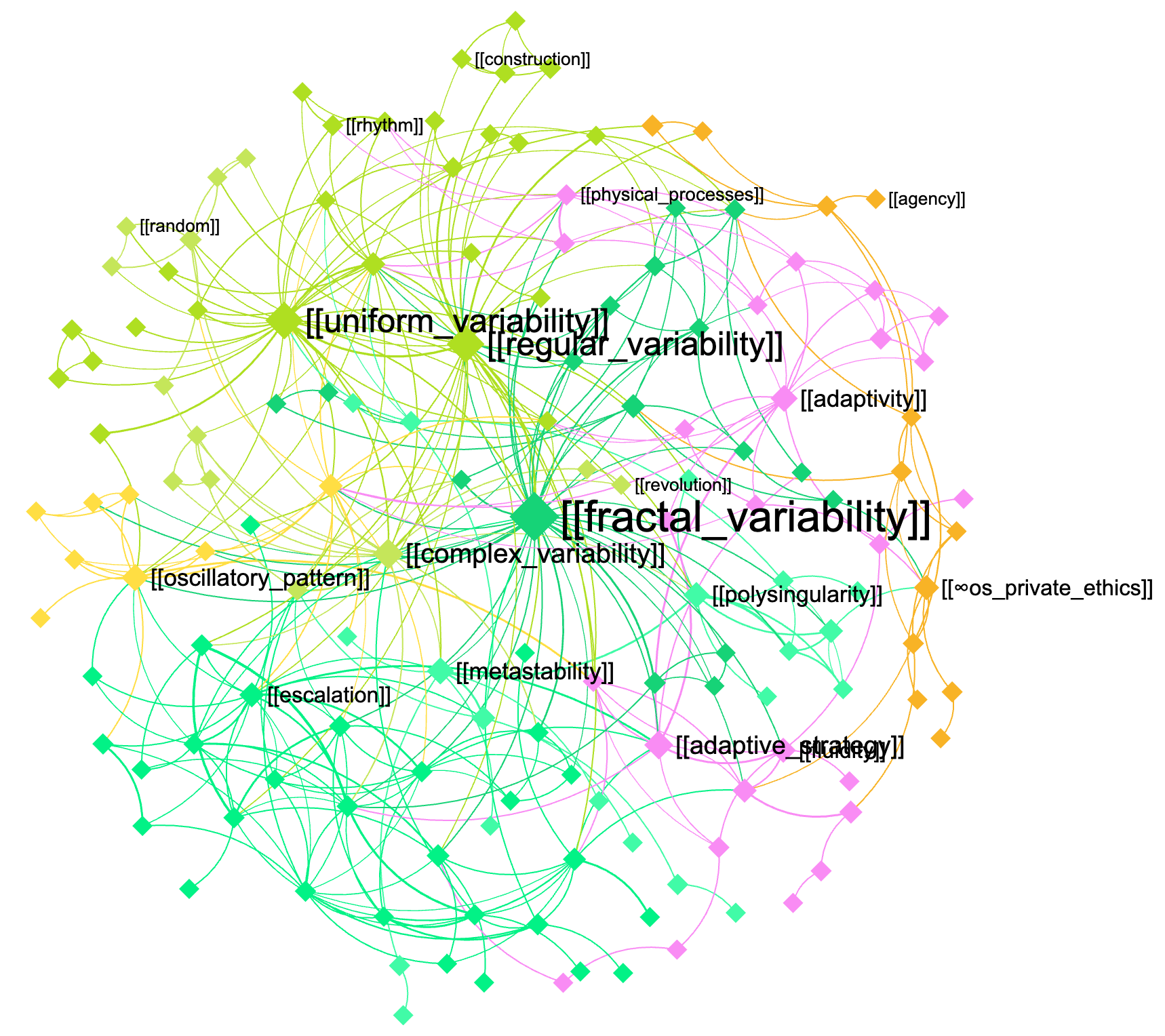"
},
"typeVersion": 1
},
{
"id": "c6d16d77-1aed-4fa8-a7aa-fb7fc6974469",
"name": "Haftnotiz9",
"type": "n8n-nodes-base.stickyNote",
"position": [
400,
-32
],
"parameters": {
"width": 520,
"height": 1216,
"content": "\n\n\n\n\n\n\n\n\n\n\n\n\n\n\n\n\n## 3. The augmented query is sent to the knowledge base and the response is retrieved using GraphRAG\n\nNow that the query is augmented with domain-specific knowledge, you can send it back to this same graph or to another graph (for cross-disciplinary requests — e.g. to use the machine learning expertise in biology, etc)\n\n[InfraNodus](https://infranodus.com) will use [GraphRAG](https://infranodus.com/docs/graph-rag-knowledge-graph) to traverse the graph for answers and extract a response for your user query.\n\nProvide the name of the graph you'll be using as a knowledge base in the `name` field of the node.\n\nYou can also replace this node with any external AI model (e.g. Open AI chat message node).\n"
},
"typeVersion": 1
},
{
"id": "3d1fe3e7-dbd5-4b13-a62c-97ee5fa42046",
"name": "Haftnotiz2",
"type": "n8n-nodes-base.stickyNote",
"position": [
-576,
-48
],
"parameters": {
"height": 768,
"content": "\n\n\n\n\n\n\n\n\n\n\n\n\n\n\n\n\n## 1. Trigger the chat and send a message\n\nYou can also make this node publicly available via a URL and embed it on a website or make it available via a Telegram node that is activated upon receiving a message (check [this workflow](https://n8n.io/workflows/4485-telegram-ai-chatbot-agent-with-infranodus-graphrag-knowledge-base/) to learn how to set it up). "
},
"typeVersion": 1
}
],
"active": false,
"pinData": {},
"settings": {
"executionOrder": "v1"
},
"versionId": "2bb0a437-1815-4bff-bdd4-600faa19b456",
"connections": {
"2568cca8-643d-48cd-969a-eccf267dd000": {
"main": [
[
{
"node": "92d3bec1-b54d-43c8-8ac2-1e11d92135cb",
"type": "main",
"index": 0
}
]
]
},
"92d3bec1-b54d-43c8-8ac2-1e11d92135cb": {
"main": [
[
{
"node": "cb908d48-e575-4844-a026-aa95d0655935",
"type": "main",
"index": 0
}
]
]
}
}
}Wie verwende ich diesen Workflow?
Kopieren Sie den obigen JSON-Code, erstellen Sie einen neuen Workflow in Ihrer n8n-Instanz und wählen Sie "Aus JSON importieren". Fügen Sie die Konfiguration ein und passen Sie die Anmeldedaten nach Bedarf an.
Für welche Szenarien ist dieser Workflow geeignet?
Fortgeschritten - Internes Wiki, KI RAG
Ist es kostenpflichtig?
Dieser Workflow ist völlig kostenlos. Beachten Sie jedoch, dass Drittanbieterdienste (wie OpenAI API), die im Workflow verwendet werden, möglicherweise kostenpflichtig sind.
Verwandte Workflows

InfraNodus
@infranodusI'm Dmitry, the founder of InfraNodus — an AI text network analysis tool. I'm passionate about networks and data visualization and its ability to reveal what everyone else is missing and to highlight different perspectives. I'm sharing the n8n templates that make use of this unique capability of InfraNodus for multiple scenarios.
Diesen Workflow teilen