Landingseiten-Analyser
Fortgeschritten
Dies ist ein AI Summarization, Multimodal AI-Bereich Automatisierungsworkflow mit 10 Nodes. Hauptsächlich werden Form, Markdown, FormTrigger, HttpRequest, Agent und andere Nodes verwendet. Landing Page Analyse-Agent
Voraussetzungen
- •Möglicherweise sind Ziel-API-Anmeldedaten erforderlich
- •Google Gemini API Key
Verwendete Nodes (10)
Kategorie
Workflow-Vorschau
Visualisierung der Node-Verbindungen, mit Zoom und Pan
Workflow exportieren
Kopieren Sie die folgende JSON-Konfiguration und importieren Sie sie in n8n
{
"id": "YYiCCvfGPMJ8gAnt",
"meta": {
"instanceId": "061ca141d020a6e1355b8c7fe05f92a699e37e92079ad2e150a506ee8bbe9e11",
"templateCredsSetupCompleted": true
},
"name": "Landing Page Analyzer",
"tags": [],
"nodes": [
{
"id": "950a73f5-aecb-4844-add2-c244f0a946a7",
"name": "Bei Formularübermittlung",
"type": "n8n-nodes-base.formTrigger",
"position": [
1008,
128
],
"webhookId": "57604090-1df3-41ca-8d55-1002798a1721",
"parameters": {
"options": {
"appendAttribution": false
},
"formTitle": "Landing Page Optimizer",
"formFields": {
"values": [
{
"fieldLabel": "Your Landing Page Url",
"placeholder": "https://example.anything",
"requiredField": true
}
]
},
"formDescription": "Make Your Page Convert Like a Top 1% Funnel"
},
"typeVersion": 2.2
},
{
"id": "fcede911-8351-4b6b-9daa-3a6fa9d68473",
"name": "HTTP Request",
"type": "n8n-nodes-base.httpRequest",
"position": [
1232,
128
],
"parameters": {
"url": "={{ $json['Your Landing Page Url'] }}",
"options": {}
},
"typeVersion": 4.2
},
{
"id": "3f28ef06-fdbf-4488-8136-7826a1a0293a",
"name": "Markdown",
"type": "n8n-nodes-base.markdown",
"position": [
1440,
128
],
"parameters": {
"html": "={{ $json.data }}",
"options": {}
},
"typeVersion": 1
},
{
"id": "1254e722-ebdc-4421-af8c-fa61e3096944",
"name": "KI-Agent",
"type": "@n8n/n8n-nodes-langchain.agent",
"position": [
1648,
128
],
"parameters": {
"text": "={{ $json.data }}",
"options": {
"systemMessage": "=You are a world-class Conversion Rate Optimization (CRO) expert.\n\nYour mission is to analyze my landing page and return with the most important actions the business should take to improve conversions. No fluff, no filler — just what matters most.\n\n🎯 YOUR RESPONSE MUST FOLLOW THIS STRUCTURE:\n\n1) Each item should start with a strong action verb (e.g., Replace, Add, Remove, Rewrite, Rearrange, Clarify, Simplify, Make visible, etc.)\n\n2) Be specific. Tell me exactly what to do — what headline to change, what section to remove, what to add and where.\n\n3) Every recommendation must be based on the actual landing page content. No generic advice.\n\n4) Prioritize modern, high-impact CRO ideas relevant to 2024 digital audiences.\n\n5) Keep it easy to understand and implement. No heavy dev work required.\n\n6) Focus on conversion levers: clarity, relevance, trust, desire, urgency, and friction reduction.\n"
},
"promptType": "define"
},
"typeVersion": 2
},
{
"id": "0d7250e0-8b9d-4626-a748-f7c056e2999b",
"name": "Formular",
"type": "n8n-nodes-base.form",
"position": [
2320,
128
],
"webhookId": "a80f45af-8f8a-480b-922b-264691668bb7",
"parameters": {
"options": {},
"operation": "completion",
"completionTitle": "Here are 5 Things You Should Improve 🧐",
"completionMessage": "=1. {{ $json.output['Improvement Tip 1'] }}\n\n2. {{ $json.output['Improvement Tip 2'] }}\n\n3. {{ $json.output['Improvement Tip 3'] }}\n\n4. {{ $json.output['Improvement Tip 4'] }} \n\n5. {{ $json.output['Improvement Tip 5'] }} "
},
"typeVersion": 1
},
{
"id": "1db518d9-3c1f-4c20-84f4-167684f959e9",
"name": "Informationsextraktor",
"type": "@n8n/n8n-nodes-langchain.informationExtractor",
"position": [
1984,
128
],
"parameters": {
"text": "={{ $json.output }}",
"options": {},
"attributes": {
"attributes": [
{
"name": "Improvement Tip 1",
"description": "=The 1st most important improvement tip without any symbol, add relevent Emoji"
},
{
"name": "Improvement Tip 2",
"description": "The 2nd most important improvement tip without any symbol, add relevant Emoji"
},
{
"name": "Improvement Tip 3",
"description": "The 3rd most important improvement tip without any symbol, add relevant Emoji"
},
{
"name": "Improvement Tip 4",
"description": "The 4th most important improvement tip without any symbol, add relevant Emoji"
},
{
"name": "Improvement Tip 5",
"description": "The 5th most important improvement tip without any symbol, add relevant Emoji"
}
]
}
},
"typeVersion": 1.2
},
{
"id": "08cf9cfe-7328-4de6-bd33-c0e2295c9e35",
"name": "Haftnotiz",
"type": "n8n-nodes-base.stickyNote",
"position": [
0,
0
],
"parameters": {
"color": 6,
"width": 840,
"height": 600,
"content": "# 🛠 Setup Guide \n## **Author:** [Rakin Jakaria](https://www.youtube.com/@rakinjakaria)\n\nFollow these steps to get your Landing Page Analyzer workflow up and running: \n\n1. **Configure Google Gemini API Credentials** \n - Navigate to the \"Google Gemini Chat Model\" node in your workflow. \n - Ensure your Google Gemini (PaLM) API credentials are properly set up in your N8N instance. \n - If you don't have an API key, obtain one from [Google AI Studio](https://aistudio.google.com/apikey). \n\n2. **Test the Webhook Form (Optional)** \n - The workflow starts with a form submission trigger. \n - If you plan to embed this in a website or app, ensure the webhook URL is correctly configured and accessible. \n\n3. **Verify HTTP Request Node** \n - The workflow fetches the landing page content via HTTP. \n - Ensure the target URLs are publicly accessible and not behind authentication. \n\n4. **Review AI Agent Instructions** \n - The AI Agent node includes a system prompt for CRO analysis. \n - Customize the prompt if needed to align with your specific goals or industry. \n\nOnce these steps are complete, your Landing Page Analyzer is ready to use! Submit a URL via the form to receive actionable CRO improvements. 🚀"
},
"typeVersion": 1
},
{
"id": "938a192a-8474-4bd6-8471-e0617cdf9c74",
"name": "Haftnotiz1",
"type": "n8n-nodes-base.stickyNote",
"position": [
944,
0
],
"parameters": {
"color": 6,
"width": 1620,
"height": 580,
"content": "## Landing Page Analyzer"
},
"typeVersion": 1
},
{
"id": "18698e25-23ce-4ca2-834c-e7cdd0521588",
"name": "Gemini 2.5 Flash",
"type": "@n8n/n8n-nodes-langchain.lmChatGoogleGemini",
"position": [
1808,
432
],
"parameters": {
"options": {}
},
"credentials": {
"googlePalmApi": {
"id": "uIFmTaGcf3XXfitE",
"name": "Google Gemini(PaLM) Api account 2"
}
},
"typeVersion": 1
},
{
"id": "2f1293bc-cfef-425f-9988-161836bcf8b2",
"name": "Haftnotiz3",
"type": "n8n-nodes-base.stickyNote",
"position": [
208,
-528
],
"parameters": {
"color": 6,
"width": 480,
"height": 464,
"content": "## Start here: Step-by Step Youtube Tutorial :star:\n[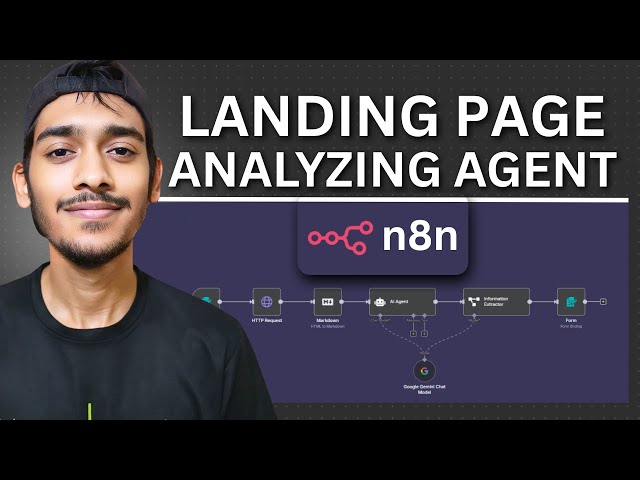](https://youtu.be/gsFl25jw-7I)"
},
"typeVersion": 1
}
],
"active": false,
"pinData": {},
"settings": {
"executionOrder": "v1"
},
"versionId": "0f6ecd02-d6ef-4d36-a122-4f8f07852ecd",
"connections": {
"1254e722-ebdc-4421-af8c-fa61e3096944": {
"main": [
[
{
"node": "1db518d9-3c1f-4c20-84f4-167684f959e9",
"type": "main",
"index": 0
}
]
]
},
"3f28ef06-fdbf-4488-8136-7826a1a0293a": {
"main": [
[
{
"node": "1254e722-ebdc-4421-af8c-fa61e3096944",
"type": "main",
"index": 0
}
]
]
},
"fcede911-8351-4b6b-9daa-3a6fa9d68473": {
"main": [
[
{
"node": "3f28ef06-fdbf-4488-8136-7826a1a0293a",
"type": "main",
"index": 0
}
]
]
},
"18698e25-23ce-4ca2-834c-e7cdd0521588": {
"ai_languageModel": [
[
{
"node": "1254e722-ebdc-4421-af8c-fa61e3096944",
"type": "ai_languageModel",
"index": 0
},
{
"node": "1db518d9-3c1f-4c20-84f4-167684f959e9",
"type": "ai_languageModel",
"index": 0
}
]
]
},
"950a73f5-aecb-4844-add2-c244f0a946a7": {
"main": [
[
{
"node": "fcede911-8351-4b6b-9daa-3a6fa9d68473",
"type": "main",
"index": 0
}
]
]
},
"1db518d9-3c1f-4c20-84f4-167684f959e9": {
"main": [
[
{
"node": "0d7250e0-8b9d-4626-a748-f7c056e2999b",
"type": "main",
"index": 0
}
]
]
}
}
}Häufig gestellte Fragen
Wie verwende ich diesen Workflow?
Kopieren Sie den obigen JSON-Code, erstellen Sie einen neuen Workflow in Ihrer n8n-Instanz und wählen Sie "Aus JSON importieren". Fügen Sie die Konfiguration ein und passen Sie die Anmeldedaten nach Bedarf an.
Für welche Szenarien ist dieser Workflow geeignet?
Fortgeschritten - KI-Zusammenfassung, Multimodales KI
Ist es kostenpflichtig?
Dieser Workflow ist völlig kostenlos. Beachten Sie jedoch, dass Drittanbieterdienste (wie OpenAI API), die im Workflow verwendet werden, möglicherweise kostenpflichtig sind.
Verwandte Workflows
Bewerbungsstellvertreter
Bewerbungsautomatisierungs-Agent
If
Form
Markdown
+
If
Form
Markdown
15 NodesRakin Jakaria
Multimodales KI
AI-Rekrutierungsassistent
Automatisiertes Lebenslauf-Screening- und Antwortsystem für Gemini AI, Gmail und Forms
Gmail
Form Trigger
Google Sheets
+
Gmail
Form Trigger
Google Sheets
9 NodesRakin Jakaria
KI-Zusammenfassung
KI-Lead-Mining-Agent
Automatisierte Lead-Generierung und Kalt-E-Mail-Versand unter Verwendung von Apify, KI und Gmail
If
Set
Wait
+
If
Set
Wait
20 NodesRakin Jakaria
Lead-Generierung
Automatisierung von Lieferanten-Due-Diligence-Studien mit Gemini und Jina AI
Automatisierung der Due-Diligence-Untersuchung für Lieferanten mit Gemini und Jina AI
If
Set
Code
+
If
Set
Code
27 NodesAdnan
Dokumentenextraktion
KI-gesteuerte Automatisierung eines Reddit-Zusammenfassungs im Morning-Brew-Stil und Veröffentlichung auf DEV
Automatisierung eines Reddit-Zusammenfassung im Morning-Brew-Stil und Veröffentlichung auf DEV mit AI
If
Set
Wait
+
If
Set
Wait
26 NodesAngel Menendez
KI-Zusammenfassung
KI-Rechnungsassistent
KI-Rechnungsagent
Set
Gmail
Filter
+
Set
Gmail
Filter
13 NodesRakin Jakaria
Rechnungsverarbeitung
Workflow-Informationen
Schwierigkeitsgrad
Fortgeschritten
Anzahl der Nodes10
Kategorie2
Node-Typen8
Autor

Rakin Jakaria
@rakinjakariaExterne Links
Auf n8n.io ansehen →
Diesen Workflow teilen