Verwenden Sie Ada AI, um Daten aus mehreren Quellen zu analysieren, zu interpretieren und zu visualisieren
Experte
Dies ist ein Automatisierungsworkflow mit 25 Nodes. Hauptsächlich werden Set, Code, Gmail, MySql, Markdown und andere Nodes verwendet. Verwendung von Ada AI zur Analyse, Interpretation und Visualisierung mehrquelliger Daten
Voraussetzungen
- •Google-Konto + Gmail API-Anmeldedaten
- •MySQL-Datenbankverbindungsdaten
- •Möglicherweise sind Ziel-API-Anmeldedaten erforderlich
- •Google Sheets API-Anmeldedaten
Verwendete Nodes (25)
Kategorie
-
Workflow-Vorschau
Visualisierung der Node-Verbindungen, mit Zoom und Pan
Workflow exportieren
Kopieren Sie die folgende JSON-Konfiguration und importieren Sie sie in n8n
{
"meta": {
"instanceId": "806e76bc68769277cc91003cf60c5af8793416e570a07db359be1a94e4c0b217"
},
"nodes": [
{
"id": "78b49282-5384-4a85-aadf-f05fc08cfe7f",
"name": "Notizzettel",
"type": "n8n-nodes-base.stickyNote",
"position": [
-144,
-112
],
"parameters": {
"color": 4,
"width": 448,
"height": 1536,
"content": "## Data Source\nThese nodes extract structured data directly from your data source (e.g., MySQL, Google Sheets, Excel/CSV).\n\nSimply connect the data source nodes you need and disconnect any unused nodes.\n\n**You must select one - and only one - data source node. Disconnect any additional data source nodes. You can also replace these nodes with any other data sources**\n\nAs long as the generated data matches the structured format required by the subsequent steps.\n\n## Sample Data\nA node is provided here that randomly generates one thousand data entries each time.\n\nThis dataset is a collection of simulated sales order records. Each record contains the following fields:\n\norder_date: The date when the order was placed.\nproduct_category: The category of the product sold, such as \"Electronics,\" \"Clothing & Fashion,\" \"Home & Furniture,\" \"Food & Beverages,\" \"Sports & Outdoors,\" or \"Beauty & Personal Care.\"\nregion: The sales region, which can include \"North America,\" \"South America,\" \"Europe,\" \"Asia,\" \"Africa,\" \"Oceania,\" \"Middle East,\" or \"Central Asia.\"\nsales_amount: The total sales amount for the order.\nThis type of data is typically used for analyzing sales performance across different time periods, product categories, and regions. In n8n, such data is usually structured as an array of objects, making it suitable for further processing, analysis, and automation workflows."
},
"typeVersion": 1
},
{
"id": "bf8a1e18-4fcf-4ba5-ba20-ec534dbb3499",
"name": "Notizzettel1",
"type": "n8n-nodes-base.stickyNote",
"position": [
496,
240
],
"parameters": {
"color": 4,
"width": 656,
"height": 976,
"content": "## Select the skills you need\nConnect the skill nodes you require\n\nYou need to apply for an API key according to the instructions, configure credentials, and set up Authentication in the DataAnalysis, DataInterpretation, and DataVisualization nodes.\n\n### Input parameters\ninput_json: Data from previous nodes\nquery: Query statement, you can set a fixed query according to your needs or use LLM to generate the query\n\n### Output\nThe output of DataAnalysis and DataInterpretation nodes will include markdown text, while the output of DataVisualization nodes will include HTML code."
},
"typeVersion": 1
},
{
"id": "dd510d46-fb9d-4020-b675-cddb76dfbfc5",
"name": "Notizzettel2",
"type": "n8n-nodes-base.stickyNote",
"position": [
1328,
368
],
"parameters": {
"color": 4,
"width": 336,
"height": 848,
"content": "## Output\n\nHere we use sending email as an example; you can choose the method that suits your needs."
},
"typeVersion": 1
},
{
"id": "64975f75-6153-43a0-ad61-4bc8c69c0e33",
"name": "Notizzettel3",
"type": "n8n-nodes-base.stickyNote",
"position": [
-3584,
240
],
"parameters": {
"color": 7,
"width": 3088,
"height": 4672,
"content": "## Overview\nThis template empowers low-code data analysis using natural language. Simply connect to your data sources (e.g., MySQL, Google Sheets),\nand it automates the entire workflow—from data querying and processing to interpretation and visualization. For instance,\nit can professionally analyze, interpret, and visualize weekly sales data and have the report delivered directly to your inbox.\n\nThis template is supported by [ada.im](https://ada.im/home?ada_data_=&utm_source=n8n&utm_medium=landingpage&utm_infeluncer=landingpage&utm_campain=landingpage&utm_content=landingpage)\n## Here are some example results:\n\n### DataVisualization\nquery: Use a pie chart to display the sales of each product in 2024, and a line chart to represent the total monthly sales of each product in 2024. Additionally, you can add some extra charts based on the data.\nresult: \n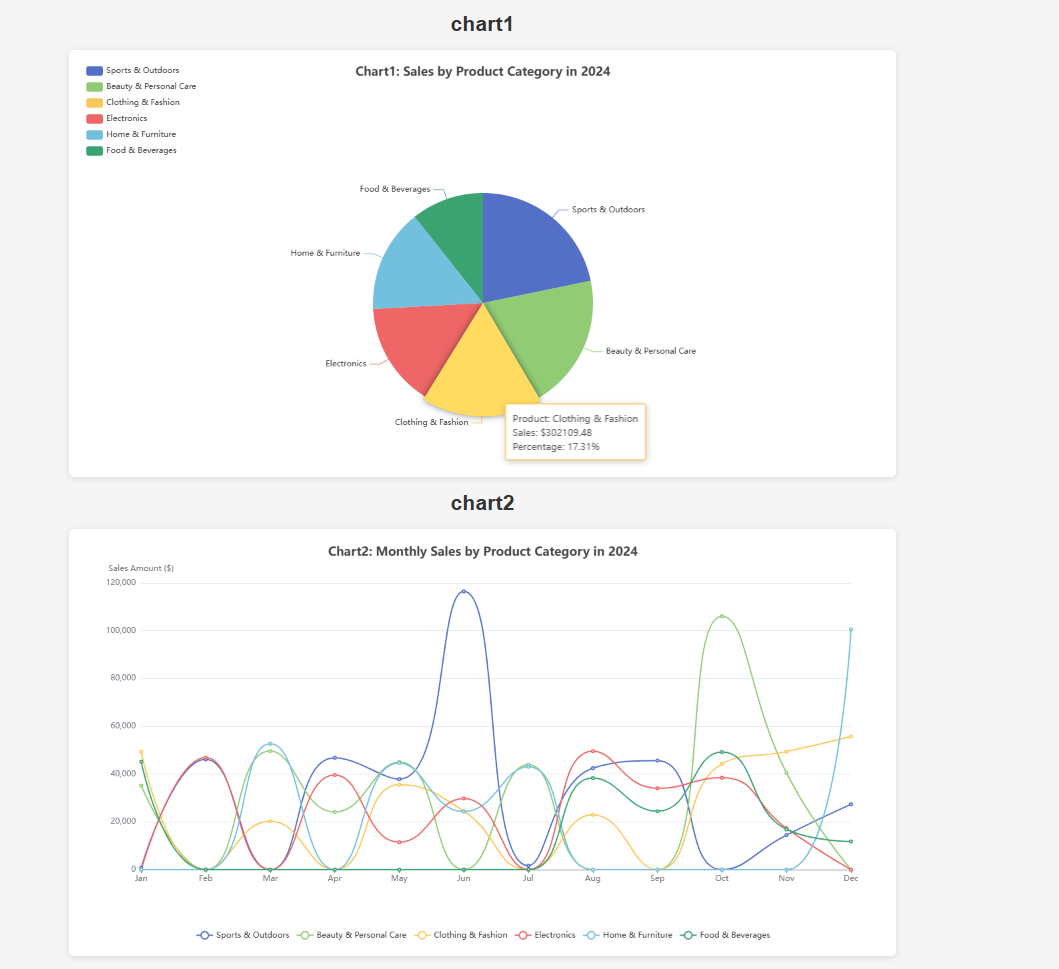\n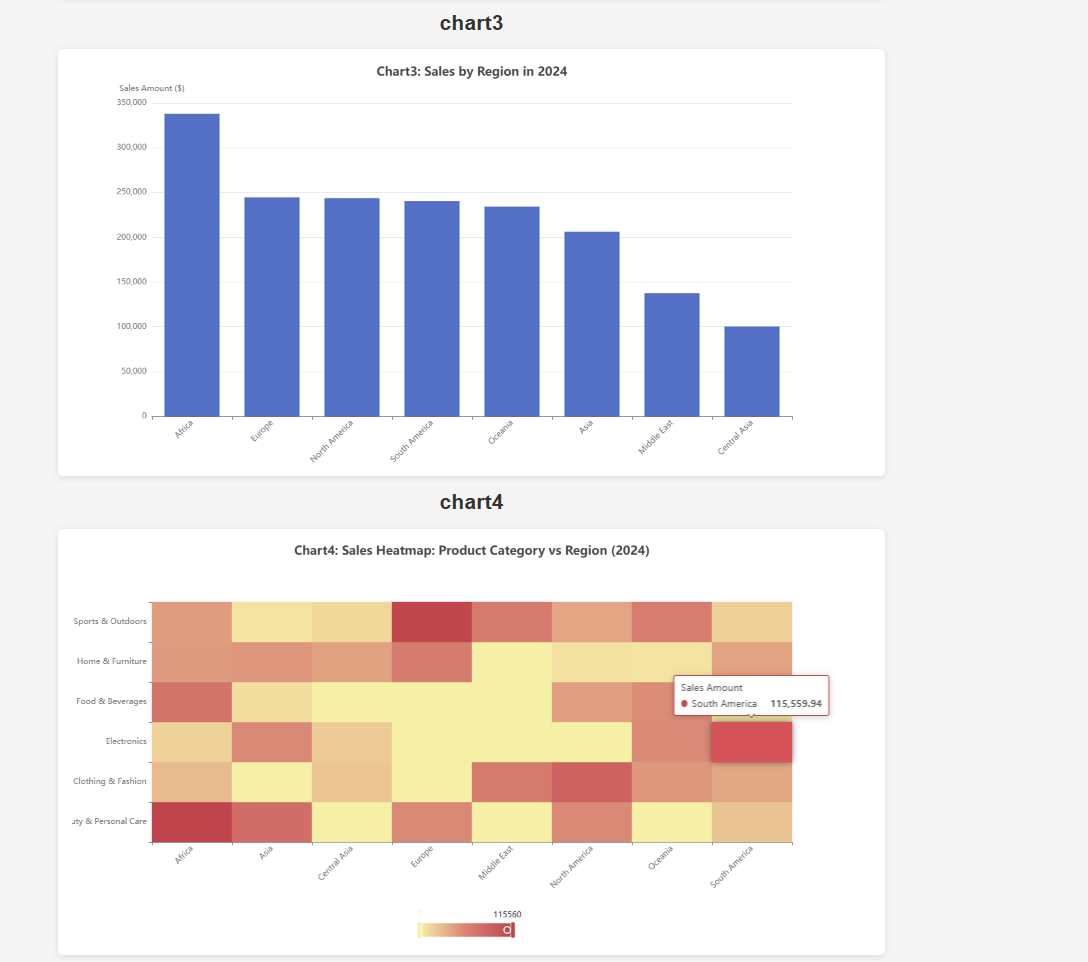\n\n### DataInterpretation\nquery: Sales volume of each product in 2024\nresult: \n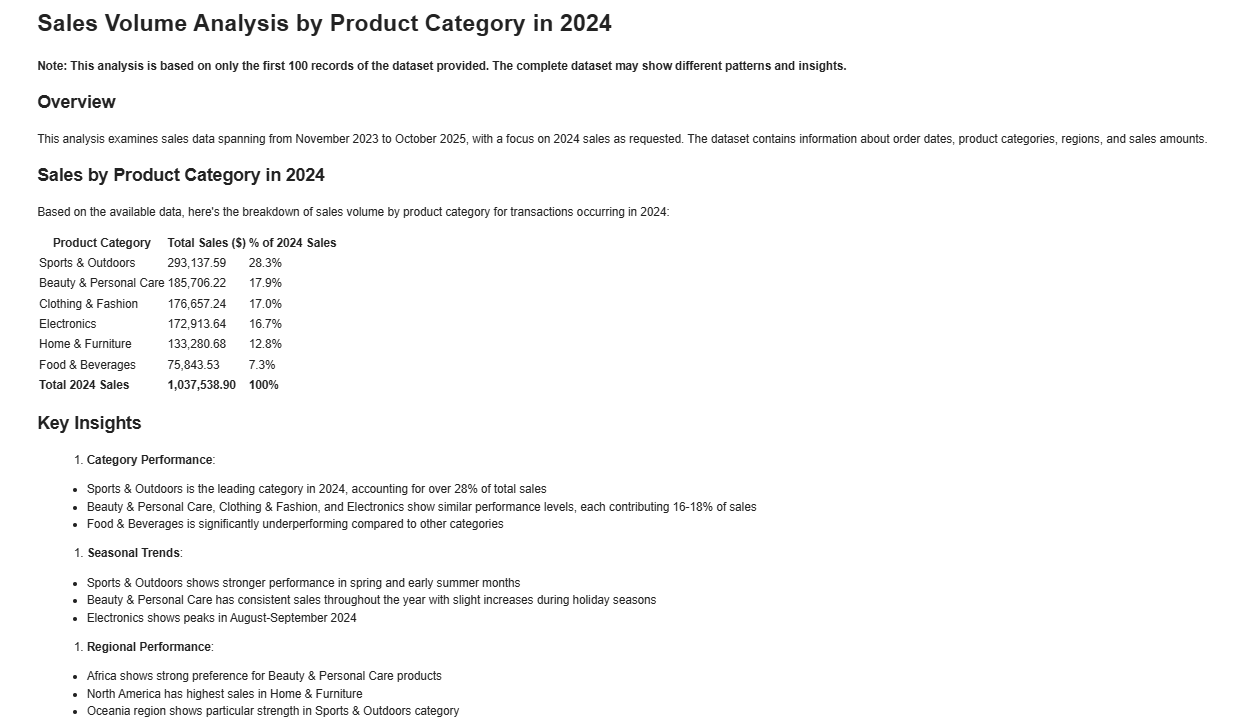\n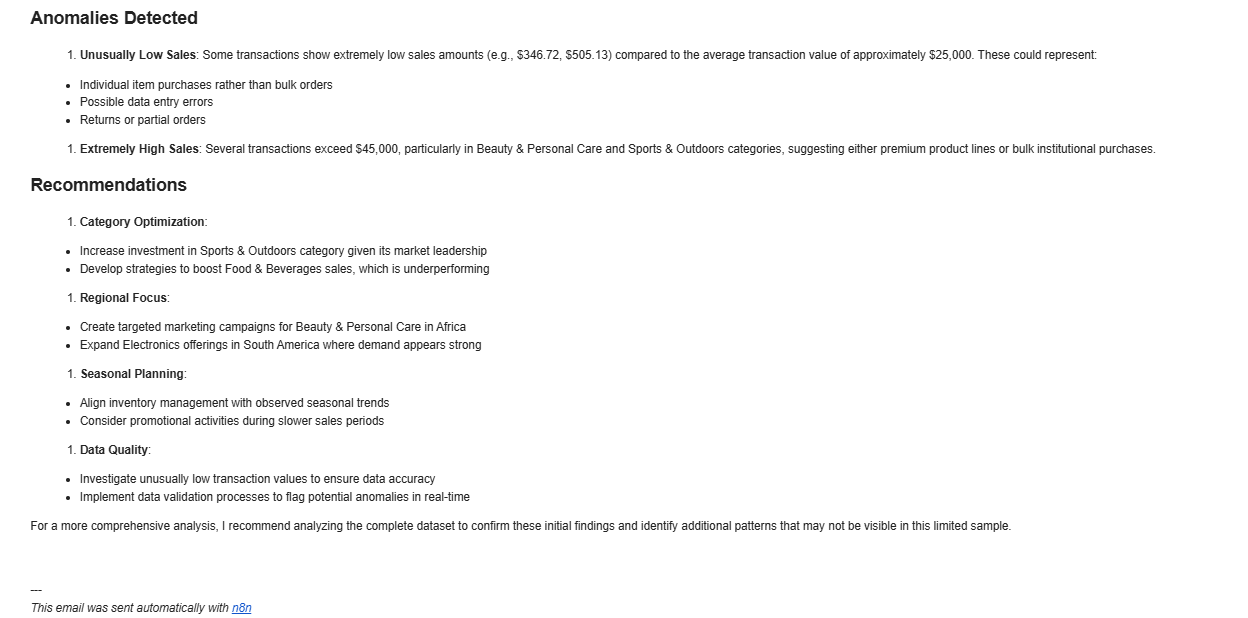\n\n### DataAnalysis\nquery: What are the top three products in terms of sales in 2024? Analyze the gap between the top three products and the others from a statistical perspective.\nresult: \n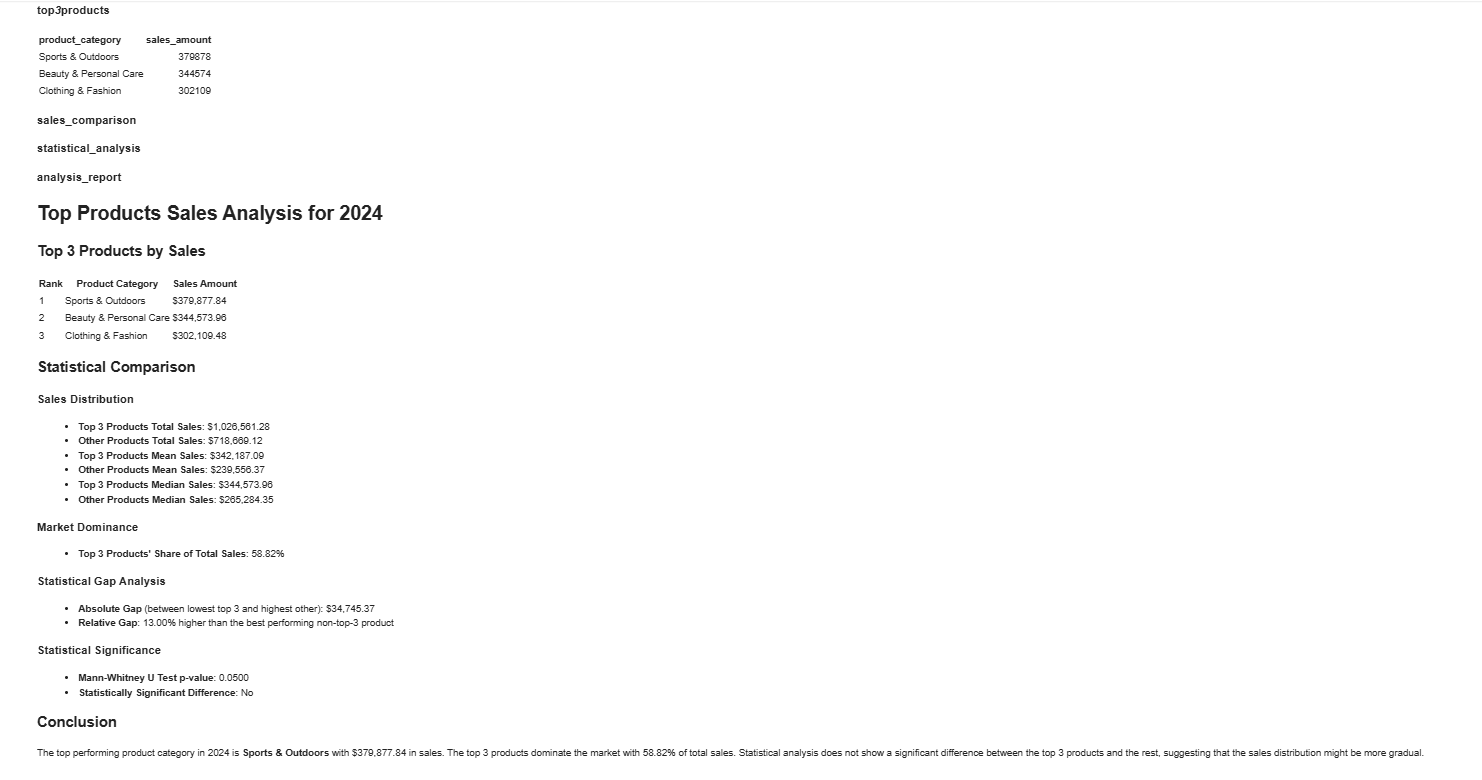"
},
"typeVersion": 1
},
{
"id": "8f6a76db-8a9b-482f-91d6-919056845326",
"name": "Notizzettel4",
"type": "n8n-nodes-base.stickyNote",
"position": [
-1152,
512
],
"parameters": {
"width": 512,
"height": 1536,
"content": "## 2️⃣ Set credentials\n\nIn HTTP nodes(DataAnalysis, DataInterpretation, and DataVisualization) select Authentication → Generic Credential Type\n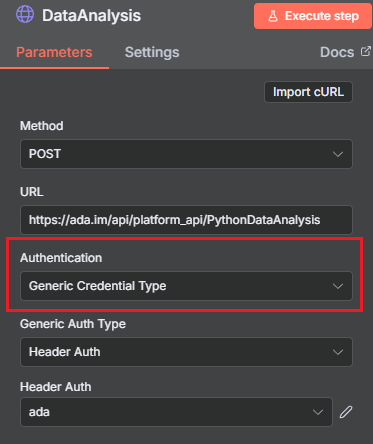\n\nChoose Header Auth → Create new credential\n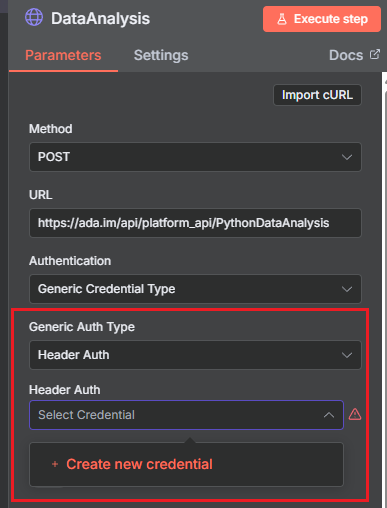\n\nName the header Authorization, which must be exactly 'Authorization', and fill in the previously applied API key\n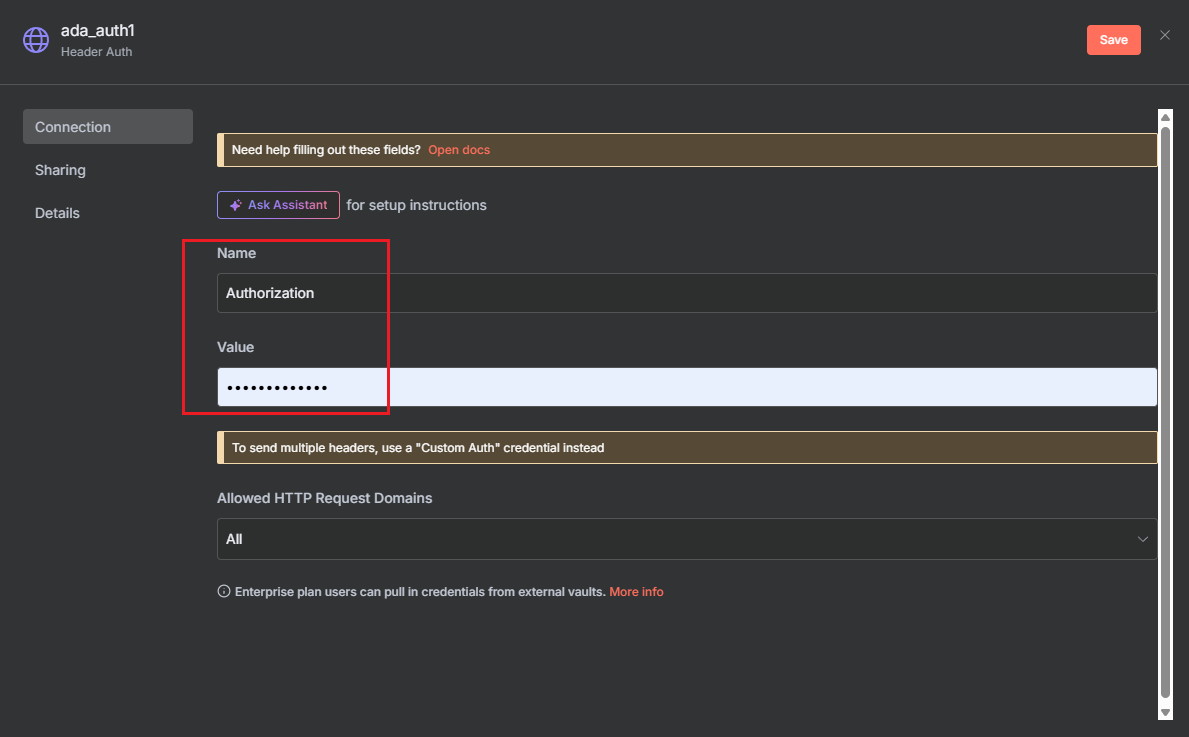"
},
"typeVersion": 1
},
{
"id": "a207fbeb-3186-4116-920d-7c835c819af7",
"name": "Notizzettel5",
"type": "n8n-nodes-base.stickyNote",
"position": [
-2272,
2880
],
"parameters": {
"width": 1088,
"height": 224,
"content": "## Consult\nContact us for inquiries or feedback.\n\nemail: n8n-plugin@ada.im\n\n[Discord](https://discord.com/invite/Bwd6zGYThS)\n\nExplore [Ada](https://ada.im/home?ada_data_=&utm_source=n8n&utm_medium=landingpage&utm_infeluncer=landingpage&utm_campain=landingpage&utm_content=landingpage) : Your own AI Data Analyst."
},
"typeVersion": 1
},
{
"id": "ab5c1992-7fc4-497b-8fd1-af121a4cd31b",
"name": "Notizzettel6",
"type": "n8n-nodes-base.stickyNote",
"position": [
-2288,
512
],
"parameters": {
"width": 1056,
"height": 2336,
"content": "## 1️⃣ Apply for an API Key\nYou can easily create and manage your API Key in the [ADA official website](https://ada.im/home?ada_data_=&utm_source=n8n&utm_medium=landingpage&utm_infeluncer=landingpage&utm_campain=landingpage&utm_content=landingpage) - API. To begin with, You need to register for an ADA account.\n\nOnce on the homepage, click the bottom left corner to access the API management dashboard.\n\n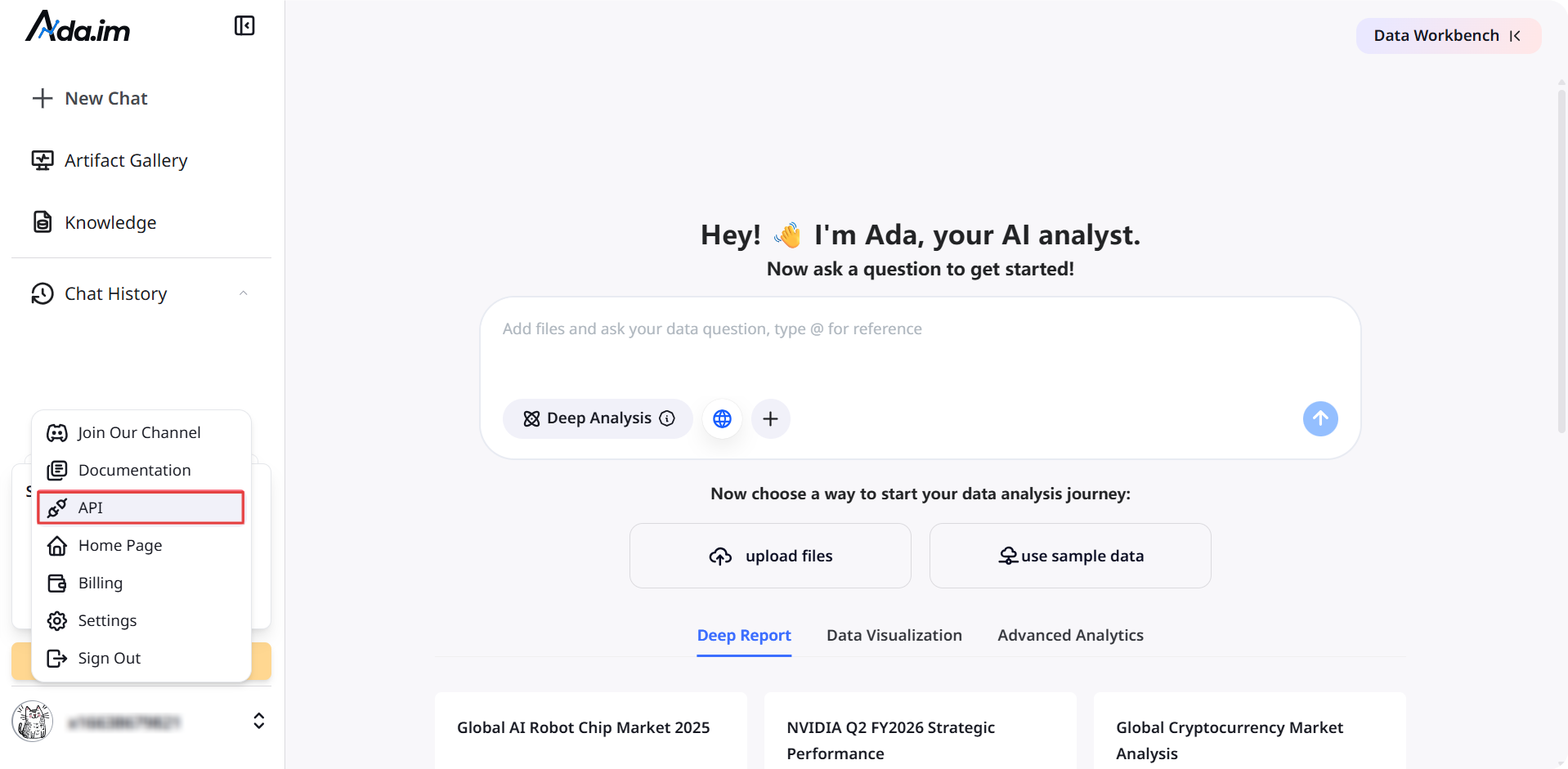\n\nHere, you can create new APIs and set the credit consumption limit for each API. A single account can create up to 10 APIs.\n\n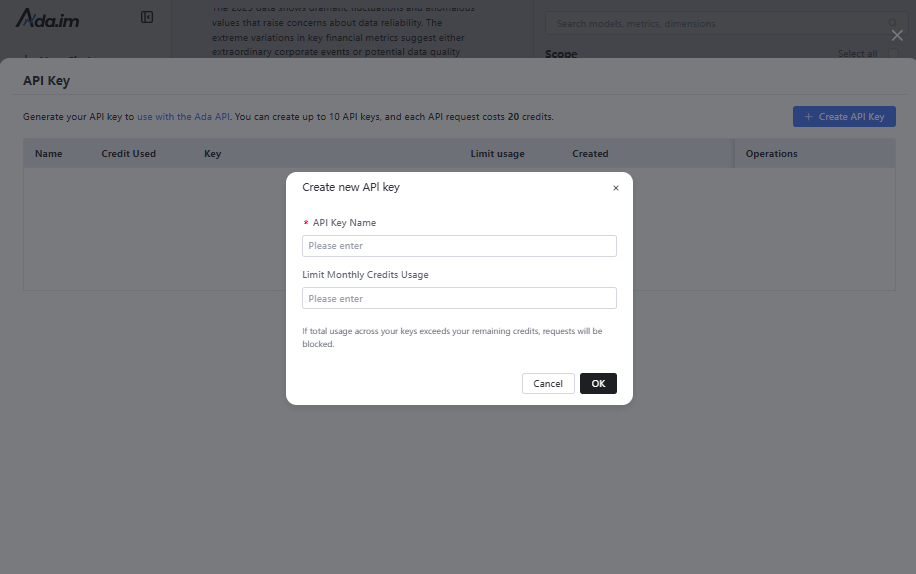\n\nAfter successful creation, you can copy the API Key to set credentials. You can also view the credit consumption of each API and manage your APIs.\n\n\n### **Credit Rules:**\n\n- Calling a single tool consumes 20 credits.\n- You will get 500 free credits per month for ADA Free account, with each batch of credits valid for three months.\n- When credits run out, you can purchase more or upgrade your account on the ADA Billing page. Each batch of purchased credits is valid for three months. Expiration dates and billing details are available on the [ADA website-Billing](https://ada.im/udsl/#/system/billing).\n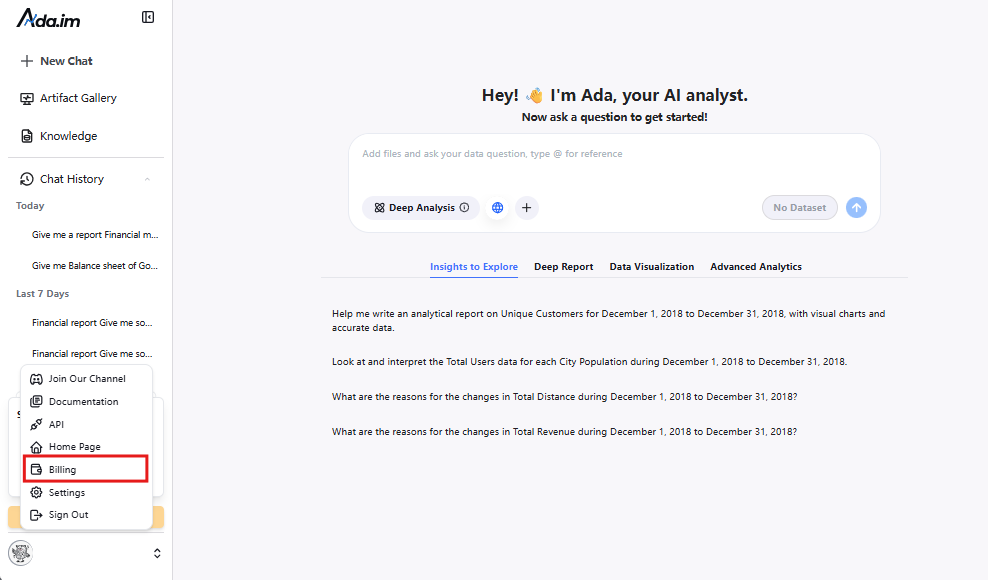"
},
"typeVersion": 1
},
{
"id": "c29c4606-ab1b-42b8-bbf3-8c79d68a2a98",
"name": "Start",
"type": "n8n-nodes-base.manualTrigger",
"position": [
-432,
608
],
"parameters": {},
"typeVersion": 1
},
{
"id": "a4d275ff-e4ff-4066-a4e0-f4d857f5e4c4",
"name": "Daten aus Datenbank abrufen",
"type": "n8n-nodes-base.mySql",
"position": [
0,
800
],
"parameters": {
"query": "select * from orders limit 100",
"options": {},
"operation": "executeQuery"
},
"typeVersion": 2.5
},
{
"id": "75fc8170-eec6-47c7-bd66-384d2f1a53a8",
"name": "Daten verarbeiten",
"type": "n8n-nodes-base.aggregate",
"position": [
336,
608
],
"parameters": {
"options": {},
"aggregate": "aggregateAllItemData"
},
"typeVersion": 1
},
{
"id": "809b1798-dcf6-42cc-8d8d-d258fa6d67fd",
"name": "Daten aus Google Tabellen abrufen",
"type": "n8n-nodes-base.googleSheets",
"position": [
0,
992
],
"parameters": {
"options": {},
"sheetName": {
"__rl": true,
"mode": "list",
"value": 332281959,
"cachedResultUrl": "https://docs.google.com/spreadsheets/d/1IhUFreWCZFLAUaCP9ELBnvakg1xSs4CgqnSnMvgkGmM/edit#gid=332281959",
"cachedResultName": "Sheet1"
},
"documentId": {
"__rl": true,
"mode": "list",
"value": "1IhUFreWCZFLAUaCP9ELBnvakg1xSs4CgqnSnMvgkGmM",
"cachedResultUrl": "https://docs.google.com/spreadsheets/d/1IhUFreWCZFLAUaCP9ELBnvakg1xSs4CgqnSnMvgkGmM/edit?usp=drivesdk",
"cachedResultName": "example_data"
}
},
"credentials": {
"googleSheetsOAuth2Api": {
"id": "TYgnI9PXhFzSLNSk",
"name": "Google Sheets account"
}
},
"typeVersion": 4.7
},
{
"id": "0cf1ecaf-77a5-4c42-a8a4-c1ed05d1b044",
"name": "Daten aus lokaler Datei abrufen",
"type": "n8n-nodes-base.readWriteFile",
"position": [
-80,
1184
],
"parameters": {
"options": {
"dataPropertyName": "input_file"
}
},
"typeVersion": 1
},
{
"id": "53f02952-806b-4023-9723-f30a35024b3f",
"name": "JSON aus xlsx-Datei extrahieren",
"type": "n8n-nodes-base.extractFromFile",
"position": [
112,
1184
],
"parameters": {
"options": {},
"operation": "xlsx",
"binaryPropertyName": "input_file"
},
"typeVersion": 1
},
{
"id": "02987176-ebb7-4fda-b5e3-fb99f023f381",
"name": "DataAnalysis",
"type": "n8n-nodes-base.httpRequest",
"position": [
560,
608
],
"parameters": {
"url": "https://ada.im/api/platform_api/PythonDataAnalysis",
"method": "POST",
"options": {},
"sendBody": true,
"authentication": "genericCredentialType",
"bodyParameters": {
"parameters": [
{
"name": "input_json",
"value": "={{$json.data}}"
},
{
"name": "query",
"value": "What are the top three products in terms of sales in 2024? Analyze the gap between the top three products and the others from a statistical perspective."
},
{
"name": "platform",
"value": "n8n"
}
]
},
"genericAuthType": "httpHeaderAuth"
},
"typeVersion": 4.2
},
{
"id": "34c0b0d3-197d-4966-936b-b7601530e325",
"name": "DataInterpretation",
"type": "n8n-nodes-base.httpRequest",
"position": [
560,
784
],
"parameters": {
"url": "https://ada.im/api/platform_api/DataInterpretation",
"method": "POST",
"options": {},
"sendBody": true,
"authentication": "genericCredentialType",
"bodyParameters": {
"parameters": [
{
"name": "input_json",
"value": "={{$json.data}}"
},
{
"name": "query",
"value": "Sales volume of each product in 2024"
},
{
"name": "platform",
"value": "n8n"
}
]
},
"genericAuthType": "httpHeaderAuth"
},
"typeVersion": 4.2
},
{
"id": "50a3424f-7147-4d38-9cb3-2b90fed8a572",
"name": "DataVisualization",
"type": "n8n-nodes-base.httpRequest",
"position": [
560,
960
],
"parameters": {
"url": "https://ada.im/api/platform_api/EchartsVisualization",
"method": "POST",
"options": {},
"sendBody": true,
"authentication": "genericCredentialType",
"bodyParameters": {
"parameters": [
{
"name": "input_json",
"value": "={{$json.data}}"
},
{
"name": "query",
"value": "Use a pie chart to display the sales of each product in 2024, and a line chart to represent the total monthly sales of each product in 2024. Additionally, you can add some extra charts based on the data."
},
{
"name": "platform",
"value": "n8n"
}
]
},
"genericAuthType": "httpHeaderAuth"
},
"credentials": {
"httpHeaderAuth": {
"id": "A1ydMlIrxdo5rBa4",
"name": "Header Auth account"
}
},
"typeVersion": 4.2
},
{
"id": "0d7f6c15-aef5-4b3a-81bc-b21a0a9f4c1d",
"name": "In HTML-Datei konvertieren",
"type": "n8n-nodes-base.convertToFile",
"position": [
976,
960
],
"parameters": {
"options": {
"fileName": "chart.html"
},
"operation": "toText",
"sourceProperty": "html",
"binaryPropertyName": "chart"
},
"typeVersion": 1.1
},
{
"id": "0454bd77-f7fc-4798-afa1-3f93a0e006d5",
"name": "Markdown in HTML konvertieren",
"type": "n8n-nodes-base.markdown",
"position": [
976,
608
],
"parameters": {
"mode": "markdownToHtml",
"options": {
"tables": true,
"simpleLineBreaks": true,
"completeHTMLDocument": false
},
"markdown": "={{ $json.data.parseJson().data }}",
"destinationKey": "html"
},
"typeVersion": 1
},
{
"id": "6ffbdfb1-f72a-480b-82ae-c0fcdc881feb",
"name": "Markdown in HTML konvertieren 2",
"type": "n8n-nodes-base.markdown",
"position": [
976,
784
],
"parameters": {
"mode": "markdownToHtml",
"options": {
"tables": true,
"simpleLineBreaks": true,
"completeHTMLDocument": false
},
"markdown": "={{ $json.data.parseJson().data }}",
"destinationKey": "html"
},
"typeVersion": 1
},
{
"id": "f765788b-4efb-4daa-908c-84e653784156",
"name": "Notizzettel7",
"type": "n8n-nodes-base.stickyNote",
"position": [
-1152,
2096
],
"parameters": {
"width": 512,
"height": 1168,
"content": "## 3️⃣ Try out the skills\nSelect the data source and fill in the query parameters for the DataAnalysis, DataInterpretation, and DataVisualization nodes.\n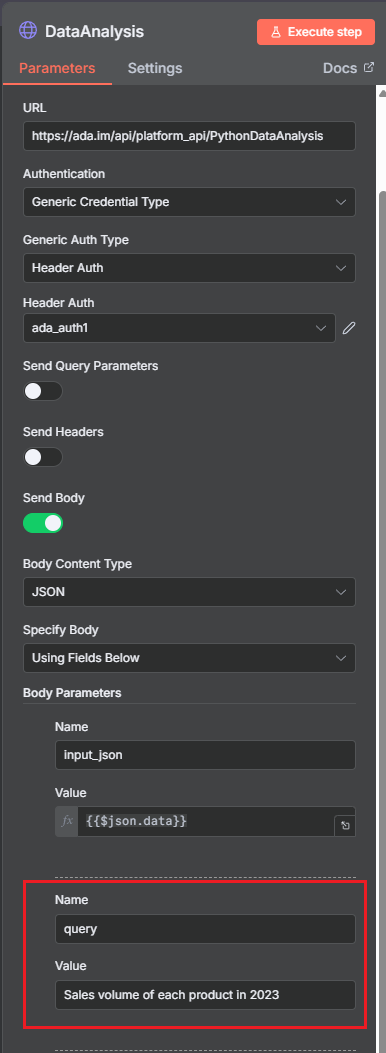"
},
"typeVersion": 1
},
{
"id": "30aaf9f5-e935-4ddb-adcc-baff0ab5b101",
"name": "DataAnalysis-Nachricht senden",
"type": "n8n-nodes-base.gmail",
"position": [
1456,
608
],
"webhookId": "6634ed2d-552c-4bf6-a7f2-bbdee8d61df4",
"parameters": {
"message": "={{ $json.html }}",
"options": {},
"subject": "n8n-email"
},
"typeVersion": 2.1
},
{
"id": "a10921fc-2258-48d5-8f40-99bf495a082c",
"name": "DataInterpretation-Nachricht senden",
"type": "n8n-nodes-base.gmail",
"position": [
1456,
784
],
"webhookId": "6634ed2d-552c-4bf6-a7f2-bbdee8d61df4",
"parameters": {
"sendTo": "cuifangxu1999@gmail.com",
"message": "={{ $json.html }}",
"options": {},
"subject": "n8ntest"
},
"typeVersion": 2.1
},
{
"id": "8fb14896-41b4-4eb1-8d4e-b70f3b97ad49",
"name": "Send DataVisualization",
"type": "n8n-nodes-base.gmail",
"position": [
1456,
960
],
"webhookId": "6634ed2d-552c-4bf6-a7f2-bbdee8d61df4",
"parameters": {
"sendTo": "cuifangxu1999@gmail.com",
"message": "From n8n, please use a browser to open the HTML file in the attachment",
"options": {
"attachmentsUi": {
"attachmentsBinary": [
{
"property": "=chart"
}
]
}
},
"subject": "n8ntest",
"emailType": "text"
},
"typeVersion": 2.1
},
{
"id": "b29b555a-bd5d-4a6f-8873-9027c13ae3ef",
"name": "Beispieldaten",
"type": "n8n-nodes-base.code",
"position": [
0,
608
],
"parameters": {
"jsCode": "const categories = [\n 'Electronics',\n 'Clothing & Fashion',\n 'Home & Furniture',\n 'Food & Beverages',\n 'Sports & Outdoors',\n 'Beauty & Personal Care'\n];\nconst regions = [\n 'North America',\n 'South America',\n 'Europe',\n 'Asia',\n 'Africa',\n 'Oceania',\n 'Middle East',\n 'Central Asia'\n];\n\nfunction randomDateWithin730Days() {\n const now = new Date();\n const daysAgo = Math.floor(Math.random() * 730);\n now.setDate(now.getDate() - daysAgo);\n return now.toISOString().slice(0, 10);\n}\n\nlet items = [];\nfor (let i = 0; i < 1000; i++) {\n items.push({\n json: {\n order_date: randomDateWithin730Days(),\n product_category: categories[Math.floor(Math.random() * categories.length)],\n region: regions[Math.floor(Math.random() * regions.length)],\n sales_amount: (50 + Math.random() * 49950).toFixed(2)\n }\n });\n}\nreturn items;"
},
"typeVersion": 2
},
{
"id": "7213ec38-425d-4020-9776-5750c286aa65",
"name": "Visualisierungsdaten verarbeiten",
"type": "n8n-nodes-base.set",
"position": [
768,
960
],
"parameters": {
"options": {},
"assignments": {
"assignments": [
{
"id": "ab328d59-6af7-4084-9c75-a7b5c5673168",
"name": "html",
"type": "string",
"value": "={{ JSON.parse($json.data).data }}"
}
]
}
},
"typeVersion": 3.4
}
],
"pinData": {},
"connections": {
"c29c4606-ab1b-42b8-bbf3-8c79d68a2a98": {
"main": [
[
{
"node": "b29b555a-bd5d-4a6f-8873-9027c13ae3ef",
"type": "main",
"index": 0
}
]
]
},
"b29b555a-bd5d-4a6f-8873-9027c13ae3ef": {
"main": [
[
{
"node": "75fc8170-eec6-47c7-bd66-384d2f1a53a8",
"type": "main",
"index": 0
}
]
]
},
"02987176-ebb7-4fda-b5e3-fb99f023f381": {
"main": [
[
{
"node": "0454bd77-f7fc-4798-afa1-3f93a0e006d5",
"type": "main",
"index": 0
}
]
]
},
"75fc8170-eec6-47c7-bd66-384d2f1a53a8": {
"main": [
[
{
"node": "50a3424f-7147-4d38-9cb3-2b90fed8a572",
"type": "main",
"index": 0
},
{
"node": "02987176-ebb7-4fda-b5e3-fb99f023f381",
"type": "main",
"index": 0
},
{
"node": "34c0b0d3-197d-4966-936b-b7601530e325",
"type": "main",
"index": 0
}
]
]
},
"50a3424f-7147-4d38-9cb3-2b90fed8a572": {
"main": [
[
{
"node": "7213ec38-425d-4020-9776-5750c286aa65",
"type": "main",
"index": 0
}
]
]
},
"34c0b0d3-197d-4966-936b-b7601530e325": {
"main": [
[
{
"node": "6ffbdfb1-f72a-480b-82ae-c0fcdc881feb",
"type": "main",
"index": 0
}
]
]
},
"0d7f6c15-aef5-4b3a-81bc-b21a0a9f4c1d": {
"main": [
[
{
"node": "8fb14896-41b4-4eb1-8d4e-b70f3b97ad49",
"type": "main",
"index": 0
}
]
]
},
"a4d275ff-e4ff-4066-a4e0-f4d857f5e4c4": {
"main": [
[
{
"node": "75fc8170-eec6-47c7-bd66-384d2f1a53a8",
"type": "main",
"index": 0
}
]
]
},
"8fb14896-41b4-4eb1-8d4e-b70f3b97ad49": {
"main": [
[]
]
},
"0454bd77-f7fc-4798-afa1-3f93a0e006d5": {
"main": [
[
{
"node": "30aaf9f5-e935-4ddb-adcc-baff0ab5b101",
"type": "main",
"index": 0
}
]
]
},
"0cf1ecaf-77a5-4c42-a8a4-c1ed05d1b044": {
"main": [
[
{
"node": "53f02952-806b-4023-9723-f30a35024b3f",
"type": "main",
"index": 0
}
]
]
},
"30aaf9f5-e935-4ddb-adcc-baff0ab5b101": {
"main": [
[]
]
},
"6ffbdfb1-f72a-480b-82ae-c0fcdc881feb": {
"main": [
[
{
"node": "a10921fc-2258-48d5-8f40-99bf495a082c",
"type": "main",
"index": 0
}
]
]
},
"7213ec38-425d-4020-9776-5750c286aa65": {
"main": [
[
{
"node": "0d7f6c15-aef5-4b3a-81bc-b21a0a9f4c1d",
"type": "main",
"index": 0
}
]
]
},
"53f02952-806b-4023-9723-f30a35024b3f": {
"main": [
[
{
"node": "75fc8170-eec6-47c7-bd66-384d2f1a53a8",
"type": "main",
"index": 0
}
]
]
},
"Daten aus Google Sheets abrufen": {
"main": [
[
{
"node": "75fc8170-eec6-47c7-bd66-384d2f1a53a8",
"type": "main",
"index": 0
}
]
]
},
"a10921fc-2258-48d5-8f40-99bf495a082c": {
"main": [
[]
]
}
}
}Häufig gestellte Fragen
Wie verwende ich diesen Workflow?
Kopieren Sie den obigen JSON-Code, erstellen Sie einen neuen Workflow in Ihrer n8n-Instanz und wählen Sie "Aus JSON importieren". Fügen Sie die Konfiguration ein und passen Sie die Anmeldedaten nach Bedarf an.
Für welche Szenarien ist dieser Workflow geeignet?
Experte
Ist es kostenpflichtig?
Dieser Workflow ist völlig kostenlos. Beachten Sie jedoch, dass Drittanbieterdienste (wie OpenAI API), die im Workflow verwendet werden, möglicherweise kostenpflichtig sind.
Verwandte Workflows
n8n-Knoten in der visuellen Referenzbibliothek erkunden
Erkundung von n8n-Knoten in der visuellen Referenzbibliothek
If
Ftp
Set
+
If
Ftp
Set
113 NodesI versus AI
Sonstiges
Automatisiertes Senden von LinkedIn-Kontaktanfragen und Einstiegsnachrichten mit Unipile und Google Sheets
Automatisierte LinkedIn-Kontaktanfragen und Eisbrecher-Nachrichten mit Unipile und Google Sheets
If
Set
Code
+
If
Set
Code
44 NodesPollupAI
Sonstiges
Automatisierter Blog-Schreib- und Social-Media-Promotions-Agent
Automatisierung der Erstellung von SEO-Blogs + Social Media mit GPT-4, Perplexity und WordPress
Set
Code
Gmail
+
Set
Code
Gmail
79 NodesLukaszB
Design
AI-Medien mit ComfyUI generieren: Bilder, Videos, 3D und Audio-Brücken
KI-Medien mit ComfyUI generieren: Bilder, Videos, 3D und Audio-Brücken
If
Set
Code
+
If
Set
Code
51 NodesNielo
Design
Transkriptions-Evaluator
Analyse und Visualisierung von Audiogesprächen mit DeepGram und GPT-4o
Set
Code
Html
+
Set
Code
Html
54 NodesRealSimple Solutions
Künstliche Intelligenz
Lead-Generierung und E-Mail-Arbeitsabläufe
Automatisierung der B2B-Lead-Generierung und E-Mail-Marketing mit Google Maps, SendGrid und KI
If
Set
Code
+
If
Set
Code
141 NodesEzema Kingsley Chibuzo
Lead-Generierung
Workflow-Informationen
Schwierigkeitsgrad
Experte
Anzahl der Nodes25
Kategorie-
Node-Typen13
Autor

Ada
@adaExterne Links
Auf n8n.io ansehen →
Diesen Workflow teilen