Construye tu propio motor de búsqueda de imágenes con detección de objetos por IA, CDN y ElasticSearch
Este es unAIflujo de automatización del dominio deautomatización que contiene 17 nodos.Utiliza principalmente nodos como Set, Filter, SplitOut, EditImage, HttpRequest, combinando tecnología de inteligencia artificial para lograr automatización inteligente. Construye tu propio motor de búsqueda de imágenes usando detección de objetos por IA, CDN y ElasticSearch
- •Pueden requerirse credenciales de autenticación para la API de destino
Nodos utilizados (17)
Categoría
{
"meta": {
"instanceId": "26ba763460b97c249b82942b23b6384876dfeb9327513332e743c5f6219c2b8e"
},
"nodes": [
{
"id": "6359f725-1ede-4b05-bc19-05a7e85c0865",
"name": "Al hacer clic en \"Probar flujo de trabajo\"",
"type": "n8n-nodes-base.manualTrigger",
"position": [
680,
292
],
"parameters": {},
"typeVersion": 1
},
{
"id": "9e1e61c7-f5fd-4e8a-99a6-ccc5a24f5528",
"name": "Obtener imagen fuente",
"type": "n8n-nodes-base.httpRequest",
"position": [
1000,
292
],
"parameters": {
"url": "={{ $json.source_image }}",
"options": {}
},
"typeVersion": 4.2
},
{
"id": "9b1b94cf-3a7d-4c43-ab6c-8df9824b5667",
"name": "Separar solo resultados",
"type": "n8n-nodes-base.splitOut",
"position": [
1428,
323
],
"parameters": {
"options": {},
"fieldToSplitOut": "result"
},
"typeVersion": 1
},
{
"id": "fcbaf6c3-2aee-4ea1-9c5e-2833dd7a9f50",
"name": "Filtrar puntuación >= 0.9",
"type": "n8n-nodes-base.filter",
"position": [
1608,
323
],
"parameters": {
"options": {},
"conditions": {
"options": {
"leftValue": "",
"caseSensitive": true,
"typeValidation": "strict"
},
"combinator": "and",
"conditions": [
{
"id": "367d83ef-8ecf-41fe-858c-9bfd78b0ae9f",
"operator": {
"type": "number",
"operation": "gte"
},
"leftValue": "={{ $json.score }}",
"rightValue": 0.9
}
]
}
},
"typeVersion": 2
},
{
"id": "954ce7b0-ef82-4203-8706-17cfa5e5e3ff",
"name": "Recortar objeto de la imagen",
"type": "n8n-nodes-base.editImage",
"position": [
2080,
432
],
"parameters": {
"width": "={{ $json.box.xmax - $json.box.xmin }}",
"height": "={{ $json.box.ymax - $json.box.ymin }}",
"options": {
"format": "jpeg",
"fileName": "={{ $binary.data.fileName.split('.')[0].urlEncode()+'-'+$json.label.urlEncode() + '-' + $itemIndex }}.jpg"
},
"operation": "crop",
"positionX": "={{ $json.box.xmin }}",
"positionY": "={{ $json.box.ymin }}"
},
"typeVersion": 1
},
{
"id": "40027456-4bf9-4eea-8d71-aa28e69b29e5",
"name": "Establecer variables",
"type": "n8n-nodes-base.set",
"position": [
840,
292
],
"parameters": {
"options": {},
"assignments": {
"assignments": [
{
"id": "9e95d951-8530-4a80-bd00-6bb55623a71f",
"name": "CLOUDFLARE_ACCOUNT_ID",
"type": "string",
"value": ""
},
{
"id": "66807a90-63a1-4d4e-886e-e8abf3019a34",
"name": "model",
"type": "string",
"value": "@cf/facebook/detr-resnet-50"
},
{
"id": "a13ccde6-e6e3-46f4-afa3-2134af7bc765",
"name": "source_image",
"type": "string",
"value": "https://images.pexels.com/photos/2293367/pexels-photo-2293367.jpeg?auto=compress&cs=tinysrgb&w=600"
},
{
"id": "0734fc55-b414-47f7-8b3e-5c880243f3ed",
"name": "elasticsearch_index",
"type": "string",
"value": "n8n-image-search"
}
]
}
},
"typeVersion": 3.3
},
{
"id": "c3d8c5e3-546e-472c-9e6e-091cf5cee3c3",
"name": "Usar clasificación de objetos Detr-Resnet-50",
"type": "n8n-nodes-base.httpRequest",
"position": [
1248,
324
],
"parameters": {
"url": "=https://api.cloudflare.com/client/v4/accounts/{{ $('Set Variables').item.json.CLOUDFLARE_ACCOUNT_ID }}/ai/run/{{ $('Set Variables').item.json.model }}",
"method": "POST",
"options": {},
"sendBody": true,
"contentType": "binaryData",
"authentication": "predefinedCredentialType",
"inputDataFieldName": "data",
"nodeCredentialType": "cloudflareApi"
},
"credentials": {
"cloudflareApi": {
"id": "qOynkQdBH48ofOSS",
"name": "Cloudflare account"
}
},
"typeVersion": 4.2
},
{
"id": "3c7aa2fc-9ca1-41ba-a10d-aa5930d45f18",
"name": "Subir a Cloudinary",
"type": "n8n-nodes-base.httpRequest",
"position": [
2380,
380
],
"parameters": {
"url": "https://api.cloudinary.com/v1_1/daglih2g8/image/upload",
"method": "POST",
"options": {},
"sendBody": true,
"sendQuery": true,
"contentType": "multipart-form-data",
"authentication": "genericCredentialType",
"bodyParameters": {
"parameters": [
{
"name": "file",
"parameterType": "formBinaryData",
"inputDataFieldName": "data"
}
]
},
"genericAuthType": "httpQueryAuth",
"queryParameters": {
"parameters": [
{
"name": "upload_preset",
"value": "n8n-workflows-preset"
}
]
}
},
"credentials": {
"httpQueryAuth": {
"id": "sT9jeKzZiLJ3bVPz",
"name": "Cloudinary API"
}
},
"typeVersion": 4.2
},
{
"id": "3c4e1f04-a0ba-4cce-b82a-aa3eadc4e7e1",
"name": "Crear documentos en Elasticsearch",
"type": "n8n-nodes-base.elasticsearch",
"position": [
2580,
380
],
"parameters": {
"indexId": "={{ $('Set Variables').item.json.elasticsearch_index }}",
"options": {},
"fieldsUi": {
"fieldValues": [
{
"fieldId": "image_url",
"fieldValue": "={{ $json.secure_url.replace('upload','upload/f_auto,q_auto') }}"
},
{
"fieldId": "source_image_url",
"fieldValue": "={{ $('Set Variables').item.json.source_image }}"
},
{
"fieldId": "label",
"fieldValue": "={{ $('Crop Object From Image').item.json.label }}"
},
{
"fieldId": "metadata",
"fieldValue": "={{ JSON.stringify(Object.assign($('Crop Object From Image').item.json, { filename: $json.original_filename })) }}"
}
]
},
"operation": "create",
"additionalFields": {}
},
"credentials": {
"elasticsearchApi": {
"id": "dRuuhAgS7AF0mw0S",
"name": "Elasticsearch account"
}
},
"typeVersion": 1
},
{
"id": "292c9821-c123-44fa-9ba1-c37bf84079bc",
"name": "Nota adhesiva",
"type": "n8n-nodes-base.stickyNote",
"position": [
620,
120
],
"parameters": {
"color": 7,
"width": 541.1455500767354,
"height": 381.6388867600897,
"content": "## 1. Get Source Image\n[Read more about setting variables for your workflow](https://docs.n8n.io/integrations/builtin/core-nodes/n8n-nodes-base.set)\n\nFor this demo, we'll manually define an image to process. In production however, this image can come from a variety of sources such as drives, webhooks and more."
},
"typeVersion": 1
},
{
"id": "863271dc-fb9d-4211-972d-6b57336073b4",
"name": "Nota adhesiva1",
"type": "n8n-nodes-base.stickyNote",
"position": [
1180,
80
],
"parameters": {
"color": 7,
"width": 579.7748008857744,
"height": 437.4680103498263,
"content": "## 2. Use Detr-Resnet-50 Object Classification\n[Learn more about Cloudflare Workers AI](https://developers.cloudflare.com/workers-ai/)\n\nNot all AI workflows need an LLM! As in this example, we're using a non-LLM vision model to parse the source image and return what objects are contained within. The image search feature we're building will be based on the objects in the image making for a much more granular search via object association.\n\nWe'll use the Cloudflare Workers AI service which conveniently provides this model via API use."
},
"typeVersion": 1
},
{
"id": "b73b45da-0436-4099-b538-c6b3b84822f2",
"name": "Nota adhesiva2",
"type": "n8n-nodes-base.stickyNote",
"position": [
1800,
260
],
"parameters": {
"color": 7,
"width": 466.35460775498495,
"height": 371.9272151757119,
"content": "## 3. Crop Objects Out of Source Image\n[Read more about Editing Images in n8n](https://docs.n8n.io/integrations/builtin/core-nodes/n8n-nodes-base.editimage)\n\nWith our objects identified by their bounding boxes, we can \"cut\" them out of the source image as separate images."
},
"typeVersion": 1
},
{
"id": "465bd842-8a35-49d8-a9ff-c30d164620db",
"name": "Nota adhesiva3",
"type": "n8n-nodes-base.stickyNote",
"position": [
2300,
180
],
"parameters": {
"color": 7,
"width": 478.20345439832454,
"height": 386.06196032653685,
"content": "## 4. Index Object Images In ElasticSearch\n[Read more about using ElasticSearch](https://docs.n8n.io/integrations/builtin/app-nodes/n8n-nodes-base.elasticsearch)\n\nBy storing the newly created object images externally and indexing them in Elasticsearch, we now have a foundation for our Image Search service which queries by object association."
},
"typeVersion": 1
},
{
"id": "6a04b4b5-7830-410d-9b5b-79acb0b1c78b",
"name": "Nota adhesiva4",
"type": "n8n-nodes-base.stickyNote",
"position": [
1800,
-220
],
"parameters": {
"color": 7,
"width": 328.419768654291,
"height": 462.65463700396174,
"content": "Fig 1. Result of Classification\n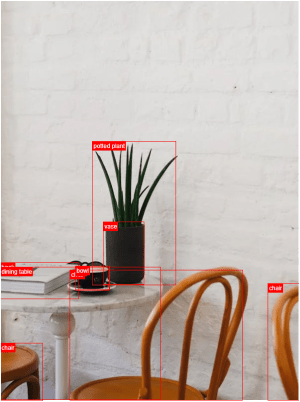"
},
"typeVersion": 1
},
{
"id": "8f607951-ba41-4362-8323-e8b4b96ad122",
"name": "Obtener imagen fuente nuevamente",
"type": "n8n-nodes-base.httpRequest",
"position": [
1880,
432
],
"parameters": {
"url": "={{ $('Set Variables').item.json.source_image }}",
"options": {}
},
"typeVersion": 4.2
},
{
"id": "6933f67d-276b-4908-8602-654aa352a68b",
"name": "Nota adhesiva8",
"type": "n8n-nodes-base.stickyNote",
"position": [
220,
120
],
"parameters": {
"width": 359.6648027457353,
"height": 352.41026669883723,
"content": "## Try It Out!\n### This workflow does the following:\n* Downloads an image\n* Uses an object classification AI model to identify objects in the image.\n* Crops the objects out from the original image into new image files.\n* Indexes the image's object in an Elasticsearch Database to enable image search.\n\n### Need Help?\nJoin the [Discord](https://discord.com/invite/XPKeKXeB7d) or ask in the [Forum](https://community.n8n.io/)!\n\nHappy Hacking!"
},
"typeVersion": 1
},
{
"id": "35615ed5-43e8-43f0-95fe-1f95a1177d69",
"name": "Nota adhesiva5",
"type": "n8n-nodes-base.stickyNote",
"position": [
800,
280
],
"parameters": {
"width": 172.9365918827757,
"height": 291.6881468483679,
"content": "\n\n\n\n\n\n\n\n\n\n\n\n\n\n\n\n🚨**Required**\n* Set your variables here first!"
},
"typeVersion": 1
}
],
"pinData": {},
"connections": {
"40027456-4bf9-4eea-8d71-aa28e69b29e5": {
"main": [
[
{
"node": "9e1e61c7-f5fd-4e8a-99a6-ccc5a24f5528",
"type": "main",
"index": 0
}
]
]
},
"9e1e61c7-f5fd-4e8a-99a6-ccc5a24f5528": {
"main": [
[
{
"node": "c3d8c5e3-546e-472c-9e6e-091cf5cee3c3",
"type": "main",
"index": 0
}
]
]
},
"fcbaf6c3-2aee-4ea1-9c5e-2833dd7a9f50": {
"main": [
[
{
"node": "8f607951-ba41-4362-8323-e8b4b96ad122",
"type": "main",
"index": 0
}
]
]
},
"3c7aa2fc-9ca1-41ba-a10d-aa5930d45f18": {
"main": [
[
{
"node": "3c4e1f04-a0ba-4cce-b82a-aa3eadc4e7e1",
"type": "main",
"index": 0
}
]
]
},
"954ce7b0-ef82-4203-8706-17cfa5e5e3ff": {
"main": [
[
{
"node": "3c7aa2fc-9ca1-41ba-a10d-aa5930d45f18",
"type": "main",
"index": 0
}
]
]
},
"9b1b94cf-3a7d-4c43-ab6c-8df9824b5667": {
"main": [
[
{
"node": "fcbaf6c3-2aee-4ea1-9c5e-2833dd7a9f50",
"type": "main",
"index": 0
}
]
]
},
"8f607951-ba41-4362-8323-e8b4b96ad122": {
"main": [
[
{
"node": "954ce7b0-ef82-4203-8706-17cfa5e5e3ff",
"type": "main",
"index": 0
}
]
]
},
"6359f725-1ede-4b05-bc19-05a7e85c0865": {
"main": [
[
{
"node": "40027456-4bf9-4eea-8d71-aa28e69b29e5",
"type": "main",
"index": 0
}
]
]
},
"c3d8c5e3-546e-472c-9e6e-091cf5cee3c3": {
"main": [
[
{
"node": "9b1b94cf-3a7d-4c43-ab6c-8df9824b5667",
"type": "main",
"index": 0
}
]
]
}
}
}¿Cómo usar este flujo de trabajo?
Copie el código de configuración JSON de arriba, cree un nuevo flujo de trabajo en su instancia de n8n y seleccione "Importar desde JSON", pegue la configuración y luego modifique la configuración de credenciales según sea necesario.
¿En qué escenarios es adecuado este flujo de trabajo?
Avanzado - Inteligencia Artificial
¿Es de pago?
Este flujo de trabajo es completamente gratuito, puede importarlo y usarlo directamente. Sin embargo, tenga en cuenta que los servicios de terceros utilizados en el flujo de trabajo (como la API de OpenAI) pueden requerir un pago por su cuenta.
Flujos de trabajo relacionados recomendados

Jimleuk
@jimleukFreelance consultant based in the UK specialising in AI-powered automations. I work with select clients tackling their most challenging projects. For business enquiries, send me an email at hello@jimle.uk LinkedIn: https://www.linkedin.com/in/jimleuk/ X/Twitter: https://x.com/jimle_uk
Compartir este flujo de trabajo