Servidor MCP de Pipedream
Este es unSupport Chatbot, AI Chatbotflujo de automatización del dominio deautomatización que contiene 8 nodos.Utiliza principalmente nodos como Agent, ChatTrigger, LmChatOpenAi, McpClientTool, MemoryBufferWindow. Construye un chatbot de IA escalable usando GPT-4 y Pipedream: integra Calendly y Gmail
- •Clave de API de OpenAI
Nodos utilizados (8)
Categoría
{
"id": "muEszdmquRYSUdM9",
"meta": {
"instanceId": "a4bfc93e975ca233ac45ed7c9227d84cf5a2329310525917adaf3312e10d5462",
"templateCredsSetupCompleted": true
},
"name": "Pipedream's MCP server",
"tags": [],
"nodes": [
{
"id": "d498ed94-65f4-4560-a186-ba324506f73f",
"name": "Cuando se recibe un mensaje de chat",
"type": "@n8n/n8n-nodes-langchain.chatTrigger",
"position": [
16,
-64
],
"webhookId": "79dae454-ccf5-4129-8197-f79bf5add978",
"parameters": {
"options": {}
},
"typeVersion": 1.1
},
{
"id": "866a327c-22a2-4a3a-8993-75ae9e836c71",
"name": "Agentee de IA",
"type": "@n8n/n8n-nodes-langchain.agent",
"position": [
240,
-64
],
"parameters": {
"options": {
"systemMessage": "You are a helpful assistant"
}
},
"typeVersion": 2.1
},
{
"id": "457b6172-4519-4bf9-aa84-44dbf14befb6",
"name": "OpenAI Modelo de Chat",
"type": "@n8n/n8n-nodes-langchain.lmChatOpenAi",
"position": [
112,
144
],
"parameters": {
"model": {
"__rl": true,
"mode": "list",
"value": "gpt-4.1-mini"
},
"options": {}
},
"credentials": {
"openAiApi": {
"id": "TefveNaDaMERl1hY",
"name": "OpenAi account (Eure)"
}
},
"typeVersion": 1.2
},
{
"id": "cd652804-a75c-4efd-b197-92810f94bb5f",
"name": "Calendly",
"type": "@n8n/n8n-nodes-langchain.mcpClientTool",
"position": [
400,
144
],
"parameters": {
"sseEndpoint": "https://mcp.pipedream.net/xxx/calendly_v2"
},
"typeVersion": 1
},
{
"id": "ae996f82-1e34-486a-af82-2fdcfe32c3d9",
"name": "Memoria Simple",
"type": "@n8n/n8n-nodes-langchain.memoryBufferWindow",
"position": [
256,
144
],
"parameters": {},
"typeVersion": 1.3
},
{
"id": "4465fc4e-68b0-456d-828a-bff296038a34",
"name": "Gmail",
"type": "@n8n/n8n-nodes-langchain.mcpClientTool",
"position": [
512,
144
],
"parameters": {
"sseEndpoint": "https://mcp.pipedream.net/xxx/gmail"
},
"typeVersion": 1
},
{
"id": "32e919f8-6e73-4aa3-9148-93f920930f3b",
"name": "Nota Adhesiva",
"type": "n8n-nodes-base.stickyNote",
"position": [
-352,
-768
],
"parameters": {
"width": 624,
"height": 656,
"content": "## Pipedream's MCP server\n\nAdd 2,700+ APIs and 10,000+ tools to your AI assistant for free. Connect your accounts securely and revoke access at any time.\n\n\n"
},
"typeVersion": 1
},
{
"id": "79a54171-4f68-418c-8ad2-b30e2ed23fe5",
"name": "Nota Adhesiva1",
"type": "n8n-nodes-base.stickyNote",
"position": [
288,
-768
],
"parameters": {
"width": 624,
"height": 656,
"content": "### How to work\n\n- Sign up on [Pipedream](https://mcp.pipedream.com/)\n- Manage your MCP server and connected accounts\n- Copy and paste your MCP Server URL https://mcp.pipedream.net/xxx/{app_slug} into the MCP SSE Endpoint node in n8n.\n\nExample:\n- https://mcp.pipedream.net/xxx/calendly_v2 for Calendly\n- https://mcp.pipedream.net/xxx/calendly_v2 for Gmail\n\n\n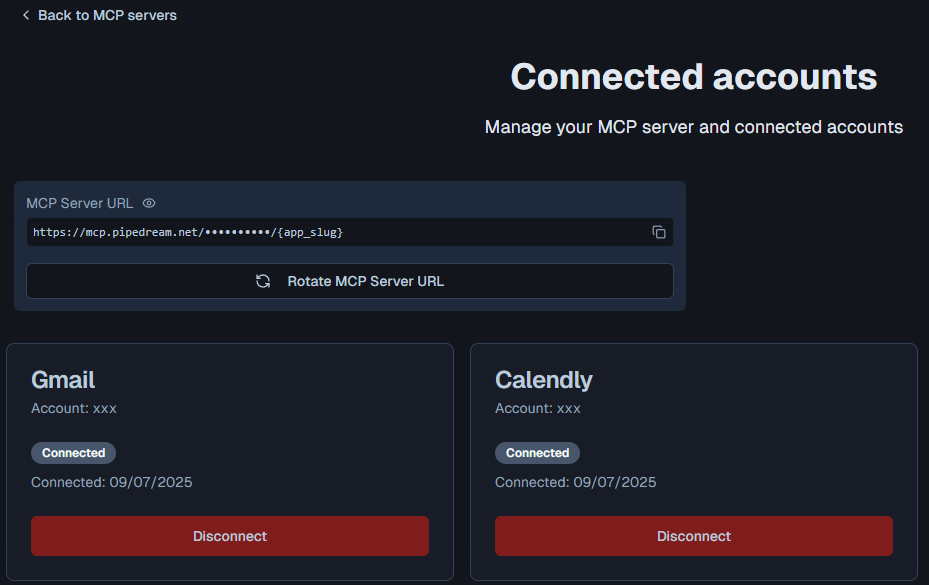"
},
"typeVersion": 1
}
],
"active": false,
"pinData": {},
"settings": {
"executionOrder": "v1"
},
"versionId": "d75b30d2-ecdf-4ac7-8d4b-72c5961c7a7c",
"connections": {
"4465fc4e-68b0-456d-828a-bff296038a34": {
"ai_tool": [
[
{
"node": "Agente de IA",
"type": "ai_tool",
"index": 0
}
]
]
},
"cd652804-a75c-4efd-b197-92810f94bb5f": {
"ai_tool": [
[
{
"node": "Agente de IA",
"type": "ai_tool",
"index": 0
}
]
]
},
"ae996f82-1e34-486a-af82-2fdcfe32c3d9": {
"ai_memory": [
[
{
"node": "Agente de IA",
"type": "ai_memory",
"index": 0
}
]
]
},
"457b6172-4519-4bf9-aa84-44dbf14befb6": {
"ai_languageModel": [
[
{
"node": "Agente de IA",
"type": "ai_languageModel",
"index": 0
}
]
]
},
"d498ed94-65f4-4560-a186-ba324506f73f": {
"main": [
[
{
"node": "Agente de IA",
"type": "main",
"index": 0
}
]
]
}
}
}¿Cómo usar este flujo de trabajo?
Copie el código de configuración JSON de arriba, cree un nuevo flujo de trabajo en su instancia de n8n y seleccione "Importar desde JSON", pegue la configuración y luego modifique la configuración de credenciales según sea necesario.
¿En qué escenarios es adecuado este flujo de trabajo?
Intermedio - Chatbot de soporte, Chatbot de IA
¿Es de pago?
Este flujo de trabajo es completamente gratuito, puede importarlo y usarlo directamente. Sin embargo, tenga en cuenta que los servicios de terceros utilizados en el flujo de trabajo (como la API de OpenAI) pueden requerir un pago por su cuenta.
Flujos de trabajo relacionados recomendados

Davide
@n3witaliaFull-stack Web Developer based in Italy specialising in Marketing & AI-powered automations. For business enquiries, send me an email at info@n3w.it or add me on Linkedin.com/in/davideboizza
Compartir este flujo de trabajo