Flujo de trabajo automatizado de revisión de canales de Slack con chatbot y GPT-4.1
Este es unAI Summarization, Multimodal AIflujo de automatización del dominio deautomatización que contiene 16 nodos.Utiliza principalmente nodos como Code, Slack, Filter, ScheduleTrigger. Auditoría y generación de informes automáticos de canales inactivos de Slack para la limpieza del espacio de trabajo
- •Bot Token de Slack o URL de Webhook
Nodos utilizados (16)
Categoría
{
"id": "IrGwRuTSulKQNDCO",
"meta": {
"instanceId": "4a2e6764ba7a6bc9890d9225f4b21d570ce88fc9bd57549c89057fcee58fed0f",
"templateCredsSetupCompleted": true
},
"name": "Automated Slack Channel Audit Workflow with Chatbot and GPT-4.1",
"tags": [],
"nodes": [
{
"id": "58a17978-d554-4042-ae0e-262a1cd5a285",
"name": "Obtener múltiples canales",
"type": "n8n-nodes-base.slack",
"position": [
-224,
32
],
"webhookId": "eaeb65ef-583f-41ad-ba11-ffe56bfe87e0",
"parameters": {
"filters": {
"types": [
"public_channel",
"private_channel"
]
},
"resource": "channel",
"operation": "getAll",
"authentication": "oAuth2"
},
"credentials": {
"slackOAuth2Api": {
"id": "4JSKt9sIRV1KGswQ",
"name": "Slack account"
}
},
"typeVersion": 2.3
},
{
"id": "12bde87c-f8a8-4eb3-bf81-8e94916f1db6",
"name": "Obtener el historial de un canal",
"type": "n8n-nodes-base.slack",
"position": [
0,
32
],
"webhookId": "301affce-942f-465e-8c4b-75e7fafc382a",
"parameters": {
"limit": 1,
"filters": {},
"resource": "channel",
"channelId": {
"__rl": true,
"mode": "id",
"value": "={{ $json.id }}"
},
"operation": "history",
"authentication": "oAuth2"
},
"credentials": {
"slackOAuth2Api": {
"id": "4JSKt9sIRV1KGswQ",
"name": "Slack account"
}
},
"typeVersion": 2.3
},
{
"id": "7043ccc2-4d82-49a5-ba8c-299e9842e92d",
"name": "Filtrar canales con última discusión hace 30 días",
"type": "n8n-nodes-base.filter",
"position": [
224,
32
],
"parameters": {
"options": {},
"conditions": {
"options": {
"version": 2,
"leftValue": "",
"caseSensitive": true,
"typeValidation": "strict"
},
"combinator": "and",
"conditions": [
{
"id": "1d9de0c9-232d-455b-a625-563dc785f484",
"operator": {
"type": "dateTime",
"operation": "before"
},
"leftValue": "={{ $json.ts.toDateTime('s') }}",
"rightValue": "={{ $today.minus(30,'days') }}"
}
]
}
},
"typeVersion": 2.2
},
{
"id": "b3c69271-5007-484d-89d6-48b1384fcf20",
"name": "Recopilar información de canales expirados",
"type": "n8n-nodes-base.code",
"position": [
448,
32
],
"parameters": {
"mode": "runOnceForEachItem",
"jsCode": "const channel = $('Get many channels').item.json;\n\nreturn {\n json: {\n ChannelID: channel.id,\n ChannelName: channel.name,\n CreatedDate: new Date(channel.created * 1000).toLocaleDateString('en-US'),\n TotalMember: $('Get many channels').item.json.num_members,\n Purpose: $('Get many channels').item.json.purpose.value || 'N/A'\n }\n};"
},
"typeVersion": 2
},
{
"id": "24fb2413-9c3c-4894-bfa3-f18f15011de9",
"name": "Procesar informe slack",
"type": "n8n-nodes-base.code",
"position": [
672,
32
],
"parameters": {
"jsCode": "const channels = $input.all().map(item => item.json);\n\nlet report = '*📊 Weekly Slack Channel Inactivity Report*\\n\\n';\nreport += 'The following channels have had *no discussion in the past 30 days*. Please review and take action if needed:\\n\\n';\nreport += '```';\nreport += 'Channel ID Name Members Created On Purpose\\n';\nreport += '------------- -------------------------- ------- ---------- ------------------------------\\n';\n\nfor (const c of channels) {\n report += `${c.ChannelID.padEnd(15)} ${('#' + c.ChannelName).padEnd(26)} ${String(c.TotalMember).padEnd(9)} ${c.CreatedDate.padEnd(12)} ${c.Purpose || 'N/A'}\\n`;\n}\n\nreport += '```\\n\\n';\n\nreport += '\\n⚠️ *Recommendation:*\\n';\nreport += '- Channels with *0 members* or *no defined purpose* should be reviewed for archiving.\\n';\nreport += '- Channels like `#aws-study-group` and `#team-coffee` may benefit from engagement prompts or repurposing.\\n\\n';\n\nreport += `📅 _Report generated on:_ ${new Date().toLocaleDateString('en-GB')}`;\n\n// Output for Slack\nreturn [\n {\n json: {\n text: report\n }\n }\n];"
},
"typeVersion": 2
},
{
"id": "92353f17-c390-4116-b66d-798605754f4f",
"name": "Enviar informe de inactividad de canal",
"type": "n8n-nodes-base.slack",
"position": [
896,
32
],
"webhookId": "5f04cdae-bef0-4df2-85a8-05818fef2549",
"parameters": {
"text": "={{ $json.text }}",
"user": {
"__rl": true,
"mode": "username",
"value": "@trung.tran"
},
"select": "user",
"otherOptions": {
"mrkdwn": true
}
},
"credentials": {
"slackApi": {
"id": "3MfZsxrz9SluxmDt",
"name": "COC Bot"
}
},
"typeVersion": 2.3
},
{
"id": "88965563-dfeb-40e4-b0af-19b4d84a5188",
"name": "Activador de programación semanal",
"type": "n8n-nodes-base.scheduleTrigger",
"position": [
-448,
32
],
"parameters": {
"rule": {
"interval": [
{
"field": "weeks",
"triggerAtDay": [
1
]
}
]
}
},
"typeVersion": 1.2
},
{
"id": "67dc318e-6c64-4f56-b225-0c061236b127",
"name": "Nota adhesiva",
"type": "n8n-nodes-base.stickyNote",
"position": [
1088,
-112
],
"parameters": {
"width": 960,
"height": 416,
"content": "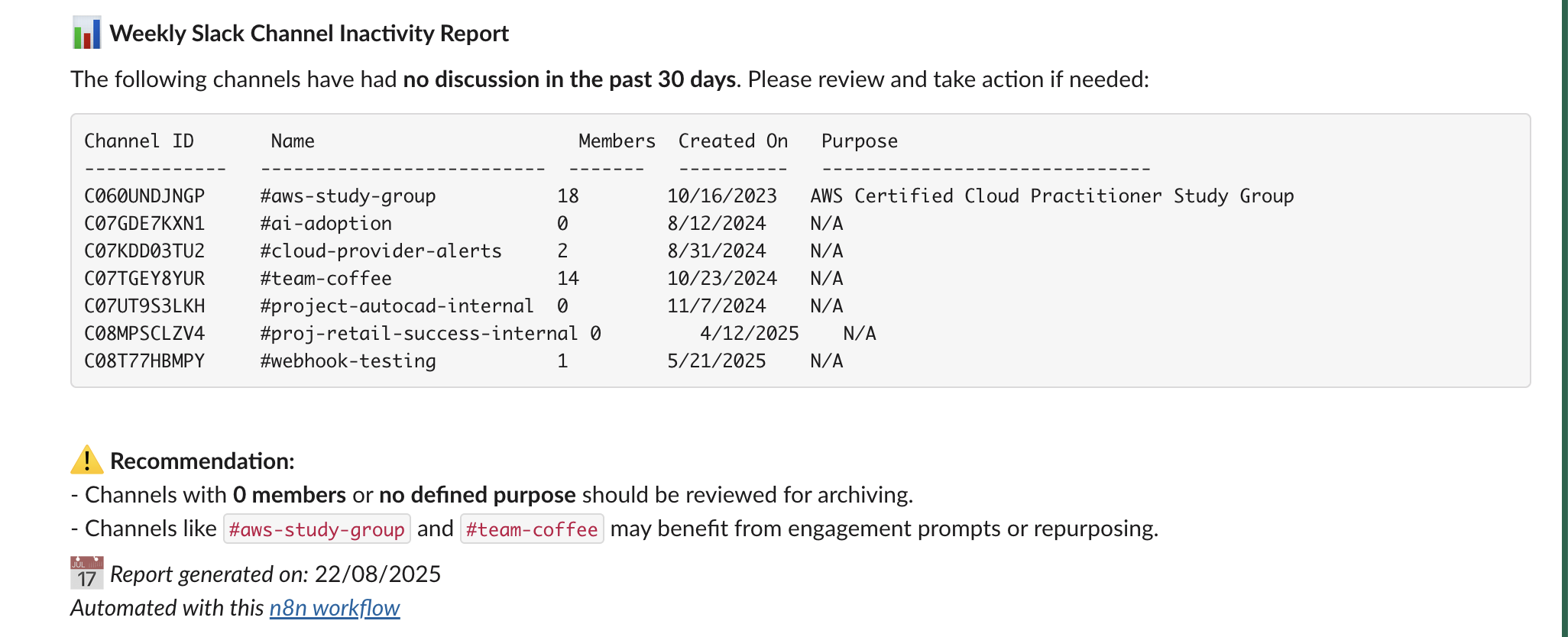"
},
"typeVersion": 1
},
{
"id": "0e5cb456-17a7-4a9e-be55-ffaa66d795fe",
"name": "Nota adhesiva1",
"type": "n8n-nodes-base.stickyNote",
"position": [
-1600,
-768
],
"parameters": {
"width": 1040,
"height": 2224,
"content": "# Automated Slack Channel Audit Workflow with Chatbot and GPT-4.1\n\n> Automatically scans all public Slack channels weekly to detect those with no activity in the past 30 days, then generates and sends a detailed inactivity report to admins for review and action. Helps keep your Slack workspace clean, relevant, and clutter-free.\n\n## 🧑💼 Who’s it for\n\nThis workflow is built for:\n- **Slack Workspace Admins**\n- **IT or Ops Managers**\n- **HR/Compliance Teams**\n…who want to maintain a clean and active Slack workspace by regularly reviewing **inactive channels**.\n\n## ⚙️ How it works / What it does\n\nThis automated n8n workflow:\n1. **Runs weekly** via a scheduled trigger.\n2. **Fetches all public Slack channels** in the workspace.\n3. **Checks message history** of each channel for activity.\n4. **Filters channels** that have had **no discussion in the past 30 days**.\n5. **Generates a Slack-friendly report** with key metadata (name, member count, purpose, etc.).\n6. **Sends the report to a Slack channel** for admin review and possible action (e.g., archive, engage, repurpose).\n\n## 🛠️ How to set up\n\n1. **Configure your Slack App**\n - Go to https://api.slack.com/apps → Create App\n - Add the following **OAuth scopes** to your **Bot Token**:\n - `channels:read` → to get list of public channels\n - `channels:history` → to fetch message history\n - `users:read` → to personalize report (optional)\n - `chat:write` → to post the report to a Slack channel\n\n2. **Install the app in your workspace** \n - Copy the **Bot User OAuth Token** \n - Add it to your n8n Slack credentials under \"Slack API\"\n\n3. **Customize the schedule** in the \"Weekly Schedule Trigger\" node to control report frequency.\n\n4. **Connect your Slack workspace** to the workflow using your credentials.\n\n## ✅ Requirements\n\n- n8n (self-hosted or cloud)\n- Slack App with:\n - `channels:read`\n - `channels:history`\n - `chat:write`\n- Active channels and member data\n- A designated Slack channel to receive the report\n\n## 🔧 How to customize the workflow\n\n| Component | Customization Options |\n|----------|------------------------|\n| ⏱️ Schedule Trigger | Change to daily, monthly, etc. |\n| 📅 Inactivity Threshold | Modify `Filter channel with last discussion 30 days ago` to 60/90 days |\n| 📊 Report Formatting | Tweak the `Consume slack report` node to change formatting or summary |\n| 💬 Output Channel | Change target channel in `Send Channel Inactivity Report` |\n| 🚫 Auto-archiving | Add logic to archive channels with 0 members or activity (using Slack API) |\n\n## 📝 Slack Permissions Reference\n\n| Action | Slack Scope Required |\n|--------|-----------------------|\n| Get all public channels | `channels:read` |\n| Get message history of a channel | `channels:history` |\n| Post message to Slack | `chat:write` |\n| Get user info (optional) | `users:read` |"
},
"typeVersion": 1
},
{
"id": "f788c89e-9c9e-42a9-ab7d-5e9ddd24ea41",
"name": "Nota adhesiva2",
"type": "n8n-nodes-base.stickyNote",
"position": [
-480,
224
],
"parameters": {
"width": 256,
"height": 144,
"content": "### 1. ⏰ Weekly Schedule Trigger\nStarts the workflow on a recurring schedule (e.g., every Monday at 9 AM) to automate the review process without manual intervention."
},
"typeVersion": 1
},
{
"id": "d71481ff-856e-493d-b3e4-fd9a44b515f7",
"name": "Nota adhesiva3",
"type": "n8n-nodes-base.stickyNote",
"position": [
-224,
-128
],
"parameters": {
"height": 128,
"content": "### 2. 📡 Get Many Channels\nFetches a list of all public Slack channels in the workspace using Slack’s `channels:read` scope."
},
"typeVersion": 1
},
{
"id": "21906417-62bb-4364-8b2f-43e7561134cb",
"name": "Nota adhesiva4",
"type": "n8n-nodes-base.stickyNote",
"position": [
-48,
224
],
"parameters": {
"width": 288,
"height": 144,
"content": "### 3. 🕓 Get the History of a Channel\nRetrieves recent message history from each channel using Slack’s `channels:history` scope. This helps determine when the last discussion occurred."
},
"typeVersion": 1
},
{
"id": "7e81e9d5-15c9-438c-8010-a8e4a7355958",
"name": "Nota adhesiva5",
"type": "n8n-nodes-base.stickyNote",
"position": [
176,
-160
],
"parameters": {
"content": "### 4. 🚫 Filter Channels with No Activity in 30 Days\nFilters out channels that have had no messages or discussion in the last 30 days. These are considered \"expired\" or inactive."
},
"typeVersion": 1
},
{
"id": "f57c3472-2168-4dcf-98a1-ed60cc2f2f96",
"name": "Nota adhesiva6",
"type": "n8n-nodes-base.stickyNote",
"position": [
368,
208
],
"parameters": {
"height": 272,
"content": "### 5. 📦 Collect Expired Channel Information\nExtracts relevant metadata for each inactive channel, including:\n- Channel ID and name\n- Member count\n- Created date\n- Purpose\n\nThis data is prepared for reporting."
},
"typeVersion": 1
},
{
"id": "089fb6fe-2711-4cfc-ae9a-34c51f8bf277",
"name": "Nota adhesiva7",
"type": "n8n-nodes-base.stickyNote",
"position": [
560,
-160
],
"parameters": {
"height": 144,
"content": "### 6. 📝 Consume Slack Report\nGenerates a clean and Slack-friendly Markdown report (or code block format) listing all inactive channels with contextual recommendations."
},
"typeVersion": 1
},
{
"id": "f70b2bd0-6db2-423e-beff-9e8083f0db2b",
"name": "Nota adhesiva8",
"type": "n8n-nodes-base.stickyNote",
"position": [
816,
208
],
"parameters": {
"content": "### 7. 📤 Send Channel Inactivity Report\nPosts the formatted report to a specified Slack channel using `chat:write`, notifying admins or moderators to take cleanup action."
},
"typeVersion": 1
}
],
"active": false,
"pinData": {},
"settings": {
"executionOrder": "v1"
},
"versionId": "89b4dd41-9469-44ca-9635-7e9670e3568f",
"connections": {
"58a17978-d554-4042-ae0e-262a1cd5a285": {
"main": [
[
{
"node": "12bde87c-f8a8-4eb3-bf81-8e94916f1db6",
"type": "main",
"index": 0
}
]
]
},
"24fb2413-9c3c-4894-bfa3-f18f15011de9": {
"main": [
[
{
"node": "92353f17-c390-4116-b66d-798605754f4f",
"type": "main",
"index": 0
}
]
]
},
"88965563-dfeb-40e4-b0af-19b4d84a5188": {
"main": [
[
{
"node": "58a17978-d554-4042-ae0e-262a1cd5a285",
"type": "main",
"index": 0
}
]
]
},
"12bde87c-f8a8-4eb3-bf81-8e94916f1db6": {
"main": [
[
{
"node": "7043ccc2-4d82-49a5-ba8c-299e9842e92d",
"type": "main",
"index": 0
}
]
]
},
"b3c69271-5007-484d-89d6-48b1384fcf20": {
"main": [
[
{
"node": "24fb2413-9c3c-4894-bfa3-f18f15011de9",
"type": "main",
"index": 0
}
]
]
},
"7043ccc2-4d82-49a5-ba8c-299e9842e92d": {
"main": [
[
{
"node": "b3c69271-5007-484d-89d6-48b1384fcf20",
"type": "main",
"index": 0
}
]
]
}
}
}¿Cómo usar este flujo de trabajo?
Copie el código de configuración JSON de arriba, cree un nuevo flujo de trabajo en su instancia de n8n y seleccione "Importar desde JSON", pegue la configuración y luego modifique la configuración de credenciales según sea necesario.
¿En qué escenarios es adecuado este flujo de trabajo?
Avanzado - Resumen de IA, IA Multimodal
¿Es de pago?
Este flujo de trabajo es completamente gratuito, puede importarlo y usarlo directamente. Sin embargo, tenga en cuenta que los servicios de terceros utilizados en el flujo de trabajo (como la API de OpenAI) pueden requerir un pago por su cuenta.
Flujos de trabajo relacionados recomendados

Trung Tran
@trungtranEmpowering small and medium businesses with smart automation and practical AI, no big tech team required.
Compartir este flujo de trabajo