Agente de Gmail
Este es unAI Chatbot, Multimodal AIflujo de automatización del dominio deautomatización que contiene 12 nodos.Utiliza principalmente nodos como GmailTool, Agent, GoogleSheetsTool, ChatTrigger, LmChatGoogleGemini. Automatización de tareas de Gmail usando el asistente de Gemini AI y la gestión de contactos
- •Cuenta de Google y credenciales de API de Gmail
- •Credenciales de API de Google Sheets
- •Clave de API de Google Gemini
Nodos utilizados (12)
Categoría
{
"id": "dCoGIILwTYxSwiHV",
"meta": {
"instanceId": "061ca141d020a6e1355b8c7fe05f92a699e37e92079ad2e150a506ee8bbe9e11"
},
"name": "Gmail Agent",
"tags": [],
"nodes": [
{
"id": "bd41a12c-009b-4812-9807-a68f75a09a81",
"name": "Cuando se recibe un mensaje en el chat",
"type": "@n8n/n8n-nodes-langchain.chatTrigger",
"position": [
752,
288
],
"webhookId": "a5718612-cc72-403e-9ee5-b5ad46da024f",
"parameters": {
"options": {}
},
"typeVersion": 1.1
},
{
"id": "a6cfb7de-5f06-437c-a509-9b45ebcfa14c",
"name": "Agente de IA",
"type": "@n8n/n8n-nodes-langchain.agent",
"position": [
1008,
288
],
"parameters": {
"options": {
"systemMessage": "=You are Rakin’s smart Gmail assistant.\n\nInstructions:\n\nFor any Gmail-related task from Rakin, use the appropriate Gmail tool (Send, Reply, Label, Delete, Get Many).\n\nIf only a name is given (no email), fetch the email from Google Sheets.\n\nAuto-complete any missing details (links, answers, summaries) needed for emails or replies.\n\nApply relevant labels like:\n\nyoutube-viewers\nsales-inquiry\nmeeting-request\npotential-clients\ncollaboration-requests\n\nwhen appropriate.\n\nStay efficient, accurate, and helpful at all times."
}
},
"typeVersion": 2
},
{
"id": "2387aefe-f80c-4e94-b516-1afea31163e7",
"name": "Enviar",
"type": "n8n-nodes-base.gmailTool",
"position": [
912,
496
],
"webhookId": "f82621ed-6e2e-464b-98c4-c81523615c43",
"parameters": {
"sendTo": "={{ /*n8n-auto-generated-fromAI-override*/ $fromAI('To', ``, 'string') }}",
"message": "={{ /*n8n-auto-generated-fromAI-override*/ $fromAI('Message', ``, 'string') }}",
"options": {
"appendAttribution": false
},
"subject": "={{ /*n8n-auto-generated-fromAI-override*/ $fromAI('Subject', ``, 'string') }}",
"emailType": "text"
},
"typeVersion": 2.1
},
{
"id": "90f756fd-d40d-4475-a02d-ddf9592d655b",
"name": "Responder",
"type": "n8n-nodes-base.gmailTool",
"position": [
1024,
496
],
"webhookId": "f82621ed-6e2e-464b-98c4-c81523615c43",
"parameters": {
"message": "={{ /*n8n-auto-generated-fromAI-override*/ $fromAI('Message', ``, 'string') }}",
"options": {
"appendAttribution": false
},
"emailType": "text",
"messageId": "={{ /*n8n-auto-generated-fromAI-override*/ $fromAI('Message_ID', ``, 'string') }}",
"operation": "reply"
},
"typeVersion": 2.1
},
{
"id": "7eb3e8d2-cc51-403d-ae01-71078a207513",
"name": "Etiqueta",
"type": "n8n-nodes-base.gmailTool",
"position": [
1152,
496
],
"webhookId": "f82621ed-6e2e-464b-98c4-c81523615c43",
"parameters": {
"labelIds": "={{ /*n8n-auto-generated-fromAI-override*/ $fromAI('Label_Names_or_IDs', ``, 'string') }}",
"messageId": "={{ /*n8n-auto-generated-fromAI-override*/ $fromAI('Message_ID', ``, 'string') }}",
"operation": "addLabels"
},
"typeVersion": 2.1
},
{
"id": "34450898-1c3b-4755-848d-93a5c3076d83",
"name": "Eliminar",
"type": "n8n-nodes-base.gmailTool",
"position": [
1264,
496
],
"webhookId": "f82621ed-6e2e-464b-98c4-c81523615c43",
"parameters": {
"messageId": "={{ /*n8n-auto-generated-fromAI-override*/ $fromAI('Message_ID', ``, 'string') }}",
"operation": "delete"
},
"typeVersion": 2.1
},
{
"id": "862846c3-3488-4932-a93d-69287299e971",
"name": "Obtener múltiples",
"type": "n8n-nodes-base.gmailTool",
"position": [
1392,
496
],
"webhookId": "f82621ed-6e2e-464b-98c4-c81523615c43",
"parameters": {
"simple": "={{ /*n8n-auto-generated-fromAI-override*/ $fromAI('Simplify', ``, 'boolean') }}",
"filters": {},
"options": {},
"operation": "getAll",
"returnAll": "={{ /*n8n-auto-generated-fromAI-override*/ $fromAI('Return_All', ``, 'boolean') }}"
},
"typeVersion": 2.1
},
{
"id": "1e39bc28-629a-4902-9e92-ed3d43296ed5",
"name": "Hoja",
"type": "n8n-nodes-base.googleSheetsTool",
"position": [
1504,
496
],
"parameters": {
"options": {},
"sheetName": {
"__rl": true,
"mode": "list",
"value": "gid=0",
"cachedResultUrl": "https://docs.google.com/spreadsheets/d/1UTOyNDNeRJj6nRuladtP61ljeZg6xXK3O1Kn3Dq7t_A/edit#gid=0",
"cachedResultName": "Sheet1"
},
"documentId": {
"__rl": true,
"mode": "list",
"value": "1UTOyNDNeRJj6nRuladtP61ljeZg6xXK3O1Kn3Dq7t_A",
"cachedResultUrl": "https://docs.google.com/spreadsheets/d/1UTOyNDNeRJj6nRuladtP61ljeZg6xXK3O1Kn3Dq7t_A/edit?usp=drivesdk",
"cachedResultName": "Contact Details"
}
},
"typeVersion": 4.6
},
{
"id": "f7320f18-2a7b-4c55-99eb-1e68ad348b51",
"name": "Gemini",
"type": "@n8n/n8n-nodes-langchain.lmChatGoogleGemini",
"position": [
672,
496
],
"parameters": {
"options": {}
},
"typeVersion": 1
},
{
"id": "c8857e6d-f0da-4d54-a7b4-c57009ce65d9",
"name": "Memoria",
"type": "@n8n/n8n-nodes-langchain.memoryBufferWindow",
"position": [
784,
496
],
"parameters": {},
"typeVersion": 1.3
},
{
"id": "133b9714-bf54-440f-8e1b-79e5be3463f6",
"name": "Nota adhesiva",
"type": "n8n-nodes-base.stickyNote",
"position": [
-64,
-304
],
"parameters": {
"color": 4,
"width": 660,
"height": 980,
"content": "# 🛠️ Setup Guide\n### 👤 Author: [Rakin Jakaria](https://www.youtube.com/@rakinjakaria)\n### 🔌 Steps to Connect:\n1. **Gmail OAuth2 Setup** \n - Connect your Gmail account to n8n using OAuth2 authentication.\n - Go to **Credentials** in n8n and create a new **Gmail OAuth2** credential.\n - Follow the authentication flow to authorize n8n to access your Gmail account.\n - Apply this credential to all Gmail nodes (Send, Reply, Label, Delete, Get Many).\n\n2. **Google Gemini API Key** \n - Visit [Google AI Studio](https://aistudio.google.com/) and generate your Gemini API key.\n - Create a new **Google Gemini (PaLM) API** credential in n8n.\n - Paste your API key into the **Gemini** language model node.\n\n3. **Google Sheets Integration** \n - Set up **Google Sheets OAuth2** credentials in n8n.\n - Create or connect to your existing Google Sheets document for contact management.\n - Update the **Sheet** node with your specific spreadsheet ID and sheet name.\n - Ensure your sheet has columns for names and email addresses.\n\n4. **Chat Trigger Configuration** \n - The **Chat Trigger** node creates a webhook URL for your Gmail agent.\n - Copy the webhook URL from the Chat Trigger node.\n - Use this URL to interact with your Gmail agent via chat interface.\n\n5. **AI Agent System Prompt Customization** \n - Modify the system message in the **AI Agent** node to match your specific needs.\n - Update the predefined labels (youtube-viewers, sales-inquiry, etc.) to your Gmail labels.\n - Customize the assistant's name and behavior instructions.\n\n6. **Memory Configuration** \n - The **Memory** node stores conversation context.\n - Adjust the buffer window size based on your chat length requirements.\n\n---\n💡 **Pro Tips:**\n- Test each Gmail operation individually before running the full workflow.\n- Create Gmail labels beforehand for better email organization.\n- Monitor your Google API usage to avoid rate limits.\n\nNeed help? Check out Rakin's [YouTube Tutorials](https://www.youtube.com/@rakinjakaria) for detailed setup instructions."
},
"typeVersion": 1
},
{
"id": "fc096be2-2970-4170-badd-e98cab6feb5d",
"name": "Nota adhesiva3",
"type": "n8n-nodes-base.stickyNote",
"position": [
656,
-304
],
"parameters": {
"color": 4,
"width": 480,
"height": 448,
"content": "## Start here: Step-by Step Youtube Tutorial :star:\n[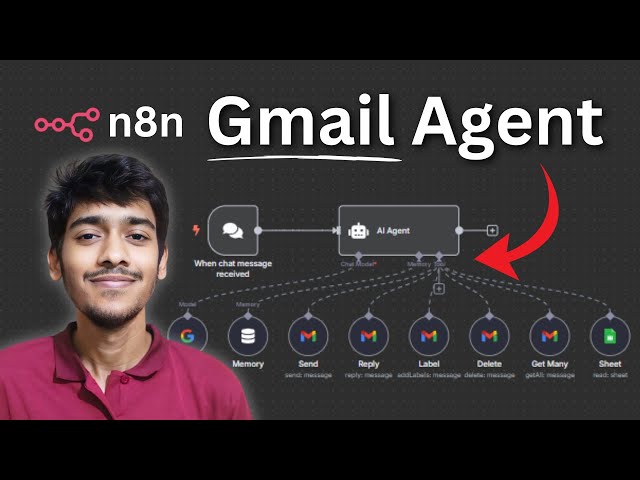](https://youtu.be/Qogyc2mPa80?si=_TcQZjBdtLHy2mdz)"
},
"typeVersion": 1
}
],
"active": false,
"pinData": {},
"settings": {
"executionOrder": "v1"
},
"versionId": "5d7c251c-1d3f-476e-9090-f101d95bdbea",
"connections": {
"2387aefe-f80c-4e94-b516-1afea31163e7": {
"ai_tool": [
[
{
"node": "a6cfb7de-5f06-437c-a509-9b45ebcfa14c",
"type": "ai_tool",
"index": 0
}
]
]
},
"7eb3e8d2-cc51-403d-ae01-71078a207513": {
"ai_tool": [
[
{
"node": "a6cfb7de-5f06-437c-a509-9b45ebcfa14c",
"type": "ai_tool",
"index": 0
}
]
]
},
"90f756fd-d40d-4475-a02d-ddf9592d655b": {
"ai_tool": [
[
{
"node": "a6cfb7de-5f06-437c-a509-9b45ebcfa14c",
"type": "ai_tool",
"index": 0
}
]
]
},
"1e39bc28-629a-4902-9e92-ed3d43296ed5": {
"ai_tool": [
[
{
"node": "a6cfb7de-5f06-437c-a509-9b45ebcfa14c",
"type": "ai_tool",
"index": 0
}
]
]
},
"34450898-1c3b-4755-848d-93a5c3076d83": {
"ai_tool": [
[
{
"node": "a6cfb7de-5f06-437c-a509-9b45ebcfa14c",
"type": "ai_tool",
"index": 0
}
]
]
},
"f7320f18-2a7b-4c55-99eb-1e68ad348b51": {
"ai_languageModel": [
[
{
"node": "a6cfb7de-5f06-437c-a509-9b45ebcfa14c",
"type": "ai_languageModel",
"index": 0
}
]
]
},
"c8857e6d-f0da-4d54-a7b4-c57009ce65d9": {
"ai_memory": [
[
{
"node": "a6cfb7de-5f06-437c-a509-9b45ebcfa14c",
"type": "ai_memory",
"index": 0
}
]
]
},
"862846c3-3488-4932-a93d-69287299e971": {
"ai_tool": [
[
{
"node": "a6cfb7de-5f06-437c-a509-9b45ebcfa14c",
"type": "ai_tool",
"index": 0
}
]
]
},
"bd41a12c-009b-4812-9807-a68f75a09a81": {
"main": [
[
{
"node": "a6cfb7de-5f06-437c-a509-9b45ebcfa14c",
"type": "main",
"index": 0
}
]
]
}
}
}¿Cómo usar este flujo de trabajo?
Copie el código de configuración JSON de arriba, cree un nuevo flujo de trabajo en su instancia de n8n y seleccione "Importar desde JSON", pegue la configuración y luego modifique la configuración de credenciales según sea necesario.
¿En qué escenarios es adecuado este flujo de trabajo?
Intermedio - Chatbot de IA, IA Multimodal
¿Es de pago?
Este flujo de trabajo es completamente gratuito, puede importarlo y usarlo directamente. Sin embargo, tenga en cuenta que los servicios de terceros utilizados en el flujo de trabajo (como la API de OpenAI) pueden requerir un pago por su cuenta.
Flujos de trabajo relacionados recomendados

Rakin Jakaria
@rakinjakariaCompartir este flujo de trabajo