Usar Ada AI para analizar, interpretar y visualizar datos de múltiples fuentes
Avanzado
Este es unautomatización que contiene 25 nodos.Utiliza principalmente nodos como Set, Code, Gmail, MySql, Markdown. Usar Ada AI para analizar, interpretar y visualizar datos de múltiples fuentes
Requisitos previos
- •Cuenta de Google y credenciales de API de Gmail
- •Información de conexión de la base de datos MySQL
- •Pueden requerirse credenciales de autenticación para la API de destino
- •Credenciales de API de Google Sheets
Nodos utilizados (25)
Categoría
-
Vista previa del flujo de trabajo
Visualización de las conexiones entre nodos, con soporte para zoom y panorámica
Exportar flujo de trabajo
Copie la siguiente configuración JSON en n8n para importar y usar este flujo de trabajo
{
"meta": {
"instanceId": "806e76bc68769277cc91003cf60c5af8793416e570a07db359be1a94e4c0b217"
},
"nodes": [
{
"id": "78b49282-5384-4a85-aadf-f05fc08cfe7f",
"name": "Nota adhesiva",
"type": "n8n-nodes-base.stickyNote",
"position": [
-144,
-112
],
"parameters": {
"color": 4,
"width": 448,
"height": 1536,
"content": "## Data Source\nThese nodes extract structured data directly from your data source (e.g., MySQL, Google Sheets, Excel/CSV).\n\nSimply connect the data source nodes you need and disconnect any unused nodes.\n\n**You must select one - and only one - data source node. Disconnect any additional data source nodes. You can also replace these nodes with any other data sources**\n\nAs long as the generated data matches the structured format required by the subsequent steps.\n\n## Sample Data\nA node is provided here that randomly generates one thousand data entries each time.\n\nThis dataset is a collection of simulated sales order records. Each record contains the following fields:\n\norder_date: The date when the order was placed.\nproduct_category: The category of the product sold, such as \"Electronics,\" \"Clothing & Fashion,\" \"Home & Furniture,\" \"Food & Beverages,\" \"Sports & Outdoors,\" or \"Beauty & Personal Care.\"\nregion: The sales region, which can include \"North America,\" \"South America,\" \"Europe,\" \"Asia,\" \"Africa,\" \"Oceania,\" \"Middle East,\" or \"Central Asia.\"\nsales_amount: The total sales amount for the order.\nThis type of data is typically used for analyzing sales performance across different time periods, product categories, and regions. In n8n, such data is usually structured as an array of objects, making it suitable for further processing, analysis, and automation workflows."
},
"typeVersion": 1
},
{
"id": "bf8a1e18-4fcf-4ba5-ba20-ec534dbb3499",
"name": "Nota adhesiva1",
"type": "n8n-nodes-base.stickyNote",
"position": [
496,
240
],
"parameters": {
"color": 4,
"width": 656,
"height": 976,
"content": "## Select the skills you need\nConnect the skill nodes you require\n\nYou need to apply for an API key according to the instructions, configure credentials, and set up Authentication in the DataAnalysis, DataInterpretation, and DataVisualization nodes.\n\n### Input parameters\ninput_json: Data from previous nodes\nquery: Query statement, you can set a fixed query according to your needs or use LLM to generate the query\n\n### Output\nThe output of DataAnalysis and DataInterpretation nodes will include markdown text, while the output of DataVisualization nodes will include HTML code."
},
"typeVersion": 1
},
{
"id": "dd510d46-fb9d-4020-b675-cddb76dfbfc5",
"name": "Nota adhesiva2",
"type": "n8n-nodes-base.stickyNote",
"position": [
1328,
368
],
"parameters": {
"color": 4,
"width": 336,
"height": 848,
"content": "## Output\n\nHere we use sending email as an example; you can choose the method that suits your needs."
},
"typeVersion": 1
},
{
"id": "64975f75-6153-43a0-ad61-4bc8c69c0e33",
"name": "Nota adhesiva3",
"type": "n8n-nodes-base.stickyNote",
"position": [
-3584,
240
],
"parameters": {
"color": 7,
"width": 3088,
"height": 4672,
"content": "## Overview\nThis template empowers low-code data analysis using natural language. Simply connect to your data sources (e.g., MySQL, Google Sheets),\nand it automates the entire workflow—from data querying and processing to interpretation and visualization. For instance,\nit can professionally analyze, interpret, and visualize weekly sales data and have the report delivered directly to your inbox.\n\nThis template is supported by [ada.im](https://ada.im/home?ada_data_=&utm_source=n8n&utm_medium=landingpage&utm_infeluncer=landingpage&utm_campain=landingpage&utm_content=landingpage)\n## Here are some example results:\n\n### DataVisualization\nquery: Use a pie chart to display the sales of each product in 2024, and a line chart to represent the total monthly sales of each product in 2024. Additionally, you can add some extra charts based on the data.\nresult: \n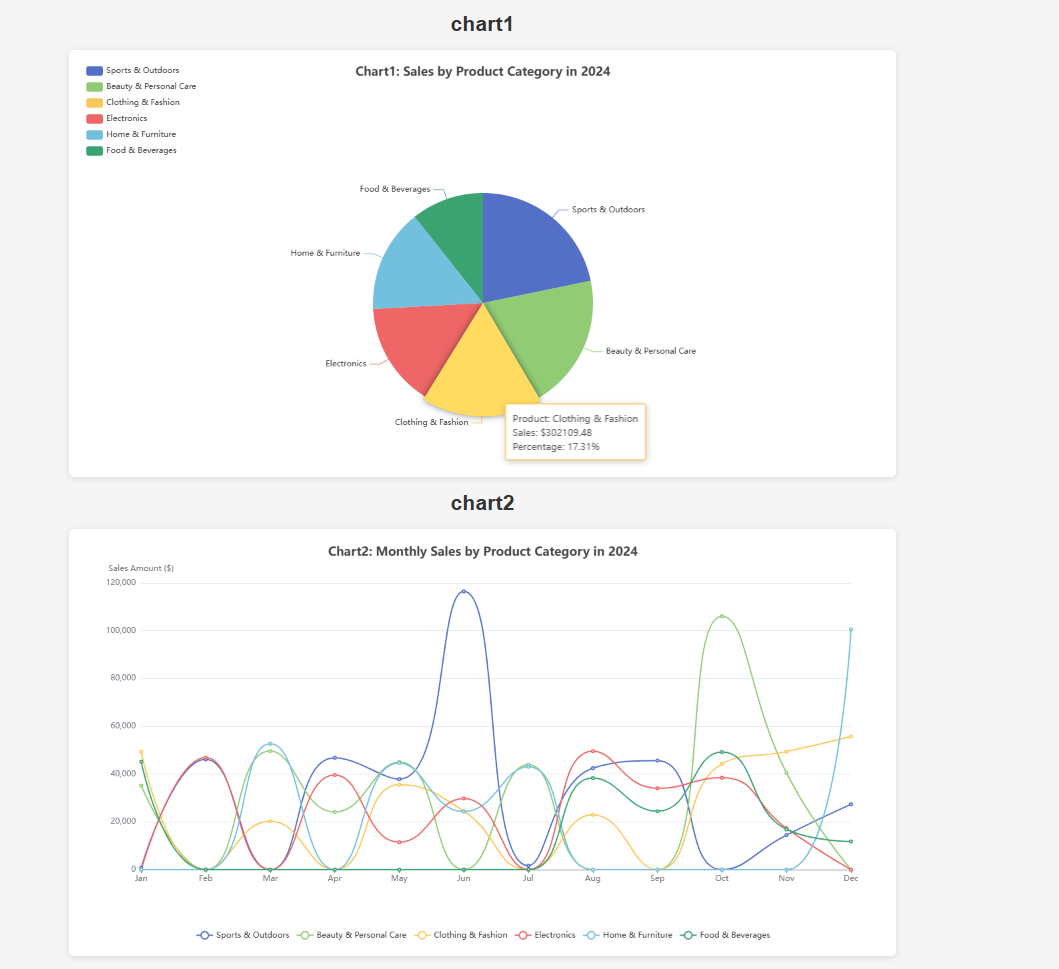\n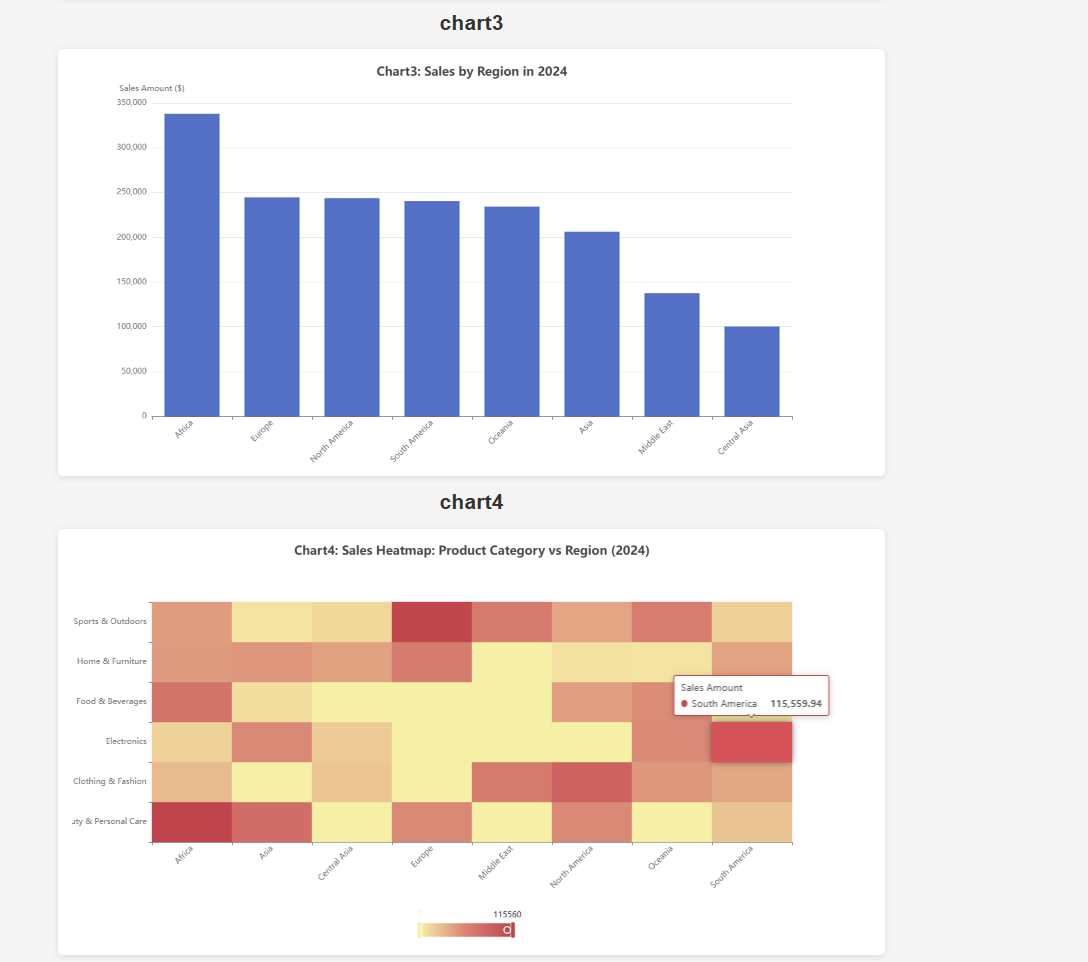\n\n### DataInterpretation\nquery: Sales volume of each product in 2024\nresult: \n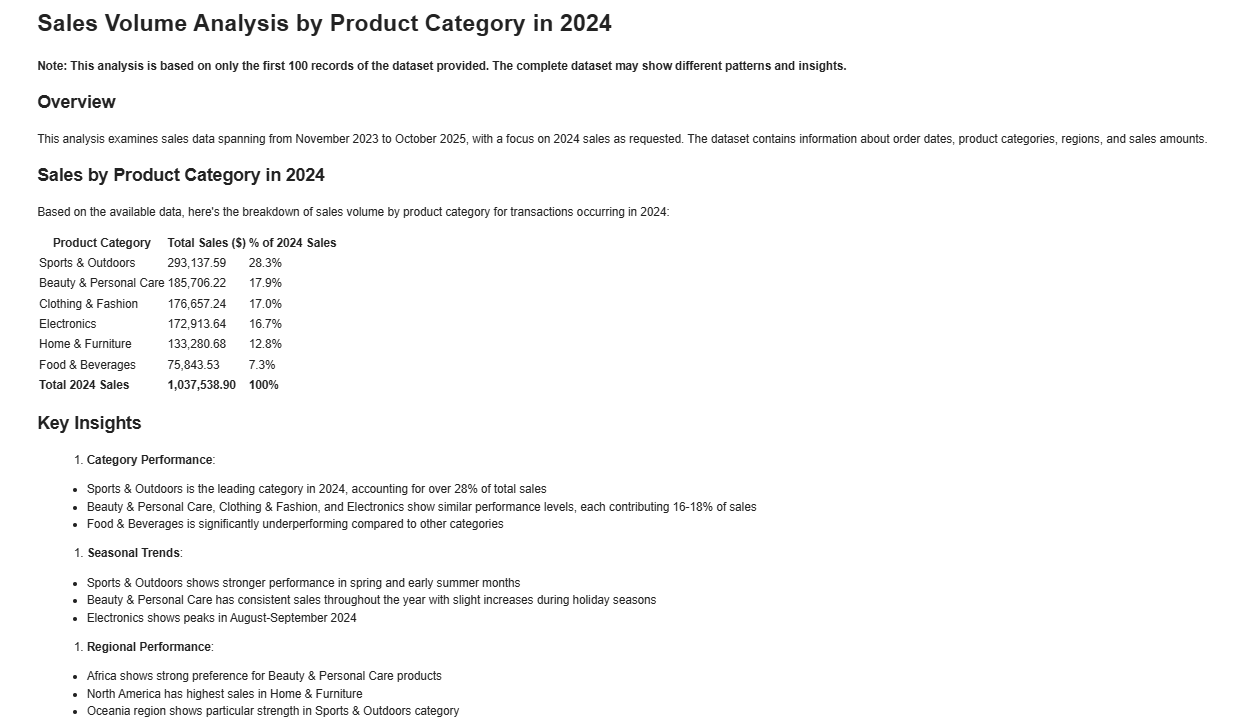\n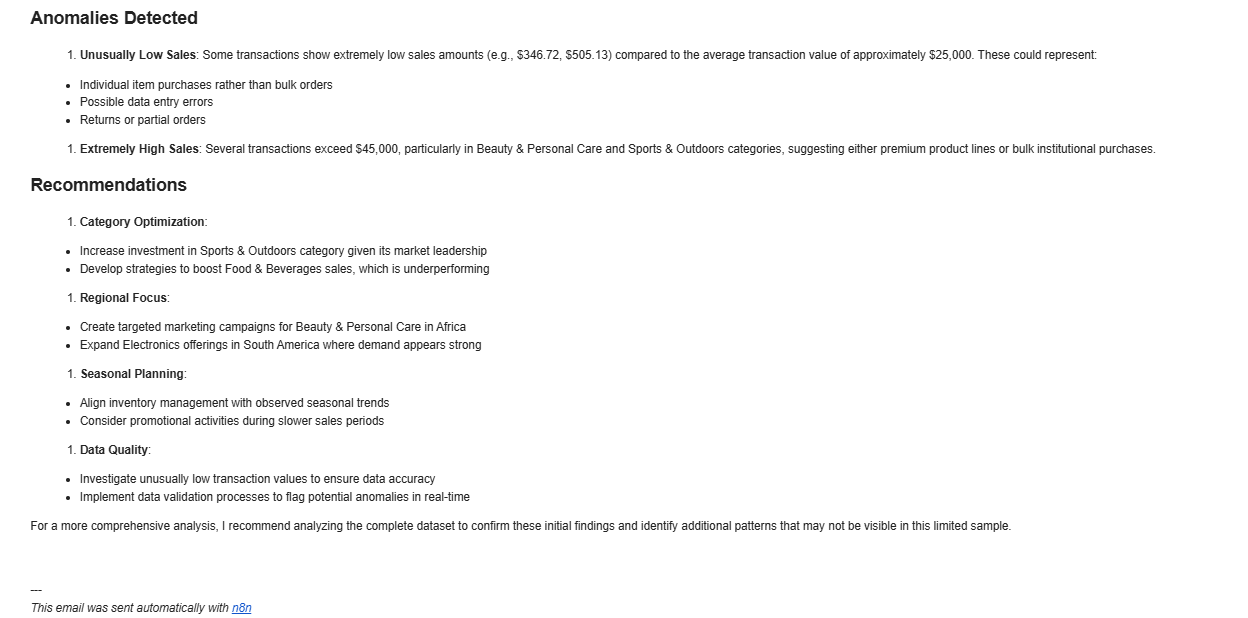\n\n### DataAnalysis\nquery: What are the top three products in terms of sales in 2024? Analyze the gap between the top three products and the others from a statistical perspective.\nresult: \n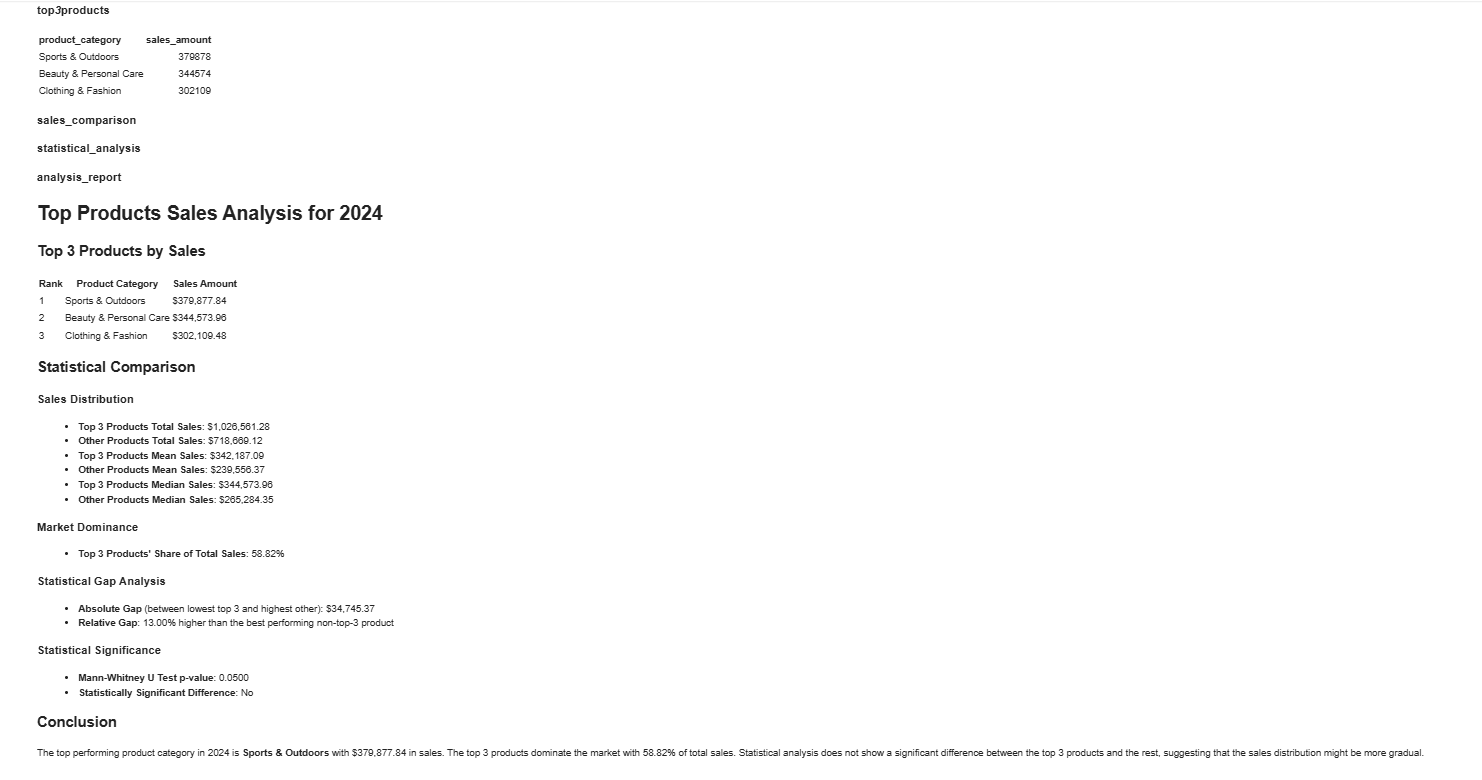"
},
"typeVersion": 1
},
{
"id": "8f6a76db-8a9b-482f-91d6-919056845326",
"name": "Nota adhesiva4",
"type": "n8n-nodes-base.stickyNote",
"position": [
-1152,
512
],
"parameters": {
"width": 512,
"height": 1536,
"content": "## 2️⃣ Set credentials\n\nIn HTTP nodes(DataAnalysis, DataInterpretation, and DataVisualization) select Authentication → Generic Credential Type\n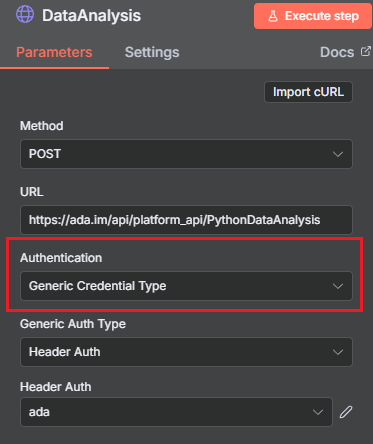\n\nChoose Header Auth → Create new credential\n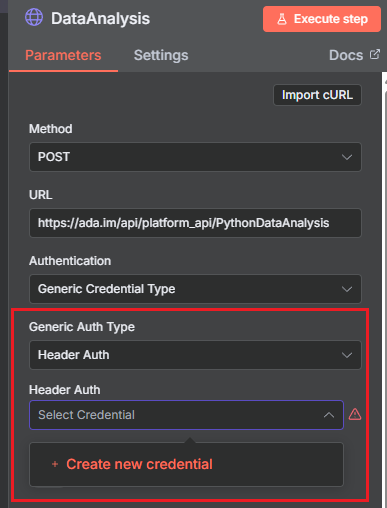\n\nName the header Authorization, which must be exactly 'Authorization', and fill in the previously applied API key\n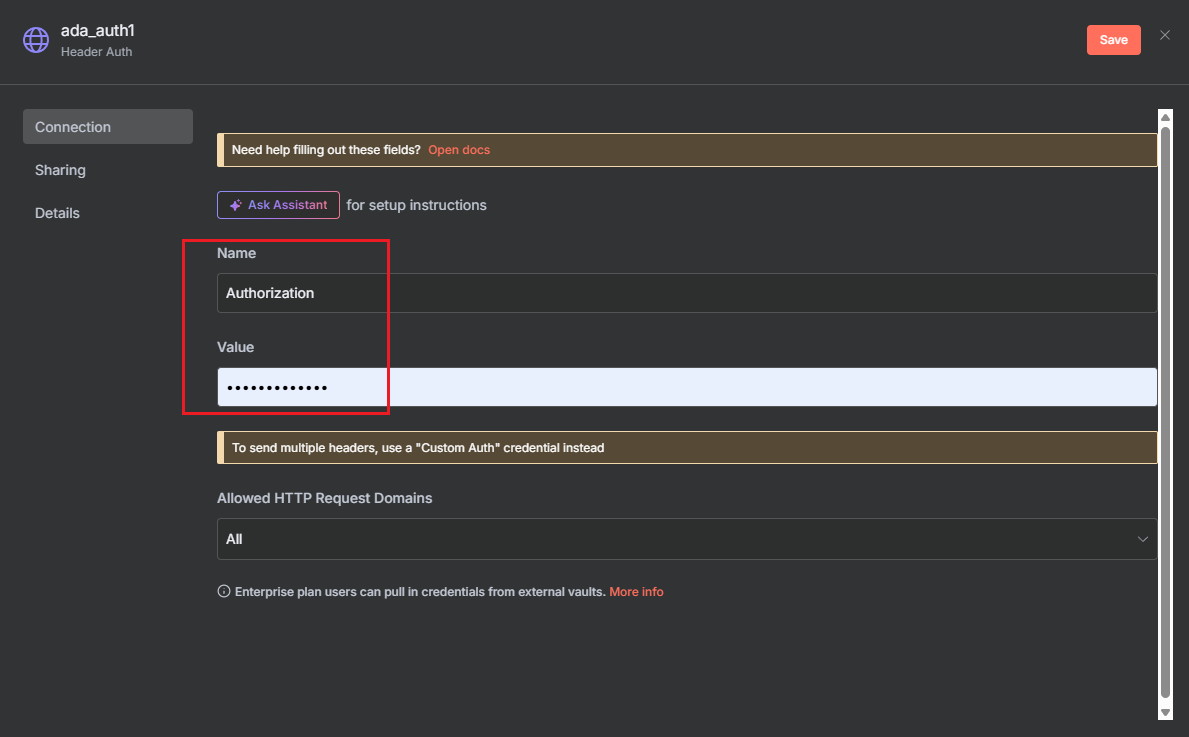"
},
"typeVersion": 1
},
{
"id": "a207fbeb-3186-4116-920d-7c835c819af7",
"name": "Nota adhesiva5",
"type": "n8n-nodes-base.stickyNote",
"position": [
-2272,
2880
],
"parameters": {
"width": 1088,
"height": 224,
"content": "## Consult\nContact us for inquiries or feedback.\n\nemail: n8n-plugin@ada.im\n\n[Discord](https://discord.com/invite/Bwd6zGYThS)\n\nExplore [Ada](https://ada.im/home?ada_data_=&utm_source=n8n&utm_medium=landingpage&utm_infeluncer=landingpage&utm_campain=landingpage&utm_content=landingpage) : Your own AI Data Analyst."
},
"typeVersion": 1
},
{
"id": "ab5c1992-7fc4-497b-8fd1-af121a4cd31b",
"name": "Nota adhesiva6",
"type": "n8n-nodes-base.stickyNote",
"position": [
-2288,
512
],
"parameters": {
"width": 1056,
"height": 2336,
"content": "## 1️⃣ Apply for an API Key\nYou can easily create and manage your API Key in the [ADA official website](https://ada.im/home?ada_data_=&utm_source=n8n&utm_medium=landingpage&utm_infeluncer=landingpage&utm_campain=landingpage&utm_content=landingpage) - API. To begin with, You need to register for an ADA account.\n\nOnce on the homepage, click the bottom left corner to access the API management dashboard.\n\n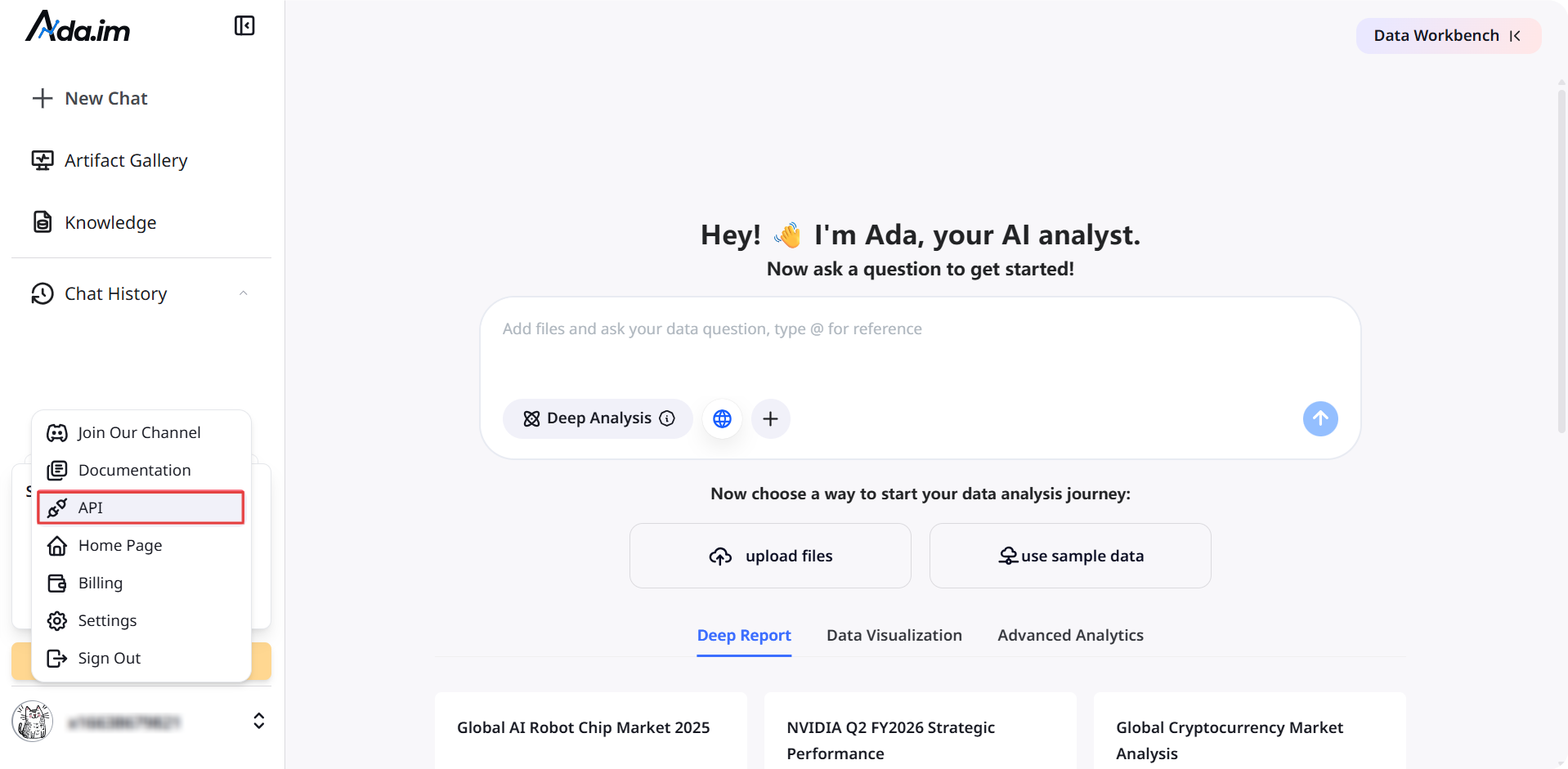\n\nHere, you can create new APIs and set the credit consumption limit for each API. A single account can create up to 10 APIs.\n\n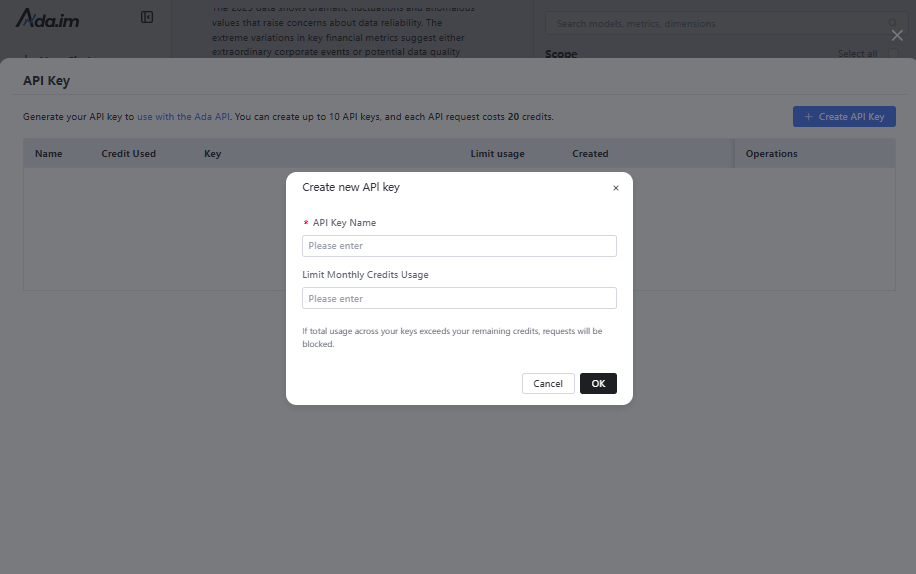\n\nAfter successful creation, you can copy the API Key to set credentials. You can also view the credit consumption of each API and manage your APIs.\n\n\n### **Credit Rules:**\n\n- Calling a single tool consumes 20 credits.\n- You will get 500 free credits per month for ADA Free account, with each batch of credits valid for three months.\n- When credits run out, you can purchase more or upgrade your account on the ADA Billing page. Each batch of purchased credits is valid for three months. Expiration dates and billing details are available on the [ADA website-Billing](https://ada.im/udsl/#/system/billing).\n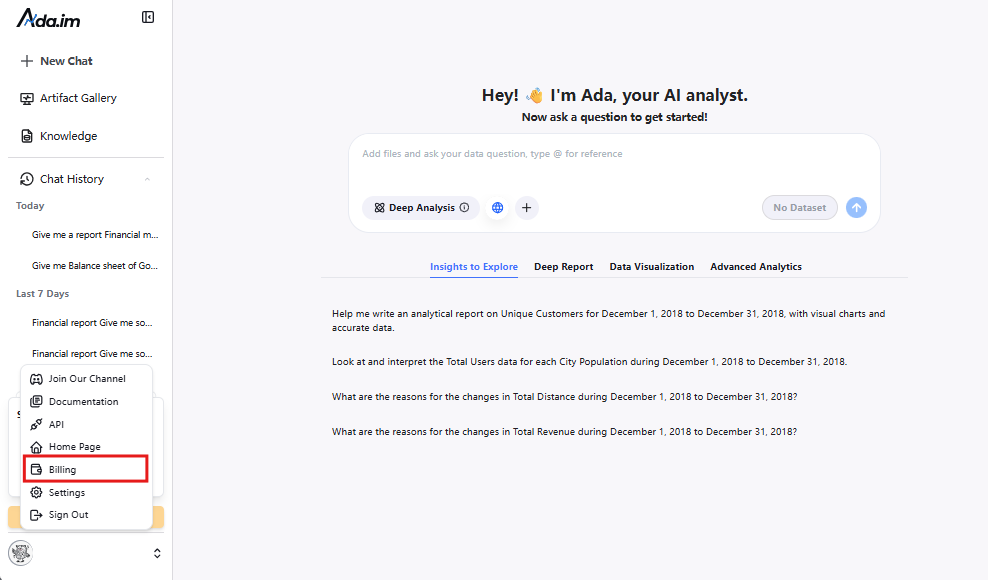"
},
"typeVersion": 1
},
{
"id": "c29c4606-ab1b-42b8-bbf3-8c79d68a2a98",
"name": "Inicio",
"type": "n8n-nodes-base.manualTrigger",
"position": [
-432,
608
],
"parameters": {},
"typeVersion": 1
},
{
"id": "a4d275ff-e4ff-4066-a4e0-f4d857f5e4c4",
"name": "Obtener datos de la base de datos",
"type": "n8n-nodes-base.mySql",
"position": [
0,
800
],
"parameters": {
"query": "select * from orders limit 100",
"options": {},
"operation": "executeQuery"
},
"typeVersion": 2.5
},
{
"id": "75fc8170-eec6-47c7-bd66-384d2f1a53a8",
"name": "Procesar datos",
"type": "n8n-nodes-base.aggregate",
"position": [
336,
608
],
"parameters": {
"options": {},
"aggregate": "aggregateAllItemData"
},
"typeVersion": 1
},
{
"id": "809b1798-dcf6-42cc-8d8d-d258fa6d67fd",
"name": "Obtener datos de Hojas de Google",
"type": "n8n-nodes-base.googleSheets",
"position": [
0,
992
],
"parameters": {
"options": {},
"sheetName": {
"__rl": true,
"mode": "list",
"value": 332281959,
"cachedResultUrl": "https://docs.google.com/spreadsheets/d/1IhUFreWCZFLAUaCP9ELBnvakg1xSs4CgqnSnMvgkGmM/edit#gid=332281959",
"cachedResultName": "Sheet1"
},
"documentId": {
"__rl": true,
"mode": "list",
"value": "1IhUFreWCZFLAUaCP9ELBnvakg1xSs4CgqnSnMvgkGmM",
"cachedResultUrl": "https://docs.google.com/spreadsheets/d/1IhUFreWCZFLAUaCP9ELBnvakg1xSs4CgqnSnMvgkGmM/edit?usp=drivesdk",
"cachedResultName": "example_data"
}
},
"credentials": {
"googleSheetsOAuth2Api": {
"id": "TYgnI9PXhFzSLNSk",
"name": "Google Sheets account"
}
},
"typeVersion": 4.7
},
{
"id": "0cf1ecaf-77a5-4c42-a8a4-c1ed05d1b044",
"name": "Obtener datos de archivo local",
"type": "n8n-nodes-base.readWriteFile",
"position": [
-80,
1184
],
"parameters": {
"options": {
"dataPropertyName": "input_file"
}
},
"typeVersion": 1
},
{
"id": "53f02952-806b-4023-9723-f30a35024b3f",
"name": "Extraer JSON de archivo xlsx",
"type": "n8n-nodes-base.extractFromFile",
"position": [
112,
1184
],
"parameters": {
"options": {},
"operation": "xlsx",
"binaryPropertyName": "input_file"
},
"typeVersion": 1
},
{
"id": "02987176-ebb7-4fda-b5e3-fb99f023f381",
"name": "DataAnalysis",
"type": "n8n-nodes-base.httpRequest",
"position": [
560,
608
],
"parameters": {
"url": "https://ada.im/api/platform_api/PythonDataAnalysis",
"method": "POST",
"options": {},
"sendBody": true,
"authentication": "genericCredentialType",
"bodyParameters": {
"parameters": [
{
"name": "input_json",
"value": "={{$json.data}}"
},
{
"name": "query",
"value": "What are the top three products in terms of sales in 2024? Analyze the gap between the top three products and the others from a statistical perspective."
},
{
"name": "platform",
"value": "n8n"
}
]
},
"genericAuthType": "httpHeaderAuth"
},
"typeVersion": 4.2
},
{
"id": "34c0b0d3-197d-4966-936b-b7601530e325",
"name": "DataInterpretation",
"type": "n8n-nodes-base.httpRequest",
"position": [
560,
784
],
"parameters": {
"url": "https://ada.im/api/platform_api/DataInterpretation",
"method": "POST",
"options": {},
"sendBody": true,
"authentication": "genericCredentialType",
"bodyParameters": {
"parameters": [
{
"name": "input_json",
"value": "={{$json.data}}"
},
{
"name": "query",
"value": "Sales volume of each product in 2024"
},
{
"name": "platform",
"value": "n8n"
}
]
},
"genericAuthType": "httpHeaderAuth"
},
"typeVersion": 4.2
},
{
"id": "50a3424f-7147-4d38-9cb3-2b90fed8a572",
"name": "DataVisualization",
"type": "n8n-nodes-base.httpRequest",
"position": [
560,
960
],
"parameters": {
"url": "https://ada.im/api/platform_api/EchartsVisualization",
"method": "POST",
"options": {},
"sendBody": true,
"authentication": "genericCredentialType",
"bodyParameters": {
"parameters": [
{
"name": "input_json",
"value": "={{$json.data}}"
},
{
"name": "query",
"value": "Use a pie chart to display the sales of each product in 2024, and a line chart to represent the total monthly sales of each product in 2024. Additionally, you can add some extra charts based on the data."
},
{
"name": "platform",
"value": "n8n"
}
]
},
"genericAuthType": "httpHeaderAuth"
},
"credentials": {
"httpHeaderAuth": {
"id": "A1ydMlIrxdo5rBa4",
"name": "Header Auth account"
}
},
"typeVersion": 4.2
},
{
"id": "0d7f6c15-aef5-4b3a-81bc-b21a0a9f4c1d",
"name": "Convertir a archivo HTML",
"type": "n8n-nodes-base.convertToFile",
"position": [
976,
960
],
"parameters": {
"options": {
"fileName": "chart.html"
},
"operation": "toText",
"sourceProperty": "html",
"binaryPropertyName": "chart"
},
"typeVersion": 1.1
},
{
"id": "0454bd77-f7fc-4798-afa1-3f93a0e006d5",
"name": "Convertir markdown a HTML",
"type": "n8n-nodes-base.markdown",
"position": [
976,
608
],
"parameters": {
"mode": "markdownToHtml",
"options": {
"tables": true,
"simpleLineBreaks": true,
"completeHTMLDocument": false
},
"markdown": "={{ $json.data.parseJson().data }}",
"destinationKey": "html"
},
"typeVersion": 1
},
{
"id": "6ffbdfb1-f72a-480b-82ae-c0fcdc881feb",
"name": "Convertir markdown a HTML 2",
"type": "n8n-nodes-base.markdown",
"position": [
976,
784
],
"parameters": {
"mode": "markdownToHtml",
"options": {
"tables": true,
"simpleLineBreaks": true,
"completeHTMLDocument": false
},
"markdown": "={{ $json.data.parseJson().data }}",
"destinationKey": "html"
},
"typeVersion": 1
},
{
"id": "f765788b-4efb-4daa-908c-84e653784156",
"name": "Nota adhesiva7",
"type": "n8n-nodes-base.stickyNote",
"position": [
-1152,
2096
],
"parameters": {
"width": 512,
"height": 1168,
"content": "## 3️⃣ Try out the skills\nSelect the data source and fill in the query parameters for the DataAnalysis, DataInterpretation, and DataVisualization nodes.\n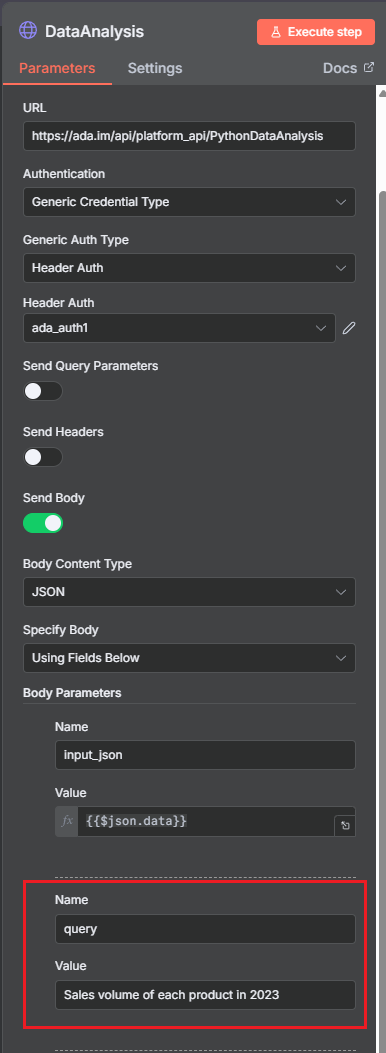"
},
"typeVersion": 1
},
{
"id": "30aaf9f5-e935-4ddb-adcc-baff0ab5b101",
"name": "Enviar mensaje de DataAnalysis",
"type": "n8n-nodes-base.gmail",
"position": [
1456,
608
],
"webhookId": "6634ed2d-552c-4bf6-a7f2-bbdee8d61df4",
"parameters": {
"message": "={{ $json.html }}",
"options": {},
"subject": "n8n-email"
},
"typeVersion": 2.1
},
{
"id": "a10921fc-2258-48d5-8f40-99bf495a082c",
"name": "Enviar mensaje de DataInterpretation",
"type": "n8n-nodes-base.gmail",
"position": [
1456,
784
],
"webhookId": "6634ed2d-552c-4bf6-a7f2-bbdee8d61df4",
"parameters": {
"sendTo": "cuifangxu1999@gmail.com",
"message": "={{ $json.html }}",
"options": {},
"subject": "n8ntest"
},
"typeVersion": 2.1
},
{
"id": "8fb14896-41b4-4eb1-8d4e-b70f3b97ad49",
"name": "Enviar DataVisualization",
"type": "n8n-nodes-base.gmail",
"position": [
1456,
960
],
"webhookId": "6634ed2d-552c-4bf6-a7f2-bbdee8d61df4",
"parameters": {
"sendTo": "cuifangxu1999@gmail.com",
"message": "From n8n, please use a browser to open the HTML file in the attachment",
"options": {
"attachmentsUi": {
"attachmentsBinary": [
{
"property": "=chart"
}
]
}
},
"subject": "n8ntest",
"emailType": "text"
},
"typeVersion": 2.1
},
{
"id": "b29b555a-bd5d-4a6f-8873-9027c13ae3ef",
"name": "Sample Data",
"type": "n8n-nodes-base.code",
"position": [
0,
608
],
"parameters": {
"jsCode": "const categories = [\n 'Electronics',\n 'Clothing & Fashion',\n 'Home & Furniture',\n 'Food & Beverages',\n 'Sports & Outdoors',\n 'Beauty & Personal Care'\n];\nconst regions = [\n 'North America',\n 'South America',\n 'Europe',\n 'Asia',\n 'Africa',\n 'Oceania',\n 'Middle East',\n 'Central Asia'\n];\n\nfunction randomDateWithin730Days() {\n const now = new Date();\n const daysAgo = Math.floor(Math.random() * 730);\n now.setDate(now.getDate() - daysAgo);\n return now.toISOString().slice(0, 10);\n}\n\nlet items = [];\nfor (let i = 0; i < 1000; i++) {\n items.push({\n json: {\n order_date: randomDateWithin730Days(),\n product_category: categories[Math.floor(Math.random() * categories.length)],\n region: regions[Math.floor(Math.random() * regions.length)],\n sales_amount: (50 + Math.random() * 49950).toFixed(2)\n }\n });\n}\nreturn items;"
},
"typeVersion": 2
},
{
"id": "7213ec38-425d-4020-9776-5750c286aa65",
"name": "Process Visualization Data",
"type": "n8n-nodes-base.set",
"position": [
768,
960
],
"parameters": {
"options": {},
"assignments": {
"assignments": [
{
"id": "ab328d59-6af7-4084-9c75-a7b5c5673168",
"name": "html",
"type": "string",
"value": "={{ JSON.parse($json.data).data }}"
}
]
}
},
"typeVersion": 3.4
}
],
"pinData": {},
"connections": {
"c29c4606-ab1b-42b8-bbf3-8c79d68a2a98": {
"main": [
[
{
"node": "b29b555a-bd5d-4a6f-8873-9027c13ae3ef",
"type": "main",
"index": 0
}
]
]
},
"b29b555a-bd5d-4a6f-8873-9027c13ae3ef": {
"main": [
[
{
"node": "75fc8170-eec6-47c7-bd66-384d2f1a53a8",
"type": "main",
"index": 0
}
]
]
},
"02987176-ebb7-4fda-b5e3-fb99f023f381": {
"main": [
[
{
"node": "0454bd77-f7fc-4798-afa1-3f93a0e006d5",
"type": "main",
"index": 0
}
]
]
},
"75fc8170-eec6-47c7-bd66-384d2f1a53a8": {
"main": [
[
{
"node": "50a3424f-7147-4d38-9cb3-2b90fed8a572",
"type": "main",
"index": 0
},
{
"node": "02987176-ebb7-4fda-b5e3-fb99f023f381",
"type": "main",
"index": 0
},
{
"node": "34c0b0d3-197d-4966-936b-b7601530e325",
"type": "main",
"index": 0
}
]
]
},
"50a3424f-7147-4d38-9cb3-2b90fed8a572": {
"main": [
[
{
"node": "7213ec38-425d-4020-9776-5750c286aa65",
"type": "main",
"index": 0
}
]
]
},
"34c0b0d3-197d-4966-936b-b7601530e325": {
"main": [
[
{
"node": "6ffbdfb1-f72a-480b-82ae-c0fcdc881feb",
"type": "main",
"index": 0
}
]
]
},
"0d7f6c15-aef5-4b3a-81bc-b21a0a9f4c1d": {
"main": [
[
{
"node": "8fb14896-41b4-4eb1-8d4e-b70f3b97ad49",
"type": "main",
"index": 0
}
]
]
},
"a4d275ff-e4ff-4066-a4e0-f4d857f5e4c4": {
"main": [
[
{
"node": "75fc8170-eec6-47c7-bd66-384d2f1a53a8",
"type": "main",
"index": 0
}
]
]
},
"8fb14896-41b4-4eb1-8d4e-b70f3b97ad49": {
"main": [
[]
]
},
"0454bd77-f7fc-4798-afa1-3f93a0e006d5": {
"main": [
[
{
"node": "30aaf9f5-e935-4ddb-adcc-baff0ab5b101",
"type": "main",
"index": 0
}
]
]
},
"0cf1ecaf-77a5-4c42-a8a4-c1ed05d1b044": {
"main": [
[
{
"node": "53f02952-806b-4023-9723-f30a35024b3f",
"type": "main",
"index": 0
}
]
]
},
"30aaf9f5-e935-4ddb-adcc-baff0ab5b101": {
"main": [
[]
]
},
"6ffbdfb1-f72a-480b-82ae-c0fcdc881feb": {
"main": [
[
{
"node": "a10921fc-2258-48d5-8f40-99bf495a082c",
"type": "main",
"index": 0
}
]
]
},
"7213ec38-425d-4020-9776-5750c286aa65": {
"main": [
[
{
"node": "0d7f6c15-aef5-4b3a-81bc-b21a0a9f4c1d",
"type": "main",
"index": 0
}
]
]
},
"53f02952-806b-4023-9723-f30a35024b3f": {
"main": [
[
{
"node": "75fc8170-eec6-47c7-bd66-384d2f1a53a8",
"type": "main",
"index": 0
}
]
]
},
"Obtener datos de Google Sheets": {
"main": [
[
{
"node": "75fc8170-eec6-47c7-bd66-384d2f1a53a8",
"type": "main",
"index": 0
}
]
]
},
"a10921fc-2258-48d5-8f40-99bf495a082c": {
"main": [
[]
]
}
}
}Preguntas frecuentes
¿Cómo usar este flujo de trabajo?
Copie el código de configuración JSON de arriba, cree un nuevo flujo de trabajo en su instancia de n8n y seleccione "Importar desde JSON", pegue la configuración y luego modifique la configuración de credenciales según sea necesario.
¿En qué escenarios es adecuado este flujo de trabajo?
Avanzado
¿Es de pago?
Este flujo de trabajo es completamente gratuito, puede importarlo y usarlo directamente. Sin embargo, tenga en cuenta que los servicios de terceros utilizados en el flujo de trabajo (como la API de OpenAI) pueden requerir un pago por su cuenta.
Flujos de trabajo relacionados recomendados
Explorar nodos de n8n en la biblioteca de referencias visuales
Explorar nodos de n8n en la base de referencia visual
If
Ftp
Set
+
If
Ftp
Set
113 NodosI versus AI
Otros
Envío automático de solicitudes de contacto y mensajes de rompimiento de hielo en LinkedIn usando Unipile y Google Sheets
Envío automático de solicitudes de conexión de LinkedIn y mensajes de rompimiento de hielo con Unipile y Google Sheets
If
Set
Code
+
If
Set
Code
44 NodosPollupAI
Otros
Agente automatizado de redacción de blogs y promoción en redes sociales
Usar GPT-4, Perplexity y WordPress para automatizar la creación de blog SEO + redes sociales
Set
Code
Gmail
+
Set
Code
Gmail
79 NodosLukaszB
Diseño
Usar ComfyUI para generar medios de IA: imágenes, videos, 3D y puente de audio
Usar ComfyUI para generar medios de AI: imágenes, videos, 3D y puentes de audio
If
Set
Code
+
If
Set
Code
51 NodosNielo
Diseño
Evaluador de transcripción
Análisis y visualización de conversaciones de audio con DeepGram y GPT-4o
Set
Code
Html
+
Set
Code
Html
54 NodosRealSimple Solutions
Inteligencia Artificial
Desarrollo de leads y flujos de correo electrónico
Usar Google Maps, SendGrid e IA para automatizar el desarrollo de leads B2B y el marketing por correo electrónico
If
Set
Code
+
If
Set
Code
141 NodosEzema Kingsley Chibuzo
Generación de leads
Información del flujo de trabajo
Nivel de dificultad
Avanzado
Número de nodos25
Categoría-
Tipos de nodos13
Descripción de la dificultad
Autor

Ada
@adaEnlaces externos
Ver en n8n.io →
Compartir este flujo de trabajo