独自の画像検索を構築:AIオブジェクト検出、CDN、ElasticSearchを使用
上級
これはAI分野の自動化ワークフローで、17個のノードを含みます。主にSet, Filter, SplitOut, EditImage, HttpRequestなどのノードを使用、AI技術を活用したスマート自動化を実現。 AIオブジェクト検出、CDN、ElasticSearchを使用して、あなた独自の画像検索を構築する
前提条件
- •ターゲットAPIの認証情報が必要な場合あり
カテゴリー
ワークフロープレビュー
ノード接続関係を可視化、ズームとパンをサポート
ワークフローをエクスポート
以下のJSON設定をn8nにインポートして、このワークフローを使用できます
{
"meta": {
"instanceId": "26ba763460b97c249b82942b23b6384876dfeb9327513332e743c5f6219c2b8e"
},
"nodes": [
{
"id": "6359f725-1ede-4b05-bc19-05a7e85c0865",
"name": "「Test workflow」クリック時",
"type": "n8n-nodes-base.manualTrigger",
"position": [
680,
292
],
"parameters": {},
"typeVersion": 1
},
{
"id": "9e1e61c7-f5fd-4e8a-99a6-ccc5a24f5528",
"name": "ソース画像取得",
"type": "n8n-nodes-base.httpRequest",
"position": [
1000,
292
],
"parameters": {
"url": "={{ $json.source_image }}",
"options": {}
},
"typeVersion": 4.2
},
{
"id": "9b1b94cf-3a7d-4c43-ab6c-8df9824b5667",
"name": "結果のみ抽出",
"type": "n8n-nodes-base.splitOut",
"position": [
1428,
323
],
"parameters": {
"options": {},
"fieldToSplitOut": "result"
},
"typeVersion": 1
},
{
"id": "fcbaf6c3-2aee-4ea1-9c5e-2833dd7a9f50",
"name": "スコア >= 0.9 でフィルタ",
"type": "n8n-nodes-base.filter",
"position": [
1608,
323
],
"parameters": {
"options": {},
"conditions": {
"options": {
"leftValue": "",
"caseSensitive": true,
"typeValidation": "strict"
},
"combinator": "and",
"conditions": [
{
"id": "367d83ef-8ecf-41fe-858c-9bfd78b0ae9f",
"operator": {
"type": "number",
"operation": "gte"
},
"leftValue": "={{ $json.score }}",
"rightValue": 0.9
}
]
}
},
"typeVersion": 2
},
{
"id": "954ce7b0-ef82-4203-8706-17cfa5e5e3ff",
"name": "画像からオブジェクトを切り抜き",
"type": "n8n-nodes-base.editImage",
"position": [
2080,
432
],
"parameters": {
"width": "={{ $json.box.xmax - $json.box.xmin }}",
"height": "={{ $json.box.ymax - $json.box.ymin }}",
"options": {
"format": "jpeg",
"fileName": "={{ $binary.data.fileName.split('.')[0].urlEncode()+'-'+$json.label.urlEncode() + '-' + $itemIndex }}.jpg"
},
"operation": "crop",
"positionX": "={{ $json.box.xmin }}",
"positionY": "={{ $json.box.ymin }}"
},
"typeVersion": 1
},
{
"id": "40027456-4bf9-4eea-8d71-aa28e69b29e5",
"name": "変数を設定",
"type": "n8n-nodes-base.set",
"position": [
840,
292
],
"parameters": {
"options": {},
"assignments": {
"assignments": [
{
"id": "9e95d951-8530-4a80-bd00-6bb55623a71f",
"name": "CLOUDFLARE_ACCOUNT_ID",
"type": "string",
"value": ""
},
{
"id": "66807a90-63a1-4d4e-886e-e8abf3019a34",
"name": "model",
"type": "string",
"value": "@cf/facebook/detr-resnet-50"
},
{
"id": "a13ccde6-e6e3-46f4-afa3-2134af7bc765",
"name": "source_image",
"type": "string",
"value": "https://images.pexels.com/photos/2293367/pexels-photo-2293367.jpeg?auto=compress&cs=tinysrgb&w=600"
},
{
"id": "0734fc55-b414-47f7-8b3e-5c880243f3ed",
"name": "elasticsearch_index",
"type": "string",
"value": "n8n-image-search"
}
]
}
},
"typeVersion": 3.3
},
{
"id": "c3d8c5e3-546e-472c-9e6e-091cf5cee3c3",
"name": "Detr-Resnet-50 オブジェクト分類を使用",
"type": "n8n-nodes-base.httpRequest",
"position": [
1248,
324
],
"parameters": {
"url": "=https://api.cloudflare.com/client/v4/accounts/{{ $('Set Variables').item.json.CLOUDFLARE_ACCOUNT_ID }}/ai/run/{{ $('Set Variables').item.json.model }}",
"method": "POST",
"options": {},
"sendBody": true,
"contentType": "binaryData",
"authentication": "predefinedCredentialType",
"inputDataFieldName": "data",
"nodeCredentialType": "cloudflareApi"
},
"credentials": {
"cloudflareApi": {
"id": "qOynkQdBH48ofOSS",
"name": "Cloudflare account"
}
},
"typeVersion": 4.2
},
{
"id": "3c7aa2fc-9ca1-41ba-a10d-aa5930d45f18",
"name": "Cloudinaryにアップロード",
"type": "n8n-nodes-base.httpRequest",
"position": [
2380,
380
],
"parameters": {
"url": "https://api.cloudinary.com/v1_1/daglih2g8/image/upload",
"method": "POST",
"options": {},
"sendBody": true,
"sendQuery": true,
"contentType": "multipart-form-data",
"authentication": "genericCredentialType",
"bodyParameters": {
"parameters": [
{
"name": "file",
"parameterType": "formBinaryData",
"inputDataFieldName": "data"
}
]
},
"genericAuthType": "httpQueryAuth",
"queryParameters": {
"parameters": [
{
"name": "upload_preset",
"value": "n8n-workflows-preset"
}
]
}
},
"credentials": {
"httpQueryAuth": {
"id": "sT9jeKzZiLJ3bVPz",
"name": "Cloudinary API"
}
},
"typeVersion": 4.2
},
{
"id": "3c4e1f04-a0ba-4cce-b82a-aa3eadc4e7e1",
"name": "Elasticsearchにドキュメント作成",
"type": "n8n-nodes-base.elasticsearch",
"position": [
2580,
380
],
"parameters": {
"indexId": "={{ $('Set Variables').item.json.elasticsearch_index }}",
"options": {},
"fieldsUi": {
"fieldValues": [
{
"fieldId": "image_url",
"fieldValue": "={{ $json.secure_url.replace('upload','upload/f_auto,q_auto') }}"
},
{
"fieldId": "source_image_url",
"fieldValue": "={{ $('Set Variables').item.json.source_image }}"
},
{
"fieldId": "label",
"fieldValue": "={{ $('Crop Object From Image').item.json.label }}"
},
{
"fieldId": "metadata",
"fieldValue": "={{ JSON.stringify(Object.assign($('Crop Object From Image').item.json, { filename: $json.original_filename })) }}"
}
]
},
"operation": "create",
"additionalFields": {}
},
"credentials": {
"elasticsearchApi": {
"id": "dRuuhAgS7AF0mw0S",
"name": "Elasticsearch account"
}
},
"typeVersion": 1
},
{
"id": "292c9821-c123-44fa-9ba1-c37bf84079bc",
"name": "付箋",
"type": "n8n-nodes-base.stickyNote",
"position": [
620,
120
],
"parameters": {
"color": 7,
"width": 541.1455500767354,
"height": 381.6388867600897,
"content": "## 1. Get Source Image\n[Read more about setting variables for your workflow](https://docs.n8n.io/integrations/builtin/core-nodes/n8n-nodes-base.set)\n\nFor this demo, we'll manually define an image to process. In production however, this image can come from a variety of sources such as drives, webhooks and more."
},
"typeVersion": 1
},
{
"id": "863271dc-fb9d-4211-972d-6b57336073b4",
"name": "付箋1",
"type": "n8n-nodes-base.stickyNote",
"position": [
1180,
80
],
"parameters": {
"color": 7,
"width": 579.7748008857744,
"height": 437.4680103498263,
"content": "## 2. Use Detr-Resnet-50 Object Classification\n[Learn more about Cloudflare Workers AI](https://developers.cloudflare.com/workers-ai/)\n\nNot all AI workflows need an LLM! As in this example, we're using a non-LLM vision model to parse the source image and return what objects are contained within. The image search feature we're building will be based on the objects in the image making for a much more granular search via object association.\n\nWe'll use the Cloudflare Workers AI service which conveniently provides this model via API use."
},
"typeVersion": 1
},
{
"id": "b73b45da-0436-4099-b538-c6b3b84822f2",
"name": "付箋2",
"type": "n8n-nodes-base.stickyNote",
"position": [
1800,
260
],
"parameters": {
"color": 7,
"width": 466.35460775498495,
"height": 371.9272151757119,
"content": "## 3. Crop Objects Out of Source Image\n[Read more about Editing Images in n8n](https://docs.n8n.io/integrations/builtin/core-nodes/n8n-nodes-base.editimage)\n\nWith our objects identified by their bounding boxes, we can \"cut\" them out of the source image as separate images."
},
"typeVersion": 1
},
{
"id": "465bd842-8a35-49d8-a9ff-c30d164620db",
"name": "付箋3",
"type": "n8n-nodes-base.stickyNote",
"position": [
2300,
180
],
"parameters": {
"color": 7,
"width": 478.20345439832454,
"height": 386.06196032653685,
"content": "## 4. Index Object Images In ElasticSearch\n[Read more about using ElasticSearch](https://docs.n8n.io/integrations/builtin/app-nodes/n8n-nodes-base.elasticsearch)\n\nBy storing the newly created object images externally and indexing them in Elasticsearch, we now have a foundation for our Image Search service which queries by object association."
},
"typeVersion": 1
},
{
"id": "6a04b4b5-7830-410d-9b5b-79acb0b1c78b",
"name": "付箋4",
"type": "n8n-nodes-base.stickyNote",
"position": [
1800,
-220
],
"parameters": {
"color": 7,
"width": 328.419768654291,
"height": 462.65463700396174,
"content": "Fig 1. Result of Classification\n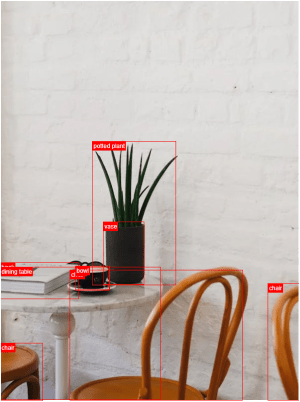"
},
"typeVersion": 1
},
{
"id": "8f607951-ba41-4362-8323-e8b4b96ad122",
"name": "ソース画像再取得",
"type": "n8n-nodes-base.httpRequest",
"position": [
1880,
432
],
"parameters": {
"url": "={{ $('Set Variables').item.json.source_image }}",
"options": {}
},
"typeVersion": 4.2
},
{
"id": "6933f67d-276b-4908-8602-654aa352a68b",
"name": "付箋8",
"type": "n8n-nodes-base.stickyNote",
"position": [
220,
120
],
"parameters": {
"width": 359.6648027457353,
"height": 352.41026669883723,
"content": "## Try It Out!\n### This workflow does the following:\n* Downloads an image\n* Uses an object classification AI model to identify objects in the image.\n* Crops the objects out from the original image into new image files.\n* Indexes the image's object in an Elasticsearch Database to enable image search.\n\n### Need Help?\nJoin the [Discord](https://discord.com/invite/XPKeKXeB7d) or ask in the [Forum](https://community.n8n.io/)!\n\nHappy Hacking!"
},
"typeVersion": 1
},
{
"id": "35615ed5-43e8-43f0-95fe-1f95a1177d69",
"name": "付箋5",
"type": "n8n-nodes-base.stickyNote",
"position": [
800,
280
],
"parameters": {
"width": 172.9365918827757,
"height": 291.6881468483679,
"content": "\n\n\n\n\n\n\n\n\n\n\n\n\n\n\n\n🚨**Required**\n* Set your variables here first!"
},
"typeVersion": 1
}
],
"pinData": {},
"connections": {
"40027456-4bf9-4eea-8d71-aa28e69b29e5": {
"main": [
[
{
"node": "9e1e61c7-f5fd-4e8a-99a6-ccc5a24f5528",
"type": "main",
"index": 0
}
]
]
},
"9e1e61c7-f5fd-4e8a-99a6-ccc5a24f5528": {
"main": [
[
{
"node": "c3d8c5e3-546e-472c-9e6e-091cf5cee3c3",
"type": "main",
"index": 0
}
]
]
},
"fcbaf6c3-2aee-4ea1-9c5e-2833dd7a9f50": {
"main": [
[
{
"node": "8f607951-ba41-4362-8323-e8b4b96ad122",
"type": "main",
"index": 0
}
]
]
},
"3c7aa2fc-9ca1-41ba-a10d-aa5930d45f18": {
"main": [
[
{
"node": "3c4e1f04-a0ba-4cce-b82a-aa3eadc4e7e1",
"type": "main",
"index": 0
}
]
]
},
"954ce7b0-ef82-4203-8706-17cfa5e5e3ff": {
"main": [
[
{
"node": "3c7aa2fc-9ca1-41ba-a10d-aa5930d45f18",
"type": "main",
"index": 0
}
]
]
},
"9b1b94cf-3a7d-4c43-ab6c-8df9824b5667": {
"main": [
[
{
"node": "fcbaf6c3-2aee-4ea1-9c5e-2833dd7a9f50",
"type": "main",
"index": 0
}
]
]
},
"8f607951-ba41-4362-8323-e8b4b96ad122": {
"main": [
[
{
"node": "954ce7b0-ef82-4203-8706-17cfa5e5e3ff",
"type": "main",
"index": 0
}
]
]
},
"6359f725-1ede-4b05-bc19-05a7e85c0865": {
"main": [
[
{
"node": "40027456-4bf9-4eea-8d71-aa28e69b29e5",
"type": "main",
"index": 0
}
]
]
},
"c3d8c5e3-546e-472c-9e6e-091cf5cee3c3": {
"main": [
[
{
"node": "9b1b94cf-3a7d-4c43-ab6c-8df9824b5667",
"type": "main",
"index": 0
}
]
]
}
}
}よくある質問
このワークフローの使い方は?
上記のJSON設定コードをコピーし、n8nインスタンスで新しいワークフローを作成して「JSONからインポート」を選択、設定を貼り付けて認証情報を必要に応じて変更してください。
このワークフローはどんな場面に適していますか?
上級 - 人工知能
有料ですか?
このワークフローは完全無料です。ただし、ワークフローで使用するサードパーティサービス(OpenAI APIなど)は別途料金が発生する場合があります。
関連ワークフロー
納税申告アシスタントの構築:Qdrant、Mistral.ai、OpenAIを使用
税務法アシスタントをQdrant、Mistral.ai、OpenAIで構築
Set
Wait
Filter
+
Set
Wait
Filter
38 ノードJimleuk
財務
カスタムQdrantベクタース토アMCPサーバーを構築
カスタムQdrantベクターストアMCPサーバーを構築する
If
Set
Code
+
If
Set
Code
44 ノードJimleuk
ビルディングブロック
基于动态提示与AirtableのAIデータ抽出
経由动态提示与Airtable实现AIデータ抽出
Set
Code
Filter
+
Set
Code
Filter
51 ノードJimleuk
人工知能
動のプロンプトとBaserowを活用したAIデータ抽出
動のプロンプトとBaserowを活用したAIデータ抽出
Set
Code
Filter
+
Set
Code
Filter
45 ノードJimleuk
人工知能
AIを使ったブランド文風のブログ作成の自動化
AIを使ってブランドスタイルのブログを自動生成
Set
Html
Limit
+
Set
Html
Limit
27 ノードJimleuk
人工知能
AIビジョンを使用した画像検証タスクの自動化
AI ビジュアル技術による画像検証タスクの自動化
Set
Split Out
Edit Image
+
Set
Split Out
Edit Image
11 ノードJimleuk
プロダクト
ワークフロー情報
難易度
上級
ノード数17
カテゴリー1
ノードタイプ8
作成者

Jimleuk
@jimleukFreelance consultant based in the UK specialising in AI-powered automations. I work with select clients tackling their most challenging projects. For business enquiries, send me an email at hello@jimle.uk LinkedIn: https://www.linkedin.com/in/jimleuk/ X/Twitter: https://x.com/jimle_uk
外部リンク
n8n.ioで表示 →
このワークフローを共有