💻 ワークフロー実行時刻のスケジュール設定
中級
これはDevOps, Building Blocks分野の自動化ワークフローで、13個のノードを含みます。主にN8n, Set, Merge, ScheduleTriggerなどのノードを使用。 生のn8n APIを使って、スケジュールでワークフローを有効化と無効化
前提条件
- •特別な前提条件なし、インポートしてすぐに使用可能
使用ノード (13)
カテゴリー
ワークフロープレビュー
ノード接続関係を可視化、ズームとパンをサポート
ワークフローをエクスポート
以下のJSON設定をn8nにインポートして、このワークフローを使用できます
{
"id": "cGqPi5Uy2u1ShmoO",
"meta": {
"instanceId": "8fccc85e4982eaaf920505127420cfb3a600b56930a56e499973488bb6dc5e3a",
"templateCredsSetupCompleted": true
},
"name": "💻 Schedule workflow activity time",
"tags": [
{
"id": "0IPbflTW7vujkmxO",
"name": "DevOps",
"createdAt": "2025-03-16T13:11:38.707Z",
"updatedAt": "2025-03-16T13:11:38.707Z"
}
],
"nodes": [
{
"id": "294244fd-8c35-4b70-af84-cc466a60541f",
"name": "n8n 有効化",
"type": "n8n-nodes-base.n8n",
"position": [
360,
-180
],
"parameters": {
"operation": "activate",
"workflowId": {
"__rl": true,
"mode": "id",
"value": "={{ $json.workflowID }}"
},
"requestOptions": {}
},
"credentials": {
"n8nApi": {
"id": "zYX6aInNigxW08J2",
"name": "n8n acc for Gitlab/hub sync of repos"
}
},
"typeVersion": 1
},
{
"id": "e669e5e3-288a-4d6b-af12-011340e60f64",
"name": "n8n 無効化",
"type": "n8n-nodes-base.n8n",
"position": [
360,
140
],
"parameters": {
"operation": "deactivate",
"workflowId": {
"__rl": true,
"mode": "id",
"value": "={{ $json.workflowID }}"
},
"requestOptions": {}
},
"credentials": {
"n8nApi": {
"id": "zYX6aInNigxW08J2",
"name": "n8n acc for Gitlab/hub sync of repos"
}
},
"typeVersion": 1
},
{
"id": "a9c7337f-d0ca-4e7e-873d-1d38813f2717",
"name": "ワークフローID",
"type": "n8n-nodes-base.set",
"position": [
-60,
-80
],
"parameters": {
"options": {},
"assignments": {
"assignments": [
{
"id": "86a66597-b7c3-4e26-aab9-fdf6cc4e43b5",
"name": "workflowID",
"type": "string",
"value": "cGqPi5Uy2u1ShmoO"
}
]
}
},
"typeVersion": 3.4
},
{
"id": "9c641940-fb33-4750-b3ef-ed3d216c339e",
"name": "ワークフローID(無効化用)をマージ",
"type": "n8n-nodes-base.merge",
"position": [
180,
140
],
"parameters": {
"mode": "combine",
"options": {},
"combineBy": "combineByPosition"
},
"typeVersion": 3
},
{
"id": "1368366d-0bec-45b3-9de9-d1902ca9b30c",
"name": "ワークフローID(有効化用)をマージ",
"type": "n8n-nodes-base.merge",
"position": [
180,
-180
],
"parameters": {
"mode": "combine",
"options": {},
"combineBy": "combineByPosition"
},
"typeVersion": 3
},
{
"id": "68f765bc-23e2-48c9-8558-a30fc4d8bbb1",
"name": "毎日08:00に有効化",
"type": "n8n-nodes-base.scheduleTrigger",
"position": [
-320,
-200
],
"parameters": {
"rule": {
"interval": [
{
"field": "cronExpression",
"expression": "0 8 * * *"
}
]
}
},
"typeVersion": 1.2
},
{
"id": "2b51cc72-55c8-444a-931e-54adb0a7ada8",
"name": "毎日20:00に無効化",
"type": "n8n-nodes-base.scheduleTrigger",
"position": [
-320,
160
],
"parameters": {
"rule": {
"interval": [
{
"field": "cronExpression",
"expression": "0 20 * * *"
}
]
}
},
"typeVersion": 1.2
},
{
"id": "27edd566-b0cc-47d8-922b-33a909df9e56",
"name": "付箋",
"type": "n8n-nodes-base.stickyNote",
"position": [
-180,
-500
],
"parameters": {
"color": 5,
"width": 320,
"height": 800,
"content": "## Set targeted Workflow ID\n\nYou will find it in the URL of the workflow you want to manage.\n\n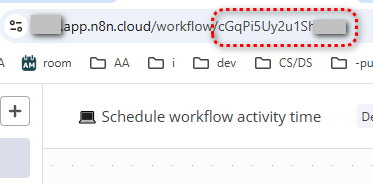\n"
},
"typeVersion": 1
},
{
"id": "d568b8e8-aaad-45ae-aa56-b6e6671f246d",
"name": "付箋1",
"type": "n8n-nodes-base.stickyNote",
"position": [
-500,
-500
],
"parameters": {
"color": 5,
"width": 300,
"height": 800,
"content": "## Set Activate/deactivate schedule \n\n[Custom (cron) interval](https://docs.n8n.io/integrations/builtin/core-nodes/n8n-nodes-base.scheduletrigger/#custom-cron-interval) is a recommended approach.\n\n"
},
"typeVersion": 1
},
{
"id": "d23ff5a9-a8c2-43c7-8241-fcc3ff53f290",
"name": "付箋2",
"type": "n8n-nodes-base.stickyNote",
"position": [
300,
-500
],
"parameters": {
"color": 5,
"width": 320,
"height": 800,
"content": "## Set n8n API credentials\n\n1. Create an API key:\nhttps://docs.n8n.io/api/authentication/\n\n2. Create n8n credentials using the API key\n\n\nThis workflow uses **[n8n node](https://docs.n8n.io/integrations/builtin/core-nodes/n8n-nodes-base.n8n/)**."
},
"typeVersion": 1
},
{
"id": "0dd08d9b-046a-4c11-9bf4-bfb6beffa852",
"name": "付箋3",
"type": "n8n-nodes-base.stickyNote",
"position": [
-500,
-620
],
"parameters": {
"width": 1120,
"height": 100,
"content": "## ⚠️ Warning!\nThis approach **won't work for trial users** as it requires n8n API that is not available to trial users.\nSee https://docs.n8n.io/api/ for details."
},
"typeVersion": 1
},
{
"id": "895034b7-5d7d-4e02-a125-6df6e4c44531",
"name": "付箋4",
"type": "n8n-nodes-base.stickyNote",
"position": [
-500,
-740
],
"parameters": {
"color": 4,
"width": 1120,
"height": 100,
"content": "## Scheduling workflow activity time\nYour workflow wants to work normal business hours?\nMaybe it is in its own right."
},
"typeVersion": 1
},
{
"id": "18e464f1-fc3b-4ce5-b5c7-c3769b3fc697",
"name": "付箋5",
"type": "n8n-nodes-base.stickyNote",
"position": [
640,
-500
],
"parameters": {
"color": 5,
"width": 320,
"height": 800,
"content": "## Activate this workflow!"
},
"typeVersion": 1
}
],
"active": false,
"pinData": {},
"settings": {
"executionOrder": "v1"
},
"versionId": "bb1c2014-2e38-41c0-ae1c-952fb98d0504",
"connections": {
"a9c7337f-d0ca-4e7e-873d-1d38813f2717": {
"main": [
[
{
"node": "1368366d-0bec-45b3-9de9-d1902ca9b30c",
"type": "main",
"index": 1
},
{
"node": "9c641940-fb33-4750-b3ef-ed3d216c339e",
"type": "main",
"index": 0
}
]
]
},
"68f765bc-23e2-48c9-8558-a30fc4d8bbb1": {
"main": [
[
{
"node": "a9c7337f-d0ca-4e7e-873d-1d38813f2717",
"type": "main",
"index": 0
},
{
"node": "1368366d-0bec-45b3-9de9-d1902ca9b30c",
"type": "main",
"index": 0
}
]
]
},
"2b51cc72-55c8-444a-931e-54adb0a7ada8": {
"main": [
[
{
"node": "a9c7337f-d0ca-4e7e-873d-1d38813f2717",
"type": "main",
"index": 0
},
{
"node": "9c641940-fb33-4750-b3ef-ed3d216c339e",
"type": "main",
"index": 1
}
]
]
},
"1368366d-0bec-45b3-9de9-d1902ca9b30c": {
"main": [
[
{
"node": "294244fd-8c35-4b70-af84-cc466a60541f",
"type": "main",
"index": 0
}
]
]
},
"9c641940-fb33-4750-b3ef-ed3d216c339e": {
"main": [
[
{
"node": "e669e5e3-288a-4d6b-af12-011340e60f64",
"type": "main",
"index": 0
}
]
]
}
}
}よくある質問
このワークフローの使い方は?
上記のJSON設定コードをコピーし、n8nインスタンスで新しいワークフローを作成して「JSONからインポート」を選択、設定を貼り付けて認証情報を必要に応じて変更してください。
このワークフローはどんな場面に適していますか?
中級 - DevOps, ビルディングブロック
有料ですか?
このワークフローは完全無料です。ただし、ワークフローで使用するサードパーティサービス(OpenAI APIなど)は別途料金が発生する場合があります。
関連ワークフロー
高度な n8n ワークフローと GitHub の同期
GitHub による スマートな変更検出を使った ワークフロー バックアップの自動化
If
N8n
Set
+
If
N8n
Set
38 ノードMaksym Brashenko
DevOps
GitHub への自動化 n8n ワークフロー バックアップおよび削除の追跡
n8n のワーキングフローを GitHub へ自動バックアップし、削除を追跡
If
N8n
Set
+
If
N8n
Set
31 ノードMarcial Ambriz
DevOps
ワークフローを GitHub リポジトリに保存する
毎日のワークフロー バックアップを GitHub にアップロードし、Slack 通知を送信
If
N8n
Set
+
If
N8n
Set
18 ノードAndrew
DevOps
n8n APIとメール送信を使用した週次ワークフローレポートの生成
n8n APIとメール送信を使って週次のワークフロー分析レポートを生成
N8n
Set
Code
+
N8n
Set
Code
19 ノードWessel Bulte
DevOps
GitHub 同期ダッシュボード - V2
コミット履歴とロールバック機能を備えた GitHub ワークフロー バージョン管理ダッシュボード
If
N8n
Set
+
If
N8n
Set
94 ノードEduard
DevOps
n8nワークフローをOneDriveにバックアップ
n8n workflowをOneDriveへ自動バックアップし、クリーンアップとメール通知機能付き
N8n
Code
Merge
+
N8n
Code
Merge
29 ノードWessel Bulte
DevOps
ワークフロー情報
難易度
中級
ノード数13
カテゴリー2
ノードタイプ5
作成者

Olek
@olekI am a **dataholic** (I trust, everything can be quantified and measured) and an **automation** enthusiast. Q of the day: Why spending 1 hour doing a routinal staff when you could spend 1 day automating it and having fun? PM me on [community.n8n.io](https://community.n8n.io/u/olek/summary) and let me know what do you think about this Q above.
外部リンク
n8n.ioで表示 →
このワークフローを共有