Tavily を通じて ChatGPT によるインターネット調査で新規 CRM 企業情報を自動のに充実
上級
これはLead Generation, AI RAG分野の自動化ワークフローで、16個のノードを含みます。主にWebhook, HttpRequest, Agent, ToolThink, TavilyToolなどのノードを使用。 Tavily を通じて ChatGPT によるインターネット調査で新規 CRM 企業情報を自動で豊富に
前提条件
- •HTTP Webhookエンドポイント(n8nが自動生成)
- •ターゲットAPIの認証情報が必要な場合あり
- •OpenAI API Key
カテゴリー
ワークフロープレビュー
ノード接続関係を可視化、ズームとパンをサポート
ワークフローをエクスポート
以下のJSON設定をn8nにインポートして、このワークフローを使用できます
{
"id": "Wm8l2EqUfFXbZefy",
"meta": {
"instanceId": "68ab8a7bd891eafb85f915471f38591da0135936f93fdf7e27d0ebea24fea950"
},
"name": "Auto-Enrich New CRM Companies with ChatGPT Web Research via Tavily",
"tags": [],
"nodes": [
{
"id": "8a9fac46-d7ca-4b5f-a809-ba9c4be4bb48",
"name": "OpenAI Chat Model",
"type": "@n8n/n8n-nodes-langchain.lmChatOpenAi",
"position": [
2320,
980
],
"parameters": {
"model": {
"__rl": true,
"mode": "list",
"value": "gpt-4.1",
"cachedResultName": "gpt-4.1"
},
"options": {}
},
"credentials": {
"openAiApi": {
"id": "bo9yE6c6LIEm8seD",
"name": "OpenAi account 3"
}
},
"typeVersion": 1.2
},
{
"id": "a9b15186-9dd1-4b2a-be23-277d6507c6b6",
"name": "付箋2",
"type": "n8n-nodes-base.stickyNote",
"position": [
1880,
0
],
"parameters": {
"color": 7,
"width": 340,
"height": 980,
"content": "## 5. set up webhook trigger\n* double-click node\n* HTTP Method: POST\n* Authentication none\n\n### For testing: \nCreate a company in CentralStationCRM and click on \"Listen for Test Event\" on the node shortly beforehand. The webhook should be triggered and the node should transfer the data.\n\n### For operation:\n* switch from \"Test URL\" to \"Production URL\"\n* copy new webhook URL (click on it)\n* enter new URL under \"Endpoint URL\" in the CentralStationCRM webhook"
},
"typeVersion": 1
},
{
"id": "04f6c697-7838-438e-95bd-db3f226d8238",
"name": "付箋3",
"type": "n8n-nodes-base.stickyNote",
"position": [
1420,
0
],
"parameters": {
"color": 7,
"width": 420,
"height": 980,
"content": "## 4. set up CentralStationCRM Webhook\n* log in to CentralStationCRM\n* click on the gear wheel in the top right corner\n\n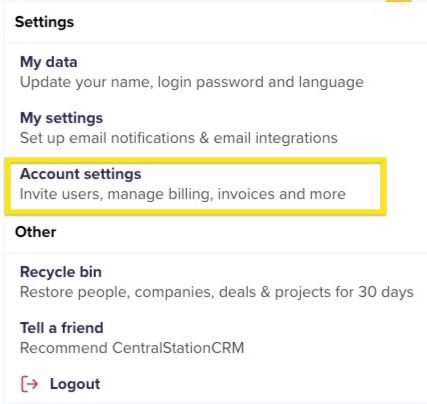\n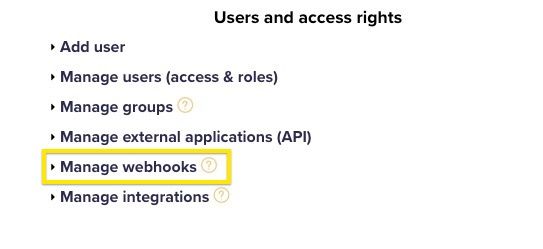\n* click \"Create webhook\"\n* enter password\n* \"Monitored object type\": company\n* \"Monitored event\": create\n* for \"Endpoint URL\" enter Webhook URL\n* for \"Nested objects\" enter:\ntags, addrs, companies\n* Enter name and description (e.g. n8n Test)\n* Set status to active and save"
},
"typeVersion": 1
},
{
"id": "2f0f0aa7-ae85-4ff1-aec2-6e78b5b4bdab",
"name": "付箋5",
"type": "n8n-nodes-base.stickyNote",
"position": [
960,
840
],
"parameters": {
"color": 7,
"width": 420,
"height": 140,
"content": "## 3. get webhook URL from n8n\n* Double-click the first node in the workflow\n* Click once on the url next to POST"
},
"typeVersion": 1
},
{
"id": "03bbfa92-95b1-4beb-a1b0-fc1a2958093b",
"name": "付箋",
"type": "n8n-nodes-base.stickyNote",
"position": [
2260,
0
],
"parameters": {
"color": 7,
"width": 500,
"height": 1160,
"content": "## 6. set up Research AI Agent\n### Set up Open AI Node\n* Register with Open AI\n* Surf to [https://platform.openai.com/api-keys](https://platform.openai.com/api-keys)\n* Click on \"Create New Secret Key\"\n* Enter name and project for the key, if applicable\n* Copy API key\n\n* Switch to n8n\n* Double-click \"OpenAI Chat Model\" node\n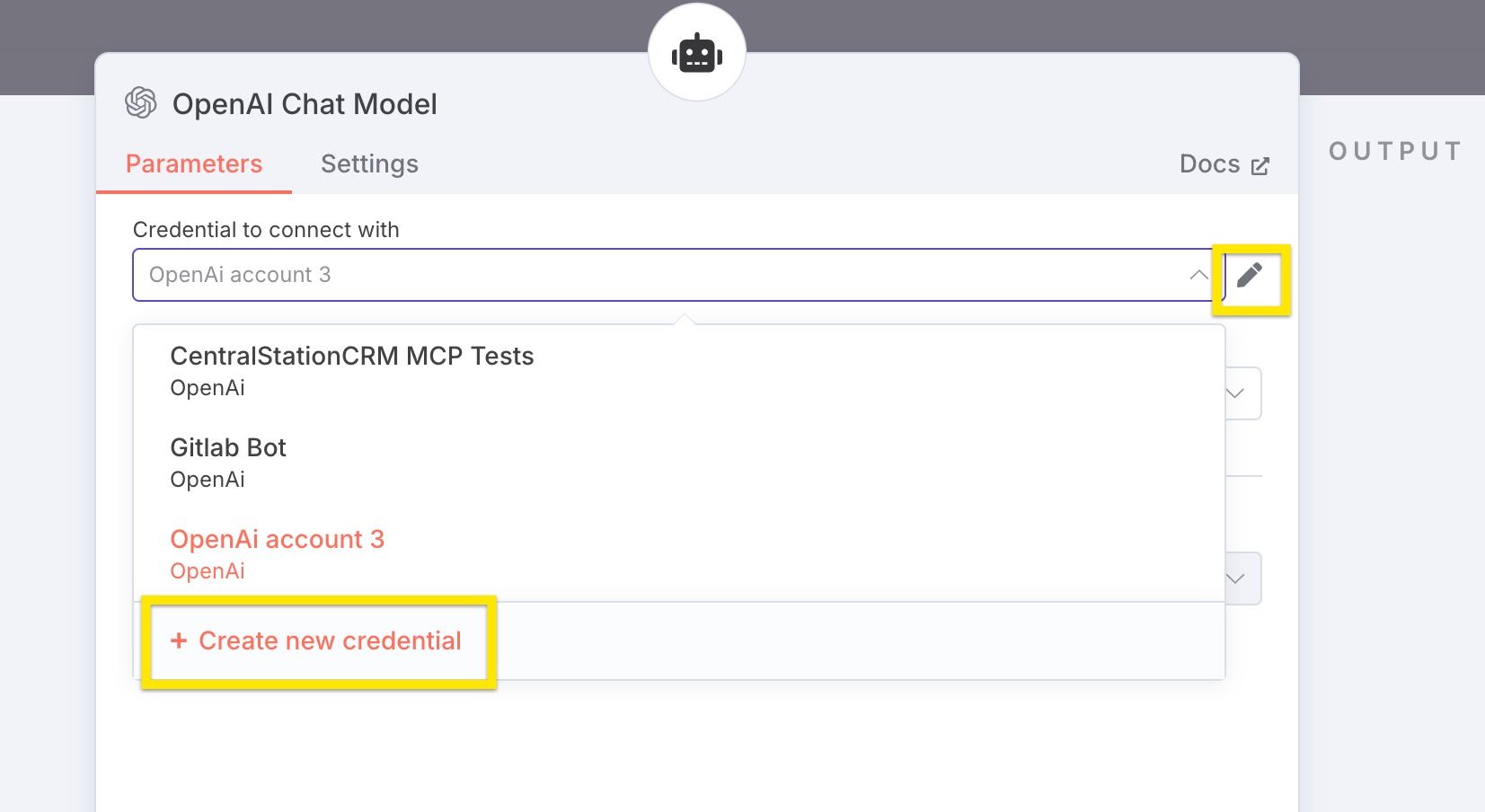\n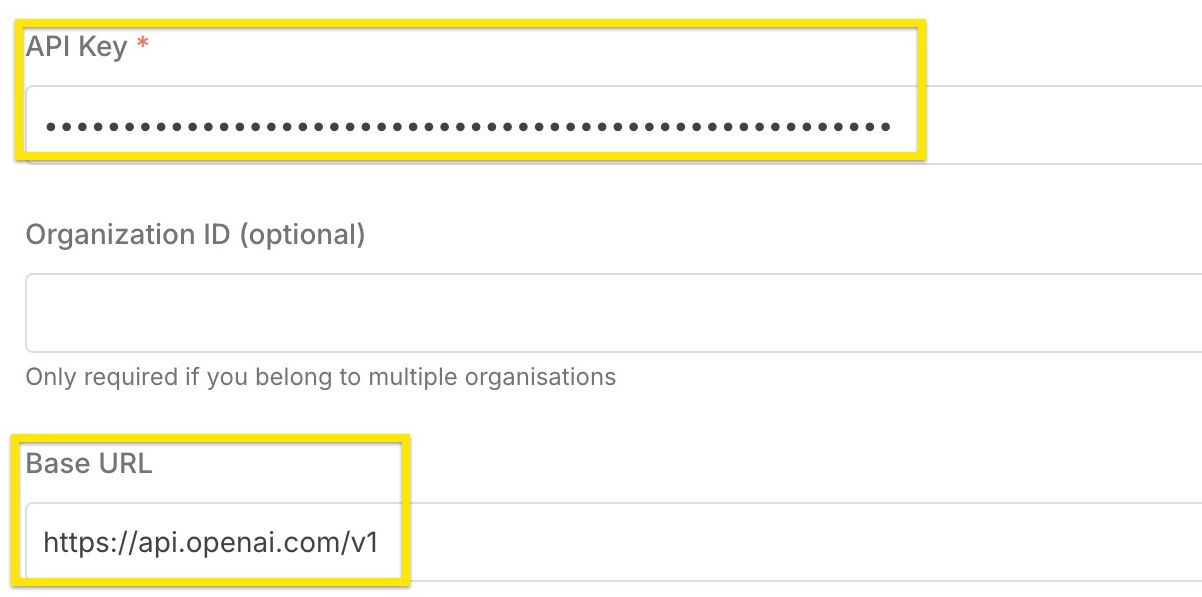\n"
},
"typeVersion": 1
},
{
"id": "f3b11fd7-2fcf-4fe0-b272-e6326b1c6b53",
"name": "付箋1",
"type": "n8n-nodes-base.stickyNote",
"position": [
2780,
0
],
"parameters": {
"color": 7,
"width": 380,
"height": 980,
"content": "## 7. set up CentralStationCRM protocol\n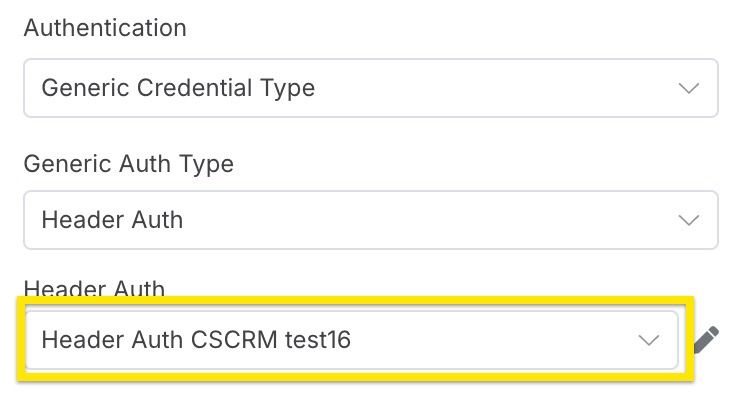\n* Select credentials created in step 1"
},
"typeVersion": 1
},
{
"id": "9ffff75c-ae83-4f5a-b656-3fea3da62e70",
"name": "付箋8",
"type": "n8n-nodes-base.stickyNote",
"position": [
960,
0
],
"parameters": {
"color": 7,
"width": 420,
"height": 820,
"content": "## 2. set up CentralStationCRM n8n credentials\n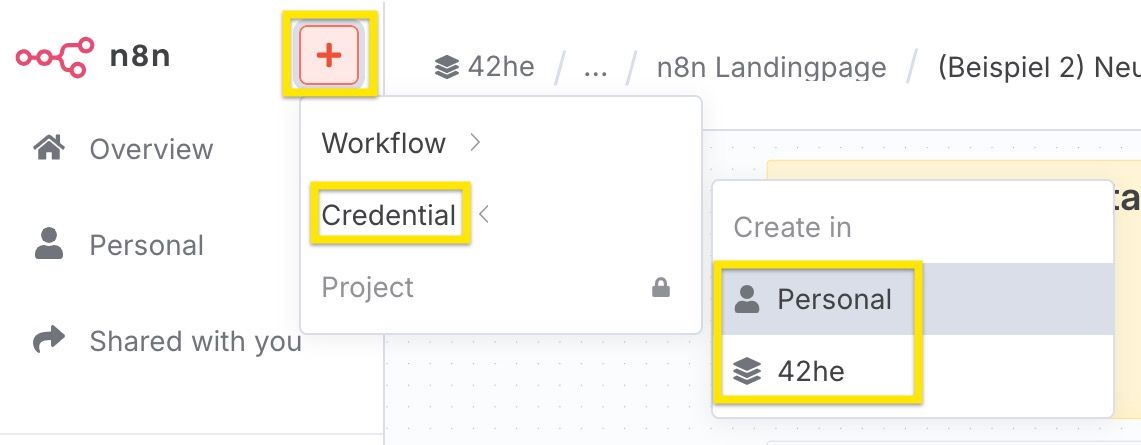\n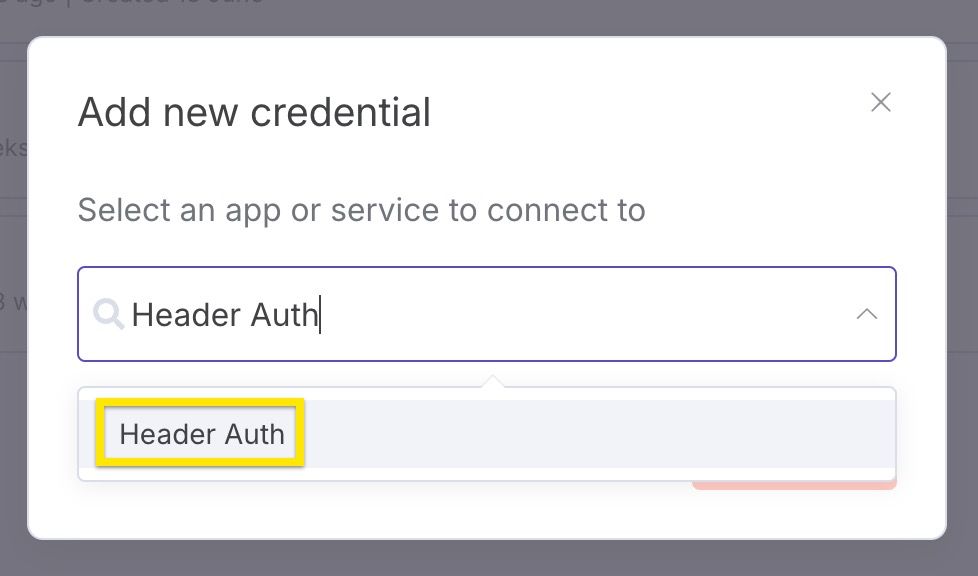\n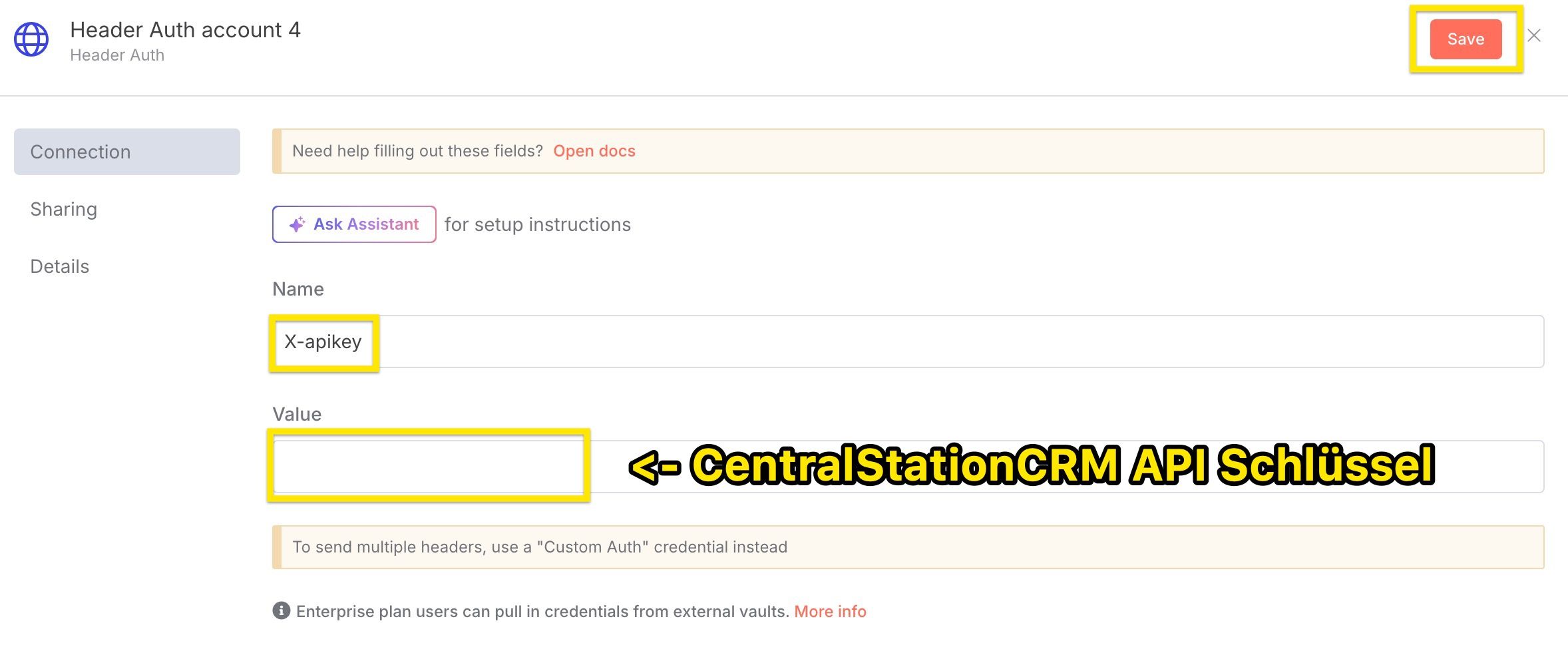\nImportant:\n* select Header Auth as credential type\n* assign X-apikey as name\n* enter the CentralStationCRM API key under \"Value"
},
"typeVersion": 1
},
{
"id": "9c9d77d8-159c-4e52-aad0-d2ccfcb84ac5",
"name": "付箋9",
"type": "n8n-nodes-base.stickyNote",
"position": [
0,
780
],
"parameters": {
"width": 460,
"height": 200,
"content": "## Tools in this workflow\n* [CentralStationCRM](https://centralstationcrm.de), the easy and intuitive CRM Software for small teams. [Here is our API Documentation](https://api.centralstationcrm.net/api-docs/index.html) if you want to customize the workflow.\n* [ChatGPT](https://openai.com), the well-known ai chatbot\n* [Tavily](https://www.tavily.com/), a web search service for large language models"
},
"typeVersion": 1
},
{
"id": "f387821a-8be9-46b9-9435-212c704a558c",
"name": "付箋4",
"type": "n8n-nodes-base.stickyNote",
"position": [
0,
0
],
"parameters": {
"width": 460,
"height": 740,
"content": "\n# Auto-Enrich New CRM Companies with ChatGPT Web Research via Tavily\n\nIn this workflow, you use **ChatGPT** in conjunction with the **web search tool Tavily**.\n\n* the webhook is triggered when a new company is created in the CRM\n* the company data is transferred to ChatGPT\n* the AI agent searches the web with Tavily and converts the information into Markdown format\n* A note with the resulting information is added to your CRM\n\n\n\n*To edit the nodes: Simply double-click!\n\n*At the very end: Set the workflow switch to “Active”."
},
"typeVersion": 1
},
{
"id": "4a3a7718-ff96-4ef5-90fe-6d03f0d81c25",
"name": "付箋6",
"type": "n8n-nodes-base.stickyNote",
"position": [
500,
0
],
"parameters": {
"color": 7,
"width": 420,
"height": 980,
"content": "## 1. set up CentralStationCRM API Key\n* log in to CentralStationCRM\n* click on the gear wheel in the top right corner\n\n\n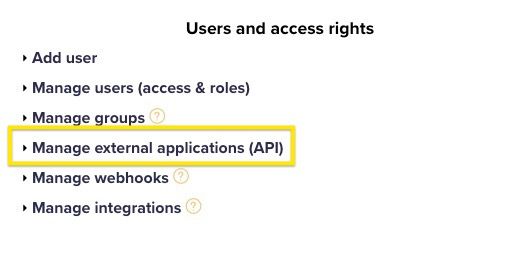\n* click \"Create API key\" on the right-hand side\n* enter \"Description\" (e.g. n8n Test)\n* save\n* save the API key! The key cannot be called up again in CRM and is required for step 2."
},
"typeVersion": 1
},
{
"id": "0cd3cfc1-74f4-400a-a5b7-0811d600ec4e",
"name": "リサーチAIエージェント",
"type": "@n8n/n8n-nodes-langchain.agent",
"position": [
2380,
800
],
"parameters": {
"text": "=We are a small consulting firm specialised on sales and marketing consulting. \n\nDo a deep research in German about the company \"{{ $json.body.record.name }}\". The research shall help sales people get a good overview about the company and allow to identify potential opportunities.\n\nUse the following structure:\n\n```markdown\n- **Name:** Firmenname\n- **Webseite:** http://foobar.com\n- **Zentrale:** San Francisco ([1](http://foobar))\n- **Gründungsjahr:** 2018 ([1](http://...), [2](http://...))\n- **Anzahl der Mitarbeiter:** 123 ([1](...))\n\nAllgemeine Beschreibung der Firma, inklusive Quellen. ([1](http://source))\n\n## Social media\n\n- **Linked In:** http://...\n- **Facebook:** http://...\n```\n\nThis structure is not complete, you can add more facts, social media sites or sections. You can use multiple searches, use more specific search queries if there are important facts missing. Add sources to every fact you mention.\n\nRespond only with the markdown itself, do not start with ```markdown.",
"options": {},
"promptType": "define"
},
"typeVersion": 2
},
{
"id": "e61f2c0b-defd-4e91-8e01-e9dc6c71e0ce",
"name": "AI用の思考空間プロンプト",
"type": "@n8n/n8n-nodes-langchain.toolThink",
"position": [
2660,
980
],
"parameters": {},
"typeVersion": 1
},
{
"id": "c4d18a52-57d1-4c9e-b8f8-f29440d12d38",
"name": "Tavily Websearch: URL抽出",
"type": "@tavily/n8n-nodes-tavily.tavilyTool",
"position": [
2560,
1120
],
"parameters": {
"urls": [
"={{ /*n8n-auto-generated-fromAI-override*/ $fromAI('urls0_URLs', ``, 'string') }}"
],
"options": {},
"resource": "extract"
},
"credentials": {
"tavilyApi": {
"id": "ORAd9u0WAvNAofCP",
"name": "Tavily account"
}
},
"typeVersion": 1
},
{
"id": "f8af5e5a-d411-4888-904a-d8f3df1be67e",
"name": "Tavily Websearch: ウェブ検索",
"type": "@tavily/n8n-nodes-tavily.tavilyTool",
"position": [
2400,
1120
],
"parameters": {
"query": "={{ /*n8n-auto-generated-fromAI-override*/ $fromAI('Query', ``, 'string') }}",
"options": {
"max_results": 15,
"search_depth": "advanced"
}
},
"credentials": {
"tavilyApi": {
"id": "ORAd9u0WAvNAofCP",
"name": "Tavily account"
}
},
"typeVersion": 1
},
{
"id": "589de93d-74f3-4bde-a5da-8f92b572c59b",
"name": "CentralStationCRM: 企業にメモを追加",
"type": "n8n-nodes-base.httpRequest",
"position": [
2920,
800
],
"parameters": {
"url": "https://api.centralstationcrm.net/api/protocols.json",
"method": "POST",
"options": {},
"jsonBody": "={\n \"protocol\": {\n \"company_ids\": [{{ $('Company created in CentralStationCRM').item.json.body.record.id }}],\n \"type\": \"ProtocolObjectNote\",\n \"badge\": \"note\",\n \"content\": {{ $json.output.toJsonString() }},\n \"format\": \"markdown\"\n }\n} \n",
"sendBody": true,
"sendHeaders": true,
"specifyBody": "json",
"authentication": "genericCredentialType",
"genericAuthType": "httpHeaderAuth",
"headerParameters": {
"parameters": [
{
"name": "accept",
"value": "application/json"
},
{
"name": "Content-Type",
"value": "application/json"
}
]
}
},
"credentials": {
"httpHeaderAuth": {
"id": "pqUNcvQBnqpxmMAD",
"name": "Header Auth CSCRM test16"
}
},
"typeVersion": 4.2
},
{
"id": "922a8cd5-ef4a-45a2-97fb-932c98ee7d8d",
"name": "CentralStationCRM: 企業が作成されました",
"type": "n8n-nodes-base.webhook",
"position": [
2000,
800
],
"webhookId": "c8682af5-17b7-48f5-9be3-49ef787b40e5",
"parameters": {
"path": "c8682af5-17b7-48f5-9be3-49ef787b40e5",
"options": {},
"httpMethod": "POST"
},
"typeVersion": 2
}
],
"active": false,
"pinData": {},
"settings": {
"executionOrder": "v1"
},
"versionId": "16f5b624-473c-424a-be92-f62e08907ce2",
"connections": {
"8a9fac46-d7ca-4b5f-a809-ba9c4be4bb48": {
"ai_languageModel": [
[
{
"node": "0cd3cfc1-74f4-400a-a5b7-0811d600ec4e",
"type": "ai_languageModel",
"index": 0
}
]
]
},
"0cd3cfc1-74f4-400a-a5b7-0811d600ec4e": {
"main": [
[
{
"node": "589de93d-74f3-4bde-a5da-8f92b572c59b",
"type": "main",
"index": 0
}
]
]
},
"c4d18a52-57d1-4c9e-b8f8-f29440d12d38": {
"ai_tool": [
[
{
"node": "0cd3cfc1-74f4-400a-a5b7-0811d600ec4e",
"type": "ai_tool",
"index": 0
}
]
]
},
"e61f2c0b-defd-4e91-8e01-e9dc6c71e0ce": {
"ai_tool": [
[
{
"node": "0cd3cfc1-74f4-400a-a5b7-0811d600ec4e",
"type": "ai_tool",
"index": 0
}
]
]
},
"f8af5e5a-d411-4888-904a-d8f3df1be67e": {
"ai_tool": [
[
{
"node": "0cd3cfc1-74f4-400a-a5b7-0811d600ec4e",
"type": "ai_tool",
"index": 0
}
]
]
},
"922a8cd5-ef4a-45a2-97fb-932c98ee7d8d": {
"main": [
[
{
"node": "0cd3cfc1-74f4-400a-a5b7-0811d600ec4e",
"type": "main",
"index": 0
}
]
]
}
}
}よくある質問
このワークフローの使い方は?
上記のJSON設定コードをコピーし、n8nインスタンスで新しいワークフローを作成して「JSONからインポート」を選択、設定を貼り付けて認証情報を必要に応じて変更してください。
このワークフローはどんな場面に適していますか?
上級 - リード獲得, AI RAG検索拡張
有料ですか?
このワークフローは完全無料です。ただし、ワークフローで使用するサードパーティサービス(OpenAI APIなど)は別途料金が発生する場合があります。
関連ワークフロー
Instagram リード生成
Apify、GPT、そして PostgreSQL を使って Instagram インフルエンサーのリード獲得を自動化
Set
Code
Postgres
+
Set
Code
Postgres
18 ノードFayzul Noor
リード獲得
dian-memo_03のエクスポート
AI音声とテキストノート - LINEメッセージ、Supabaseベクトルデータベース、Gmailの統合
If
Set
Code
+
If
Set
Code
30 ノードkote2
AI RAG検索拡張
AI による Google Sheets ウェブリサーチ(GPT と Bright Data)
AI ベースの Google スプレッドシート Web ページ調査 (GPT および Bright Data)
Set
Webhook
Data Table
+
Set
Webhook
Data Table
22 ノードElay Guez
市場調査
Bright Data、OpenAI、Redisを基盤とした高度なマルチソースAIリサーチ
高度なマルチソースAIリサーチの実装(Bright Data、OpenAI、Redis使用)
If
Set
Code
+
If
Set
Code
43 ノードDaniel Shashko
市場調査
リオーダー #1
Apify、GPT-4o、WhatsAppを使った営業のな冷水電話パイプラインの自動化
Set
Code
Webhook
+
Set
Code
Webhook
48 ノードKhairul Muhtadin
リードナーチャリング
私のワークフロー
Google DriveとGPT-4oを使ってベクター検索を通じて知識ベースチャットボットを作成
Set
Code
Webhook
+
Set
Code
Webhook
26 ノードGofive
サポートチャットボット
ワークフロー情報
難易度
上級
ノード数16
カテゴリー2
ノードタイプ7
作成者

CentralStationCRM
@centralstationcrmCentralStationCRM ist das einfache und intuitive CRM für kleine Teams. Auf n8n teilen wir unsere Workflow-Ideen: für schnellere Abläufe und einen besseren Arbeitsalltag. CentralStationCRM is the simple and intuitive CRM for small businesses. On n8, we share CRM-workflow ideas to speed up your working life!
外部リンク
n8n.ioで表示 →
このワークフローを共有