あなたのプロンプトを、Knowledge Graph Ontologyの専門家で強化する
中級
これはInternal Wiki, AI RAG分野の自動化ワークフローで、7個のノードを含みます。主にHttpRequest, ChatTriggerなどのノードを使用。 InfraNodusの知識グラフ推論とGraphRAGによるAIチャットボットの応答を強化
前提条件
- •ターゲットAPIの認証情報が必要な場合あり
使用ノード (7)
カテゴリー
ワークフロープレビュー
ノード接続関係を可視化、ズームとパンをサポート
ワークフローをエクスポート
以下のJSON設定をn8nにインポートして、このワークフローを使用できます
{
"id": "MqHZXsobgwvx8B1f",
"meta": {
"instanceId": "334f4f928505fa56392672dcbddf0c1a39709717127e8d60d133a12f8f82b3b4",
"templateCredsSetupCompleted": true
},
"name": "Augment Your Prompt with a Knowledge Graph Ontology Expert",
"tags": [
{
"id": "2Q64isOPYcTslspA",
"name": "AI",
"createdAt": "2025-08-02T13:39:06.091Z",
"updatedAt": "2025-08-02T13:39:06.091Z"
},
{
"id": "pZUWchtD7Jo42VrS",
"name": "AI Chatbot",
"createdAt": "2025-08-02T13:39:11.275Z",
"updatedAt": "2025-08-02T13:39:11.275Z"
},
{
"id": "MNbFLjKxPdVAYXIC",
"name": "AI Rag",
"createdAt": "2025-08-02T13:39:08.349Z",
"updatedAt": "2025-08-02T13:39:08.349Z"
}
],
"nodes": [
{
"id": "2568cca8-643d-48cd-969a-eccf267dd000",
"name": "チャットメッセージ受信時",
"type": "@n8n/n8n-nodes-langchain.chatTrigger",
"position": [
-512,
0
],
"webhookId": "26592391-6f28-4740-8caa-79ce80b582d0",
"parameters": {
"public": true,
"options": {}
},
"typeVersion": 1.1
},
{
"id": "92d3bec1-b54d-43c8-8ac2-1e11d92135cb",
"name": "推論オントロジーで強化されたプロンプト",
"type": "n8n-nodes-base.httpRequest",
"position": [
-16,
0
],
"parameters": {
"url": "https://infranodus.com/api/v1/graphAndAdvice?doNotSave=true&addStats=true&optimize=develop&includeStatements=true&includeGraphSummary=true&includeGraph=false",
"method": "POST",
"options": {},
"sendBody": true,
"authentication": "genericCredentialType",
"bodyParameters": {
"parameters": [
{
"name": "name",
"value": "eightos_system"
},
{
"name": "requestMode",
"value": "reprompt"
},
{
"name": "aiTopics",
"value": "true"
},
{
"name": "prompt",
"value": "={{ $json.chatInput }}"
},
{
"name": "systemPrompt",
"value": "Your task is to reformulate the original query of a user using the context provided"
}
]
},
"genericAuthType": "httpBearerAuth"
},
"credentials": {
"httpBearerAuth": {
"id": "C3Li2OwYebUs6Dmg",
"name": "InfraNodus Expert"
}
},
"typeVersion": 4.2
},
{
"id": "cb908d48-e575-4844-a026-aa95d0655935",
"name": "ナレッジベースに質問",
"type": "n8n-nodes-base.httpRequest",
"position": [
608,
0
],
"parameters": {
"url": "https://infranodus.com/api/v1/graphAndAdvice?doNotSave=true&addStats=true&optimize=develop&includeStatements=true&includeGraphSummary=true&includeGraph=false",
"method": "POST",
"options": {},
"sendBody": true,
"authentication": "genericCredentialType",
"bodyParameters": {
"parameters": [
{
"name": "name",
"value": "eightos_system"
},
{
"name": "requestMode",
"value": "response"
},
{
"name": "aiTopics",
"value": "true"
},
{
"name": "prompt",
"value": "={{ $json.aiAdvice[0].text }}"
},
{
"name": "systemPrompt",
"value": "Use the context you are provided as a logic to use when providing a response to the user query, not as the content you should be providing. IT IS IMPERATIVE THAT YOU DO NOT EXTRACT THE CONTENT FROM THE CONTEXT PROVIDED FOR YOUR ANSWER BUT USE IT AS A REASONING LOGIC TO PROVIDE YOUR ANSWER."
}
]
},
"genericAuthType": "httpBearerAuth"
},
"credentials": {
"httpBearerAuth": {
"id": "C3Li2OwYebUs6Dmg",
"name": "InfraNodus Expert"
}
},
"typeVersion": 4.2
},
{
"id": "401b9dc0-c51e-4fe9-87cd-be393c5bd66e",
"name": "付箋",
"type": "n8n-nodes-base.stickyNote",
"position": [
-2592,
-976
],
"parameters": {
"color": 6,
"width": 540,
"height": 760,
"content": "## AI Chatbot Agent with Experts\n\n### Uses the InfraNodus knowledge graphs and its Graph RAG to retrieve relevant information.\n\nUse your [InfraNodus graph](https://infranodus.com) as the knowledge base for your AI chatbot. \n\nUpload any data to InfraNodus, generate separate knowledge graphs, then connect them as tools to the agent, so it can decide which \"expert\" to use. InfraNodus' Graph RAG will provide high-quality responses that will augment the chatbot's answers.\n\nVideo demo: [https://www.youtube.com/watch?v=kS0QTUvcH6E](https://www.youtube.com/watch?v=kS0QTUvcH6E)\n\nDetailed description: [Nodus Labs support portal](https://support.noduslabs.com/hc/en-us/articles/20174217658396-Using-InfraNodus-Knowledge-Graphs-as-Experts-for-AI-Chatbot-Agents-in-n8n)\n\nInfraNodus API key can be obtained at [InfraNodus.Com](https://infranodus.com/use-case/ai-knowledge-graphs)\n\n\n[](https://www.youtube.com/watch?v=kS0QTUvcH6E)"
},
"typeVersion": 1
},
{
"id": "8f70c71d-84bc-43cd-a13c-550ca6da336a",
"name": "付箋1",
"type": "n8n-nodes-base.stickyNote",
"position": [
-224,
-32
],
"parameters": {
"width": 520,
"height": 1220,
"content": "\n\n\n\n\n\n\n\n\n\n\n\n\n\n\n\n\n## 2. Reasoning Expert Reformulates the User's Query\n\n### Create an InfraNodus graph with a reasoning ontology. This node will then provide the reasoning logic to your LLM to reformulate the original query. Learn more about this approach in our [article on reasoning agents](https://support.noduslabs.com/hc/en-us/articles/21429518472988-Using-Knowledge-Graphs-as-Reasoning-Experts) \n\nTO CREATE THE REASONING CHAIN GRAPH:\n\n• use the [InfraNodus AI Ontologies Generator](https://infranodus.com/import/ai-ontologies) — learn more how it works on our [support portal](https://support.noduslabs.com/hc/en-us/articles/18301655686172-Generate-Knowledge-Graphs-and-Ontologies-in-Plain-Text)\n\n• choose a reasoning graph from our [multiple freely available graphs online](https://infranodus.com/knowledge-graphs)\n\n• download the existing graph on [EightOS cognitive variability framework](https://infranodus.com/expert/eightos_system?background=dark&show_analytics=1&most_influential=bc2&maxnodes=150&threshold=8&labelsize=proportional&edgestype=curve&drawedges=true&drawnodes=true&labelsizeratio=2&dynamic=highlight&cutgraph=1&selected=highlight) or use one \n\n### Once ready, add your InfraNodus graph here via the HTTP node using its name in the `body.name` field.\n\n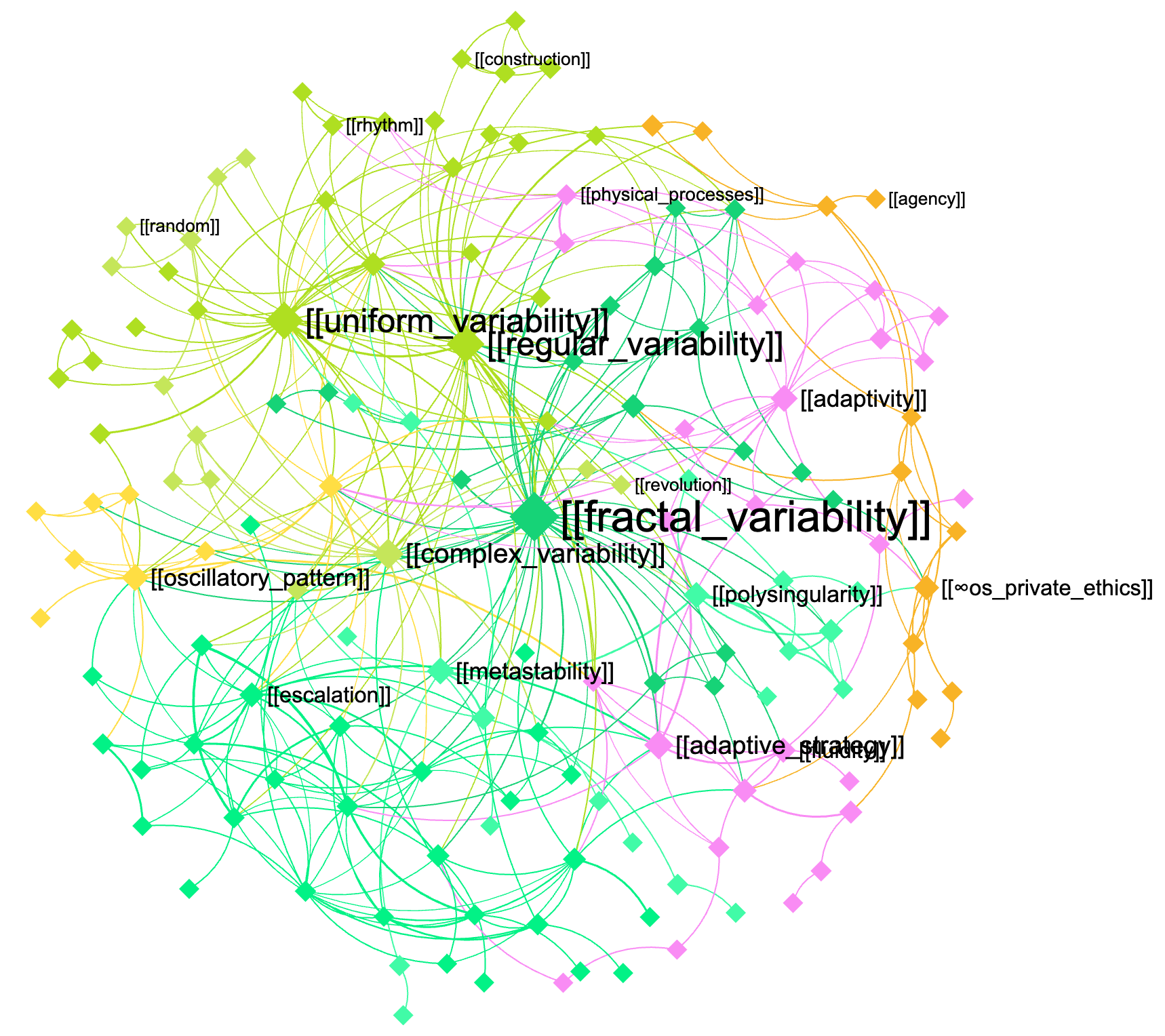"
},
"typeVersion": 1
},
{
"id": "c6d16d77-1aed-4fa8-a7aa-fb7fc6974469",
"name": "付箋9",
"type": "n8n-nodes-base.stickyNote",
"position": [
400,
-32
],
"parameters": {
"width": 520,
"height": 1216,
"content": "\n\n\n\n\n\n\n\n\n\n\n\n\n\n\n\n\n## 3. The augmented query is sent to the knowledge base and the response is retrieved using GraphRAG\n\nNow that the query is augmented with domain-specific knowledge, you can send it back to this same graph or to another graph (for cross-disciplinary requests — e.g. to use the machine learning expertise in biology, etc)\n\n[InfraNodus](https://infranodus.com) will use [GraphRAG](https://infranodus.com/docs/graph-rag-knowledge-graph) to traverse the graph for answers and extract a response for your user query.\n\nProvide the name of the graph you'll be using as a knowledge base in the `name` field of the node.\n\nYou can also replace this node with any external AI model (e.g. Open AI chat message node).\n"
},
"typeVersion": 1
},
{
"id": "3d1fe3e7-dbd5-4b13-a62c-97ee5fa42046",
"name": "付箋2",
"type": "n8n-nodes-base.stickyNote",
"position": [
-576,
-48
],
"parameters": {
"height": 768,
"content": "\n\n\n\n\n\n\n\n\n\n\n\n\n\n\n\n\n## 1. Trigger the chat and send a message\n\nYou can also make this node publicly available via a URL and embed it on a website or make it available via a Telegram node that is activated upon receiving a message (check [this workflow](https://n8n.io/workflows/4485-telegram-ai-chatbot-agent-with-infranodus-graphrag-knowledge-base/) to learn how to set it up). "
},
"typeVersion": 1
}
],
"active": false,
"pinData": {},
"settings": {
"executionOrder": "v1"
},
"versionId": "2bb0a437-1815-4bff-bdd4-600faa19b456",
"connections": {
"2568cca8-643d-48cd-969a-eccf267dd000": {
"main": [
[
{
"node": "92d3bec1-b54d-43c8-8ac2-1e11d92135cb",
"type": "main",
"index": 0
}
]
]
},
"92d3bec1-b54d-43c8-8ac2-1e11d92135cb": {
"main": [
[
{
"node": "cb908d48-e575-4844-a026-aa95d0655935",
"type": "main",
"index": 0
}
]
]
}
}
}よくある質問
このワークフローの使い方は?
上記のJSON設定コードをコピーし、n8nインスタンスで新しいワークフローを作成して「JSONからインポート」を選択、設定を貼り付けて認証情報を必要に応じて変更してください。
このワークフローはどんな場面に適していますか?
中級 - 内部Wiki, AI RAG検索拡張
有料ですか?
このワークフローは完全無料です。ただし、ワークフローで使用するサードパーティサービス(OpenAI APIなど)は別途料金が発生する場合があります。
関連ワークフロー
Gemini RAGパイプラインを使ったドキュメント専門家チャットボット
Gemini RAGパイプラインを使用したドキュメント専家チャットボット
Set
Html
Filter
+
Set
Html
Filter
48 ノードLucas Peyrin
内部Wiki
🤖 Gemini RAGパイプラインを使用してドキュメントエキスパートチャットボットを構築
n8nドキュメント専門のチャットボットをOpenAI RAGパイプラインで構築
Set
Html
Filter
+
Set
Html
Filter
46 ノードAyham
内部Wiki
Graph RAG知識オントロジーを備えた推論エキスパート
GraphRAGと知識オntologyを使ってAIエージェントのカスタム推論パターンを作成
Agent
Http Request Tool
Chat Trigger
+
Agent
Http Request Tool
Chat Trigger
8 ノードInfraNodus
エンジニアリング
GitHub向けのAIエージェント
OpenAIを使用してGitHubレポジトリを学習するコーディングアシスタントを作成
Set
Github
Http Request
+
Set
Github
Http Request
19 ノードNghia Nguyen
内部Wiki
ドキュメントRAGとチャットアジェント:Google DriveからQdrantへ、Mistral OCR
ドキュメントRAGチャットエージェント:Google Drive→QdrantとMistral OCR
If
Set
Code
+
If
Set
Code
40 ノードDIGITAL BIZ TECH
内部Wiki
🤖 RAG、Gemini、Supabase を使用してドキュメントエキスパットロボットを作成
🤖 RAG、Gemini、Supabaseを使用してドキュメント専門ボットを作成
Set
Html
Filter
+
Set
Html
Filter
54 ノードLucas Peyrin
内部Wiki
ワークフロー情報
難易度
中級
ノード数7
カテゴリー2
ノードタイプ3
作成者

InfraNodus
@infranodusI'm Dmitry, the founder of InfraNodus — an AI text network analysis tool. I'm passionate about networks and data visualization and its ability to reveal what everyone else is missing and to highlight different perspectives. I'm sharing the n8n templates that make use of this unique capability of InfraNodus for multiple scenarios.
外部リンク
n8n.ioで表示 →
このワークフローを共有