期限切れの AWS ACM 証明書をクリーンし、Slack で承認が必要
中級
これはDevOps, Multimodal AI分野の自動化ワークフローで、14個のノードを含みます。主にSlack, Filter, ScheduleTrigger, AwsCertificateManagerなどのノードを使用。 Slack経由で期限切れのAWS ACM証明書を承認
前提条件
- •Slack Bot Token または Webhook URL
- •AWS Access Key と Secret
ワークフロープレビュー
ノード接続関係を可視化、ズームとパンをサポート
ワークフローをエクスポート
以下のJSON設定をn8nにインポートして、このワークフローを使用できます
{
"id": "ISewUDgaQCM3Lw59",
"meta": {
"instanceId": "4a2e6764ba7a6bc9890d9225f4b21d570ce88fc9bd57549c89057fcee58fed0f",
"templateCredsSetupCompleted": true
},
"name": "Clean Expired AWS ACM Certs with Slack Approval",
"tags": [
{
"id": "ZWDTpzMgM2j0ZGMO",
"name": "acm",
"createdAt": "2025-08-20T04:24:13.252Z",
"updatedAt": "2025-08-20T04:24:13.252Z"
},
{
"id": "hvp6nueQ4hpIJWbY",
"name": "aws",
"createdAt": "2025-08-17T05:47:27.209Z",
"updatedAt": "2025-08-17T05:47:27.209Z"
}
],
"nodes": [
{
"id": "0fa56096-8872-400b-afa1-5c52090bd33c",
"name": "多数の証明書を取得",
"type": "n8n-nodes-base.awsCertificateManager",
"position": [
224,
0
],
"parameters": {
"options": {},
"operation": "getMany"
},
"credentials": {
"aws": {
"id": "IZYsJuHhfVJ3PIrC",
"name": "ap-southeast-1"
}
},
"typeVersion": 1
},
{
"id": "849ac135-f381-4a26-a9c5-79e62d20f74d",
"name": "メッセージ送信と応答待機",
"type": "n8n-nodes-base.slack",
"disabled": true,
"position": [
720,
0
],
"webhookId": "a2040fd8-4de2-4eb9-ad51-fa9a5b974afc",
"parameters": {
"user": {
"__rl": true,
"mode": "list",
"value": "U054RMBTVBM",
"cachedResultName": "trung.tran"
},
"message": "=:warning: *Expired SSL Certificate Detected*\nAn SSL certificate in AWS ACM has expired. Please review the details below and approve deletion to keep the environment clean.\n*📄 Certificate Summary:*\n• *Domain Name:* `{{ $json.DomainName }}`\n• *Certificate ARN:* `{{ $json.CertificateArn }}`\n• *Issueed Date:* `{{ $json.IssuedAt.toDateTime('s').toString() }}`\n• *Expiration Date:* `{{ $json.NotAfter.toDateTime('s').toString() }}`\n\n👉 *Next Step:* \nReact to this message with:\n:white_check_mark: to approve deletion \n:x: to keep the certificate\n\n_(This message will be auto-checked in 1 hour for reactions.)_",
"options": {
"limitWaitTime": {
"values": {
"resumeUnit": "minutes",
"resumeAmount": 60
}
}
},
"operation": "sendAndWait",
"authentication": "oAuth2",
"approvalOptions": {
"values": {
"approvalType": "double"
}
}
},
"credentials": {
"slackOAuth2Api": {
"id": "4JSKt9sIRV1KGswQ",
"name": "Slack account"
}
},
"typeVersion": 2.3
},
{
"id": "203fe369-3299-46e3-a076-99d0b8dd1c00",
"name": "付箋",
"type": "n8n-nodes-base.stickyNote",
"position": [
-1264,
-672
],
"parameters": {
"width": 1056,
"height": 1744,
"content": "# Clean Up Expired AWS ACM Certificates with Human Approval\n> Automate the cleanup of expired AWS ACM certificates with Slack-based approval. This workflow helps maintain a secure and tidy AWS environment by detecting expired SSL certs, sending detailed Slack notifications to admins, and deleting them upon approval, ensuring full visibility and control over certificate lifecycle management.\n## 🧑💼 Who’s it for\n\nThis workflow is designed for:\n- **AWS administrators** who want to keep their environment clean and secure \n- **DevOps teams** managing SSL lifecycle in AWS ACM \n- **IT Admins** needing visibility and control over expired cert removal \n- Teams that use **Slack for collaboration and approvals**\n\n## ⚙️ How it works / What it does\n\nThis automated workflow performs the following tasks on a **daily schedule**:\n1. **Fetch all ACM certificates** in your AWS account.\n2. **Filter out the expired ones** by comparing expiration date and status.\n3. **Send a Slack approval message** with certificate details to the admin team.\n4. **Wait for approval response** directly in Slack (`✅` to approve deletion).\n5. If approved, it **deletes the expired certificate** using AWS ACM.\n6. Finally, it **notifies the IT admin** about the action taken.\n\n## 🔧 How to set up\n\n1. **Create the Workflow**\n - Add the nodes as shown:\n - `Schedule Trigger`\n - `AWS - ACM: listCertificates`\n - `AWS - ACM: describeCertificate` (loop per cert)\n - `IF Node` to filter expired certs\n - `Slack - Send & Wait for Reaction`\n - `AWS - ACM: deleteCertificate`\n - `Slack - Post Message` to notify\n\n2. **Configure Slack**\n - Create a **Slack Bot Token** with:\n - `chat:write`\n - `reactions:read`\n - `channels:read`\n - Connect it in your Slack nodes.\n\n3. **Configure AWS Credentials**\n - Use IAM User or Role with:\n - `acm:ListCertificates`\n - `acm:DescribeCertificate`\n - `acm:DeleteCertificate`\n\n4. **Set schedule**\n - Daily, Weekly, or custom cron expression.\n\n## 📋 Requirements\n\n| Component | Description |\n|------------------|--------------------------------------|\n| AWS ACM Access | IAM permissions for ACM actions |\n| Slack Bot Token | With `chat:write` & `reactions:read` |\n| n8n Environment | Self-hosted or n8n Cloud |\n| Slack Channel | Where approval messages will be sent |\n\n## 🛠️ How to customize the workflow\n\n### 🕒 Change waiting time\nAdjust the wait time before checking Slack reactions in the `sendAndWait` node (default 1 hour).\n\n### 👥 Change Slack target\nChange the Slack channel or tag specific people (`<@U123456>`).\n\n### 📓 Add logging\nAdd Google Sheets, Notion, or DynamoDB to log certificate details and approval decisions.\n\n### 🧪 Add dry-run/test mode\nUse an IF node before deletion to simulate removal when `ENV === dry-run`.\n"
},
"typeVersion": 1
},
{
"id": "4539a804-c2ca-4591-9b7c-5c018cffdf97",
"name": "付箋1",
"type": "n8n-nodes-base.stickyNote",
"position": [
-176,
192
],
"parameters": {
"width": 272,
"height": 128,
"content": "### 1. Schedule Trigger\nThe workflow starts on a scheduled basis (e.g., daily at 09:00) to automatically check ACM certificates without manual intervention."
},
"typeVersion": 1
},
{
"id": "0333abeb-5624-4b50-a25e-15ea74211a5a",
"name": "付箋2",
"type": "n8n-nodes-base.stickyNote",
"position": [
144,
192
],
"parameters": {
"width": 208,
"content": "### 2. Get Certificates\nFetches all ACM certificates in the configured AWS region(s), including details such as domain names, status, and expiration dates."
},
"typeVersion": 1
},
{
"id": "b09e50cd-01bd-4901-ad4c-136d30352564",
"name": "付箋3",
"type": "n8n-nodes-base.stickyNote",
"position": [
400,
192
],
"parameters": {
"width": 192,
"content": "### 3. Filter Expired Certificates Only\nChecks each certificate and keeps only those that expired already.\n\n"
},
"typeVersion": 1
},
{
"id": "0084a198-5701-4af9-b009-293951900c2a",
"name": "付箋4",
"type": "n8n-nodes-base.stickyNote",
"position": [
624,
192
],
"parameters": {
"height": 176,
"content": "### 4. Notify via Slack and Wait for Approval\nSends a Slack message with certificate details (domain, ARN, expiration date, status). \nThe workflow pauses here until a user clicks **Approve** or **Reject**."
},
"typeVersion": 1
},
{
"id": "0c6903b4-8ddc-4c94-bb11-9e2ef518e5a9",
"name": "付箋5",
"type": "n8n-nodes-base.stickyNote",
"position": [
896,
192
],
"parameters": {
"width": 304,
"content": "### 5. Delete Expired Certificate\nIf **Approve** is selected in Slack, the workflow triggers AWS ACM to delete the certificate automatically. \nIf **Reject** is clicked, no action is taken, and the workflow ends."
},
"typeVersion": 1
},
{
"id": "079cb3e6-73cc-41ad-95a5-c0af457b25bf",
"name": "IT管理者に通知",
"type": "n8n-nodes-base.slack",
"position": [
1296,
0
],
"webhookId": "7ea60ebd-bef7-4a22-ba58-4009b32b63b4",
"parameters": {
"text": "=:white_check_mark: *ACM Certificate Deleted Successfully*\n\n*Domain:* {{ $('Get expired certification only').item.json.DomainName }}\n*ARN:* {{ $('Get expired certification only').item.json.CertificateArn }}\n*Deleted At:* {{ $now }}\n\nApproved by: {{ $('Send message and wait for response').item.json.user?.name || $('Send message and wait for response').item.json.username || 'N/A' }}",
"user": {
"__rl": true,
"mode": "list",
"value": "U054RMBTVBM",
"cachedResultName": "trung.tran"
},
"select": "user",
"otherOptions": {},
"authentication": "oAuth2"
},
"credentials": {
"slackOAuth2Api": {
"id": "4JSKt9sIRV1KGswQ",
"name": "Slack account"
}
},
"typeVersion": 2.3
},
{
"id": "347da160-cca8-4d35-9e50-64f538dd4b46",
"name": "付箋6",
"type": "n8n-nodes-base.stickyNote",
"position": [
640,
-496
],
"parameters": {
"width": 608,
"height": 416,
"content": "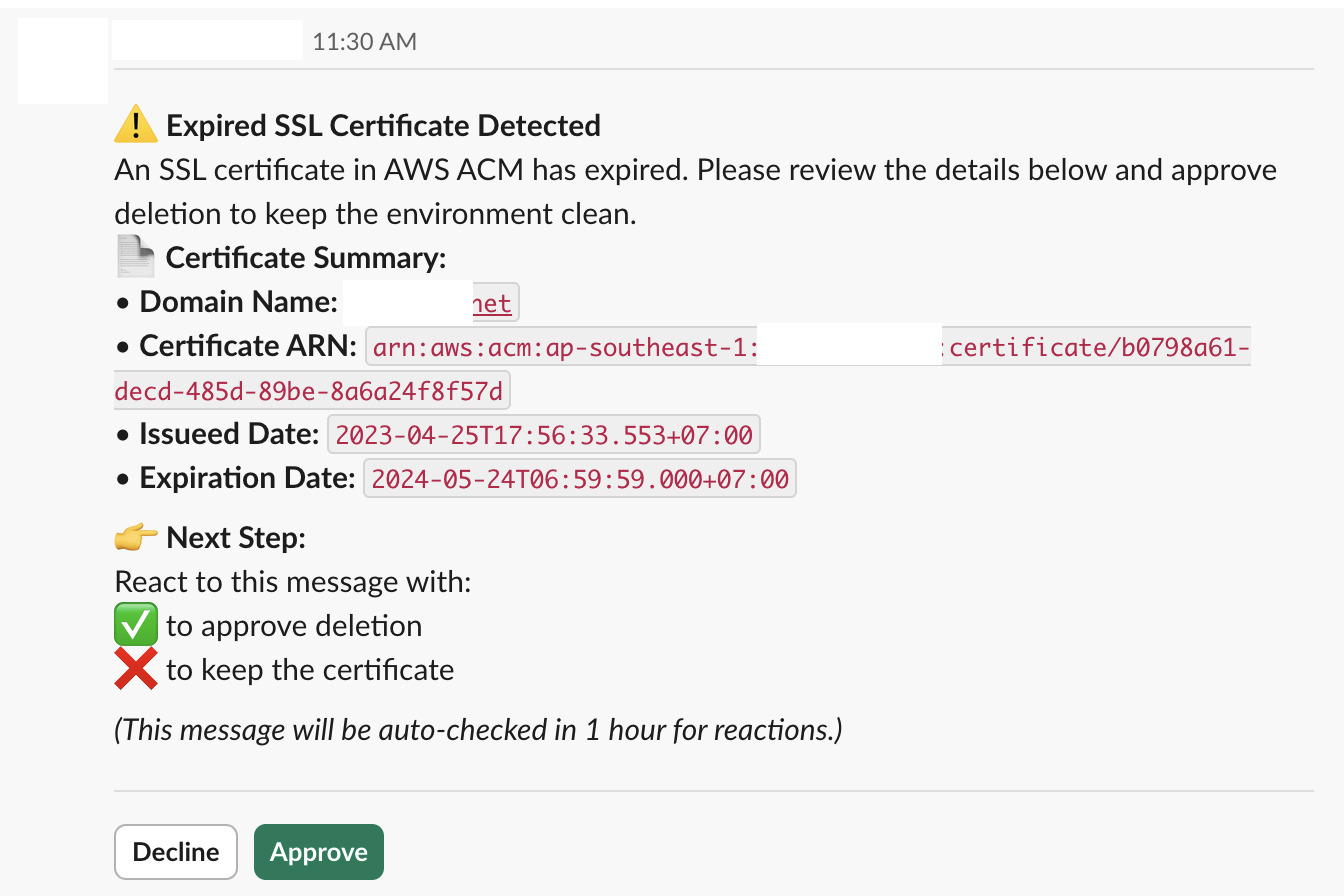"
},
"typeVersion": 1
},
{
"id": "8a2d6219-969d-4b6f-9c1b-9c818f12e9c0",
"name": "付箋7",
"type": "n8n-nodes-base.stickyNote",
"position": [
1280,
192
],
"parameters": {
"content": "### 6. Notify admin via Slack"
},
"typeVersion": 1
},
{
"id": "58b1a7e2-765c-4fe7-8831-cdab2eda3932",
"name": "期限切れ証明書のみ取得",
"type": "n8n-nodes-base.filter",
"position": [
448,
0
],
"parameters": {
"options": {},
"conditions": {
"options": {
"version": 2,
"leftValue": "",
"caseSensitive": true,
"typeValidation": "strict"
},
"combinator": "or",
"conditions": [
{
"id": "fe1b749d-3046-465e-b60a-786f5b0e2f99",
"operator": {
"type": "string",
"operation": "equals"
},
"leftValue": "={{ $json.Status }}",
"rightValue": "=EXPIRED"
}
]
}
},
"typeVersion": 2.2
},
{
"id": "c948316a-c28f-40b0-a320-927efbd8883b",
"name": "日次スケジュールトリガー",
"type": "n8n-nodes-base.scheduleTrigger",
"position": [
0,
0
],
"parameters": {
"rule": {
"interval": [
{}
]
}
},
"typeVersion": 1.2
},
{
"id": "ebb985a7-ba79-4690-8892-976b19fe2941",
"name": "証明書を削除",
"type": "n8n-nodes-base.awsCertificateManager",
"position": [
992,
0
],
"parameters": {
"operation": "delete",
"certificateArn": "={{ $json.CertificateArn }}"
},
"credentials": {
"aws": {
"id": "d62669OP9bvnmE4n",
"name": "us-east-1"
}
},
"typeVersion": 1
}
],
"active": false,
"pinData": {},
"settings": {
"executionOrder": "v1"
},
"versionId": "bfa1e782-637f-49eb-8c58-fbd6e4540d77",
"connections": {
"ebb985a7-ba79-4690-8892-976b19fe2941": {
"main": [
[
{
"node": "079cb3e6-73cc-41ad-95a5-c0af457b25bf",
"type": "main",
"index": 0
}
]
]
},
"0fa56096-8872-400b-afa1-5c52090bd33c": {
"main": [
[
{
"node": "58b1a7e2-765c-4fe7-8831-cdab2eda3932",
"type": "main",
"index": 0
}
]
]
},
"c948316a-c28f-40b0-a320-927efbd8883b": {
"main": [
[
{
"node": "0fa56096-8872-400b-afa1-5c52090bd33c",
"type": "main",
"index": 0
}
]
]
},
"58b1a7e2-765c-4fe7-8831-cdab2eda3932": {
"main": [
[
{
"node": "849ac135-f381-4a26-a9c5-79e62d20f74d",
"type": "main",
"index": 0
}
]
]
},
"849ac135-f381-4a26-a9c5-79e62d20f74d": {
"main": [
[
{
"node": "ebb985a7-ba79-4690-8892-976b19fe2941",
"type": "main",
"index": 0
}
]
]
}
}
}よくある質問
このワークフローの使い方は?
上記のJSON設定コードをコピーし、n8nインスタンスで新しいワークフローを作成して「JSONからインポート」を選択、設定を貼り付けて認証情報を必要に応じて変更してください。
このワークフローはどんな場面に適していますか?
中級 - DevOps, マルチモーダルAI
有料ですか?
このワークフローは完全無料です。ただし、ワークフローで使用するサードパーティサービス(OpenAI APIなど)は別途料金が発生する場合があります。
関連ワークフロー
AWS ACM 証明書の自動更新(Slack 承認込み)
Slack承認ワークフローを使用したAWS証明書の自動更新
Slack
Filter
Schedule Trigger
+
Slack
Filter
Schedule Trigger
14 ノードTrung Tran
セキュリティ運用
チャットボットと GPT-4.1 を活用した自動 Slack チャンネルModeration ワークフロー
ワークスペースクリーニング用のSlackチャンネルランデブ照会とレポート作成の自動化
Code
Slack
Filter
+
Code
Slack
Filter
16 ノードTrung Tran
AI要約
AWS における SSL/TLS 証明書の有効期限切れレポートの自動化
AWS ACMとAIを使ってSlackとメールのSSL/TLS証明書の期限切れレポートを生成する
Set
Code
Slack
+
Set
Code
Slack
23 ノードTrung Tran
AI要約
MFA強制適用とアクセスキー無効化のための自動化AWS IAMコンプライアンスワークフロー
AWS IAMコンプライアンスの自動化:MFAの強制とアクセスキーのクリーンアップ
Code
Slack
Aws Iam
+
Code
Slack
Aws Iam
19 ノードTrung Tran
セキュリティ運用
AI GPT-4.1-miniを使用したスマートサプライヤー契約更新とリマインダー自動化
GPT-4.1 mini、Slack、および Gmail を使用したサプライヤー契約の更新とリマインダーの自動化
If
Code
Slack
+
If
Code
Slack
21 ノードTrung Tran
文書抽出
AI駆動のYouTube自動タグワーキング(SEOの自動化)
GPTとSlack通知を使用してYouTube動画のSEOタグを自動化
Set
Slack
You Tube
+
Set
Slack
You Tube
19 ノードTrung Tran
AI要約
ワークフロー情報
難易度
中級
ノード数14
カテゴリー2
ノードタイプ5
作成者

Trung Tran
@trungtranEmpowering small and medium businesses with smart automation and practical AI, no big tech team required.
外部リンク
n8n.ioで表示 →
このワークフローを共有