チャットベースAWS Lambda 管理者と自動監査ログ記録(GPT-4.1 mini + Google スプレッドシート)
中級
これはDevOps, AI Chatbot分野の自動化ワークフローで、15個のノードを含みます。主にAwsLambdaTool, Agent, HttpRequestTool, GoogleSheetsTool, ChatTriggerなどのノードを使用。 GPT-4.1とGoogleスプレッドシートを使ったチャットベースAWS Lambda マネージャと監査ログ記録
前提条件
- •AWS Access Key と Secret
- •ターゲットAPIの認証情報が必要な場合あり
- •Google Sheets API認証情報
- •OpenAI API Key
使用ノード (15)
ワークフロープレビュー
ノード接続関係を可視化、ズームとパンをサポート
ワークフローをエクスポート
以下のJSON設定をn8nにインポートして、このワークフローを使用できます
{
"id": "8Hr1UiypOyXzJuXf",
"meta": {
"instanceId": "e145bfb15cacc90e0d1ae6ee743e6744f8fc7108de50458700cb2ae620dc5ca5",
"templateCredsSetupCompleted": true
},
"name": "Chat-Based AWS Lambda Manager with Automated Audit Logging (GPT-4.1 mini + Google Sheet)",
"tags": [
{
"id": "zVkByIt5M465W2a8",
"name": "aws",
"createdAt": "2025-09-12T06:14:33.823Z",
"updatedAt": "2025-09-12T06:14:33.823Z"
}
],
"nodes": [
{
"id": "616e9751-00a6-4313-a1ae-aa0ffb44430e",
"name": "OpenAI Chat Model",
"type": "@n8n/n8n-nodes-langchain.lmChatOpenAi",
"position": [
-160,
736
],
"parameters": {
"model": {
"__rl": true,
"mode": "list",
"value": "gpt-4.1-mini"
},
"options": {}
},
"credentials": {
"openAiApi": {
"id": "tnXtbK3d66hDjxXa",
"name": "OpenAi account"
}
},
"typeVersion": 1.2
},
{
"id": "a1dca496-5a02-45d4-b230-65a12d8a51d9",
"name": "Simple Memory",
"type": "@n8n/n8n-nodes-langchain.memoryBufferWindow",
"position": [
-32,
736
],
"parameters": {
"contextWindowLength": 10
},
"typeVersion": 1.3
},
{
"id": "cffff788-b047-4553-83cc-726d5028ebfb",
"name": "チャットメッセージ受信時",
"type": "@n8n/n8n-nodes-langchain.chatTrigger",
"position": [
-384,
512
],
"webhookId": "c676ef51-4e8a-4d31-9b8b-7c05602edd32",
"parameters": {
"options": {}
},
"typeVersion": 1.3
},
{
"id": "73569e82-cc64-4435-a06c-c7b8eed1b453",
"name": "付箋",
"type": "n8n-nodes-base.stickyNote",
"position": [
-1840,
-80
],
"parameters": {
"color": 6,
"width": 880,
"height": 1184,
"content": "# Chat-Based AWS Lambda Manager with Automated Audit Logging (GPT-4.1 mini + Google Sheet)\n> This workflow provides a chat-based AI agent to manage AWS Lambda functions. It allows users to list, invoke, get details, and delete Lambda functions, while automatically recording every action into Google Sheets for audit and compliance tracking.\n\n## **Who’s it for**\n- Cloud engineers and DevOps teams managing AWS Lambda functions. \n- Developers who want a simple chat interface to perform Lambda operations. \n- Compliance and operations teams needing automatic audit logs of AWS actions. \n\n## **How it works / What it does**\n1. A chat message triggers the **AWS Lambda Manager Agent**. \n2. The agent interprets user intent and calls one of the available tools: \n - **Invoke Lambda Function**: Runs a Lambda function with given payload. \n - **List Lambda Functions**: Shows all functions in the account. \n - **Get Lambda Function**: Retrieves details/configuration of a function. \n - **Delete a Function**: Removes a Lambda function permanently. \n3. After each action, the agent calls **Audit Logs (Google Sheets)** to record the operation type, function name, timestamp, and outcome. \n4. The agent confirms destructive actions (like delete) before execution. \n\n## **How to set up**\n1. Add a **Chat Trigger** node to start the workflow when a user sends a message. \n2. Connect it to the **AWS Lambda Manager Agent** node. \n3. Configure the agent with the provided system prompt to enforce rules and logging. \n4. Link the agent to the following tool nodes: \n - Invoke Lambda Function \n - List Lambda Functions \n - Get Lambda Function \n - Delete a Function \n - Audit Logs (Google Sheets with `appendOrUpdate` enabled) \n5. Deploy the workflow and test it with sample chat commands like “list functions” or “invoke testFunction”. \n\n## **Requirements**\n- AWS account with IAM credentials that have `lambda:ListFunctions`, `lambda:InvokeFunction`, `lambda:GetFunction`, and `lambda:DeleteFunction` permissions. \n- Google Sheets API connected for storing audit logs. \n- Proper region and function names configured when invoking or deleting. \n- n8n instance or automation platform that supports agent + tool integration. \n\n## **How to customize the workflow**\n- **Add new tools**: Extend with more AWS Lambda operations like Update Function Code or Publish Version. \n- **Enhance logging**: Include user ID, request payload, or execution results in Audit Logs. \n- **Access control**: Restrict delete actions to admins by adding role-based logic. \n- **Multi-cloud support**: Extend the agent to handle Azure/AWS/GCP serverless functions in one workflow. \n- **Custom responses**: Modify agent prompt to tailor tone (developer-friendly vs. business-friendly). "
},
"typeVersion": 1
},
{
"id": "40693ce3-331d-4164-bd28-1fbee18ec87b",
"name": "付箋1",
"type": "n8n-nodes-base.stickyNote",
"position": [
-416,
368
],
"parameters": {
"color": 5,
"height": 128,
"content": "### Receive Chat Message\nThe workflow begins when a user sends a chat message. This acts as the trigger for the AWS Lambda Manager Agent."
},
"typeVersion": 1
},
{
"id": "bd9ce2c4-5637-4d1e-b5ed-5b11ed11e2ac",
"name": "付箋2",
"type": "n8n-nodes-base.stickyNote",
"position": [
144,
320
],
"parameters": {
"color": 5,
"content": "### Interpret User Intent\nThe AWS Lambda Manager Agent analyzes the chat input to determine which Lambda operation is being requested (list, invoke, get details, or delete)."
},
"typeVersion": 1
},
{
"id": "bc5292ea-8e7b-4c3a-ae26-555861f7b8e7",
"name": "AWS Lambda Manager Agent",
"type": "@n8n/n8n-nodes-langchain.agent",
"position": [
152,
512
],
"parameters": {
"options": {
"systemMessage": "You are AWS Lambda Manager Agent, a chat-based assistant that helps users manage their AWS Lambda functions.\nYou are equipped with 5 tools:\n1. Invoke Lambda Function – Run a specific Lambda function with an input payload.\n2. List Lambda Functions – Retrieve all Lambda functions in the account/region.\n3. Get Lambda Function – Get configuration and details of a function.\n4. Delete a Function – Permanently delete a Lambda function.\n5. Audit Logs – Append every action performed into Google Sheets for tracking. The input must always be a simple log string (for example: \"Invoked function processOrders at 2025-09-16 10:30 UTC\").\n\nResponsibilities:\n- Parse user requests and determine intent.\n- Call the correct tool to execute the operation.\n- After any of the first 4 Lambda operations, always call Audit Logs to record action details (function name, action type, timestamp, requestor, and outcome).\n- If the request is unclear, ask clarifying questions before taking action.\n- Keep answers short and action-focused, but confirm important destructive actions like deletion.\nExamples of behavior:\n- User: “Show me all my Lambda functions.”\nAgent: Calls List Lambda Functions, then logs action with Audit Logs.\n- User: “Run my processOrders function with this JSON.”\nAgent: Calls Invoke Lambda Function with provided JSON, then logs action.\n- User: “Tell me details about paymentHandler.”\nAgent: Calls Get Lambda Function, then logs action.\n- User: “Delete the testFunction.”\nAgent: Confirms: “Are you sure you want to permanently delete testFunction?” If confirmed, calls Delete a Function, then logs action.\nRules:\n- Always log operations in Audit Logs as a single text string.\n- Never skip logging.\n- Confirm destructive actions like delete.\n- Respect the user’s natural language and support flexible phrasing such as “remove,” “run,” “show,” or “info.”"
}
},
"typeVersion": 2.2
},
{
"id": "9c1b9a0d-3152-459e-99ac-e5ef64fc5e66",
"name": "Lambda関数の呼び出し",
"type": "n8n-nodes-base.awsLambdaTool",
"position": [
96,
736
],
"parameters": {
"payload": "={{ /*n8n-auto-generated-fromAI-override*/ $fromAI('JSON_Input', ``, 'string') }}",
"function": "arn:aws:lambda:ap-southeast-1:984623028397:function:myFunction",
"invocationType": "Event"
},
"credentials": {
"aws": {
"id": "mx7x25MWVlUbEtd3",
"name": "ap-southeast-1"
}
},
"typeVersion": 1
},
{
"id": "ce85a47e-4828-4e7e-b3b6-ef2c0195510b",
"name": "Lambda関数の一覧表示",
"type": "n8n-nodes-base.httpRequestTool",
"position": [
224,
736
],
"parameters": {
"url": "={{ /*n8n-auto-generated-fromAI-override*/ $fromAI('URL', `Template: https://lambda.REGION.amazonaws.com/2015-03-31/functions\nREGION is parameter`, 'string') }}",
"options": {},
"sendHeaders": true,
"authentication": "predefinedCredentialType",
"toolDescription": "Description: Returns all Lambda functions in your account for the given region.",
"headerParameters": {
"parameters": [
{}
]
},
"nodeCredentialType": "aws"
},
"credentials": {
"aws": {
"id": "Q5gor70maeAQPEU4",
"name": "AWS account 2"
}
},
"typeVersion": 4.2
},
{
"id": "3e2516da-8d3f-4c82-8026-8d9fbd037906",
"name": "Lambda関数の取得",
"type": "n8n-nodes-base.httpRequestTool",
"position": [
352,
736
],
"parameters": {
"url": "={{ /*n8n-auto-generated-fromAI-override*/ $fromAI('URL', `Format: https://lambda.region.amazonaws.com/2015-03-31/functions/FUNCTION_NAME\nRegion & function_name are params`, 'string') }}",
"options": {},
"sendHeaders": true,
"authentication": "predefinedCredentialType",
"nodeCredentialType": "aws"
},
"credentials": {
"aws": {
"id": "Q5gor70maeAQPEU4",
"name": "AWS account 2"
}
},
"typeVersion": 4.2
},
{
"id": "02700199-d4ab-499c-ad0f-6e2063d551a4",
"name": "関数の削除",
"type": "n8n-nodes-base.httpRequestTool",
"position": [
480,
736
],
"parameters": {
"url": "={{ /*n8n-auto-generated-fromAI-override*/ $fromAI('URL', `Template: https://lambda.region.amazonaws.com/2015-03-31/functions/FUNCTION_NAME\nregion & FUNCTION_NAME are params`, 'string') }}",
"method": "DELETE",
"options": {},
"sendHeaders": true,
"authentication": "predefinedCredentialType",
"toolDescription": "Description: Deletes a Lambda function permanently.",
"headerParameters": {
"parameters": [
{}
]
},
"nodeCredentialType": "aws"
},
"credentials": {
"aws": {
"id": "Q5gor70maeAQPEU4",
"name": "AWS account 2"
}
},
"typeVersion": 4.2
},
{
"id": "65430de9-aadf-4af9-a755-3ed28ff84e25",
"name": "監査ログ",
"type": "n8n-nodes-base.googleSheetsTool",
"position": [
608,
736
],
"parameters": {
"columns": {
"value": {},
"schema": [],
"mappingMode": "autoMapInputData",
"matchingColumns": [],
"attemptToConvertTypes": false,
"convertFieldsToString": false
},
"options": {},
"operation": "appendOrUpdate",
"sheetName": {
"__rl": true,
"mode": "list",
"value": "gid=0",
"cachedResultUrl": "https://docs.google.com/spreadsheets/d/1aaDJ9ZAt2LLpZDFcXjVaYW57JwyruCrl5UJWejG1ZTk/edit#gid=0",
"cachedResultName": "Sheet1"
},
"documentId": {
"__rl": true,
"mode": "list",
"value": "1aaDJ9ZAt2LLpZDFcXjVaYW57JwyruCrl5UJWejG1ZTk",
"cachedResultUrl": "https://docs.google.com/spreadsheets/d/1aaDJ9ZAt2LLpZDFcXjVaYW57JwyruCrl5UJWejG1ZTk/edit?usp=drivesdk",
"cachedResultName": "AWS S3 Audit Logs"
}
},
"credentials": {
"googleSheetsOAuth2Api": {
"id": "7zk8xcj4pNU6f1WM",
"name": "Google Sheets account"
}
},
"typeVersion": 4.7
},
{
"id": "a08f808b-1196-46dd-bac4-ae1b4682ff6d",
"name": "付箋3",
"type": "n8n-nodes-base.stickyNote",
"position": [
80,
912
],
"parameters": {
"color": 5,
"width": 336,
"height": 256,
"content": "### Execute Lambda Operation\nBased on the intent, the agent calls one of the connected Lambda tools:\n- **Invoke Lambda Function** to run a function with payload. \n- **List Lambda Functions** to retrieve all available functions. \n- **Get Lambda Function** to fetch configuration details. \n- **Delete a Function** to permanently remove a Lambda function (requires confirmation)."
},
"typeVersion": 1
},
{
"id": "f445f4a6-9ff0-46c0-932a-7deee046648c",
"name": "付箋4",
"type": "n8n-nodes-base.stickyNote",
"position": [
544,
912
],
"parameters": {
"color": 5,
"height": 176,
"content": "### Record Action in Audit Logs\nAfter executing any Lambda operation, the agent automatically calls the **Audit Logs** tool to append details (function name, action, timestamp, result) into Google Sheets for compliance tracking."
},
"typeVersion": 1
},
{
"id": "b84bbe70-1375-41e1-9e91-6b27cd707ed4",
"name": "付箋5",
"type": "n8n-nodes-base.stickyNote",
"position": [
-928,
208
],
"parameters": {
"width": 480,
"height": 624,
"content": "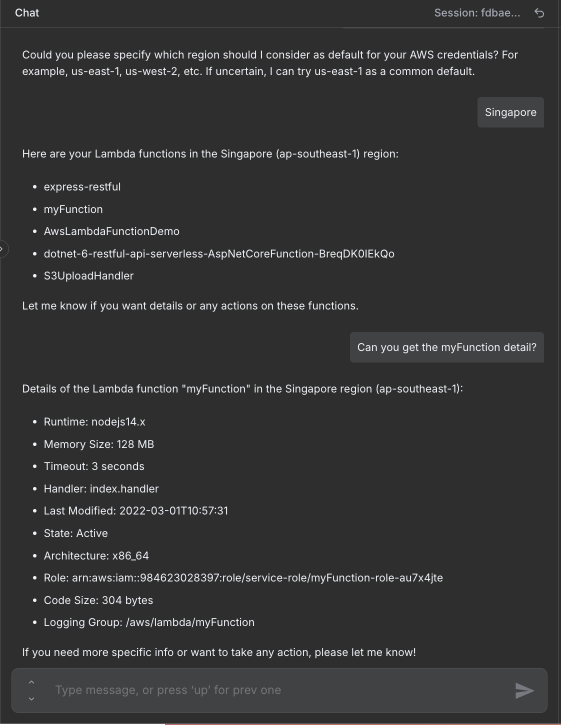"
},
"typeVersion": 1
}
],
"active": false,
"pinData": {},
"settings": {
"executionOrder": "v1"
},
"versionId": "72f00ce5-d7b4-4369-b869-48b6e73611ba",
"connections": {
"65430de9-aadf-4af9-a755-3ed28ff84e25": {
"ai_tool": [
[
{
"node": "bc5292ea-8e7b-4c3a-ae26-555861f7b8e7",
"type": "ai_tool",
"index": 0
}
]
]
},
"a1dca496-5a02-45d4-b230-65a12d8a51d9": {
"ai_memory": [
[
{
"node": "bc5292ea-8e7b-4c3a-ae26-555861f7b8e7",
"type": "ai_memory",
"index": 0
}
]
]
},
"02700199-d4ab-499c-ad0f-6e2063d551a4": {
"ai_tool": [
[
{
"node": "bc5292ea-8e7b-4c3a-ae26-555861f7b8e7",
"type": "ai_tool",
"index": 0
}
]
]
},
"616e9751-00a6-4313-a1ae-aa0ffb44430e": {
"ai_languageModel": [
[
{
"node": "bc5292ea-8e7b-4c3a-ae26-555861f7b8e7",
"type": "ai_languageModel",
"index": 0
}
]
]
},
"3e2516da-8d3f-4c82-8026-8d9fbd037906": {
"ai_tool": [
[
{
"node": "bc5292ea-8e7b-4c3a-ae26-555861f7b8e7",
"type": "ai_tool",
"index": 0
}
]
]
},
"ce85a47e-4828-4e7e-b3b6-ef2c0195510b": {
"ai_tool": [
[
{
"node": "bc5292ea-8e7b-4c3a-ae26-555861f7b8e7",
"type": "ai_tool",
"index": 0
}
]
]
},
"9c1b9a0d-3152-459e-99ac-e5ef64fc5e66": {
"ai_tool": [
[
{
"node": "bc5292ea-8e7b-4c3a-ae26-555861f7b8e7",
"type": "ai_tool",
"index": 0
}
]
]
},
"bc5292ea-8e7b-4c3a-ae26-555861f7b8e7": {
"main": [
[]
]
},
"cffff788-b047-4553-83cc-726d5028ebfb": {
"main": [
[
{
"node": "bc5292ea-8e7b-4c3a-ae26-555861f7b8e7",
"type": "main",
"index": 0
}
]
]
}
}
}よくある質問
このワークフローの使い方は?
上記のJSON設定コードをコピーし、n8nインスタンスで新しいワークフローを作成して「JSONからインポート」を選択、設定を貼り付けて認証情報を必要に応じて変更してください。
このワークフローはどんな場面に適していますか?
中級 - DevOps, AIチャットボット
有料ですか?
このワークフローは完全無料です。ただし、ワークフローで使用するサードパーティサービス(OpenAI APIなど)は別途料金が発生する場合があります。
関連ワークフロー
EC2ライフサイクル管理プログラムとAIチャットアシスタント( description / start / stop / restart / terminate )
AIチャットエージェント付きAWS EC2 ライフサイクル マネージャ(記述、起動、停止、リスタート)
Agent
Http Request Tool
Chat Trigger
+
Agent
Http Request Tool
Chat Trigger
16 ノードTrung Tran
DevOps
n8n監査ログ付きAI駆動AWS S3マネージャー(Slack/ChatOpsワークフロー)
Slackを使用してGPT-4エージェントとGoogleスプレッドシートでAWS S3の監査ログを管理する
Aws S3 Tool
Agent
Google Sheets Tool
+
Aws S3 Tool
Agent
Google Sheets Tool
16 ノードTrung Tran
DevOps
チャットベースAWS IAMポリシージェネレータ+AIアシスタント(OpenAI)
チャットインターフェースを使ってGPT-4アシスタントでAWS IAMポリシーを生成
Email Send
Http Request
Agent
+
Email Send
Http Request
Agent
14 ノードTrung Tran
DevOps
Slack候補者評価のためのAI駆動チャットボット構築
AI履歴書分析と候補者評価:SlackとGoogleスプレッドシートの統合
If
Code
Slack
+
If
Code
Slack
29 ノードTrung Tran
AIチャットボット
AirtopとGPT-4を使用したブラウザタスクの自動化 - Reddit投稿 サンプル
AirtopとGPT-4を使用したブラウザタスクの自動化 - Reddit投稿例
Airtop Tool
Agent
Google Sheets Tool
+
Airtop Tool
Agent
Google Sheets Tool
18 ノードJoseph
ソーシャルメディア
AIチャットボットによるリード獲得と業務への質問応答
GPT-4o、Pinecone、および Google Sheets を基にした自動化されたリードキャプチャとビジネス関連 Q&A
Google Drive
Agent
Google Sheets Tool
+
Google Drive
Agent
Google Sheets Tool
17 ノードBelgacem Dhiflaoui
リードナーチャリング
ワークフロー情報
難易度
中級
ノード数15
カテゴリー2
ノードタイプ8
作成者

Trung Tran
@trungtranEmpowering small and medium businesses with smart automation and practical AI, no big tech team required. Youtube channel: youtube.com/@theStackExplorer
外部リンク
n8n.ioで表示 →
このワークフローを共有