Ada AI を使って複数のソースからのデータを分析・解釈・可視化
上級
これは自動化ワークフローで、25個のノードを含みます。主にSet, Code, Gmail, MySql, Markdownなどのノードを使用。 Ada AI を使用して複数のデータソースを分析し、解釈し、可視化する
前提条件
- •Googleアカウント + Gmail API認証情報
- •MySQLデータベース接続情報
- •ターゲットAPIの認証情報が必要な場合あり
- •Google Sheets API認証情報
使用ノード (25)
カテゴリー
-
ワークフロープレビュー
ノード接続関係を可視化、ズームとパンをサポート
ワークフローをエクスポート
以下のJSON設定をn8nにインポートして、このワークフローを使用できます
{
"meta": {
"instanceId": "806e76bc68769277cc91003cf60c5af8793416e570a07db359be1a94e4c0b217"
},
"nodes": [
{
"id": "78b49282-5384-4a85-aadf-f05fc08cfe7f",
"name": "付箋",
"type": "n8n-nodes-base.stickyNote",
"position": [
-144,
-112
],
"parameters": {
"color": 4,
"width": 448,
"height": 1536,
"content": "## Data Source\nThese nodes extract structured data directly from your data source (e.g., MySQL, Google Sheets, Excel/CSV).\n\nSimply connect the data source nodes you need and disconnect any unused nodes.\n\n**You must select one - and only one - data source node. Disconnect any additional data source nodes. You can also replace these nodes with any other data sources**\n\nAs long as the generated data matches the structured format required by the subsequent steps.\n\n## Sample Data\nA node is provided here that randomly generates one thousand data entries each time.\n\nThis dataset is a collection of simulated sales order records. Each record contains the following fields:\n\norder_date: The date when the order was placed.\nproduct_category: The category of the product sold, such as \"Electronics,\" \"Clothing & Fashion,\" \"Home & Furniture,\" \"Food & Beverages,\" \"Sports & Outdoors,\" or \"Beauty & Personal Care.\"\nregion: The sales region, which can include \"North America,\" \"South America,\" \"Europe,\" \"Asia,\" \"Africa,\" \"Oceania,\" \"Middle East,\" or \"Central Asia.\"\nsales_amount: The total sales amount for the order.\nThis type of data is typically used for analyzing sales performance across different time periods, product categories, and regions. In n8n, such data is usually structured as an array of objects, making it suitable for further processing, analysis, and automation workflows."
},
"typeVersion": 1
},
{
"id": "bf8a1e18-4fcf-4ba5-ba20-ec534dbb3499",
"name": "付箋1",
"type": "n8n-nodes-base.stickyNote",
"position": [
496,
240
],
"parameters": {
"color": 4,
"width": 656,
"height": 976,
"content": "## Select the skills you need\nConnect the skill nodes you require\n\nYou need to apply for an API key according to the instructions, configure credentials, and set up Authentication in the DataAnalysis, DataInterpretation, and DataVisualization nodes.\n\n### Input parameters\ninput_json: Data from previous nodes\nquery: Query statement, you can set a fixed query according to your needs or use LLM to generate the query\n\n### Output\nThe output of DataAnalysis and DataInterpretation nodes will include markdown text, while the output of DataVisualization nodes will include HTML code."
},
"typeVersion": 1
},
{
"id": "dd510d46-fb9d-4020-b675-cddb76dfbfc5",
"name": "付箋2",
"type": "n8n-nodes-base.stickyNote",
"position": [
1328,
368
],
"parameters": {
"color": 4,
"width": 336,
"height": 848,
"content": "## Output\n\nHere we use sending email as an example; you can choose the method that suits your needs."
},
"typeVersion": 1
},
{
"id": "64975f75-6153-43a0-ad61-4bc8c69c0e33",
"name": "付箋3",
"type": "n8n-nodes-base.stickyNote",
"position": [
-3584,
240
],
"parameters": {
"color": 7,
"width": 3088,
"height": 4672,
"content": "## Overview\nThis template empowers low-code data analysis using natural language. Simply connect to your data sources (e.g., MySQL, Google Sheets),\nand it automates the entire workflow—from data querying and processing to interpretation and visualization. For instance,\nit can professionally analyze, interpret, and visualize weekly sales data and have the report delivered directly to your inbox.\n\nThis template is supported by [ada.im](https://ada.im/home?ada_data_=&utm_source=n8n&utm_medium=landingpage&utm_infeluncer=landingpage&utm_campain=landingpage&utm_content=landingpage)\n## Here are some example results:\n\n### DataVisualization\nquery: Use a pie chart to display the sales of each product in 2024, and a line chart to represent the total monthly sales of each product in 2024. Additionally, you can add some extra charts based on the data.\nresult: \n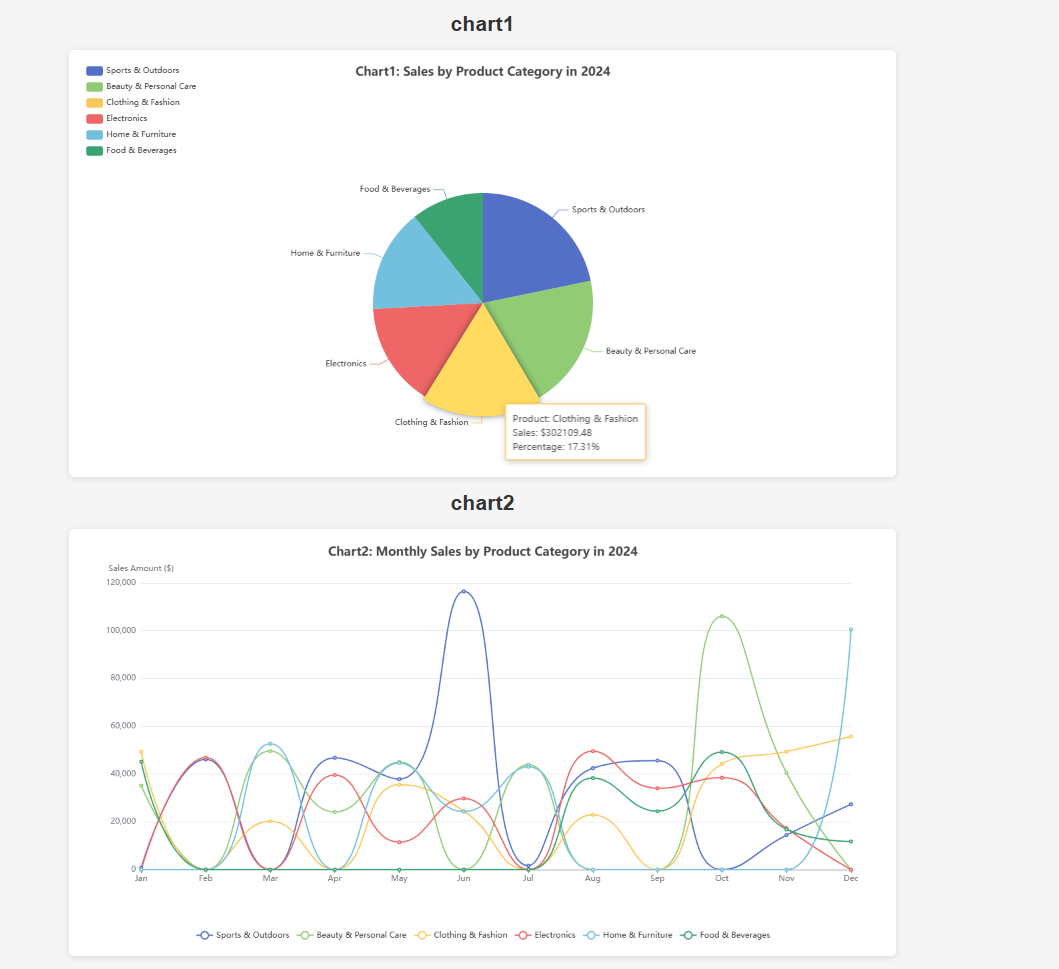\n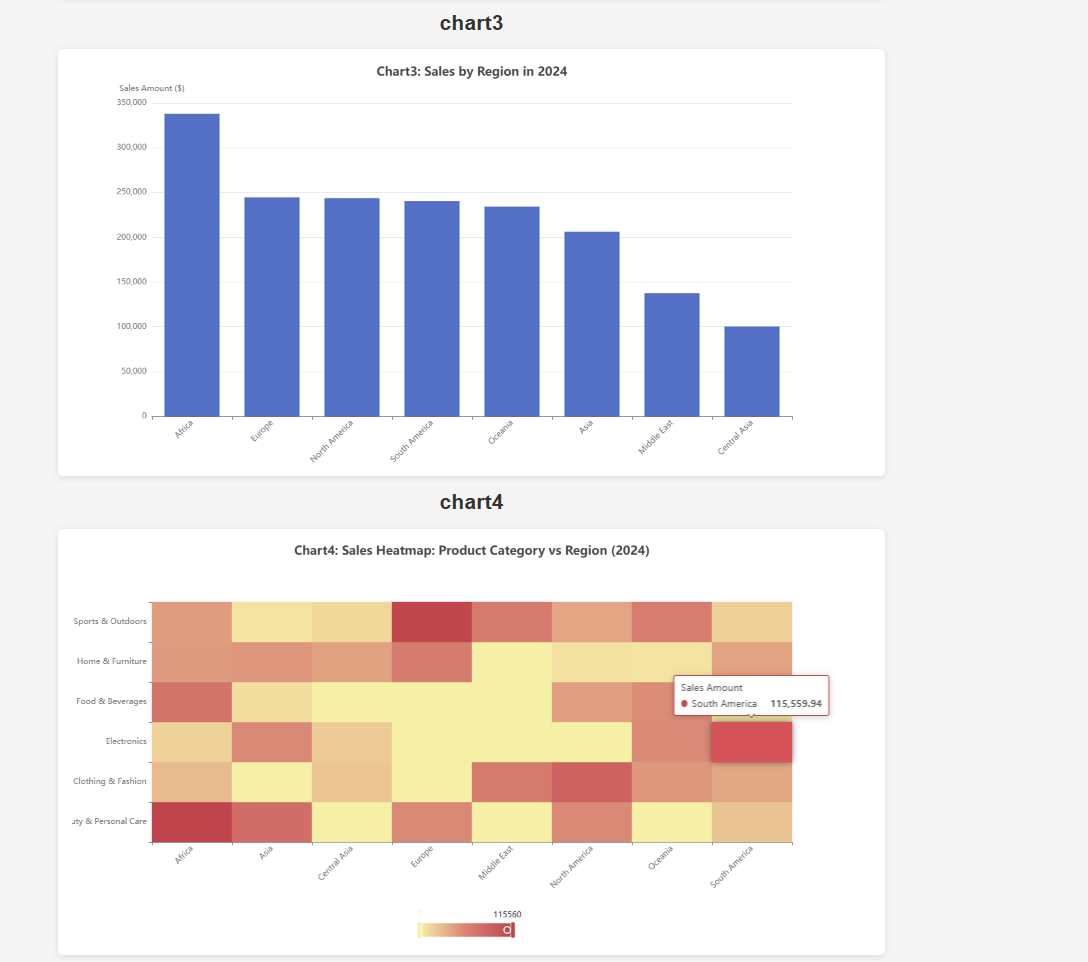\n\n### DataInterpretation\nquery: Sales volume of each product in 2024\nresult: \n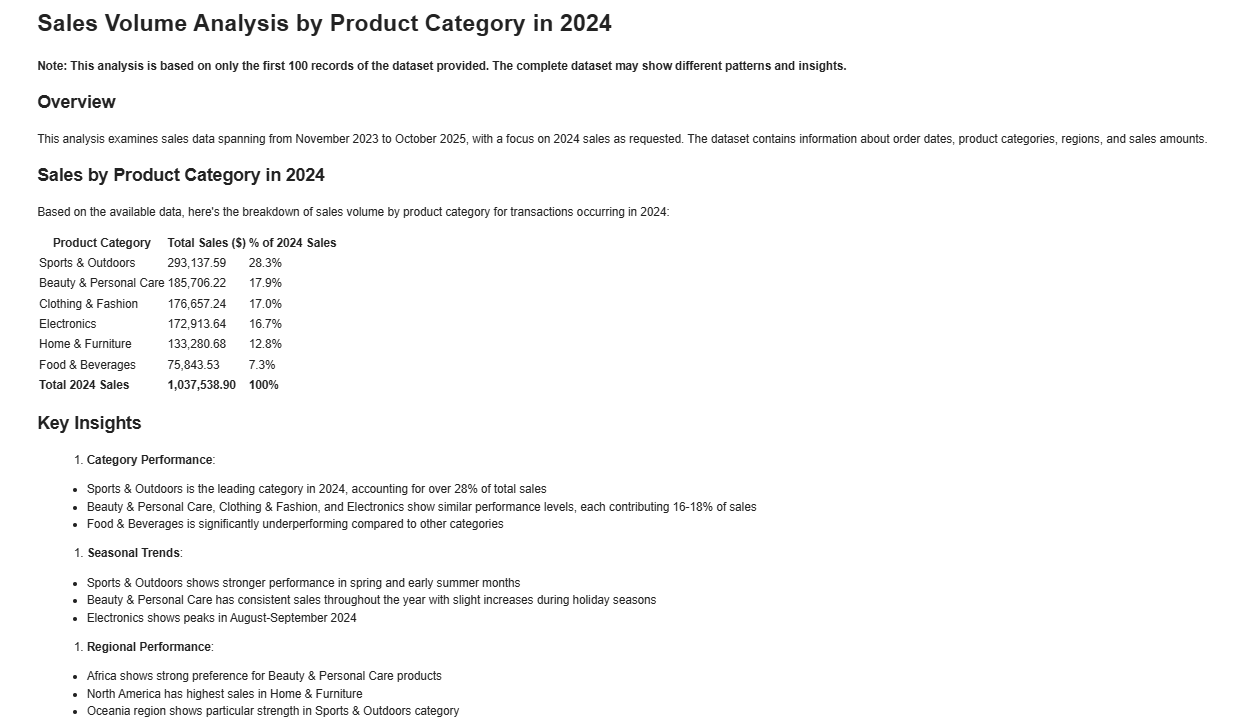\n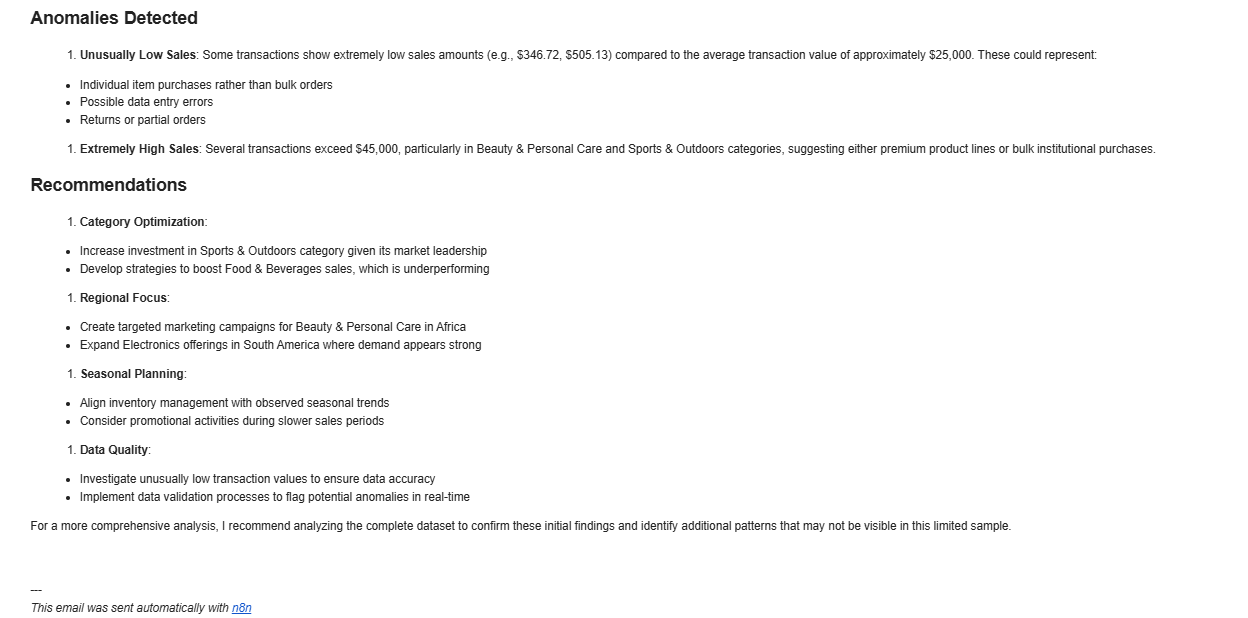\n\n### DataAnalysis\nquery: What are the top three products in terms of sales in 2024? Analyze the gap between the top three products and the others from a statistical perspective.\nresult: \n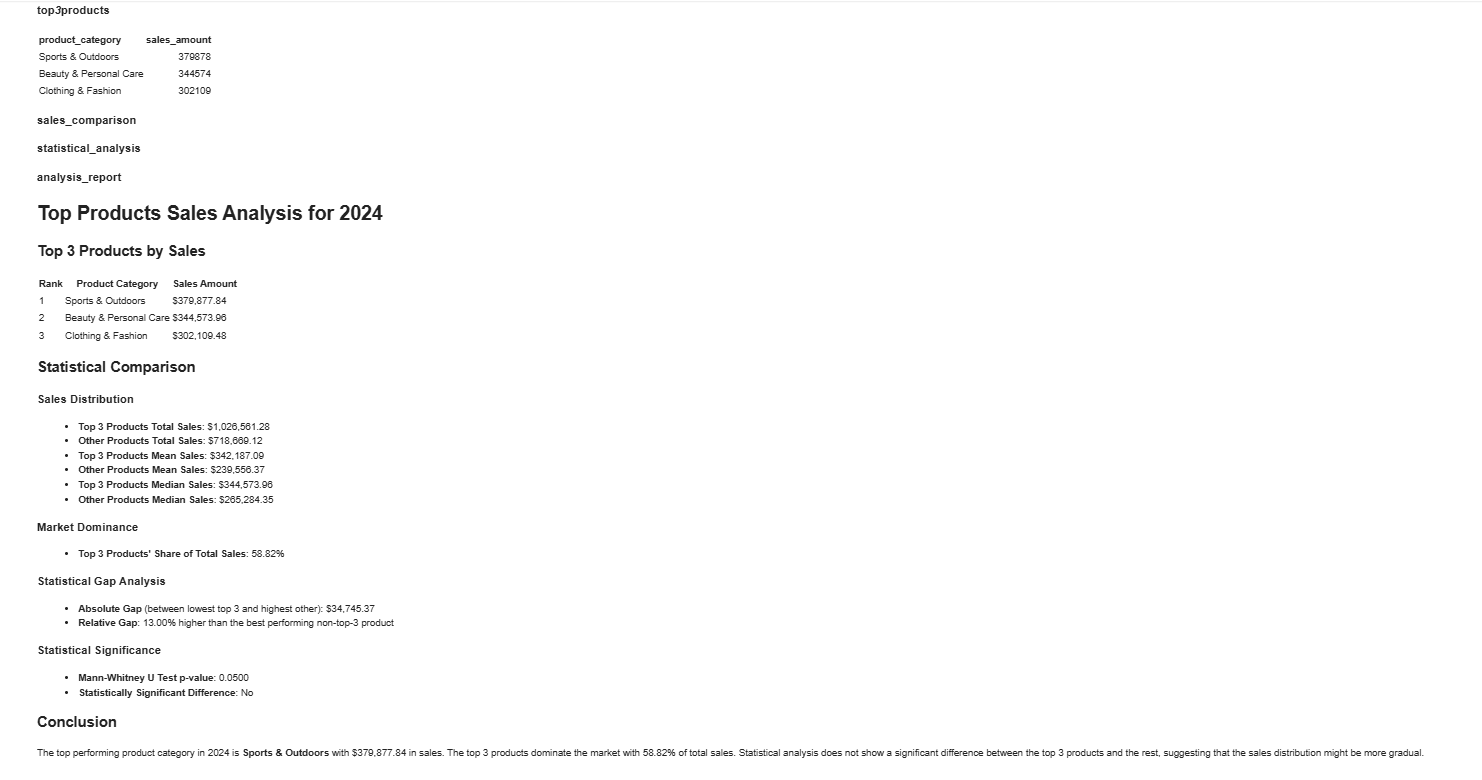"
},
"typeVersion": 1
},
{
"id": "8f6a76db-8a9b-482f-91d6-919056845326",
"name": "付箋4",
"type": "n8n-nodes-base.stickyNote",
"position": [
-1152,
512
],
"parameters": {
"width": 512,
"height": 1536,
"content": "## 2️⃣ Set credentials\n\nIn HTTP nodes(DataAnalysis, DataInterpretation, and DataVisualization) select Authentication → Generic Credential Type\n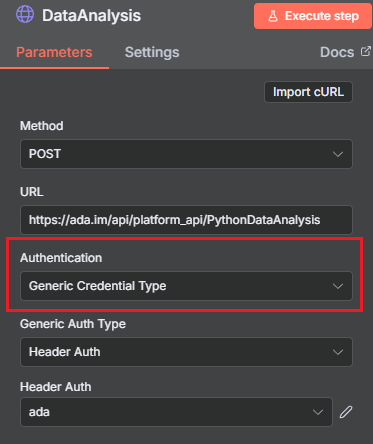\n\nChoose Header Auth → Create new credential\n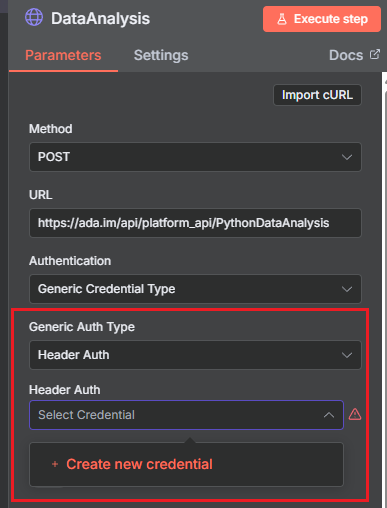\n\nName the header Authorization, which must be exactly 'Authorization', and fill in the previously applied API key\n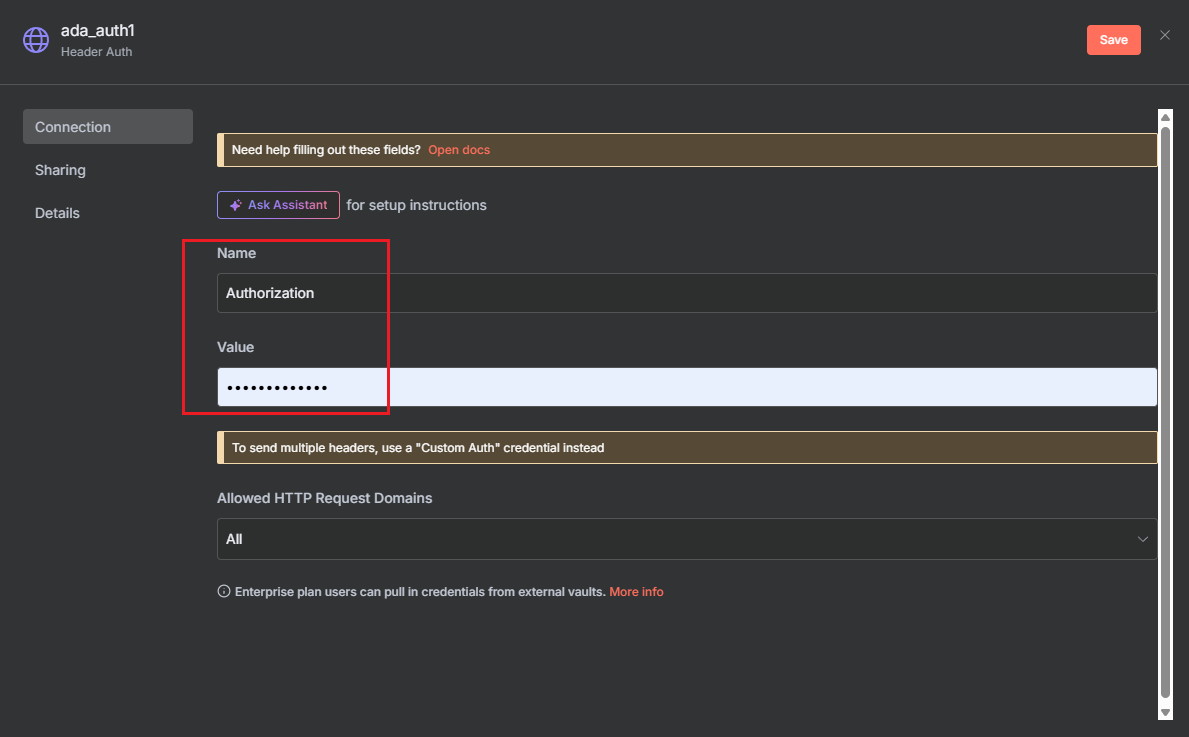"
},
"typeVersion": 1
},
{
"id": "a207fbeb-3186-4116-920d-7c835c819af7",
"name": "付箋5",
"type": "n8n-nodes-base.stickyNote",
"position": [
-2272,
2880
],
"parameters": {
"width": 1088,
"height": 224,
"content": "## Consult\nContact us for inquiries or feedback.\n\nemail: n8n-plugin@ada.im\n\n[Discord](https://discord.com/invite/Bwd6zGYThS)\n\nExplore [Ada](https://ada.im/home?ada_data_=&utm_source=n8n&utm_medium=landingpage&utm_infeluncer=landingpage&utm_campain=landingpage&utm_content=landingpage) : Your own AI Data Analyst."
},
"typeVersion": 1
},
{
"id": "ab5c1992-7fc4-497b-8fd1-af121a4cd31b",
"name": "付箋6",
"type": "n8n-nodes-base.stickyNote",
"position": [
-2288,
512
],
"parameters": {
"width": 1056,
"height": 2336,
"content": "## 1️⃣ Apply for an API Key\nYou can easily create and manage your API Key in the [ADA official website](https://ada.im/home?ada_data_=&utm_source=n8n&utm_medium=landingpage&utm_infeluncer=landingpage&utm_campain=landingpage&utm_content=landingpage) - API. To begin with, You need to register for an ADA account.\n\nOnce on the homepage, click the bottom left corner to access the API management dashboard.\n\n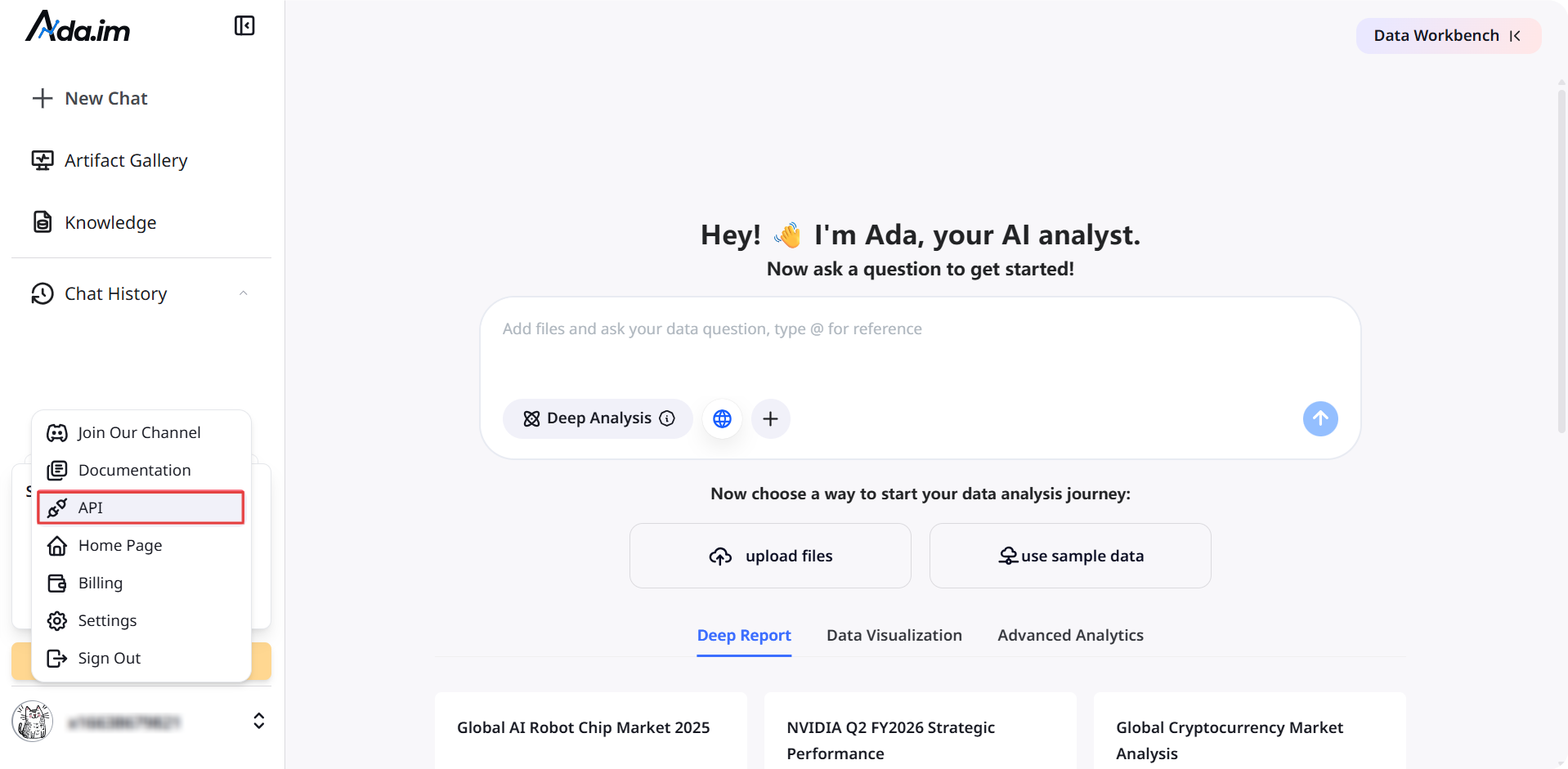\n\nHere, you can create new APIs and set the credit consumption limit for each API. A single account can create up to 10 APIs.\n\n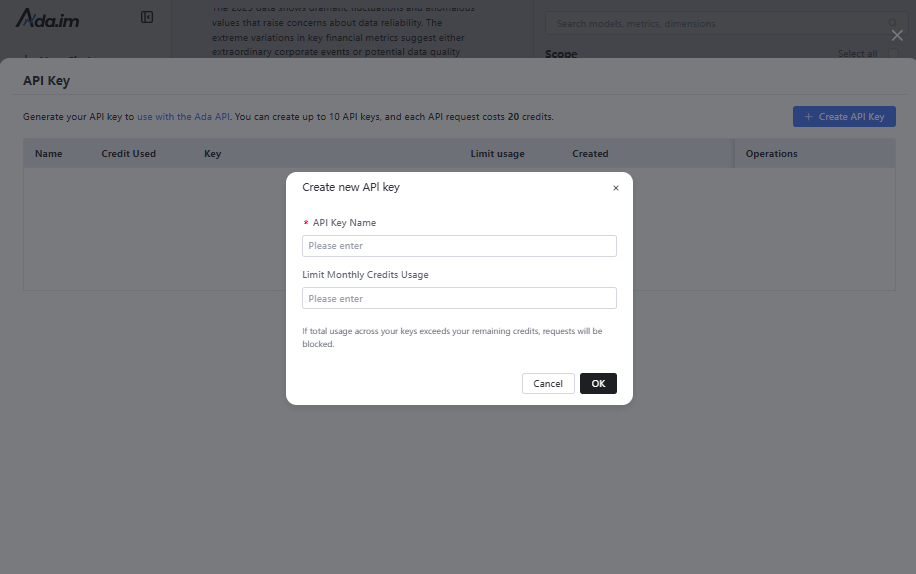\n\nAfter successful creation, you can copy the API Key to set credentials. You can also view the credit consumption of each API and manage your APIs.\n\n\n### **Credit Rules:**\n\n- Calling a single tool consumes 20 credits.\n- You will get 500 free credits per month for ADA Free account, with each batch of credits valid for three months.\n- When credits run out, you can purchase more or upgrade your account on the ADA Billing page. Each batch of purchased credits is valid for three months. Expiration dates and billing details are available on the [ADA website-Billing](https://ada.im/udsl/#/system/billing).\n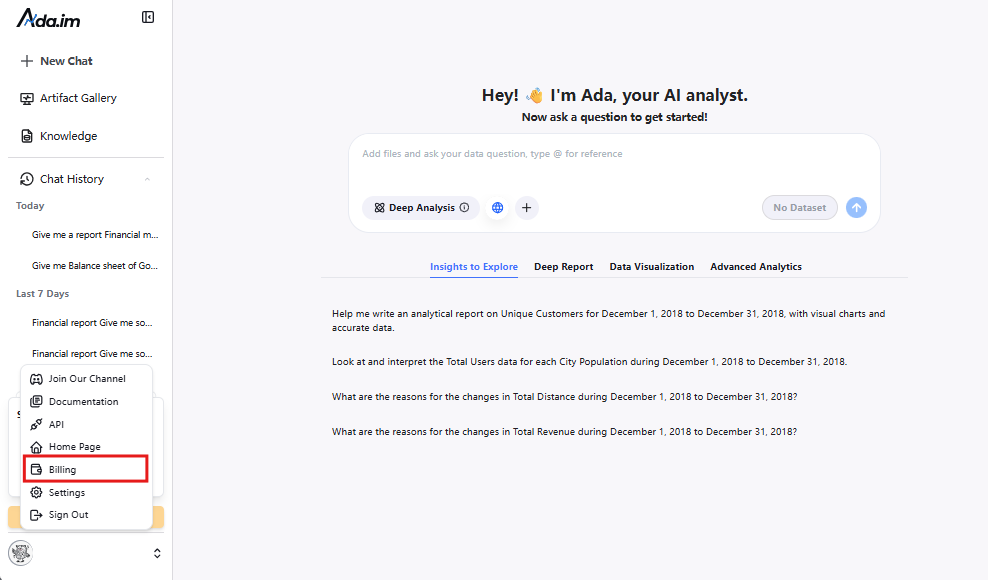"
},
"typeVersion": 1
},
{
"id": "c29c4606-ab1b-42b8-bbf3-8c79d68a2a98",
"name": "開始",
"type": "n8n-nodes-base.manualTrigger",
"position": [
-432,
608
],
"parameters": {},
"typeVersion": 1
},
{
"id": "a4d275ff-e4ff-4066-a4e0-f4d857f5e4c4",
"name": "データベースからデータを取得",
"type": "n8n-nodes-base.mySql",
"position": [
0,
800
],
"parameters": {
"query": "select * from orders limit 100",
"options": {},
"operation": "executeQuery"
},
"typeVersion": 2.5
},
{
"id": "75fc8170-eec6-47c7-bd66-384d2f1a53a8",
"name": "データ処理",
"type": "n8n-nodes-base.aggregate",
"position": [
336,
608
],
"parameters": {
"options": {},
"aggregate": "aggregateAllItemData"
},
"typeVersion": 1
},
{
"id": "809b1798-dcf6-42cc-8d8d-d258fa6d67fd",
"name": "Google Sheetsからデータを取得",
"type": "n8n-nodes-base.googleSheets",
"position": [
0,
992
],
"parameters": {
"options": {},
"sheetName": {
"__rl": true,
"mode": "list",
"value": 332281959,
"cachedResultUrl": "https://docs.google.com/spreadsheets/d/1IhUFreWCZFLAUaCP9ELBnvakg1xSs4CgqnSnMvgkGmM/edit#gid=332281959",
"cachedResultName": "Sheet1"
},
"documentId": {
"__rl": true,
"mode": "list",
"value": "1IhUFreWCZFLAUaCP9ELBnvakg1xSs4CgqnSnMvgkGmM",
"cachedResultUrl": "https://docs.google.com/spreadsheets/d/1IhUFreWCZFLAUaCP9ELBnvakg1xSs4CgqnSnMvgkGmM/edit?usp=drivesdk",
"cachedResultName": "example_data"
}
},
"credentials": {
"googleSheetsOAuth2Api": {
"id": "TYgnI9PXhFzSLNSk",
"name": "Google Sheets account"
}
},
"typeVersion": 4.7
},
{
"id": "0cf1ecaf-77a5-4c42-a8a4-c1ed05d1b044",
"name": "ローカルファイルからデータを取得",
"type": "n8n-nodes-base.readWriteFile",
"position": [
-80,
1184
],
"parameters": {
"options": {
"dataPropertyName": "input_file"
}
},
"typeVersion": 1
},
{
"id": "53f02952-806b-4023-9723-f30a35024b3f",
"name": "xlsxファイルからJSONを抽出",
"type": "n8n-nodes-base.extractFromFile",
"position": [
112,
1184
],
"parameters": {
"options": {},
"operation": "xlsx",
"binaryPropertyName": "input_file"
},
"typeVersion": 1
},
{
"id": "02987176-ebb7-4fda-b5e3-fb99f023f381",
"name": "データ分析",
"type": "n8n-nodes-base.httpRequest",
"position": [
560,
608
],
"parameters": {
"url": "https://ada.im/api/platform_api/PythonDataAnalysis",
"method": "POST",
"options": {},
"sendBody": true,
"authentication": "genericCredentialType",
"bodyParameters": {
"parameters": [
{
"name": "input_json",
"value": "={{$json.data}}"
},
{
"name": "query",
"value": "What are the top three products in terms of sales in 2024? Analyze the gap between the top three products and the others from a statistical perspective."
},
{
"name": "platform",
"value": "n8n"
}
]
},
"genericAuthType": "httpHeaderAuth"
},
"typeVersion": 4.2
},
{
"id": "34c0b0d3-197d-4966-936b-b7601530e325",
"name": "データ解釈",
"type": "n8n-nodes-base.httpRequest",
"position": [
560,
784
],
"parameters": {
"url": "https://ada.im/api/platform_api/DataInterpretation",
"method": "POST",
"options": {},
"sendBody": true,
"authentication": "genericCredentialType",
"bodyParameters": {
"parameters": [
{
"name": "input_json",
"value": "={{$json.data}}"
},
{
"name": "query",
"value": "Sales volume of each product in 2024"
},
{
"name": "platform",
"value": "n8n"
}
]
},
"genericAuthType": "httpHeaderAuth"
},
"typeVersion": 4.2
},
{
"id": "50a3424f-7147-4d38-9cb3-2b90fed8a572",
"name": "データ可視化",
"type": "n8n-nodes-base.httpRequest",
"position": [
560,
960
],
"parameters": {
"url": "https://ada.im/api/platform_api/EchartsVisualization",
"method": "POST",
"options": {},
"sendBody": true,
"authentication": "genericCredentialType",
"bodyParameters": {
"parameters": [
{
"name": "input_json",
"value": "={{$json.data}}"
},
{
"name": "query",
"value": "Use a pie chart to display the sales of each product in 2024, and a line chart to represent the total monthly sales of each product in 2024. Additionally, you can add some extra charts based on the data."
},
{
"name": "platform",
"value": "n8n"
}
]
},
"genericAuthType": "httpHeaderAuth"
},
"credentials": {
"httpHeaderAuth": {
"id": "A1ydMlIrxdo5rBa4",
"name": "Header Auth account"
}
},
"typeVersion": 4.2
},
{
"id": "0d7f6c15-aef5-4b3a-81bc-b21a0a9f4c1d",
"name": "HTMLファイルに変換",
"type": "n8n-nodes-base.convertToFile",
"position": [
976,
960
],
"parameters": {
"options": {
"fileName": "chart.html"
},
"operation": "toText",
"sourceProperty": "html",
"binaryPropertyName": "chart"
},
"typeVersion": 1.1
},
{
"id": "0454bd77-f7fc-4798-afa1-3f93a0e006d5",
"name": "マークダウンをHTMLに変換",
"type": "n8n-nodes-base.markdown",
"position": [
976,
608
],
"parameters": {
"mode": "markdownToHtml",
"options": {
"tables": true,
"simpleLineBreaks": true,
"completeHTMLDocument": false
},
"markdown": "={{ $json.data.parseJson().data }}",
"destinationKey": "html"
},
"typeVersion": 1
},
{
"id": "6ffbdfb1-f72a-480b-82ae-c0fcdc881feb",
"name": "マークダウンをHTMLに変換 2",
"type": "n8n-nodes-base.markdown",
"position": [
976,
784
],
"parameters": {
"mode": "markdownToHtml",
"options": {
"tables": true,
"simpleLineBreaks": true,
"completeHTMLDocument": false
},
"markdown": "={{ $json.data.parseJson().data }}",
"destinationKey": "html"
},
"typeVersion": 1
},
{
"id": "f765788b-4efb-4daa-908c-84e653784156",
"name": "付箋7",
"type": "n8n-nodes-base.stickyNote",
"position": [
-1152,
2096
],
"parameters": {
"width": 512,
"height": 1168,
"content": "## 3️⃣ Try out the skills\nSelect the data source and fill in the query parameters for the DataAnalysis, DataInterpretation, and DataVisualization nodes.\n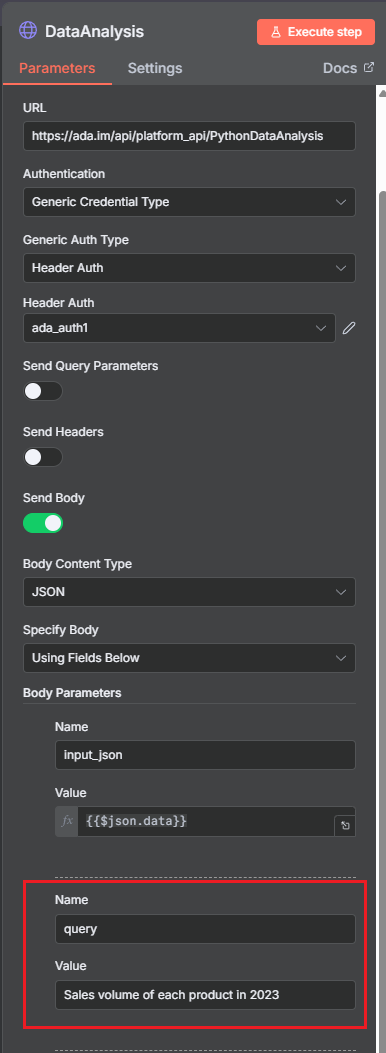"
},
"typeVersion": 1
},
{
"id": "30aaf9f5-e935-4ddb-adcc-baff0ab5b101",
"name": "データ分析メッセージを送信",
"type": "n8n-nodes-base.gmail",
"position": [
1456,
608
],
"webhookId": "6634ed2d-552c-4bf6-a7f2-bbdee8d61df4",
"parameters": {
"message": "={{ $json.html }}",
"options": {},
"subject": "n8n-email"
},
"typeVersion": 2.1
},
{
"id": "a10921fc-2258-48d5-8f40-99bf495a082c",
"name": "データ解釈メッセージを送信",
"type": "n8n-nodes-base.gmail",
"position": [
1456,
784
],
"webhookId": "6634ed2d-552c-4bf6-a7f2-bbdee8d61df4",
"parameters": {
"sendTo": "cuifangxu1999@gmail.com",
"message": "={{ $json.html }}",
"options": {},
"subject": "n8ntest"
},
"typeVersion": 2.1
},
{
"id": "8fb14896-41b4-4eb1-8d4e-b70f3b97ad49",
"name": "データ可視化を送信",
"type": "n8n-nodes-base.gmail",
"position": [
1456,
960
],
"webhookId": "6634ed2d-552c-4bf6-a7f2-bbdee8d61df4",
"parameters": {
"sendTo": "cuifangxu1999@gmail.com",
"message": "From n8n, please use a browser to open the HTML file in the attachment",
"options": {
"attachmentsUi": {
"attachmentsBinary": [
{
"property": "=chart"
}
]
}
},
"subject": "n8ntest",
"emailType": "text"
},
"typeVersion": 2.1
},
{
"id": "b29b555a-bd5d-4a6f-8873-9027c13ae3ef",
"name": "サンプルデータ",
"type": "n8n-nodes-base.code",
"position": [
0,
608
],
"parameters": {
"jsCode": "const categories = [\n 'Electronics',\n 'Clothing & Fashion',\n 'Home & Furniture',\n 'Food & Beverages',\n 'Sports & Outdoors',\n 'Beauty & Personal Care'\n];\nconst regions = [\n 'North America',\n 'South America',\n 'Europe',\n 'Asia',\n 'Africa',\n 'Oceania',\n 'Middle East',\n 'Central Asia'\n];\n\nfunction randomDateWithin730Days() {\n const now = new Date();\n const daysAgo = Math.floor(Math.random() * 730);\n now.setDate(now.getDate() - daysAgo);\n return now.toISOString().slice(0, 10);\n}\n\nlet items = [];\nfor (let i = 0; i < 1000; i++) {\n items.push({\n json: {\n order_date: randomDateWithin730Days(),\n product_category: categories[Math.floor(Math.random() * categories.length)],\n region: regions[Math.floor(Math.random() * regions.length)],\n sales_amount: (50 + Math.random() * 49950).toFixed(2)\n }\n });\n}\nreturn items;"
},
"typeVersion": 2
},
{
"id": "7213ec38-425d-4020-9776-5750c286aa65",
"name": "可視化データ処理",
"type": "n8n-nodes-base.set",
"position": [
768,
960
],
"parameters": {
"options": {},
"assignments": {
"assignments": [
{
"id": "ab328d59-6af7-4084-9c75-a7b5c5673168",
"name": "html",
"type": "string",
"value": "={{ JSON.parse($json.data).data }}"
}
]
}
},
"typeVersion": 3.4
}
],
"pinData": {},
"connections": {
"c29c4606-ab1b-42b8-bbf3-8c79d68a2a98": {
"main": [
[
{
"node": "b29b555a-bd5d-4a6f-8873-9027c13ae3ef",
"type": "main",
"index": 0
}
]
]
},
"b29b555a-bd5d-4a6f-8873-9027c13ae3ef": {
"main": [
[
{
"node": "75fc8170-eec6-47c7-bd66-384d2f1a53a8",
"type": "main",
"index": 0
}
]
]
},
"02987176-ebb7-4fda-b5e3-fb99f023f381": {
"main": [
[
{
"node": "0454bd77-f7fc-4798-afa1-3f93a0e006d5",
"type": "main",
"index": 0
}
]
]
},
"75fc8170-eec6-47c7-bd66-384d2f1a53a8": {
"main": [
[
{
"node": "50a3424f-7147-4d38-9cb3-2b90fed8a572",
"type": "main",
"index": 0
},
{
"node": "02987176-ebb7-4fda-b5e3-fb99f023f381",
"type": "main",
"index": 0
},
{
"node": "34c0b0d3-197d-4966-936b-b7601530e325",
"type": "main",
"index": 0
}
]
]
},
"50a3424f-7147-4d38-9cb3-2b90fed8a572": {
"main": [
[
{
"node": "7213ec38-425d-4020-9776-5750c286aa65",
"type": "main",
"index": 0
}
]
]
},
"34c0b0d3-197d-4966-936b-b7601530e325": {
"main": [
[
{
"node": "6ffbdfb1-f72a-480b-82ae-c0fcdc881feb",
"type": "main",
"index": 0
}
]
]
},
"0d7f6c15-aef5-4b3a-81bc-b21a0a9f4c1d": {
"main": [
[
{
"node": "8fb14896-41b4-4eb1-8d4e-b70f3b97ad49",
"type": "main",
"index": 0
}
]
]
},
"a4d275ff-e4ff-4066-a4e0-f4d857f5e4c4": {
"main": [
[
{
"node": "75fc8170-eec6-47c7-bd66-384d2f1a53a8",
"type": "main",
"index": 0
}
]
]
},
"8fb14896-41b4-4eb1-8d4e-b70f3b97ad49": {
"main": [
[]
]
},
"0454bd77-f7fc-4798-afa1-3f93a0e006d5": {
"main": [
[
{
"node": "30aaf9f5-e935-4ddb-adcc-baff0ab5b101",
"type": "main",
"index": 0
}
]
]
},
"0cf1ecaf-77a5-4c42-a8a4-c1ed05d1b044": {
"main": [
[
{
"node": "53f02952-806b-4023-9723-f30a35024b3f",
"type": "main",
"index": 0
}
]
]
},
"30aaf9f5-e935-4ddb-adcc-baff0ab5b101": {
"main": [
[]
]
},
"6ffbdfb1-f72a-480b-82ae-c0fcdc881feb": {
"main": [
[
{
"node": "a10921fc-2258-48d5-8f40-99bf495a082c",
"type": "main",
"index": 0
}
]
]
},
"7213ec38-425d-4020-9776-5750c286aa65": {
"main": [
[
{
"node": "0d7f6c15-aef5-4b3a-81bc-b21a0a9f4c1d",
"type": "main",
"index": 0
}
]
]
},
"53f02952-806b-4023-9723-f30a35024b3f": {
"main": [
[
{
"node": "75fc8170-eec6-47c7-bd66-384d2f1a53a8",
"type": "main",
"index": 0
}
]
]
},
"809b1798-dcf6-42cc-8d8d-d258fa6d67fd": {
"main": [
[
{
"node": "75fc8170-eec6-47c7-bd66-384d2f1a53a8",
"type": "main",
"index": 0
}
]
]
},
"a10921fc-2258-48d5-8f40-99bf495a082c": {
"main": [
[]
]
}
}
}よくある質問
このワークフローの使い方は?
上記のJSON設定コードをコピーし、n8nインスタンスで新しいワークフローを作成して「JSONからインポート」を選択、設定を貼り付けて認証情報を必要に応じて変更してください。
このワークフローはどんな場面に適していますか?
上級
有料ですか?
このワークフローは完全無料です。ただし、ワークフローで使用するサードパーティサービス(OpenAI APIなど)は別途料金が発生する場合があります。
関連ワークフロー
n8nノードの探索(可視化リファレンスライブラリ内)
n8nノードを可視化リファレンスライブラリで探索
If
Ftp
Set
+
If
Ftp
Set
113 ノードI versus AI
その他
Unipile と Google Sheets を使って LinkedIn 連絡依頼とアイシングメッセージを自動送信
Unipile と Google Sheets を使って LinkedIn 連絡先へのリクエストとフリーマーキングメッセージを自動送信
If
Set
Code
+
If
Set
Code
44 ノードPollupAI
その他
ブログ投稿自動化とSNSプロモーションエージェント
GPT-4、Perplexity、WordPressを使用したSEOブログ作成の自動化+ソーシャルメディア
Set
Code
Gmail
+
Set
Code
Gmail
79 ノードLukaszB
デザイン
ComfyUI を使用して AI メディアの生成:画像、動画、3D、オーディオ橋渡し
ComfyUI を使って AI メディアを生成する:画像、動画、3D、オーディオ連携
If
Set
Code
+
If
Set
Code
51 ノードNielo
デザイン
以下は、入力された中国語テキストを日本語に正確に翻訳し、元の専門用語は変更せず、1 行に 1 つの翻訳を加えた結果です。
DeepGramとGPT-4oによる音声対話分析・可視化
Set
Code
Html
+
Set
Code
Html
54 ノードRealSimple Solutions
人工知能
潜在顧客開掘とメールワーキングフロー
Google Maps、SendGrid、AIを使用してB2Bリード獲得とメールマーケティングを自動化
If
Set
Code
+
If
Set
Code
141 ノードEzema Kingsley Chibuzo
リード獲得
