AI 객체 검출, CDN 및 ElasticSearch를 사용하여 자신의 이미지 검색을 구축
고급
이것은AI분야의자동화 워크플로우로, 17개의 노드를 포함합니다.주로 Set, Filter, SplitOut, EditImage, HttpRequest 등의 노드를 사용하며인공지능 기술을 결합하여 스마트 자동화를 구현합니다. 사용법 AI 객체 검출, CDN 및 ElasticSearch를 사용하여 자신의 이미지 검색 구축
사전 요구사항
- •대상 API의 인증 정보가 필요할 수 있음
카테고리
워크플로우 미리보기
노드 연결 관계를 시각적으로 표시하며, 확대/축소 및 이동을 지원합니다
워크플로우 내보내기
다음 JSON 구성을 복사하여 n8n에 가져오면 이 워크플로우를 사용할 수 있습니다
{
"meta": {
"instanceId": "26ba763460b97c249b82942b23b6384876dfeb9327513332e743c5f6219c2b8e"
},
"nodes": [
{
"id": "6359f725-1ede-4b05-bc19-05a7e85c0865",
"name": "\"Test workflow\" 클릭 시",
"type": "n8n-nodes-base.manualTrigger",
"position": [
680,
292
],
"parameters": {},
"typeVersion": 1
},
{
"id": "9e1e61c7-f5fd-4e8a-99a6-ccc5a24f5528",
"name": "원본 이미지 가져오기",
"type": "n8n-nodes-base.httpRequest",
"position": [
1000,
292
],
"parameters": {
"url": "={{ $json.source_image }}",
"options": {}
},
"typeVersion": 4.2
},
{
"id": "9b1b94cf-3a7d-4c43-ab6c-8df9824b5667",
"name": "결과만 분리하기",
"type": "n8n-nodes-base.splitOut",
"position": [
1428,
323
],
"parameters": {
"options": {},
"fieldToSplitOut": "result"
},
"typeVersion": 1
},
{
"id": "fcbaf6c3-2aee-4ea1-9c5e-2833dd7a9f50",
"name": "점수 >= 0.9 필터링",
"type": "n8n-nodes-base.filter",
"position": [
1608,
323
],
"parameters": {
"options": {},
"conditions": {
"options": {
"leftValue": "",
"caseSensitive": true,
"typeValidation": "strict"
},
"combinator": "and",
"conditions": [
{
"id": "367d83ef-8ecf-41fe-858c-9bfd78b0ae9f",
"operator": {
"type": "number",
"operation": "gte"
},
"leftValue": "={{ $json.score }}",
"rightValue": 0.9
}
]
}
},
"typeVersion": 2
},
{
"id": "954ce7b0-ef82-4203-8706-17cfa5e5e3ff",
"name": "이미지에서 객체 자르기",
"type": "n8n-nodes-base.editImage",
"position": [
2080,
432
],
"parameters": {
"width": "={{ $json.box.xmax - $json.box.xmin }}",
"height": "={{ $json.box.ymax - $json.box.ymin }}",
"options": {
"format": "jpeg",
"fileName": "={{ $binary.data.fileName.split('.')[0].urlEncode()+'-'+$json.label.urlEncode() + '-' + $itemIndex }}.jpg"
},
"operation": "crop",
"positionX": "={{ $json.box.xmin }}",
"positionY": "={{ $json.box.ymin }}"
},
"typeVersion": 1
},
{
"id": "40027456-4bf9-4eea-8d71-aa28e69b29e5",
"name": "변수 설정",
"type": "n8n-nodes-base.set",
"position": [
840,
292
],
"parameters": {
"options": {},
"assignments": {
"assignments": [
{
"id": "9e95d951-8530-4a80-bd00-6bb55623a71f",
"name": "CLOUDFLARE_ACCOUNT_ID",
"type": "string",
"value": ""
},
{
"id": "66807a90-63a1-4d4e-886e-e8abf3019a34",
"name": "model",
"type": "string",
"value": "@cf/facebook/detr-resnet-50"
},
{
"id": "a13ccde6-e6e3-46f4-afa3-2134af7bc765",
"name": "source_image",
"type": "string",
"value": "https://images.pexels.com/photos/2293367/pexels-photo-2293367.jpeg?auto=compress&cs=tinysrgb&w=600"
},
{
"id": "0734fc55-b414-47f7-8b3e-5c880243f3ed",
"name": "elasticsearch_index",
"type": "string",
"value": "n8n-image-search"
}
]
}
},
"typeVersion": 3.3
},
{
"id": "c3d8c5e3-546e-472c-9e6e-091cf5cee3c3",
"name": "Detr-Resnet-50 객체 분류 사용",
"type": "n8n-nodes-base.httpRequest",
"position": [
1248,
324
],
"parameters": {
"url": "=https://api.cloudflare.com/client/v4/accounts/{{ $('Set Variables').item.json.CLOUDFLARE_ACCOUNT_ID }}/ai/run/{{ $('Set Variables').item.json.model }}",
"method": "POST",
"options": {},
"sendBody": true,
"contentType": "binaryData",
"authentication": "predefinedCredentialType",
"inputDataFieldName": "data",
"nodeCredentialType": "cloudflareApi"
},
"credentials": {
"cloudflareApi": {
"id": "qOynkQdBH48ofOSS",
"name": "Cloudflare account"
}
},
"typeVersion": 4.2
},
{
"id": "3c7aa2fc-9ca1-41ba-a10d-aa5930d45f18",
"name": "Cloudinary에 업로드",
"type": "n8n-nodes-base.httpRequest",
"position": [
2380,
380
],
"parameters": {
"url": "https://api.cloudinary.com/v1_1/daglih2g8/image/upload",
"method": "POST",
"options": {},
"sendBody": true,
"sendQuery": true,
"contentType": "multipart-form-data",
"authentication": "genericCredentialType",
"bodyParameters": {
"parameters": [
{
"name": "file",
"parameterType": "formBinaryData",
"inputDataFieldName": "data"
}
]
},
"genericAuthType": "httpQueryAuth",
"queryParameters": {
"parameters": [
{
"name": "upload_preset",
"value": "n8n-workflows-preset"
}
]
}
},
"credentials": {
"httpQueryAuth": {
"id": "sT9jeKzZiLJ3bVPz",
"name": "Cloudinary API"
}
},
"typeVersion": 4.2
},
{
"id": "3c4e1f04-a0ba-4cce-b82a-aa3eadc4e7e1",
"name": "Elasticsearch에 문서 생성",
"type": "n8n-nodes-base.elasticsearch",
"position": [
2580,
380
],
"parameters": {
"indexId": "={{ $('Set Variables').item.json.elasticsearch_index }}",
"options": {},
"fieldsUi": {
"fieldValues": [
{
"fieldId": "image_url",
"fieldValue": "={{ $json.secure_url.replace('upload','upload/f_auto,q_auto') }}"
},
{
"fieldId": "source_image_url",
"fieldValue": "={{ $('Set Variables').item.json.source_image }}"
},
{
"fieldId": "label",
"fieldValue": "={{ $('Crop Object From Image').item.json.label }}"
},
{
"fieldId": "metadata",
"fieldValue": "={{ JSON.stringify(Object.assign($('Crop Object From Image').item.json, { filename: $json.original_filename })) }}"
}
]
},
"operation": "create",
"additionalFields": {}
},
"credentials": {
"elasticsearchApi": {
"id": "dRuuhAgS7AF0mw0S",
"name": "Elasticsearch account"
}
},
"typeVersion": 1
},
{
"id": "292c9821-c123-44fa-9ba1-c37bf84079bc",
"name": "스티커 메모",
"type": "n8n-nodes-base.stickyNote",
"position": [
620,
120
],
"parameters": {
"color": 7,
"width": 541.1455500767354,
"height": 381.6388867600897,
"content": "## 1. Get Source Image\n[Read more about setting variables for your workflow](https://docs.n8n.io/integrations/builtin/core-nodes/n8n-nodes-base.set)\n\nFor this demo, we'll manually define an image to process. In production however, this image can come from a variety of sources such as drives, webhooks and more."
},
"typeVersion": 1
},
{
"id": "863271dc-fb9d-4211-972d-6b57336073b4",
"name": "스티커 메모1",
"type": "n8n-nodes-base.stickyNote",
"position": [
1180,
80
],
"parameters": {
"color": 7,
"width": 579.7748008857744,
"height": 437.4680103498263,
"content": "## 2. Use Detr-Resnet-50 Object Classification\n[Learn more about Cloudflare Workers AI](https://developers.cloudflare.com/workers-ai/)\n\nNot all AI workflows need an LLM! As in this example, we're using a non-LLM vision model to parse the source image and return what objects are contained within. The image search feature we're building will be based on the objects in the image making for a much more granular search via object association.\n\nWe'll use the Cloudflare Workers AI service which conveniently provides this model via API use."
},
"typeVersion": 1
},
{
"id": "b73b45da-0436-4099-b538-c6b3b84822f2",
"name": "스티커 메모2",
"type": "n8n-nodes-base.stickyNote",
"position": [
1800,
260
],
"parameters": {
"color": 7,
"width": 466.35460775498495,
"height": 371.9272151757119,
"content": "## 3. Crop Objects Out of Source Image\n[Read more about Editing Images in n8n](https://docs.n8n.io/integrations/builtin/core-nodes/n8n-nodes-base.editimage)\n\nWith our objects identified by their bounding boxes, we can \"cut\" them out of the source image as separate images."
},
"typeVersion": 1
},
{
"id": "465bd842-8a35-49d8-a9ff-c30d164620db",
"name": "스티커 메모3",
"type": "n8n-nodes-base.stickyNote",
"position": [
2300,
180
],
"parameters": {
"color": 7,
"width": 478.20345439832454,
"height": 386.06196032653685,
"content": "## 4. Index Object Images In ElasticSearch\n[Read more about using ElasticSearch](https://docs.n8n.io/integrations/builtin/app-nodes/n8n-nodes-base.elasticsearch)\n\nBy storing the newly created object images externally and indexing them in Elasticsearch, we now have a foundation for our Image Search service which queries by object association."
},
"typeVersion": 1
},
{
"id": "6a04b4b5-7830-410d-9b5b-79acb0b1c78b",
"name": "스티커 메모4",
"type": "n8n-nodes-base.stickyNote",
"position": [
1800,
-220
],
"parameters": {
"color": 7,
"width": 328.419768654291,
"height": 462.65463700396174,
"content": "Fig 1. Result of Classification\n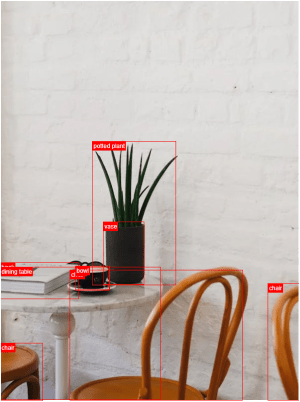"
},
"typeVersion": 1
},
{
"id": "8f607951-ba41-4362-8323-e8b4b96ad122",
"name": "원본 이미지 다시 가져오기",
"type": "n8n-nodes-base.httpRequest",
"position": [
1880,
432
],
"parameters": {
"url": "={{ $('Set Variables').item.json.source_image }}",
"options": {}
},
"typeVersion": 4.2
},
{
"id": "6933f67d-276b-4908-8602-654aa352a68b",
"name": "스티커 메모8",
"type": "n8n-nodes-base.stickyNote",
"position": [
220,
120
],
"parameters": {
"width": 359.6648027457353,
"height": 352.41026669883723,
"content": "## Try It Out!\n### This workflow does the following:\n* Downloads an image\n* Uses an object classification AI model to identify objects in the image.\n* Crops the objects out from the original image into new image files.\n* Indexes the image's object in an Elasticsearch Database to enable image search.\n\n### Need Help?\nJoin the [Discord](https://discord.com/invite/XPKeKXeB7d) or ask in the [Forum](https://community.n8n.io/)!\n\nHappy Hacking!"
},
"typeVersion": 1
},
{
"id": "35615ed5-43e8-43f0-95fe-1f95a1177d69",
"name": "스티커 메모5",
"type": "n8n-nodes-base.stickyNote",
"position": [
800,
280
],
"parameters": {
"width": 172.9365918827757,
"height": 291.6881468483679,
"content": "\n\n\n\n\n\n\n\n\n\n\n\n\n\n\n\n🚨**Required**\n* Set your variables here first!"
},
"typeVersion": 1
}
],
"pinData": {},
"connections": {
"40027456-4bf9-4eea-8d71-aa28e69b29e5": {
"main": [
[
{
"node": "9e1e61c7-f5fd-4e8a-99a6-ccc5a24f5528",
"type": "main",
"index": 0
}
]
]
},
"9e1e61c7-f5fd-4e8a-99a6-ccc5a24f5528": {
"main": [
[
{
"node": "c3d8c5e3-546e-472c-9e6e-091cf5cee3c3",
"type": "main",
"index": 0
}
]
]
},
"fcbaf6c3-2aee-4ea1-9c5e-2833dd7a9f50": {
"main": [
[
{
"node": "8f607951-ba41-4362-8323-e8b4b96ad122",
"type": "main",
"index": 0
}
]
]
},
"3c7aa2fc-9ca1-41ba-a10d-aa5930d45f18": {
"main": [
[
{
"node": "3c4e1f04-a0ba-4cce-b82a-aa3eadc4e7e1",
"type": "main",
"index": 0
}
]
]
},
"954ce7b0-ef82-4203-8706-17cfa5e5e3ff": {
"main": [
[
{
"node": "3c7aa2fc-9ca1-41ba-a10d-aa5930d45f18",
"type": "main",
"index": 0
}
]
]
},
"9b1b94cf-3a7d-4c43-ab6c-8df9824b5667": {
"main": [
[
{
"node": "fcbaf6c3-2aee-4ea1-9c5e-2833dd7a9f50",
"type": "main",
"index": 0
}
]
]
},
"8f607951-ba41-4362-8323-e8b4b96ad122": {
"main": [
[
{
"node": "954ce7b0-ef82-4203-8706-17cfa5e5e3ff",
"type": "main",
"index": 0
}
]
]
},
"6359f725-1ede-4b05-bc19-05a7e85c0865": {
"main": [
[
{
"node": "40027456-4bf9-4eea-8d71-aa28e69b29e5",
"type": "main",
"index": 0
}
]
]
},
"c3d8c5e3-546e-472c-9e6e-091cf5cee3c3": {
"main": [
[
{
"node": "9b1b94cf-3a7d-4c43-ab6c-8df9824b5667",
"type": "main",
"index": 0
}
]
]
}
}
}자주 묻는 질문
이 워크플로우를 어떻게 사용하나요?
위의 JSON 구성 코드를 복사하여 n8n 인스턴스에서 새 워크플로우를 생성하고 "JSON에서 가져오기"를 선택한 후, 구성을 붙여넣고 필요에 따라 인증 설정을 수정하세요.
이 워크플로우는 어떤 시나리오에 적합한가요?
고급 - 인공지능
유료인가요?
이 워크플로우는 완전히 무료이며 직접 가져와 사용할 수 있습니다. 다만, 워크플로우에서 사용하는 타사 서비스(예: OpenAI API)는 사용자 직접 비용을 지불해야 할 수 있습니다.
관련 워크플로우 추천
Qdrant, Mistral.ai, OpenAI를 사용하여 세금 법률 어시스턴트를 구축합니다.
Qdrant, Mistral.ai, OpenAI를 사용하여 세금 법률 어시스턴트를 구축합니다.
Set
Wait
Filter
+
Set
Wait
Filter
38 노드Jimleuk
금융
빌드 커스텀 Qdrant 벡터 스토리지 MCP 서버
개별 Qdrant 벡터 스토리지 MCP 서버 구축
If
Set
Code
+
If
Set
Code
44 노드Jimleuk
빌딩 블록
基于动态提示与Airtable의AI데이터추출
통해动态提示与Airtable实现AI데이터추출
Set
Code
Filter
+
Set
Code
Filter
51 노드Jimleuk
인공지능
동적 프롬프트와 Baserow를 활용한 AI 데이터 추출
동적 프롬프트와 Baserow를 활용한 AI 데이터 추출
Set
Code
Filter
+
Set
Code
Filter
45 노드Jimleuk
인공지능
AI를 사용한 브랜드 스타일 블로그 생성 자동화
AI를 사용한 브랜드 스타일 블로그 생성 자동화
Set
Html
Limit
+
Set
Html
Limit
27 노드Jimleuk
인공지능
AI 비전으로 이미지 검증 작업 자동화
AI 비전 기술을 통한 이미지 검증 작업 자동화
Set
Split Out
Edit Image
+
Set
Split Out
Edit Image
11 노드Jimleuk
제품
워크플로우 정보
난이도
고급
노드 수17
카테고리1
노드 유형8
저자

Jimleuk
@jimleukFreelance consultant based in the UK specialising in AI-powered automations. I work with select clients tackling their most challenging projects. For business enquiries, send me an email at hello@jimle.uk LinkedIn: https://www.linkedin.com/in/jimleuk/ X/Twitter: https://x.com/jimle_uk
외부 링크
n8n.io에서 보기 →
이 워크플로우 공유