n8n과 Gemini AI 이미지 편집을 기반으로 한 이미지 복구 서비스 구축
고급
이것은Design, AI분야의자동화 워크플로우로, 17개의 노드를 포함합니다.주로 Set, SplitOut, GoogleDrive, HttpRequest, ConvertToFile 등의 노드를 사용하며인공지능 기술을 결합하여 스마트 자동화를 구현합니다. n8n과 Gemini AI 이미지 편집을 기반으로 한 이미지 복구 서비스 구축
사전 요구사항
- •Google Drive API 인증 정보
- •대상 API의 인증 정보가 필요할 수 있음
워크플로우 미리보기
노드 연결 관계를 시각적으로 표시하며, 확대/축소 및 이동을 지원합니다
워크플로우 내보내기
다음 JSON 구성을 복사하여 n8n에 가져오면 이 워크플로우를 사용할 수 있습니다
{
"meta": {
"instanceId": "408f9fb9940c3cb18ffdef0e0150fe342d6e655c3a9fac21f0f644e8bedabcd9",
"templateCredsSetupCompleted": true
},
"nodes": [
{
"id": "b6a5c37d-b845-4fd2-8ea3-db23aed99286",
"name": "'워크플로 실행' 클릭 시",
"type": "n8n-nodes-base.manualTrigger",
"position": [
-80,
320
],
"parameters": {},
"typeVersion": 1
},
{
"id": "1f363fc5-42cf-4e9c-ae74-496030362ed9",
"name": "샘플 이미지",
"type": "n8n-nodes-base.set",
"position": [
120,
320
],
"parameters": {
"options": {},
"assignments": {
"assignments": [
{
"id": "7196d08d-dff6-48e4-a06d-0ec863a4dff3",
"name": "url",
"type": "array",
"value": "={{\n[\n \"https://res.cloudinary.com/daglih2g8/image/upload/f_auto,q_auto/v1/n8n-workflows/l8b3j1sf6ejx73z0awsh\",\n \"https://res.cloudinary.com/daglih2g8/image/upload/f_auto,q_auto/v1/n8n-workflows/htrjbmiozdrvxwdsreyt\",\n \"https://res.cloudinary.com/daglih2g8/image/upload/f_auto,q_auto/v1/n8n-workflows/ykftgxpozp2pr4sxpuoy\"\n]\n}}"
}
]
}
},
"typeVersion": 3.4
},
{
"id": "e078aba0-2f2b-47b5-90b2-c457184e6237",
"name": "분할 출력",
"type": "n8n-nodes-base.splitOut",
"position": [
320,
320
],
"parameters": {
"options": {},
"fieldToSplitOut": "url"
},
"typeVersion": 1
},
{
"id": "a0fbf72b-d079-4777-be06-531e0e131857",
"name": "이미지 다운로드",
"type": "n8n-nodes-base.httpRequest",
"position": [
520,
320
],
"parameters": {
"url": "={{ $json.url }}",
"options": {}
},
"typeVersion": 4.2
},
{
"id": "77f0d0c7-e6bd-4f15-beff-9cb53446fcb0",
"name": "Gemini 이미지 복원",
"type": "n8n-nodes-base.httpRequest",
"position": [
1100,
320
],
"parameters": {
"url": "https://generativelanguage.googleapis.com/v1beta/models/gemini-2.0-flash-preview-image-generation:generateContent",
"method": "POST",
"options": {},
"jsonBody": "={\n \"contents\": [\n {\n \"parts\": [\n {\n \"text\": \"You are an vintage image restoration agent. Restore the given image by removing cracks and tears and fill in missing sections of the image. Retain the dimensions, colors and camera film type of the original image.\"\n },\n {\n \"inline_data\": {\n \"mime_type\": \"{{ $('Download Image').item.binary.data.mimeType }}\",\n \"data\": \"{{ $json.data }}\"\n }\n }\n ]\n }\n ],\n \"generationConfig\": {\n \"responseModalities\": [\n \"TEXT\",\n \"IMAGE\"\n ]\n }\n}",
"sendBody": true,
"specifyBody": "json",
"authentication": "predefinedCredentialType",
"nodeCredentialType": "googlePalmApi"
},
"credentials": {
"googlePalmApi": {
"id": "dSxo6ns5wn658r8N",
"name": "Google Gemini(PaLM) Api account"
}
},
"typeVersion": 4.2
},
{
"id": "6aebcc29-a65d-4cb9-8d6a-56f24b58c7f5",
"name": "파일에서 추출",
"type": "n8n-nodes-base.extractFromFile",
"position": [
720,
320
],
"parameters": {
"options": {},
"operation": "binaryToPropery"
},
"typeVersion": 1
},
{
"id": "1c50d319-1771-408f-9015-f04bb6a3d305",
"name": "이미지 콘텐츠 가져오기",
"type": "n8n-nodes-base.set",
"position": [
1340,
320
],
"parameters": {
"options": {},
"assignments": {
"assignments": [
{
"id": "021aad70-de11-4387-844e-7e7dfd3b1044",
"name": "image",
"type": "string",
"value": "={{ $json.candidates[0].content.parts.find(part => part.inlineData).inlineData.data }}"
},
{
"id": "62877ef7-2057-4d35-a44b-1d58fa1f1769",
"name": "mimeType",
"type": "string",
"value": "={{ $json.candidates[0].content.parts.find(part => part.inlineData).inlineData.mimeType }}"
}
]
}
},
"typeVersion": 3.4
},
{
"id": "c19074f0-45a1-42bd-b25f-966f26ef5ef5",
"name": "스티커 노트",
"type": "n8n-nodes-base.stickyNote",
"position": [
2220,
-200
],
"parameters": {
"width": 700,
"height": 320,
"content": "|Original|Restored|\n|-|-|\n|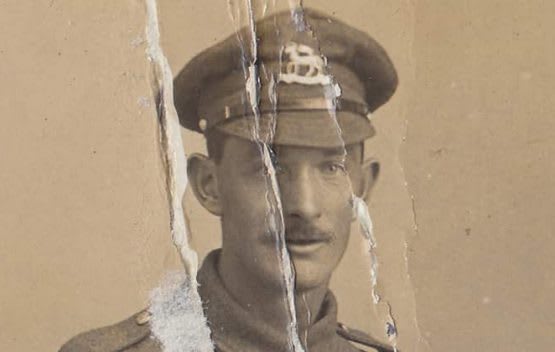|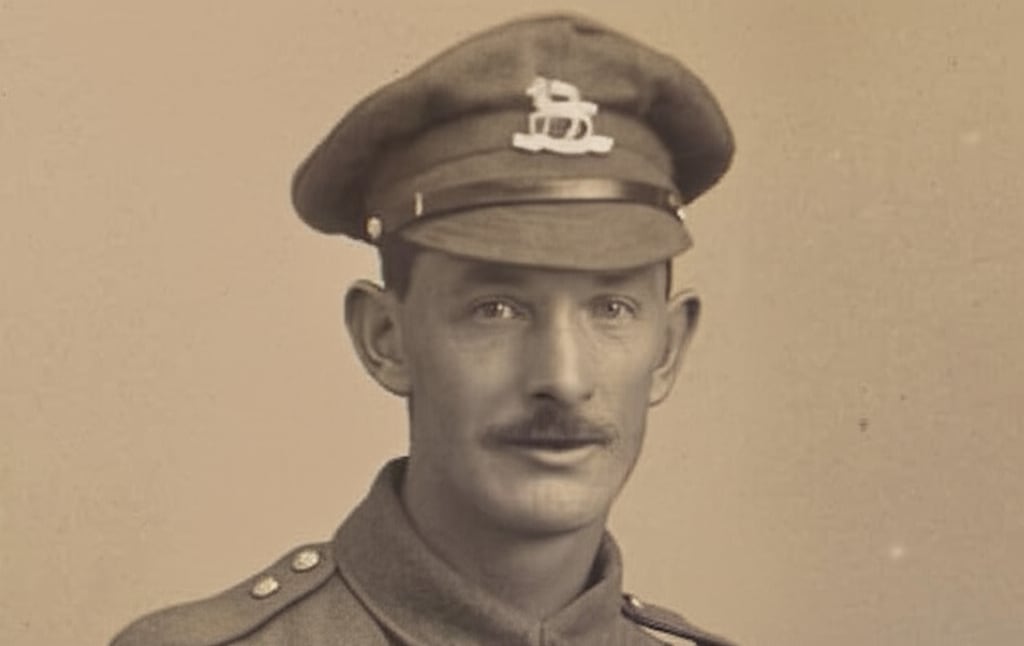|"
},
"typeVersion": 1
},
{
"id": "82e82d53-e5ff-44a2-96ca-1867058fbb65",
"name": "스티커 노트1",
"type": "n8n-nodes-base.stickyNote",
"position": [
-140,
80
],
"parameters": {
"color": 7,
"width": 1060,
"height": 460,
"content": "## 1. Download Sample Images\n[Read more about the HTTP Request node](https://docs.n8n.io/integrations/builtin/core-nodes/n8n-nodes-base.httprequest/)\n\nFor this demonstration, we'll download 3 sample vintage photographs. These images show a variety of damage such as cracks, tears and missing or obscured sections and it will be the goal of this workflow to automate the restoration.\n\nInstead of a manual trigger, use a webhook trigger instead to integrate it into apps!"
},
"typeVersion": 1
},
{
"id": "eb1f70d5-2d3f-4f22-badb-d49569f565c2",
"name": "드라이브에 업로드",
"type": "n8n-nodes-base.googleDrive",
"position": [
1960,
320
],
"parameters": {
"name": "=file_restored_{{ $itemIndex }}.{{ $binary.data.fileExtension }}",
"driveId": {
"__rl": true,
"mode": "list",
"value": "My Drive"
},
"options": {},
"folderId": {
"__rl": true,
"mode": "list",
"value": "root",
"cachedResultName": "/ (Root folder)"
}
},
"credentials": {
"googleDriveOAuth2Api": {
"id": "yOwz41gMQclOadgu",
"name": "Google Drive account"
}
},
"typeVersion": 3
},
{
"id": "4f980d9d-a993-4ec6-80fd-1a323e40822d",
"name": "스티커 노트2",
"type": "n8n-nodes-base.stickyNote",
"position": [
960,
80
],
"parameters": {
"color": 7,
"width": 620,
"height": 460,
"content": "## 2. Use Gemini LLM to Restore Damaged Images\n[Read more about Gemini's Text and Image to Image Editing](https://ai.google.dev/gemini-api/docs/image-generation#gemini-image-editing)\n\nText-and-image-to-image capability enables LLMs to become instant replacements for a lot of image and photo editing applications. Here, we can use Gemini's new Image Generation model to restore vintage photos by removing damage and filling in missing sections."
},
"typeVersion": 1
},
{
"id": "69f7f355-5443-4265-b2a1-901711fa93dd",
"name": "파일로 변환",
"type": "n8n-nodes-base.convertToFile",
"onError": "continueRegularOutput",
"position": [
1720,
320
],
"parameters": {
"options": {
"mimeType": "={{ $json.mimeType }}"
},
"operation": "toBinary",
"sourceProperty": "image"
},
"typeVersion": 1.1
},
{
"id": "beae9111-8186-4afd-9fa6-c732f0229854",
"name": "스티커 노트3",
"type": "n8n-nodes-base.stickyNote",
"position": [
1620,
80
],
"parameters": {
"color": 7,
"width": 560,
"height": 460,
"content": "## 3. Upload to Google Drive\n[Read more about Google Drive node](https://docs.n8n.io/integrations/builtin/app-nodes/n8n-nodes-base.googledrive)\n\nGemini outputs the image data as a base64 string so conversion to binary is sometimes necessary such as when uploading to Google Drive. We're using Google drive here but you can upload to any destination of your choosing."
},
"typeVersion": 1
},
{
"id": "00aaa458-1c49-4adf-87d6-ea70309107f9",
"name": "스티커 노트4",
"type": "n8n-nodes-base.stickyNote",
"position": [
-640,
-380
],
"parameters": {
"width": 460,
"height": 920,
"content": "## Try It Out!\n### This n8n template demonstrates how to build a simple but effective vintage image restoration service using an AI model with image editing capabilities.\n\nWith Gemini now capable of multimodal output, it's a great time to explore this capability for image or graphics automation. Let's see how well it does for a task such as image restoration.\n\n**Please note, at time of writing each image generated will cost $0.039 USD**. See Gemini Pricing for updated info.\n\n### How it works\n* Images are imported into our workflow via the HTTP node and converted to base64 strings using the Extract from file node.\n* The image data is then pipelined to Gemini's Image Generation model. A prompt is provided to instruct Gemini to \"restore\" the image to near new condition - of course, feel free to experiment with this prompt to improve the results!\n* Gemini's responds with the image as a base64 string and hence, a convert to file node is used to transform the data to binary.\n* With the restored image as a binary, we can then use this with our Google Drive node to upload it to our desired folder.\n\n### How to use\n* This demonstration uses 3 random images sourced from the internet but any typical image file will work.\n* Use a webhook node to allow integration from other applications.\n* Use a telegram trigger for instant mobile service!\n\n### Requirements\n* Google Gemini for LLM/Image generation\n* Google Drive for Upload Storage\n\n### Need Help?\nJoin the [Discord](https://discord.com/invite/XPKeKXeB7d) or ask in the [Forum](https://community.n8n.io/)!\n\nHappy Hacking!"
},
"typeVersion": 1
},
{
"id": "4e4b822b-983b-48d2-a319-68242b7af171",
"name": "스티커 노트8",
"type": "n8n-nodes-base.stickyNote",
"position": [
-640,
580
],
"parameters": {
"color": 5,
"width": 460,
"height": 140,
"content": "### Geo Restrictions!\nPlease note at time of writing, the Gemini Image Generation model is restricted to certain countries and regions. If you're getting model not found errors, it's possible the model may not be available in your country!"
},
"typeVersion": 1
},
{
"id": "24d74843-d9b5-4302-8136-159e0a7dd492",
"name": "스티커 노트5",
"type": "n8n-nodes-base.stickyNote",
"position": [
2220,
140
],
"parameters": {
"width": 400,
"height": 440,
"content": "|Original|Restored|\n|-|-|\n||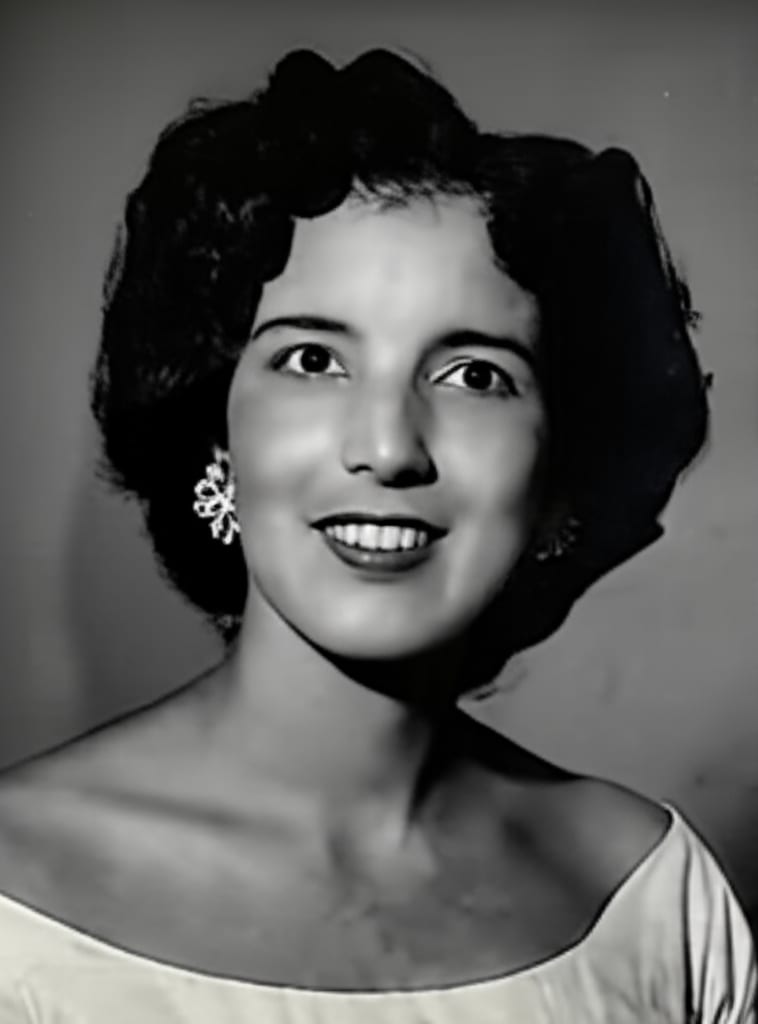|"
},
"typeVersion": 1
},
{
"id": "f77ed90e-70ca-4268-9c77-17e49f94a4bb",
"name": "스티커 노트6",
"type": "n8n-nodes-base.stickyNote",
"position": [
2640,
140
],
"parameters": {
"width": 580,
"height": 300,
"content": "|Original|Restored|\n|-|-|\n|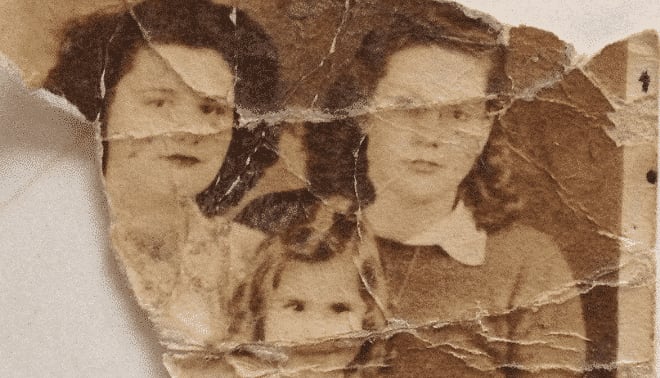|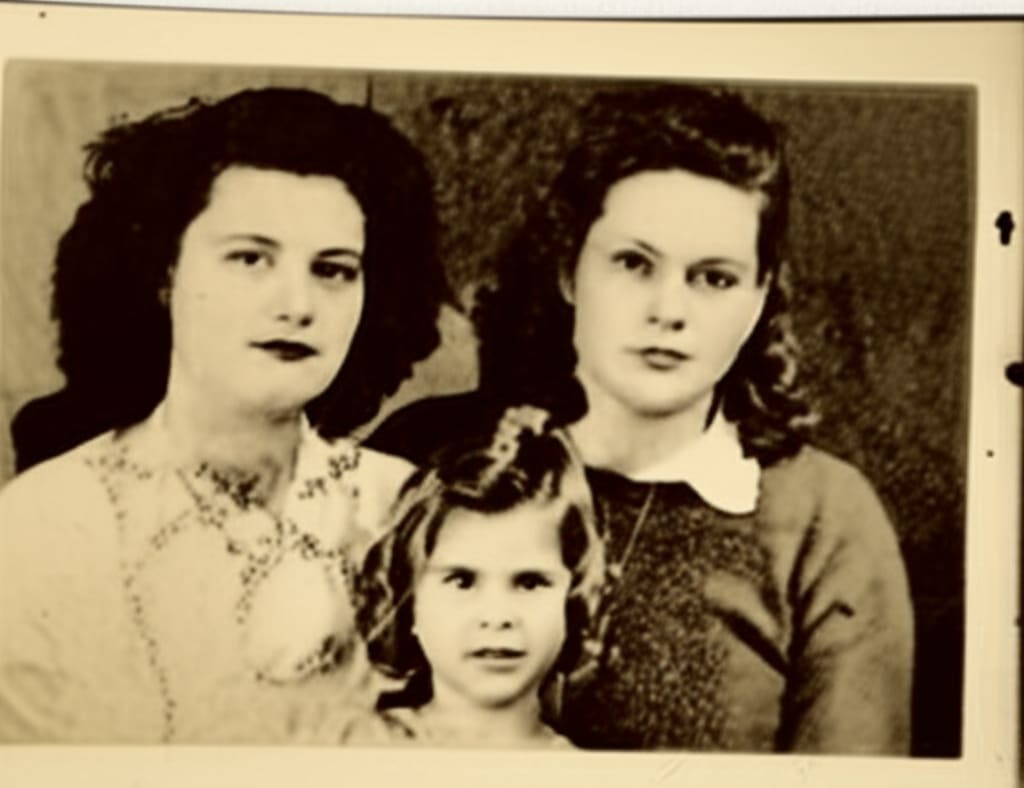|"
},
"typeVersion": 1
}
],
"pinData": {},
"connections": {
"e078aba0-2f2b-47b5-90b2-c457184e6237": {
"main": [
[
{
"node": "a0fbf72b-d079-4777-be06-531e0e131857",
"type": "main",
"index": 0
}
]
]
},
"1f363fc5-42cf-4e9c-ae74-496030362ed9": {
"main": [
[
{
"node": "e078aba0-2f2b-47b5-90b2-c457184e6237",
"type": "main",
"index": 0
}
]
]
},
"a0fbf72b-d079-4777-be06-531e0e131857": {
"main": [
[
{
"node": "6aebcc29-a65d-4cb9-8d6a-56f24b58c7f5",
"type": "main",
"index": 0
}
]
]
},
"69f7f355-5443-4265-b2a1-901711fa93dd": {
"main": [
[
{
"node": "eb1f70d5-2d3f-4f22-badb-d49569f565c2",
"type": "main",
"index": 0
}
]
]
},
"6aebcc29-a65d-4cb9-8d6a-56f24b58c7f5": {
"main": [
[
{
"node": "77f0d0c7-e6bd-4f15-beff-9cb53446fcb0",
"type": "main",
"index": 0
}
]
]
},
"1c50d319-1771-408f-9015-f04bb6a3d305": {
"main": [
[
{
"node": "69f7f355-5443-4265-b2a1-901711fa93dd",
"type": "main",
"index": 0
}
]
]
},
"77f0d0c7-e6bd-4f15-beff-9cb53446fcb0": {
"main": [
[
{
"node": "1c50d319-1771-408f-9015-f04bb6a3d305",
"type": "main",
"index": 0
}
]
]
},
"b6a5c37d-b845-4fd2-8ea3-db23aed99286": {
"main": [
[
{
"node": "1f363fc5-42cf-4e9c-ae74-496030362ed9",
"type": "main",
"index": 0
}
]
]
}
}
}자주 묻는 질문
이 워크플로우를 어떻게 사용하나요?
위의 JSON 구성 코드를 복사하여 n8n 인스턴스에서 새 워크플로우를 생성하고 "JSON에서 가져오기"를 선택한 후, 구성을 붙여넣고 필요에 따라 인증 설정을 수정하세요.
이 워크플로우는 어떤 시나리오에 적합한가요?
고급 - 디자인, 인공지능
유료인가요?
이 워크플로우는 완전히 무료이며 직접 가져와 사용할 수 있습니다. 다만, 워크플로우에서 사용하는 타사 서비스(예: OpenAI API)는 사용자 직접 비용을 지불해야 할 수 있습니다.
관련 워크플로우 추천
n8n과 Gemini AI 이미지 편집을 사용하여 이미지 분리 및 결합
n8n과 Gemini AI 이미지 편집을 사용하여 이미지를 분리 편집
Set
Merge
Aggregate
+
Set
Merge
Aggregate
20 노드Jimleuk
디자인
Qdrant, Mistral.ai, OpenAI를 사용하여 세금 법률 어시스턴트를 구축합니다.
Qdrant, Mistral.ai, OpenAI를 사용하여 세금 법률 어시스턴트를 구축합니다.
Set
Wait
Filter
+
Set
Wait
Filter
38 노드Jimleuk
금융
CloudFlare Markdown 변환을 사용하여 Excel에서 대학 학기 일정 추출
CloudFlare Markdown 변환을 사용하여 Excel에서 대학 학기 날짜를 추출
Set
Code
Sort
+
Set
Code
Sort
18 노드Jimleuk
인공지능
템플릿 데모 - chatgpt-이미지-1-드라이브와 시트 복사
GPT-image-1을 사용하여 이미지 생성 및 Google Drive에 저장, 비용 추적 포함
Set
Split Out
Aggregate
+
Set
Split Out
Aggregate
16 노드darrell_tw
디자인
基于动态提示与Airtable의AI데이터추출
통해动态提示与Airtable实现AI데이터추출
Set
Code
Filter
+
Set
Code
Filter
51 노드Jimleuk
인공지능
동적 프롬프트와 Baserow를 활용한 AI 데이터 추출
동적 프롬프트와 Baserow를 활용한 AI 데이터 추출
Set
Code
Filter
+
Set
Code
Filter
45 노드Jimleuk
인공지능
워크플로우 정보
난이도
고급
노드 수17
카테고리2
노드 유형8
저자

Jimleuk
@jimleukFreelance consultant based in the UK specialising in AI-powered automations. I work with select clients tackling their most challenging projects. For business enquiries, send me an email at hello@jimle.uk LinkedIn: https://www.linkedin.com/in/jimleuk/ X/Twitter: https://x.com/jimle_uk
외부 링크
n8n.io에서 보기 →
이 워크플로우 공유