Pipedream의 MCP 서버
중급
이것은Support Chatbot, AI Chatbot분야의자동화 워크플로우로, 8개의 노드를 포함합니다.주로 Agent, ChatTrigger, LmChatOpenAi, McpClientTool, MemoryBufferWindow 등의 노드를 사용하며. GPT-4, Pipedream을 사용하여 확장 가능한 AI 챗봇을 구축합니다: Calendly와 Gmail 통합
사전 요구사항
- •OpenAI API Key
워크플로우 미리보기
노드 연결 관계를 시각적으로 표시하며, 확대/축소 및 이동을 지원합니다
워크플로우 내보내기
다음 JSON 구성을 복사하여 n8n에 가져오면 이 워크플로우를 사용할 수 있습니다
{
"id": "muEszdmquRYSUdM9",
"meta": {
"instanceId": "a4bfc93e975ca233ac45ed7c9227d84cf5a2329310525917adaf3312e10d5462",
"templateCredsSetupCompleted": true
},
"name": "Pipedream's MCP server",
"tags": [],
"nodes": [
{
"id": "d498ed94-65f4-4560-a186-ba324506f73f",
"name": "채팅 메시지 수신 시",
"type": "@n8n/n8n-nodes-langchain.chatTrigger",
"position": [
16,
-64
],
"webhookId": "79dae454-ccf5-4129-8197-f79bf5add978",
"parameters": {
"options": {}
},
"typeVersion": 1.1
},
{
"id": "866a327c-22a2-4a3a-8993-75ae9e836c71",
"name": "AI 에이전트",
"type": "@n8n/n8n-nodes-langchain.agent",
"position": [
240,
-64
],
"parameters": {
"options": {
"systemMessage": "You are a helpful assistant"
}
},
"typeVersion": 2.1
},
{
"id": "457b6172-4519-4bf9-aa84-44dbf14befb6",
"name": "OpenAI 채팅 모델",
"type": "@n8n/n8n-nodes-langchain.lmChatOpenAi",
"position": [
112,
144
],
"parameters": {
"model": {
"__rl": true,
"mode": "list",
"value": "gpt-4.1-mini"
},
"options": {}
},
"credentials": {
"openAiApi": {
"id": "TefveNaDaMERl1hY",
"name": "OpenAi account (Eure)"
}
},
"typeVersion": 1.2
},
{
"id": "cd652804-a75c-4efd-b197-92810f94bb5f",
"name": "Calendly",
"type": "@n8n/n8n-nodes-langchain.mcpClientTool",
"position": [
400,
144
],
"parameters": {
"sseEndpoint": "https://mcp.pipedream.net/xxx/calendly_v2"
},
"typeVersion": 1
},
{
"id": "ae996f82-1e34-486a-af82-2fdcfe32c3d9",
"name": "Simple Memory",
"type": "@n8n/n8n-nodes-langchain.memoryBufferWindow",
"position": [
256,
144
],
"parameters": {},
"typeVersion": 1.3
},
{
"id": "4465fc4e-68b0-456d-828a-bff296038a34",
"name": "Gmail",
"type": "@n8n/n8n-nodes-langchain.mcpClientTool",
"position": [
512,
144
],
"parameters": {
"sseEndpoint": "https://mcp.pipedream.net/xxx/gmail"
},
"typeVersion": 1
},
{
"id": "32e919f8-6e73-4aa3-9148-93f920930f3b",
"name": "Sticky Note",
"type": "n8n-nodes-base.stickyNote",
"position": [
-352,
-768
],
"parameters": {
"width": 624,
"height": 656,
"content": "## Pipedream's MCP server\n\nAdd 2,700+ APIs and 10,000+ tools to your AI assistant for free. Connect your accounts securely and revoke access at any time.\n\n\n"
},
"typeVersion": 1
},
{
"id": "79a54171-4f68-418c-8ad2-b30e2ed23fe5",
"name": "Sticky Note1",
"type": "n8n-nodes-base.stickyNote",
"position": [
288,
-768
],
"parameters": {
"width": 624,
"height": 656,
"content": "### How to work\n\n- Sign up on [Pipedream](https://mcp.pipedream.com/)\n- Manage your MCP server and connected accounts\n- Copy and paste your MCP Server URL https://mcp.pipedream.net/xxx/{app_slug} into the MCP SSE Endpoint node in n8n.\n\nExample:\n- https://mcp.pipedream.net/xxx/calendly_v2 for Calendly\n- https://mcp.pipedream.net/xxx/calendly_v2 for Gmail\n\n\n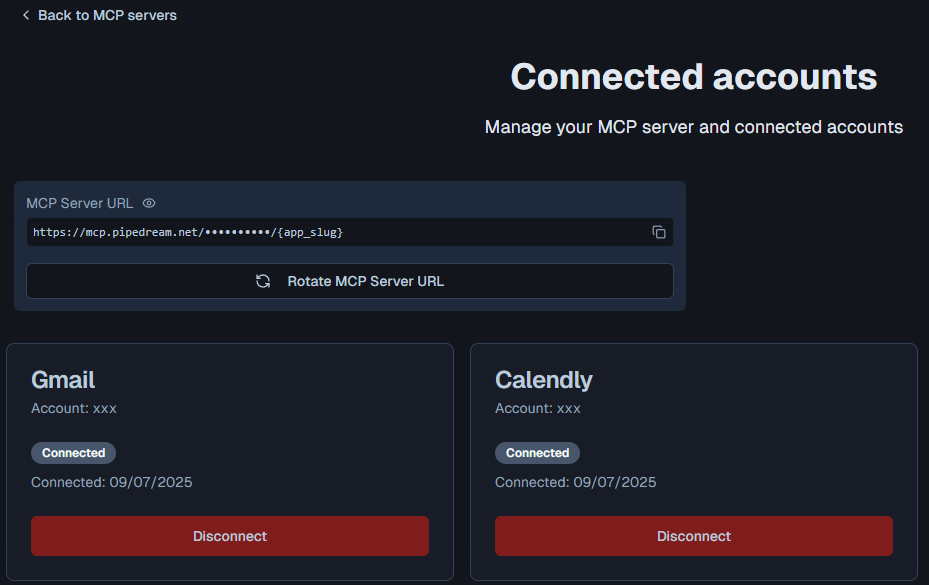"
},
"typeVersion": 1
}
],
"active": false,
"pinData": {},
"settings": {
"executionOrder": "v1"
},
"versionId": "d75b30d2-ecdf-4ac7-8d4b-72c5961c7a7c",
"connections": {
"4465fc4e-68b0-456d-828a-bff296038a34": {
"ai_tool": [
[
{
"node": "866a327c-22a2-4a3a-8993-75ae9e836c71",
"type": "ai_tool",
"index": 0
}
]
]
},
"cd652804-a75c-4efd-b197-92810f94bb5f": {
"ai_tool": [
[
{
"node": "866a327c-22a2-4a3a-8993-75ae9e836c71",
"type": "ai_tool",
"index": 0
}
]
]
},
"ae996f82-1e34-486a-af82-2fdcfe32c3d9": {
"ai_memory": [
[
{
"node": "866a327c-22a2-4a3a-8993-75ae9e836c71",
"type": "ai_memory",
"index": 0
}
]
]
},
"457b6172-4519-4bf9-aa84-44dbf14befb6": {
"ai_languageModel": [
[
{
"node": "866a327c-22a2-4a3a-8993-75ae9e836c71",
"type": "ai_languageModel",
"index": 0
}
]
]
},
"d498ed94-65f4-4560-a186-ba324506f73f": {
"main": [
[
{
"node": "866a327c-22a2-4a3a-8993-75ae9e836c71",
"type": "main",
"index": 0
}
]
]
}
}
}자주 묻는 질문
이 워크플로우를 어떻게 사용하나요?
위의 JSON 구성 코드를 복사하여 n8n 인스턴스에서 새 워크플로우를 생성하고 "JSON에서 가져오기"를 선택한 후, 구성을 붙여넣고 필요에 따라 인증 설정을 수정하세요.
이 워크플로우는 어떤 시나리오에 적합한가요?
중급 - 지원 챗봇, AI 챗봇
유료인가요?
이 워크플로우는 완전히 무료이며 직접 가져와 사용할 수 있습니다. 다만, 워크플로우에서 사용하는 타사 서비스(예: OpenAI API)는 사용자 직접 비용을 지불해야 할 수 있습니다.
관련 워크플로우 추천
OpenAI GPT-4 Mini를 활용한 Baserow 데이터베이스 쿼리 AI 챗봇
OpenAI GPT-4 Mini를 사용하여 Baserow 데이터베이스를 쿼리하는 AI 챗봇
Baserow Tool
Agent
Chat Trigger
+
Baserow Tool
Agent
Chat Trigger
9 노드Gegenfeld
지원 챗봇
다 플랫폼 전자상거래 도우미
GPT-4o, Gemini, RAG를 통합한 Shopify와 WooCommerce 전자상거래 어시스턴트
If
Merge
Graphql Tool
+
If
Merge
Graphql Tool
32 노드Harsh Maniya
지원 챗봇
이메일 뉴스 MCP 템플릿
이메일 초안 및 뉴스 연구 어시스턴트 - OpenAI, Gmail, Tavily, Perplexity 통합
Gmail Tool
Perplexity Tool
Agent
+
Gmail Tool
Perplexity Tool
Agent
18 노드Automate With Marc
AI 챗봇
다단계 도구 실행이 가능한 AI 기반 HVAC 스케줄링 에이전트
AI 에이전트, Google 캘린더 및 Gmail을 통한 HVAC 서비스 스케줄링 자동화
Wait
Gmail
Webhook
+
Wait
Gmail
Webhook
30 노드Bhuvanesh R
지원 챗봇
AI를 사용한 WhatsApp 및 Google 스프레드시트에서 레스토랑 예약 자동화
AI를 사용한 WhatsApp 및 Google 스프레드시트 레스토랑 예약 자동화
If
Filter
Whats App
+
If
Filter
Whats App
23 노드Basil Irfan
지원 챗봇
WhatsApp/Telegram WooCommerce 주문 지원
Telegram과 Gmail을 통해 Gemini와 GPT를 사용한 WooCommerce 고객 지원 자동화
Set
Gmail
Merge
+
Set
Gmail
Merge
25 노드AppStoneLab Technologies LLP
지원 챗봇
워크플로우 정보
난이도
중급
노드 수8
카테고리2
노드 유형6
저자

Davide
@n3witaliaFull-stack Web Developer based in Italy specialising in Marketing & AI-powered automations. For business enquiries, send me an email at info@n3w.it or add me on Linkedin.com/in/davideboizza
외부 링크
n8n.io에서 보기 →
이 워크플로우 공유