Tavily를 통해 ChatGPT 웹 연구를 사용한 새로운 CRM 회사 정보 자동 강화
고급
이것은Lead Generation, AI RAG분야의자동화 워크플로우로, 16개의 노드를 포함합니다.주로 Webhook, HttpRequest, Agent, ToolThink, TavilyTool 등의 노드를 사용하며. Tavily 통해 ChatGPT 웹 연구로 새로운 CRM 회사 정보 자동 보강
사전 요구사항
- •HTTP Webhook 엔드포인트(n8n이 자동으로 생성)
- •대상 API의 인증 정보가 필요할 수 있음
- •OpenAI API Key
워크플로우 미리보기
노드 연결 관계를 시각적으로 표시하며, 확대/축소 및 이동을 지원합니다
워크플로우 내보내기
다음 JSON 구성을 복사하여 n8n에 가져오면 이 워크플로우를 사용할 수 있습니다
{
"id": "Wm8l2EqUfFXbZefy",
"meta": {
"instanceId": "68ab8a7bd891eafb85f915471f38591da0135936f93fdf7e27d0ebea24fea950"
},
"name": "Auto-Enrich New CRM Companies with ChatGPT Web Research via Tavily",
"tags": [],
"nodes": [
{
"id": "8a9fac46-d7ca-4b5f-a809-ba9c4be4bb48",
"name": "OpenAI 채팅 모델",
"type": "@n8n/n8n-nodes-langchain.lmChatOpenAi",
"position": [
2320,
980
],
"parameters": {
"model": {
"__rl": true,
"mode": "list",
"value": "gpt-4.1",
"cachedResultName": "gpt-4.1"
},
"options": {}
},
"credentials": {
"openAiApi": {
"id": "bo9yE6c6LIEm8seD",
"name": "OpenAi account 3"
}
},
"typeVersion": 1.2
},
{
"id": "a9b15186-9dd1-4b2a-be23-277d6507c6b6",
"name": "스티키 노트2",
"type": "n8n-nodes-base.stickyNote",
"position": [
1880,
0
],
"parameters": {
"color": 7,
"width": 340,
"height": 980,
"content": "## 5. set up webhook trigger\n* double-click node\n* HTTP Method: POST\n* Authentication none\n\n### For testing: \nCreate a company in CentralStationCRM and click on \"Listen for Test Event\" on the node shortly beforehand. The webhook should be triggered and the node should transfer the data.\n\n### For operation:\n* switch from \"Test URL\" to \"Production URL\"\n* copy new webhook URL (click on it)\n* enter new URL under \"Endpoint URL\" in the CentralStationCRM webhook"
},
"typeVersion": 1
},
{
"id": "04f6c697-7838-438e-95bd-db3f226d8238",
"name": "스티키 노트3",
"type": "n8n-nodes-base.stickyNote",
"position": [
1420,
0
],
"parameters": {
"color": 7,
"width": 420,
"height": 980,
"content": "## 4. set up CentralStationCRM Webhook\n* log in to CentralStationCRM\n* click on the gear wheel in the top right corner\n\n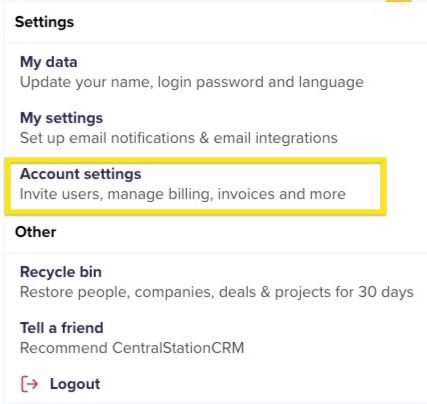\n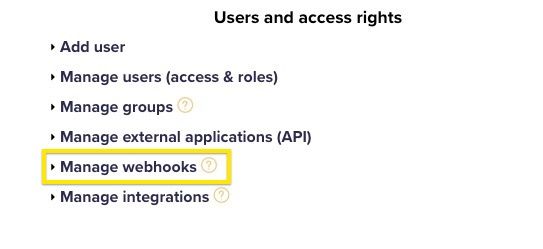\n* click \"Create webhook\"\n* enter password\n* \"Monitored object type\": company\n* \"Monitored event\": create\n* for \"Endpoint URL\" enter Webhook URL\n* for \"Nested objects\" enter:\ntags, addrs, companies\n* Enter name and description (e.g. n8n Test)\n* Set status to active and save"
},
"typeVersion": 1
},
{
"id": "2f0f0aa7-ae85-4ff1-aec2-6e78b5b4bdab",
"name": "스티키 노트5",
"type": "n8n-nodes-base.stickyNote",
"position": [
960,
840
],
"parameters": {
"color": 7,
"width": 420,
"height": 140,
"content": "## 3. get webhook URL from n8n\n* Double-click the first node in the workflow\n* Click once on the url next to POST"
},
"typeVersion": 1
},
{
"id": "03bbfa92-95b1-4beb-a1b0-fc1a2958093b",
"name": "스티키 노트",
"type": "n8n-nodes-base.stickyNote",
"position": [
2260,
0
],
"parameters": {
"color": 7,
"width": 500,
"height": 1160,
"content": "## 6. set up Research AI Agent\n### Set up Open AI Node\n* Register with Open AI\n* Surf to [https://platform.openai.com/api-keys](https://platform.openai.com/api-keys)\n* Click on \"Create New Secret Key\"\n* Enter name and project for the key, if applicable\n* Copy API key\n\n* Switch to n8n\n* Double-click \"OpenAI Chat Model\" node\n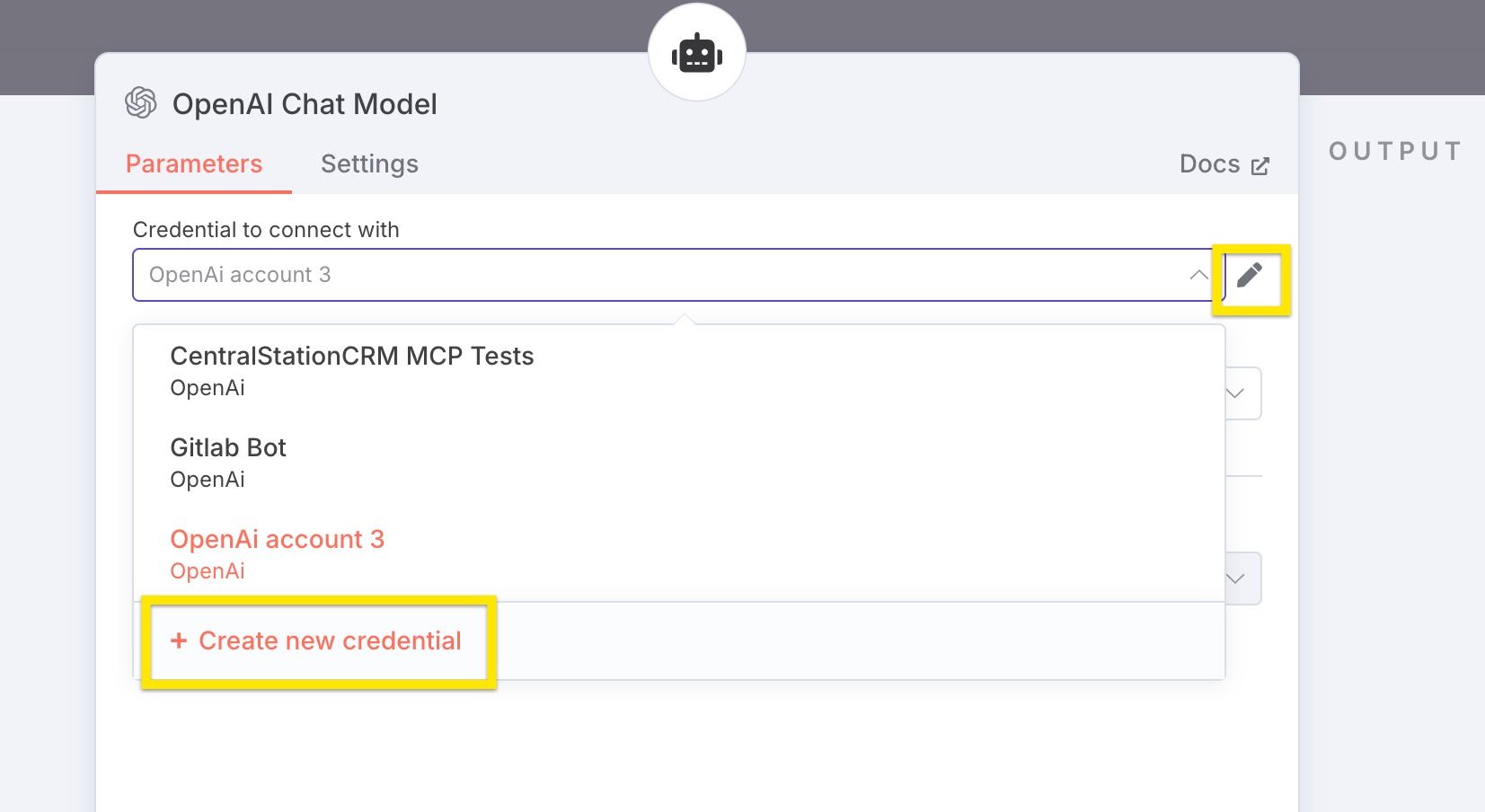\n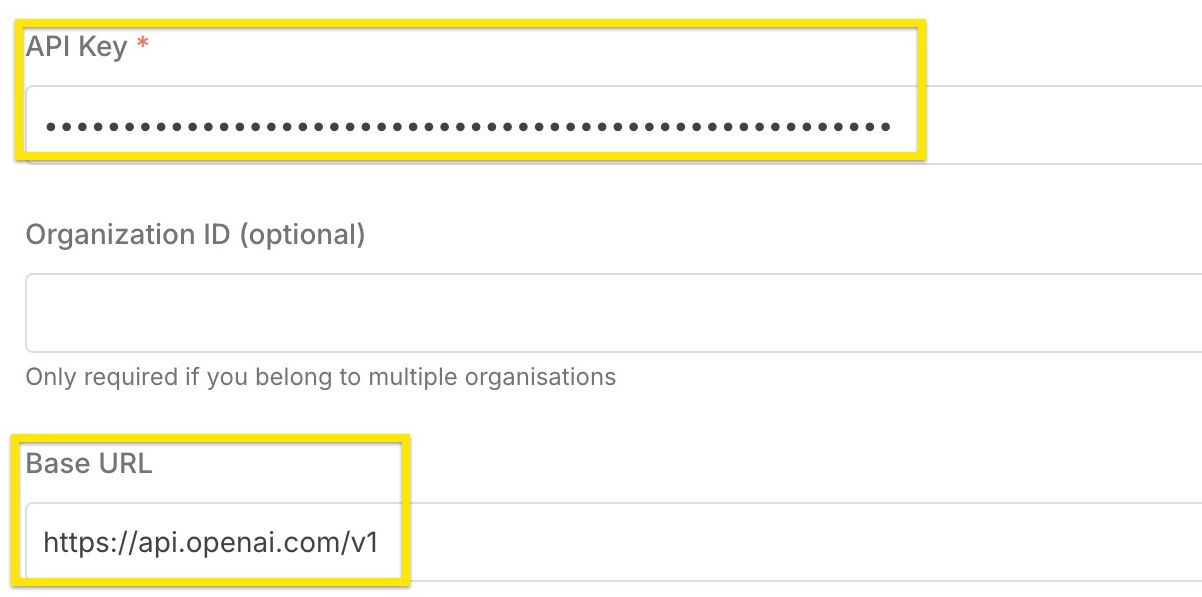\n"
},
"typeVersion": 1
},
{
"id": "f3b11fd7-2fcf-4fe0-b272-e6326b1c6b53",
"name": "스티키 노트1",
"type": "n8n-nodes-base.stickyNote",
"position": [
2780,
0
],
"parameters": {
"color": 7,
"width": 380,
"height": 980,
"content": "## 7. set up CentralStationCRM protocol\n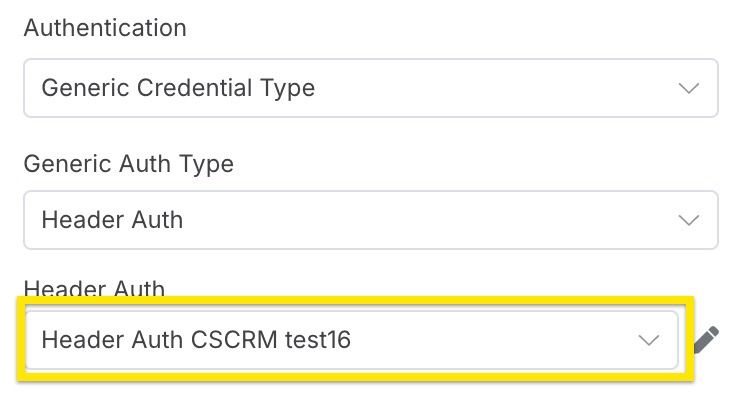\n* Select credentials created in step 1"
},
"typeVersion": 1
},
{
"id": "9ffff75c-ae83-4f5a-b656-3fea3da62e70",
"name": "스티키 노트8",
"type": "n8n-nodes-base.stickyNote",
"position": [
960,
0
],
"parameters": {
"color": 7,
"width": 420,
"height": 820,
"content": "## 2. set up CentralStationCRM n8n credentials\n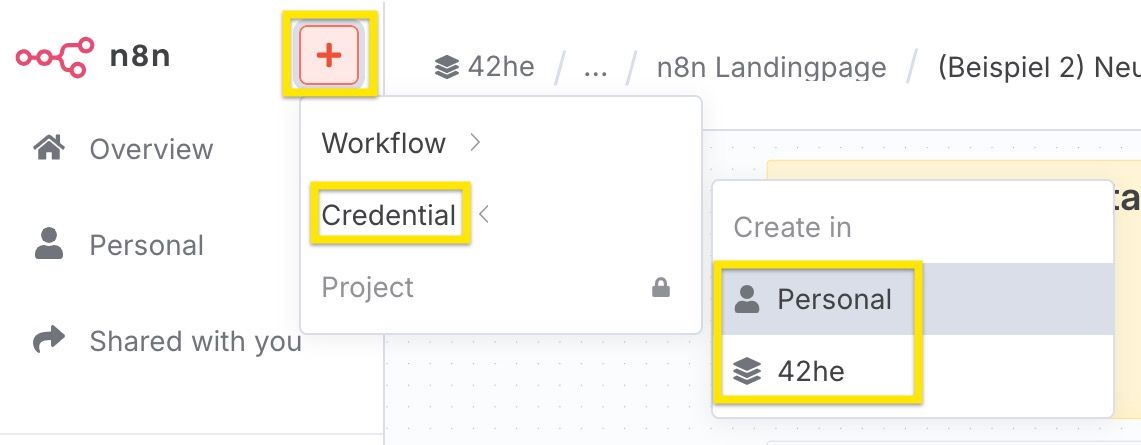\n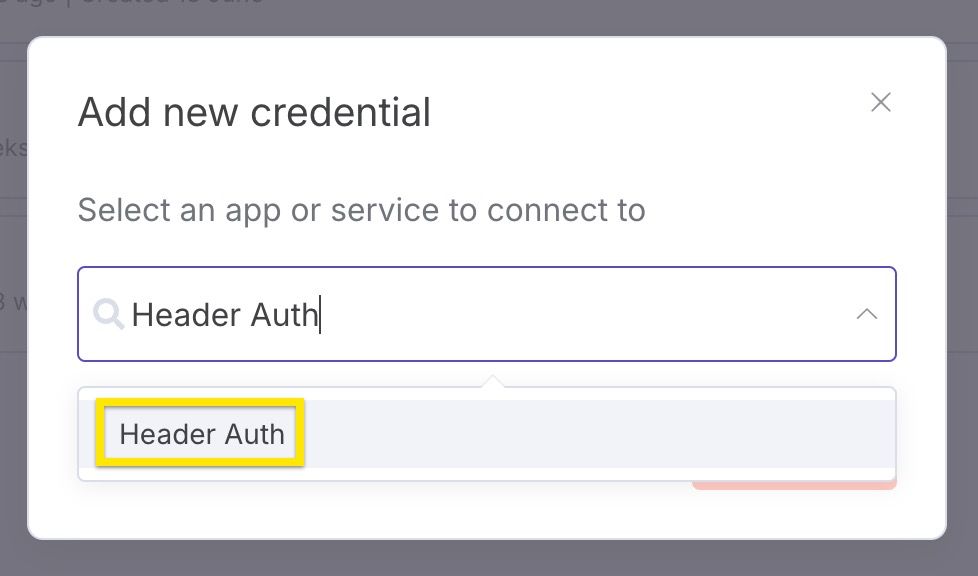\n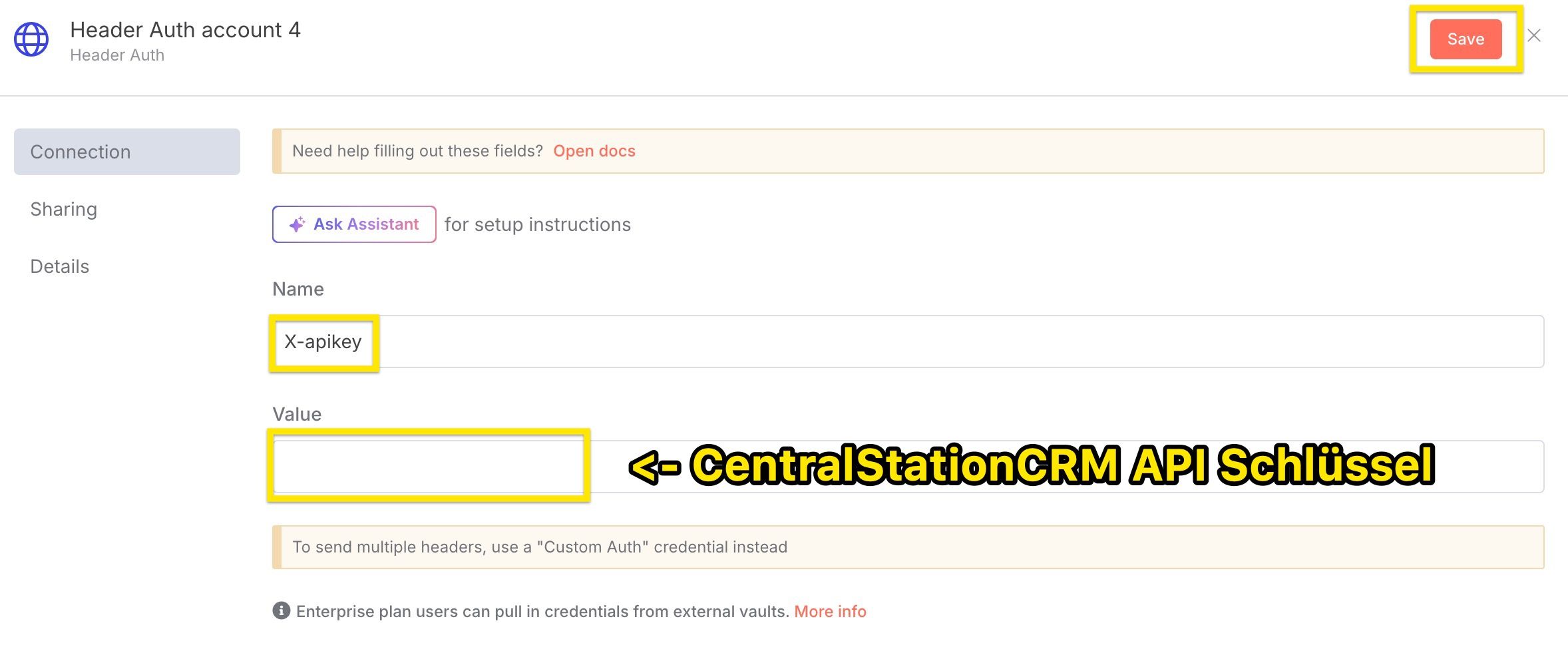\nImportant:\n* select Header Auth as credential type\n* assign X-apikey as name\n* enter the CentralStationCRM API key under \"Value"
},
"typeVersion": 1
},
{
"id": "9c9d77d8-159c-4e52-aad0-d2ccfcb84ac5",
"name": "스티키 노트9",
"type": "n8n-nodes-base.stickyNote",
"position": [
0,
780
],
"parameters": {
"width": 460,
"height": 200,
"content": "## Tools in this workflow\n* [CentralStationCRM](https://centralstationcrm.de), the easy and intuitive CRM Software for small teams. [Here is our API Documentation](https://api.centralstationcrm.net/api-docs/index.html) if you want to customize the workflow.\n* [ChatGPT](https://openai.com), the well-known ai chatbot\n* [Tavily](https://www.tavily.com/), a web search service for large language models"
},
"typeVersion": 1
},
{
"id": "f387821a-8be9-46b9-9435-212c704a558c",
"name": "스티키 노트4",
"type": "n8n-nodes-base.stickyNote",
"position": [
0,
0
],
"parameters": {
"width": 460,
"height": 740,
"content": "\n# Auto-Enrich New CRM Companies with ChatGPT Web Research via Tavily\n\nIn this workflow, you use **ChatGPT** in conjunction with the **web search tool Tavily**.\n\n* the webhook is triggered when a new company is created in the CRM\n* the company data is transferred to ChatGPT\n* the AI agent searches the web with Tavily and converts the information into Markdown format\n* A note with the resulting information is added to your CRM\n\n\n\n*To edit the nodes: Simply double-click!\n\n*At the very end: Set the workflow switch to “Active”."
},
"typeVersion": 1
},
{
"id": "4a3a7718-ff96-4ef5-90fe-6d03f0d81c25",
"name": "스티키 노트6",
"type": "n8n-nodes-base.stickyNote",
"position": [
500,
0
],
"parameters": {
"color": 7,
"width": 420,
"height": 980,
"content": "## 1. set up CentralStationCRM API Key\n* log in to CentralStationCRM\n* click on the gear wheel in the top right corner\n\n\n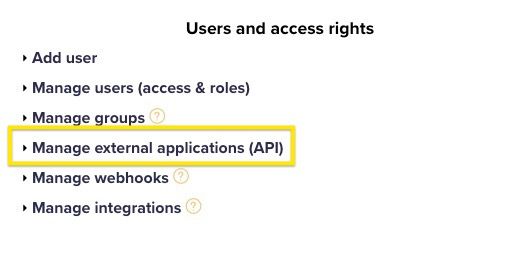\n* click \"Create API key\" on the right-hand side\n* enter \"Description\" (e.g. n8n Test)\n* save\n* save the API key! The key cannot be called up again in CRM and is required for step 2."
},
"typeVersion": 1
},
{
"id": "0cd3cfc1-74f4-400a-a5b7-0811d600ec4e",
"name": "연구 AI 에이전트",
"type": "@n8n/n8n-nodes-langchain.agent",
"position": [
2380,
800
],
"parameters": {
"text": "=We are a small consulting firm specialised on sales and marketing consulting. \n\nDo a deep research in German about the company \"{{ $json.body.record.name }}\". The research shall help sales people get a good overview about the company and allow to identify potential opportunities.\n\nUse the following structure:\n\n```markdown\n- **Name:** Firmenname\n- **Webseite:** http://foobar.com\n- **Zentrale:** San Francisco ([1](http://foobar))\n- **Gründungsjahr:** 2018 ([1](http://...), [2](http://...))\n- **Anzahl der Mitarbeiter:** 123 ([1](...))\n\nAllgemeine Beschreibung der Firma, inklusive Quellen. ([1](http://source))\n\n## Social media\n\n- **Linked In:** http://...\n- **Facebook:** http://...\n```\n\nThis structure is not complete, you can add more facts, social media sites or sections. You can use multiple searches, use more specific search queries if there are important facts missing. Add sources to every fact you mention.\n\nRespond only with the markdown itself, do not start with ```markdown.",
"options": {},
"promptType": "define"
},
"typeVersion": 2
},
{
"id": "e61f2c0b-defd-4e91-8e01-e9dc6c71e0ce",
"name": "AI를 위한 마인드 스페이스 프롬프트",
"type": "@n8n/n8n-nodes-langchain.toolThink",
"position": [
2660,
980
],
"parameters": {},
"typeVersion": 1
},
{
"id": "c4d18a52-57d1-4c9e-b8f8-f29440d12d38",
"name": "Tavily 웹검색 URL 추출",
"type": "@tavily/n8n-nodes-tavily.tavilyTool",
"position": [
2560,
1120
],
"parameters": {
"urls": [
"={{ /*n8n-auto-generated-fromAI-override*/ $fromAI('urls0_URLs', ``, 'string') }}"
],
"options": {},
"resource": "extract"
},
"credentials": {
"tavilyApi": {
"id": "ORAd9u0WAvNAofCP",
"name": "Tavily account"
}
},
"typeVersion": 1
},
{
"id": "f8af5e5a-d411-4888-904a-d8f3df1be67e",
"name": "Tavily 웹검색 웹 검색",
"type": "@tavily/n8n-nodes-tavily.tavilyTool",
"position": [
2400,
1120
],
"parameters": {
"query": "={{ /*n8n-auto-generated-fromAI-override*/ $fromAI('Query', ``, 'string') }}",
"options": {
"max_results": 15,
"search_depth": "advanced"
}
},
"credentials": {
"tavilyApi": {
"id": "ORAd9u0WAvNAofCP",
"name": "Tavily account"
}
},
"typeVersion": 1
},
{
"id": "589de93d-74f3-4bde-a5da-8f92b572c59b",
"name": "CentralStationCRM에서 회사에 메모 추가",
"type": "n8n-nodes-base.httpRequest",
"position": [
2920,
800
],
"parameters": {
"url": "https://api.centralstationcrm.net/api/protocols.json",
"method": "POST",
"options": {},
"jsonBody": "={\n \"protocol\": {\n \"company_ids\": [{{ $('Company created in CentralStationCRM').item.json.body.record.id }}],\n \"type\": \"ProtocolObjectNote\",\n \"badge\": \"note\",\n \"content\": {{ $json.output.toJsonString() }},\n \"format\": \"markdown\"\n }\n} \n",
"sendBody": true,
"sendHeaders": true,
"specifyBody": "json",
"authentication": "genericCredentialType",
"genericAuthType": "httpHeaderAuth",
"headerParameters": {
"parameters": [
{
"name": "accept",
"value": "application/json"
},
{
"name": "Content-Type",
"value": "application/json"
}
]
}
},
"credentials": {
"httpHeaderAuth": {
"id": "pqUNcvQBnqpxmMAD",
"name": "Header Auth CSCRM test16"
}
},
"typeVersion": 4.2
},
{
"id": "922a8cd5-ef4a-45a2-97fb-932c98ee7d8d",
"name": "CentralStationCRM에서 생성된 회사",
"type": "n8n-nodes-base.webhook",
"position": [
2000,
800
],
"webhookId": "c8682af5-17b7-48f5-9be3-49ef787b40e5",
"parameters": {
"path": "c8682af5-17b7-48f5-9be3-49ef787b40e5",
"options": {},
"httpMethod": "POST"
},
"typeVersion": 2
}
],
"active": false,
"pinData": {},
"settings": {
"executionOrder": "v1"
},
"versionId": "16f5b624-473c-424a-be92-f62e08907ce2",
"connections": {
"8a9fac46-d7ca-4b5f-a809-ba9c4be4bb48": {
"ai_languageModel": [
[
{
"node": "0cd3cfc1-74f4-400a-a5b7-0811d600ec4e",
"type": "ai_languageModel",
"index": 0
}
]
]
},
"0cd3cfc1-74f4-400a-a5b7-0811d600ec4e": {
"main": [
[
{
"node": "589de93d-74f3-4bde-a5da-8f92b572c59b",
"type": "main",
"index": 0
}
]
]
},
"c4d18a52-57d1-4c9e-b8f8-f29440d12d38": {
"ai_tool": [
[
{
"node": "0cd3cfc1-74f4-400a-a5b7-0811d600ec4e",
"type": "ai_tool",
"index": 0
}
]
]
},
"e61f2c0b-defd-4e91-8e01-e9dc6c71e0ce": {
"ai_tool": [
[
{
"node": "0cd3cfc1-74f4-400a-a5b7-0811d600ec4e",
"type": "ai_tool",
"index": 0
}
]
]
},
"f8af5e5a-d411-4888-904a-d8f3df1be67e": {
"ai_tool": [
[
{
"node": "0cd3cfc1-74f4-400a-a5b7-0811d600ec4e",
"type": "ai_tool",
"index": 0
}
]
]
},
"922a8cd5-ef4a-45a2-97fb-932c98ee7d8d": {
"main": [
[
{
"node": "0cd3cfc1-74f4-400a-a5b7-0811d600ec4e",
"type": "main",
"index": 0
}
]
]
}
}
}자주 묻는 질문
이 워크플로우를 어떻게 사용하나요?
위의 JSON 구성 코드를 복사하여 n8n 인스턴스에서 새 워크플로우를 생성하고 "JSON에서 가져오기"를 선택한 후, 구성을 붙여넣고 필요에 따라 인증 설정을 수정하세요.
이 워크플로우는 어떤 시나리오에 적합한가요?
고급 - 리드 생성, AI RAG
유료인가요?
이 워크플로우는 완전히 무료이며 직접 가져와 사용할 수 있습니다. 다만, 워크플로우에서 사용하는 타사 서비스(예: OpenAI API)는 사용자 직접 비용을 지불해야 할 수 있습니다.
관련 워크플로우 추천
Instagram 잠재 고객 생성
Apify, GPT 및 PostgreSQL을 활용한 Instagram 인플루언서 잠재고객 수집 자동화
Set
Code
Postgres
+
Set
Code
Postgres
18 노드Fayzul Noor
리드 생성
dian-memo_03 내보내기
AI 음성 및 텍스트 메모 - LINE 메시지, Supabase 벡터 데이터베이스 및 Gmail 통합
If
Set
Code
+
If
Set
Code
30 노드kote2
AI RAG
AI 기반 Google Sheets 웹 리서치(GPT와 Bright Data)
AI 기반 Google Sheets 웹 리서치(GPT와 Bright Data)
Set
Webhook
Data Table
+
Set
Webhook
Data Table
22 노드Elay Guez
시장 조사
Bright Data, OpenAI 및 Redis 기반 고급 다중 소스 AI 연구
사용Bright Data、OpenAI및Redis进行高级多源AI研究
If
Set
Code
+
If
Set
Code
43 노드Daniel Shashko
시장 조사
재정렬 #1
Apify, GPT-4o 및 WhatsApp을 사용한 영업 콜드 콜 파이프라인 자동화
Set
Code
Webhook
+
Set
Code
Webhook
48 노드Khairul Muhtadin
리드 육성
제 작업 흐름
Google Drive와 GPT-4o를 통해 벡터 검색을 사용하여 지식庫 채팅 로봇을 생성합니다.
Set
Code
Webhook
+
Set
Code
Webhook
26 노드Gofive
지원 챗봇
워크플로우 정보
난이도
고급
노드 수16
카테고리2
노드 유형7
저자

CentralStationCRM
@centralstationcrmCentralStationCRM ist das einfache und intuitive CRM für kleine Teams. Auf n8n teilen wir unsere Workflow-Ideen: für schnellere Abläufe und einen besseren Arbeitsalltag. CentralStationCRM is the simple and intuitive CRM for small businesses. On n8, we share CRM-workflow ideas to speed up your working life!
외부 링크
n8n.io에서 보기 →
이 워크플로우 공유