22. 지식 그래프本体 전문가를 사용하여 푸시 토플리케이션 강화
중급
이것은Internal Wiki, AI RAG분야의자동화 워크플로우로, 7개의 노드를 포함합니다.주로 HttpRequest, ChatTrigger 등의 노드를 사용하며. 통해InfraNodus知识图谱推理및GraphRAG增强AI채팅봇响应
사전 요구사항
- •대상 API의 인증 정보가 필요할 수 있음
사용된 노드 (7)
워크플로우 미리보기
노드 연결 관계를 시각적으로 표시하며, 확대/축소 및 이동을 지원합니다
워크플로우 내보내기
다음 JSON 구성을 복사하여 n8n에 가져오면 이 워크플로우를 사용할 수 있습니다
{
"id": "MqHZXsobgwvx8B1f",
"meta": {
"instanceId": "334f4f928505fa56392672dcbddf0c1a39709717127e8d60d133a12f8f82b3b4",
"templateCredsSetupCompleted": true
},
"name": "Augment Your Prompt with a Knowledge Graph Ontology Expert",
"tags": [
{
"id": "2Q64isOPYcTslspA",
"name": "AI",
"createdAt": "2025-08-02T13:39:06.091Z",
"updatedAt": "2025-08-02T13:39:06.091Z"
},
{
"id": "pZUWchtD7Jo42VrS",
"name": "AI Chatbot",
"createdAt": "2025-08-02T13:39:11.275Z",
"updatedAt": "2025-08-02T13:39:11.275Z"
},
{
"id": "MNbFLjKxPdVAYXIC",
"name": "AI Rag",
"createdAt": "2025-08-02T13:39:08.349Z",
"updatedAt": "2025-08-02T13:39:08.349Z"
}
],
"nodes": [
{
"id": "2568cca8-643d-48cd-969a-eccf267dd000",
"name": "채팅 메시지 수신 시",
"type": "@n8n/n8n-nodes-langchain.chatTrigger",
"position": [
-512,
0
],
"webhookId": "26592391-6f28-4740-8caa-79ce80b582d0",
"parameters": {
"public": true,
"options": {}
},
"typeVersion": 1.1
},
{
"id": "92d3bec1-b54d-43c8-8ac2-1e11d92135cb",
"name": "추론 온톨로지로 강화된 프롬프트",
"type": "n8n-nodes-base.httpRequest",
"position": [
-16,
0
],
"parameters": {
"url": "https://infranodus.com/api/v1/graphAndAdvice?doNotSave=true&addStats=true&optimize=develop&includeStatements=true&includeGraphSummary=true&includeGraph=false",
"method": "POST",
"options": {},
"sendBody": true,
"authentication": "genericCredentialType",
"bodyParameters": {
"parameters": [
{
"name": "name",
"value": "eightos_system"
},
{
"name": "requestMode",
"value": "reprompt"
},
{
"name": "aiTopics",
"value": "true"
},
{
"name": "prompt",
"value": "={{ $json.chatInput }}"
},
{
"name": "systemPrompt",
"value": "Your task is to reformulate the original query of a user using the context provided"
}
]
},
"genericAuthType": "httpBearerAuth"
},
"credentials": {
"httpBearerAuth": {
"id": "C3Li2OwYebUs6Dmg",
"name": "InfraNodus Expert"
}
},
"typeVersion": 4.2
},
{
"id": "cb908d48-e575-4844-a026-aa95d0655935",
"name": "지식 베이스에 질문",
"type": "n8n-nodes-base.httpRequest",
"position": [
608,
0
],
"parameters": {
"url": "https://infranodus.com/api/v1/graphAndAdvice?doNotSave=true&addStats=true&optimize=develop&includeStatements=true&includeGraphSummary=true&includeGraph=false",
"method": "POST",
"options": {},
"sendBody": true,
"authentication": "genericCredentialType",
"bodyParameters": {
"parameters": [
{
"name": "name",
"value": "eightos_system"
},
{
"name": "requestMode",
"value": "response"
},
{
"name": "aiTopics",
"value": "true"
},
{
"name": "prompt",
"value": "={{ $json.aiAdvice[0].text }}"
},
{
"name": "systemPrompt",
"value": "Use the context you are provided as a logic to use when providing a response to the user query, not as the content you should be providing. IT IS IMPERATIVE THAT YOU DO NOT EXTRACT THE CONTENT FROM THE CONTEXT PROVIDED FOR YOUR ANSWER BUT USE IT AS A REASONING LOGIC TO PROVIDE YOUR ANSWER."
}
]
},
"genericAuthType": "httpBearerAuth"
},
"credentials": {
"httpBearerAuth": {
"id": "C3Li2OwYebUs6Dmg",
"name": "InfraNodus Expert"
}
},
"typeVersion": 4.2
},
{
"id": "401b9dc0-c51e-4fe9-87cd-be393c5bd66e",
"name": "스티키 노트",
"type": "n8n-nodes-base.stickyNote",
"position": [
-2592,
-976
],
"parameters": {
"color": 6,
"width": 540,
"height": 760,
"content": "## AI Chatbot Agent with Experts\n\n### Uses the InfraNodus knowledge graphs and its Graph RAG to retrieve relevant information.\n\nUse your [InfraNodus graph](https://infranodus.com) as the knowledge base for your AI chatbot. \n\nUpload any data to InfraNodus, generate separate knowledge graphs, then connect them as tools to the agent, so it can decide which \"expert\" to use. InfraNodus' Graph RAG will provide high-quality responses that will augment the chatbot's answers.\n\nVideo demo: [https://www.youtube.com/watch?v=kS0QTUvcH6E](https://www.youtube.com/watch?v=kS0QTUvcH6E)\n\nDetailed description: [Nodus Labs support portal](https://support.noduslabs.com/hc/en-us/articles/20174217658396-Using-InfraNodus-Knowledge-Graphs-as-Experts-for-AI-Chatbot-Agents-in-n8n)\n\nInfraNodus API key can be obtained at [InfraNodus.Com](https://infranodus.com/use-case/ai-knowledge-graphs)\n\n\n[](https://www.youtube.com/watch?v=kS0QTUvcH6E)"
},
"typeVersion": 1
},
{
"id": "8f70c71d-84bc-43cd-a13c-550ca6da336a",
"name": "스티키 노트1",
"type": "n8n-nodes-base.stickyNote",
"position": [
-224,
-32
],
"parameters": {
"width": 520,
"height": 1220,
"content": "\n\n\n\n\n\n\n\n\n\n\n\n\n\n\n\n\n## 2. Reasoning Expert Reformulates the User's Query\n\n### Create an InfraNodus graph with a reasoning ontology. This node will then provide the reasoning logic to your LLM to reformulate the original query. Learn more about this approach in our [article on reasoning agents](https://support.noduslabs.com/hc/en-us/articles/21429518472988-Using-Knowledge-Graphs-as-Reasoning-Experts) \n\nTO CREATE THE REASONING CHAIN GRAPH:\n\n• use the [InfraNodus AI Ontologies Generator](https://infranodus.com/import/ai-ontologies) — learn more how it works on our [support portal](https://support.noduslabs.com/hc/en-us/articles/18301655686172-Generate-Knowledge-Graphs-and-Ontologies-in-Plain-Text)\n\n• choose a reasoning graph from our [multiple freely available graphs online](https://infranodus.com/knowledge-graphs)\n\n• download the existing graph on [EightOS cognitive variability framework](https://infranodus.com/expert/eightos_system?background=dark&show_analytics=1&most_influential=bc2&maxnodes=150&threshold=8&labelsize=proportional&edgestype=curve&drawedges=true&drawnodes=true&labelsizeratio=2&dynamic=highlight&cutgraph=1&selected=highlight) or use one \n\n### Once ready, add your InfraNodus graph here via the HTTP node using its name in the `body.name` field.\n\n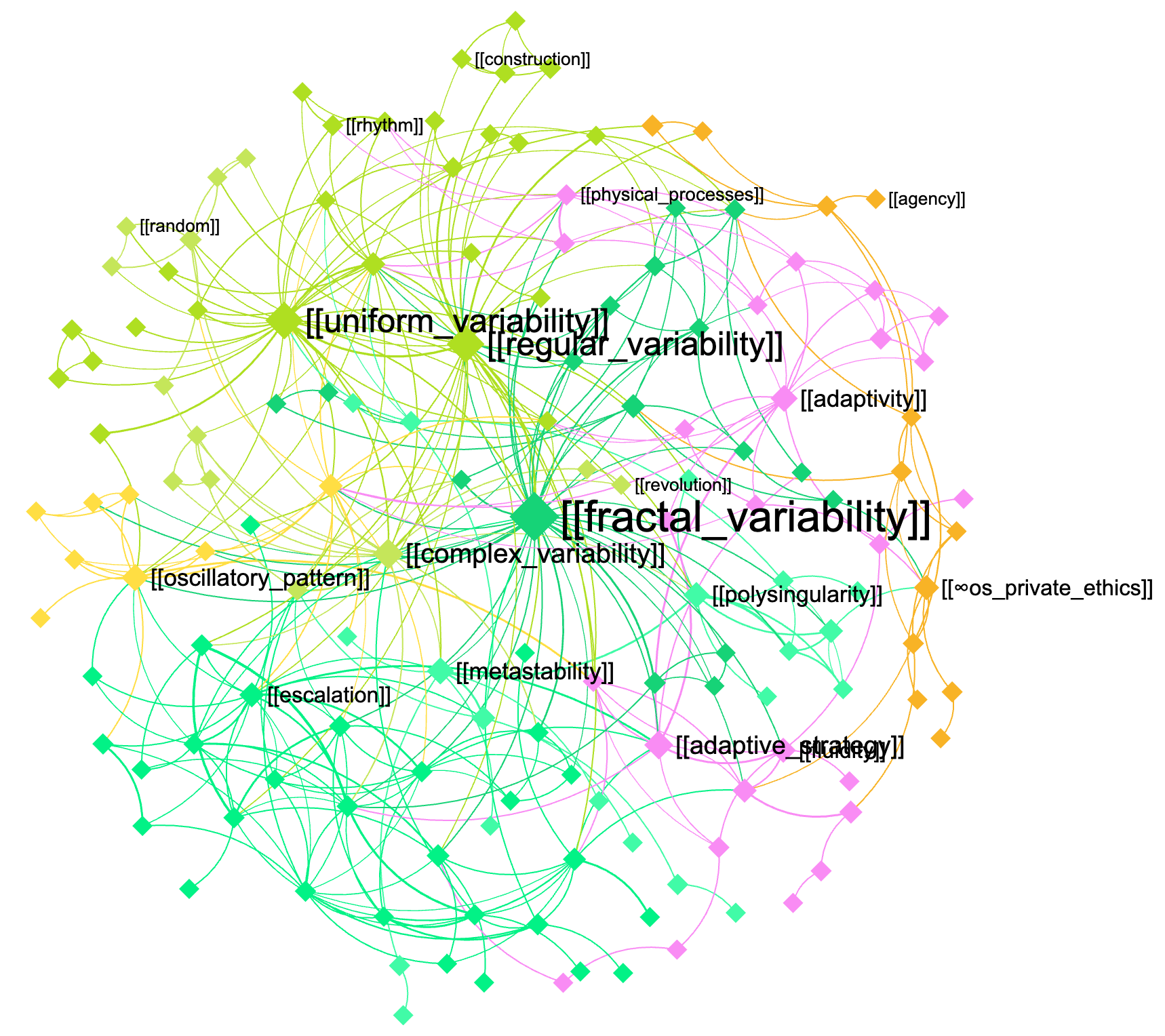"
},
"typeVersion": 1
},
{
"id": "c6d16d77-1aed-4fa8-a7aa-fb7fc6974469",
"name": "스티키 노트9",
"type": "n8n-nodes-base.stickyNote",
"position": [
400,
-32
],
"parameters": {
"width": 520,
"height": 1216,
"content": "\n\n\n\n\n\n\n\n\n\n\n\n\n\n\n\n\n## 3. The augmented query is sent to the knowledge base and the response is retrieved using GraphRAG\n\nNow that the query is augmented with domain-specific knowledge, you can send it back to this same graph or to another graph (for cross-disciplinary requests — e.g. to use the machine learning expertise in biology, etc)\n\n[InfraNodus](https://infranodus.com) will use [GraphRAG](https://infranodus.com/docs/graph-rag-knowledge-graph) to traverse the graph for answers and extract a response for your user query.\n\nProvide the name of the graph you'll be using as a knowledge base in the `name` field of the node.\n\nYou can also replace this node with any external AI model (e.g. Open AI chat message node).\n"
},
"typeVersion": 1
},
{
"id": "3d1fe3e7-dbd5-4b13-a62c-97ee5fa42046",
"name": "스티키 노트2",
"type": "n8n-nodes-base.stickyNote",
"position": [
-576,
-48
],
"parameters": {
"height": 768,
"content": "\n\n\n\n\n\n\n\n\n\n\n\n\n\n\n\n\n## 1. Trigger the chat and send a message\n\nYou can also make this node publicly available via a URL and embed it on a website or make it available via a Telegram node that is activated upon receiving a message (check [this workflow](https://n8n.io/workflows/4485-telegram-ai-chatbot-agent-with-infranodus-graphrag-knowledge-base/) to learn how to set it up). "
},
"typeVersion": 1
}
],
"active": false,
"pinData": {},
"settings": {
"executionOrder": "v1"
},
"versionId": "2bb0a437-1815-4bff-bdd4-600faa19b456",
"connections": {
"2568cca8-643d-48cd-969a-eccf267dd000": {
"main": [
[
{
"node": "92d3bec1-b54d-43c8-8ac2-1e11d92135cb",
"type": "main",
"index": 0
}
]
]
},
"92d3bec1-b54d-43c8-8ac2-1e11d92135cb": {
"main": [
[
{
"node": "cb908d48-e575-4844-a026-aa95d0655935",
"type": "main",
"index": 0
}
]
]
}
}
}자주 묻는 질문
이 워크플로우를 어떻게 사용하나요?
위의 JSON 구성 코드를 복사하여 n8n 인스턴스에서 새 워크플로우를 생성하고 "JSON에서 가져오기"를 선택한 후, 구성을 붙여넣고 필요에 따라 인증 설정을 수정하세요.
이 워크플로우는 어떤 시나리오에 적합한가요?
중급 - 내부 위키, AI RAG
유료인가요?
이 워크플로우는 완전히 무료이며 직접 가져와 사용할 수 있습니다. 다만, 워크플로우에서 사용하는 타사 서비스(예: OpenAI API)는 사용자 직접 비용을 지불해야 할 수 있습니다.
관련 워크플로우 추천
Gemini RAG 파이프라인을 사용하여 문서 전문가 채팅 로봇을 구축
사용법 Gemini RAG 파이프라인을 사용하여 문서 전문가 채팅 로봇 구축
Set
Html
Filter
+
Set
Html
Filter
48 노드Lucas Peyrin
내부 위키
🤖 Gemini RAG 파이프라인을 사용한 문서 전문가 채팅 로봇 구축
OpenAI RAG 파이프라인을 사용하여 n8n 문서 전문가 채팅 로봇 구축
Set
Html
Filter
+
Set
Html
Filter
46 노드Ayham
내부 위키
Graph RAG 지식 본체를 가진 추론 전문가
GraphRAG와 지식 본체를 사용하여 AI 대리인을 위해 맞춤형 추론 모드를 생성하세요
Agent
Http Request Tool
Chat Trigger
+
Agent
Http Request Tool
Chat Trigger
8 노드InfraNodus
엔지니어링
GitHub용 AI 대리자
OpenAI로 GitHub 저장소에서 학습하는 코드 어시스턴트 생성
Set
Github
Http Request
+
Set
Github
Http Request
19 노드Nghia Nguyen
내부 위키
문서 RAG과 채팅 대리자: 구글 드라이브에서 Qdrant과 Mistral OCR로
문서 RAG 및 채팅 대리인: Google Drive에서 Qdrant과 Mistral OCR
If
Set
Code
+
If
Set
Code
40 노드DIGITAL BIZ TECH
내부 위키
🤖 RAG, 제미니, Supabase를 사용하여 문서 전문가 로봇 생성
🤖 RAG, 제미니, Supabase를 사용하여 문서 전문가 로봇 생성
Set
Html
Filter
+
Set
Html
Filter
54 노드Lucas Peyrin
내부 위키
워크플로우 정보
난이도
중급
노드 수7
카테고리2
노드 유형3
저자

InfraNodus
@infranodusI'm Dmitry, the founder of InfraNodus — an AI text network analysis tool. I'm passionate about networks and data visualization and its ability to reveal what everyone else is missing and to highlight different perspectives. I'm sharing the n8n templates that make use of this unique capability of InfraNodus for multiple scenarios.
외부 링크
n8n.io에서 보기 →
이 워크플로우 공유