전체 예약 시스템
고급
이것은Miscellaneous, Multimodal AI분야의자동화 워크플로우로, 41개의 노드를 포함합니다.주로 If, Set, Code, Wait, Webhook 등의 노드를 사용하며. Google Calendar, 영업 시간 및 REST API를 사용하는 완전한 예약 시스템
사전 요구사항
- •HTTP Webhook 엔드포인트(n8n이 자동으로 생성)
워크플로우 미리보기
노드 연결 관계를 시각적으로 표시하며, 확대/축소 및 이동을 지원합니다
워크플로우 내보내기
다음 JSON 구성을 복사하여 n8n에 가져오면 이 워크플로우를 사용할 수 있습니다
{
"id": "TEMPLATE_WORKFLOW_ID",
"meta": {
"instanceId": "TEMPLATE_INSTANCE_ID",
"templateCredsSetupCompleted": true
},
"name": "Complete Booking System",
"tags": [
{
"id": "TEMPLATE_TAG_ID",
"name": "Booking System",
"createdAt": "2025-09-15T05:27:59.706Z",
"updatedAt": "2025-09-15T05:27:59.706Z"
}
],
"nodes": [
{
"id": "f634fd9d-8ba4-4c93-9db1-582b1e8ad991",
"name": "Booking Webhook",
"type": "n8n-nodes-base.webhook",
"position": [
-2464,
-240
],
"webhookId": "booking-webhook",
"parameters": {
"path": "make-booking",
"options": {
"allowedOrigins": "*"
},
"httpMethod": "POST",
"responseMode": "responseNode"
},
"typeVersion": 1
},
{
"id": "011a2f41-f0c3-4cd0-9969-7da1cbc3f427",
"name": "입력값 검증",
"type": "n8n-nodes-base.code",
"position": [
-1968,
-240
],
"parameters": {
"jsCode": "// Parse and validate incoming booking data\nconst inputData = $input.first().json.body ||{};\n\n// Extract booking information\nconst bookingData = {\n name: inputData.name || '',\n email: inputData.email || '',\n phone: inputData.phone || '',\n date: inputData.date || '',\n time: inputData.time || '',\n source: inputData.source || 'Unknown',\n timestamp: new Date().toISOString()\n};\n\n// Validate required fields\nconst requiredFields = ['name', 'email', 'phone', 'date', 'time'];\nconst missingFields = requiredFields.filter(field => !bookingData[field]);\n\nif (missingFields.length > 0) {\n return {\n success: false,\n error: `Missing required fields: ${missingFields.join(', ')}`,\n bookingData: null\n };\n}\n\n// Validate email format\nconst emailRegex = /^[^\\s@]+@[^\\s@]+\\.[^\\s@]+$/;\nif (!emailRegex.test(bookingData.email)) {\n return {\n success: false,\n error: 'Invalid email format',\n bookingData: null\n };\n}\n\n// Validate phone format (basic validation)\nconst phoneRegex = /^[+]?[0-9\\s\\-()]{10,}$/;\nif (!phoneRegex.test(bookingData.phone)) {\n return {\n success: false,\n error: 'Invalid phone number format',\n bookingData: null\n };\n}\n\n// Validate date format (YYYY-MM-DD)\nconst dateRegex = /^\\d{4}-\\d{2}-\\d{2}$/;\nif (!dateRegex.test(bookingData.date)) {\n return {\n success: false,\n error: 'Invalid date format. Please use YYYY-MM-DD',\n bookingData: null\n };\n}\n\n// Validate time format (HH:MM)\nconst timeRegex = /^\\d{2}:\\d{2}$/;\nif (!timeRegex.test(bookingData.time)) {\n return {\n success: false,\n error: 'Invalid time format. Please use HH:MM',\n bookingData: null\n };\n}\n\nreturn {\n success: true,\n error: null,\n bookingData: bookingData\n};"
},
"typeVersion": 2
},
{
"id": "c6138e82-ab61-40ca-b910-5d3fd220ef06",
"name": "유효성 검사",
"type": "n8n-nodes-base.if",
"position": [
-1808,
-240
],
"parameters": {
"options": {},
"conditions": {
"options": {
"version": 1,
"leftValue": "",
"caseSensitive": true,
"typeValidation": "strict"
},
"combinator": "or",
"conditions": [
{
"id": "validation-success",
"operator": {
"type": "boolean",
"operation": "equal"
},
"leftValue": "={{ $json.success }}",
"rightValue": true
},
{
"id": "2500dc60-1b39-487b-8d12-b977f6d557a7",
"operator": {
"type": "boolean",
"operation": "true",
"singleValue": true
},
"leftValue": "={{ $json.success }}",
"rightValue": ""
}
]
}
},
"typeVersion": 2
},
{
"id": "657c2588-a78d-4a56-84a9-d05402027348",
"name": "영업 시간 확인",
"type": "n8n-nodes-base.code",
"position": [
-1056,
-240
],
"parameters": {
"jsCode": "// Business hours validation for Malaysia timezone\nconst bookingData = $input.first().json.bookingData;\n\n// Parse date and time components\nconst [year, month, day] = bookingData.date.split('-').map(Number);\nconst [hour, minute] = bookingData.time.split(':').map(Number);\n\n// Create date object in Malaysia timezone (UTC+8)\n// Note: JavaScript Date constructor treats the date as local time when no timezone is specified\n// We need to account for Malaysia being UTC+8\nconst malaysiaTime = new Date(year, month - 1, day, hour, minute, 0);\n\n// Get day of week (0 = Sunday, 1 = Monday, ..., 6 = Saturday)\nconst dayOfWeek = malaysiaTime.getDay();\nconst timeInMinutes = hour * 60 + minute;\n\n// Business hours: Mon-Fri (1-5), 9am-9pm (540-1260 minutes)\n// Excluding: 12-2pm (720-840 minutes), 6-8pm (1080-1200 minutes)\nconst isWeekday = dayOfWeek >= 1 && dayOfWeek <= 5;\nconst isWithinBusinessHours = timeInMinutes >= 540 && timeInMinutes <= 1260;\nconst isNotLunchBreak = !(timeInMinutes >= 720 && timeInMinutes <= 840);\nconst isNotDinnerBreak = !(timeInMinutes >= 1080 && timeInMinutes <= 1200);\n\n// Check if time is valid\nconst isValidTime = isWeekday && isWithinBusinessHours && isNotLunchBreak && isNotDinnerBreak;\n\n// Format the requested datetime for Google Calendar (in Malaysia timezone)\n// Create proper ISO string with Malaysia timezone offset\nconst startDateTime = new Date(year, month - 1, day, hour, minute, 0).toISOString().replace('Z', '+08:00');\nconst endDateTime = new Date(year, month - 1, day, hour + 1, minute, 0).toISOString().replace('Z', '+08:00');\n\n// Create proper ISO string with Malaysia timezone offset\nconst startDateTimeCal = new Date(year, month - 1, day, hour, minute, 0).toISOString().replace('Z', '+08:00').replace('.000', '');\nconst endDateTimeCal = new Date(year, month - 1, day, hour + 1, minute, 0).toISOString().replace('Z', '+08:00').replace('.000', '');\n\nlet errorMessage = '';\nif (!isWeekday) {\n errorMessage = 'Sorry, we only accept bookings on weekdays (Monday to Friday).';\n} else if (!isWithinBusinessHours) {\n errorMessage = 'Sorry, we only accept bookings between 9:00 AM and 9:00 PM Malaysia time.';\n} else if (!isNotLunchBreak) {\n errorMessage = 'Sorry, we are closed for lunch from 12:00 PM to 2:00 PM Malaysia time.';\n} else if (!isNotDinnerBreak) {\n errorMessage = 'Sorry, we are closed for dinner from 6:00 PM to 8:00 PM Malaysia time.';\n}\n\n\nreturn {\n isValidTime: isValidTime,\n errorMessage: errorMessage,\n bookingData: bookingData,\n startDateTimeCal: startDateTimeCal,\n endDateTimeCal: endDateTimeCal,\n startDateTime: startDateTime,\n endDateTime: endDateTime,\n\n \n malaysiaTime: malaysiaTime.toLocaleString('en-MY', { timeZone: 'Asia/Kuala_Lumpur' }),\n dayOfWeek: ['Sunday', 'Monday', 'Tuesday', 'Wednesday', 'Thursday', 'Friday', 'Saturday'][dayOfWeek],\n debug: {\n parsedDate: bookingData.date,\n parsedTime: bookingData.time,\n dayOfWeek: dayOfWeek,\n timeInMinutes: timeInMinutes,\n isWeekday: isWeekday,\n isWithinBusinessHours: isWithinBusinessHours,\n isNotLunchBreak: isNotLunchBreak,\n isNotDinnerBreak: isNotDinnerBreak\n }\n};"
},
"typeVersion": 2
},
{
"id": "f1696ada-2220-409f-a6d6-20a0af802a46",
"name": "시간 유효성 확인",
"type": "n8n-nodes-base.if",
"position": [
-880,
-240
],
"parameters": {
"options": {},
"conditions": {
"options": {
"version": 1,
"leftValue": "",
"caseSensitive": true,
"typeValidation": "strict"
},
"combinator": "or",
"conditions": [
{
"id": "time-valid",
"operator": {
"type": "boolean",
"operation": "equal"
},
"leftValue": "={{ $json.isValidTime }}",
"rightValue": true
},
{
"id": "2ad109e2-afbf-4ac5-a850-c5e21ec7c8bf",
"operator": {
"type": "boolean",
"operation": "true",
"singleValue": true
},
"leftValue": "={{ $json.isValidTime }}",
"rightValue": ""
},
{
"id": "fcec51d1-e421-46b0-9787-343004cd04ae",
"operator": {
"type": "string",
"operation": "empty",
"singleValue": true
},
"leftValue": "={{ $json.errorMessage }}",
"rightValue": ""
}
]
}
},
"typeVersion": 2
},
{
"id": "1a83780e-5c40-4eda-b9bf-07db8db03c5c",
"name": "가용성 확인",
"type": "n8n-nodes-base.code",
"position": [
320,
-272
],
"parameters": {
"jsCode": "function checkCalendar(calendarEvents, bookingData,startDateTime,endDateTime){\n\n \n\n// Filter out events that might conflict\nconst conflictingEvents = calendarEvents.filter(event => {\n const eventStart = new Date(event.json.start?.dateTime || event.json.start?.date);\n const eventEnd = new Date(event.json.end?.dateTime || event.json.end?.date);\n \n // Check for overlap\n return (eventStart < new Date(endDateTime) && eventEnd > new Date(startDateTime));\n});\n\nconst isAvailable = conflictingEvents.length === 0;\n\nlet availabilityMessage = '';\nif (!isAvailable) {\n const conflictingTimes = conflictingEvents.map(event => {\n const start = new Date(event.json.start?.dateTime || event.json.start?.date);\n return start.toLocaleString('en-MY', { timeZone: 'Asia/Kuala_Lumpur' });\n }).join(', ');\n \n availabilityMessage = `Sorry, the requested time slot is not available. We have existing bookings at: ${conflictingTimes}. Please choose a different time.`;\n}\n\nreturn {\n isAvailable: isAvailable,\n availabilityMessage: availabilityMessage,\n conflictingEvents: conflictingEvents,\n bookingData: bookingData,\n startDateTime: startDateTime,\n endDateTime: endDateTime\n};\n\n \n} \n\n\n// PUBLIC HOLIDAY\n// Check if there are any conflicting events \nlet calendarEvents = $input.all();\nlet bookingData =$('Time Validation Check').first().json.bookingData;\nlet startDateTime = $('Time Validation Check').first().json.startDateTime\nlet endDateTime =$('Time Validation Check').first().json.endDateTime\n \nconst result1 = checkCalendar(calendarEvents, bookingData,startDateTime,endDateTime)\nif(!result1.isAvailable ){\n return result1\n}\n\n \n// MAIN CALENDAR\n// Check if there are any conflicting events \n\nlet calendarEvents2 = $('Check Calendar Availability - Main').all(); \n\nconst result2 = checkCalendar(calendarEvents2, bookingData,startDateTime,endDateTime)\nif(!result2.isAvailable ){\n return result2\n}\n\n\n \nreturn {result2, result1:result1, result22:result2}\n "
},
"typeVersion": 2
},
{
"id": "d306380e-991b-4ed1-9e49-120416e9a368",
"name": "가용성 검사",
"type": "n8n-nodes-base.if",
"position": [
496,
-272
],
"parameters": {
"options": {},
"conditions": {
"options": {
"version": 1,
"leftValue": "",
"caseSensitive": true,
"typeValidation": "strict"
},
"combinator": "or",
"conditions": [
{
"id": "slot-available",
"operator": {
"type": "boolean",
"operation": "equal"
},
"leftValue": "={{ $json.isAvailable }}",
"rightValue": true
},
{
"id": "a2aeaf3c-a4a9-46c7-957b-71a83b5b43d4",
"operator": {
"type": "string",
"operation": "equals"
},
"leftValue": "={{ $json.isAvailable +\"\"}}",
"rightValue": "\"true\""
},
{
"id": "71292758-80a6-4c61-b6ee-9dcb6df7fef7",
"operator": {
"type": "array",
"operation": "lengthLt",
"rightType": "number"
},
"leftValue": "={{ $json.conflictingEvents }}",
"rightValue": 1
}
]
}
},
"typeVersion": 2
},
{
"id": "b99740f9-2f54-4463-8f5d-3ce5dfa0f6f8",
"name": "캘린더 이벤트 생성",
"type": "n8n-nodes-base.googleCalendar",
"position": [
1136,
-272
],
"parameters": {
"end": "={{ $('Business Hours Check').all()[0].json.endDateTimeCal }}",
"start": "={{ $('Business Hours Check').all()[0].json.startDateTimeCal }}",
"calendar": {
"__rl": true,
"mode": "list",
"value": "YOUR_BOOKING_CALENDAR_ID@group.calendar.google.com",
"cachedResultName": "Main Booking Calendar"
},
"additionalFields": {
"color": "2",
"summary": "=Booking with {{ $('Booking Webhook').first().json.body.name }}",
"attendees": [
"={{ $('Booking Webhook').first().json.body.email }}"
],
"visibility": "default",
"description": "=Booking with {{ $('Booking Webhook').first().json.body.name }}",
"conferenceDataUi": {
"conferenceDataValues": {
"conferenceSolution": "hangoutsMeet"
}
},
"guestsCanInviteOthers": false
}
},
"credentials": {
"googleCalendarOAuth2Api": {
"id": "YOUR_GOOGLE_CALENDAR_CREDENTIAL_ID",
"name": "Google Calendar account"
}
},
"typeVersion": 1
},
{
"id": "ce008e1d-3ea2-47f7-9ad6-444b85011fb1",
"name": "성공 응답 준비",
"type": "n8n-nodes-base.code",
"position": [
1344,
-272
],
"parameters": {
"jsCode": "\nconst calendarEvent = $input.first().json;\n\nconst bookingData =$('Booking Webhook').first().json.body\n\nreturn {\n success: true,\n message: 'Booking confirmed successfully!',\n bookingDetails: {\n name: bookingData.name,\n email: bookingData.email,\n phone: bookingData.phone,\n date: bookingData.date,\n time: bookingData.time,\n eventId: calendarEvent.id,\n eventLink: calendarEvent.htmlLink,\n calendarEvent: calendarEvent\n },\n confirmationMessage: `Hi ${bookingData.name}, your booking has been confirmed for ${bookingData.date} at ${bookingData.time} Malaysia time. You will receive a calendar invitation shortly.`\n};"
},
"typeVersion": 2
},
{
"id": "bd5d586c-101f-43a0-996d-9daf56e16006",
"name": "성공 응답",
"type": "n8n-nodes-base.respondToWebhook",
"position": [
1520,
-272
],
"parameters": {
"options": {
"responseHeaders": {
"entries": [
{
"name": "Content-Type",
"value": "application/json"
}
]
}
},
"respondWith": "json",
"responseBody": "={{ $json }}"
},
"typeVersion": 1
},
{
"id": "4809f9d6-0545-4929-9b7e-2fed1baef77d",
"name": "오류 응답",
"type": "n8n-nodes-base.respondToWebhook",
"position": [
-1408,
96
],
"parameters": {
"options": {
"responseHeaders": {
"entries": [
{
"name": "Content-Type",
"value": "application/json"
}
]
}
},
"respondWith": "json",
"responseBody": "={{ $json }}"
},
"typeVersion": 1
},
{
"id": "8ed8f9f8-0e0e-4672-9b96-3493090d0cc7",
"name": "시간 오류 응답",
"type": "n8n-nodes-base.respondToWebhook",
"position": [
-480,
112
],
"parameters": {
"options": {
"responseHeaders": {
"entries": [
{
"name": "Content-Type",
"value": "application/json"
}
]
}
},
"respondWith": "json",
"responseBody": "={{ $json }}"
},
"typeVersion": 1
},
{
"id": "f275c219-5f3e-432c-a56a-1e120b1b72a1",
"name": "가용성 오류 응답",
"type": "n8n-nodes-base.respondToWebhook",
"position": [
832,
80
],
"parameters": {
"options": {
"responseHeaders": {
"entries": [
{
"name": "Content-Type",
"value": "application/json"
}
]
}
},
"respondWith": "json",
"responseBody": "={{ $json }}"
},
"typeVersion": 1
},
{
"id": "5eafcbd8-36ae-447b-9801-b599c154ae93",
"name": "검증 오류 준비",
"type": "n8n-nodes-base.code",
"position": [
-1568,
96
],
"parameters": {
"jsCode": "// Prepare error response for validation failures\nconst errorData = $input.first().json;\n\nreturn {\n success: false,\n error: errorData.error,\n message: 'Booking request failed validation',\n details: errorData\n};"
},
"typeVersion": 2
},
{
"id": "05e0736b-2e25-4414-94f9-e065c7a2f78a",
"name": "시간 오류 준비",
"type": "n8n-nodes-base.code",
"position": [
-624,
112
],
"parameters": {
"jsCode": "// Prepare error response for business hours violations\nconst errorData = $input.first().json;\n\nreturn {\n success: false,\n error: errorData.errorMessage,\n message: 'Booking request outside business hours',\n details: {\n requestedTime: errorData.malaysiaTime,\n dayOfWeek: errorData.dayOfWeek,\n businessHours: 'Monday to Friday, 9:00 AM - 9:00 PM Malaysia time',\n excludedHours: '12:00 PM - 2:00 PM (lunch), 6:00 PM - 8:00 PM (dinner)'\n }\n};"
},
"typeVersion": 2
},
{
"id": "a4b2ce24-64ed-4554-817a-be4e8e1f219a",
"name": "가용성 오류 준비",
"type": "n8n-nodes-base.code",
"position": [
656,
80
],
"parameters": {
"jsCode": "// Prepare error response for availability issues\nconst errorData = $input.first().json;\n\nreturn {\n success: false,\n error: errorData.availabilityMessage,\n message: 'Requested time slot is not available',\n details: {\n requestedTime: errorData.bookingData.date + ' ' + errorData.bookingData.time,\n conflictingEvents: errorData.conflictingEvents.length,\n suggestion: 'Please try a different time slot'\n }\n};"
},
"typeVersion": 2
},
{
"id": "b2b026d5-aace-4e35-96e0-50ad518becc4",
"name": "캘린더 가용성 확인 - 공휴일",
"type": "n8n-nodes-base.googleCalendar",
"position": [
112,
-272
],
"parameters": {
"limit": 10,
"options": {
"orderBy": "startTime",
"timeMax": "={{ $('Business Hours Check').all()[0].json.endDateTime}}",
"timeMin": "={{ $('Business Hours Check').all()[0].json.startDateTime }}",
"singleEvents": true
},
"calendar": {
"__rl": true,
"mode": "list",
"value": "en.malaysia#holiday@group.v.calendar.google.com",
"cachedResultName": "Holidays in Malaysia"
},
"operation": "getAll"
},
"credentials": {
"googleCalendarOAuth2Api": {
"id": "YOUR_GOOGLE_CALENDAR_CREDENTIAL_ID",
"name": "Google Calendar account"
}
},
"typeVersion": 1,
"alwaysOutputData": true
},
{
"id": "21087fe4-a8f3-45ce-9311-271638b3ed01",
"name": "캘린더 가용성 확인 - 메인",
"type": "n8n-nodes-base.googleCalendar",
"position": [
-64,
-272
],
"parameters": {
"limit": 10,
"options": {
"orderBy": "startTime",
"timeMax": "={{ $('Business Hours Check').all()[0].json.endDateTime}}",
"timeMin": "={{ $('Business Hours Check').all()[0].json.startDateTime }}",
"singleEvents": true
},
"calendar": {
"__rl": true,
"mode": "list",
"value": "YOUR_BOOKING_CALENDAR_ID@group.calendar.google.com",
"cachedResultName": "Main Booking Calendar"
},
"operation": "getAll"
},
"credentials": {
"googleCalendarOAuth2Api": {
"id": "YOUR_GOOGLE_CALENDAR_CREDENTIAL_ID",
"name": "Google Calendar account"
}
},
"typeVersion": 1,
"alwaysOutputData": true
},
{
"id": "2b3e3f48-053c-4aca-a620-262220445eed",
"name": "캘린더 가용성 확인",
"type": "n8n-nodes-base.googleCalendar",
"position": [
-1344,
1952
],
"parameters": {
"limit": 10,
"options": {
"orderBy": "startTime",
"timeMax": "={{ $('Validate Date1').first().json.checkData.date + 'T23:59:59+08:00' }}",
"timeMin": "={{ $('Validate Date1').first().json.checkData.date + 'T00:00:00+08:00' }}",
"singleEvents": true
},
"calendar": {
"__rl": true,
"mode": "list",
"value": "YOUR_BOOKING_CALENDAR_ID@group.calendar.google.com",
"cachedResultName": "Main Booking Calendar"
},
"operation": "getAll"
},
"credentials": {
"googleCalendarOAuth2Api": {
"id": "YOUR_GOOGLE_CALENDAR_CREDENTIAL_ID",
"name": "Google Calendar account"
}
},
"typeVersion": 1,
"alwaysOutputData": true
},
{
"id": "657ea779-54a4-4b14-97f8-6ad9338ba6a9",
"name": "날짜1 검증",
"type": "n8n-nodes-base.code",
"position": [
-1744,
1952
],
"parameters": {
"jsCode": "// Parse and validate incoming date data\nconst inputData = $('Booking Timeslot webhook').first().json.body;\n\n// Extract date information\nconst checkData = {\n date: inputData.date || '',\n timestamp: new Date().toISOString()\n};\n\n// Validate required fields\nif (!checkData.date) {\n return {\n success: false,\n error: 'Missing required field: date',\n checkData: null\n };\n}\n\n// Validate date format (YYYY-MM-DD)\nconst dateRegex = /^\\d{4}-\\d{2}-\\d{2}$/;\nif (!dateRegex.test(checkData.date)) {\n return {\n success: false,\n error: 'Invalid date format. Please use YYYY-MM-DD',\n checkData: null\n };\n}\n\n// Parse date components\nconst [year, month, day] = checkData.date.split('-').map(Number);\nconst checkDate = new Date(year, month - 1, day);\nconst dayOfWeek = checkDate.getDay();\n\n// Check if it's a weekend\nconst isWeekend = dayOfWeek === 0 || dayOfWeek === 6;\n\nreturn {\n success: true,\n error: null,\n checkData: checkData,\n parsedDate: {\n year: year,\n month: month,\n day: day,\n dayOfWeek: dayOfWeek,\n dayName: ['Sunday', 'Monday', 'Tuesday', 'Wednesday', 'Thursday', 'Friday', 'Saturday'][dayOfWeek],\n isWeekend: isWeekend\n }\n};"
},
"typeVersion": 2
},
{
"id": "6986af41-125a-44a8-863c-c0bf287f391a",
"name": "Booking Timeslot webhook",
"type": "n8n-nodes-base.webhook",
"position": [
-2336,
1952
],
"webhookId": "booking-webhook",
"parameters": {
"path": "check-booking-date",
"options": {
"allowedOrigins": "*"
},
"httpMethod": "POST",
"responseMode": "responseNode"
},
"typeVersion": 1
},
{
"id": "682404b7-8e65-458c-88ab-8f7af92c0654",
"name": "스티커 메모1",
"type": "n8n-nodes-base.stickyNote",
"position": [
-3392,
-544
],
"parameters": {
"color": 6,
"width": 208,
"height": 80,
"content": "## Make a Booking"
},
"typeVersion": 1
},
{
"id": "020d4645-f547-46a8-b79d-f3474f410172",
"name": "대기",
"type": "n8n-nodes-base.wait",
"position": [
-2272,
-240
],
"webhookId": "YOUR_WEBHOOK_ID",
"parameters": {
"amount": 2.2
},
"typeVersion": 1.1
},
{
"id": "521cabc0-39ac-44e9-9cdc-eb278d00914f",
"name": "대기1",
"type": "n8n-nodes-base.wait",
"position": [
-2128,
1952
],
"webhookId": "YOUR_WEBHOOK_ID",
"parameters": {
"amount": 2.2
},
"typeVersion": 1.1
},
{
"id": "7baeedf5-55e5-4f29-be40-b1e16bd4ebe8",
"name": "ConfigTimeSlots",
"type": "n8n-nodes-base.set",
"position": [
-1968,
1952
],
"parameters": {
"options": {},
"assignments": {
"assignments": [
{
"id": "3bfa3c4b-14c7-4c54-b186-bd4df7faafde",
"name": "configuredAvailableTimeSlots",
"type": "array",
"value": " [ { \"time\": '09:30', \"display\": '9:30 AM - 10:30 AM', \"available\": true }, { \"time\": '10:30', \"display\": '10:30 AM - 11:30 AM', \"available\": true }, { \"time\": '11:30', \"display\": '11:30 AM - 12:30 PM', \"available\": true }, { \"time\": '11:30', \"display\": '12:30 AM - 2:30 PM', \"available\": false }, { \"time\": '14:30', \"display\": '2:30 PM - 3:30 PM', \"available\": true }, { \"time\": '15:30', \"display\": '3:30 PM - 4:30 PM', \"available\": true }, { \"time\": '16:30', \"display\": '4:30 PM - 5:30 PM', \"available\": true }, { \"time\": '17:30', \"display\": '5:30 PM - 6:30 PM', \"available\": true }, { \"time\": '17:30', \"display\": '6:30 PM - 8:30 PM', \"available\": false }, { \"time\": '20:30', \"display\": '8:30 PM - 9:30 PM', \"available\": true } ] "
}
]
}
},
"typeVersion": 3.4
},
{
"id": "8008974b-2b69-4c9f-a9eb-cc4a3dfc16bb",
"name": "스티커 메모3",
"type": "n8n-nodes-base.stickyNote",
"position": [
-1616,
-48
],
"parameters": {
"color": 3,
"width": 384,
"height": 304,
"content": "## Handle validation \n1. name + email validation\n2. phone validation\n3. date time validation"
},
"typeVersion": 1
},
{
"id": "863e46b6-20c9-4d46-ac72-a8d8a276ae84",
"name": "스티커 메모4",
"type": "n8n-nodes-base.stickyNote",
"position": [
-656,
-32
],
"parameters": {
"color": 3,
"width": 400,
"height": 288,
"content": "## Handle validation \n1. datetime is weekend \n2. datetime is non-business hours \n3. datetime is lunch or dinner hours"
},
"typeVersion": 1
},
{
"id": "9d5bb1b8-797a-45ae-8099-09e2dc52b29e",
"name": "스티커 메모5",
"type": "n8n-nodes-base.stickyNote",
"position": [
656,
-64
],
"parameters": {
"color": 3,
"width": 320,
"height": 304,
"content": "## Handle validation \n1. datetime is conflicting with another event\n2. datetime is a malaysian public holiday "
},
"typeVersion": 1
},
{
"id": "a6c9d369-708c-48d1-bd3c-bbdb99dde83b",
"name": "스티커 메모6",
"type": "n8n-nodes-base.stickyNote",
"position": [
-112,
-480
],
"parameters": {
"color": 6,
"width": 1120,
"height": 736,
"content": "## Checking datetime \n1. Malaysian public holiday\n2. Event booking conflict"
},
"typeVersion": 1
},
{
"id": "f63f18ce-12f1-4ad8-bb41-3b9c1238f462",
"name": "스티커 메모7",
"type": "n8n-nodes-base.stickyNote",
"position": [
-1104,
-464
],
"parameters": {
"color": 6,
"width": 864,
"height": 736,
"content": "## Checking datetime \n1. is a weekend working day?\n2. is a non-business hours?\n3. is a lunch or dinner hours?"
},
"typeVersion": 1
},
{
"id": "579efc35-1b5f-4f50-bae5-10a1a1d3544f",
"name": "스티커 메모8",
"type": "n8n-nodes-base.stickyNote",
"position": [
-2032,
-464
],
"parameters": {
"color": 6,
"width": 816,
"height": 736,
"content": "## Checking input received\n1. is a valid name, email?\n2. is a valid phone number?\n3. is a valid date time?"
},
"typeVersion": 1
},
{
"id": "43bce511-7190-4152-8392-5b196b52e9b6",
"name": "스티커 메모9",
"type": "n8n-nodes-base.stickyNote",
"position": [
1104,
-480
],
"parameters": {
"color": 6,
"width": 560,
"height": 720,
"content": "## Creating the calendar entry\n "
},
"typeVersion": 1
},
{
"id": "192d0193-0783-40e3-b763-be38026cff03",
"name": "스티커 메모10",
"type": "n8n-nodes-base.stickyNote",
"position": [
-2496,
-464
],
"parameters": {
"color": 6,
"width": 400,
"height": 736,
"content": "## Endpoint for making a booking\nReceives the input name,email,phone and datetime for booking"
},
"typeVersion": 1
},
{
"id": "53d5e3b2-8d1b-4427-bc55-c1925bd79cc3",
"name": "스티커 메모12",
"type": "n8n-nodes-base.stickyNote",
"position": [
-3392,
-448
],
"parameters": {
"color": 6,
"width": 840,
"height": 2020,
"content": "## Create a Booking : MAKE A BOOKING ENDPOINT\n\n### Purpose \nThis workflow provides a webhook API endpoint that your frontend can easily integrate typically triggered by a submit button on a booking form.\nWhen the frontend calls this REST API, the workflow handles the booking logic by performing several key checks:\n- Valid Input — Ensures all required fields are present and correctly formatted.\n- Date & Time Validation — Confirms the requested slot falls within business hours, excludes lunch/dinner breaks, and respects public holidays.\n- Conflict Detection — Checks for any existing bookings at the requested time to prevent overlaps.\n- Calendar Integration — Once all checks pass, the workflow automatically creates a booking entry in your Google Calendar, keeping everything synced and visible.\n\n### Examples\n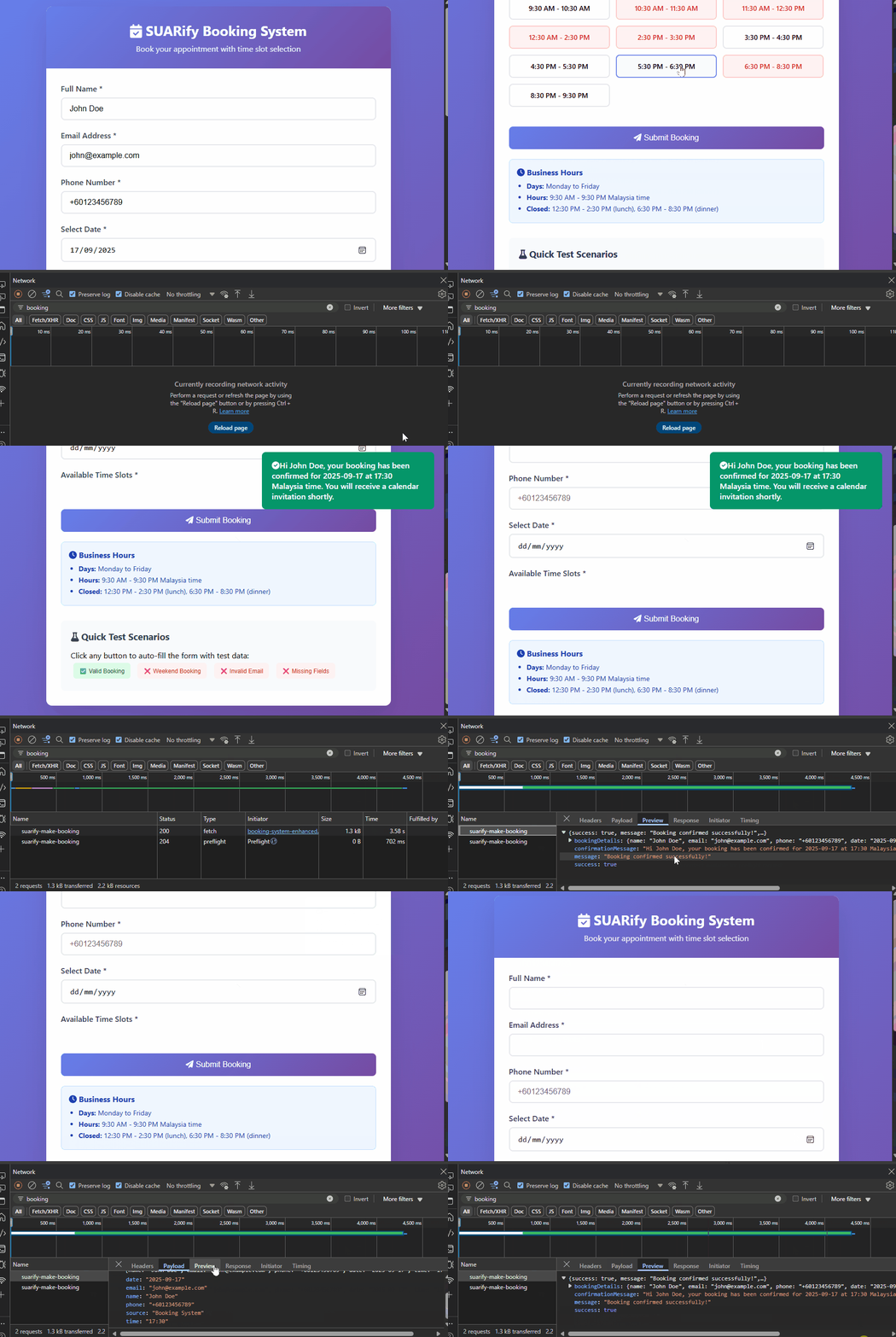\n\n\n### How to integrate\n1. Connect your frontend interface to this api below. You may change the base endpoint to `webhook` or `webhook-test` depending on your environment.\n\nYou can also change the based the endpoint 'https://n8n.io' to your own hosted domain like 'https://mycustomdomain.io/'\n\n```\ncurl -X POST 'https://n8n.io/webhook-test/suarify-make-booking' \n-H 'Content-Type: application/json' -d '\n {\n \"name\":\"John Doe\",\n \"email\":\"john@example.com\",\n \"phone\":\"+60123456789\",\n \"date\":\"2025-09-17\",\n \"time\":\"14:30\",\n \"source\":\"Booking System\"\n}' \n```\n\n2. You will see a sample output response:\n\n\n```\n{\n \"success\": true,\n \"message\": \"Booking confirmed successfully!\",\n \"bookingDetails\": {\n \"name\": \"John Doe\",\n \"email\": \"john@example.com\",\n \"phone\": \"+60123456789\",\n \"date\": \"2025-09-17\",\n \"time\": \"14:30\",\n \"eventId\": \"1sin1h9cp7dh779g3s4c15dbqo\",\n \"eventLink\": \"https://www.google.com/calendar/event?eid=MXNbjFoOWNwN2RoNzc5ZzNzNGMxNWRicW8gZGI5OGJiMjhiNzcxNjU4ZjE3YzQzNzE2MzY2MGI2NzcyMTYzZThhYWE5NWIwMDI1OWMxZDFkNDA4M2YwNThjNkBn\",\n \"calendarEvent\": { }\n },\n \"confirmationMessage\": \"Hi John Doe, your booking has been confirmed for 2025-09-17 at 14:30 Malaysia time. You will receive a calendar invitation shortly.\"\n}\n```"
},
"typeVersion": 1
},
{
"id": "3e214651-c3b0-4166-a49f-bc6eb15fefe2",
"name": "스티커 메모13",
"type": "n8n-nodes-base.stickyNote",
"position": [
-3408,
1808
],
"parameters": {
"color": 4,
"width": 840,
"height": 2244,
"content": "## Get Booking Slots : FETCH BOOKING SLOTS ENDPOINT\n\n### Purpose \nThis workflow powers a REST API endpoint designed to respond when a user interacts with the frontend booking form and selects a specific date.\n\nUpon receiving the request, the endpoint returns a list of available time slots that can be booked. If the selected slot is already occupied, the system will mark the slot accordingly.\nIn cases where no slots for the entire day such as during public holidays, weekends, or scheduled closures — the response will clearly indicate that bookings are not possible on that day.\n\n\n\n### Examples\n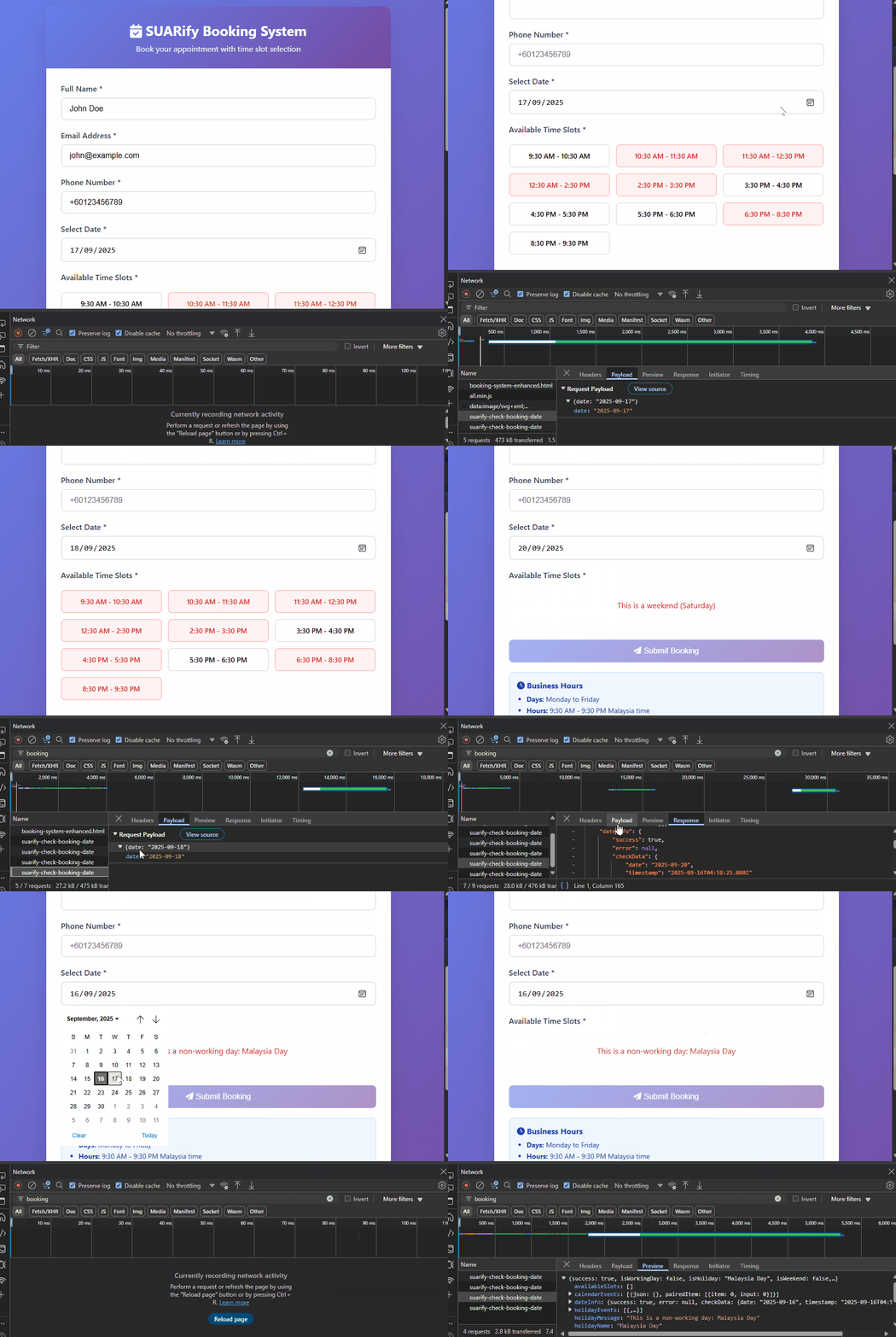\n\n\n### How to integrate\n1. Connect your frontend interface to this api below. You may change the base endpoint to `webhook` or `webhook-test` depending on your environment.\n\nYou can also change the based the endpoint 'https://n8n.io' to your own hosted domain like 'https://mycustomdomain.io/'\n\n```\ncurl -X POST 'https://n8n.io/webhook-test/suarify-check-booking-date' \n-H 'Content-Type: application/json' -d '\n{\n date: \"2025-09-18\"\n}' \n```\n\n2. You will see a sample output response:\n\n\n```\n{\n \"success\": true,\n \"isWorkingDay\": true,\n \"isWeekend\": false,\n \"holidayName\": \"\",\n \"holidayMessage\": \"\",\n \"weekendMessage\": \"\",\n \"availableSlots\": [\n {\n \"time\": \"09:30\",\n \"display\": \"9:30 AM - 10:30 AM\",\n \"available\": false,\n \"status\": \"booked\"\n },\n {\n \"time\": \"10:30\",\n \"display\": \"10:30 AM - 11:30 AM\",\n \"available\": false,\n \"status\": \"booked\"\n },\n {\n \"time\": \"11:30\",\n \"display\": \"11:30 AM - 12:30 PM\",\n \"available\": false,\n \"status\": \"booked\"\n },\n {\n \"time\": \"11:30\",\n \"display\": \"12:30 AM - 2:30 PM\",\n \"available\": false,\n \"status\": \"booked\"\n },\n {\n \"time\": \"14:30\",\n \"display\": \"2:30 PM - 3:30 PM\",\n \"available\": false,\n \"status\": \"booked\"\n },\n {\n \"time\": \"15:30\",\n \"display\": \"3:30 PM - 4:30 PM\",\n \"available\": true\n },\n {\n \"time\": \"16:30\",\n \"display\": \"4:30 PM - 5:30 PM\",\n \"available\": false,\n \"status\": \"booked\"\n },\n {\n \"time\": \"17:30\",\n \"display\": \"5:30 PM - 6:30 PM\",\n \"available\": true\n },\n {\n \"time\": \"17:30\",\n \"display\": \"6:30 PM - 8:30 PM\",\n \"available\": false\n },\n {\n \"time\": \"20:30\",\n \"display\": \"8:30 PM - 9:30 PM\",\n \"available\": false,\n \"status\": \"booked\"\n }\n ],\n \"dateInfo\": {\n \"success\": true,\n \"error\": null,\n \"checkData\": {\n \"date\": \"2025-09-18\",\n \"timestamp\": \"2025-09-16T06:58:56.210Z\"\n },\n \"parsedDate\": {\n \"year\": 2025,\n \"month\": 9,\n \"day\": 18,\n \"dayOfWeek\": 4,\n \"dayName\": \"Thursday\",\n \"isWeekend\": false\n }\n },\n \"holidayEvents\": [],\n \"calendarEvents\": [ ],\n \"totalConflicts\": 6\n}\n```"
},
"typeVersion": 1
},
{
"id": "3e51b455-3bf6-4f0c-a7f6-55085adbcdec",
"name": "스티커 메모11",
"type": "n8n-nodes-base.stickyNote",
"position": [
-2416,
1808
],
"parameters": {
"color": 4,
"width": 1712,
"height": 416,
"content": "## Endpoint for getting booking slots by specific date\nReceives the timeslots for booking"
},
"typeVersion": 1
},
{
"id": "023484db-6e34-4a00-b19c-419c8e486ee4",
"name": "스티커 메모14",
"type": "n8n-nodes-base.stickyNote",
"position": [
-4192,
-448
],
"parameters": {
"color": 3,
"width": 660,
"height": 3200,
"content": "## Demo\n\n \n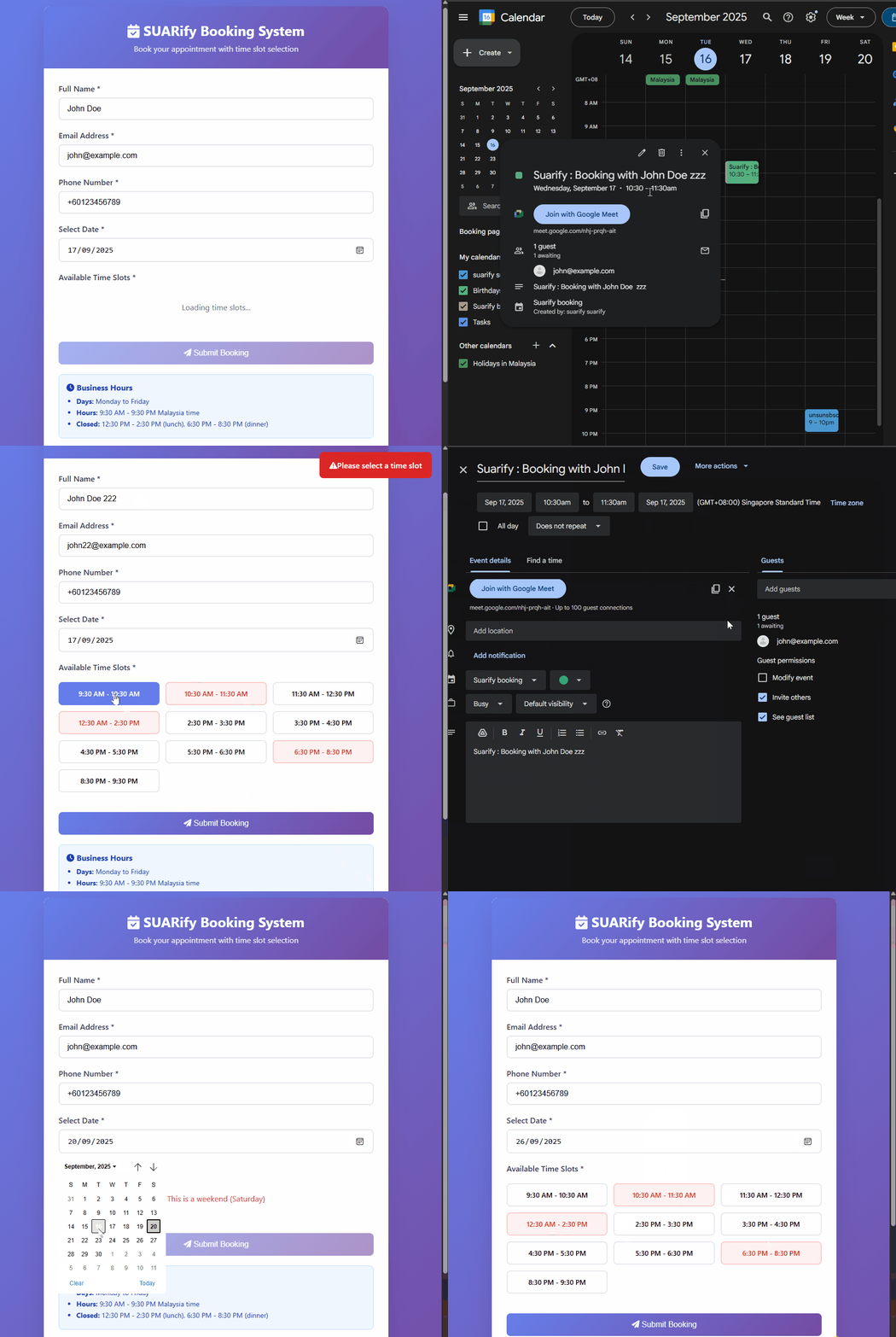\n\n* [frontend code example](https://github.com/dragonjump/suarify-booking/blob/gh-pages/index.html/)\n* [try yourself](https://dragonjump.github.io/suarify-booking/)\n\n## Set up steps\n\n1. **Google Cloud Project and Vertex AI API**:\n - Create a Google Cloud project.\n - Enable the Vertex AI API for your project. \n\n2. **Google Calendar**:\n - Follow setup link [n8n-google-calendar-setup](https://docs.n8n.io/integrations/builtin/credentials/google/)\n - Follow capability link [n8n-google-calendar-capability](https://docs.n8n.io/integrations/builtin/app-nodes/n8n-nodes-base.googlecalendar/)\n\n\n3. **Setting up Google Calendar**:\n - Add the public holiday calendar that you want in your calendar. (eg public holiday malaysia)\n - Create a new booking-specific calendar. (eg. suarify-booking-calendar)\n - In the current node for calendar, ensure you setup the same too\n\n \n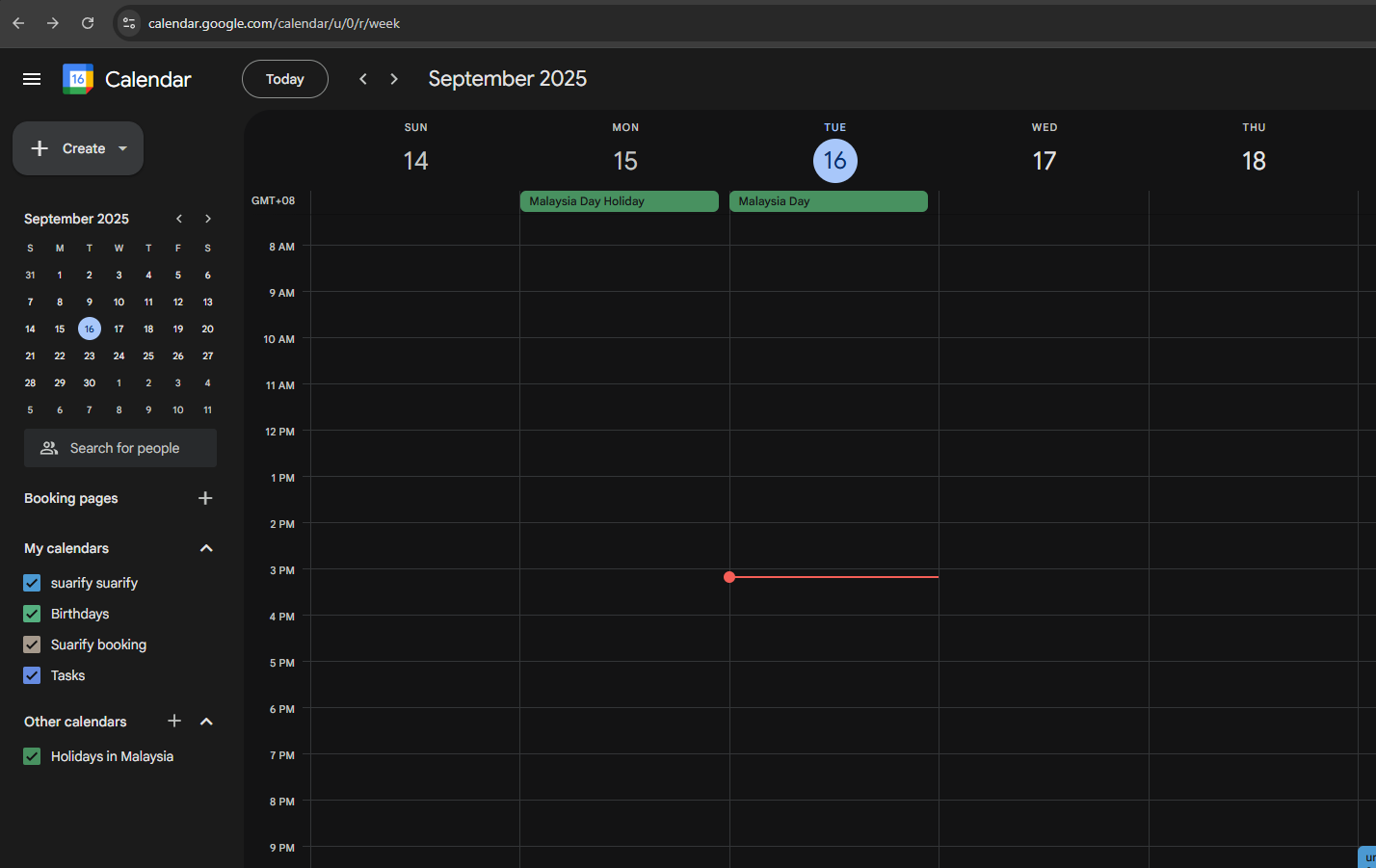\n\n4. **Changing business hours**:\n - Change the param in node `ConfigTimeSlots`\n\n## Workflow snapshots\n\nSome last tested snapshots in n8n\n\n\n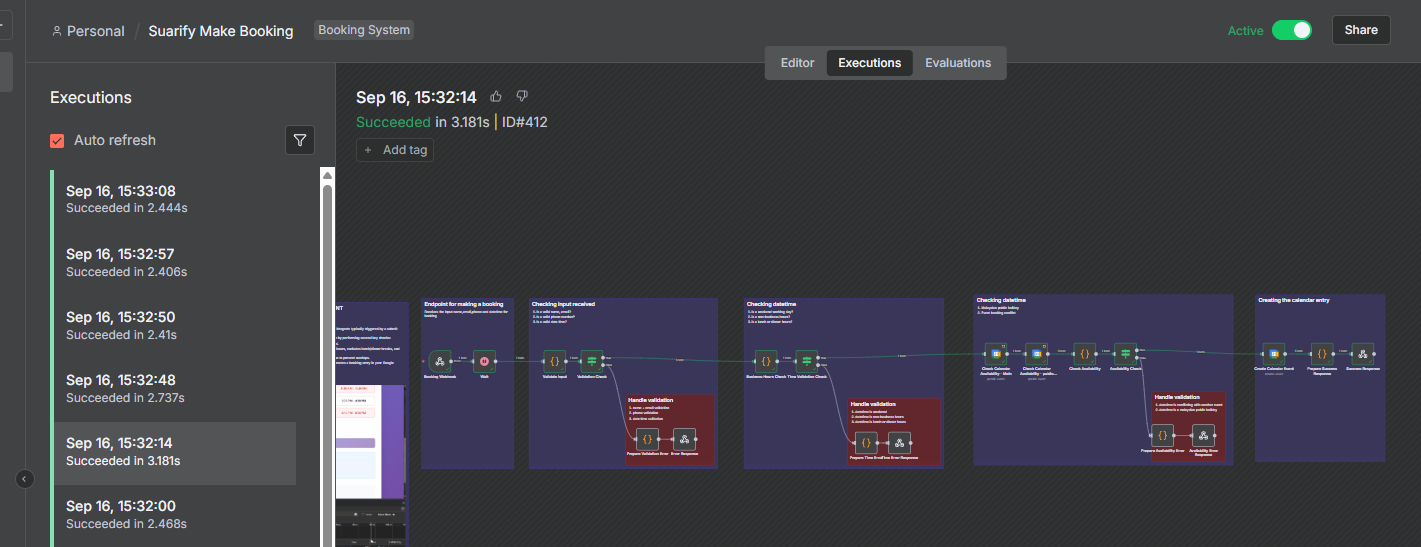\n\n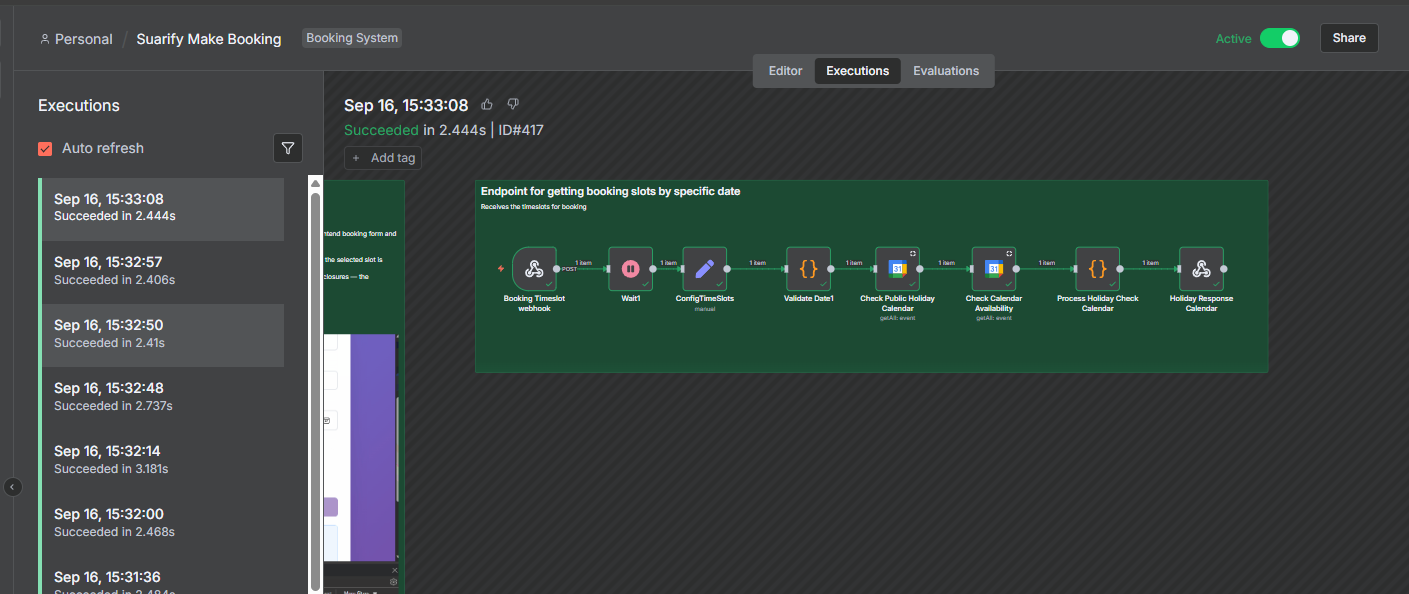"
},
"typeVersion": 1
},
{
"id": "d210e469-05a7-42f5-91f2-9c5e571094cd",
"name": "스티커 메모",
"type": "n8n-nodes-base.stickyNote",
"position": [
-3392,
1680
],
"parameters": {
"color": 4,
"width": 400,
"height": 80,
"content": "## Get Booking slots for date"
},
"typeVersion": 1
},
{
"id": "d0249a98-bd41-4129-b443-acb4fd1f7426",
"name": "공휴일 캘린더 확인",
"type": "n8n-nodes-base.googleCalendar",
"position": [
-1552,
1952
],
"parameters": {
"limit": 10,
"options": {
"orderBy": "startTime",
"timeMax": "={{ $json.checkData.date + 'T23:59:59+08:00' }}",
"timeMin": "={{ $json.checkData.date + 'T00:00:00+08:00' }}",
"singleEvents": true
},
"calendar": {
"__rl": true,
"mode": "list",
"value": "en.malaysia#holiday@group.v.calendar.google.com",
"cachedResultName": "Holidays in Malaysia"
},
"operation": "getAll"
},
"credentials": {
"googleCalendarOAuth2Api": {
"id": "YOUR_GOOGLE_CALENDAR_CREDENTIAL_ID",
"name": "Google Calendar account"
}
},
"typeVersion": 1,
"alwaysOutputData": true
},
{
"id": "22b73d2f-d8ca-40c8-87df-9eecc3e40db4",
"name": "공휴일 확인 캘린더 처리",
"type": "n8n-nodes-base.code",
"position": [
-1120,
1952
],
"parameters": {
"jsCode": "// Check if the date is a public holiday and calendar conflicts\nconst holidayEvents = $('Check Public Holiday Calendar').all();\nconst calendarEvents = $('Check Calendar Availability').all();\nconst dateInfo = $('Validate Date1').first().json;\nconst configTimeSlots = $('ConfigTimeSlots').first().json.configuredAvailableTimeSlots\n\n// Check if there are any holiday events for this date\nconst isHoliday = holidayEvents && holidayEvents[0] && holidayEvents[0].json && holidayEvents[0].json.summary;\nlet holidayName = '';\nlet holidayMessage = '';\n\nif (isHoliday) {\n // Get the first holiday event name\n holidayName = holidayEvents[0].json.summary || 'Public Holiday';\n holidayMessage = `This is a non-working day: ${holidayName}`;\n}\n\n// Check if it's a weekend\nconst isWeekend = dateInfo.parsedDate.isWeekend;\nlet weekendMessage = '';\n\nif (isWeekend) {\n weekendMessage = `This is a weekend (${dateInfo.parsedDate.dayName})`;\n}\n\n// Determine if it's a working day\nconst isWorkingDay = !isHoliday && !isWeekend;\n\n// Generate available time slots for working days\nlet availableSlots = [];\nif (isWorkingDay) {\n // Business hours: 9am-9pm, excluding 12-2pm and 6-8pm\n const slots = configTimeSlots ||[];\n \n // Check each slot against calendar events for conflicts\n const selectedDate = dateInfo.checkData.date;\n \n slots.forEach(slot => {\n // Create start and end times for this slot\n const slotStartTime = `${selectedDate}T${slot.time}:00+08:00`;\n const slotEndTime = `${selectedDate}T${String(parseInt(slot.time.split(':')[0]) + 1).padStart(2, '0')}:${slot.time.split(':')[1]}:00+08:00`;\n \n // Check if any calendar events conflict with this slot\n const hasConflict = calendarEvents.some(event => {\n const eventStart = new Date(event.json.start?.dateTime || event.json.start?.date);\n const eventEnd = new Date(event.json.end?.dateTime || event.json.end?.date);\n const slotStart = new Date(slotStartTime);\n const slotEnd = new Date(slotEndTime);\n \n // Check for overlap\n return (eventStart < slotEnd && eventEnd > slotStart);\n });\n \n if (hasConflict) {\n slot.available = false;\n slot.status = 'booked';\n }\n });\n \n availableSlots = slots;\n}\n\nreturn {\n success: true,\n isWorkingDay: isWorkingDay,\n isHoliday: isHoliday,\n isWeekend: isWeekend,\n holidayName: holidayName,\n holidayMessage: holidayMessage,\n weekendMessage: weekendMessage,\n availableSlots: availableSlots,\n dateInfo: dateInfo,\n holidayEvents: holidayEvents,\n calendarEvents: calendarEvents,\n totalConflicts: calendarEvents.length\n};"
},
"typeVersion": 2
},
{
"id": "989997f0-1ca6-48fb-a078-b160df5f5812",
"name": "공휴일 응답 캘린더",
"type": "n8n-nodes-base.respondToWebhook",
"position": [
-896,
1952
],
"parameters": {
"options": {
"responseHeaders": {
"entries": [
{
"name": "Content-Type",
"value": "application/json"
}
]
}
},
"respondWith": "json",
"responseBody": "={{ $json }}"
},
"typeVersion": 1
}
],
"active": true,
"pinData": {},
"settings": {
"timezone": "Asia/Singapore",
"callerPolicy": "workflowsFromSameOwner",
"errorWorkflow": "TEMPLATE_ERROR_WORKFLOW_ID",
"executionOrder": "v1",
"executionTimeout": 60,
"timeSavedPerExecution": 4
},
"versionId": "TEMPLATE_VERSION_ID",
"connections": {
"020d4645-f547-46a8-b79d-f3474f410172": {
"main": [
[
{
"node": "011a2f41-f0c3-4cd0-9969-7da1cbc3f427",
"type": "main",
"index": 0
}
]
]
},
"521cabc0-39ac-44e9-9cdc-eb278d00914f": {
"main": [
[
{
"node": "7baeedf5-55e5-4f29-be40-b1e16bd4ebe8",
"type": "main",
"index": 0
}
]
]
},
"657ea779-54a4-4b14-97f8-6ad9338ba6a9": {
"main": [
[
{
"node": "d0249a98-bd41-4129-b443-acb4fd1f7426",
"type": "main",
"index": 0
}
]
]
},
"011a2f41-f0c3-4cd0-9969-7da1cbc3f427": {
"main": [
[
{
"node": "c6138e82-ab61-40ca-b910-5d3fd220ef06",
"type": "main",
"index": 0
}
]
]
},
"f634fd9d-8ba4-4c93-9db1-582b1e8ad991": {
"main": [
[
{
"node": "020d4645-f547-46a8-b79d-f3474f410172",
"type": "main",
"index": 0
}
]
]
},
"7baeedf5-55e5-4f29-be40-b1e16bd4ebe8": {
"main": [
[
{
"node": "657ea779-54a4-4b14-97f8-6ad9338ba6a9",
"type": "main",
"index": 0
}
]
]
},
"c6138e82-ab61-40ca-b910-5d3fd220ef06": {
"main": [
[
{
"node": "657c2588-a78d-4a56-84a9-d05402027348",
"type": "main",
"index": 0
}
],
[
{
"node": "5eafcbd8-36ae-447b-9801-b599c154ae93",
"type": "main",
"index": 0
}
]
]
},
"d306380e-991b-4ed1-9e49-120416e9a368": {
"main": [
[
{
"node": "b99740f9-2f54-4463-8f5d-3ce5dfa0f6f8",
"type": "main",
"index": 0
}
],
[
{
"node": "a4b2ce24-64ed-4554-817a-be4e8e1f219a",
"type": "main",
"index": 0
}
]
]
},
"1a83780e-5c40-4eda-b9bf-07db8db03c5c": {
"main": [
[
{
"node": "d306380e-991b-4ed1-9e49-120416e9a368",
"type": "main",
"index": 0
}
]
]
},
"05e0736b-2e25-4414-94f9-e065c7a2f78a": {
"main": [
[
{
"node": "8ed8f9f8-0e0e-4672-9b96-3493090d0cc7",
"type": "main",
"index": 0
}
]
]
},
"657c2588-a78d-4a56-84a9-d05402027348": {
"main": [
[
{
"node": "f1696ada-2220-409f-a6d6-20a0af802a46",
"type": "main",
"index": 0
}
]
]
},
"b99740f9-2f54-4463-8f5d-3ce5dfa0f6f8": {
"main": [
[
{
"node": "ce008e1d-3ea2-47f7-9ad6-444b85011fb1",
"type": "main",
"index": 0
}
]
]
},
"f1696ada-2220-409f-a6d6-20a0af802a46": {
"main": [
[
{
"node": "21087fe4-a8f3-45ce-9311-271638b3ed01",
"type": "main",
"index": 0
}
],
[
{
"node": "05e0736b-2e25-4414-94f9-e065c7a2f78a",
"type": "main",
"index": 0
}
]
]
},
"6986af41-125a-44a8-863c-c0bf287f391a": {
"main": [
[
{
"node": "521cabc0-39ac-44e9-9cdc-eb278d00914f",
"type": "main",
"index": 0
}
]
]
},
"ce008e1d-3ea2-47f7-9ad6-444b85011fb1": {
"main": [
[
{
"node": "bd5d586c-101f-43a0-996d-9daf56e16006",
"type": "main",
"index": 0
}
]
]
},
"5eafcbd8-36ae-447b-9801-b599c154ae93": {
"main": [
[
{
"node": "4809f9d6-0545-4929-9b7e-2fed1baef77d",
"type": "main",
"index": 0
}
]
]
},
"a4b2ce24-64ed-4554-817a-be4e8e1f219a": {
"main": [
[
{
"node": "f275c219-5f3e-432c-a56a-1e120b1b72a1",
"type": "main",
"index": 0
}
]
]
},
"2b3e3f48-053c-4aca-a620-262220445eed": {
"main": [
[
{
"node": "22b73d2f-d8ca-40c8-87df-9eecc3e40db4",
"type": "main",
"index": 0
}
]
]
},
"d0249a98-bd41-4129-b443-acb4fd1f7426": {
"main": [
[
{
"node": "2b3e3f48-053c-4aca-a620-262220445eed",
"type": "main",
"index": 0
}
]
]
},
"22b73d2f-d8ca-40c8-87df-9eecc3e40db4": {
"main": [
[
{
"node": "989997f0-1ca6-48fb-a078-b160df5f5812",
"type": "main",
"index": 0
}
]
]
},
"21087fe4-a8f3-45ce-9311-271638b3ed01": {
"main": [
[
{
"node": "b2b026d5-aace-4e35-96e0-50ad518becc4",
"type": "main",
"index": 0
}
]
]
},
"b2b026d5-aace-4e35-96e0-50ad518becc4": {
"main": [
[
{
"node": "1a83780e-5c40-4eda-b9bf-07db8db03c5c",
"type": "main",
"index": 0
}
]
]
}
}
}자주 묻는 질문
이 워크플로우를 어떻게 사용하나요?
위의 JSON 구성 코드를 복사하여 n8n 인스턴스에서 새 워크플로우를 생성하고 "JSON에서 가져오기"를 선택한 후, 구성을 붙여넣고 필요에 따라 인증 설정을 수정하세요.
이 워크플로우는 어떤 시나리오에 적합한가요?
고급 - 기타, 멀티모달 AI
유료인가요?
이 워크플로우는 완전히 무료이며 직접 가져와 사용할 수 있습니다. 다만, 워크플로우에서 사용하는 타사 서비스(예: OpenAI API)는 사용자 직접 비용을 지불해야 할 수 있습니다.
관련 워크플로우 추천
경쟁사 콘텐츠 격차 분석기: 자동화된 웹사이트 주제 매핑
Gemini AI, Apify, Google Sheets를 사용한 경쟁사 콘텐츠 격차 분석
If
Set
Code
+
If
Set
Code
30 노드Mychel Garzon
기타
Groq AI와 GhostGenius를 사용하여 LinkedIn 개인 프로필과 직업 설명을 비교
Groq AI와 GhostGenius를 사용하여 LinkedIn 개인 프로필과 직업 설명의 일치도를 비교합니다.
If
Set
Code
+
If
Set
Code
17 노드Stephan Koning
기타
매일 WhatsApp 그룹 지능형 분석: GPT-4.1 분석 및 음성 메시지 변환
매일 WhatsApp 그룹 지능 분석: GPT-4.1 분석 및 음성 메시지 트랜스크립션
If
Set
Code
+
If
Set
Code
52 노드Daniel Lianes
기타
코치 온보딩 및 교육 자동화
문자 메시지, Twilio 및 Google 시트를 사용한 30일 코칭 트레이닝 자동화
If
Set
Code
+
If
Set
Code
36 노드Ronnie Craig
콘텐츠 제작
Google Docs, DocuSign 및 Airtable을 사용한 계약직 직원 라이프사이클 자동화
Google Docs, DocuSign 및 Airtable을 활용한 계약직 직원 라이프사이클 관리 자동화
If
Wait
Slack
+
If
Wait
Slack
16 노드Marth
인사
Google Drive 저장 및 Telegram 알림으로 Instagram Reel 다운로드 자동화
Google Drive 저장 및 Telegram 알림을 활용한 Instagram Reel 다운로드 자동화
If
Code
Webhook
+
If
Code
Webhook
11 노드Aryan Shinde
파일 관리
워크플로우 정보
난이도
고급
노드 수41
카테고리2
노드 유형8
저자

Sean Lon
@seanlonI embarked on my coding journey at the age of 13, driven by a deep passion for AI, automation, and engineering. Over the years, I've taken on various roles including Developer, Engineer, Senior Engineer, Architect, Principal Engineer, Freelance Consultant, and Head of Engineering.
외부 링크
n8n.io에서 보기 →
이 워크플로우 공유