Fragen und Antworten Chatbot für Leitlinien (RAG-gesteuert)
Dies ist ein AI RAG, Multimodal AI-Bereich Automatisierungsworkflow mit 24 Nodes. Hauptsächlich werden If, Code, Slack, Webhook, FormTrigger und andere Nodes verwendet. Fragen zum Verhaltensregeln in Slack mit GPT-4 und RAG beantworten
- •Slack Bot Token oder Webhook URL
- •HTTP Webhook-Endpunkt (wird von n8n automatisch generiert)
- •Google Drive API-Anmeldedaten
- •OpenAI API Key
Verwendete Nodes (24)
Kategorie
{
"id": "rFm9WyEEbE0Cbp4V",
"meta": {
"instanceId": "4a2e6764ba7a6bc9890d9225f4b21d570ce88fc9bd57549c89057fcee58fed0f",
"templateId": "1961",
"templateCredsSetupCompleted": true
},
"name": "Code of Conduct Q&A Slack Chatbot with RAG Powered ",
"tags": [
{
"id": "mrjg6I7yRRonHQkj",
"name": "slack",
"createdAt": "2025-08-22T05:19:22.985Z",
"updatedAt": "2025-08-22T05:19:22.985Z"
}
],
"nodes": [
{
"id": "d8182642-5598-4fae-8a72-13f63d9436a2",
"name": "Ist Benutzernachricht?",
"type": "n8n-nodes-base.if",
"position": [
-3224,
1192
],
"parameters": {
"options": {},
"conditions": {
"options": {
"version": 2,
"leftValue": "",
"caseSensitive": true,
"typeValidation": "strict"
},
"combinator": "and",
"conditions": [
{
"id": "1def7344-ce55-450d-a85a-468f746fe31f",
"operator": {
"type": "string",
"operation": "exists",
"singleValue": true
},
"leftValue": "={{ $json.body.event.type }}",
"rightValue": ""
}
]
}
},
"typeVersion": 2.2
},
{
"id": "d2ae5571-62c6-4ada-8807-0e53d90ae6c5",
"name": "No Operation, do nothing",
"type": "n8n-nodes-base.noOp",
"position": [
-2760,
1392
],
"parameters": {},
"typeVersion": 1
},
{
"id": "8794702d-9c02-40ba-8a62-acd6ccb8df08",
"name": "Webhook",
"type": "n8n-nodes-base.webhook",
"position": [
-3536,
1200
],
"webhookId": "4e9d4215-802a-4322-ad54-67ce21d5c1e3",
"parameters": {
"path": "4e9d4215-802a-4322-ad54-67ce21d5c1e3",
"options": {},
"httpMethod": "POST",
"responseMode": "lastNode"
},
"typeVersion": 2
},
{
"id": "b9c6502a-8232-4840-a252-0f2889d96d7d",
"name": "gpt4-1 model",
"type": "@n8n/n8n-nodes-langchain.lmChatOpenAi",
"position": [
-2912,
1008
],
"parameters": {
"model": {
"__rl": true,
"mode": "list",
"value": "gpt-4.1-mini"
},
"options": {}
},
"credentials": {
"openAiApi": {
"id": "PPSwAKeLQYgAPobT",
"name": "OpenAi account"
}
},
"typeVersion": 1.2
},
{
"id": "372bc24d-4510-4eb2-9ef5-fbaba46e18fc",
"name": "Ergebnis im genannten Kanal senden",
"type": "n8n-nodes-base.slack",
"position": [
-2160,
992
],
"webhookId": "9e363320-9c63-4ed9-9438-31d5fdc030c9",
"parameters": {
"text": "=<@{{ $json.id }}> {{ $('Code Of Conduct Agent').item.json.output }}",
"select": "channel",
"channelId": {
"__rl": true,
"mode": "id",
"value": "={{ $('Webhook').item.json.body.event.channel }}"
},
"otherOptions": {
"mrkdwn": true
}
},
"credentials": {
"slackApi": {
"id": "3MfZsxrz9SluxmDt",
"name": "COC Bot"
}
},
"typeVersion": 2.3
},
{
"id": "a9a7c510-4b00-4fcb-988a-f6b126a9564a",
"name": "Informationen über einen Benutzer abrufen",
"type": "n8n-nodes-base.slack",
"position": [
-2384,
992
],
"webhookId": "4b89e5a8-34cc-4d7b-a91b-465e7a864875",
"parameters": {
"user": {
"__rl": true,
"mode": "id",
"value": "={{ $('Webhook').item.json.body.event.user }}"
},
"resource": "user",
"authentication": "oAuth2"
},
"credentials": {
"slackOAuth2Api": {
"id": "4JSKt9sIRV1KGswQ",
"name": "Slack account"
}
},
"typeVersion": 2.3
},
{
"id": "5821abdb-fba3-47fd-986e-29e0282855ee",
"name": "Sticky Note",
"type": "n8n-nodes-base.stickyNote",
"position": [
-4928,
592
],
"parameters": {
"color": 4,
"width": 1056,
"height": 2144,
"content": "\n# 📘 Code of Conduct Q&A Chatbot (RAG-powered for Slack)\n[](https://www.youtube.com/watch?v=2EWgC5UKiBQ)\n> Empower employees to instantly access and understand the company’s Code of Conduct via a Slack chatbot, powered by Retrieval-Augmented Generation (RAG) and LLMs.\n\n## 🧑💼 Who’s it for\n\nThis workflow is designed for:\n- **HR and compliance teams** to automate policy-related inquiries\n- **Employees** who want quick answers to Code of Conduct questions directly inside Slack\n- **Startups or enterprises** that need internal compliance self-service tools powered by AI\n\n## ⚙️ How it works / What it does\n\nThis RAG-powered Slack chatbot answers user questions based on your uploaded **Code of Conduct PDF** using GPT-4 and embedded document chunks. Here's the flow:\n\n1. **Receive Message from Slack:** A webhook triggers when a message is posted in Slack.\n2. **Check if it’s a valid query:** Filters out non-user messages (e.g., bot mentions).\n3. **Run Agent with RAG:**\n - Uses GPT-4 with `Query Data Tool` to retrieve relevant document chunks.\n - Returns a well-formatted, context-aware answer.\n4. **Send Response to Slack:** Fetches user info and posts the answer back in the same channel.\n5. **Document Upload Flow:**\n - HR can upload the PDF Code of Conduct file.\n - It’s parsed, chunked, embedded using OpenAI, and stored for future query retrieval.\n - A backup copy is saved to Google Drive.\n\n## 🛠️ How to set up\n\n1. **Prepare your environment:**\n - Slack Bot token & webhook configured (Sample slack app manifest: https://wisestackai.s3.ap-southeast-1.amazonaws.com/slack_bot_manifest.json)\n - OpenAI API key (for GPT-4 & embedding)\n - Google Drive credentials (optional for backup)\n\n2. **Upload the Code of Conduct PDF:**\n - Use the designated node to upload your document (Sample file: https://wisestackai.s3.ap-southeast-1.amazonaws.com/20220419-ingrs-code-of-conduct-policy-en.pdf)\n - This triggers chunking → embedding → data store.\n\n3. **Deploy the chatbot:**\n - Host the webhook and connect it to your Slack app.\n - Share the command format with employees (e.g., `@CodeBot Can I accept gifts from partners?`)\n\n4. **Monitor and iterate:**\n - Improve chunk size or embed model if queries aren’t accurate.\n - Review unanswered queries to enhance coverage.\n\n## 📋 Requirements\n\n- n8n (Self-hosted or Cloud)\n- Slack App (with `chat:write`, `users:read`, `commands`)\n- OpenAI account (embedding + GPT-4 access)\n- Google Drive integration (for backups)\n- Uploaded Code of Conduct in PDF format\n\n## 🧩 How to customize the workflow\n\n| What to Customize | How to Do It |\n|-----------------------------|------------------------------------------------------------------------------|\n| 🔤 **Prompt style** | Edit the System & User prompts inside the `Code Of Conduct Agent` node |\n| 📄 **Document types** | Upload additional policy PDFs and tag them differently in metadata |\n| 🤖 **Agent behavior** | Tune GPT temperature or replace with different LLM |\n| 💬 **Slack interaction** | Customize message formats or trigger phrases |\n| 📁 **Data Store engine** | Swap to Pinecone, Weaviate, Supabase, etc. depending on use case |\n| 🌐 **Multilingual support** | Preprocess text and support locale detection via Slack metadata |"
},
"typeVersion": 1
},
{
"id": "e06f197d-f4e7-4e29-96c9-5c44dea773d5",
"name": "Default Data Loader",
"type": "@n8n/n8n-nodes-langchain.documentDefaultDataLoader",
"position": [
-3216,
1608
],
"parameters": {
"options": {},
"dataType": "binary"
},
"typeVersion": 1.1
},
{
"id": "24bb84e8-1ab4-42d9-9e8e-088590882f45",
"name": "Daten in Store einfügen",
"type": "@n8n/n8n-nodes-langchain.vectorStoreInMemory",
"position": [
-3312,
1384
],
"parameters": {
"mode": "insert",
"memoryKey": {
"__rl": true,
"mode": "list",
"value": "vector_store_key",
"cachedResultName": "vector_store_key"
}
},
"typeVersion": 1.2
},
{
"id": "de57e328-271a-42a5-914a-073ee5762a54",
"name": "Code",
"type": "n8n-nodes-base.code",
"position": [
-3224,
1784
],
"parameters": {
"jsCode": "const data = $input.item.json;\nconst binaryData = $input.item.binary;\n\nlet output = [];\n\nObject.keys(binaryData)\n .filter(label => label.startsWith(\"CV_\"))\n .forEach(label => {\n output.push({\n json: data,\n binary: { data: binaryData[label] }\n });\n });\n\nreturn output;"
},
"typeVersion": 2
},
{
"id": "264b1310-b80d-4e92-88da-218f261a9687",
"name": "Laden Sie hier Ihr PDF-Dokument hoch",
"type": "n8n-nodes-base.formTrigger",
"position": [
-3536,
1636
],
"webhookId": "82848bc4-5ea2-4e5a-8bb6-3c09b94a8c5d",
"parameters": {
"options": {},
"formTitle": "Upload your data to test RAG",
"formFields": {
"values": [
{
"fieldType": "file",
"fieldLabel": "Upload your file(s)",
"requiredField": true,
"acceptFileTypes": ".pdf"
}
]
}
},
"typeVersion": 2.2
},
{
"id": "f1b4fece-cac6-49b7-ad47-a1a8ced08ba9",
"name": "Dokument(e) in Google Drive sichern",
"type": "n8n-nodes-base.googleDrive",
"position": [
-2760,
1784
],
"parameters": {
"name": "=document-{{ $now.toFormat(\"yyyyLLdd-HHmmss\") }}-{{$binary.data.fileName}}",
"driveId": {
"__rl": true,
"mode": "list",
"value": "My Drive",
"cachedResultUrl": "https://drive.google.com/drive/my-drive",
"cachedResultName": "My Drive"
},
"options": {},
"folderId": {
"__rl": true,
"mode": "list",
"value": "1ObNNVJFR2vcKqP8p-ZnX_eaZy4gBHgha",
"cachedResultUrl": "https://drive.google.com/drive/folders/1ObNNVJFR2vcKqP8p-ZnX_eaZy4gBHgha",
"cachedResultName": "SmartIT"
}
},
"credentials": {
"googleDriveOAuth2Api": {
"id": "fC471es5gk5Mm900",
"name": "Google Drive account"
}
},
"typeVersion": 3
},
{
"id": "73b5b601-f14a-44d7-9737-7efe05af9fa1",
"name": "Embeddings OpenAI",
"type": "@n8n/n8n-nodes-langchain.embeddingsOpenAi",
"position": [
-2688,
1216
],
"parameters": {
"options": {}
},
"credentials": {
"openAiApi": {
"id": "PPSwAKeLQYgAPobT",
"name": "OpenAi account"
}
},
"typeVersion": 1.2
},
{
"id": "f229958a-af79-4420-a218-0ed18e5562fc",
"name": "Query Data Tool",
"type": "@n8n/n8n-nodes-langchain.vectorStoreInMemory",
"position": [
-2784,
1008
],
"parameters": {
"mode": "retrieve-as-tool",
"toolName": "knowledge_base",
"memoryKey": {
"__rl": true,
"mode": "list",
"value": "vector_store_key"
},
"toolDescription": "Use this knowledge base to answer questions from the user"
},
"typeVersion": 1.2
},
{
"id": "a6310e4a-fcc0-4814-a203-ce38b8daeff6",
"name": "Code Of Conduct Agent",
"type": "@n8n/n8n-nodes-langchain.agent",
"position": [
-2896,
784
],
"parameters": {
"text": "=You are an AI Slack chatbot for Code of Conduct Q&A.\n\nThe user has asked:\n{{ $json.body.event.text }}\n\nYour answer should be clear, professional, and easy for employees to understand.\nIf the information isn’t found in the retrieved content, say: “I couldn’t find an answer to that in the Code of Conduct. Please reach out to HR or the compliance team for clarification.”\n\nRespond in Slack-friendly format (Markdown supported).",
"options": {
"systemMessage": "You are an AI assistant trained to help employees understand and comply with the company's Code of Conduct. Your role is to provide clear, accurate, and friendly answers to questions based on the retrieved content from the official Code of Conduct documentation. Always reference the relevant section when possible, and avoid making assumptions beyond the retrieved data.\n\nIf the question cannot be answered from the provided data, politely respond that the information is not available and suggest contacting HR or compliance team for clarification.\n\nFormatting: \n- Use bullet points or numbered lists if helpful\n- Bold key terms or important statements\n- Keep the tone professional yet approachable\n\nNever fabricate information. Only use the content provided in the retrieved chunks."
},
"promptType": "define",
"hasOutputParser": true
},
"executeOnce": true,
"typeVersion": 2.1
},
{
"id": "3cee5a9d-bf5c-4f8e-bbc2-abfe3087a52a",
"name": "Sticky Note1",
"type": "n8n-nodes-base.stickyNote",
"position": [
-1920,
784
],
"parameters": {
"width": 1056,
"height": 560,
"content": "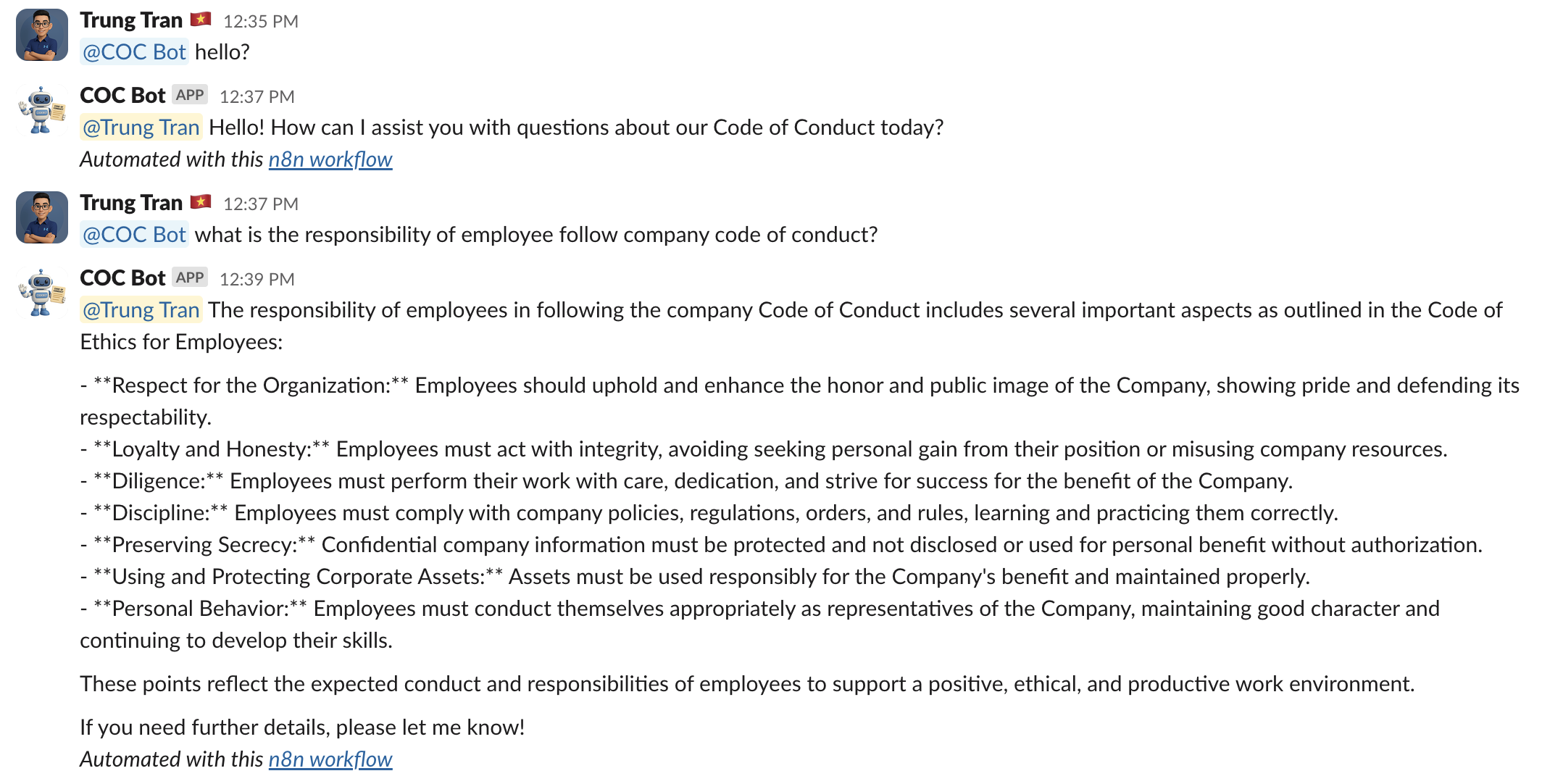"
},
"typeVersion": 1
},
{
"id": "1235b85c-8ef7-493e-a91b-84e09e09da12",
"name": "Sticky Note2",
"type": "n8n-nodes-base.stickyNote",
"position": [
-3616,
1824
],
"parameters": {
"height": 224,
"content": "#### 1. 🟢 Upload PDF Document\nAllows HR/admin users to upload the official **Code of Conduct PDF** via an input node.\nSample: https://wisestackai.s3.ap-southeast-1.amazonaws.com/20220419-ingrs-code-of-conduct-policy-en.pdf"
},
"typeVersion": 1
},
{
"id": "263a5ad7-9392-4d37-8a68-eeff78a73379",
"name": "Sticky Note3",
"type": "n8n-nodes-base.stickyNote",
"position": [
-3072,
1568
],
"parameters": {
"height": 128,
"content": "#### 2. 📑 Parse PDF Content\nUses the **Default Data Loader** to read and process the uploaded PDF content into structured format."
},
"typeVersion": 1
},
{
"id": "159e3edf-f845-49e6-9fdd-ddd7c45f3016",
"name": "Sticky Note4",
"type": "n8n-nodes-base.stickyNote",
"position": [
-2544,
1264
],
"parameters": {
"height": 256,
"content": "#### 3. 🧬 Generate Embeddings (OpenAI)\n- Splits the content into smaller chunks and sends each to **OpenAI's Embedding API** for vectorization.\n- Saves the resulting vector embeddings into the connected **vector database or internal store** for RAG querying."
},
"typeVersion": 1
},
{
"id": "559c1f98-3af4-46ef-9207-dbda744d8a48",
"name": "Sticky Note5",
"type": "n8n-nodes-base.stickyNote",
"position": [
-2544,
1760
],
"parameters": {
"content": "#### 4. ☁️ Backup to Google Drive\nSaves the uploaded PDF as a backup into a designated folder in Google Drive."
},
"typeVersion": 1
},
{
"id": "b5144bb8-087c-4563-8095-8b1aa7b8c15c",
"name": "Sticky Note6",
"type": "n8n-nodes-base.stickyNote",
"position": [
-3616,
992
],
"parameters": {
"color": 7,
"content": "#### 1. 🟢 Webhook Trigger (Slack Event)\nListens for incoming Slack events specifically user messages mentioning the bot via a POST webhook integration."
},
"typeVersion": 1
},
{
"id": "ccc08f58-a7c3-48b1-ab1b-774525644fc4",
"name": "Sticky Note7",
"type": "n8n-nodes-base.stickyNote",
"position": [
-3296,
1024
],
"parameters": {
"color": 7,
"height": 128,
"content": "#### 2. 🧠 Message Validation\nChecks whether the incoming event is a user message. If not, it routes to a \"No Operation\" node."
},
"typeVersion": 1
},
{
"id": "bd562f0a-fab6-4d3b-9712-1adc0af8d720",
"name": "Sticky Note8",
"type": "n8n-nodes-base.stickyNote",
"position": [
-3024,
560
],
"parameters": {
"color": 7,
"width": 512,
"content": "#### 3. 🤖 Code of Conduct Agent (GPT-4 + Query Tool)\nExecutes the AI assistant agent:\n- Uses **GPT-4** as the chat model\n- Calls **Query Data Tool** to retrieve relevant chunks from the embedded Code of Conduct content\n- Returns a Slack-friendly, Markdown-formatted response"
},
"typeVersion": 1
},
{
"id": "7e9c0b48-063b-48cf-8ed1-fa902e83cfc8",
"name": "Sticky Note9",
"type": "n8n-nodes-base.stickyNote",
"position": [
-2368,
784
],
"parameters": {
"color": 7,
"width": 288,
"height": 144,
"content": "#### 5. 💬 Post Response to Slack\n- Fetches user details to personalize the reply.\n- Delivers the final answer back to the mentioned Slack channel, replying to the original message or thread."
},
"typeVersion": 1
}
],
"active": false,
"pinData": {},
"settings": {},
"versionId": "e0003593-074e-4bad-9302-b7c166e9fd92",
"connections": {
"de57e328-271a-42a5-914a-073ee5762a54": {
"main": [
[
{
"node": "f1b4fece-cac6-49b7-ad47-a1a8ced08ba9",
"type": "main",
"index": 0
}
]
]
},
"8794702d-9c02-40ba-8a62-acd6ccb8df08": {
"main": [
[
{
"node": "d8182642-5598-4fae-8a72-13f63d9436a2",
"type": "main",
"index": 0
}
]
]
},
"b9c6502a-8232-4840-a252-0f2889d96d7d": {
"ai_languageModel": [
[
{
"node": "a6310e4a-fcc0-4814-a203-ce38b8daeff6",
"type": "ai_languageModel",
"index": 0
}
]
]
},
"f229958a-af79-4420-a218-0ed18e5562fc": {
"ai_tool": [
[
{
"node": "a6310e4a-fcc0-4814-a203-ce38b8daeff6",
"type": "ai_tool",
"index": 0
}
]
]
},
"d8182642-5598-4fae-8a72-13f63d9436a2": {
"main": [
[
{
"node": "a6310e4a-fcc0-4814-a203-ce38b8daeff6",
"type": "main",
"index": 0
}
],
[
{
"node": "d2ae5571-62c6-4ada-8807-0e53d90ae6c5",
"type": "main",
"index": 0
}
]
]
},
"73b5b601-f14a-44d7-9737-7efe05af9fa1": {
"ai_embedding": [
[
{
"node": "24bb84e8-1ab4-42d9-9e8e-088590882f45",
"type": "ai_embedding",
"index": 0
},
{
"node": "f229958a-af79-4420-a218-0ed18e5562fc",
"type": "ai_embedding",
"index": 0
}
]
]
},
"e06f197d-f4e7-4e29-96c9-5c44dea773d5": {
"ai_document": [
[
{
"node": "24bb84e8-1ab4-42d9-9e8e-088590882f45",
"type": "ai_document",
"index": 0
}
]
]
},
"a6310e4a-fcc0-4814-a203-ce38b8daeff6": {
"main": [
[
{
"node": "a9a7c510-4b00-4fcb-988a-f6b126a9564a",
"type": "main",
"index": 0
}
]
]
},
"a9a7c510-4b00-4fcb-988a-f6b126a9564a": {
"main": [
[
{
"node": "372bc24d-4510-4eb2-9ef5-fbaba46e18fc",
"type": "main",
"index": 0
}
]
]
},
"264b1310-b80d-4e92-88da-218f261a9687": {
"main": [
[
{
"node": "24bb84e8-1ab4-42d9-9e8e-088590882f45",
"type": "main",
"index": 0
},
{
"node": "de57e328-271a-42a5-914a-073ee5762a54",
"type": "main",
"index": 0
}
]
]
},
"372bc24d-4510-4eb2-9ef5-fbaba46e18fc": {
"main": [
[]
]
}
}
}Wie verwende ich diesen Workflow?
Kopieren Sie den obigen JSON-Code, erstellen Sie einen neuen Workflow in Ihrer n8n-Instanz und wählen Sie "Aus JSON importieren". Fügen Sie die Konfiguration ein und passen Sie die Anmeldedaten nach Bedarf an.
Für welche Szenarien ist dieser Workflow geeignet?
Experte - KI RAG, Multimodales KI
Ist es kostenpflichtig?
Dieser Workflow ist völlig kostenlos. Beachten Sie jedoch, dass Drittanbieterdienste (wie OpenAI API), die im Workflow verwendet werden, möglicherweise kostenpflichtig sind.
Verwandte Workflows

Trung Tran
@trungtranEmpowering small and medium businesses with smart automation and practical AI, no big tech team required.
Diesen Workflow teilen