Renovación automática de certificado AWS ACM (aprobación de Slack incluida)
Este es unSecOps, Multimodal AIflujo de automatización del dominio deautomatización que contiene 14 nodos.Utiliza principalmente nodos como Slack, Filter, ScheduleTrigger, AwsCertificateManager. Renovación automática de certificados de AWS con flujo de trabajo de aprobación de Slack
- •Bot Token de Slack o URL de Webhook
- •Access Key y Secret de AWS
Nodos utilizados (14)
{
"id": "Rptc1H55PaNYDVZa",
"meta": {
"instanceId": "4a2e6764ba7a6bc9890d9225f4b21d570ce88fc9bd57549c89057fcee58fed0f",
"templateCredsSetupCompleted": true
},
"name": "AWS ACM Certificate Auto-Renew with Slack approval",
"tags": [],
"nodes": [
{
"id": "19f3e8a0-5957-4c10-8d09-75d88a55402e",
"name": "Disparador programado",
"type": "n8n-nodes-base.scheduleTrigger",
"position": [
0,
0
],
"parameters": {
"rule": {
"interval": [
{}
]
}
},
"typeVersion": 1.2
},
{
"id": "76302994-4f45-4353-8b5e-f253fbf28b5a",
"name": "Renovar certificado",
"type": "n8n-nodes-base.awsCertificateManager",
"position": [
1184,
0
],
"parameters": {
"certificateArn": "={{ $('Cert expire in next 7 days?').item.json.CertificateArn }}"
},
"credentials": {
"aws": {
"id": "IZYsJuHhfVJ3PIrC",
"name": "AWS account"
}
},
"typeVersion": 1
},
{
"id": "0620ba39-d94d-4876-a802-b6cc1100e9a9",
"name": "Obtener múltiples certificados",
"type": "n8n-nodes-base.awsCertificateManager",
"position": [
240,
0
],
"parameters": {
"options": {},
"operation": "getMany"
},
"credentials": {
"aws": {
"id": "IZYsJuHhfVJ3PIrC",
"name": "AWS account"
}
},
"typeVersion": 1
},
{
"id": "6d3e2484-43da-4a0e-8e92-175b4d1ec3fe",
"name": "Enviar mensaje y esperar respuesta",
"type": "n8n-nodes-base.slack",
"position": [
880,
0
],
"webhookId": "768d9aee-c2e3-4b84-8afc-d0fdf1e5964b",
"parameters": {
"user": {
"__rl": true,
"mode": "list",
"value": "U054RMBTVBM",
"cachedResultName": "trung.tran"
},
"message": "=:warning: *AWS ACM Certificate Expiry Alert* :warning:\n\nThe following ACM certificate will expire soon and requires renewal:\n\n*Domain Name:* {{ $json.DomainName }}\n*Alternate Names:* {{ $json.SubjectAlternativeNameSummaries }}\n*Certificate ARN:* {{ $json.CertificateArn }}\n*Key Algorithm:* {{ $json.KeyAlgorithm }}\n*Status:* {{ $json.Status }}\n*Issued At:* {{ $json.IssuedAt.toDateTime('s')}}\n*Expires At:* {{ $json.NotAfter.toDateTime('s')}}\n\nPlease confirm renewal action to proceed.",
"options": {},
"operation": "sendAndWait",
"authentication": "oAuth2"
},
"credentials": {
"slackOAuth2Api": {
"id": "4JSKt9sIRV1KGswQ",
"name": "Slack account"
}
},
"typeVersion": 2.3
},
{
"id": "6e47976b-6eb8-4a42-a777-b23e857f9651",
"name": "¿Certificado expira en 7 días?",
"type": "n8n-nodes-base.filter",
"position": [
528,
0
],
"parameters": {
"options": {},
"conditions": {
"options": {
"version": 2,
"leftValue": "",
"caseSensitive": true,
"typeValidation": "strict"
},
"combinator": "or",
"conditions": [
{
"id": "fe1b749d-3046-465e-b60a-786f5b0e2f99",
"operator": {
"type": "dateTime",
"operation": "before"
},
"leftValue": "={{ $json.NotAfter.toDateTime('s') }}",
"rightValue": "={{ $today.plus(7,'days') }}"
},
{
"id": "8db3e990-dca3-4c23-9d62-e4d25a807588",
"operator": {
"type": "dateTime",
"operation": "before"
},
"leftValue": "={{ $json.NotBefore.toDateTime('s') }}",
"rightValue": "={{ $today }}"
}
]
}
},
"typeVersion": 2.2
},
{
"id": "5a336509-7d02-4c62-8198-04ad2750682f",
"name": "Nota adhesiva",
"type": "n8n-nodes-base.stickyNote",
"position": [
-1136,
-576
],
"parameters": {
"width": 928,
"height": 1616,
"content": "# AWS ACM Certificate Auto-Renew with Slack approval\n\n## **Who’s it for**\n- SRE/DevOps teams managing many ACM certs.\n- Cloud ops who want **hands-off renewals** with an **approval step in Slack**.\n- MSPs that need auditable reminders and renewals on schedule.\n\n## **How it works / What it does**\n1. **Schedule Trigger** – runs daily (or your cadence).\n2. **Get many certificates** – fetches ACM certs (paginate if needed).\n3. **Filter: expiring in next 7 days** – keeps items where:\n - `NotAfter` **before** `today + 7d`\n - `NotBefore` **before** `today` (already valid)\n4. **Send message and wait for response (Slack)** – posts a certificate summary and **pauses** until Approve/Reject.\n5. **Renew a certificate** – on **Approve**, calls the renew action for the item.\n\n## **How to set up**\n1. **Credentials**\n - **AWS** in n8n with permissions to list/read/renew certs.\n - **Slack** OAuth (bot in the target channel). \n2. **Schedule Trigger**\n - Set to run once per day (e.g., `09:00` local).\n3. **Get many certificates**\n - Region: your ACM region(s). \n - If you have several regions, loop regions or run multiple branches.\n4. **Filter (IF / Filter node)**\n - Add these two conditions (AND):\n - `{{ $json.NotAfter.toDateTime('s') }}` **is before** `{{ $today.plus(7,'days') }}`\n - `{{ $json.NotBefore.toDateTime('s') }}` **is before** `{{ $today }}`\n5. **Slack → Send & Wait**\n - Message (text input):\n ```\n :warning: *ACM Certificate Expiry Alert* :warning:\n\n *Domain:* {{ $json.DomainName }}\n *SANs:* {{ $json.SubjectAlternativeNameSummaries }}\n *ARN:* {{ $json.CertificateArn }}\n *Algo:* {{ $json.KeyAlgorithm }}\n *Status:* {{ $json.Status }}\n *Issued:* {{ $json.IssuedAt | toDate | formatDate(\"YYYY-MM-DD HH:mm\") }}\n *Expires:* {{ $json.NotAfter | toDate | formatDate(\"YYYY-MM-DD HH:mm\") }}\n\n Approve to start renewal.\n ```\n - Add two buttons: **Approve** / **Reject** (the node will output which was clicked).\n6. **Renew a certificate**\n - Map the **CertificateArn** from the Slack Approved branch.\n\n## **Requirements**\n- n8n (current version with Slack *Send & Wait*).\n- AWS IAM permissions (read + renew ACM), e.g.:\n - `acm:ListCertificates`, `acm:DescribeCertificate`, `acm:RenewCertificate` (plus region access).\n- Slack bot with permission to post & use interactivity in the target channel.\n\n## **How to customize the workflow**\n- **Window size:** change `7` to `14` or `30` days in the filter.\n- **Catch expired**: add an OR path `{{ $json.NotAfter.toDateTime('s') }} is before {{ $today }}` → send a **red** Slack alert.\n- **Auto-renew w/o approval:** bypass Slack and renew directly for low-risk domains.\n- **Multiple regions/accounts:** iterate over a list of regions or assume roles per account.\n- **Logging:** add a Google Sheet/DB append after Slack click with `user`, `time`, `result`.\n- **Escalation:** if no Slack response after N hours, ping `@oncall` or open a ticket.\n\n## **Notes**\n- The Slack node **pauses** execution until a button is clicked—perfect for change control.\n- Time conversions above assume `NotAfter`/`IssuedAt` are Unix seconds (`'s'`). Adjust if your data differs."
},
"typeVersion": 1
},
{
"id": "158aa163-42cb-42d6-b915-c1525983e069",
"name": "Nota adhesiva1",
"type": "n8n-nodes-base.stickyNote",
"position": [
-80,
192
],
"parameters": {
"width": 272,
"content": "### 1. Schedule Trigger\nThe workflow starts on a scheduled basis (e.g., daily at 09:00) to automatically check ACM certificates without manual intervention."
},
"typeVersion": 1
},
{
"id": "38d53502-a32b-4734-a63b-d362f0c16f7d",
"name": "Nota adhesiva2",
"type": "n8n-nodes-base.stickyNote",
"position": [
240,
192
],
"parameters": {
"width": 256,
"content": "### 2. Get Certificates\nFetches all ACM certificates in the configured AWS region(s), including details such as domain names, status, and expiration dates."
},
"typeVersion": 1
},
{
"id": "c41f8bcd-9473-45a5-b8da-08090d024955",
"name": "Nota adhesiva3",
"type": "n8n-nodes-base.stickyNote",
"position": [
528,
192
],
"parameters": {
"content": "### 3. Filter Certificates Expiring Soon\nChecks each certificate and keeps only those that are already valid and will expire within the next 7 days.\n\n"
},
"typeVersion": 1
},
{
"id": "8b46936f-4dfd-44ea-bdda-cd35209d7c61",
"name": "Nota adhesiva4",
"type": "n8n-nodes-base.stickyNote",
"position": [
832,
192
],
"parameters": {
"content": "### 4. Notify via Slack and Wait for Approval\nSends a Slack message with certificate details (domain, ARN, expiration date, status). \nThe workflow pauses here until a user clicks **Approve** or **Reject**."
},
"typeVersion": 1
},
{
"id": "4de9462c-89e2-4a78-87c1-eaeaf0b418a5",
"name": "Nota adhesiva5",
"type": "n8n-nodes-base.stickyNote",
"position": [
1120,
192
],
"parameters": {
"content": "### 5. Renew Certificate\nIf **Approve** is selected in Slack, the workflow triggers AWS ACM to renew the certificate automatically. \nIf **Reject** is clicked, no action is taken, and the workflow ends."
},
"typeVersion": 1
},
{
"id": "d72ec217-74be-481b-bb17-d640a80dfede",
"name": "Informar a administrador de TI",
"type": "n8n-nodes-base.slack",
"position": [
1456,
0
],
"webhookId": "eacf27c7-db94-47bd-89ad-6f497815398c",
"parameters": {
"text": "=:white_check_mark: *ACM Certificate Renewed Successfully*\n\n*Domain:* {{ $('Cert expire in next 7 days?').item.json.DomainName }}\n*ARN:* {{ $('Cert expire in next 7 days?').item.json.CertificateArn }}\n*Previous Expiry:* {{ $('Cert expire in next 7 days?').item.json.NotAfter.toDateTime('s') }}\n*Renewed At:* {{ $now }}\n\nApproved by: {{ $('Send message and wait for response').item.json.user?.name || $('Send message and wait for response').item.json.username || 'N/A' }}",
"user": {
"__rl": true,
"mode": "list",
"value": "U054RMBTVBM",
"cachedResultName": "trung.tran"
},
"select": "user",
"otherOptions": {},
"authentication": "oAuth2"
},
"credentials": {
"slackOAuth2Api": {
"id": "4JSKt9sIRV1KGswQ",
"name": "Slack account"
}
},
"typeVersion": 2.3
},
{
"id": "5b0e2374-fc3a-49e5-8538-65551f9d5422",
"name": "Nota adhesiva6",
"type": "n8n-nodes-base.stickyNote",
"position": [
1680,
-32
],
"parameters": {
"width": 624,
"height": 192,
"content": "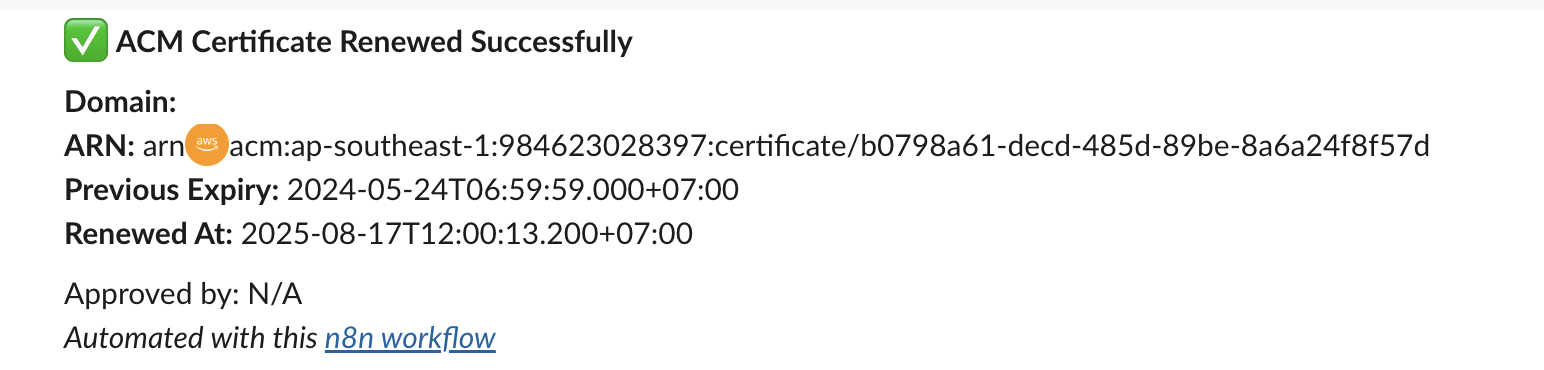"
},
"typeVersion": 1
},
{
"id": "8fd13176-f90c-4fea-bb42-c13d98488d33",
"name": "Nota adhesiva7",
"type": "n8n-nodes-base.stickyNote",
"position": [
1424,
192
],
"parameters": {
"content": "### 6. Notify admin via Slack"
},
"typeVersion": 1
}
],
"active": false,
"pinData": {},
"settings": {
"executionOrder": "v1"
},
"versionId": "e61ccea4-43f6-410d-9036-90d750e3837b",
"connections": {
"19f3e8a0-5957-4c10-8d09-75d88a55402e": {
"main": [
[
{
"node": "0620ba39-d94d-4876-a802-b6cc1100e9a9",
"type": "main",
"index": 0
}
]
]
},
"76302994-4f45-4353-8b5e-f253fbf28b5a": {
"main": [
[
{
"node": "d72ec217-74be-481b-bb17-d640a80dfede",
"type": "main",
"index": 0
}
]
]
},
"0620ba39-d94d-4876-a802-b6cc1100e9a9": {
"main": [
[
{
"node": "6e47976b-6eb8-4a42-a777-b23e857f9651",
"type": "main",
"index": 0
}
]
]
},
"6e47976b-6eb8-4a42-a777-b23e857f9651": {
"main": [
[
{
"node": "6d3e2484-43da-4a0e-8e92-175b4d1ec3fe",
"type": "main",
"index": 0
}
]
]
},
"6d3e2484-43da-4a0e-8e92-175b4d1ec3fe": {
"main": [
[
{
"node": "76302994-4f45-4353-8b5e-f253fbf28b5a",
"type": "main",
"index": 0
}
]
]
}
}
}¿Cómo usar este flujo de trabajo?
Copie el código de configuración JSON de arriba, cree un nuevo flujo de trabajo en su instancia de n8n y seleccione "Importar desde JSON", pegue la configuración y luego modifique la configuración de credenciales según sea necesario.
¿En qué escenarios es adecuado este flujo de trabajo?
Intermedio - Operaciones de seguridad, IA Multimodal
¿Es de pago?
Este flujo de trabajo es completamente gratuito, puede importarlo y usarlo directamente. Sin embargo, tenga en cuenta que los servicios de terceros utilizados en el flujo de trabajo (como la API de OpenAI) pueden requerir un pago por su cuenta.
Flujos de trabajo relacionados recomendados

Trung Tran
@trungtranEmpowering small and medium businesses with smart automation and practical AI, no big tech team required.
Compartir este flujo de trabajo