Construire votre propre moteur de recherche d'images avec la détection d'objets IA, CDN et ElasticSearch
Ceci est unAIworkflow d'automatisation du domainecontenant 17 nœuds.Utilise principalement des nœuds comme Set, Filter, SplitOut, EditImage, HttpRequest, combinant la technologie d'intelligence artificielle pour une automatisation intelligente. Construire votre propre moteur de recherche d'images avec la détection d'objets IA, CDN et ElasticSearch
- •Peut nécessiter les informations d'identification d'authentification de l'API cible
Nœuds utilisés (17)
Catégorie
{
"meta": {
"instanceId": "26ba763460b97c249b82942b23b6384876dfeb9327513332e743c5f6219c2b8e"
},
"nodes": [
{
"id": "6359f725-1ede-4b05-bc19-05a7e85c0865",
"name": "En cliquant sur \"Test workflow\"",
"type": "n8n-nodes-base.manualTrigger",
"position": [
680,
292
],
"parameters": {},
"typeVersion": 1
},
{
"id": "9e1e61c7-f5fd-4e8a-99a6-ccc5a24f5528",
"name": "Récupérer l'image source",
"type": "n8n-nodes-base.httpRequest",
"position": [
1000,
292
],
"parameters": {
"url": "={{ $json.source_image }}",
"options": {}
},
"typeVersion": 4.2
},
{
"id": "9b1b94cf-3a7d-4c43-ab6c-8df9824b5667",
"name": "Extraire uniquement les résultats",
"type": "n8n-nodes-base.splitOut",
"position": [
1428,
323
],
"parameters": {
"options": {},
"fieldToSplitOut": "result"
},
"typeVersion": 1
},
{
"id": "fcbaf6c3-2aee-4ea1-9c5e-2833dd7a9f50",
"name": "Filtrer score >= 0.9",
"type": "n8n-nodes-base.filter",
"position": [
1608,
323
],
"parameters": {
"options": {},
"conditions": {
"options": {
"leftValue": "",
"caseSensitive": true,
"typeValidation": "strict"
},
"combinator": "and",
"conditions": [
{
"id": "367d83ef-8ecf-41fe-858c-9bfd78b0ae9f",
"operator": {
"type": "number",
"operation": "gte"
},
"leftValue": "={{ $json.score }}",
"rightValue": 0.9
}
]
}
},
"typeVersion": 2
},
{
"id": "954ce7b0-ef82-4203-8706-17cfa5e5e3ff",
"name": "Rogner l'objet dans l'image",
"type": "n8n-nodes-base.editImage",
"position": [
2080,
432
],
"parameters": {
"width": "={{ $json.box.xmax - $json.box.xmin }}",
"height": "={{ $json.box.ymax - $json.box.ymin }}",
"options": {
"format": "jpeg",
"fileName": "={{ $binary.data.fileName.split('.')[0].urlEncode()+'-'+$json.label.urlEncode() + '-' + $itemIndex }}.jpg"
},
"operation": "crop",
"positionX": "={{ $json.box.xmin }}",
"positionY": "={{ $json.box.ymin }}"
},
"typeVersion": 1
},
{
"id": "40027456-4bf9-4eea-8d71-aa28e69b29e5",
"name": "Définir des variables",
"type": "n8n-nodes-base.set",
"position": [
840,
292
],
"parameters": {
"options": {},
"assignments": {
"assignments": [
{
"id": "9e95d951-8530-4a80-bd00-6bb55623a71f",
"name": "CLOUDFLARE_ACCOUNT_ID",
"type": "string",
"value": ""
},
{
"id": "66807a90-63a1-4d4e-886e-e8abf3019a34",
"name": "model",
"type": "string",
"value": "@cf/facebook/detr-resnet-50"
},
{
"id": "a13ccde6-e6e3-46f4-afa3-2134af7bc765",
"name": "source_image",
"type": "string",
"value": "https://images.pexels.com/photos/2293367/pexels-photo-2293367.jpeg?auto=compress&cs=tinysrgb&w=600"
},
{
"id": "0734fc55-b414-47f7-8b3e-5c880243f3ed",
"name": "elasticsearch_index",
"type": "string",
"value": "n8n-image-search"
}
]
}
},
"typeVersion": 3.3
},
{
"id": "c3d8c5e3-546e-472c-9e6e-091cf5cee3c3",
"name": "Utiliser DETR-ResNet-50 Classification d'objets",
"type": "n8n-nodes-base.httpRequest",
"position": [
1248,
324
],
"parameters": {
"url": "=https://api.cloudflare.com/client/v4/accounts/{{ $('Set Variables').item.json.CLOUDFLARE_ACCOUNT_ID }}/ai/run/{{ $('Set Variables').item.json.model }}",
"method": "POST",
"options": {},
"sendBody": true,
"contentType": "binaryData",
"authentication": "predefinedCredentialType",
"inputDataFieldName": "data",
"nodeCredentialType": "cloudflareApi"
},
"credentials": {
"cloudflareApi": {
"id": "qOynkQdBH48ofOSS",
"name": "Cloudflare account"
}
},
"typeVersion": 4.2
},
{
"id": "3c7aa2fc-9ca1-41ba-a10d-aa5930d45f18",
"name": "Téléverser sur Cloudinary",
"type": "n8n-nodes-base.httpRequest",
"position": [
2380,
380
],
"parameters": {
"url": "https://api.cloudinary.com/v1_1/daglih2g8/image/upload",
"method": "POST",
"options": {},
"sendBody": true,
"sendQuery": true,
"contentType": "multipart-form-data",
"authentication": "genericCredentialType",
"bodyParameters": {
"parameters": [
{
"name": "file",
"parameterType": "formBinaryData",
"inputDataFieldName": "data"
}
]
},
"genericAuthType": "httpQueryAuth",
"queryParameters": {
"parameters": [
{
"name": "upload_preset",
"value": "n8n-workflows-preset"
}
]
}
},
"credentials": {
"httpQueryAuth": {
"id": "sT9jeKzZiLJ3bVPz",
"name": "Cloudinary API"
}
},
"typeVersion": 4.2
},
{
"id": "3c4e1f04-a0ba-4cce-b82a-aa3eadc4e7e1",
"name": "Créer des documents dans Elasticsearch",
"type": "n8n-nodes-base.elasticsearch",
"position": [
2580,
380
],
"parameters": {
"indexId": "={{ $('Set Variables').item.json.elasticsearch_index }}",
"options": {},
"fieldsUi": {
"fieldValues": [
{
"fieldId": "image_url",
"fieldValue": "={{ $json.secure_url.replace('upload','upload/f_auto,q_auto') }}"
},
{
"fieldId": "source_image_url",
"fieldValue": "={{ $('Set Variables').item.json.source_image }}"
},
{
"fieldId": "label",
"fieldValue": "={{ $('Crop Object From Image').item.json.label }}"
},
{
"fieldId": "metadata",
"fieldValue": "={{ JSON.stringify(Object.assign($('Crop Object From Image').item.json, { filename: $json.original_filename })) }}"
}
]
},
"operation": "create",
"additionalFields": {}
},
"credentials": {
"elasticsearchApi": {
"id": "dRuuhAgS7AF0mw0S",
"name": "Elasticsearch account"
}
},
"typeVersion": 1
},
{
"id": "292c9821-c123-44fa-9ba1-c37bf84079bc",
"name": "Note adhésive",
"type": "n8n-nodes-base.stickyNote",
"position": [
620,
120
],
"parameters": {
"color": 7,
"width": 541.1455500767354,
"height": 381.6388867600897,
"content": "## 1. Get Source Image\n[Read more about setting variables for your workflow](https://docs.n8n.io/integrations/builtin/core-nodes/n8n-nodes-base.set)\n\nFor this demo, we'll manually define an image to process. In production however, this image can come from a variety of sources such as drives, webhooks and more."
},
"typeVersion": 1
},
{
"id": "863271dc-fb9d-4211-972d-6b57336073b4",
"name": "Note adhésive 1",
"type": "n8n-nodes-base.stickyNote",
"position": [
1180,
80
],
"parameters": {
"color": 7,
"width": 579.7748008857744,
"height": 437.4680103498263,
"content": "## 2. Use Detr-Resnet-50 Object Classification\n[Learn more about Cloudflare Workers AI](https://developers.cloudflare.com/workers-ai/)\n\nNot all AI workflows need an LLM! As in this example, we're using a non-LLM vision model to parse the source image and return what objects are contained within. The image search feature we're building will be based on the objects in the image making for a much more granular search via object association.\n\nWe'll use the Cloudflare Workers AI service which conveniently provides this model via API use."
},
"typeVersion": 1
},
{
"id": "b73b45da-0436-4099-b538-c6b3b84822f2",
"name": "Note adhésive 2",
"type": "n8n-nodes-base.stickyNote",
"position": [
1800,
260
],
"parameters": {
"color": 7,
"width": 466.35460775498495,
"height": 371.9272151757119,
"content": "## 3. Crop Objects Out of Source Image\n[Read more about Editing Images in n8n](https://docs.n8n.io/integrations/builtin/core-nodes/n8n-nodes-base.editimage)\n\nWith our objects identified by their bounding boxes, we can \"cut\" them out of the source image as separate images."
},
"typeVersion": 1
},
{
"id": "465bd842-8a35-49d8-a9ff-c30d164620db",
"name": "Note adhésive 3",
"type": "n8n-nodes-base.stickyNote",
"position": [
2300,
180
],
"parameters": {
"color": 7,
"width": 478.20345439832454,
"height": 386.06196032653685,
"content": "## 4. Index Object Images In ElasticSearch\n[Read more about using ElasticSearch](https://docs.n8n.io/integrations/builtin/app-nodes/n8n-nodes-base.elasticsearch)\n\nBy storing the newly created object images externally and indexing them in Elasticsearch, we now have a foundation for our Image Search service which queries by object association."
},
"typeVersion": 1
},
{
"id": "6a04b4b5-7830-410d-9b5b-79acb0b1c78b",
"name": "Note adhésive 4",
"type": "n8n-nodes-base.stickyNote",
"position": [
1800,
-220
],
"parameters": {
"color": 7,
"width": 328.419768654291,
"height": 462.65463700396174,
"content": "Fig 1. Result of Classification\n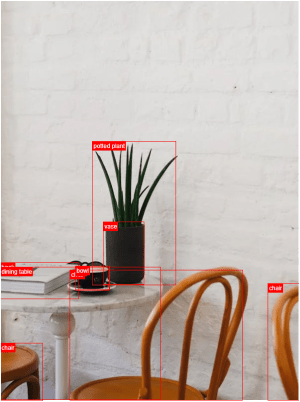"
},
"typeVersion": 1
},
{
"id": "8f607951-ba41-4362-8323-e8b4b96ad122",
"name": "Récupérer à nouveau l'image source",
"type": "n8n-nodes-base.httpRequest",
"position": [
1880,
432
],
"parameters": {
"url": "={{ $('Set Variables').item.json.source_image }}",
"options": {}
},
"typeVersion": 4.2
},
{
"id": "6933f67d-276b-4908-8602-654aa352a68b",
"name": "Note adhésive 8",
"type": "n8n-nodes-base.stickyNote",
"position": [
220,
120
],
"parameters": {
"width": 359.6648027457353,
"height": 352.41026669883723,
"content": "## Try It Out!\n### This workflow does the following:\n* Downloads an image\n* Uses an object classification AI model to identify objects in the image.\n* Crops the objects out from the original image into new image files.\n* Indexes the image's object in an Elasticsearch Database to enable image search.\n\n### Need Help?\nJoin the [Discord](https://discord.com/invite/XPKeKXeB7d) or ask in the [Forum](https://community.n8n.io/)!\n\nHappy Hacking!"
},
"typeVersion": 1
},
{
"id": "35615ed5-43e8-43f0-95fe-1f95a1177d69",
"name": "Note adhésive 5",
"type": "n8n-nodes-base.stickyNote",
"position": [
800,
280
],
"parameters": {
"width": 172.9365918827757,
"height": 291.6881468483679,
"content": "\n\n\n\n\n\n\n\n\n\n\n\n\n\n\n\n🚨**Required**\n* Set your variables here first!"
},
"typeVersion": 1
}
],
"pinData": {},
"connections": {
"40027456-4bf9-4eea-8d71-aa28e69b29e5": {
"main": [
[
{
"node": "9e1e61c7-f5fd-4e8a-99a6-ccc5a24f5528",
"type": "main",
"index": 0
}
]
]
},
"9e1e61c7-f5fd-4e8a-99a6-ccc5a24f5528": {
"main": [
[
{
"node": "c3d8c5e3-546e-472c-9e6e-091cf5cee3c3",
"type": "main",
"index": 0
}
]
]
},
"fcbaf6c3-2aee-4ea1-9c5e-2833dd7a9f50": {
"main": [
[
{
"node": "8f607951-ba41-4362-8323-e8b4b96ad122",
"type": "main",
"index": 0
}
]
]
},
"3c7aa2fc-9ca1-41ba-a10d-aa5930d45f18": {
"main": [
[
{
"node": "3c4e1f04-a0ba-4cce-b82a-aa3eadc4e7e1",
"type": "main",
"index": 0
}
]
]
},
"954ce7b0-ef82-4203-8706-17cfa5e5e3ff": {
"main": [
[
{
"node": "3c7aa2fc-9ca1-41ba-a10d-aa5930d45f18",
"type": "main",
"index": 0
}
]
]
},
"9b1b94cf-3a7d-4c43-ab6c-8df9824b5667": {
"main": [
[
{
"node": "fcbaf6c3-2aee-4ea1-9c5e-2833dd7a9f50",
"type": "main",
"index": 0
}
]
]
},
"8f607951-ba41-4362-8323-e8b4b96ad122": {
"main": [
[
{
"node": "954ce7b0-ef82-4203-8706-17cfa5e5e3ff",
"type": "main",
"index": 0
}
]
]
},
"6359f725-1ede-4b05-bc19-05a7e85c0865": {
"main": [
[
{
"node": "40027456-4bf9-4eea-8d71-aa28e69b29e5",
"type": "main",
"index": 0
}
]
]
},
"c3d8c5e3-546e-472c-9e6e-091cf5cee3c3": {
"main": [
[
{
"node": "9b1b94cf-3a7d-4c43-ab6c-8df9824b5667",
"type": "main",
"index": 0
}
]
]
}
}
}Comment utiliser ce workflow ?
Copiez le code de configuration JSON ci-dessus, créez un nouveau workflow dans votre instance n8n et sélectionnez "Importer depuis le JSON", collez la configuration et modifiez les paramètres d'authentification selon vos besoins.
Dans quelles scénarios ce workflow est-il adapté ?
Avancé - Intelligence Artificielle
Est-ce payant ?
Ce workflow est entièrement gratuit et peut être utilisé directement. Veuillez noter que les services tiers utilisés dans le workflow (comme l'API OpenAI) peuvent nécessiter un paiement de votre part.
Workflows recommandés

Jimleuk
@jimleukFreelance consultant based in the UK specialising in AI-powered automations. I work with select clients tackling their most challenging projects. For business enquiries, send me an email at hello@jimle.uk LinkedIn: https://www.linkedin.com/in/jimleuk/ X/Twitter: https://x.com/jimle_uk
Partager ce workflow