Propriété de résumé Notion AI
Ceci est unSupport, AIworkflow d'automatisation du domainecontenant 15 nœuds.Utilise principalement des nœuds comme Set, Filter, Notion, HttpRequest, Agent, combinant la technologie d'intelligence artificielle pour une automatisation intelligente. Générer un résumé IA pour vos commentaires Notion
- •Clé API Notion
- •Peut nécessiter les informations d'identification d'authentification de l'API cible
- •Clé API Google Gemini
Nœuds utilisés (15)
Catégorie
{
"id": "VkMKwxev9DEtmKjz",
"meta": {
"instanceId": "45ec8c77777a5853bd5f816d90a5686ba4ffda778dd004b1e44156ab933213ec",
"templateCredsSetupCompleted": true
},
"name": "Notion AI summary property",
"tags": [],
"nodes": [
{
"id": "3ea07cde-120c-4e53-a4ab-150bbe9d3f3d",
"name": "Note adhésive",
"type": "n8n-nodes-base.stickyNote",
"position": [
280,
-300
],
"parameters": {
"color": 5,
"width": 440,
"height": 300,
"content": "## Adapt this template to your needs \n1. Instead of using a cron that runs every hour, use Notion webhooks to retrigger the automation when a new comment is added (and run it only on the pages that received a new comment). It's easier to do with a Cloud n8n.\n2. Play around with the prompt to get something short/longer, more action oriented, etc. \n3. If the AI summary has been erased by mistake, make sure the automation will re-fill it. \n4. Reduce what is passed to the AI model to reduce the tokens consumption (e.g. to keep only the plain text version of the comments)"
},
"typeVersion": 1
},
{
"id": "1669e388-fc92-4290-86a6-af565fd16cc7",
"name": "Google Gemini Modèle de chat",
"type": "@n8n/n8n-nodes-langchain.lmChatGoogleGemini",
"position": [
1860,
-260
],
"parameters": {
"options": {},
"modelName": "models/gemini-2.5-pro-preview-03-25"
},
"credentials": {
"googlePalmApi": {
"id": "YgUXXut63hqIVf51",
"name": "Google Gemini(PaLM) Api account"
}
},
"typeVersion": 1
},
{
"id": "26177b80-b908-408d-9adc-be87d60625d0",
"name": "Note adhésive5",
"type": "n8n-nodes-base.stickyNote",
"position": [
960,
-300
],
"parameters": {
"width": 200,
"height": 240,
"content": "## Step 1\nDefine your variables: \n* ID of the database\n* Name of the property that will contain the AI summary (type text)\n* Name of the property that can store the last execution date (type date)"
},
"typeVersion": 1
},
{
"id": "383071b8-d174-423d-8bfc-eff9c431c551",
"name": "Note adhésive6",
"type": "n8n-nodes-base.stickyNote",
"position": [
1200,
-300
],
"parameters": {
"width": 180,
"height": 220,
"content": "## Step 2\nSet your Notion credentials. \n\nYou'll need a Notion internal integration.\n\nhttps://www.notion.so/profile/integrations"
},
"typeVersion": 1
},
{
"id": "704f0a7e-e9c3-4109-854b-49341f4b218f",
"name": "Note adhésive7",
"type": "n8n-nodes-base.stickyNote",
"position": [
1420,
-300
],
"parameters": {
"width": 180,
"content": "## Step 3\nSet your Notion credentials. \n\nRe-use the credentials created in Step 2\n"
},
"typeVersion": 1
},
{
"id": "d6c30d1b-eea3-46fd-a96c-0b9f9d0b57e2",
"name": "Note adhésive8",
"type": "n8n-nodes-base.stickyNote",
"position": [
1820,
-100
],
"parameters": {
"width": 180,
"height": 140,
"content": "## Step 4\nSet your API key. You can use the LLM of your choice (e.g. OpenAI, Claude, etc.)."
},
"typeVersion": 1
},
{
"id": "96749f98-914f-4317-ae47-fb4d7bb12d41",
"name": "Exécuter toutes les heures",
"type": "n8n-nodes-base.scheduleTrigger",
"position": [
800,
-480
],
"parameters": {
"rule": {
"interval": [
{
"field": "hours"
}
]
}
},
"typeVersion": 1.2
},
{
"id": "fc95f0f5-80b1-4e36-9004-d188d15eec4a",
"name": "Définir votre base de données Notion",
"type": "n8n-nodes-base.set",
"position": [
1000,
-480
],
"parameters": {
"options": {},
"assignments": {
"assignments": [
{
"id": "8a294900-f367-47a2-b260-344b133dc2ff",
"name": "notionDatabaseId",
"type": "string",
"value": "20d45c70c57381f09418d42c78ad360b"
},
{
"id": "650dfea4-7240-482e-bf0d-b978edcc3d78",
"name": "AI Summary Notion Property (type text)",
"type": "string",
"value": "AI Summary"
},
{
"id": "47c1271d-2b0b-4dab-a3c2-c6030a03a660",
"name": "Last Execution Notion Property (type date)",
"type": "string",
"value": "Last AI summary update"
}
]
}
},
"typeVersion": 3.4,
"alwaysOutputData": true
},
{
"id": "45a590dc-ccf0-4497-87e3-e257f5ce9279",
"name": "Lister les pages de la base de données",
"type": "n8n-nodes-base.notion",
"position": [
1220,
-480
],
"parameters": {
"simple": false,
"options": {},
"resource": "databasePage",
"operation": "getAll",
"returnAll": true,
"databaseId": {
"__rl": true,
"mode": "id",
"value": "={{ $json.notionDatabaseId }}"
}
},
"credentials": {
"notionApi": {
"id": "t9GKX11hpKjJFR0M",
"name": "Notion account"
}
},
"typeVersion": 2.2
},
{
"id": "95959678-6a03-454f-beba-ac622f42f293",
"name": "Lister les commentaires",
"type": "n8n-nodes-base.httpRequest",
"position": [
1440,
-480
],
"parameters": {
"url": "=https://api.notion.com/v1/comments?block_id={{ $json.id }}",
"options": {},
"authentication": "predefinedCredentialType",
"nodeCredentialType": "notionApi"
},
"credentials": {
"notionApi": {
"id": "t9GKX11hpKjJFR0M",
"name": "Notion account"
}
},
"typeVersion": 4.2
},
{
"id": "25a54b62-0b18-4012-880f-1c6ce05386fb",
"name": "Ne conserver que les pages ayant reçu de nouveaux commentaires depuis la dernière exécution",
"type": "n8n-nodes-base.filter",
"position": [
1640,
-480
],
"parameters": {
"options": {},
"conditions": {
"options": {
"version": 2,
"leftValue": "",
"caseSensitive": true,
"typeValidation": "strict"
},
"combinator": "or",
"conditions": [
{
"id": "309836eb-51d2-4543-bc03-949d6280b0dc",
"operator": {
"type": "dateTime",
"operation": "after"
},
"leftValue": "={{$json.results.length && $json.results[$json.results.length-1].last_edited_time }}",
"rightValue": "={{ $('List database pages').item.json.properties[$('Define your Notion Database').item.json['Last Execution Notion Property']].date.start }}"
},
{
"id": "24faa20c-973d-4539-9b7a-706368527304",
"operator": {
"type": "string",
"operation": "empty",
"singleValue": true
},
"leftValue": "={{ $('List database pages').item.json.properties[$('Define your Notion Database').item.json['Last Execution Notion Property']].date.start }}",
"rightValue": ""
}
]
}
},
"typeVersion": 2.2
},
{
"id": "5b7a56df-590f-4c4b-a912-086ec4cddce6",
"name": "Résumer la conversation",
"type": "@n8n/n8n-nodes-langchain.agent",
"position": [
1880,
-480
],
"parameters": {
"text": "={{ JSON.stringify($json.results)}}\n\nThose are comments from a single Notion Page extracted from Notion API. They show an email conversation (each comment representing an email). \n\nCan you please summarize the email conversation? \n\nPlease send me only the summary of maximum 6 sentencences. Example: \"Stefan initially had trouble selecting a Notion database in Slap, which he resolved. He then faced email delivery/ingestion issues between his Infomaniak email and Slap/Notion, partly complicated by general Notion instability. They scheduled and had a meeting, after which Laura shared resources and promised follow-ups on specific features/offers.\"\n\nIf there is no comment, do not generate a summary but give as answer \"Empty\".",
"options": {},
"promptType": "define"
},
"typeVersion": 2
},
{
"id": "5351ddd9-b900-4646-9fa4-03529a73dba7",
"name": "Ajouter le résumé à la page Notion et mettre à jour la date de dernière exécution",
"type": "n8n-nodes-base.notion",
"position": [
2260,
-480
],
"parameters": {
"pageId": {
"__rl": true,
"mode": "id",
"value": "={{ $('List database pages').item.json.id }}"
},
"simple": false,
"options": {},
"resource": "databasePage",
"operation": "update",
"propertiesUi": {
"propertyValues": [
{
"key": "={{ $('Define your Notion Database').item.json['AI Summary Notion Property (type text)'] }}|rich_text",
"textContent": "={{ $json.output }}"
},
{
"key": "={{ $('Define your Notion Database').item.json['Last Execution Notion Property (type date)'] }}|date",
"date": "={{ $('Run every hour').item.json.timestamp }}"
}
]
}
},
"credentials": {
"notionApi": {
"id": "t9GKX11hpKjJFR0M",
"name": "Notion account"
}
},
"typeVersion": 2.2
},
{
"id": "04e9194e-adc5-4f3f-9b20-bec0be48304b",
"name": "Note adhésive1",
"type": "n8n-nodes-base.stickyNote",
"position": [
280,
-620
],
"parameters": {
"color": 6,
"width": 440,
"height": 300,
"content": "## Generate an AI summary of your Notion comments\n\nThis automation reads the comments of your Notion pages and ask the AI to provide a summary of the conversation.\n\n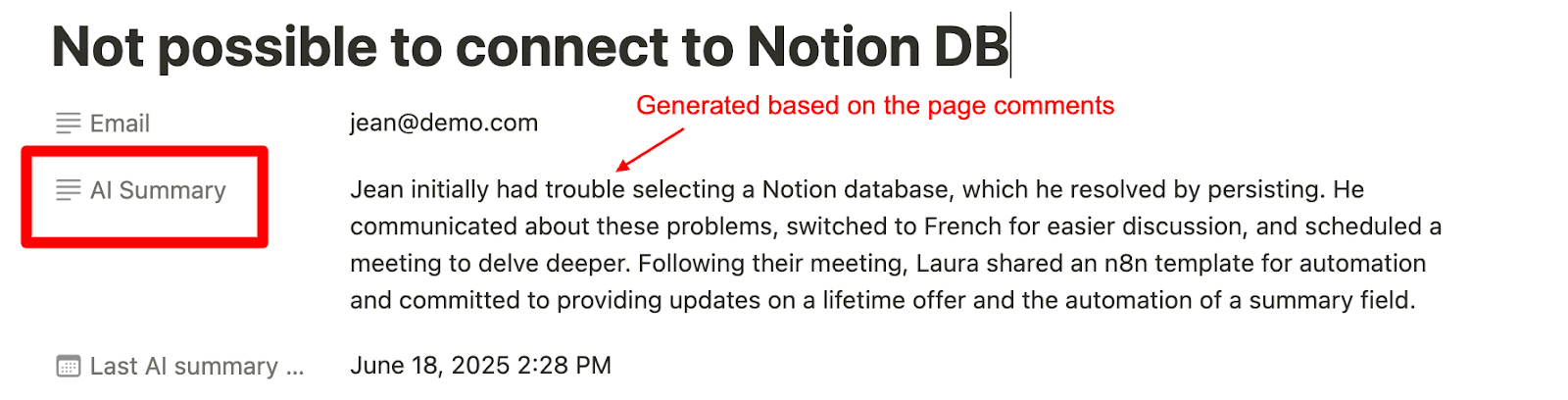\n"
},
"typeVersion": 1
},
{
"id": "c67a2e06-14ef-414c-b4b6-1d04ee4ed43e",
"name": "Note adhésive2",
"type": "n8n-nodes-base.stickyNote",
"position": [
1880,
-580
],
"parameters": {
"color": 5,
"height": 80,
"content": "**Tip**\nAdapt the prompt to your use case for better results."
},
"typeVersion": 1
}
],
"active": false,
"pinData": {},
"settings": {
"executionOrder": "v1"
},
"versionId": "264e930a-01cf-4bf7-a198-cd344d25038f",
"connections": {
"95959678-6a03-454f-beba-ac622f42f293": {
"main": [
[
{
"node": "25a54b62-0b18-4012-880f-1c6ce05386fb",
"type": "main",
"index": 0
}
]
]
},
"96749f98-914f-4317-ae47-fb4d7bb12d41": {
"main": [
[
{
"node": "fc95f0f5-80b1-4e36-9004-d188d15eec4a",
"type": "main",
"index": 0
}
]
]
},
"45a590dc-ccf0-4497-87e3-e257f5ce9279": {
"main": [
[
{
"node": "95959678-6a03-454f-beba-ac622f42f293",
"type": "main",
"index": 0
}
]
]
},
"5b7a56df-590f-4c4b-a912-086ec4cddce6": {
"main": [
[
{
"node": "5351ddd9-b900-4646-9fa4-03529a73dba7",
"type": "main",
"index": 0
}
]
]
},
"1669e388-fc92-4290-86a6-af565fd16cc7": {
"ai_languageModel": [
[
{
"node": "5b7a56df-590f-4c4b-a912-086ec4cddce6",
"type": "ai_languageModel",
"index": 0
}
]
]
},
"fc95f0f5-80b1-4e36-9004-d188d15eec4a": {
"main": [
[
{
"node": "45a590dc-ccf0-4497-87e3-e257f5ce9279",
"type": "main",
"index": 0
}
]
]
},
"25a54b62-0b18-4012-880f-1c6ce05386fb": {
"main": [
[
{
"node": "5b7a56df-590f-4c4b-a912-086ec4cddce6",
"type": "main",
"index": 0
}
]
]
}
}
}Comment utiliser ce workflow ?
Copiez le code de configuration JSON ci-dessus, créez un nouveau workflow dans votre instance n8n et sélectionnez "Importer depuis le JSON", collez la configuration et modifiez les paramètres d'authentification selon vos besoins.
Dans quelles scénarios ce workflow est-il adapté ?
Intermédiaire - Support, Intelligence Artificielle
Est-ce payant ?
Ce workflow est entièrement gratuit et peut être utilisé directement. Veuillez noter que les services tiers utilisés dans le workflow (comme l'API OpenAI) peuvent nécessiter un paiement de votre part.
Workflows recommandés

Laura Piraux
@lauraslapPartager ce workflow