n8nとGemini AI画像編集を活用した画像修復サービスの構築
上級
これはDesign, AI分野の自動化ワークフローで、17個のノードを含みます。主にSet, SplitOut, GoogleDrive, HttpRequest, ConvertToFileなどのノードを使用、AI技術を活用したスマート自動化を実現。 n8nとGemini AI画像編集による画像修復サービスの構築
前提条件
- •Google Drive API認証情報
- •ターゲットAPIの認証情報が必要な場合あり
ワークフロープレビュー
ノード接続関係を可視化、ズームとパンをサポート
ワークフローをエクスポート
以下のJSON設定をn8nにインポートして、このワークフローを使用できます
{
"meta": {
"instanceId": "408f9fb9940c3cb18ffdef0e0150fe342d6e655c3a9fac21f0f644e8bedabcd9",
"templateCredsSetupCompleted": true
},
"nodes": [
{
"id": "b6a5c37d-b845-4fd2-8ea3-db23aed99286",
"name": "ワークフロー実行時",
"type": "n8n-nodes-base.manualTrigger",
"position": [
-80,
320
],
"parameters": {},
"typeVersion": 1
},
{
"id": "1f363fc5-42cf-4e9c-ae74-496030362ed9",
"name": "サンプル画像",
"type": "n8n-nodes-base.set",
"position": [
120,
320
],
"parameters": {
"options": {},
"assignments": {
"assignments": [
{
"id": "7196d08d-dff6-48e4-a06d-0ec863a4dff3",
"name": "url",
"type": "array",
"value": "={{\n[\n \"https://res.cloudinary.com/daglih2g8/image/upload/f_auto,q_auto/v1/n8n-workflows/l8b3j1sf6ejx73z0awsh\",\n \"https://res.cloudinary.com/daglih2g8/image/upload/f_auto,q_auto/v1/n8n-workflows/htrjbmiozdrvxwdsreyt\",\n \"https://res.cloudinary.com/daglih2g8/image/upload/f_auto,q_auto/v1/n8n-workflows/ykftgxpozp2pr4sxpuoy\"\n]\n}}"
}
]
}
},
"typeVersion": 3.4
},
{
"id": "e078aba0-2f2b-47b5-90b2-c457184e6237",
"name": "分割出力",
"type": "n8n-nodes-base.splitOut",
"position": [
320,
320
],
"parameters": {
"options": {},
"fieldToSplitOut": "url"
},
"typeVersion": 1
},
{
"id": "a0fbf72b-d079-4777-be06-531e0e131857",
"name": "画像ダウンロード",
"type": "n8n-nodes-base.httpRequest",
"position": [
520,
320
],
"parameters": {
"url": "={{ $json.url }}",
"options": {}
},
"typeVersion": 4.2
},
{
"id": "77f0d0c7-e6bd-4f15-beff-9cb53446fcb0",
"name": "Gemini Image Restoration",
"type": "n8n-nodes-base.httpRequest",
"position": [
1100,
320
],
"parameters": {
"url": "https://generativelanguage.googleapis.com/v1beta/models/gemini-2.0-flash-preview-image-generation:generateContent",
"method": "POST",
"options": {},
"jsonBody": "={\n \"contents\": [\n {\n \"parts\": [\n {\n \"text\": \"You are an vintage image restoration agent. Restore the given image by removing cracks and tears and fill in missing sections of the image. Retain the dimensions, colors and camera film type of the original image.\"\n },\n {\n \"inline_data\": {\n \"mime_type\": \"{{ $('Download Image').item.binary.data.mimeType }}\",\n \"data\": \"{{ $json.data }}\"\n }\n }\n ]\n }\n ],\n \"generationConfig\": {\n \"responseModalities\": [\n \"TEXT\",\n \"IMAGE\"\n ]\n }\n}",
"sendBody": true,
"specifyBody": "json",
"authentication": "predefinedCredentialType",
"nodeCredentialType": "googlePalmApi"
},
"credentials": {
"googlePalmApi": {
"id": "dSxo6ns5wn658r8N",
"name": "Google Gemini(PaLM) Api account"
}
},
"typeVersion": 4.2
},
{
"id": "6aebcc29-a65d-4cb9-8d6a-56f24b58c7f5",
"name": "ファイルからの抽出",
"type": "n8n-nodes-base.extractFromFile",
"position": [
720,
320
],
"parameters": {
"options": {},
"operation": "binaryToPropery"
},
"typeVersion": 1
},
{
"id": "1c50d319-1771-408f-9015-f04bb6a3d305",
"name": "画像コンテンツ取得",
"type": "n8n-nodes-base.set",
"position": [
1340,
320
],
"parameters": {
"options": {},
"assignments": {
"assignments": [
{
"id": "021aad70-de11-4387-844e-7e7dfd3b1044",
"name": "image",
"type": "string",
"value": "={{ $json.candidates[0].content.parts.find(part => part.inlineData).inlineData.data }}"
},
{
"id": "62877ef7-2057-4d35-a44b-1d58fa1f1769",
"name": "mimeType",
"type": "string",
"value": "={{ $json.candidates[0].content.parts.find(part => part.inlineData).inlineData.mimeType }}"
}
]
}
},
"typeVersion": 3.4
},
{
"id": "c19074f0-45a1-42bd-b25f-966f26ef5ef5",
"name": "付箋",
"type": "n8n-nodes-base.stickyNote",
"position": [
2220,
-200
],
"parameters": {
"width": 700,
"height": 320,
"content": "|Original|Restored|\n|-|-|\n|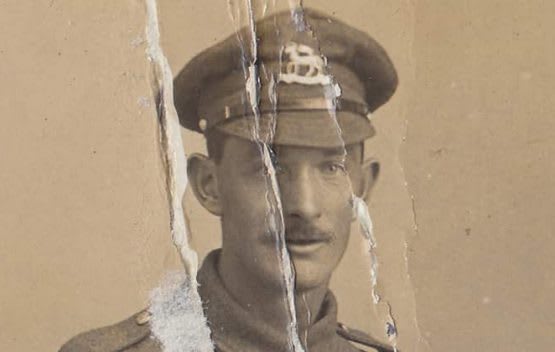|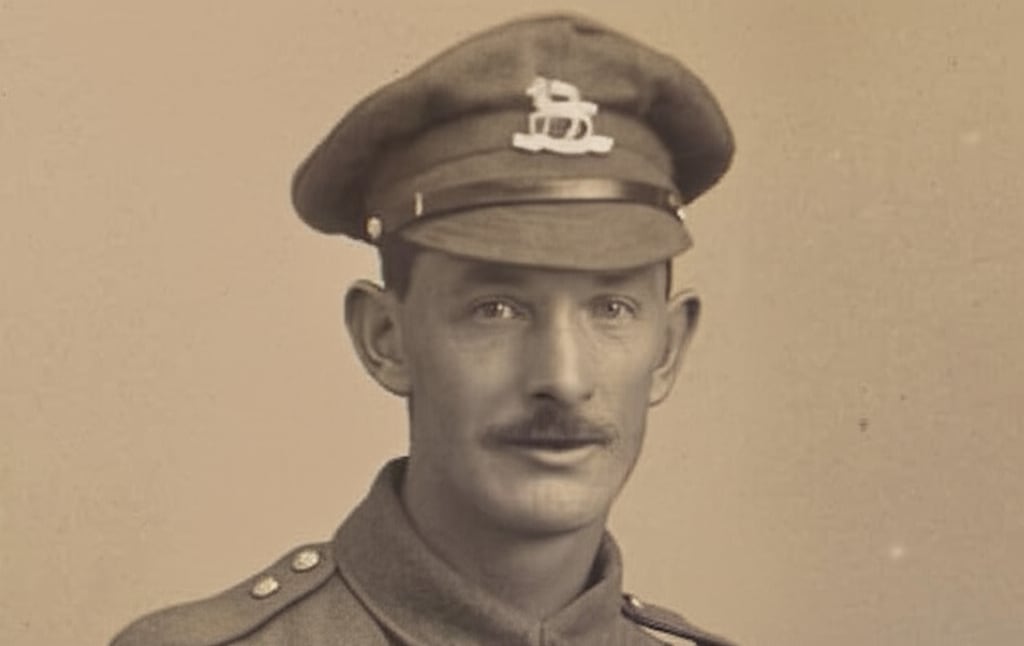|"
},
"typeVersion": 1
},
{
"id": "82e82d53-e5ff-44a2-96ca-1867058fbb65",
"name": "付箋1",
"type": "n8n-nodes-base.stickyNote",
"position": [
-140,
80
],
"parameters": {
"color": 7,
"width": 1060,
"height": 460,
"content": "## 1. Download Sample Images\n[Read more about the HTTP Request node](https://docs.n8n.io/integrations/builtin/core-nodes/n8n-nodes-base.httprequest/)\n\nFor this demonstration, we'll download 3 sample vintage photographs. These images show a variety of damage such as cracks, tears and missing or obscured sections and it will be the goal of this workflow to automate the restoration.\n\nInstead of a manual trigger, use a webhook trigger instead to integrate it into apps!"
},
"typeVersion": 1
},
{
"id": "eb1f70d5-2d3f-4f22-badb-d49569f565c2",
"name": "Driveにアップロード",
"type": "n8n-nodes-base.googleDrive",
"position": [
1960,
320
],
"parameters": {
"name": "=file_restored_{{ $itemIndex }}.{{ $binary.data.fileExtension }}",
"driveId": {
"__rl": true,
"mode": "list",
"value": "My Drive"
},
"options": {},
"folderId": {
"__rl": true,
"mode": "list",
"value": "root",
"cachedResultName": "/ (Root folder)"
}
},
"credentials": {
"googleDriveOAuth2Api": {
"id": "yOwz41gMQclOadgu",
"name": "Google Drive account"
}
},
"typeVersion": 3
},
{
"id": "4f980d9d-a993-4ec6-80fd-1a323e40822d",
"name": "付箋2",
"type": "n8n-nodes-base.stickyNote",
"position": [
960,
80
],
"parameters": {
"color": 7,
"width": 620,
"height": 460,
"content": "## 2. Use Gemini LLM to Restore Damaged Images\n[Read more about Gemini's Text and Image to Image Editing](https://ai.google.dev/gemini-api/docs/image-generation#gemini-image-editing)\n\nText-and-image-to-image capability enables LLMs to become instant replacements for a lot of image and photo editing applications. Here, we can use Gemini's new Image Generation model to restore vintage photos by removing damage and filling in missing sections."
},
"typeVersion": 1
},
{
"id": "69f7f355-5443-4265-b2a1-901711fa93dd",
"name": "ファイルへ変換",
"type": "n8n-nodes-base.convertToFile",
"onError": "continueRegularOutput",
"position": [
1720,
320
],
"parameters": {
"options": {
"mimeType": "={{ $json.mimeType }}"
},
"operation": "toBinary",
"sourceProperty": "image"
},
"typeVersion": 1.1
},
{
"id": "beae9111-8186-4afd-9fa6-c732f0229854",
"name": "付箋3",
"type": "n8n-nodes-base.stickyNote",
"position": [
1620,
80
],
"parameters": {
"color": 7,
"width": 560,
"height": 460,
"content": "## 3. Upload to Google Drive\n[Read more about Google Drive node](https://docs.n8n.io/integrations/builtin/app-nodes/n8n-nodes-base.googledrive)\n\nGemini outputs the image data as a base64 string so conversion to binary is sometimes necessary such as when uploading to Google Drive. We're using Google drive here but you can upload to any destination of your choosing."
},
"typeVersion": 1
},
{
"id": "00aaa458-1c49-4adf-87d6-ea70309107f9",
"name": "付箋4",
"type": "n8n-nodes-base.stickyNote",
"position": [
-640,
-380
],
"parameters": {
"width": 460,
"height": 920,
"content": "## Try It Out!\n### This n8n template demonstrates how to build a simple but effective vintage image restoration service using an AI model with image editing capabilities.\n\nWith Gemini now capable of multimodal output, it's a great time to explore this capability for image or graphics automation. Let's see how well it does for a task such as image restoration.\n\n**Please note, at time of writing each image generated will cost $0.039 USD**. See Gemini Pricing for updated info.\n\n### How it works\n* Images are imported into our workflow via the HTTP node and converted to base64 strings using the Extract from file node.\n* The image data is then pipelined to Gemini's Image Generation model. A prompt is provided to instruct Gemini to \"restore\" the image to near new condition - of course, feel free to experiment with this prompt to improve the results!\n* Gemini's responds with the image as a base64 string and hence, a convert to file node is used to transform the data to binary.\n* With the restored image as a binary, we can then use this with our Google Drive node to upload it to our desired folder.\n\n### How to use\n* This demonstration uses 3 random images sourced from the internet but any typical image file will work.\n* Use a webhook node to allow integration from other applications.\n* Use a telegram trigger for instant mobile service!\n\n### Requirements\n* Google Gemini for LLM/Image generation\n* Google Drive for Upload Storage\n\n### Need Help?\nJoin the [Discord](https://discord.com/invite/XPKeKXeB7d) or ask in the [Forum](https://community.n8n.io/)!\n\nHappy Hacking!"
},
"typeVersion": 1
},
{
"id": "4e4b822b-983b-48d2-a319-68242b7af171",
"name": "付箋8",
"type": "n8n-nodes-base.stickyNote",
"position": [
-640,
580
],
"parameters": {
"color": 5,
"width": 460,
"height": 140,
"content": "### Geo Restrictions!\nPlease note at time of writing, the Gemini Image Generation model is restricted to certain countries and regions. If you're getting model not found errors, it's possible the model may not be available in your country!"
},
"typeVersion": 1
},
{
"id": "24d74843-d9b5-4302-8136-159e0a7dd492",
"name": "付箋5",
"type": "n8n-nodes-base.stickyNote",
"position": [
2220,
140
],
"parameters": {
"width": 400,
"height": 440,
"content": "|Original|Restored|\n|-|-|\n||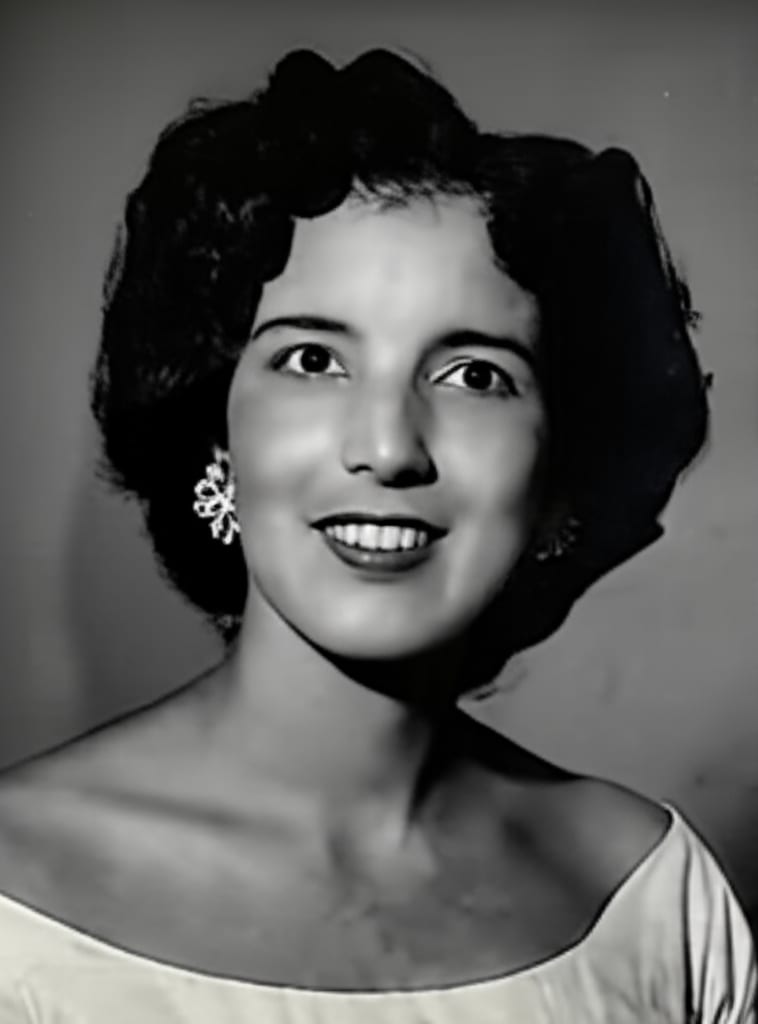|"
},
"typeVersion": 1
},
{
"id": "f77ed90e-70ca-4268-9c77-17e49f94a4bb",
"name": "付箋6",
"type": "n8n-nodes-base.stickyNote",
"position": [
2640,
140
],
"parameters": {
"width": 580,
"height": 300,
"content": "|Original|Restored|\n|-|-|\n|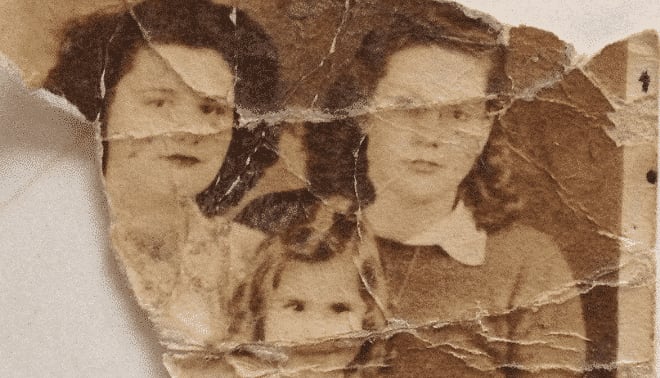|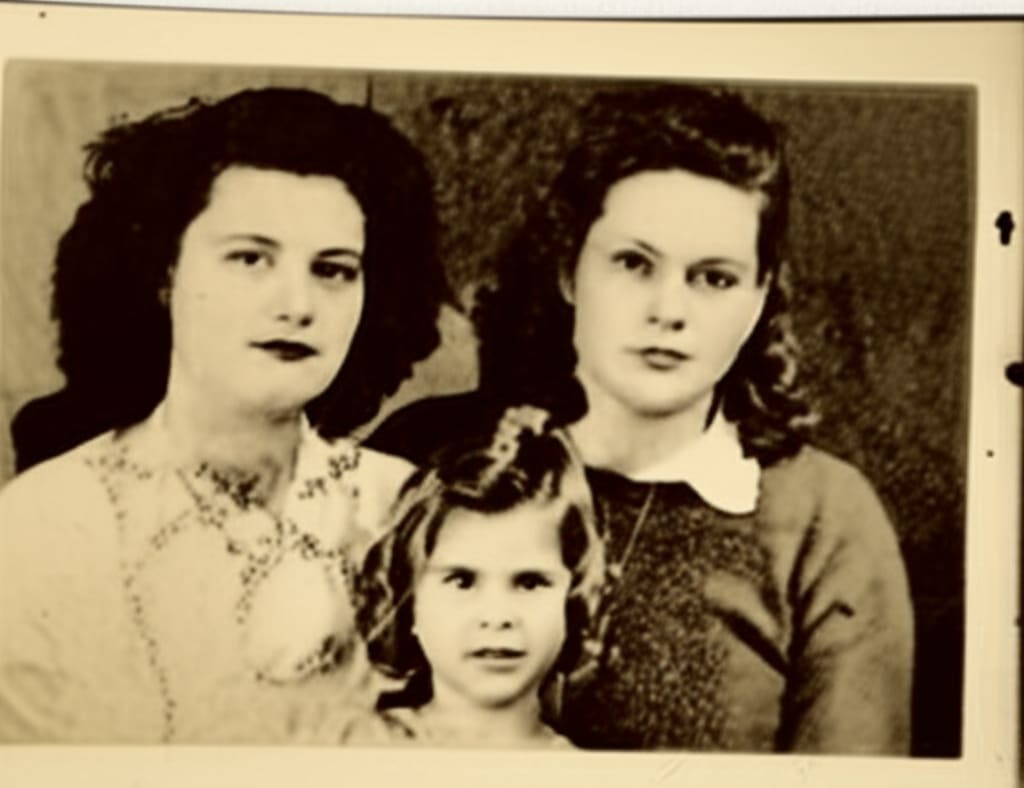|"
},
"typeVersion": 1
}
],
"pinData": {},
"connections": {
"e078aba0-2f2b-47b5-90b2-c457184e6237": {
"main": [
[
{
"node": "a0fbf72b-d079-4777-be06-531e0e131857",
"type": "main",
"index": 0
}
]
]
},
"1f363fc5-42cf-4e9c-ae74-496030362ed9": {
"main": [
[
{
"node": "e078aba0-2f2b-47b5-90b2-c457184e6237",
"type": "main",
"index": 0
}
]
]
},
"a0fbf72b-d079-4777-be06-531e0e131857": {
"main": [
[
{
"node": "6aebcc29-a65d-4cb9-8d6a-56f24b58c7f5",
"type": "main",
"index": 0
}
]
]
},
"69f7f355-5443-4265-b2a1-901711fa93dd": {
"main": [
[
{
"node": "eb1f70d5-2d3f-4f22-badb-d49569f565c2",
"type": "main",
"index": 0
}
]
]
},
"6aebcc29-a65d-4cb9-8d6a-56f24b58c7f5": {
"main": [
[
{
"node": "77f0d0c7-e6bd-4f15-beff-9cb53446fcb0",
"type": "main",
"index": 0
}
]
]
},
"1c50d319-1771-408f-9015-f04bb6a3d305": {
"main": [
[
{
"node": "69f7f355-5443-4265-b2a1-901711fa93dd",
"type": "main",
"index": 0
}
]
]
},
"77f0d0c7-e6bd-4f15-beff-9cb53446fcb0": {
"main": [
[
{
"node": "1c50d319-1771-408f-9015-f04bb6a3d305",
"type": "main",
"index": 0
}
]
]
},
"b6a5c37d-b845-4fd2-8ea3-db23aed99286": {
"main": [
[
{
"node": "1f363fc5-42cf-4e9c-ae74-496030362ed9",
"type": "main",
"index": 0
}
]
]
}
}
}よくある質問
このワークフローの使い方は?
上記のJSON設定コードをコピーし、n8nインスタンスで新しいワークフローを作成して「JSONからインポート」を選択、設定を貼り付けて認証情報を必要に応じて変更してください。
このワークフローはどんな場面に適していますか?
上級 - デザイン, 人工知能
有料ですか?
このワークフローは完全無料です。ただし、ワークフローで使用するサードパーティサービス(OpenAI APIなど)は別途料金が発生する場合があります。
関連ワークフロー
n8n と Gemini AI を使って画像編集で分離された画像を結合
n8nとGemini AIを使った画像編集による画像の分離と接合
Set
Merge
Aggregate
+
Set
Merge
Aggregate
20 ノードJimleuk
デザイン
納税申告アシスタントの構築:Qdrant、Mistral.ai、OpenAIを使用
税務法アシスタントをQdrant、Mistral.ai、OpenAIで構築
Set
Wait
Filter
+
Set
Wait
Filter
38 ノードJimleuk
財務
Excelから大学の学期日付を抽出し、CloudFlare Markdown変換を使う
CloudFlare Markdown変換を使用してExcelから大学の学期日付を抽出
Set
Code
Sort
+
Set
Code
Sort
18 ノードJimleuk
人工知能
テンプレートデモ - chatgpt - 画像 - 1 - drive および sheet 有りコピー
GPT-image-1で画像を生成し、Google Driveに保存(コスト追跡付き)
Set
Split Out
Aggregate
+
Set
Split Out
Aggregate
16 ノードdarrell_tw
デザイン
基于动态提示与AirtableのAIデータ抽出
経由动态提示与Airtable实现AIデータ抽出
Set
Code
Filter
+
Set
Code
Filter
51 ノードJimleuk
人工知能
動のプロンプトとBaserowを活用したAIデータ抽出
動のプロンプトとBaserowを活用したAIデータ抽出
Set
Code
Filter
+
Set
Code
Filter
45 ノードJimleuk
人工知能
ワークフロー情報
難易度
上級
ノード数17
カテゴリー2
ノードタイプ8
作成者

Jimleuk
@jimleukFreelance consultant based in the UK specialising in AI-powered automations. I work with select clients tackling their most challenging projects. For business enquiries, send me an email at hello@jimle.uk LinkedIn: https://www.linkedin.com/in/jimleuk/ X/Twitter: https://x.com/jimle_uk
外部リンク
n8n.ioで表示 →
このワークフローを共有