Gmail、Groq AI、Google Sheets を使ったメールフィルタリング+AI要約の自動化
中級
これはTicket Management, AI Summarization分野の自動化ワークフローで、14個のノードを含みます。主にIf, Code, GmailTrigger, GoogleSheets, Agentなどのノードを使用。 Gmail、Groq AI、Google Sheets を使ったメールフィルタリングと AI 要約の自動化
前提条件
- •Googleアカウント + Gmail API認証情報
- •Google Sheets API認証情報
ワークフロープレビュー
ノード接続関係を可視化、ズームとパンをサポート
ワークフローをエクスポート
以下のJSON設定をn8nにインポートして、このワークフローを使用できます
{
"meta": {
"instanceId": "a62a87f42cfae9ad2ff7f238a8854ab1946946f1bd38cb9d8b7442e62435a1d5"
},
"nodes": [
{
"id": "39b2d4bd-b29b-4e52-864e-0090e8f8e56f",
"name": "テスト用メモ",
"type": "n8n-nodes-base.stickyNote",
"position": [
1360,
1460
],
"parameters": {
"color": 6,
"width": 300,
"height": 220,
"content": "## 🧪 TEST BEFORE DEPLOYING\n1. Send test email\n2. Check Sheets output\n3. Verify summary quality\n4. Adjust filters/prompt as needed"
},
"typeVersion": 1
},
{
"id": "75cc1f51-da2d-411a-bd64-7c574c5d5d11",
"name": "Google Sheets1へログ",
"type": "n8n-nodes-base.googleSheets",
"position": [
980,
1560
],
"parameters": {
"columns": {
"value": {
"Date": "={{ $('info1').item.json.Date }}",
"summary": "={{ $json.output }}",
"subject ": "={{ $('info1').item.json.Subject }}",
"sender name": "={{ $('info1').item.json[\"Sender Name\"] }}",
"sender email": "={{ $('info1').item.json[\"Sender Email\"] }}"
},
"schema": [
{
"id": "sender name",
"type": "string",
"display": true,
"removed": false,
"required": false,
"displayName": "sender name",
"defaultMatch": false,
"canBeUsedToMatch": true
},
{
"id": "sender email",
"type": "string",
"display": true,
"removed": false,
"required": false,
"displayName": "sender email",
"defaultMatch": false,
"canBeUsedToMatch": true
},
{
"id": "subject ",
"type": "string",
"display": true,
"removed": false,
"required": false,
"displayName": "subject ",
"defaultMatch": false,
"canBeUsedToMatch": true
},
{
"id": "summary",
"type": "string",
"display": true,
"removed": false,
"required": false,
"displayName": "summary",
"defaultMatch": false,
"canBeUsedToMatch": true
},
{
"id": "Date",
"type": "string",
"display": true,
"removed": false,
"required": false,
"displayName": "Date",
"defaultMatch": false,
"canBeUsedToMatch": true
}
],
"mappingMode": "defineBelow",
"matchingColumns": [
"sender name"
],
"attemptToConvertTypes": false,
"convertFieldsToString": false
},
"options": {},
"operation": "appendOrUpdate",
"sheetName": {
"__rl": true,
"mode": "list",
"value": "gid=0",
"cachedResultUrl": "YOUR_GOOGLE_SHEETS_URL",
"cachedResultName": "Sheet1"
},
"documentId": {
"__rl": true,
"mode": "url",
"value": "YOUR_GOOGLE_SHEETS_DOCUMENT_ID"
}
},
"typeVersion": 4
},
{
"id": "b5d3d06e-116f-4c40-bbd0-c22cd622af96",
"name": "AI Agent1",
"type": "@n8n/n8n-nodes-langchain.agent",
"position": [
400,
1500
],
"parameters": {
"text": "=Please read this email \"{{ $json.Content }}\" and provide a very short, concise summary containing only the most important information. Keep the summary as brief as possible without losing essential details. ",
"options": {},
"promptType": "define"
},
"typeVersion": 2
},
{
"id": "a69f2251-947b-444c-b314-d510870b6583",
"name": "Gmail トリガー",
"type": "n8n-nodes-base.gmailTrigger",
"position": [
-600,
1600
],
"parameters": {
"simple": false,
"filters": {
"labelIds": [
"CATEGORY_PERSONAL"
]
},
"options": {
"downloadAttachments": false
},
"pollTimes": {
"item": [
{
"mode": "=everyHour",
"minute": 59
}
]
}
},
"typeVersion": 1
},
{
"id": "a7024314-9303-42f3-a854-dcb385c991f7",
"name": "メール有効性チェック",
"type": "n8n-nodes-base.if",
"position": [
60,
1600
],
"parameters": {
"options": {},
"conditions": {
"options": {
"version": 1,
"leftValue": "",
"caseSensitive": true,
"typeValidation": "strict"
},
"combinator": "and",
"conditions": [
{
"id": "c1d2e3f4-g5h6-i7j8-k9l0-m1n2o3p4q5r6",
"operator": {
"type": "string",
"operation": "equals"
},
"leftValue": "={{ $json[\"Sender Name\"] }}",
"rightValue": "YOUR_SENDER_NAME_FILTER"
}
]
}
},
"typeVersion": 2
},
{
"id": "eab995bb-43bf-4c23-9cc1-41b80a9deb0a",
"name": "Groq Chat Model1",
"type": "@n8n/n8n-nodes-langchain.lmChatGroq",
"position": [
260,
2000
],
"parameters": {
"model": "llama-3.1-8b-instant",
"options": {}
},
"typeVersion": 1
},
{
"id": "d408d58f-c818-4601-8109-f90bb152e381",
"name": "info1",
"type": "n8n-nodes-base.code",
"position": [
-260,
1600
],
"parameters": {
"jsCode": "const items = [];\n\nfor (const item of $input.all()) {\n const emailData = item.json;\n \n // Handle sender information (unchanged)\n let senderEmail = '';\n let senderName = '';\n\n if (emailData.from?.value?.[0]) {\n senderEmail = emailData.from.value[0].address || '';\n senderName = emailData.from.value[0].name || senderEmail;\n } else if (emailData.from?.text) {\n const emailMatch = emailData.from.text.match(/<([^>]+)>/) || \n emailData.from.text.match(/([^\\s]+@[^\\s]+)/);\n senderEmail = emailMatch ? emailMatch[1] : emailData.from.text;\n \n const nameMatch = emailData.from.text.match(/^([^<]+)/);\n senderName = nameMatch ? nameMatch[1].trim().replace(/\\\"/g, '') : senderEmail;\n }\n\n // Format date (unchanged)\n const receivedDate = new Date(emailData.date || emailData.receivedTime);\n const formattedDate = receivedDate.toLocaleString('en-US', {\n year: 'numeric',\n month: '2-digit',\n day: '2-digit',\n hour: '2-digit',\n minute: '2-digit',\n hour12: true\n });\n\n // FIXED CONTENT EXTRACTION\n let emailContent = '';\n \n // 1. First priority: Plain text version\n if (emailData.text) {\n emailContent = emailData.text;\n } \n // 2. Second priority: HTML version (convert to plain text)\n else if (emailData.html) {\n emailContent = emailData.html\n .replace(/<style[^>]*>.*?<\\/style>/gs, '') // Remove CSS\n .replace(/<[^>]*>/g, ' ') // Strip HTML tags\n .replace(/\\s+/g, ' ') // Collapse whitespace\n .trim();\n }\n // 3. Fallback to other possible fields\n else if (emailData.body || emailData.textPlain || emailData.textHtml) {\n emailContent = emailData.body || emailData.textPlain || emailData.textHtml;\n }\n\n // Truncate content if too long\n const maxContentLength = 5000;\n if (emailContent.length > maxContentLength) {\n emailContent = emailContent.substring(0, maxContentLength) + '... [truncated]';\n }\n\n // Create row data\n const rowData = {\n 'Date': formattedDate,\n 'Sender Name': senderName,\n 'Sender Email': senderEmail,\n 'Subject': emailData.subject || 'No Subject',\n 'Content': emailContent,\n //'Message ID': emailData.messageId || '',\n 'Has Attachments': emailData.attachments?.length > 0 ? 'Yes' : 'No'\n };\n \n items.push({ json: rowData });\n}\n\nreturn items;"
},
"typeVersion": 2
},
{
"id": "2bb19466-2a13-48d1-8f9c-be3db440c061",
"name": "付箋7",
"type": "n8n-nodes-base.stickyNote",
"position": [
-680,
1380
],
"parameters": {
"color": 5,
"width": 260,
"height": 400,
"content": "## 🔑 Step 1: Add Gmail Credentials 👇"
},
"typeVersion": 1
},
{
"id": "5fef7b17-cca7-4f06-99c0-efe6944b6a48",
"name": "付箋8",
"type": "n8n-nodes-base.stickyNote",
"position": [
-340,
1380
],
"parameters": {
"color": 5,
"width": 260,
"height": 400,
"content": "## 📧 Step 2: Email Processing Node\n"
},
"typeVersion": 1
},
{
"id": "bf269863-ccaa-4a22-aff2-a98305d8c354",
"name": "付箋9",
"type": "n8n-nodes-base.stickyNote",
"position": [
-20,
1380
],
"parameters": {
"color": 5,
"width": 260,
"height": 400,
"content": "## ⚙️ Step 3: Sender Filter\n• Replace 'YOUR_SENDER_NAME_FILTER'\n• Only emails from this sender will proceed\n• Supports multiple conditions"
},
"typeVersion": 1
},
{
"id": "2ea54fa1-fd79-48ca-854c-14b706cf3315",
"name": "付箋10",
"type": "n8n-nodes-base.stickyNote",
"position": [
360,
1360
],
"parameters": {
"color": 5,
"width": 360,
"height": 420,
"content": "## ✍️ Step 4: Customize AI Prompt\n• Default: Short email summary\n• Change tone/formality as needed"
},
"typeVersion": 1
},
{
"id": "92c18c6f-3c83-41e0-8757-67455aff44da",
"name": "付箋11",
"type": "n8n-nodes-base.stickyNote",
"position": [
-40,
1900
],
"parameters": {
"color": 5,
"width": 260,
"height": 220,
"content": "## 🤖 Step 5: AI Configuration\n1. Add Groq API key\n2. Or replace with other AI model\n"
},
"typeVersion": 1
},
{
"id": "56894a8f-5340-43a3-a852-7d4dadbdd376",
"name": "付箋12",
"type": "n8n-nodes-base.stickyNote",
"position": [
800,
1380
],
"parameters": {
"color": 4,
"width": 500,
"height": 400,
"content": "## 📊 Step 6: Google Sheets Setup\n1. Add Google credentials\n2. Paste Sheet URL\n3. Select target sheet\n4. Columns auto-map to email data"
},
"typeVersion": 1
},
{
"id": "bb07639e-3edb-4be1-8554-cd6df8ebb22c",
"name": "付箋13",
"type": "n8n-nodes-base.stickyNote",
"position": [
720,
1840
],
"parameters": {
"color": 4,
"width": 700,
"height": 420,
"content": "## ✅ Expected Output Format\nColumns: Sender | Date | Email | Subject | Summary\n\n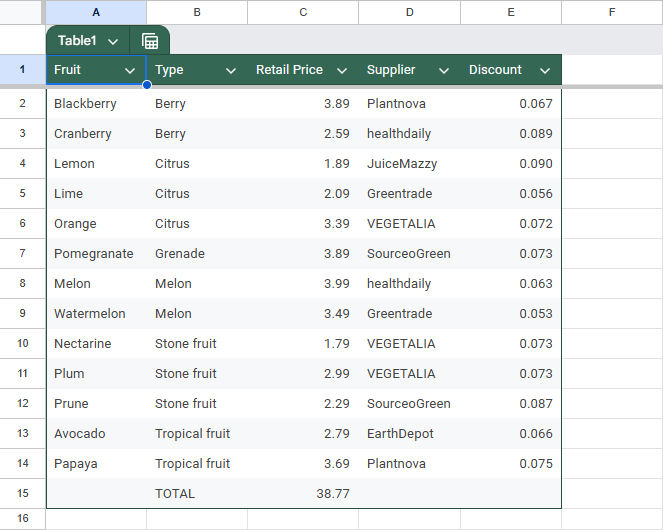"
},
"typeVersion": 1
}
],
"pinData": {},
"connections": {
"d408d58f-c818-4601-8109-f90bb152e381": {
"main": [
[
{
"node": "a7024314-9303-42f3-a854-dcb385c991f7",
"type": "main",
"index": 0
}
]
]
},
"b5d3d06e-116f-4c40-bbd0-c22cd622af96": {
"main": [
[
{
"node": "75cc1f51-da2d-411a-bd64-7c574c5d5d11",
"type": "main",
"index": 0
}
]
]
},
"a69f2251-947b-444c-b314-d510870b6583": {
"main": [
[
{
"node": "d408d58f-c818-4601-8109-f90bb152e381",
"type": "main",
"index": 0
}
]
]
},
"eab995bb-43bf-4c23-9cc1-41b80a9deb0a": {
"ai_languageModel": [
[
{
"node": "b5d3d06e-116f-4c40-bbd0-c22cd622af96",
"type": "ai_languageModel",
"index": 0
}
]
]
},
"a7024314-9303-42f3-a854-dcb385c991f7": {
"main": [
[
{
"node": "b5d3d06e-116f-4c40-bbd0-c22cd622af96",
"type": "main",
"index": 0
}
]
]
}
}
}よくある質問
このワークフローの使い方は?
上記のJSON設定コードをコピーし、n8nインスタンスで新しいワークフローを作成して「JSONからインポート」を選択、設定を貼り付けて認証情報を必要に応じて変更してください。
このワークフローはどんな場面に適していますか?
中級 - チケット管理, AI要約
有料ですか?
このワークフローは完全無料です。ただし、ワークフローで使用するサードパーティサービス(OpenAI APIなど)は別途料金が発生する場合があります。
関連ワークフロー
プレイリストからポッドキャストの重要な情報を100%無料で取得✅
プレイリストからPodcastの重要な情報を100%無料で取得✅
Code
You Tube
Function
+
Code
You Tube
Function
23 ノードARRE
コンテンツ作成
AIによるサポート送迎と要約システム
GPT-4o、SlackとCRM連携で顧客サポートを自動処理
If
Set
Code
+
If
Set
Code
32 ノードNodeAlchemy
チケット管理
Intercom対話コメント
Intercom、GPT、Google Sheetsを使用したサポート品質評価の自動化
If
Code
Merge
+
If
Code
Merge
22 ノードSaleshandy
チケット管理
アクティブインテリジェント・カスタマーサポートセンター
GPT-4、Gmail、Trelloを使用した自動メールサポートトリAGE
If
Code
Gmail
+
If
Code
Gmail
14 ノードMarth
チケット管理
15 - LeadFlow オートメーション
OpenAI GPT-4O、HubSpot、Slack、Google Sheetsを使ってGmailのリードフォローアップを自動化
If
Set
Code
+
If
Set
Code
14 ノードAvkash Kakdiya
AI要約
GPT-4o-miniを使ってGmailからGoogle Sheetsへホテル予約リクエストを自動化
GPT-4o-miniでGmailのホテル予約リクエストをGoogle Sheetsへ自動入力
If
Set
Code
+
If
Set
Code
29 ノードGtaras
文書抽出
ワークフロー情報
難易度
中級
ノード数14
カテゴリー2
ノードタイプ7
作成者

ARRE
@arreAutomation Architect | I transform complexity into simplicity Building intelligent n8n workflows that do your heavy lifting in minutes, not hours. My mission: Eliminate repetitive tasks, streamline your operations, and give you back the most valuable resource – your time. Let’s make work feel lighter together.
外部リンク
n8n.ioで表示 →
このワークフローを共有