RetellAI를 사용한 AI 전화 어시스턴트
고급
이것은AI분야의자동화 워크플로우로, 36개의 노드를 포함합니다.주로 Set, Filter, Webhook, Telegram, GoogleDrive 등의 노드를 사용하며인공지능 기술을 결합하여 스마트 자동화를 구현합니다. Retell, Google 캘린더 및 RAG 통합된 AI 전화 어시스턴트 구축
사전 요구사항
- •HTTP Webhook 엔드포인트(n8n이 자동으로 생성)
- •Telegram Bot Token
- •Google Drive API 인증 정보
- •대상 API의 인증 정보가 필요할 수 있음
- •OpenAI API Key
- •Qdrant 서버 연결 정보
사용된 노드 (36)
카테고리
워크플로우 미리보기
노드 연결 관계를 시각적으로 표시하며, 확대/축소 및 이동을 지원합니다
워크플로우 내보내기
다음 JSON 구성을 복사하여 n8n에 가져오면 이 워크플로우를 사용할 수 있습니다
{
"id": "29P4X9mTSmplnjlJ",
"meta": {
"instanceId": "a4bfc93e975ca233ac45ed7c9227d84cf5a2329310525917adaf3312e10d5462",
"templateCredsSetupCompleted": true
},
"name": "AI Phone Agent with RetellAI",
"tags": [],
"nodes": [
{
"id": "55ef0229-0c33-4821-926d-9aabf4f6c812",
"name": "필터",
"type": "n8n-nodes-base.filter",
"position": [
-100,
120
],
"parameters": {
"options": {},
"conditions": {
"options": {
"version": 2,
"leftValue": "",
"caseSensitive": true,
"typeValidation": "strict"
},
"combinator": "or",
"conditions": [
{
"id": "cce162e9-50f7-41dc-ae45-763a53a835af",
"operator": {
"name": "filter.operator.equals",
"type": "string",
"operation": "equals"
},
"leftValue": "={{ $json.body.event }}",
"rightValue": "call_ended"
},
{
"id": "b0cec556-f565-4ade-90c9-1cfd74ed238b",
"operator": {
"name": "filter.operator.equals",
"type": "string",
"operation": "equals"
},
"leftValue": "={{ $json.body.event }}",
"rightValue": "call_analyzed"
}
]
}
},
"typeVersion": 2.2
},
{
"id": "1873c991-0ac0-40c4-b027-e48a9f2582c6",
"name": "OpenAI 채팅 모델",
"type": "@n8n/n8n-nodes-langchain.lmChatOpenAi",
"position": [
320,
320
],
"parameters": {
"model": {
"__rl": true,
"mode": "list",
"value": "gpt-4o-mini"
},
"options": {}
},
"credentials": {
"openAiApi": {
"id": "4zwP0MSr8zkNvvV9",
"name": "OpenAi account"
}
},
"typeVersion": 1.2
},
{
"id": "d05a7ec8-2b27-474b-b618-f85da8cf0780",
"name": "구조화 출력 파서",
"type": "@n8n/n8n-nodes-langchain.outputParserStructured",
"position": [
640,
300
],
"parameters": {
"schemaType": "manual",
"inputSchema": "{\n\t\"type\": \"object\",\n\t\"properties\": {\n\t\t\"first_name\": {\n\t\t\t\"type\": \"string\",\n \"description\":\"\"\n\t\t},\n\t\t\"last_name\": {\n\t\t\t\"type\": \"string\",\n \"description\":\"\"\n\t\t},\n \"email\": {\n\t\t\t\"type\": \"string\",\n \"description\":\"\"\n\t\t},\n \"telephone\": {\n\t\t\t\"type\": \"string\",\n \"description\":\"\"\n\t\t},\n \"summary\": {\n\t\t\t\"type\": \"string\",\n \"description\":\"\"\n\t\t},\n \"date\": {\n\t\t\t\"type\": \"date\",\n \"description\":\"\"\n\t\t},\n \"date\": {\n\t\t\t\"type\": \"date\",\n \"description\":\"\"\n\t\t},\n \"dateTime\": {\n\t\t\t\"type\": \"date\",\n \"description\":\"\"\n }\n\t}\n}"
},
"typeVersion": 1.2
},
{
"id": "aef9edfc-ff3b-42b6-9839-562a5376135d",
"name": "n8n_rag_function",
"type": "n8n-nodes-base.webhook",
"position": [
-360,
720
],
"webhookId": "edb1e894-1210-4902-a34f-a014bbdad8d8",
"parameters": {
"path": "edb1e894-1210-4902-a34f-a014bbdad8d8",
"options": {},
"httpMethod": "POST",
"responseMode": "responseNode"
},
"typeVersion": 2
},
{
"id": "247567b1-b45c-433f-86f8-43cfe210a532",
"name": "Qdrant 벡터 저장소 검색",
"type": "@n8n/n8n-nodes-langchain.vectorStoreQdrant",
"position": [
20,
1140
],
"parameters": {
"options": {},
"qdrantCollection": {
"__rl": true,
"mode": "list",
"value": "scarperia",
"cachedResultName": "scarperia"
}
},
"credentials": {
"qdrantApi": {
"id": "iyQ6MQiVaF3VMBmt",
"name": "QdrantApi account"
}
},
"typeVersion": 1
},
{
"id": "c8153076-8ae2-4b34-893d-ef75233c2a74",
"name": "OpenAI2 임베딩",
"type": "@n8n/n8n-nodes-langchain.embeddingsOpenAi",
"position": [
-20,
1320
],
"parameters": {
"options": {}
},
"credentials": {
"openAiApi": {
"id": "4zwP0MSr8zkNvvV9",
"name": "OpenAi account"
}
},
"typeVersion": 1.2
},
{
"id": "0acec55e-cb6a-4220-a491-aa29eccc692a",
"name": "RAG",
"type": "@n8n/n8n-nodes-langchain.toolVectorStore",
"position": [
180,
940
],
"parameters": {
"name": "company_data",
"description": "Retrive data about company knowledge from vector store"
},
"typeVersion": 1
},
{
"id": "b7a86b9f-1620-4fc7-973f-e6e169e4ecbe",
"name": "OpenAI 채팅 모델2",
"type": "@n8n/n8n-nodes-langchain.lmChatOpenAi",
"position": [
-20,
940
],
"parameters": {
"model": {
"__rl": true,
"mode": "list",
"value": "gpt-4o-mini"
},
"options": {}
},
"credentials": {
"openAiApi": {
"id": "4zwP0MSr8zkNvvV9",
"name": "OpenAi account"
}
},
"typeVersion": 1.2
},
{
"id": "64354f1c-388d-47b7-be4e-a67a6feeb0ed",
"name": "Webhook 응답",
"type": "n8n-nodes-base.respondToWebhook",
"position": [
620,
720
],
"parameters": {
"options": {}
},
"typeVersion": 1.1
},
{
"id": "baa32a03-3295-434a-afca-8f7cadece512",
"name": "OpenAI 채팅 모델1",
"type": "@n8n/n8n-nodes-langchain.lmChatOpenAi",
"position": [
340,
1160
],
"parameters": {
"model": {
"__rl": true,
"mode": "list",
"value": "gpt-4o-mini"
},
"options": {}
},
"credentials": {
"openAiApi": {
"id": "4zwP0MSr8zkNvvV9",
"name": "OpenAi account"
}
},
"typeVersion": 1.2
},
{
"id": "1d5c9eb2-b468-4dd2-aa77-d33924fdbb41",
"name": "Telegram",
"type": "n8n-nodes-base.telegram",
"position": [
820,
120
],
"webhookId": "44d73068-54dc-458b-a6fb-4b4d10ebed34",
"parameters": {
"text": "=Call summary:\n{{ $json.output.summary }}\n\nFirst name: {{ $json.output.first_name }}\nLast name: {{ $json.output.last_name }}\nEmail: {{ $json.output.email }}\nTelephone: {{ $json.output.telephone }}\nSummary: {{ $json.output.summary }}\nDate: {{ $json.output.date }}\nDateTiem: {{ $json.output.dateTime }}",
"chatId": "CHAT_ID",
"additionalFields": {}
},
"credentials": {
"telegramApi": {
"id": "rQ5q95W7uKesMDx4",
"name": "Telegram account Fastewb"
}
},
"typeVersion": 1.2
},
{
"id": "5ca696a0-b1d2-45f5-93d6-066654a0c2f6",
"name": "Google 캘린더",
"type": "n8n-nodes-base.googleCalendar",
"position": [
1860,
100
],
"parameters": {
"end": "={{ $json.output.end }}",
"start": "={{ $json.output.start }}",
"calendar": {
"__rl": true,
"mode": "list",
"value": "info@n3w.it",
"cachedResultName": "info@n3w.it"
},
"additionalFields": {
"summary": "Event title",
"description": "Event description"
}
},
"credentials": {
"googleCalendarOAuth2Api": {
"id": "8RFK3u13g2PJEGa9",
"name": "Google Calendar account"
}
},
"typeVersion": 1.3
},
{
"id": "57fedd6a-94a4-4f58-8179-9fd8ae1d0006",
"name": "OpenAI 채팅 모델3",
"type": "@n8n/n8n-nodes-langchain.lmChatOpenAi",
"position": [
1340,
320
],
"parameters": {
"model": {
"__rl": true,
"mode": "list",
"value": "gpt-4o-mini"
},
"options": {}
},
"credentials": {
"openAiApi": {
"id": "4zwP0MSr8zkNvvV9",
"name": "OpenAi account"
}
},
"typeVersion": 1.2
},
{
"id": "f3f8a781-eb03-4e99-8512-b926249aabba",
"name": "구조화 출력 파서1",
"type": "@n8n/n8n-nodes-langchain.outputParserStructured",
"position": [
1640,
320
],
"parameters": {
"schemaType": "manual",
"inputSchema": "{\n\t\"type\": \"object\",\n\t\"properties\": {\n\t\t\"start\": {\n\t\t\t\"type\": \"string\"\n\t\t},\n\t\t\"end\": {\n\t\t\t\"type\": \"string\"\n\t\t}\n\t}\n}"
},
"typeVersion": 1.2
},
{
"id": "f3c416a2-6b42-43cc-aa66-e7d146c1b325",
"name": "n8n_call",
"type": "n8n-nodes-base.webhook",
"position": [
-340,
120
],
"webhookId": "b352dd49-d3b3-4e0a-a781-17137f7199c8",
"parameters": {
"path": "b352dd49-d3b3-4e0a-a781-17137f7199c8",
"options": {},
"httpMethod": "POST"
},
"typeVersion": 2
},
{
"id": "2862b10c-77d7-4555-b9ec-86c9c4b9fe7b",
"name": "스티커 노트",
"type": "n8n-nodes-base.stickyNote",
"position": [
1080,
-1140
],
"parameters": {
"width": 1140,
"height": 920,
"content": "# STEP 3 - RETELL AI\n\n- Register on [Retell AI](https://retellai.com) (10$ FREE credits)\n- Create an Agent an set \"Voice & Language\" and add your system prompt\n- In Webhook settings add the \"Agent Level Webhook URL\" with the n8n webhook node url called \"n8n_call\"\n- Buy a new phone number with your FREE credits by Twilio Provider and connect it to the created agent\n- Enter the previously created agency and create the flow as shown in the following image\n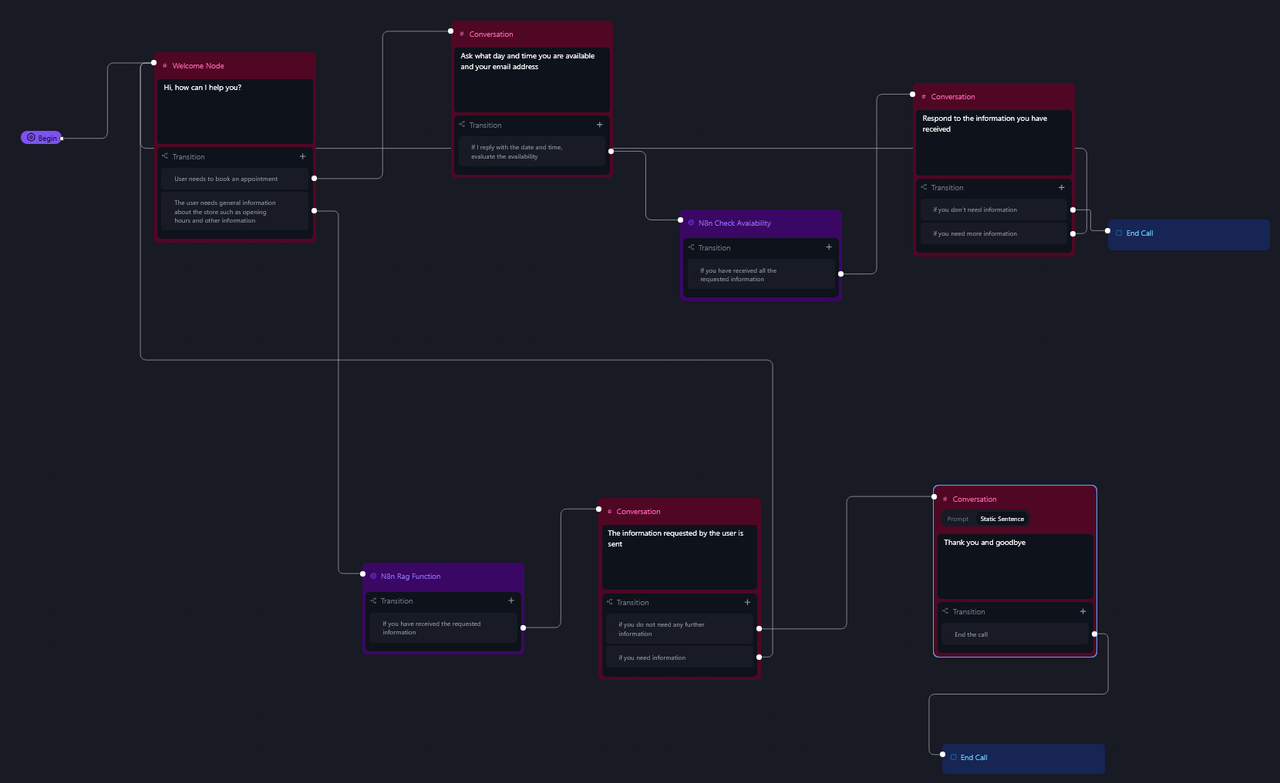\n- Aggiungere 2 funzioni (una per RAG e una per il Booking) e inserire l'url apposito ricavato dai webhook di n8n \"n8n_rag_function\" e \"n8n_check_available\"\n\n"
},
"typeVersion": 1
},
{
"id": "98de797e-56d8-42b4-85a5-245ae7d086db",
"name": "스티커 노트1",
"type": "n8n-nodes-base.stickyNote",
"position": [
-340,
-100
],
"parameters": {
"color": 5,
"width": 1220,
"content": "# STEP 4\nIntercept the \"end call\" event and get the full call transcript\n- Add your CHAT_ID in Telegram node"
},
"typeVersion": 1
},
{
"id": "ccf11ce4-3bc4-46bd-a71e-12e59d7a2504",
"name": "n8n_check_available",
"type": "n8n-nodes-base.webhook",
"position": [
1120,
100
],
"webhookId": "4dcd68b1-91d3-40bc-8aa6-c681126752b2",
"parameters": {
"path": "4dcd68b1-91d3-40bc-8aa6-c681126752b2",
"options": {},
"httpMethod": "POST",
"responseMode": "lastNode"
},
"typeVersion": 2
},
{
"id": "ddc50779-c0cf-4862-87b9-e187d1ab19a5",
"name": "워크플로우 테스트 클릭 시",
"type": "n8n-nodes-base.manualTrigger",
"position": [
-400,
-940
],
"parameters": {},
"typeVersion": 1
},
{
"id": "fd6f36d4-c8b3-4643-8df9-a775d94946d9",
"name": "Qdrant 벡터 저장소",
"type": "@n8n/n8n-nodes-langchain.vectorStoreQdrant",
"position": [
580,
-820
],
"parameters": {
"mode": "insert",
"options": {},
"qdrantCollection": {
"__rl": true,
"mode": "id",
"value": "="
}
},
"credentials": {
"qdrantApi": {
"id": "iyQ6MQiVaF3VMBmt",
"name": "QdrantApi account"
}
},
"typeVersion": 1
},
{
"id": "3c4f9805-57e7-4662-ab12-8bedc5e5a815",
"name": "컬렉션 생성",
"type": "n8n-nodes-base.httpRequest",
"position": [
-100,
-1080
],
"parameters": {
"url": "https://QDRANTURL/collections/COLLECTION",
"method": "POST",
"options": {},
"jsonBody": "{\n \"filter\": {}\n}",
"sendBody": true,
"sendHeaders": true,
"specifyBody": "json",
"authentication": "genericCredentialType",
"genericAuthType": "httpHeaderAuth",
"headerParameters": {
"parameters": [
{
"name": "Content-Type",
"value": "application/json"
}
]
}
},
"credentials": {
"httpHeaderAuth": {
"id": "qhny6r5ql9wwotpn",
"name": "Qdrant API (Hetzner)"
}
},
"typeVersion": 4.2
},
{
"id": "b5fdbd4d-0cc9-4b5c-8aa8-b7fe6fd0f3b4",
"name": "컬렉션 새로고침",
"type": "n8n-nodes-base.httpRequest",
"position": [
-100,
-820
],
"parameters": {
"url": "https://QDRANTURL/collections/COLLECTION/points/delete",
"method": "POST",
"options": {},
"jsonBody": "{\n \"filter\": {}\n}",
"sendBody": true,
"sendHeaders": true,
"specifyBody": "json",
"authentication": "genericCredentialType",
"genericAuthType": "httpHeaderAuth",
"headerParameters": {
"parameters": [
{
"name": "Content-Type",
"value": "application/json"
}
]
}
},
"credentials": {
"httpHeaderAuth": {
"id": "qhny6r5ql9wwotpn",
"name": "Qdrant API (Hetzner)"
}
},
"typeVersion": 4.2
},
{
"id": "c2f5ded2-adcb-4c50-95e6-94e54a7c2116",
"name": "폴더 가져오기",
"type": "n8n-nodes-base.googleDrive",
"position": [
120,
-820
],
"parameters": {
"filter": {
"driveId": {
"__rl": true,
"mode": "list",
"value": "My Drive",
"cachedResultUrl": "https://drive.google.com/drive/my-drive",
"cachedResultName": "My Drive"
},
"folderId": {
"__rl": true,
"mode": "id",
"value": "=test-whatsapp"
}
},
"options": {},
"resource": "fileFolder"
},
"credentials": {
"googleDriveOAuth2Api": {
"id": "HEy5EuZkgPZVEa9w",
"name": "Google Drive account (n3w.it)"
}
},
"typeVersion": 3
},
{
"id": "640ede03-46fc-44a3-a9e8-29118036d64f",
"name": "파일 다운로드",
"type": "n8n-nodes-base.googleDrive",
"position": [
340,
-820
],
"parameters": {
"fileId": {
"__rl": true,
"mode": "id",
"value": "={{ $json.id }}"
},
"options": {
"googleFileConversion": {
"conversion": {
"docsToFormat": "text/plain"
}
}
},
"operation": "download"
},
"credentials": {
"googleDriveOAuth2Api": {
"id": "HEy5EuZkgPZVEa9w",
"name": "Google Drive account (n3w.it)"
}
},
"typeVersion": 3
},
{
"id": "ff40b36c-3092-43fc-a001-9683b0e33460",
"name": "OpenAI 임베딩",
"type": "@n8n/n8n-nodes-langchain.embeddingsOpenAi",
"position": [
560,
-620
],
"parameters": {
"options": {}
},
"credentials": {
"openAiApi": {
"id": "4zwP0MSr8zkNvvV9",
"name": "OpenAi account"
}
},
"typeVersion": 1.1
},
{
"id": "cfc6a14a-1445-4d38-8fbb-3dc3c7bfff8b",
"name": "기본 데이터 로더",
"type": "@n8n/n8n-nodes-langchain.documentDefaultDataLoader",
"position": [
740,
-620
],
"parameters": {
"options": {},
"dataType": "binary"
},
"typeVersion": 1
},
{
"id": "38a49484-82f0-4520-ba03-47edef117cd8",
"name": "토큰 분할기",
"type": "@n8n/n8n-nodes-langchain.textSplitterTokenSplitter",
"position": [
700,
-460
],
"parameters": {
"chunkSize": 300,
"chunkOverlap": 30
},
"typeVersion": 1
},
{
"id": "62726443-9c09-4ee7-becb-789982bc2e9b",
"name": "스티커 노트3",
"type": "n8n-nodes-base.stickyNote",
"position": [
100,
-1140
],
"parameters": {
"color": 6,
"width": 880,
"height": 220,
"content": "# STEP 1\n\n## Create Qdrant Collection\nChange:\n- QDRANTURL\n- COLLECTION"
},
"typeVersion": 1
},
{
"id": "5f52d12f-6bbe-468c-b23f-356e0675b15a",
"name": "스티커 노트4",
"type": "n8n-nodes-base.stickyNote",
"position": [
-120,
-880
],
"parameters": {
"color": 4,
"width": 620,
"height": 400,
"content": "# STEP 2\n\n\n\n\n\n\n\n\n\n\n\n\n## Documents vectorization with Qdrant and Google Drive\nChange:\n- QDRANTURL\n- COLLECTION"
},
"typeVersion": 1
},
{
"id": "08525507-990d-43f3-b2d3-6d73bc2aed84",
"name": "통화 필드 설정",
"type": "n8n-nodes-base.set",
"position": [
140,
120
],
"parameters": {
"options": {},
"assignments": {
"assignments": [
{
"id": "15b079b9-e36d-4c9b-8ca4-30bf858ce75b",
"name": "Transcript",
"type": "string",
"value": "={{ $json.body.call.transcript }}"
},
{
"id": "f1cbced3-bd9c-4d8f-bd81-060406ff27b0",
"name": "Duration (sec)",
"type": "string",
"value": "={{ $('n8n_call').item.json.body.call.call_cost.total_duration_seconds }}"
},
{
"id": "829ee367-1f5e-4d66-9818-8a27344d7e79",
"name": "From",
"type": "string",
"value": "={{ $('n8n_call').item.json.body.call.from_number }}"
},
{
"id": "38e9e856-d87d-4c23-8486-4ebbac2da595",
"name": "To",
"type": "string",
"value": "={{ $('n8n_call').item.json.body.call.to_number }}"
},
{
"id": "4209d6d3-4881-4296-a1db-fff0c14addda",
"name": "Cost ",
"type": "string",
"value": "={{ $('n8n_call').item.json.body.call.call_cost.combined_cost }}"
},
{
"id": "3c871d3b-95b5-493a-b3fe-3c9bf06a0d62",
"name": "Telephony Identifier",
"type": "string",
"value": "={{ $('n8n_call').item.json.body.call.telephony_identifier.twilio_call_sid }}"
},
{
"id": "0a926748-8aff-4dd7-a252-516f3339210a",
"name": "Disconnection reason",
"type": "string",
"value": "={{ $json.body.call.disconnection_reason }}"
},
{
"id": "9c88eafc-4370-47ad-ad98-d14767c137d0",
"name": "Recording url",
"type": "string",
"value": "={{ $json.body.call.recording_url }}"
},
{
"id": "a737a3bd-c871-4273-85b8-8e423bf7c443",
"name": "Public log url",
"type": "string",
"value": "={{ $json.body.call.public_log_url }}"
}
]
}
},
"typeVersion": 3.4
},
{
"id": "db21e42c-ff87-45ad-a228-77ce4c9c6b0c",
"name": "핵심 포인트 추출",
"type": "@n8n/n8n-nodes-langchain.chainLlm",
"position": [
400,
120
],
"parameters": {
"text": "=To: {{ $json.To }}\n\nComplete transcript:\n{{ $json.Transcript }} ",
"messages": {
"messageValues": [
{
"message": "=You are a specialized AI assistant responsible for analyzing complete voice conversation transcripts. Your task is to create concise summaries that extract the essential information from these conversations.\n\nInput: You will receive the complete transcript of a voice conversation between two or more participants.\n\nTask:\n1. Analyze the entire conversation transcript carefully.\n2. Identify and extract the most important key points discussed.\n3. Create a clear, structured summary that captures the essential information.\n4. Highlight any decisions made, action items agreed upon, or critical information shared.\n5. Maintain objectivity in your summary, avoiding interpretation or judgment.\n\nOutput format:\n- Begin with a brief overview of the conversation (1-2 sentences)\n- List the key points in bullet format\n- Include a separate \"Action Items\" section if any tasks or follow-ups were mentioned\n- Keep your summary concise while ensuring all important information is captured\n\nRemember that accuracy is paramount. Focus on extracting what was explicitly stated rather than inferring unstated meanings. If something is unclear in the transcript, note it as such rather than guessing."
}
]
},
"promptType": "define",
"hasOutputParser": true
},
"typeVersion": 1.6
},
{
"id": "0c6c8765-d28f-4398-aa0e-8f65879cc740",
"name": "콘서트 시작 날짜",
"type": "@n8n/n8n-nodes-langchain.chainLlm",
"position": [
1420,
100
],
"parameters": {
"text": "=Convert this date to a compatible format for Google Calendar APIs for the start date, and for the end date add 1 hour to the start date.\n\nHere is the start date:\n{{ $json.body.args.date }}",
"promptType": "define",
"hasOutputParser": true
},
"typeVersion": 1.6
},
{
"id": "0b33c34a-f61c-4aab-8315-600da2da3281",
"name": "스티커 노트2",
"type": "n8n-nodes-base.stickyNote",
"position": [
1100,
-100
],
"parameters": {
"color": 5,
"width": 1100,
"content": "# STEP 5\nIf required, create the event in the calendar\n- Enter the title and description of the event"
},
"typeVersion": 1
},
{
"id": "138555e5-b62b-4f59-b223-c73611e5dece",
"name": "스티커 노트5",
"type": "n8n-nodes-base.stickyNote",
"position": [
-360,
520
],
"parameters": {
"color": 5,
"width": 1220,
"content": "# STEP 6\nIf required retrive the informations by RAG system"
},
"typeVersion": 1
},
{
"id": "65d998a1-b31b-4463-be9b-0b27448f9026",
"name": "에이전트 검색",
"type": "@n8n/n8n-nodes-langchain.agent",
"position": [
60,
720
],
"parameters": {
"text": "={{ $json.body.args.query }}",
"agent": "conversationalAgent",
"options": {
"systemMessage": "You are an AI-powered assistant for an electronics store. Answer in Italian. Your primary goal is to assist customers by providing accurate and helpful information about products, troubleshooting tips, and general support. Use the provided knowledge base (retrieved documents) to answer questions with precision and professionalism.\n\n**Guidelines**:\n1. **Product Information**:\n - Provide detailed descriptions of products, including specifications, features, and compatibility.\n - Highlight key selling points and differences between similar products.\n - Mention availability, pricing, and promotions if applicable.\n\n2. **Technical Support**:\n - Offer step-by-step troubleshooting guides for common issues.\n - Suggest solutions for setup, installation, or configuration problems.\n - If the issue is complex, recommend contacting the store’s support team for further assistance.\n\n3. **Customer Service**:\n - Respond politely and professionally to all inquiries.\n - If a question is unclear, ask for clarification to provide the best possible answer.\n - For order-related questions (e.g., status, returns, or cancellations), guide customers on how to proceed using the store’s systems.\n\n4. **Knowledge Base Usage**:\n - Always reference the provided knowledge base (retrieved documents) to ensure accuracy.\n - If the knowledge base does not contain relevant information, inform the customer and suggest alternative resources or actions.\n\n5. **Tone and Style**:\n - Use a friendly, approachable, and professional tone.\n - Avoid technical jargon unless the customer demonstrates familiarity with the topic.\n - Keep responses concise but informative.\n\n**Example Interactions**:\n1. **Product Inquiry**:\n - Customer: \"What’s the difference between the XYZ Smartwatch and the ABC Smartwatch?\"\n - AI: \"The XYZ Smartwatch features a longer battery life (up to 7 days) and built-in GPS, while the ABC Smartwatch has a brighter AMOLED display and supports wireless charging. Both are compatible with iOS and Android devices. Would you like more details on either product?\"\n\n2. **Technical Support**:\n - Customer: \"My wireless router isn’t connecting to the internet.\"\n - AI: \"Please try the following steps: 1) Restart your router and modem. 2) Ensure all cables are securely connected. 3) Check if the router’s LED indicators show a stable connection. If the issue persists, you may need to reset the router to factory settings. Would you like a detailed guide for resetting your router?\"\n\n3. **Customer Service**:\n - Customer: \"How do I return a defective product?\"\n - AI: \"To return a defective product, please visit our Returns Portal on our website and enter your order number. You’ll receive a return label and instructions. If you need further assistance, our support team is available at support@electronicsstore.com.\"\n\n**Limitations**:\n- If the question is outside the scope of the knowledge base or requires human intervention, inform the customer and provide contact details for the appropriate department.\n- Do not provide speculative or unverified information. Always rely on the knowledge base or direct the customer to official resources."
},
"promptType": "define"
},
"typeVersion": 1.7
},
{
"id": "a98a4ed7-4ebc-4d40-8aaa-70de751bc15f",
"name": "스티커 노트6",
"type": "n8n-nodes-base.stickyNote",
"position": [
-380,
-1600
],
"parameters": {
"color": 3,
"width": 2580,
"height": 360,
"content": "# Create your first AI Phone Agent\n\nBuild, test, deploy, and monitor AI phone agents. Retell is a comprehensive platform for building, testing, deploying, and monitoring reliable AI phone agents.\nConversation flow agent allows you to create multiple nodes to handle different scenarios in the conversation. It provides more fine-grained control over the conversation flow compared to single / multi prompt agent, which unlocks the ability to handle more complex scenarios.\n\nThis Workflow simulates an AI-powered phone agent with two main functions:\n\n📅 Appointment Booking – It can schedule appointments directly into Google Calendar.\n\n🧠 RAG-based Information Retrieval – It provides answers using a Retrieval-Augmented Generation (RAG) system. For example, it can respond to questions such as store opening hours, return policies, or product details.\n\nThe guide also explains how to purchase a dedicated phone number (with a +1 prefix) and link it to the AI agent. This setup is cost-effective, as it uses a free $10 credit to operate without additional charges in the beginning."
},
"typeVersion": 1
}
],
"active": true,
"pinData": {},
"settings": {
"timezone": "Europe/Rome",
"callerPolicy": "workflowsFromSameOwner",
"executionOrder": "v1"
},
"versionId": "d78ac941-900b-49f5-a9a8-158effbd2479",
"connections": {
"0acec55e-cb6a-4220-a491-aa29eccc692a": {
"ai_tool": [
[
{
"node": "65d998a1-b31b-4463-be9b-0b27448f9026",
"type": "ai_tool",
"index": 0
}
]
]
},
"55ef0229-0c33-4821-926d-9aabf4f6c812": {
"main": [
[
{
"node": "08525507-990d-43f3-b2d3-6d73bc2aed84",
"type": "main",
"index": 0
}
]
]
},
"f3c416a2-6b42-43cc-aa66-e7d146c1b325": {
"main": [
[
{
"node": "55ef0229-0c33-4821-926d-9aabf4f6c812",
"type": "main",
"index": 0
}
]
]
},
"c2f5ded2-adcb-4c50-95e6-94e54a7c2116": {
"main": [
[
{
"node": "640ede03-46fc-44a3-a9e8-29118036d64f",
"type": "main",
"index": 0
}
]
]
},
"65d998a1-b31b-4463-be9b-0b27448f9026": {
"main": [
[
{
"node": "64354f1c-388d-47b7-be4e-a67a6feeb0ed",
"type": "main",
"index": 0
}
]
]
},
"640ede03-46fc-44a3-a9e8-29118036d64f": {
"main": [
[
{
"node": "fd6f36d4-c8b3-4643-8df9-a775d94946d9",
"type": "main",
"index": 0
}
]
]
},
"38a49484-82f0-4520-ba03-47edef117cd8": {
"ai_textSplitter": [
[
{
"node": "cfc6a14a-1445-4d38-8fbb-3dc3c7bfff8b",
"type": "ai_textSplitter",
"index": 0
}
]
]
},
"5ca696a0-b1d2-45f5-93d6-066654a0c2f6": {
"main": [
[]
]
},
"08525507-990d-43f3-b2d3-6d73bc2aed84": {
"main": [
[
{
"node": "db21e42c-ff87-45ad-a228-77ce4c9c6b0c",
"type": "main",
"index": 0
}
]
]
},
"aef9edfc-ff3b-42b6-9839-562a5376135d": {
"main": [
[
{
"node": "65d998a1-b31b-4463-be9b-0b27448f9026",
"type": "main",
"index": 0
}
]
]
},
"ff40b36c-3092-43fc-a001-9683b0e33460": {
"ai_embedding": [
[
{
"node": "fd6f36d4-c8b3-4643-8df9-a775d94946d9",
"type": "ai_embedding",
"index": 0
}
]
]
},
"1873c991-0ac0-40c4-b027-e48a9f2582c6": {
"ai_languageModel": [
[
{
"node": "db21e42c-ff87-45ad-a228-77ce4c9c6b0c",
"type": "ai_languageModel",
"index": 0
}
]
]
},
"0c6c8765-d28f-4398-aa0e-8f65879cc740": {
"main": [
[
{
"node": "5ca696a0-b1d2-45f5-93d6-066654a0c2f6",
"type": "main",
"index": 0
}
]
]
},
"c8153076-8ae2-4b34-893d-ef75233c2a74": {
"ai_embedding": [
[
{
"node": "247567b1-b45c-433f-86f8-43cfe210a532",
"type": "ai_embedding",
"index": 0
}
]
]
},
"db21e42c-ff87-45ad-a228-77ce4c9c6b0c": {
"main": [
[
{
"node": "1d5c9eb2-b468-4dd2-aa77-d33924fdbb41",
"type": "main",
"index": 0
}
]
]
},
"baa32a03-3295-434a-afca-8f7cadece512": {
"ai_languageModel": [
[
{
"node": "0acec55e-cb6a-4220-a491-aa29eccc692a",
"type": "ai_languageModel",
"index": 0
}
]
]
},
"b7a86b9f-1620-4fc7-973f-e6e169e4ecbe": {
"ai_languageModel": [
[
{
"node": "65d998a1-b31b-4463-be9b-0b27448f9026",
"type": "ai_languageModel",
"index": 0
}
]
]
},
"57fedd6a-94a4-4f58-8179-9fd8ae1d0006": {
"ai_languageModel": [
[
{
"node": "0c6c8765-d28f-4398-aa0e-8f65879cc740",
"type": "ai_languageModel",
"index": 0
}
]
]
},
"b5fdbd4d-0cc9-4b5c-8aa8-b7fe6fd0f3b4": {
"main": [
[
{
"node": "c2f5ded2-adcb-4c50-95e6-94e54a7c2116",
"type": "main",
"index": 0
}
]
]
},
"cfc6a14a-1445-4d38-8fbb-3dc3c7bfff8b": {
"ai_document": [
[
{
"node": "fd6f36d4-c8b3-4643-8df9-a775d94946d9",
"type": "ai_document",
"index": 0
}
]
]
},
"ccf11ce4-3bc4-46bd-a71e-12e59d7a2504": {
"main": [
[
{
"node": "0c6c8765-d28f-4398-aa0e-8f65879cc740",
"type": "main",
"index": 0
}
]
]
},
"d05a7ec8-2b27-474b-b618-f85da8cf0780": {
"ai_outputParser": [
[
{
"node": "db21e42c-ff87-45ad-a228-77ce4c9c6b0c",
"type": "ai_outputParser",
"index": 0
}
]
]
},
"f3f8a781-eb03-4e99-8512-b926249aabba": {
"ai_outputParser": [
[
{
"node": "0c6c8765-d28f-4398-aa0e-8f65879cc740",
"type": "ai_outputParser",
"index": 0
}
]
]
},
"247567b1-b45c-433f-86f8-43cfe210a532": {
"ai_vectorStore": [
[
{
"node": "0acec55e-cb6a-4220-a491-aa29eccc692a",
"type": "ai_vectorStore",
"index": 0
}
]
]
},
"ddc50779-c0cf-4862-87b9-e187d1ab19a5": {
"main": [
[
{
"node": "3c4f9805-57e7-4662-ab12-8bedc5e5a815",
"type": "main",
"index": 0
},
{
"node": "b5fdbd4d-0cc9-4b5c-8aa8-b7fe6fd0f3b4",
"type": "main",
"index": 0
}
]
]
}
}
}자주 묻는 질문
이 워크플로우를 어떻게 사용하나요?
위의 JSON 구성 코드를 복사하여 n8n 인스턴스에서 새 워크플로우를 생성하고 "JSON에서 가져오기"를 선택한 후, 구성을 붙여넣고 필요에 따라 인증 설정을 수정하세요.
이 워크플로우는 어떤 시나리오에 적합한가요?
고급 - 인공지능
유료인가요?
이 워크플로우는 완전히 무료이며 직접 가져와 사용할 수 있습니다. 다만, 워크플로우에서 사용하는 타사 서비스(예: OpenAI API)는 사용자 직접 비용을 지불해야 할 수 있습니다.
관련 워크플로우 추천
Voiceflow, Google Calendar 및 RAG을 사용하여 채팅 로봇, 음성 대리자 및 전화 대리자를 구축
사용법 Voiceflow, Google Calendar 및 RAG를 사용하여 채팅 로봇, 음성 및 전화 대리인 구축
Set
Webhook
Google Drive
+
Set
Webhook
Google Drive
34 노드Davide
인공지능
고급 챗봰+RAG 에이전트
OpenAI, Google Sheets, Glide 및 Supabase 기반 AI 구동 RAG 질의응답 챗봰
Set
Webhook
Google Drive
+
Set
Webhook
Google Drive
34 노드Sam Yassine
지원
ElevenLabs와 OpenAI를 활용한 음성 RAG 챗봇
ElevenLabs와 OpenAI 기반 AI 음성 챗봇 - 고객 서비스 및 음식 업계에 적합
Webhook
Google Drive
Http Request
+
Webhook
Google Drive
Http Request
23 노드Davide
인공지능
비즈니스 WhatsApp AI RAG 채팅 로봇
OpenAI 기반 완전한 비즈니스 WhatsApp AI 드라이브 RAG 채팅 로봇
If
Webhook
Whats App
+
If
Webhook
Whats App
24 노드Davide
인공지능
[템플릿] AI 반려동물 가게 v8
🐶 AI 펫 샵 어시스턴트 - GPT-4o, Google 캘린더 및 WhatsApp/Instagram/Facebook 통합
If
N8n
Set
+
If
N8n
Set
244 노드Amanda Benks
영업
AI 대리인 레스토랑 [템플릿]
🤖 WhatsApp, 인스타그램, 메신저의 AI 레스토랑 도우미
If
N8n
Set
+
If
N8n
Set
239 노드Amanda Benks
기타
워크플로우 정보
난이도
고급
노드 수36
카테고리1
노드 유형19
저자

Davide
@n3witaliaFull-stack Web Developer based in Italy specialising in Marketing & AI-powered automations. For business enquiries, send me an email at info@n3w.it or add me on Linkedin.com/in/davideboizza
외부 링크
n8n.io에서 보기 →
이 워크플로우 공유