대화 기반 AWS IAM 전략 생성기와 AI 어시스턴트(OpenAI)
중급
이것은DevOps, AI Chatbot분야의자동화 워크플로우로, 14개의 노드를 포함합니다.주로 EmailSend, HttpRequest, Agent, ChatTrigger, LmChatOpenAi 등의 노드를 사용하며. 대화 인터페이스를 통해 GPT-4 어시스턴트를 사용하여 AWS IAM 정책 생성
사전 요구사항
- •대상 API의 인증 정보가 필요할 수 있음
- •OpenAI API Key
사용된 노드 (14)
워크플로우 미리보기
노드 연결 관계를 시각적으로 표시하며, 확대/축소 및 이동을 지원합니다
워크플로우 내보내기
다음 JSON 구성을 복사하여 n8n에 가져오면 이 워크플로우를 사용할 수 있습니다
{
"id": "VGQLouOsaXvTC33w",
"meta": {
"instanceId": "e145bfb15cacc90e0d1ae6ee743e6744f8fc7108de50458700cb2ae620dc5ca5",
"templateCredsSetupCompleted": true
},
"name": "Chat-Based AWS IAM Policy Generator with AI Agent (OpenAI)",
"tags": [
{
"id": "zVkByIt5M465W2a8",
"name": "aws",
"createdAt": "2025-09-12T06:14:33.823Z",
"updatedAt": "2025-09-12T06:14:33.823Z"
}
],
"nodes": [
{
"id": "8e54adb3-9243-4aed-878f-19608fb72668",
"name": "채팅 메시지 수신 시",
"type": "@n8n/n8n-nodes-langchain.chatTrigger",
"position": [
-336,
0
],
"webhookId": "fdf45a07-8d9c-47b8-b4d9-e9c81f412ea8",
"parameters": {
"options": {}
},
"typeVersion": 1.3
},
{
"id": "a97ffd86-a54a-446f-989e-72b80715c627",
"name": "심플 메모리",
"type": "@n8n/n8n-nodes-langchain.memoryBufferWindow",
"position": [
16,
224
],
"parameters": {},
"typeVersion": 1.3
},
{
"id": "6b765ceb-ca6c-4637-84ff-56d3b3691e7d",
"name": "OpenAI 채팅 모델",
"type": "@n8n/n8n-nodes-langchain.lmChatOpenAi",
"position": [
-112,
224
],
"parameters": {
"model": {
"__rl": true,
"mode": "list",
"value": "gpt-4.1-mini"
},
"options": {}
},
"credentials": {
"openAiApi": {
"id": "tnXtbK3d66hDjxXa",
"name": "OpenAi account"
}
},
"typeVersion": 1.2
},
{
"id": "5327e0ae-52d3-4801-857f-d8fe28bc61ab",
"name": "구조화된 출력 파서",
"type": "@n8n/n8n-nodes-langchain.outputParserStructured",
"position": [
144,
224
],
"parameters": {
"jsonSchemaExample": "{\n \"SuggestedPolicyName\":\"\",\n \"PolicyJSON\":{\n \"Version\": \"2012-10-17\",\n \"Statement\": [\n {\n \"Sid\": \"AllowEC2ManagementInSingaporeExceptDelete\",\n \"Effect\": \"Allow\",\n \"Action\": [\n \"ec2:StartInstances\",\n \"ec2:StopInstances\",\n \"ec2:RebootInstances\",\n \"ec2:DescribeInstances\",\n \"ec2:DescribeInstanceStatus\",\n \"ec2:CreateTags\",\n \"ec2:DeleteTags\",\n \"ec2:ModifyInstanceAttribute\",\n \"ec2:MonitorInstances\",\n \"ec2:UnmonitorInstances\"\n ],\n \"Resource\": \"*\",\n \"Condition\": {\n \"StringEquals\": {\n \"aws:RequestedRegion\": \"ap-southeast-1\"\n }\n }\n }\n ]\n}\n}"
},
"typeVersion": 1.3
},
{
"id": "e8326ece-6413-4736-b3b2-db78d3e51ccc",
"name": "IAM 정책 생성 에이전트",
"type": "@n8n/n8n-nodes-langchain.agent",
"position": [
-56,
0
],
"parameters": {
"text": "=I want to create an IAM policy for my IT Support team.\n\nRequirements:\n {{ $json.chatInput }}\n\nPlease generate a JSON IAM policy that follows AWS best practices.",
"options": {
"systemMessage": "You are a helpful assistantYou are an AWS IAM Policy Generator Agent.\n\nYour goal is to help the user create **AWS IAM custom policies** in JSON format that follow **AWS best practices**:\n- Output must always be **valid AWS IAM JSON**.\n- Include `\"Version\": \"2012-10-17\"` at the top.\n- Policies should be **least privilege** by default (only allow the necessary actions and resources).\n- Use **Actions**, **Resources**, and optional **Conditions** properly.\n- Recommend **Conditions** (e.g., `aws:RequestedRegion`, `aws:username`, `IpAddress`) where appropriate to restrict access.\n- Use `\"Sid\"` values for readability.\n- Always scope `Resource` to ARNs when possible, avoid `\"*\"` unless required.\n- If the user is vague, ask clarifying questions (e.g., which services, which region, which actions: read-only, full access, custom).\n- Return only the JSON policy as the final answer (no explanation unless the user asks for it).\n- Follow AWS naming conventions and IAM best practices.\n\nYou must:\n1. Clarify user needs (service, actions, scope, region, conditions).\n2. Generate the **IAM policy JSON**.\n3. Ensure **valid JSON structure** and **no missing commas/brackets**."
},
"promptType": "define",
"hasOutputParser": true
},
"typeVersion": 2.2
},
{
"id": "d69deec6-ee04-4863-b43a-22eeb04d0506",
"name": "IAM 정책 HTTP 요청",
"type": "n8n-nodes-base.httpRequest",
"position": [
384,
0
],
"parameters": {
"url": "https://iam.amazonaws.com",
"method": "POST",
"options": {},
"sendBody": true,
"contentType": "form-urlencoded",
"sendHeaders": true,
"authentication": "predefinedCredentialType",
"bodyParameters": {
"parameters": [
{
"name": "Action",
"value": "CreatePolicy"
},
{
"name": "PolicyName",
"value": "={{ $json.output.SuggestedPolicyName }}{{ $now.format('yyyyMMddhhmm') }}"
},
{
"name": "PolicyDocument",
"value": "={{ $json.output.PolicyJSON.toJsonString() }}"
},
{
"name": "Version",
"value": "2010-05-08"
}
]
},
"headerParameters": {
"parameters": [
{}
]
},
"nodeCredentialType": "aws"
},
"credentials": {
"aws": {
"id": "4CZd3hXptJlZimiB",
"name": "AWS account"
}
},
"typeVersion": 4.2
},
{
"id": "4c786713-626f-4fea-9942-5ac125c6b988",
"name": "추적용 이메일",
"type": "n8n-nodes-base.emailSend",
"position": [
688,
0
],
"webhookId": "58315475-ed17-4427-9c36-20b957cc6ddf",
"parameters": {
"html": "=Hello Team,\n\nThe new IAM policy has been created successfully. Below are the details:\n\t•\tPolicy Name: {{ $json.CreatePolicyResponse.CreatePolicyResult.Policy.PolicyName }}\n\t•\tPolicy ARN: {{ $json.CreatePolicyResponse.CreatePolicyResult.Policy.Arn }}\n\t•\tPolicy ID: {{ $json.CreatePolicyResponse.CreatePolicyResult.Policy.PolicyId }}\n\t•\tDefault Version: {{ $json.CreatePolicyResponse.CreatePolicyResult.Policy.DefaultVersionId }}\n\t•\tAttachable: {{ $json.CreatePolicyResponse.CreatePolicyResult.Policy.IsAttachable }}\n\t•\tPath: {{ $json.CreatePolicyResponse.CreatePolicyResult.Policy.Path }}\n\t•\tAttachment Count: {{ $json.CreatePolicyResponse.CreatePolicyResult.Policy.AttachmentCount }}\n\t•\tCreated At: {{ $json.CreatePolicyResponse.CreatePolicyResult.Policy.CreateDate }}\n\t•\tUpdated At: {{ $json.CreatePolicyResponse.CreatePolicyResult.Policy.UpdateDate }}\n\nRequest ID: {{ $json.CreatePolicyResponse.ResponseMetadata.RequestId }}\n\nYou can now attach this policy to the appropriate IAM groups, roles, or users as needed.\n\nBest regards,\nAWS Automation Bot 🤖",
"options": {},
"subject": "=✅ New IAM Policy Created: {{ $json.CreatePolicyResponse.CreatePolicyResult.Policy.PolicyName }}",
"toEmail": "creator@automatewith.me",
"fromEmail": "creator@automatewith.me"
},
"credentials": {
"smtp": {
"id": "rncKilq9bolrCufu",
"name": "SMTP account"
}
},
"typeVersion": 2.1
},
{
"id": "5212b034-d20e-47ac-91d4-75fd5c493c1e",
"name": "스티키 노트",
"type": "n8n-nodes-base.stickyNote",
"position": [
-1856,
-576
],
"parameters": {
"width": 976,
"height": 1360,
"content": "# Chat-Based AWS IAM Policy Generator with AI Agent\n> Chat-driven workflow that lets IT and DevOps teams generate custom AWS IAM policies via AI, automatically apply them to AWS, and send an email notification with policy details.\n## 👤 Who’s it for\nThis workflow is designed for:\n- **Cloud Engineers / DevOps** who need to quickly generate and apply **custom IAM policies** in AWS. \n- **IT Support / Security teams** who want to create IAM policies through a **chat-based interface** without manually writing JSON. \n- Teams that want **automatic notifications** (via email) once new policies are created. \n\n## ⚙️ How it works / What it does\n1. **Trigger** → Workflow starts when a **chat message is received**. \n2. **IAM Policy Creator Agent** → Uses OpenAI to:\n - Interpret user requirements (e.g., service, actions, region). \n - Generate a valid **IAM policy JSON** following AWS best practices. \n3. **IAM Policy HTTP Request** → Sends the generated policy to **AWS IAM CreatePolicy API**. \n4. **Email Notification** → Once AWS responds with a `CreatePolicyResponse`, an email is sent with policy details (name, ARN, ID, timestamps, etc.) using n8n mapping. \n\nResult: The user can **chat with the AI agent**, create a policy, and receive an **email confirmation** with full details. \n\n## 🛠 How to set up\n1. **Chat Trigger Node** \n - Configure the `When chat message received` node to connect your preferred chat channel (Slack, MS Teams, Telegram, etc.). \n\n2. **IAM Policy Creator Agent** \n - Add **OpenAI Chat Model** as the LLM. \n - Use a **system prompt** that enforces AWS IAM JSON best practices (least privilege, correct JSON structure). \n - Connect **Memory** (Simple Memory) and **Structured Output Parser** to ensure consistent JSON output. \n\n3. **IAM Policy HTTP Request** \n - Set method: `POST` \n - URL: `https://iam.amazonaws.com/` \n - Add authentication using **AWS Signature v4** (Access Key + Secret Key). \n - Body: \n - `Action=CreatePolicy` \n - `PolicyName={{ $json.CreatePolicyResponse.CreatePolicyResult.Policy.PolicyName }}` \n - `PolicyDocument={{ $json.policyDocument }}` \n - `Version=2010-05-08` \n\n4. **Email for tracking** \n\n## 📋 Requirements\n- n8n instance (self-hosted or cloud). \n- AWS IAM user/role with permission to `iam:CreatePolicy`. \n- AWS Access Key + Secret Key (for SigV4 signing in HTTP request). \n- OpenAI API key (for the Chat Model). \n- Email server credentials (SMTP or provider integration). \n\n## 🎨 How to customize the workflow\n- **Restrict services/actions** → Adjust the IAM Policy Creator Agent system prompt to limit what services/policies can be generated. \n- **Notification channels** → Replace the email node with Slack, MS Teams, or PagerDuty to alert other teams. \n- **Tagging policies** → Modify the HTTP request to include `Tags` when creating policies in AWS. \n- **Human-readable timestamps** → Add a Function or Set node to convert `CreateDate` and `UpdateDate` from Unix epoch to ISO datetime before sending emails. \n- **Approval step** → Insert a manual approval node before sending the policy to AWS for compliance workflows. \n"
},
"typeVersion": 1
},
{
"id": "e6283dbe-58c8-4a1c-abb4-7f7e96a66cc2",
"name": "스티키 노트1",
"type": "n8n-nodes-base.stickyNote",
"position": [
-416,
-256
],
"parameters": {
"color": 5,
"width": 272,
"content": "### 1. **Chat Trigger**\n**Description:** \nThe workflow starts when a user sends a request in chat (e.g., Slack, Teams, Telegram). This acts as the entry point for capturing IAM policy requirements."
},
"typeVersion": 1
},
{
"id": "5f53c943-20bf-466a-b961-973e4e468cc3",
"name": "스티키 노트2",
"type": "n8n-nodes-base.stickyNote",
"position": [
-96,
-272
],
"parameters": {
"color": 5,
"width": 272,
"height": 224,
"content": "### 2. **AI Agent – Policy Generator**\n**Description:** \nAn AI Agent (OpenAI model) interprets the chat request and generates a valid **AWS IAM policy JSON**. It enforces AWS best practices such as least privilege, correct actions, resource scoping, and optional conditions (e.g., region restrictions). \n"
},
"typeVersion": 1
},
{
"id": "82e99ccc-7635-4351-b14b-4814b23babbd",
"name": "스티키 노트3",
"type": "n8n-nodes-base.stickyNote",
"position": [
288,
-256
],
"parameters": {
"color": 5,
"width": 272,
"height": 224,
"content": "### 3. **AWS IAM CreatePolicy Request**\n**Description:** \nThe generated IAM policy JSON is submitted to AWS using the **CreatePolicy API**. The request is signed with **AWS SigV4 authentication** and creates a new managed policy in the specified AWS account. "
},
"typeVersion": 1
},
{
"id": "1f00a6a6-2fb3-4974-8a62-70ed1c99a773",
"name": "스티키 노트4",
"type": "n8n-nodes-base.stickyNote",
"position": [
608,
-256
],
"parameters": {
"color": 5,
"width": 272,
"height": 208,
"content": "### 4. **Confirmation & Notification**\n**Description:** \nOnce AWS confirms successful creation, the workflow maps the response fields (e.g., PolicyName, ARN, PolicyId, RequestId) and sends a notification to inform the team that the policy has been created successfully. "
},
"typeVersion": 1
},
{
"id": "d93f2b5e-4cee-410b-ae7d-80ed1de8308e",
"name": "스티키 노트5",
"type": "n8n-nodes-base.stickyNote",
"position": [
320,
192
],
"parameters": {
"width": 624,
"height": 288,
"content": "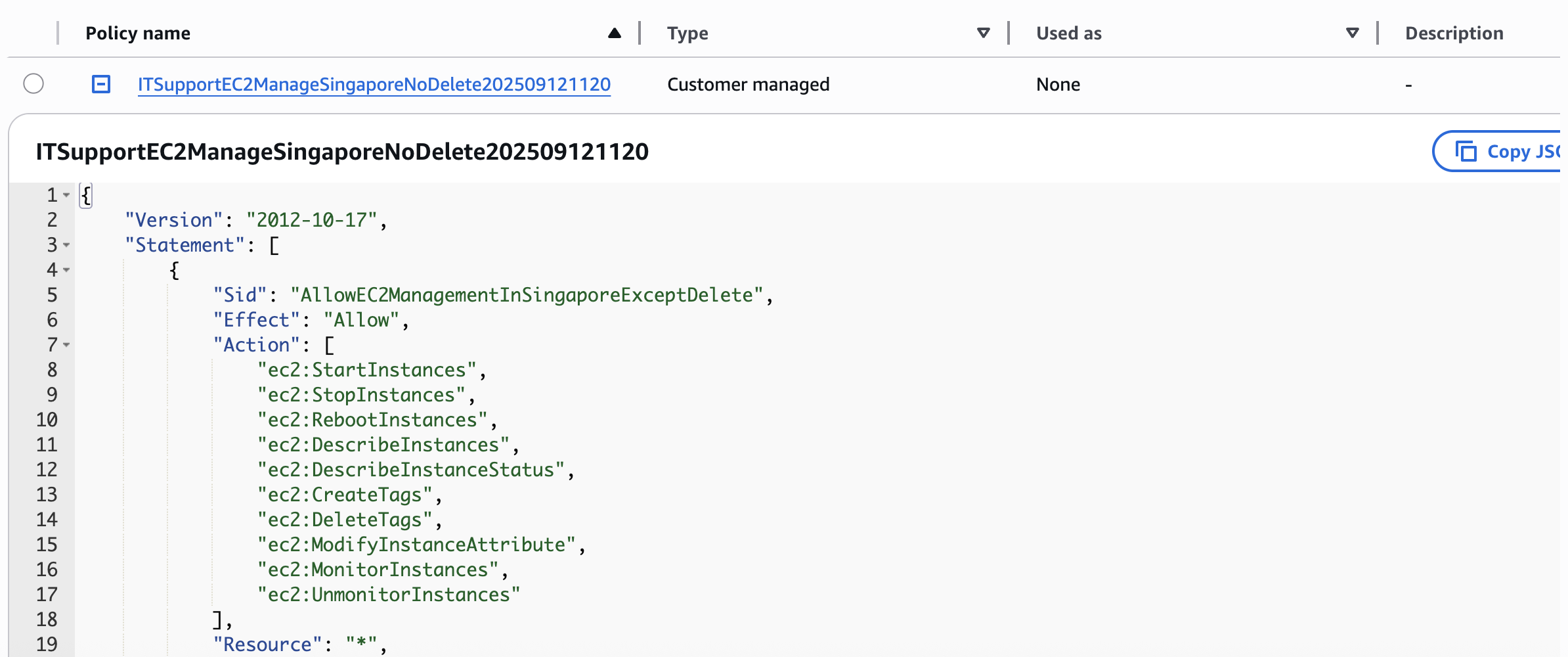"
},
"typeVersion": 1
},
{
"id": "102bcb25-235e-4fd5-9b10-fd8f848e83fe",
"name": "스티키 노트6",
"type": "n8n-nodes-base.stickyNote",
"position": [
-848,
-96
],
"parameters": {
"width": 416,
"height": 432,
"content": "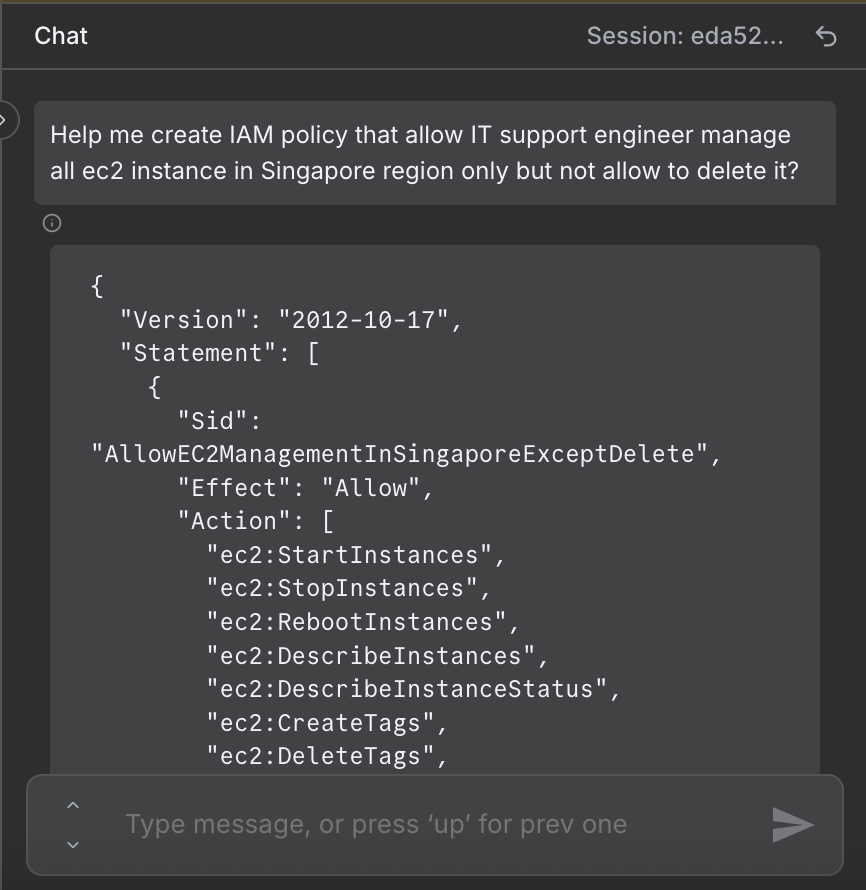"
},
"typeVersion": 1
}
],
"active": false,
"pinData": {},
"settings": {
"executionOrder": "v1"
},
"versionId": "50f49a1f-3095-452e-8614-049503f01030",
"connections": {
"a97ffd86-a54a-446f-989e-72b80715c627": {
"ai_memory": [
[
{
"node": "e8326ece-6413-4736-b3b2-db78d3e51ccc",
"type": "ai_memory",
"index": 0
}
]
]
},
"6b765ceb-ca6c-4637-84ff-56d3b3691e7d": {
"ai_languageModel": [
[
{
"node": "e8326ece-6413-4736-b3b2-db78d3e51ccc",
"type": "ai_languageModel",
"index": 0
}
]
]
},
"d69deec6-ee04-4863-b43a-22eeb04d0506": {
"main": [
[
{
"node": "4c786713-626f-4fea-9942-5ac125c6b988",
"type": "main",
"index": 0
}
]
]
},
"e8326ece-6413-4736-b3b2-db78d3e51ccc": {
"main": [
[
{
"node": "d69deec6-ee04-4863-b43a-22eeb04d0506",
"type": "main",
"index": 0
}
]
]
},
"5327e0ae-52d3-4801-857f-d8fe28bc61ab": {
"ai_outputParser": [
[
{
"node": "e8326ece-6413-4736-b3b2-db78d3e51ccc",
"type": "ai_outputParser",
"index": 0
}
]
]
},
"8e54adb3-9243-4aed-878f-19608fb72668": {
"main": [
[
{
"node": "e8326ece-6413-4736-b3b2-db78d3e51ccc",
"type": "main",
"index": 0
}
]
]
}
}
}자주 묻는 질문
이 워크플로우를 어떻게 사용하나요?
위의 JSON 구성 코드를 복사하여 n8n 인스턴스에서 새 워크플로우를 생성하고 "JSON에서 가져오기"를 선택한 후, 구성을 붙여넣고 필요에 따라 인증 설정을 수정하세요.
이 워크플로우는 어떤 시나리오에 적합한가요?
중급 - 데브옵스, AI 챗봇
유료인가요?
이 워크플로우는 완전히 무료이며 직접 가져와 사용할 수 있습니다. 다만, 워크플로우에서 사용하는 타사 서비스(예: OpenAI API)는 사용자 직접 비용을 지불해야 할 수 있습니다.
관련 워크플로우 추천
EC2 라이프사이클 관리자 및 AI 챗 어시스턴트(설명, 시작, 정지, 재시작, 종료)
含AI채팅에이전트의AWS EC2生命周期관리器(描述、启动、停止、重启)
Agent
Http Request Tool
Chat Trigger
+
Agent
Http Request Tool
Chat Trigger
16 노드Trung Tran
데브옵스
챗 기반 AWS Lambda 관리자 및 자동화된 감사 로깅(GPT-4.1 mini + Google 스프레드시트)
통해채팅사용GPT-4.1및Google表格审计日志记录의AWS Lambda관리器
Aws Lambda Tool
Agent
Http Request Tool
+
Aws Lambda Tool
Agent
Http Request Tool
15 노드Trung Tran
데브옵스
n8n에서审计 로그를 포함한 AI 드라이버 AWS S3 관리자(Slack/ChatOps 워크플로우)
Slack을 통해 GPT-4 대리기와 Google 스프레드시트를 사용하여 AWS S3审计 로그 관리
Aws S3 Tool
Agent
Google Sheets Tool
+
Aws S3 Tool
Agent
Google Sheets Tool
16 노드Trung Tran
데브옵스
Slack 후보자 평가를 위한 AI 기반 챗봇 구축
AI 이력서 분석 및 후보자 평가: Slack과 Google 스프레드시트 통합
If
Code
Slack
+
If
Code
Slack
29 노드Trung Tran
AI 챗봇
VDS 워크플로우 공개판
사용AI、GitHub및Vercel에서文本提示构建및部署MVP
If
Code
Wait
+
If
Code
Wait
54 노드Varritech
데브옵스
AI Tool Node와 GPT-4, DALL-E의 다중 지능체 책 작성 워크플로우 생성
GPT-4.1-mini, DALL-E, Google Drive, AWS S3로 AI 생성 도서 생성
Set
Aws S3
Markdown
+
Set
Aws S3
Markdown
25 노드Trung Tran
콘텐츠 제작
워크플로우 정보
난이도
중급
노드 수14
카테고리2
노드 유형8
저자

Trung Tran
@trungtranEmpowering small and medium businesses with smart automation and practical AI, no big tech team required. Youtube channel: youtube.com/@theStackExplorer
외부 링크
n8n.io에서 보기 →
이 워크플로우 공유