EC2 라이프사이클 관리자 및 AI 챗 어시스턴트(설명, 시작, 정지, 재시작, 종료)
고급
이것은DevOps, AI Chatbot분야의자동화 워크플로우로, 16개의 노드를 포함합니다.주로 Agent, HttpRequestTool, ChatTrigger, LmChatOpenAi, MemoryBufferWindow 등의 노드를 사용하며. 含AI채팅에이전트의AWS EC2生命周期관리器(描述、启动、停止、重启)
사전 요구사항
- •대상 API의 인증 정보가 필요할 수 있음
- •OpenAI API Key
워크플로우 미리보기
노드 연결 관계를 시각적으로 표시하며, 확대/축소 및 이동을 지원합니다
워크플로우 내보내기
다음 JSON 구성을 복사하여 n8n에 가져오면 이 워크플로우를 사용할 수 있습니다
{
"id": "ikTVURA2ASogFn99",
"meta": {
"instanceId": "e145bfb15cacc90e0d1ae6ee743e6744f8fc7108de50458700cb2ae620dc5ca5",
"templateCredsSetupCompleted": true
},
"name": "EC2 Lifecycle Manager with AI Chat Agent (Describe, Start, Stop, Reboot, Terminate)",
"tags": [
{
"id": "zVkByIt5M465W2a8",
"name": "aws",
"createdAt": "2025-09-12T06:14:33.823Z",
"updatedAt": "2025-09-12T06:14:33.823Z"
},
{
"id": "yWCPKVRlpoRhCpMO",
"name": "Chatbot",
"createdAt": "2025-09-07T13:41:21.818Z",
"updatedAt": "2025-09-07T13:41:21.818Z"
}
],
"nodes": [
{
"id": "961b680a-008c-43ae-8396-154cbee1c2e2",
"name": "OpenAI 채팅 모델",
"type": "@n8n/n8n-nodes-langchain.lmChatOpenAi",
"position": [
-128,
160
],
"parameters": {
"model": {
"__rl": true,
"mode": "list",
"value": "gpt-4.1-mini"
},
"options": {}
},
"credentials": {
"openAiApi": {
"id": "tnXtbK3d66hDjxXa",
"name": "OpenAi account"
}
},
"typeVersion": 1.2
},
{
"id": "a1bc7d6e-c5d0-4a50-b211-7302725a0601",
"name": "Describe Instance",
"type": "n8n-nodes-base.httpRequestTool",
"position": [
128,
160
],
"parameters": {
"url": "https://ec2.us-east-1.amazonaws.com",
"method": "POST",
"options": {},
"sendBody": true,
"contentType": "form-urlencoded",
"sendHeaders": true,
"authentication": "predefinedCredentialType",
"bodyParameters": {
"parameters": [
{
"name": "Action",
"value": "DescribeInstances"
},
{
"name": "Version",
"value": "2016-11-15"
}
]
},
"toolDescription": "🔍 Lists EC2 instances in your account/region, including IDs, tags, state (running, stopped, etc.).\n👉 Useful for checking status before taking actions.",
"nodeCredentialType": "aws"
},
"credentials": {
"aws": {
"id": "4CZd3hXptJlZimiB",
"name": "AWS account"
}
},
"typeVersion": 4.2
},
{
"id": "a25f84ba-5059-4021-9b7a-c36b61f13032",
"name": "시작 Instance",
"type": "n8n-nodes-base.httpRequestTool",
"position": [
256,
160
],
"parameters": {
"url": "https://ec2.us-east-1.amazonaws.com",
"method": "POST",
"options": {},
"sendBody": true,
"contentType": "form-urlencoded",
"sendHeaders": true,
"authentication": "predefinedCredentialType",
"bodyParameters": {
"parameters": [
{
"name": "Action",
"value": "StartInstances"
},
{
"name": "InstanceId.1",
"value": "={{ /*n8n-auto-generated-fromAI-override*/ $fromAI('parameters1_Value', ``, 'string') }}"
},
{
"name": "Version",
"value": "2016-11-15"
}
]
},
"toolDescription": "▶️ Boots up a stopped EC2 instance.\n👉 Use when you need to bring a development, test, or production server online.",
"headerParameters": {
"parameters": [
{}
]
},
"nodeCredentialType": "aws"
},
"credentials": {
"aws": {
"id": "4CZd3hXptJlZimiB",
"name": "AWS account"
}
},
"typeVersion": 4.2
},
{
"id": "2ffcc823-3818-4d2b-b690-b208848e5026",
"name": "Stop Instance",
"type": "n8n-nodes-base.httpRequestTool",
"position": [
384,
160
],
"parameters": {
"url": "https://ec2.us-east-1.amazonaws.com",
"method": "POST",
"options": {},
"sendBody": true,
"contentType": "form-urlencoded",
"sendHeaders": true,
"authentication": "predefinedCredentialType",
"bodyParameters": {
"parameters": [
{
"name": "Action",
"value": "StopInstances"
},
{
"name": "InstanceId.1",
"value": "={{ /*n8n-auto-generated-fromAI-override*/ $fromAI('parameters1_Value', ``, 'string') }}"
},
{
"name": "Version",
"value": "2016-11-15"
}
]
},
"toolDescription": "⏹ Gracefully shuts down a running EC2 instance (data on EBS volumes is preserved).\n👉 Good for saving costs when servers are not needed.",
"headerParameters": {
"parameters": [
{}
]
},
"nodeCredentialType": "aws"
},
"credentials": {
"aws": {
"id": "4CZd3hXptJlZimiB",
"name": "AWS account"
}
},
"typeVersion": 4.2
},
{
"id": "73d01f7e-9ac0-47c2-9e90-09b20d609adc",
"name": "Reboot Instance",
"type": "n8n-nodes-base.httpRequestTool",
"position": [
512,
160
],
"parameters": {
"url": "https://ec2.us-east-1.amazonaws.com",
"method": "POST",
"options": {},
"sendBody": true,
"contentType": "form-urlencoded",
"sendHeaders": true,
"authentication": "predefinedCredentialType",
"bodyParameters": {
"parameters": [
{
"name": "Action",
"value": "RebootInstances"
},
{
"name": "InstanceId.1",
"value": "={{ /*n8n-auto-generated-fromAI-override*/ $fromAI('parameters1_Value', ``, 'string') }}"
},
{
"name": "Version",
"value": "2016-11-15"
}
]
},
"toolDescription": "🔄 Restarts a running EC2 instance (like pressing reset on a machine).\n👉 Useful for applying patches or fixing temporary issues without stopping/starting.",
"headerParameters": {
"parameters": [
{}
]
},
"nodeCredentialType": "aws"
},
"credentials": {
"aws": {
"id": "4CZd3hXptJlZimiB",
"name": "AWS account"
}
},
"typeVersion": 4.2
},
{
"id": "6540a32d-59ee-4280-98de-1a0cd08df7b4",
"name": "Terminate Instance",
"type": "n8n-nodes-base.httpRequestTool",
"position": [
640,
160
],
"parameters": {
"url": "https://ec2.us-east-1.amazonaws.com",
"method": "POST",
"options": {},
"sendBody": true,
"contentType": "form-urlencoded",
"sendHeaders": true,
"authentication": "predefinedCredentialType",
"bodyParameters": {
"parameters": [
{
"name": "Action",
"value": "TerminateInstances"
},
{
"name": "InstanceId.1",
"value": "={{ /*n8n-auto-generated-fromAI-override*/ $fromAI('parameters1_Value', ``, 'string') }}"
},
{
"name": "Version",
"value": "2016-11-15"
}
]
},
"toolDescription": "💀 Permanently shuts down and deletes an EC2 instance (EBS root volume may also be deleted if configured).\n👉 Use with caution — this cannot be undone.",
"headerParameters": {
"parameters": [
{}
]
},
"nodeCredentialType": "aws"
},
"credentials": {
"aws": {
"id": "4CZd3hXptJlZimiB",
"name": "AWS account"
}
},
"typeVersion": 4.2
},
{
"id": "2df9a6bc-2826-4df6-8b5e-e08395a67c1d",
"name": "채팅 메시지 수신 시",
"type": "@n8n/n8n-nodes-langchain.chatTrigger",
"position": [
-352,
-64
],
"webhookId": "32788287-2cdd-49cf-b554-2aceb2e2c52d",
"parameters": {
"options": {}
},
"typeVersion": 1.3
},
{
"id": "d3125105-b7ae-4eed-b7bc-14ee92e49786",
"name": "심플 메모리",
"type": "@n8n/n8n-nodes-langchain.memoryBufferWindow",
"position": [
0,
160
],
"parameters": {
"contextWindowLength": 10
},
"typeVersion": 1.3
},
{
"id": "47627ae7-9533-400b-85a3-550fab6f49fb",
"name": "EC2 Manager AI 에이전트",
"type": "@n8n/n8n-nodes-langchain.agent",
"position": [
184,
-64
],
"parameters": {
"text": "={{ $json.chatInput }}",
"options": {
"systemMessage": "You are an AI DevOps Assistant specialized in managing AWS EC2 instances.\nYour role is to help engineers interact with EC2 in natural language by:\n1. Understanding their intent (describe, start, stop, reboot, terminate).\n2. Asking clarifying questions if information is missing (e.g., instance ID, environment, region).\n3. Mapping the request to the correct EC2 API tool.\n4. Calling the appropriate tool with precise parameters.\n5. Summarizing results in a clear, concise way for the user.\n\nRules:\n- Never assume instance ID, region, or environment without confirming with the user.\n- Always explain the action before execution, unless the user explicitly says \"do it now\".\n- If multiple instances are affected, confirm scope before calling the tool.\n- Use simple, DevOps-friendly responses (short, technical, direct).\n- After each action, provide feedback like: \"✅ Instance i-123456 stopped successfully\".\n- Always maintain safety: highlight that *terminate* is irreversible before execution.\n\nAvailable Tools:\n1. DescribeInstances – Get status and details of instances.\n2. StartInstances – Start stopped instance(s).\n3. StopInstances – Stop running instance(s).\n4. RebootInstances – Restart instance(s).\n5. TerminateInstances – Permanently delete instance(s)."
},
"promptType": "define"
},
"typeVersion": 2.2
},
{
"id": "121e09b5-033d-4433-b3c5-e56099b495d0",
"name": "메모",
"type": "n8n-nodes-base.stickyNote",
"position": [
-2240,
-672
],
"parameters": {
"color": 5,
"width": 1088,
"height": 1824,
"content": "# EC2 Lifecycle Manager with AI Chat Agent (Describe, Start, Stop, Reboot, Terminate)\n## Who’s it for\nThis workflow is designed for **DevOps engineers** and **cloud administrators** who want to manage AWS EC2 instances directly from chat platforms (Slack, Teams, Telegram, etc.) using natural language. \nIt helps engineers quickly check EC2 instance status, start/stop servers, reboot instances, or terminate unused machines — without logging into the AWS console.\n\n---\n\n## How it works / What it does\n1. A chat message (command) from the engineer triggers the workflow.\n2. The **EC2 Manager AI Agent** interprets the request using the AI chat model and memory.\n3. The agent decides which AWS EC2 action to perform:\n - `DescribeInstances` → List or check status of EC2 instances.\n - `StartInstances` → Boot up stopped instances.\n - `StopInstances` → Gracefully shut down running instances.\n - `RebootInstances` → Restart instances without stopping them.\n - `TerminateInstances` → Permanently delete instances.\n4. The selected tool (API call) is executed via an HTTP Request to the AWS EC2 endpoint.\n5. The agent replies back in chat with the result (confirmation, instance status, errors, etc.).\n\n---\n\n## How to set up\n1. **Add Chat Trigger** \n - Connect your chatbot platform (Slack/Telegram/Teams) to n8n. \n - Configure the “When chat message received” node.\n\n2. **Configure OpenAI Chat Model** \n - Select a supported LLM (GPT-4, GPT-4.1, GPT-5, etc.). \n - Add system and user prompts to define behavior (EC2 assistant role).\n\n3. **Add Memory** \n - Use `Simple Memory` to keep track of context (e.g., instance IDs, region, last action).\n\n4. **Connect EC2 API Tools** \n - Create HTTP Request nodes for:\n - Describe Instances \n - Start Instance \n - Stop Instance \n - Reboot Instance \n - Terminate Instance \n - Use AWS credentials with Signature V4 authentication. \n - API endpoint: `https://ec2.{region}.amazonaws.com/` \n\n5. **Link Tools to Agent** \n - Attach all EC2 tools to the EC2 Manager AI Agent node. \n - Ensure the agent can choose which tool to call based on user input.\n\n---\n\n## Requirements\n- **n8n instance** (self-hosted or cloud). \n- **Chat platform integration** (Slack, Teams, or Telegram). \n- **OpenAI (or other LLM) credentials**. \n- **AWS IAM user with EC2 permissions**: \n - `ec2:DescribeInstances` \n - `ec2:StartInstances` \n - `ec2:StopInstances` \n - `ec2:RebootInstances` \n - `ec2:TerminateInstances` \n- **AWS region configured** for API calls. \n\n---\n\n## How to customize the workflow\n- **Add safety checks**: Require explicit confirmation before running `Stop` or `Terminate`. \n- **Region flexibility**: Add support for multi-region management by letting the user specify the region in chat. \n- **Tag-based filters**: Extend `DescribeInstances` to return only instances matching specific tags (e.g., `env=dev`). \n- **Cost-saving automation**: Add scheduled rules to automatically stop instances outside working hours. \n- **Enhanced chatbot UX**: Format responses into tables or rich messages in Slack/Teams. \n- **Audit logging**: Store each action (who/what/when) into a database or Google Sheets for compliance. \n\n---"
},
"typeVersion": 1
},
{
"id": "17a9a095-0056-413c-8d41-4e27986f592d",
"name": "메모1",
"type": "n8n-nodes-base.stickyNote",
"position": [
-1088,
-576
],
"parameters": {
"width": 672,
"height": 928,
"content": "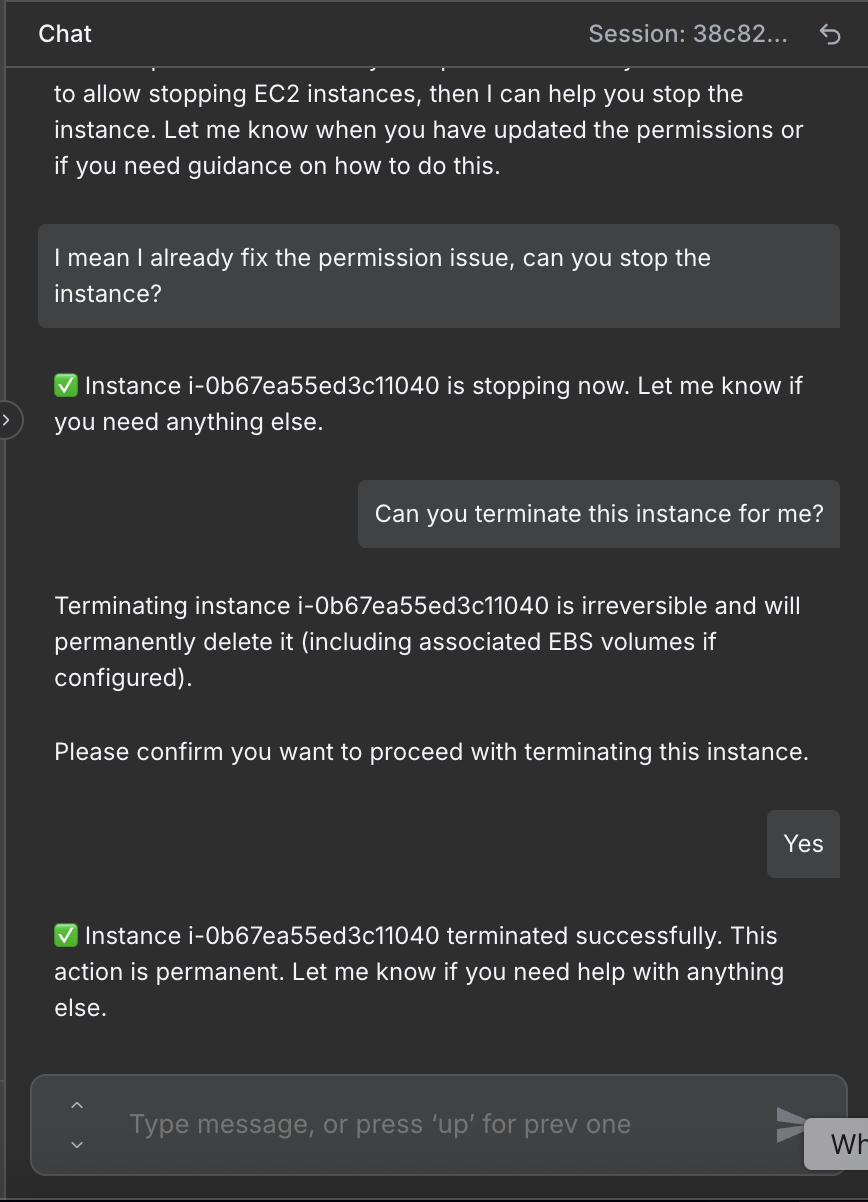"
},
"typeVersion": 1
},
{
"id": "2c91d833-b465-4f76-ba7b-1b52cc99a7ac",
"name": "메모2",
"type": "n8n-nodes-base.stickyNote",
"position": [
848,
-400
],
"parameters": {
"width": 1232,
"height": 400,
"content": "# Instance terminated by AI agent\n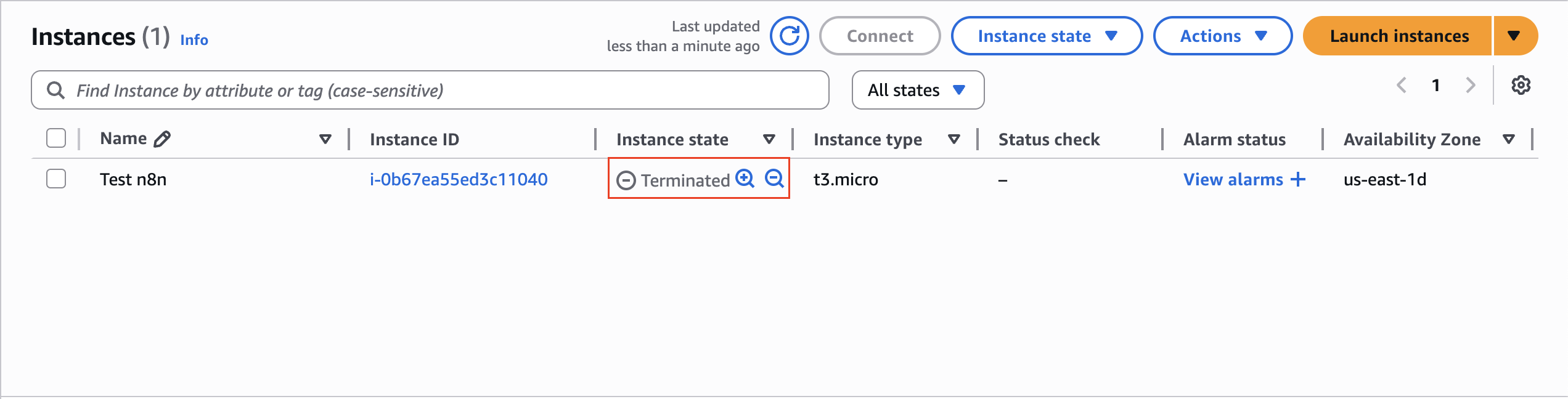"
},
"typeVersion": 1
},
{
"id": "2bbbd4fe-99ec-4f68-95d4-99afce09b20b",
"name": "메모3",
"type": "n8n-nodes-base.stickyNote",
"position": [
848,
16
],
"parameters": {
"width": 1232,
"height": 416,
"content": "# Instance stopped by AI agent\n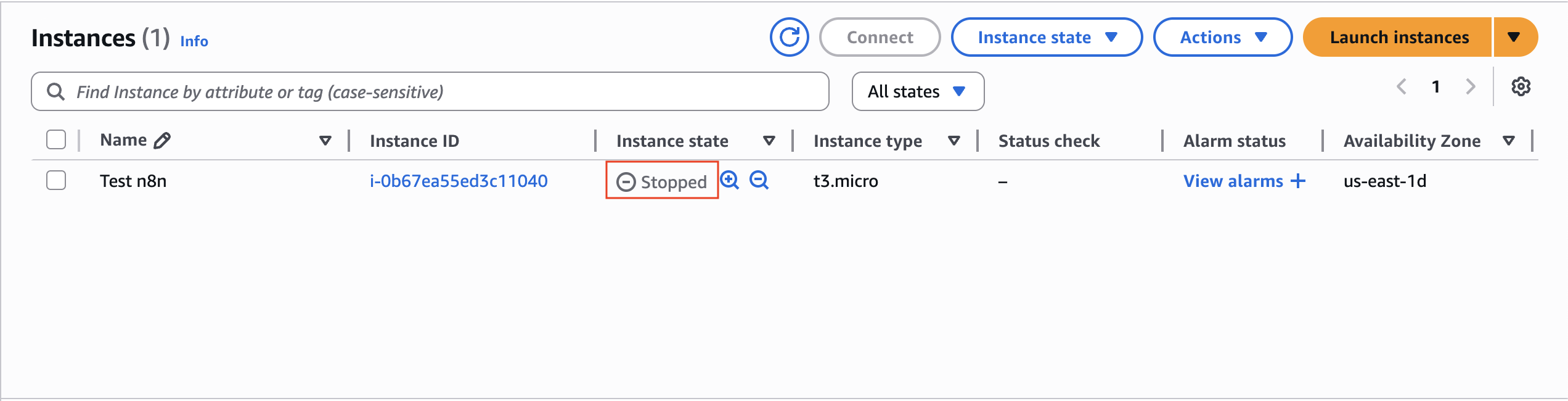"
},
"typeVersion": 1
},
{
"id": "b7a1dd2f-f489-44ec-a743-bc86ebcebfea",
"name": "메모4",
"type": "n8n-nodes-base.stickyNote",
"position": [
-1088,
384
],
"parameters": {
"width": 672,
"height": 640,
"content": "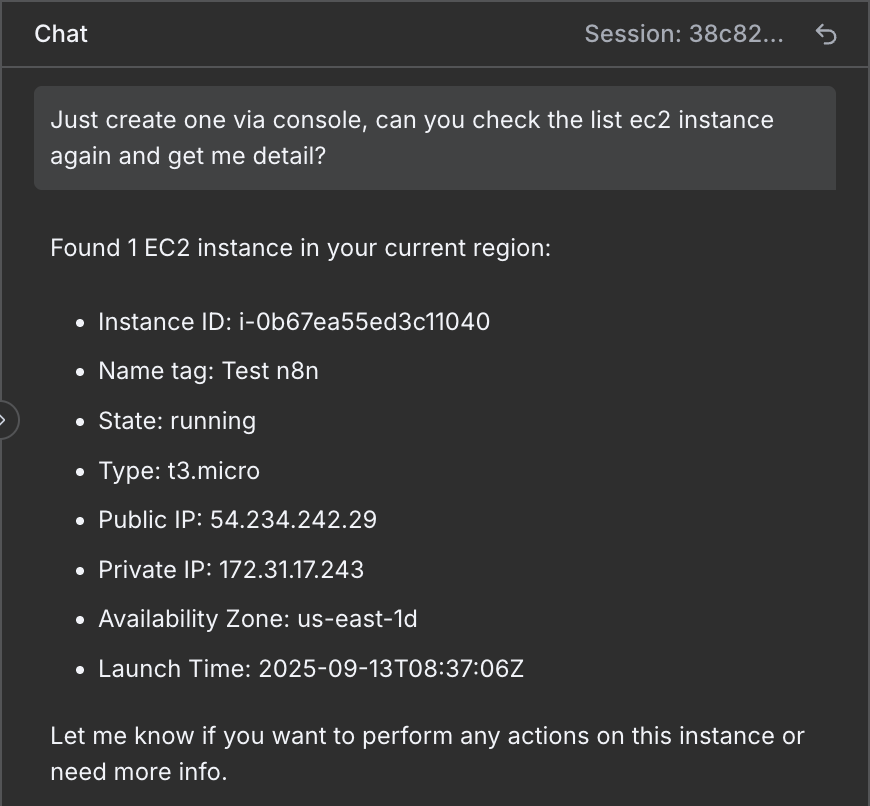"
},
"typeVersion": 1
},
{
"id": "868fb44f-162d-4f5b-9b00-b4f2615ea5c0",
"name": "메모5",
"type": "n8n-nodes-base.stickyNote",
"position": [
-368,
-400
],
"parameters": {
"color": 5,
"width": 544,
"height": 224,
"content": "### 1. Chat Step — \"When chat message received\"\n- **Purpose**: This is the **entry point** of the workflow. It listens for incoming chat messages from your connected platform (Slack, Telegram, or Teams). \n- **What it does**: \n - Captures the message content (e.g., \"start instance i-123456\"). \n - Passes it forward to the EC2 Manager AI Agent for interpretation. \n- **Why it's important**: It transforms normal chat input into a trigger for the automation. "
},
"typeVersion": 1
},
{
"id": "6705e1b5-d00b-4bbe-8267-86e3ff5aa2e3",
"name": "메모6",
"type": "n8n-nodes-base.stickyNote",
"position": [
224,
-464
],
"parameters": {
"color": 5,
"width": 544,
"height": 320,
"content": "### 2. Agent Step — \"EC2 Manager AI Agent\"\n- **Purpose**: This is the **brain of the workflow**. It acts as an AI-powered DevOps assistant that understands user intent and decides which EC2 action to perform. \n- **What it does**: \n 1. **Parses chat request** using the connected LLM (OpenAI Chat Model). \n 2. **Keeps context** (via Memory) so the agent remembers recent instance IDs, regions, or user confirmations. \n 3. **Decides tool to call** based on intent:\n - `DescribeInstances` → Get info about instances. \n - `StartInstances` → Power on EC2 servers. \n - `StopInstances` → Shut down running EC2s. \n - `RebootInstances` → Restart servers. \n - `TerminateInstances` → Delete EC2 instances permanently. \n 4. **Executes tool call** via the linked HTTP Request node. \n 5. **Returns response** in a concise chat-friendly format (status message, instance details, success/failure). \n- **Why it's important**: It abstracts AWS complexity and gives engineers a natural language interface for EC2 management. "
},
"typeVersion": 1
}
],
"active": false,
"pinData": {},
"settings": {
"executionOrder": "v1"
},
"versionId": "6392a799-1c97-4968-ab80-37ad1d676a01",
"connections": {
"Simple Memory": {
"ai_memory": [
[
{
"node": "EC2 Manager AI Agent",
"type": "ai_memory",
"index": 0
}
]
]
},
"2ffcc823-3818-4d2b-b690-b208848e5026": {
"ai_tool": [
[
{
"node": "EC2 Manager AI Agent",
"type": "ai_tool",
"index": 0
}
]
]
},
"Start Instance": {
"ai_tool": [
[
{
"node": "EC2 Manager AI Agent",
"type": "ai_tool",
"index": 0
}
]
]
},
"73d01f7e-9ac0-47c2-9e90-09b20d609adc": {
"ai_tool": [
[
{
"node": "EC2 Manager AI Agent",
"type": "ai_tool",
"index": 0
}
]
]
},
"a1bc7d6e-c5d0-4a50-b211-7302725a0601": {
"ai_tool": [
[
{
"node": "EC2 Manager AI Agent",
"type": "ai_tool",
"index": 0
}
]
]
},
"OpenAI Chat Model": {
"ai_languageModel": [
[
{
"node": "EC2 Manager AI Agent",
"type": "ai_languageModel",
"index": 0
}
]
]
},
"6540a32d-59ee-4280-98de-1a0cd08df7b4": {
"ai_tool": [
[
{
"node": "EC2 Manager AI Agent",
"type": "ai_tool",
"index": 0
}
]
]
},
"EC2 Manager AI Agent": {
"main": [
[]
]
},
"When chat message received": {
"main": [
[
{
"node": "EC2 Manager AI Agent",
"type": "main",
"index": 0
}
]
]
}
}
}자주 묻는 질문
이 워크플로우를 어떻게 사용하나요?
위의 JSON 구성 코드를 복사하여 n8n 인스턴스에서 새 워크플로우를 생성하고 "JSON에서 가져오기"를 선택한 후, 구성을 붙여넣고 필요에 따라 인증 설정을 수정하세요.
이 워크플로우는 어떤 시나리오에 적합한가요?
고급 - 데브옵스, AI 챗봇
유료인가요?
이 워크플로우는 완전히 무료이며 직접 가져와 사용할 수 있습니다. 다만, 워크플로우에서 사용하는 타사 서비스(예: OpenAI API)는 사용자 직접 비용을 지불해야 할 수 있습니다.
관련 워크플로우 추천
챗 기반 AWS Lambda 관리자 및 자동화된 감사 로깅(GPT-4.1 mini + Google 스프레드시트)
통해채팅사용GPT-4.1및Google表格审计日志记录의AWS Lambda관리器
Aws Lambda Tool
Agent
Http Request Tool
+
Aws Lambda Tool
Agent
Http Request Tool
15 노드Trung Tran
데브옵스
대화 기반 AWS IAM 전략 생성기와 AI 어시스턴트(OpenAI)
대화 인터페이스를 통해 GPT-4 어시스턴트를 사용하여 AWS IAM 정책 생성
Email Send
Http Request
Agent
+
Email Send
Http Request
Agent
14 노드Trung Tran
데브옵스
n8n에서审计 로그를 포함한 AI 드라이버 AWS S3 관리자(Slack/ChatOps 워크플로우)
Slack을 통해 GPT-4 대리기와 Google 스프레드시트를 사용하여 AWS S3审计 로그 관리
Aws S3 Tool
Agent
Google Sheets Tool
+
Aws S3 Tool
Agent
Google Sheets Tool
16 노드Trung Tran
데브옵스
지능형 챗봇
GPT-5-nano, 네트워크 검색, 대화 기억을 사용하여 지능형 챗봇을 구축합니다.
Chat
Agent
Http Request Tool
+
Chat
Agent
Http Request Tool
13 노드Oriol Seguí
기타
대화 인터페이스와 다양한 도구를 갖춘 상호작용형 AI 어시스턴트 구축
채팅 인터페이스와 다양한 도구를 포함한 상호작용형 AI 어시스턴트 구축
Crypto Tool
Date Time Tool
Agent
+
Crypto Tool
Date Time Tool
Agent
17 노드Lucas Peyrin
개인 생산성
LeadBot 자율 주행 — Salesforce 채팅을 기회로 전환
Salesforce와 GPT를 기반으로 한 대화식 유입捕获 및 일정 계획
Slack Tool
Email Send Tool
Salesforce Tool
+
Slack Tool
Email Send Tool
Salesforce Tool
25 노드Le Nguyen
AI 챗봇
워크플로우 정보
난이도
고급
노드 수16
카테고리2
노드 유형6
저자

Trung Tran
@trungtranEmpowering small and medium businesses with smart automation and practical AI, no big tech team required. Youtube channel: youtube.com/@theStackExplorer
외부 링크
n8n.io에서 보기 →
이 워크플로우 공유