Serveur MCP Pipedream
Ceci est unSupport Chatbot, AI Chatbotworkflow d'automatisation du domainecontenant 8 nœuds.Utilise principalement des nœuds comme Agent, ChatTrigger, LmChatOpenAi, McpClientTool, MemoryBufferWindow. Construire un chatbot IA évolutif avec GPT-4 et Pipedream : intégration Calendly et Gmail
- •Clé API OpenAI
Nœuds utilisés (8)
Catégorie
{
"id": "muEszdmquRYSUdM9",
"meta": {
"instanceId": "a4bfc93e975ca233ac45ed7c9227d84cf5a2329310525917adaf3312e10d5462",
"templateCredsSetupCompleted": true
},
"name": "Pipedream's MCP server",
"tags": [],
"nodes": [
{
"id": "d498ed94-65f4-4560-a186-ba324506f73f",
"name": "À la réception d'un message de chat",
"type": "@n8n/n8n-nodes-langchain.chatTrigger",
"position": [
16,
-64
],
"webhookId": "79dae454-ccf5-4129-8197-f79bf5add978",
"parameters": {
"options": {}
},
"typeVersion": 1.1
},
{
"id": "866a327c-22a2-4a3a-8993-75ae9e836c71",
"name": "Agent IA",
"type": "@n8n/n8n-nodes-langchain.agent",
"position": [
240,
-64
],
"parameters": {
"options": {
"systemMessage": "You are a helpful assistant"
}
},
"typeVersion": 2.1
},
{
"id": "457b6172-4519-4bf9-aa84-44dbf14befb6",
"name": "OpenAI Modèle de Chat",
"type": "@n8n/n8n-nodes-langchain.lmChatOpenAi",
"position": [
112,
144
],
"parameters": {
"model": {
"__rl": true,
"mode": "list",
"value": "gpt-4.1-mini"
},
"options": {}
},
"credentials": {
"openAiApi": {
"id": "TefveNaDaMERl1hY",
"name": "OpenAi account (Eure)"
}
},
"typeVersion": 1.2
},
{
"id": "cd652804-a75c-4efd-b197-92810f94bb5f",
"name": "Calendly",
"type": "@n8n/n8n-nodes-langchain.mcpClientTool",
"position": [
400,
144
],
"parameters": {
"sseEndpoint": "https://mcp.pipedream.net/xxx/calendly_v2"
},
"typeVersion": 1
},
{
"id": "ae996f82-1e34-486a-af82-2fdcfe32c3d9",
"name": "Mémoire Simple",
"type": "@n8n/n8n-nodes-langchain.memoryBufferWindow",
"position": [
256,
144
],
"parameters": {},
"typeVersion": 1.3
},
{
"id": "4465fc4e-68b0-456d-828a-bff296038a34",
"name": "Gmail",
"type": "@n8n/n8n-nodes-langchain.mcpClientTool",
"position": [
512,
144
],
"parameters": {
"sseEndpoint": "https://mcp.pipedream.net/xxx/gmail"
},
"typeVersion": 1
},
{
"id": "32e919f8-6e73-4aa3-9148-93f920930f3b",
"name": "Note adhésive",
"type": "n8n-nodes-base.stickyNote",
"position": [
-352,
-768
],
"parameters": {
"width": 624,
"height": 656,
"content": "## Pipedream's MCP server\n\nAdd 2,700+ APIs and 10,000+ tools to your AI assistant for free. Connect your accounts securely and revoke access at any time.\n\n\n"
},
"typeVersion": 1
},
{
"id": "79a54171-4f68-418c-8ad2-b30e2ed23fe5",
"name": "Note adhésive1",
"type": "n8n-nodes-base.stickyNote",
"position": [
288,
-768
],
"parameters": {
"width": 624,
"height": 656,
"content": "### How to work\n\n- Sign up on [Pipedream](https://mcp.pipedream.com/)\n- Manage your MCP server and connected accounts\n- Copy and paste your MCP Server URL https://mcp.pipedream.net/xxx/{app_slug} into the MCP SSE Endpoint node in n8n.\n\nExample:\n- https://mcp.pipedream.net/xxx/calendly_v2 for Calendly\n- https://mcp.pipedream.net/xxx/calendly_v2 for Gmail\n\n\n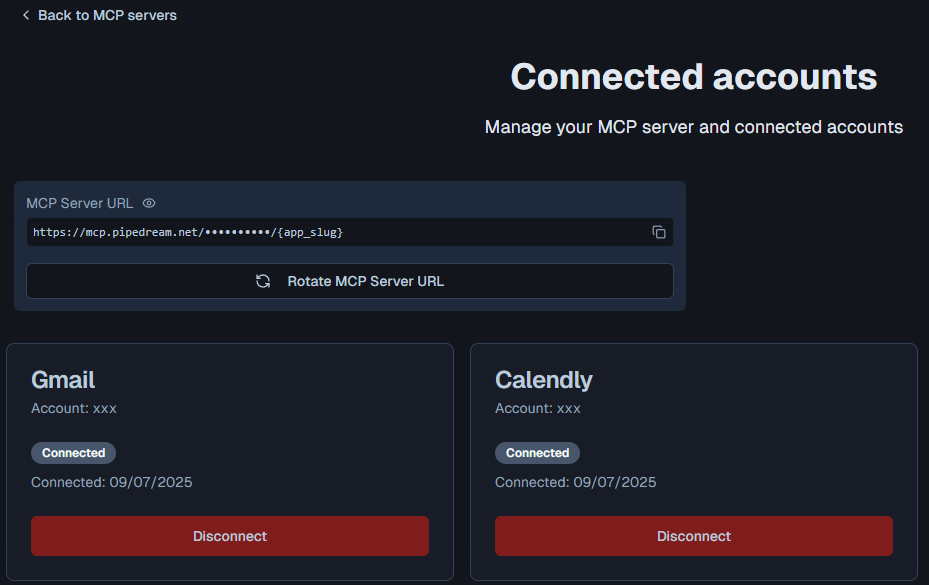"
},
"typeVersion": 1
}
],
"active": false,
"pinData": {},
"settings": {
"executionOrder": "v1"
},
"versionId": "d75b30d2-ecdf-4ac7-8d4b-72c5961c7a7c",
"connections": {
"4465fc4e-68b0-456d-828a-bff296038a34": {
"ai_tool": [
[
{
"node": "866a327c-22a2-4a3a-8993-75ae9e836c71",
"type": "ai_tool",
"index": 0
}
]
]
},
"cd652804-a75c-4efd-b197-92810f94bb5f": {
"ai_tool": [
[
{
"node": "866a327c-22a2-4a3a-8993-75ae9e836c71",
"type": "ai_tool",
"index": 0
}
]
]
},
"ae996f82-1e34-486a-af82-2fdcfe32c3d9": {
"ai_memory": [
[
{
"node": "866a327c-22a2-4a3a-8993-75ae9e836c71",
"type": "ai_memory",
"index": 0
}
]
]
},
"457b6172-4519-4bf9-aa84-44dbf14befb6": {
"ai_languageModel": [
[
{
"node": "866a327c-22a2-4a3a-8993-75ae9e836c71",
"type": "ai_languageModel",
"index": 0
}
]
]
},
"d498ed94-65f4-4560-a186-ba324506f73f": {
"main": [
[
{
"node": "866a327c-22a2-4a3a-8993-75ae9e836c71",
"type": "main",
"index": 0
}
]
]
}
}
}Comment utiliser ce workflow ?
Copiez le code de configuration JSON ci-dessus, créez un nouveau workflow dans votre instance n8n et sélectionnez "Importer depuis le JSON", collez la configuration et modifiez les paramètres d'authentification selon vos besoins.
Dans quelles scénarios ce workflow est-il adapté ?
Intermédiaire - Chatbot de support, Chatbot IA
Est-ce payant ?
Ce workflow est entièrement gratuit et peut être utilisé directement. Veuillez noter que les services tiers utilisés dans le workflow (comme l'API OpenAI) peuvent nécessiter un paiement de votre part.
Workflows recommandés

Davide
@n3witaliaFull-stack Web Developer based in Italy specialising in Marketing & AI-powered automations. For business enquiries, send me an email at info@n3w.it or add me on Linkedin.com/in/davideboizza
Partager ce workflow