Workflow automatisé de modération des canaux Slack avec chatbot et GPT-4.1
Ceci est unAI Summarization, Multimodal AIworkflow d'automatisation du domainecontenant 16 nœuds.Utilise principalement des nœuds comme Code, Slack, Filter, ScheduleTrigger. automatisationSlack频道闲置审核与rapportgénération,用于工作区清理
- •Token Bot Slack ou URL Webhook
Nœuds utilisés (16)
Catégorie
{
"id": "IrGwRuTSulKQNDCO",
"meta": {
"instanceId": "4a2e6764ba7a6bc9890d9225f4b21d570ce88fc9bd57549c89057fcee58fed0f",
"templateCredsSetupCompleted": true
},
"name": "Automated Slack Channel Audit Workflow with Chatbot and GPT-4.1",
"tags": [],
"nodes": [
{
"id": "58a17978-d554-4042-ae0e-262a1cd5a285",
"name": "Obtenir de nombreux canaux",
"type": "n8n-nodes-base.slack",
"position": [
-224,
32
],
"webhookId": "eaeb65ef-583f-41ad-ba11-ffe56bfe87e0",
"parameters": {
"filters": {
"types": [
"public_channel",
"private_channel"
]
},
"resource": "channel",
"operation": "getAll",
"authentication": "oAuth2"
},
"credentials": {
"slackOAuth2Api": {
"id": "4JSKt9sIRV1KGswQ",
"name": "Slack account"
}
},
"typeVersion": 2.3
},
{
"id": "12bde87c-f8a8-4eb3-bf81-8e94916f1db6",
"name": "Obtenir l'historique d'un canal",
"type": "n8n-nodes-base.slack",
"position": [
0,
32
],
"webhookId": "301affce-942f-465e-8c4b-75e7fafc382a",
"parameters": {
"limit": 1,
"filters": {},
"resource": "channel",
"channelId": {
"__rl": true,
"mode": "id",
"value": "={{ $json.id }}"
},
"operation": "history",
"authentication": "oAuth2"
},
"credentials": {
"slackOAuth2Api": {
"id": "4JSKt9sIRV1KGswQ",
"name": "Slack account"
}
},
"typeVersion": 2.3
},
{
"id": "7043ccc2-4d82-49a5-ba8c-299e9842e92d",
"name": "Filtrer les canaux sans discussion depuis 30 jours",
"type": "n8n-nodes-base.filter",
"position": [
224,
32
],
"parameters": {
"options": {},
"conditions": {
"options": {
"version": 2,
"leftValue": "",
"caseSensitive": true,
"typeValidation": "strict"
},
"combinator": "and",
"conditions": [
{
"id": "1d9de0c9-232d-455b-a625-563dc785f484",
"operator": {
"type": "dateTime",
"operation": "before"
},
"leftValue": "={{ $json.ts.toDateTime('s') }}",
"rightValue": "={{ $today.minus(30,'days') }}"
}
]
}
},
"typeVersion": 2.2
},
{
"id": "b3c69271-5007-484d-89d6-48b1384fcf20",
"name": "Collecter les informations des canaux expirés",
"type": "n8n-nodes-base.code",
"position": [
448,
32
],
"parameters": {
"mode": "runOnceForEachItem",
"jsCode": "const channel = $('Get many channels').item.json;\n\nreturn {\n json: {\n ChannelID: channel.id,\n ChannelName: channel.name,\n CreatedDate: new Date(channel.created * 1000).toLocaleDateString('en-US'),\n TotalMember: $('Get many channels').item.json.num_members,\n Purpose: $('Get many channels').item.json.purpose.value || 'N/A'\n }\n};"
},
"typeVersion": 2
},
{
"id": "24fb2413-9c3c-4894-bfa3-f18f15011de9",
"name": "Consommer le rapport slack",
"type": "n8n-nodes-base.code",
"position": [
672,
32
],
"parameters": {
"jsCode": "const channels = $input.all().map(item => item.json);\n\nlet report = '*📊 Weekly Slack Channel Inactivity Report*\\n\\n';\nreport += 'The following channels have had *no discussion in the past 30 days*. Please review and take action if needed:\\n\\n';\nreport += '```';\nreport += 'Channel ID Name Members Created On Purpose\\n';\nreport += '------------- -------------------------- ------- ---------- ------------------------------\\n';\n\nfor (const c of channels) {\n report += `${c.ChannelID.padEnd(15)} ${('#' + c.ChannelName).padEnd(26)} ${String(c.TotalMember).padEnd(9)} ${c.CreatedDate.padEnd(12)} ${c.Purpose || 'N/A'}\\n`;\n}\n\nreport += '```\\n\\n';\n\nreport += '\\n⚠️ *Recommendation:*\\n';\nreport += '- Channels with *0 members* or *no defined purpose* should be reviewed for archiving.\\n';\nreport += '- Channels like `#aws-study-group` and `#team-coffee` may benefit from engagement prompts or repurposing.\\n\\n';\n\nreport += `📅 _Report generated on:_ ${new Date().toLocaleDateString('en-GB')}`;\n\n// Output for Slack\nreturn [\n {\n json: {\n text: report\n }\n }\n];"
},
"typeVersion": 2
},
{
"id": "92353f17-c390-4116-b66d-798605754f4f",
"name": "Envoyer le rapport d'inactivité des canaux",
"type": "n8n-nodes-base.slack",
"position": [
896,
32
],
"webhookId": "5f04cdae-bef0-4df2-85a8-05818fef2549",
"parameters": {
"text": "={{ $json.text }}",
"user": {
"__rl": true,
"mode": "username",
"value": "@trung.tran"
},
"select": "user",
"otherOptions": {
"mrkdwn": true
}
},
"credentials": {
"slackApi": {
"id": "3MfZsxrz9SluxmDt",
"name": "COC Bot"
}
},
"typeVersion": 2.3
},
{
"id": "88965563-dfeb-40e4-b0af-19b4d84a5188",
"name": "Déclencheur hebdomadaire programmé",
"type": "n8n-nodes-base.scheduleTrigger",
"position": [
-448,
32
],
"parameters": {
"rule": {
"interval": [
{
"field": "weeks",
"triggerAtDay": [
1
]
}
]
}
},
"typeVersion": 1.2
},
{
"id": "67dc318e-6c64-4f56-b225-0c061236b127",
"name": "Note adhésive",
"type": "n8n-nodes-base.stickyNote",
"position": [
1088,
-112
],
"parameters": {
"width": 960,
"height": 416,
"content": "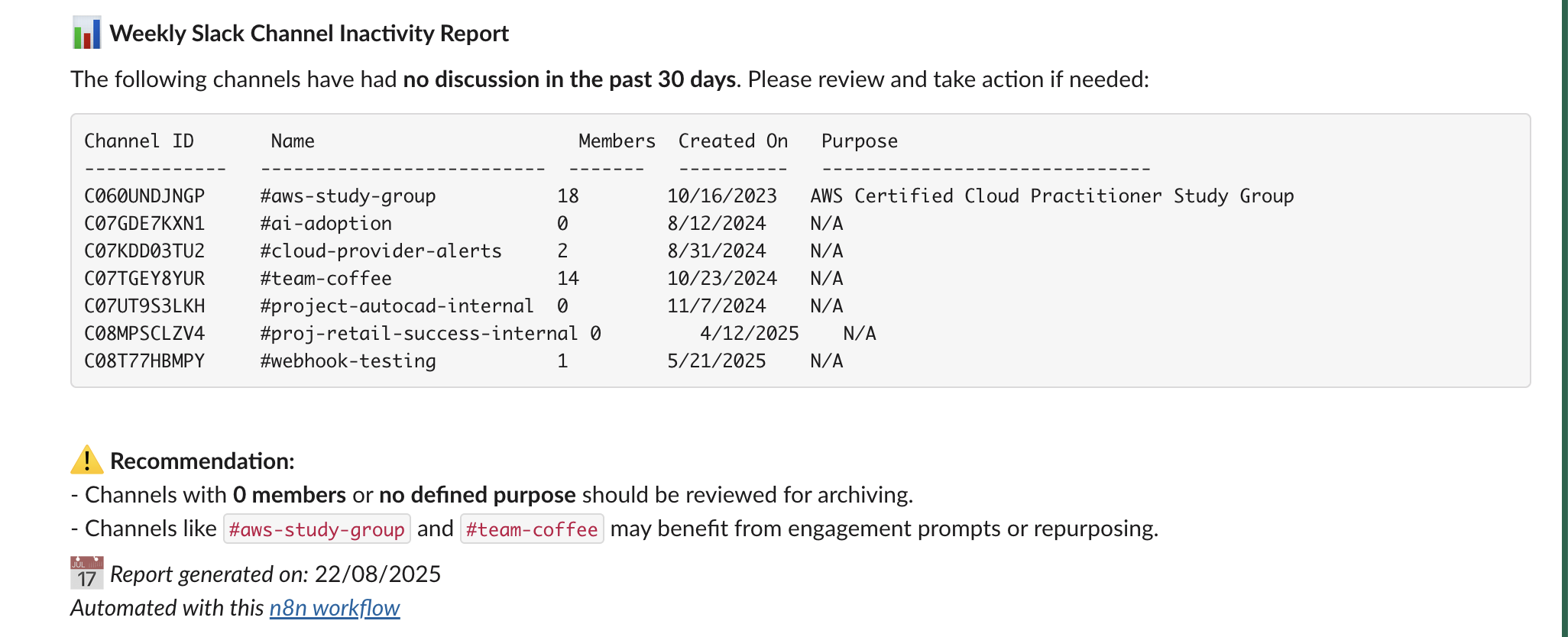"
},
"typeVersion": 1
},
{
"id": "0e5cb456-17a7-4a9e-be55-ffaa66d795fe",
"name": "Note adhésive 1",
"type": "n8n-nodes-base.stickyNote",
"position": [
-1600,
-768
],
"parameters": {
"width": 1040,
"height": 2224,
"content": "# Automated Slack Channel Audit Workflow with Chatbot and GPT-4.1\n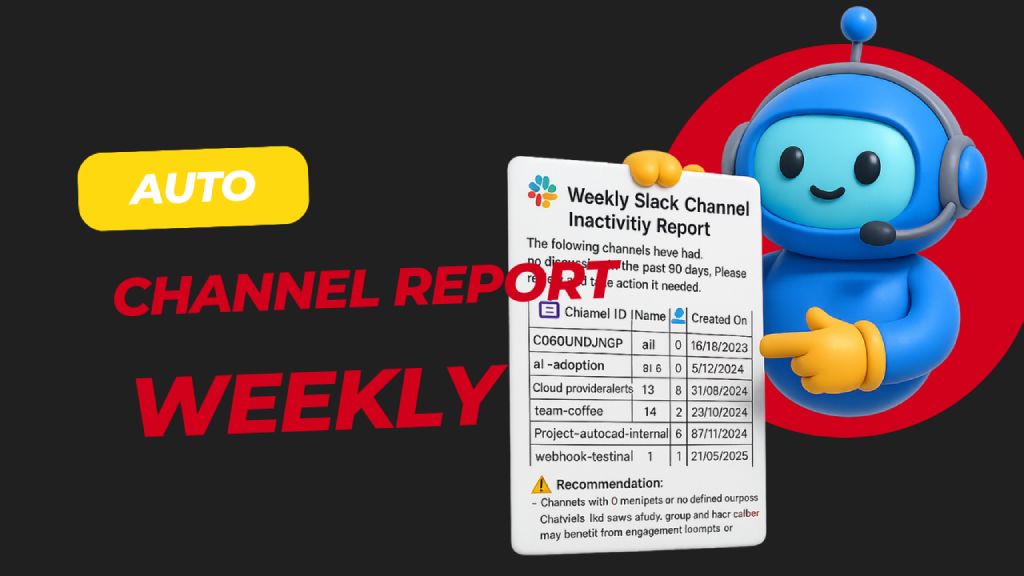\n> Automatically scans all public Slack channels weekly to detect those with no activity in the past 30 days, then generates and sends a detailed inactivity report to admins for review and action. Helps keep your Slack workspace clean, relevant, and clutter-free.\n\n## 🧑💼 Who’s it for\n\nThis workflow is built for:\n- **Slack Workspace Admins**\n- **IT or Ops Managers**\n- **HR/Compliance Teams**\n…who want to maintain a clean and active Slack workspace by regularly reviewing **inactive channels**.\n\n## ⚙️ How it works / What it does\n\nThis automated n8n workflow:\n1. **Runs weekly** via a scheduled trigger.\n2. **Fetches all public Slack channels** in the workspace.\n3. **Checks message history** of each channel for activity.\n4. **Filters channels** that have had **no discussion in the past 30 days**.\n5. **Generates a Slack-friendly report** with key metadata (name, member count, purpose, etc.).\n6. **Sends the report to a Slack channel** for admin review and possible action (e.g., archive, engage, repurpose).\n\n## 🛠️ How to set up\n\n1. **Configure your Slack App**\n - Go to https://api.slack.com/apps → Create App\n - Add the following **OAuth scopes** to your **Bot Token**:\n - `channels:read` → to get list of public channels\n - `channels:history` → to fetch message history\n - `users:read` → to personalize report (optional)\n - `chat:write` → to post the report to a Slack channel\n\n2. **Install the app in your workspace** \n - Copy the **Bot User OAuth Token** \n - Add it to your n8n Slack credentials under \"Slack API\"\n\n3. **Customize the schedule** in the \"Weekly Schedule Trigger\" node to control report frequency.\n\n4. **Connect your Slack workspace** to the workflow using your credentials.\n\n## ✅ Requirements\n\n- n8n (self-hosted or cloud)\n- Slack App with:\n - `channels:read`\n - `channels:history`\n - `chat:write`\n- Active channels and member data\n- A designated Slack channel to receive the report\n\n## 🔧 How to customize the workflow\n\n| Component | Customization Options |\n|----------|------------------------|\n| ⏱️ Schedule Trigger | Change to daily, monthly, etc. |\n| 📅 Inactivity Threshold | Modify `Filter channel with last discussion 30 days ago` to 60/90 days |\n| 📊 Report Formatting | Tweak the `Consume slack report` node to change formatting or summary |\n| 💬 Output Channel | Change target channel in `Send Channel Inactivity Report` |\n| 🚫 Auto-archiving | Add logic to archive channels with 0 members or activity (using Slack API) |\n\n## 📝 Slack Permissions Reference\n\n| Action | Slack Scope Required |\n|--------|-----------------------|\n| Get all public channels | `channels:read` |\n| Get message history of a channel | `channels:history` |\n| Post message to Slack | `chat:write` |\n| Get user info (optional) | `users:read` |"
},
"typeVersion": 1
},
{
"id": "f788c89e-9c9e-42a9-ab7d-5e9ddd24ea41",
"name": "Note adhésive 2",
"type": "n8n-nodes-base.stickyNote",
"position": [
-480,
224
],
"parameters": {
"width": 256,
"height": 144,
"content": "### 1. ⏰ Weekly Schedule Trigger\nStarts the workflow on a recurring schedule (e.g., every Monday at 9 AM) to automate the review process without manual intervention."
},
"typeVersion": 1
},
{
"id": "d71481ff-856e-493d-b3e4-fd9a44b515f7",
"name": "Note adhésive 3",
"type": "n8n-nodes-base.stickyNote",
"position": [
-224,
-128
],
"parameters": {
"height": 128,
"content": "### 2. 📡 Get Many Channels\nFetches a list of all public Slack channels in the workspace using Slack’s `channels:read` scope."
},
"typeVersion": 1
},
{
"id": "21906417-62bb-4364-8b2f-43e7561134cb",
"name": "Note adhésive 4",
"type": "n8n-nodes-base.stickyNote",
"position": [
-48,
224
],
"parameters": {
"width": 288,
"height": 144,
"content": "### 3. 🕓 Get the History of a Channel\nRetrieves recent message history from each channel using Slack’s `channels:history` scope. This helps determine when the last discussion occurred."
},
"typeVersion": 1
},
{
"id": "7e81e9d5-15c9-438c-8010-a8e4a7355958",
"name": "Note adhésive 5",
"type": "n8n-nodes-base.stickyNote",
"position": [
176,
-160
],
"parameters": {
"content": "### 4. 🚫 Filter Channels with No Activity in 30 Days\nFilters out channels that have had no messages or discussion in the last 30 days. These are considered \"expired\" or inactive."
},
"typeVersion": 1
},
{
"id": "f57c3472-2168-4dcf-98a1-ed60cc2f2f96",
"name": "Note adhésive 6",
"type": "n8n-nodes-base.stickyNote",
"position": [
368,
208
],
"parameters": {
"height": 272,
"content": "### 5. 📦 Collect Expired Channel Information\nExtracts relevant metadata for each inactive channel, including:\n- Channel ID and name\n- Member count\n- Created date\n- Purpose\n\nThis data is prepared for reporting."
},
"typeVersion": 1
},
{
"id": "089fb6fe-2711-4cfc-ae9a-34c51f8bf277",
"name": "Note adhésive 7",
"type": "n8n-nodes-base.stickyNote",
"position": [
560,
-160
],
"parameters": {
"height": 144,
"content": "### 6. 📝 Consume Slack Report\nGenerates a clean and Slack-friendly Markdown report (or code block format) listing all inactive channels with contextual recommendations."
},
"typeVersion": 1
},
{
"id": "f70b2bd0-6db2-423e-beff-9e8083f0db2b",
"name": "Note adhésive 8",
"type": "n8n-nodes-base.stickyNote",
"position": [
816,
208
],
"parameters": {
"content": "### 7. 📤 Send Channel Inactivity Report\nPosts the formatted report to a specified Slack channel using `chat:write`, notifying admins or moderators to take cleanup action."
},
"typeVersion": 1
}
],
"active": false,
"pinData": {},
"settings": {
"executionOrder": "v1"
},
"versionId": "89b4dd41-9469-44ca-9635-7e9670e3568f",
"connections": {
"58a17978-d554-4042-ae0e-262a1cd5a285": {
"main": [
[
{
"node": "12bde87c-f8a8-4eb3-bf81-8e94916f1db6",
"type": "main",
"index": 0
}
]
]
},
"24fb2413-9c3c-4894-bfa3-f18f15011de9": {
"main": [
[
{
"node": "92353f17-c390-4116-b66d-798605754f4f",
"type": "main",
"index": 0
}
]
]
},
"88965563-dfeb-40e4-b0af-19b4d84a5188": {
"main": [
[
{
"node": "58a17978-d554-4042-ae0e-262a1cd5a285",
"type": "main",
"index": 0
}
]
]
},
"12bde87c-f8a8-4eb3-bf81-8e94916f1db6": {
"main": [
[
{
"node": "7043ccc2-4d82-49a5-ba8c-299e9842e92d",
"type": "main",
"index": 0
}
]
]
},
"b3c69271-5007-484d-89d6-48b1384fcf20": {
"main": [
[
{
"node": "24fb2413-9c3c-4894-bfa3-f18f15011de9",
"type": "main",
"index": 0
}
]
]
},
"7043ccc2-4d82-49a5-ba8c-299e9842e92d": {
"main": [
[
{
"node": "b3c69271-5007-484d-89d6-48b1384fcf20",
"type": "main",
"index": 0
}
]
]
}
}
}Comment utiliser ce workflow ?
Copiez le code de configuration JSON ci-dessus, créez un nouveau workflow dans votre instance n8n et sélectionnez "Importer depuis le JSON", collez la configuration et modifiez les paramètres d'authentification selon vos besoins.
Dans quelles scénarios ce workflow est-il adapté ?
Avancé - Résumé IA, IA Multimodale
Est-ce payant ?
Ce workflow est entièrement gratuit et peut être utilisé directement. Veuillez noter que les services tiers utilisés dans le workflow (comme l'API OpenAI) peuvent nécessiter un paiement de votre part.
Workflows recommandés

Trung Tran
@trungtranEmpowering small and medium businesses with smart automation and practical AI, no big tech team required.
Partager ce workflow