Workflow de conformité AWS IAM automatisé pour l'application du MFA et la désactivation des clés d'accès
Ceci est unSecOps, Multimodal AIworkflow d'automatisation du domainecontenant 19 nœuds.Utilise principalement des nœuds comme Code, Slack, AwsIam, Filter, HttpRequest. Automatisation de la conformité AWS IAM : MFA obligatoire et nettoyage des clés d'accès
- •Token Bot Slack ou URL Webhook
- •Access Key et Secret AWS
- •Peut nécessiter les informations d'identification d'authentification de l'API cible
Nœuds utilisés (19)
Catégorie
{
"id": "Q0EjgXk8j2ygOvy5",
"meta": {
"instanceId": "4a2e6764ba7a6bc9890d9225f4b21d570ce88fc9bd57549c89057fcee58fed0f",
"templateCredsSetupCompleted": true
},
"name": "Automated AWS IAM Compliance Workflow for MFA Enforcement and Access Key Deactivation",
"tags": [
{
"id": "hvp6nueQ4hpIJWbY",
"name": "aws",
"createdAt": "2025-08-17T05:47:27.209Z",
"updatedAt": "2025-08-17T05:47:27.209Z"
}
],
"nodes": [
{
"id": "e0c92177-d85f-45c1-b0a6-bcb7e9b424e1",
"name": "Obtenir plusieurs utilisateurs",
"type": "n8n-nodes-base.awsIam",
"position": [
-224,
-48
],
"parameters": {
"returnAll": true,
"requestOptions": {},
"additionalFields": {}
},
"credentials": {
"aws": {
"id": "d62669OP9bvnmE4n",
"name": "us-east-1"
}
},
"typeVersion": 1
},
{
"id": "7b14679e-4c0d-42bc-904f-41c8f2e3d957",
"name": "Note adhésive",
"type": "n8n-nodes-base.stickyNote",
"position": [
-1536,
-592
],
"parameters": {
"width": 976,
"height": 1200,
"content": "# Automated AWS IAM Compliance Workflow for MFA Enforcement and Access Key Deactivation\n> This workflow leverages AWS IAM APIs and n8n automation to ensure strict security compliance by continuously monitoring IAM users for MFA (Multi-Factor Authentication) enforcement.\n\n[.jpg)](https://www.youtube.com/watch?v=ZggCRl8z_gQ)\n\n## **Who’s it for**\nThis workflow is designed for **DevOps, Security, or Cloud Engineers** responsible for maintaining IAM security compliance in AWS accounts. It's ideal for teams who want to **enforce MFA usage** and **automatically disable access** for non-compliant IAM users.\n\n## **How it works / What it does**\nThis automated workflow performs a **daily check** to detect IAM users without an MFA device and deactivate their access keys.\n\n### Step-by-step:\n1. **Daily scheduler**: Triggers the workflow once a day.\n2. **Get many users**: Retrieves a list of all IAM users in the account.\n3. **Get IAM User MFA Devices**: Calls AWS API to get MFA device info for each user.\n4. **Filter out IAM users with MFA**: Keeps only users **without any MFA device**.\n5. **Send warning message(s)**: Sends Slack alerts for users who do not have MFA enabled.\n6. **Get User Access Key(s)**: Fetches access keys for each non-MFA user.\n7. **Parse the list of user access key(s)**: Extracts and flattens key information like `AccessKeyId`, `Status`, and `UserName`.\n8. **Filter out inactive keys**: Keeps only **active** access keys for further action.\n9. **Deactivate Access Key(s)**: Calls AWS API to deactivate each active key for non-MFA users.\n\n## **How to set up**\n1. **Configure AWS credentials** in your environment (IAM role or AWS access key with required permissions).\n2. **Connect Slack** via the Slack node for alerting (set channel and credentials).\n3. Set the **scheduler** to your preferred frequency (e.g., daily at 9AM).\n4. Adjust any Slack message template or filtering conditions as needed.\n\n## **Requirements**\n- IAM user or role credentials with the following AWS IAM permissions:\n - `iam:ListUsers`\n - `iam:ListMFADevices`\n - `iam:ListAccessKeys`\n - `iam:UpdateAccessKey`\n- Slack credentials (Bot token with `chat:write` permission).\n- n8n environment with:\n - Slack integration\n - AWS credentials (set via environment or credentials manager)\n\n## **How to customize the workflow**\n- **Alert threshold**: Instead of immediate deactivation, you can delay action (e.g., alert first, wait 24h, then disable).\n- **Change notification channel**: Modify the Slack node to send alerts to a different channel or add email integration.\n- **Whitelist exceptions**: Add a Set or IF node to exclude specific usernames (e.g., service accounts).\n- **Add audit logging**: Use Google Sheets, Airtable, or a database to log which users were flagged or had access disabled.\n- **Extend access checks**: Include console password check (`GetLoginProfile`) if needed."
},
"typeVersion": 1
},
{
"id": "9234cd35-9728-47de-96c8-1eb5c4ffb354",
"name": "Note adhésive1",
"type": "n8n-nodes-base.stickyNote",
"position": [
-528,
-208
],
"parameters": {
"width": 256,
"height": 144,
"content": "### 1. Schedule Workflow\nTriggers the workflow automatically once per day to ensure continuous IAM compliance monitoring without manual intervention."
},
"typeVersion": 1
},
{
"id": "9d2fff11-c252-45f8-af8b-e18761fed2a6",
"name": "Note adhésive2",
"type": "n8n-nodes-base.stickyNote",
"position": [
-320,
128
],
"parameters": {
"width": 304,
"height": 128,
"content": "### 2. 👥 Get All IAM Users\nUses the `ListUsers` API to retrieve all active IAM users in the AWS account. These users will be evaluated for MFA compliance.\n"
},
"typeVersion": 1
},
{
"id": "e5535511-2750-45dd-bd7b-1daf18d41842",
"name": "Note adhésive3",
"type": "n8n-nodes-base.stickyNote",
"position": [
-96,
-240
],
"parameters": {
"width": 288,
"height": 144,
"content": "### 3. 🔐 Get IAM User MFA Devices\nCalls `ListMFADevices` for each user to check if they have at least one MFA device enabled. This is a critical step in identifying users who are not following best security practices."
},
"typeVersion": 1
},
{
"id": "9714750e-365f-40fb-a917-7dfbce8d1803",
"name": "Note adhésive4",
"type": "n8n-nodes-base.stickyNote",
"position": [
384,
224
],
"parameters": {
"width": 368,
"height": 128,
"content": "\n### 5. 🔎 Get User Access Key(s)\nFor each user without MFA, calls the `ListAccessKeys` API to retrieve all associated access keys that may allow programmatic access to AWS.\n"
},
"typeVersion": 1
},
{
"id": "bee26e8e-3f62-44e0-abf1-2a42b293ae75",
"name": "Note adhésive7",
"type": "n8n-nodes-base.stickyNote",
"position": [
1280,
-144
],
"parameters": {
"width": 608,
"content": "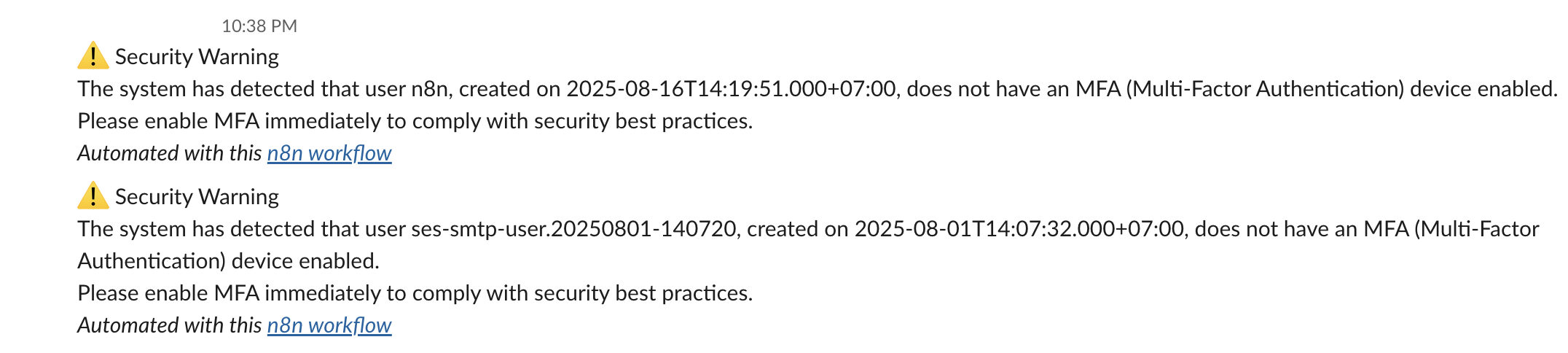"
},
"typeVersion": 1
},
{
"id": "f98f864f-2efa-4246-93ab-a45667751d7a",
"name": "Note adhésive5",
"type": "n8n-nodes-base.stickyNote",
"position": [
368,
-320
],
"parameters": {
"width": 272,
"content": "### 4. 💬 Send Warning Messages\nSends real-time Slack alerts for each non-compliant user, including their username and account creation date. This provides visibility and prompts action before access is revoked."
},
"typeVersion": 1
},
{
"id": "ccbe9813-0aa1-410c-b389-abe678fa1d25",
"name": "Obtenir les appareils MFA de l'utilisateur IAM",
"type": "n8n-nodes-base.httpRequest",
"position": [
0,
-48
],
"parameters": {
"url": "=https://iam.amazonaws.com/?Action=ListMFADevices&UserName={{ $json.UserName }}&Version=2010-05-08",
"options": {},
"authentication": "predefinedCredentialType",
"nodeCredentialType": "aws"
},
"credentials": {
"aws": {
"id": "d62669OP9bvnmE4n",
"name": "us-east-1"
}
},
"typeVersion": 4.2
},
{
"id": "60809479-ea5c-4446-aa70-5c6d841d09ea",
"name": "Filtrer les utilisateurs IAM sans appareil MFA",
"type": "n8n-nodes-base.filter",
"position": [
224,
-48
],
"parameters": {
"options": {},
"conditions": {
"options": {
"version": 2,
"leftValue": "",
"caseSensitive": true,
"typeValidation": "strict"
},
"combinator": "and",
"conditions": [
{
"id": "2853872a-825b-4f59-8b4b-358cac8b197b",
"operator": {
"type": "array",
"operation": "empty",
"singleValue": true
},
"leftValue": "={{ $json.ListMFADevicesResponse.ListMFADevicesResult.MFADevices }}",
"rightValue": "Active"
}
]
}
},
"typeVersion": 2.2
},
{
"id": "5a499cf2-b352-4e15-93ee-03ce2d0df32d",
"name": "Obtenir la/les clé(s) d'accès utilisateur",
"type": "n8n-nodes-base.httpRequest",
"position": [
448,
48
],
"parameters": {
"url": "=https://iam.amazonaws.com/?Action=ListAccessKeys&UserName={{ $('Get many users').item.json.UserName }}&Version=2010-05-08",
"options": {},
"authentication": "predefinedCredentialType",
"nodeCredentialType": "aws"
},
"credentials": {
"aws": {
"id": "d62669OP9bvnmE4n",
"name": "us-east-1"
}
},
"typeVersion": 4.2
},
{
"id": "77d5914f-44dd-4267-be75-f960f477702d",
"name": "Planificateur quotidien",
"type": "n8n-nodes-base.scheduleTrigger",
"position": [
-448,
-48
],
"parameters": {
"rule": {
"interval": [
{}
]
}
},
"typeVersion": 1.2
},
{
"id": "f0b5101b-e521-45d9-9d93-9bcffa3a1702",
"name": "Envoyer le(s) message(s) d'avertissement",
"type": "n8n-nodes-base.slack",
"position": [
448,
-144
],
"webhookId": "7c4ae1f3-4589-484f-b55e-0e74b920044a",
"parameters": {
"text": "=⚠️ Security Warning\nThe system has detected that user {{ $('Get many users').item.json.UserName }}, created on {{ $('Get many users').item.json.CreateDate.toDateTime('s') }}, does not have an MFA (Multi-Factor Authentication) device enabled.\nPlease enable MFA immediately to comply with security best practices.",
"select": "channel",
"channelId": {
"__rl": true,
"mode": "list",
"value": "C097VAKKPUP",
"cachedResultName": "it-support"
},
"otherOptions": {},
"authentication": "oAuth2"
},
"credentials": {
"slackOAuth2Api": {
"id": "4JSKt9sIRV1KGswQ",
"name": "Slack account"
}
},
"typeVersion": 2.3
},
{
"id": "33fec879-44f5-4b87-aa36-976f440a8cd4",
"name": "Désactiver la/les clé(s) d'accès",
"type": "n8n-nodes-base.httpRequest",
"position": [
1328,
48
],
"parameters": {
"url": "=https://iam.amazonaws.com/?Action=UpdateAccessKey&UserName={{ $json.UserName }}&AccessKeyId={{ $json.AccessKeyId }}&Status=Inactive&Version=2010-05-08",
"options": {},
"authentication": "predefinedCredentialType",
"nodeCredentialType": "aws"
},
"credentials": {
"aws": {
"id": "d62669OP9bvnmE4n",
"name": "us-east-1"
}
},
"typeVersion": 4.2
},
{
"id": "5d112ea5-aff9-4a4e-aa4b-835847a70fb3",
"name": "Filtrer les clés inactives",
"type": "n8n-nodes-base.filter",
"position": [
896,
48
],
"parameters": {
"options": {},
"conditions": {
"options": {
"version": 2,
"leftValue": "",
"caseSensitive": true,
"typeValidation": "strict"
},
"combinator": "and",
"conditions": [
{
"id": "2853872a-825b-4f59-8b4b-358cac8b197b",
"operator": {
"type": "string",
"operation": "equals"
},
"leftValue": "={{ $json.Status }}",
"rightValue": "Active"
}
]
}
},
"typeVersion": 2.2
},
{
"id": "96034aab-7108-4dc8-a525-074ea63b5f3a",
"name": "Analyser la liste des clés d'accès utilisateur",
"type": "n8n-nodes-base.code",
"position": [
672,
48
],
"parameters": {
"jsCode": "const items = await $input.all();\nconst results = [];\n\nfor (const item of items) {\n const accessKeys = item.json?.ListAccessKeysResponse?.ListAccessKeysResult?.AccessKeyMetadata || [];\n\n for (const key of accessKeys) {\n results.push({\n json: {\n UserName: key.UserName,\n AccessKeyId: key.AccessKeyId,\n Status: key.Status,\n CreateDate: new Date(key.CreateDate * 1000).toISOString(),\n }\n });\n }\n}\n\nreturn results.length > 0\n ? results\n : [{ json: { warning: 'No access keys found in input data' } }];"
},
"typeVersion": 2
},
{
"id": "f62c4dac-f501-49ca-962a-20dad60cca72",
"name": "Note adhésive6",
"type": "n8n-nodes-base.stickyNote",
"position": [
1520,
48
],
"parameters": {
"width": 400,
"height": 128,
"content": "### 6. 🔒 Deactivate Access Key(s)\nUses the `UpdateAccessKey` API to set the status of each active access key to `Inactive`. This immediately blocks unauthorized programmatic access for non-MFA users."
},
"typeVersion": 1
},
{
"id": "e96b7315-a7c9-4fdf-b2cd-dd7ceebd6cd4",
"name": "Envoyer un message et attendre la réponse",
"type": "n8n-nodes-base.slack",
"position": [
1136,
48
],
"webhookId": "2c7c3227-a44d-4fa2-a390-00c30b11e800",
"parameters": {
"user": {
"__rl": true,
"mode": "list",
"value": "U054RMBTVBM",
"cachedResultName": "trung.tran"
},
"message": "=⚠️ *Access Key Deactivation Request*\nUser *`{{ $json.UserName }}`* does not have MFA enabled.\nThey have active access key(s) that may pose a security risk.\nDo you approve disabling the access key *`{{ $json.AccessKeyId }}`*?",
"options": {
"limitWaitTime": {
"values": {
"resumeUnit": "minutes",
"resumeAmount": 60
}
}
},
"operation": "sendAndWait",
"authentication": "oAuth2",
"approvalOptions": {
"values": {
"approvalType": "double"
}
}
},
"credentials": {
"slackOAuth2Api": {
"id": "4JSKt9sIRV1KGswQ",
"name": "Slack account"
}
},
"typeVersion": 2.3
},
{
"id": "807d2857-7a94-4a93-8943-5987497daf13",
"name": "Note adhésive8",
"type": "n8n-nodes-base.stickyNote",
"position": [
928,
224
],
"parameters": {
"width": 464,
"height": 176,
"content": "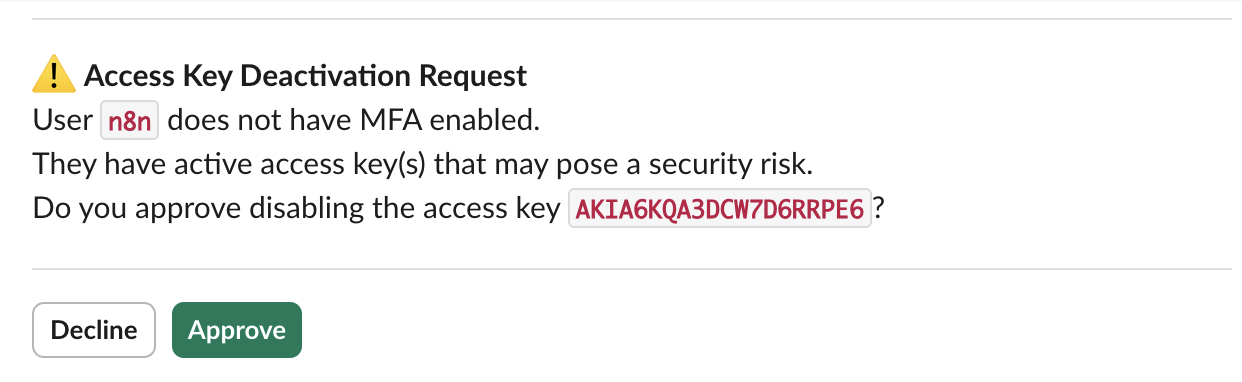"
},
"typeVersion": 1
}
],
"active": false,
"pinData": {},
"settings": {
"executionOrder": "v1"
},
"versionId": "16313843-f027-42f1-a3dd-e8e0be8ad28a",
"connections": {
"e0c92177-d85f-45c1-b0a6-bcb7e9b424e1": {
"main": [
[
{
"node": "ccbe9813-0aa1-410c-b389-abe678fa1d25",
"type": "main",
"index": 0
}
]
]
},
"77d5914f-44dd-4267-be75-f960f477702d": {
"main": [
[
{
"node": "e0c92177-d85f-45c1-b0a6-bcb7e9b424e1",
"type": "main",
"index": 0
}
]
]
},
"5a499cf2-b352-4e15-93ee-03ce2d0df32d": {
"main": [
[
{
"node": "96034aab-7108-4dc8-a525-074ea63b5f3a",
"type": "main",
"index": 0
}
]
]
},
"33fec879-44f5-4b87-aa36-976f440a8cd4": {
"main": [
[]
]
},
"5d112ea5-aff9-4a4e-aa4b-835847a70fb3": {
"main": [
[
{
"node": "e96b7315-a7c9-4fdf-b2cd-dd7ceebd6cd4",
"type": "main",
"index": 0
}
]
]
},
"ccbe9813-0aa1-410c-b389-abe678fa1d25": {
"main": [
[
{
"node": "60809479-ea5c-4446-aa70-5c6d841d09ea",
"type": "main",
"index": 0
}
]
]
},
"e96b7315-a7c9-4fdf-b2cd-dd7ceebd6cd4": {
"main": [
[
{
"node": "33fec879-44f5-4b87-aa36-976f440a8cd4",
"type": "main",
"index": 0
}
]
]
},
"60809479-ea5c-4446-aa70-5c6d841d09ea": {
"main": [
[
{
"node": "f0b5101b-e521-45d9-9d93-9bcffa3a1702",
"type": "main",
"index": 0
},
{
"node": "5a499cf2-b352-4e15-93ee-03ce2d0df32d",
"type": "main",
"index": 0
}
]
]
},
"96034aab-7108-4dc8-a525-074ea63b5f3a": {
"main": [
[
{
"node": "5d112ea5-aff9-4a4e-aa4b-835847a70fb3",
"type": "main",
"index": 0
}
]
]
}
}
}Comment utiliser ce workflow ?
Copiez le code de configuration JSON ci-dessus, créez un nouveau workflow dans votre instance n8n et sélectionnez "Importer depuis le JSON", collez la configuration et modifiez les paramètres d'authentification selon vos besoins.
Dans quelles scénarios ce workflow est-il adapté ?
Avancé - Opérations de sécurité, IA Multimodale
Est-ce payant ?
Ce workflow est entièrement gratuit et peut être utilisé directement. Veuillez noter que les services tiers utilisés dans le workflow (comme l'API OpenAI) peuvent nécessiter un paiement de votre part.
Workflows recommandés

Trung Tran
@trungtranEmpowering small and medium businesses with smart automation and practical AI, no big tech team required.
Partager ce workflow