Nettoyer les certificats ACM AWS expirés et demander une approbation Slack
Ceci est unDevOps, Multimodal AIworkflow d'automatisation du domainecontenant 14 nœuds.Utilise principalement des nœuds comme Slack, Filter, ScheduleTrigger, AwsCertificateManager. Approuver la suppression des certificats AWS ACM expirés via Slack
- •Token Bot Slack ou URL Webhook
- •Access Key et Secret AWS
Nœuds utilisés (14)
Catégorie
{
"id": "ISewUDgaQCM3Lw59",
"meta": {
"instanceId": "4a2e6764ba7a6bc9890d9225f4b21d570ce88fc9bd57549c89057fcee58fed0f",
"templateCredsSetupCompleted": true
},
"name": "Clean Expired AWS ACM Certs with Slack Approval",
"tags": [
{
"id": "ZWDTpzMgM2j0ZGMO",
"name": "acm",
"createdAt": "2025-08-20T04:24:13.252Z",
"updatedAt": "2025-08-20T04:24:13.252Z"
},
{
"id": "hvp6nueQ4hpIJWbY",
"name": "aws",
"createdAt": "2025-08-17T05:47:27.209Z",
"updatedAt": "2025-08-17T05:47:27.209Z"
}
],
"nodes": [
{
"id": "0fa56096-8872-400b-afa1-5c52090bd33c",
"name": "Obtenir plusieurs certificats",
"type": "n8n-nodes-base.awsCertificateManager",
"position": [
224,
0
],
"parameters": {
"options": {},
"operation": "getMany"
},
"credentials": {
"aws": {
"id": "IZYsJuHhfVJ3PIrC",
"name": "ap-southeast-1"
}
},
"typeVersion": 1
},
{
"id": "849ac135-f381-4a26-a9c5-79e62d20f74d",
"name": "Envoyer un message et attendre la réponse",
"type": "n8n-nodes-base.slack",
"disabled": true,
"position": [
720,
0
],
"webhookId": "a2040fd8-4de2-4eb9-ad51-fa9a5b974afc",
"parameters": {
"user": {
"__rl": true,
"mode": "list",
"value": "U054RMBTVBM",
"cachedResultName": "trung.tran"
},
"message": "=:warning: *Expired SSL Certificate Detected*\nAn SSL certificate in AWS ACM has expired. Please review the details below and approve deletion to keep the environment clean.\n*📄 Certificate Summary:*\n• *Domain Name:* `{{ $json.DomainName }}`\n• *Certificate ARN:* `{{ $json.CertificateArn }}`\n• *Issueed Date:* `{{ $json.IssuedAt.toDateTime('s').toString() }}`\n• *Expiration Date:* `{{ $json.NotAfter.toDateTime('s').toString() }}`\n\n👉 *Next Step:* \nReact to this message with:\n:white_check_mark: to approve deletion \n:x: to keep the certificate\n\n_(This message will be auto-checked in 1 hour for reactions.)_",
"options": {
"limitWaitTime": {
"values": {
"resumeUnit": "minutes",
"resumeAmount": 60
}
}
},
"operation": "sendAndWait",
"authentication": "oAuth2",
"approvalOptions": {
"values": {
"approvalType": "double"
}
}
},
"credentials": {
"slackOAuth2Api": {
"id": "4JSKt9sIRV1KGswQ",
"name": "Slack account"
}
},
"typeVersion": 2.3
},
{
"id": "203fe369-3299-46e3-a076-99d0b8dd1c00",
"name": "Note adhésive",
"type": "n8n-nodes-base.stickyNote",
"position": [
-1264,
-672
],
"parameters": {
"width": 1056,
"height": 1744,
"content": "# Clean Up Expired AWS ACM Certificates with Human Approval\n> Automate the cleanup of expired AWS ACM certificates with Slack-based approval. This workflow helps maintain a secure and tidy AWS environment by detecting expired SSL certs, sending detailed Slack notifications to admins, and deleting them upon approval, ensuring full visibility and control over certificate lifecycle management.\n## 🧑💼 Who’s it for\n\nThis workflow is designed for:\n- **AWS administrators** who want to keep their environment clean and secure \n- **DevOps teams** managing SSL lifecycle in AWS ACM \n- **IT Admins** needing visibility and control over expired cert removal \n- Teams that use **Slack for collaboration and approvals**\n\n## ⚙️ How it works / What it does\n\nThis automated workflow performs the following tasks on a **daily schedule**:\n1. **Fetch all ACM certificates** in your AWS account.\n2. **Filter out the expired ones** by comparing expiration date and status.\n3. **Send a Slack approval message** with certificate details to the admin team.\n4. **Wait for approval response** directly in Slack (`✅` to approve deletion).\n5. If approved, it **deletes the expired certificate** using AWS ACM.\n6. Finally, it **notifies the IT admin** about the action taken.\n\n## 🔧 How to set up\n\n1. **Create the Workflow**\n - Add the nodes as shown:\n - `Schedule Trigger`\n - `AWS - ACM: listCertificates`\n - `AWS - ACM: describeCertificate` (loop per cert)\n - `IF Node` to filter expired certs\n - `Slack - Send & Wait for Reaction`\n - `AWS - ACM: deleteCertificate`\n - `Slack - Post Message` to notify\n\n2. **Configure Slack**\n - Create a **Slack Bot Token** with:\n - `chat:write`\n - `reactions:read`\n - `channels:read`\n - Connect it in your Slack nodes.\n\n3. **Configure AWS Credentials**\n - Use IAM User or Role with:\n - `acm:ListCertificates`\n - `acm:DescribeCertificate`\n - `acm:DeleteCertificate`\n\n4. **Set schedule**\n - Daily, Weekly, or custom cron expression.\n\n## 📋 Requirements\n\n| Component | Description |\n|------------------|--------------------------------------|\n| AWS ACM Access | IAM permissions for ACM actions |\n| Slack Bot Token | With `chat:write` & `reactions:read` |\n| n8n Environment | Self-hosted or n8n Cloud |\n| Slack Channel | Where approval messages will be sent |\n\n## 🛠️ How to customize the workflow\n\n### 🕒 Change waiting time\nAdjust the wait time before checking Slack reactions in the `sendAndWait` node (default 1 hour).\n\n### 👥 Change Slack target\nChange the Slack channel or tag specific people (`<@U123456>`).\n\n### 📓 Add logging\nAdd Google Sheets, Notion, or DynamoDB to log certificate details and approval decisions.\n\n### 🧪 Add dry-run/test mode\nUse an IF node before deletion to simulate removal when `ENV === dry-run`.\n"
},
"typeVersion": 1
},
{
"id": "4539a804-c2ca-4591-9b7c-5c018cffdf97",
"name": "Note adhésive1",
"type": "n8n-nodes-base.stickyNote",
"position": [
-176,
192
],
"parameters": {
"width": 272,
"height": 128,
"content": "### 1. Schedule Trigger\nThe workflow starts on a scheduled basis (e.g., daily at 09:00) to automatically check ACM certificates without manual intervention."
},
"typeVersion": 1
},
{
"id": "0333abeb-5624-4b50-a25e-15ea74211a5a",
"name": "Note adhésive2",
"type": "n8n-nodes-base.stickyNote",
"position": [
144,
192
],
"parameters": {
"width": 208,
"content": "### 2. Get Certificates\nFetches all ACM certificates in the configured AWS region(s), including details such as domain names, status, and expiration dates."
},
"typeVersion": 1
},
{
"id": "b09e50cd-01bd-4901-ad4c-136d30352564",
"name": "Note adhésive3",
"type": "n8n-nodes-base.stickyNote",
"position": [
400,
192
],
"parameters": {
"width": 192,
"content": "### 3. Filter Expired Certificates Only\nChecks each certificate and keeps only those that expired already.\n\n"
},
"typeVersion": 1
},
{
"id": "0084a198-5701-4af9-b009-293951900c2a",
"name": "Note adhésive4",
"type": "n8n-nodes-base.stickyNote",
"position": [
624,
192
],
"parameters": {
"height": 176,
"content": "### 4. Notify via Slack and Wait for Approval\nSends a Slack message with certificate details (domain, ARN, expiration date, status). \nThe workflow pauses here until a user clicks **Approve** or **Reject**."
},
"typeVersion": 1
},
{
"id": "0c6903b4-8ddc-4c94-bb11-9e2ef518e5a9",
"name": "Note adhésive5",
"type": "n8n-nodes-base.stickyNote",
"position": [
896,
192
],
"parameters": {
"width": 304,
"content": "### 5. Delete Expired Certificate\nIf **Approve** is selected in Slack, the workflow triggers AWS ACM to delete the certificate automatically. \nIf **Reject** is clicked, no action is taken, and the workflow ends."
},
"typeVersion": 1
},
{
"id": "079cb3e6-73cc-41ad-95a5-c0af457b25bf",
"name": "Informer l'administrateur IT",
"type": "n8n-nodes-base.slack",
"position": [
1296,
0
],
"webhookId": "7ea60ebd-bef7-4a22-ba58-4009b32b63b4",
"parameters": {
"text": "=:white_check_mark: *ACM Certificate Deleted Successfully*\n\n*Domain:* {{ $('Get expired certification only').item.json.DomainName }}\n*ARN:* {{ $('Get expired certification only').item.json.CertificateArn }}\n*Deleted At:* {{ $now }}\n\nApproved by: {{ $('Send message and wait for response').item.json.user?.name || $('Send message and wait for response').item.json.username || 'N/A' }}",
"user": {
"__rl": true,
"mode": "list",
"value": "U054RMBTVBM",
"cachedResultName": "trung.tran"
},
"select": "user",
"otherOptions": {},
"authentication": "oAuth2"
},
"credentials": {
"slackOAuth2Api": {
"id": "4JSKt9sIRV1KGswQ",
"name": "Slack account"
}
},
"typeVersion": 2.3
},
{
"id": "347da160-cca8-4d35-9e50-64f538dd4b46",
"name": "Note adhésive6",
"type": "n8n-nodes-base.stickyNote",
"position": [
640,
-496
],
"parameters": {
"width": 608,
"height": 416,
"content": "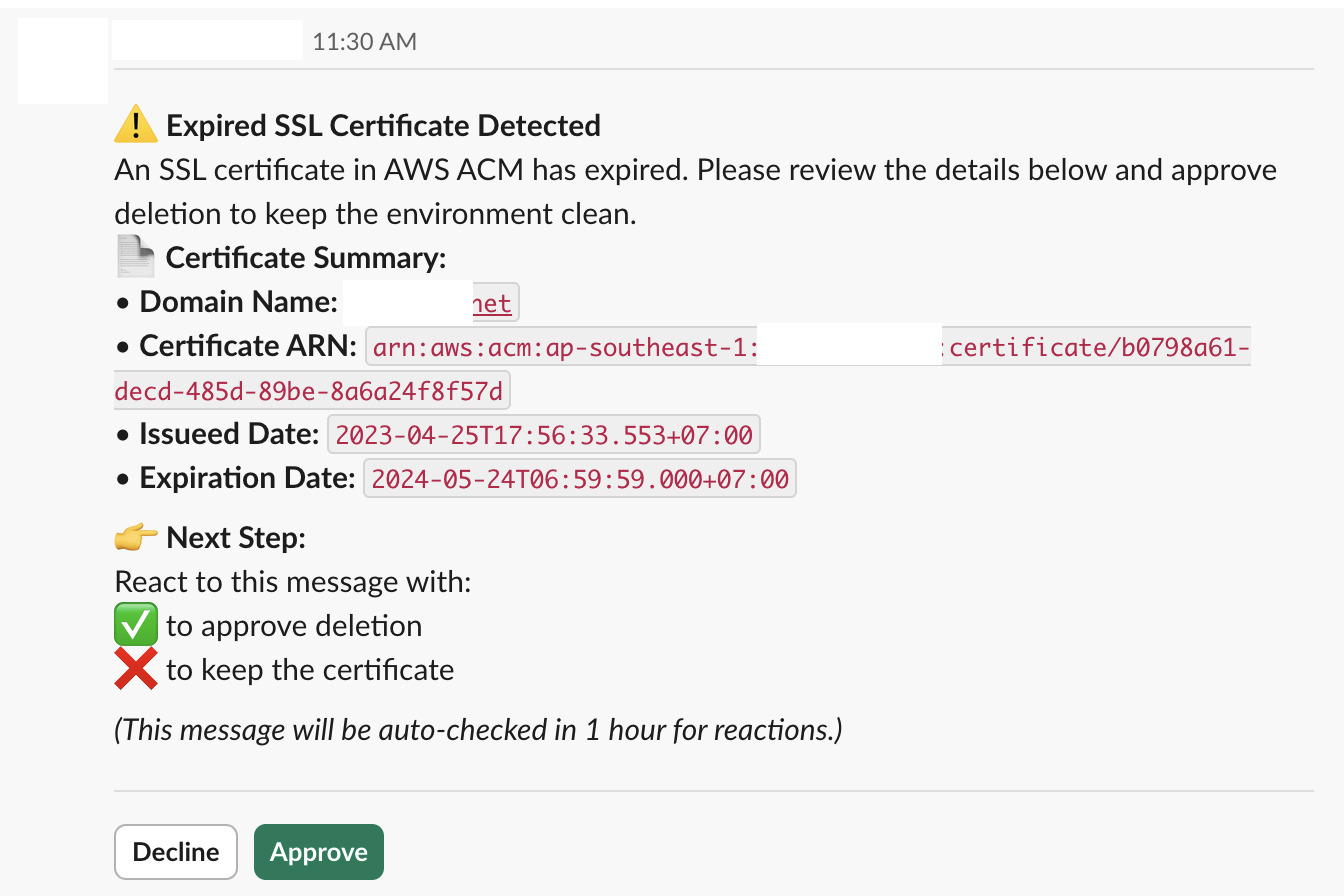"
},
"typeVersion": 1
},
{
"id": "8a2d6219-969d-4b6f-9c1b-9c818f12e9c0",
"name": "Note adhésive7",
"type": "n8n-nodes-base.stickyNote",
"position": [
1280,
192
],
"parameters": {
"content": "### 6. Notify admin via Slack"
},
"typeVersion": 1
},
{
"id": "58b1a7e2-765c-4fe7-8831-cdab2eda3932",
"name": "Obtenir uniquement les certificats expirés",
"type": "n8n-nodes-base.filter",
"position": [
448,
0
],
"parameters": {
"options": {},
"conditions": {
"options": {
"version": 2,
"leftValue": "",
"caseSensitive": true,
"typeValidation": "strict"
},
"combinator": "or",
"conditions": [
{
"id": "fe1b749d-3046-465e-b60a-786f5b0e2f99",
"operator": {
"type": "string",
"operation": "equals"
},
"leftValue": "={{ $json.Status }}",
"rightValue": "=EXPIRED"
}
]
}
},
"typeVersion": 2.2
},
{
"id": "c948316a-c28f-40b0-a320-927efbd8883b",
"name": "Déclencheur de planification quotidienne",
"type": "n8n-nodes-base.scheduleTrigger",
"position": [
0,
0
],
"parameters": {
"rule": {
"interval": [
{}
]
}
},
"typeVersion": 1.2
},
{
"id": "ebb985a7-ba79-4690-8892-976b19fe2941",
"name": "Supprimer un certificat",
"type": "n8n-nodes-base.awsCertificateManager",
"position": [
992,
0
],
"parameters": {
"operation": "delete",
"certificateArn": "={{ $json.CertificateArn }}"
},
"credentials": {
"aws": {
"id": "d62669OP9bvnmE4n",
"name": "us-east-1"
}
},
"typeVersion": 1
}
],
"active": false,
"pinData": {},
"settings": {
"executionOrder": "v1"
},
"versionId": "bfa1e782-637f-49eb-8c58-fbd6e4540d77",
"connections": {
"ebb985a7-ba79-4690-8892-976b19fe2941": {
"main": [
[
{
"node": "079cb3e6-73cc-41ad-95a5-c0af457b25bf",
"type": "main",
"index": 0
}
]
]
},
"0fa56096-8872-400b-afa1-5c52090bd33c": {
"main": [
[
{
"node": "58b1a7e2-765c-4fe7-8831-cdab2eda3932",
"type": "main",
"index": 0
}
]
]
},
"c948316a-c28f-40b0-a320-927efbd8883b": {
"main": [
[
{
"node": "0fa56096-8872-400b-afa1-5c52090bd33c",
"type": "main",
"index": 0
}
]
]
},
"58b1a7e2-765c-4fe7-8831-cdab2eda3932": {
"main": [
[
{
"node": "849ac135-f381-4a26-a9c5-79e62d20f74d",
"type": "main",
"index": 0
}
]
]
},
"849ac135-f381-4a26-a9c5-79e62d20f74d": {
"main": [
[
{
"node": "ebb985a7-ba79-4690-8892-976b19fe2941",
"type": "main",
"index": 0
}
]
]
}
}
}Comment utiliser ce workflow ?
Copiez le code de configuration JSON ci-dessus, créez un nouveau workflow dans votre instance n8n et sélectionnez "Importer depuis le JSON", collez la configuration et modifiez les paramètres d'authentification selon vos besoins.
Dans quelles scénarios ce workflow est-il adapté ?
Intermédiaire - DevOps, IA Multimodale
Est-ce payant ?
Ce workflow est entièrement gratuit et peut être utilisé directement. Veuillez noter que les services tiers utilisés dans le workflow (comme l'API OpenAI) peuvent nécessiter un paiement de votre part.
Workflows recommandés

Trung Tran
@trungtranEmpowering small and medium businesses with smart automation and practical AI, no big tech team required.
Partager ce workflow