Analyseur de page de destination
Intermédiaire
Ceci est unAI Summarization, Multimodal AIworkflow d'automatisation du domainecontenant 10 nœuds.Utilise principalement des nœuds comme Form, Markdown, FormTrigger, HttpRequest, Agent. Agent d'analyse de pages de destination
Prérequis
- •Peut nécessiter les informations d'identification d'authentification de l'API cible
- •Clé API Google Gemini
Nœuds utilisés (10)
Catégorie
Aperçu du workflow
Visualisation des connexions entre les nœuds, avec support du zoom et du déplacement
Exporter le workflow
Copiez la configuration JSON suivante dans n8n pour importer et utiliser ce workflow
{
"id": "YYiCCvfGPMJ8gAnt",
"meta": {
"instanceId": "061ca141d020a6e1355b8c7fe05f92a699e37e92079ad2e150a506ee8bbe9e11",
"templateCredsSetupCompleted": true
},
"name": "Landing Page Analyzer",
"tags": [],
"nodes": [
{
"id": "950a73f5-aecb-4844-add2-c244f0a946a7",
"name": "On form submission",
"type": "n8n-nodes-base.formTrigger",
"position": [
1008,
128
],
"webhookId": "57604090-1df3-41ca-8d55-1002798a1721",
"parameters": {
"options": {
"appendAttribution": false
},
"formTitle": "Landing Page Optimizer",
"formFields": {
"values": [
{
"fieldLabel": "Your Landing Page Url",
"placeholder": "https://example.anything",
"requiredField": true
}
]
},
"formDescription": "Make Your Page Convert Like a Top 1% Funnel"
},
"typeVersion": 2.2
},
{
"id": "fcede911-8351-4b6b-9daa-3a6fa9d68473",
"name": "Requête HTTP",
"type": "n8n-nodes-base.httpRequest",
"position": [
1232,
128
],
"parameters": {
"url": "={{ $json['Your Landing Page Url'] }}",
"options": {}
},
"typeVersion": 4.2
},
{
"id": "3f28ef06-fdbf-4488-8136-7826a1a0293a",
"name": "Markdown",
"type": "n8n-nodes-base.markdown",
"position": [
1440,
128
],
"parameters": {
"html": "={{ $json.data }}",
"options": {}
},
"typeVersion": 1
},
{
"id": "1254e722-ebdc-4421-af8c-fa61e3096944",
"name": "Agent IA",
"type": "@n8n/n8n-nodes-langchain.agent",
"position": [
1648,
128
],
"parameters": {
"text": "={{ $json.data }}",
"options": {
"systemMessage": "=You are a world-class Conversion Rate Optimization (CRO) expert.\n\nYour mission is to analyze my landing page and return with the most important actions the business should take to improve conversions. No fluff, no filler — just what matters most.\n\n🎯 YOUR RESPONSE MUST FOLLOW THIS STRUCTURE:\n\n1) Each item should start with a strong action verb (e.g., Replace, Add, Remove, Rewrite, Rearrange, Clarify, Simplify, Make visible, etc.)\n\n2) Be specific. Tell me exactly what to do — what headline to change, what section to remove, what to add and where.\n\n3) Every recommendation must be based on the actual landing page content. No generic advice.\n\n4) Prioritize modern, high-impact CRO ideas relevant to 2024 digital audiences.\n\n5) Keep it easy to understand and implement. No heavy dev work required.\n\n6) Focus on conversion levers: clarity, relevance, trust, desire, urgency, and friction reduction.\n"
},
"promptType": "define"
},
"typeVersion": 2
},
{
"id": "0d7250e0-8b9d-4626-a748-f7c056e2999b",
"name": "Form",
"type": "n8n-nodes-base.form",
"position": [
2320,
128
],
"webhookId": "a80f45af-8f8a-480b-922b-264691668bb7",
"parameters": {
"options": {},
"operation": "completion",
"completionTitle": "Here are 5 Things You Should Improve 🧐",
"completionMessage": "=1. {{ $json.output['Improvement Tip 1'] }}\n\n2. {{ $json.output['Improvement Tip 2'] }}\n\n3. {{ $json.output['Improvement Tip 3'] }}\n\n4. {{ $json.output['Improvement Tip 4'] }} \n\n5. {{ $json.output['Improvement Tip 5'] }} "
},
"typeVersion": 1
},
{
"id": "1db518d9-3c1f-4c20-84f4-167684f959e9",
"name": "Extracteur d'informations",
"type": "@n8n/n8n-nodes-langchain.informationExtractor",
"position": [
1984,
128
],
"parameters": {
"text": "={{ $json.output }}",
"options": {},
"attributes": {
"attributes": [
{
"name": "Improvement Tip 1",
"description": "=The 1st most important improvement tip without any symbol, add relevent Emoji"
},
{
"name": "Improvement Tip 2",
"description": "The 2nd most important improvement tip without any symbol, add relevant Emoji"
},
{
"name": "Improvement Tip 3",
"description": "The 3rd most important improvement tip without any symbol, add relevant Emoji"
},
{
"name": "Improvement Tip 4",
"description": "The 4th most important improvement tip without any symbol, add relevant Emoji"
},
{
"name": "Improvement Tip 5",
"description": "The 5th most important improvement tip without any symbol, add relevant Emoji"
}
]
}
},
"typeVersion": 1.2
},
{
"id": "08cf9cfe-7328-4de6-bd33-c0e2295c9e35",
"name": "Note adhésive",
"type": "n8n-nodes-base.stickyNote",
"position": [
0,
0
],
"parameters": {
"color": 6,
"width": 840,
"height": 600,
"content": "# 🛠 Setup Guide \n## **Author:** [Rakin Jakaria](https://www.youtube.com/@rakinjakaria)\n\nFollow these steps to get your Landing Page Analyzer workflow up and running: \n\n1. **Configure Google Gemini API Credentials** \n - Navigate to the \"Google Gemini Chat Model\" node in your workflow. \n - Ensure your Google Gemini (PaLM) API credentials are properly set up in your N8N instance. \n - If you don't have an API key, obtain one from [Google AI Studio](https://aistudio.google.com/apikey). \n\n2. **Test the Webhook Form (Optional)** \n - The workflow starts with a form submission trigger. \n - If you plan to embed this in a website or app, ensure the webhook URL is correctly configured and accessible. \n\n3. **Verify HTTP Request Node** \n - The workflow fetches the landing page content via HTTP. \n - Ensure the target URLs are publicly accessible and not behind authentication. \n\n4. **Review AI Agent Instructions** \n - The AI Agent node includes a system prompt for CRO analysis. \n - Customize the prompt if needed to align with your specific goals or industry. \n\nOnce these steps are complete, your Landing Page Analyzer is ready to use! Submit a URL via the form to receive actionable CRO improvements. 🚀"
},
"typeVersion": 1
},
{
"id": "938a192a-8474-4bd6-8471-e0617cdf9c74",
"name": "Note adhésive1",
"type": "n8n-nodes-base.stickyNote",
"position": [
944,
0
],
"parameters": {
"color": 6,
"width": 1620,
"height": 580,
"content": "## Landing Page Analyzer"
},
"typeVersion": 1
},
{
"id": "18698e25-23ce-4ca2-834c-e7cdd0521588",
"name": "Gemini 2.5 Flash",
"type": "@n8n/n8n-nodes-langchain.lmChatGoogleGemini",
"position": [
1808,
432
],
"parameters": {
"options": {}
},
"credentials": {
"googlePalmApi": {
"id": "uIFmTaGcf3XXfitE",
"name": "Google Gemini(PaLM) Api account 2"
}
},
"typeVersion": 1
},
{
"id": "2f1293bc-cfef-425f-9988-161836bcf8b2",
"name": "Note adhésive3",
"type": "n8n-nodes-base.stickyNote",
"position": [
208,
-528
],
"parameters": {
"color": 6,
"width": 480,
"height": 464,
"content": "## Start here: Step-by Step Youtube Tutorial :star:\n[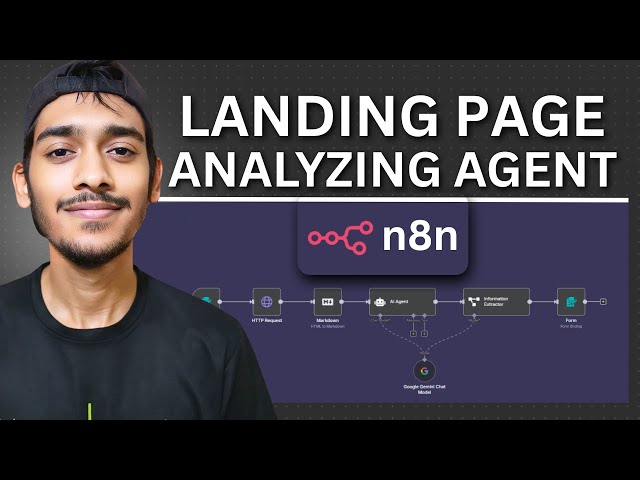](https://youtu.be/gsFl25jw-7I)"
},
"typeVersion": 1
}
],
"active": false,
"pinData": {},
"settings": {
"executionOrder": "v1"
},
"versionId": "0f6ecd02-d6ef-4d36-a122-4f8f07852ecd",
"connections": {
"AI Agent": {
"main": [
[
{
"node": "Information Extractor",
"type": "main",
"index": 0
}
]
]
},
"3f28ef06-fdbf-4488-8136-7826a1a0293a": {
"main": [
[
{
"node": "AI Agent",
"type": "main",
"index": 0
}
]
]
},
"HTTP Request": {
"main": [
[
{
"node": "3f28ef06-fdbf-4488-8136-7826a1a0293a",
"type": "main",
"index": 0
}
]
]
},
"18698e25-23ce-4ca2-834c-e7cdd0521588": {
"ai_languageModel": [
[
{
"node": "AI Agent",
"type": "ai_languageModel",
"index": 0
},
{
"node": "Information Extractor",
"type": "ai_languageModel",
"index": 0
}
]
]
},
"950a73f5-aecb-4844-add2-c244f0a946a7": {
"main": [
[
{
"node": "HTTP Request",
"type": "main",
"index": 0
}
]
]
},
"Information Extractor": {
"main": [
[
{
"node": "0d7250e0-8b9d-4626-a748-f7c056e2999b",
"type": "main",
"index": 0
}
]
]
}
}
}Foire aux questions
Comment utiliser ce workflow ?
Copiez le code de configuration JSON ci-dessus, créez un nouveau workflow dans votre instance n8n et sélectionnez "Importer depuis le JSON", collez la configuration et modifiez les paramètres d'authentification selon vos besoins.
Dans quelles scénarios ce workflow est-il adapté ?
Intermédiaire - Résumé IA, IA Multimodale
Est-ce payant ?
Ce workflow est entièrement gratuit et peut être utilisé directement. Veuillez noter que les services tiers utilisés dans le workflow (comme l'API OpenAI) peuvent nécessiter un paiement de votre part.
Workflows recommandés
Agent de candidature
Agent d'automatisation des candidatures d'emploi
If
Form
Markdown
+
If
Form
Markdown
15 NœudsRakin Jakaria
IA Multimodale
Assistant de recrutement IA
Gemini AI、Gmailet表格deautomatisation简历筛选与回复系统
Gmail
Form Trigger
Google Sheets
+
Gmail
Form Trigger
Google Sheets
9 NœudsRakin Jakaria
Résumé IA
Agent intelligent de prospection IA
Génération automatisée de prospects et envoi de froid e-mails avec Apify, l'IA et Gmail
If
Set
Wait
+
If
Set
Wait
20 NœudsRakin Jakaria
Génération de leads
Automatisation de la diligence raisonnable sur les fournisseurs avec Gemini et Jina AI
Automatiser l'enquête de diligence raisonnable des fournisseurs avec Gemini et Jina AI
If
Set
Code
+
If
Set
Code
27 NœudsAdnan
Extraction de documents
Automatisation d'un résumé Reddit de style Morning Brew et publication sur DEV
Utiliser AI pour automatiser un résumé de style Morning Brew pour Reddit et le publier sur DEV
If
Set
Wait
+
If
Set
Wait
26 NœudsAngel Menendez
Résumé IA
AIassistant pour les factures
Agent IA pour les factures
Set
Gmail
Filter
+
Set
Gmail
Filter
13 NœudsRakin Jakaria
Traitement des factures
Informations sur le workflow
Niveau de difficulté
Intermédiaire
Nombre de nœuds10
Catégorie2
Types de nœuds8
Description de la difficulté
Auteur

Rakin Jakaria
@rakinjakariaLiens externes
Voir sur n8n.io →
Partager ce workflow