Gestionnaire du cycle de vie EC2 et assistant de chat AI (description, démarrage, arrêt, redémarrage, terminaison)
Ceci est unDevOps, AI Chatbotworkflow d'automatisation du domainecontenant 16 nœuds.Utilise principalement des nœuds comme Agent, HttpRequestTool, ChatTrigger, LmChatOpenAi, MemoryBufferWindow. Gestionnaire du cycle de vie AWS EC2 avec chatbot IA (démarrer, arrêter, redémarrer)
- •Peut nécessiter les informations d'identification d'authentification de l'API cible
- •Clé API OpenAI
Nœuds utilisés (16)
Catégorie
{
"id": "ikTVURA2ASogFn99",
"meta": {
"instanceId": "e145bfb15cacc90e0d1ae6ee743e6744f8fc7108de50458700cb2ae620dc5ca5",
"templateCredsSetupCompleted": true
},
"name": "EC2 Lifecycle Manager with AI Chat Agent (Describe, Start, Stop, Reboot, Terminate)",
"tags": [
{
"id": "zVkByIt5M465W2a8",
"name": "aws",
"createdAt": "2025-09-12T06:14:33.823Z",
"updatedAt": "2025-09-12T06:14:33.823Z"
},
{
"id": "yWCPKVRlpoRhCpMO",
"name": "Chatbot",
"createdAt": "2025-09-07T13:41:21.818Z",
"updatedAt": "2025-09-07T13:41:21.818Z"
}
],
"nodes": [
{
"id": "961b680a-008c-43ae-8396-154cbee1c2e2",
"name": "Modèle de chat OpenAI",
"type": "@n8n/n8n-nodes-langchain.lmChatOpenAi",
"position": [
-128,
160
],
"parameters": {
"model": {
"__rl": true,
"mode": "list",
"value": "gpt-4.1-mini"
},
"options": {}
},
"credentials": {
"openAiApi": {
"id": "tnXtbK3d66hDjxXa",
"name": "OpenAi account"
}
},
"typeVersion": 1.2
},
{
"id": "a1bc7d6e-c5d0-4a50-b211-7302725a0601",
"name": "Describe Instance",
"type": "n8n-nodes-base.httpRequestTool",
"position": [
128,
160
],
"parameters": {
"url": "https://ec2.us-east-1.amazonaws.com",
"method": "POST",
"options": {},
"sendBody": true,
"contentType": "form-urlencoded",
"sendHeaders": true,
"authentication": "predefinedCredentialType",
"bodyParameters": {
"parameters": [
{
"name": "Action",
"value": "DescribeInstances"
},
{
"name": "Version",
"value": "2016-11-15"
}
]
},
"toolDescription": "🔍 Lists EC2 instances in your account/region, including IDs, tags, state (running, stopped, etc.).\n👉 Useful for checking status before taking actions.",
"nodeCredentialType": "aws"
},
"credentials": {
"aws": {
"id": "4CZd3hXptJlZimiB",
"name": "AWS account"
}
},
"typeVersion": 4.2
},
{
"id": "a25f84ba-5059-4021-9b7a-c36b61f13032",
"name": "Début Instance",
"type": "n8n-nodes-base.httpRequestTool",
"position": [
256,
160
],
"parameters": {
"url": "https://ec2.us-east-1.amazonaws.com",
"method": "POST",
"options": {},
"sendBody": true,
"contentType": "form-urlencoded",
"sendHeaders": true,
"authentication": "predefinedCredentialType",
"bodyParameters": {
"parameters": [
{
"name": "Action",
"value": "StartInstances"
},
{
"name": "InstanceId.1",
"value": "={{ /*n8n-auto-generated-fromAI-override*/ $fromAI('parameters1_Value', ``, 'string') }}"
},
{
"name": "Version",
"value": "2016-11-15"
}
]
},
"toolDescription": "▶️ Boots up a stopped EC2 instance.\n👉 Use when you need to bring a development, test, or production server online.",
"headerParameters": {
"parameters": [
{}
]
},
"nodeCredentialType": "aws"
},
"credentials": {
"aws": {
"id": "4CZd3hXptJlZimiB",
"name": "AWS account"
}
},
"typeVersion": 4.2
},
{
"id": "2ffcc823-3818-4d2b-b690-b208848e5026",
"name": "Stop Instance",
"type": "n8n-nodes-base.httpRequestTool",
"position": [
384,
160
],
"parameters": {
"url": "https://ec2.us-east-1.amazonaws.com",
"method": "POST",
"options": {},
"sendBody": true,
"contentType": "form-urlencoded",
"sendHeaders": true,
"authentication": "predefinedCredentialType",
"bodyParameters": {
"parameters": [
{
"name": "Action",
"value": "StopInstances"
},
{
"name": "InstanceId.1",
"value": "={{ /*n8n-auto-generated-fromAI-override*/ $fromAI('parameters1_Value', ``, 'string') }}"
},
{
"name": "Version",
"value": "2016-11-15"
}
]
},
"toolDescription": "⏹ Gracefully shuts down a running EC2 instance (data on EBS volumes is preserved).\n👉 Good for saving costs when servers are not needed.",
"headerParameters": {
"parameters": [
{}
]
},
"nodeCredentialType": "aws"
},
"credentials": {
"aws": {
"id": "4CZd3hXptJlZimiB",
"name": "AWS account"
}
},
"typeVersion": 4.2
},
{
"id": "73d01f7e-9ac0-47c2-9e90-09b20d609adc",
"name": "Reboot Instance",
"type": "n8n-nodes-base.httpRequestTool",
"position": [
512,
160
],
"parameters": {
"url": "https://ec2.us-east-1.amazonaws.com",
"method": "POST",
"options": {},
"sendBody": true,
"contentType": "form-urlencoded",
"sendHeaders": true,
"authentication": "predefinedCredentialType",
"bodyParameters": {
"parameters": [
{
"name": "Action",
"value": "RebootInstances"
},
{
"name": "InstanceId.1",
"value": "={{ /*n8n-auto-generated-fromAI-override*/ $fromAI('parameters1_Value', ``, 'string') }}"
},
{
"name": "Version",
"value": "2016-11-15"
}
]
},
"toolDescription": "🔄 Restarts a running EC2 instance (like pressing reset on a machine).\n👉 Useful for applying patches or fixing temporary issues without stopping/starting.",
"headerParameters": {
"parameters": [
{}
]
},
"nodeCredentialType": "aws"
},
"credentials": {
"aws": {
"id": "4CZd3hXptJlZimiB",
"name": "AWS account"
}
},
"typeVersion": 4.2
},
{
"id": "6540a32d-59ee-4280-98de-1a0cd08df7b4",
"name": "Terminate Instance",
"type": "n8n-nodes-base.httpRequestTool",
"position": [
640,
160
],
"parameters": {
"url": "https://ec2.us-east-1.amazonaws.com",
"method": "POST",
"options": {},
"sendBody": true,
"contentType": "form-urlencoded",
"sendHeaders": true,
"authentication": "predefinedCredentialType",
"bodyParameters": {
"parameters": [
{
"name": "Action",
"value": "TerminateInstances"
},
{
"name": "InstanceId.1",
"value": "={{ /*n8n-auto-generated-fromAI-override*/ $fromAI('parameters1_Value', ``, 'string') }}"
},
{
"name": "Version",
"value": "2016-11-15"
}
]
},
"toolDescription": "💀 Permanently shuts down and deletes an EC2 instance (EBS root volume may also be deleted if configured).\n👉 Use with caution — this cannot be undone.",
"headerParameters": {
"parameters": [
{}
]
},
"nodeCredentialType": "aws"
},
"credentials": {
"aws": {
"id": "4CZd3hXptJlZimiB",
"name": "AWS account"
}
},
"typeVersion": 4.2
},
{
"id": "2df9a6bc-2826-4df6-8b5e-e08395a67c1d",
"name": "À la réception du message",
"type": "@n8n/n8n-nodes-langchain.chatTrigger",
"position": [
-352,
-64
],
"webhookId": "32788287-2cdd-49cf-b554-2aceb2e2c52d",
"parameters": {
"options": {}
},
"typeVersion": 1.3
},
{
"id": "d3125105-b7ae-4eed-b7bc-14ee92e49786",
"name": "Simple Mémoire",
"type": "@n8n/n8n-nodes-langchain.memoryBufferWindow",
"position": [
0,
160
],
"parameters": {
"contextWindowLength": 10
},
"typeVersion": 1.3
},
{
"id": "47627ae7-9533-400b-85a3-550fab6f49fb",
"name": "EC2 Manager Agent IA",
"type": "@n8n/n8n-nodes-langchain.agent",
"position": [
184,
-64
],
"parameters": {
"text": "={{ $json.chatInput }}",
"options": {
"systemMessage": "You are an AI DevOps Assistant specialized in managing AWS EC2 instances.\nYour role is to help engineers interact with EC2 in natural language by:\n1. Understanding their intent (describe, start, stop, reboot, terminate).\n2. Asking clarifying questions if information is missing (e.g., instance ID, environment, region).\n3. Mapping the request to the correct EC2 API tool.\n4. Calling the appropriate tool with precise parameters.\n5. Summarizing results in a clear, concise way for the user.\n\nRules:\n- Never assume instance ID, region, or environment without confirming with the user.\n- Always explain the action before execution, unless the user explicitly says \"do it now\".\n- If multiple instances are affected, confirm scope before calling the tool.\n- Use simple, DevOps-friendly responses (short, technical, direct).\n- After each action, provide feedback like: \"✅ Instance i-123456 stopped successfully\".\n- Always maintain safety: highlight that *terminate* is irreversible before execution.\n\nAvailable Tools:\n1. DescribeInstances – Get status and details of instances.\n2. StartInstances – Start stopped instance(s).\n3. StopInstances – Stop running instance(s).\n4. RebootInstances – Restart instance(s).\n5. TerminateInstances – Permanently delete instance(s)."
},
"promptType": "define"
},
"typeVersion": 2.2
},
{
"id": "121e09b5-033d-4433-b3c5-e56099b495d0",
"name": "Note adhésive",
"type": "n8n-nodes-base.stickyNote",
"position": [
-2240,
-672
],
"parameters": {
"color": 5,
"width": 1088,
"height": 1824,
"content": "# EC2 Lifecycle Manager with AI Chat Agent (Describe, Start, Stop, Reboot, Terminate)\n## Who’s it for\nThis workflow is designed for **DevOps engineers** and **cloud administrators** who want to manage AWS EC2 instances directly from chat platforms (Slack, Teams, Telegram, etc.) using natural language. \nIt helps engineers quickly check EC2 instance status, start/stop servers, reboot instances, or terminate unused machines — without logging into the AWS console.\n\n---\n\n## How it works / What it does\n1. A chat message (command) from the engineer triggers the workflow.\n2. The **EC2 Manager AI Agent** interprets the request using the AI chat model and memory.\n3. The agent decides which AWS EC2 action to perform:\n - `DescribeInstances` → List or check status of EC2 instances.\n - `StartInstances` → Boot up stopped instances.\n - `StopInstances` → Gracefully shut down running instances.\n - `RebootInstances` → Restart instances without stopping them.\n - `TerminateInstances` → Permanently delete instances.\n4. The selected tool (API call) is executed via an HTTP Request to the AWS EC2 endpoint.\n5. The agent replies back in chat with the result (confirmation, instance status, errors, etc.).\n\n---\n\n## How to set up\n1. **Add Chat Trigger** \n - Connect your chatbot platform (Slack/Telegram/Teams) to n8n. \n - Configure the “When chat message received” node.\n\n2. **Configure OpenAI Chat Model** \n - Select a supported LLM (GPT-4, GPT-4.1, GPT-5, etc.). \n - Add system and user prompts to define behavior (EC2 assistant role).\n\n3. **Add Memory** \n - Use `Simple Memory` to keep track of context (e.g., instance IDs, region, last action).\n\n4. **Connect EC2 API Tools** \n - Create HTTP Request nodes for:\n - Describe Instances \n - Start Instance \n - Stop Instance \n - Reboot Instance \n - Terminate Instance \n - Use AWS credentials with Signature V4 authentication. \n - API endpoint: `https://ec2.{region}.amazonaws.com/` \n\n5. **Link Tools to Agent** \n - Attach all EC2 tools to the EC2 Manager AI Agent node. \n - Ensure the agent can choose which tool to call based on user input.\n\n---\n\n## Requirements\n- **n8n instance** (self-hosted or cloud). \n- **Chat platform integration** (Slack, Teams, or Telegram). \n- **OpenAI (or other LLM) credentials**. \n- **AWS IAM user with EC2 permissions**: \n - `ec2:DescribeInstances` \n - `ec2:StartInstances` \n - `ec2:StopInstances` \n - `ec2:RebootInstances` \n - `ec2:TerminateInstances` \n- **AWS region configured** for API calls. \n\n---\n\n## How to customize the workflow\n- **Add safety checks**: Require explicit confirmation before running `Stop` or `Terminate`. \n- **Region flexibility**: Add support for multi-region management by letting the user specify the region in chat. \n- **Tag-based filters**: Extend `DescribeInstances` to return only instances matching specific tags (e.g., `env=dev`). \n- **Cost-saving automation**: Add scheduled rules to automatically stop instances outside working hours. \n- **Enhanced chatbot UX**: Format responses into tables or rich messages in Slack/Teams. \n- **Audit logging**: Store each action (who/what/when) into a database or Google Sheets for compliance. \n\n---"
},
"typeVersion": 1
},
{
"id": "17a9a095-0056-413c-8d41-4e27986f592d",
"name": "Note adhésive1",
"type": "n8n-nodes-base.stickyNote",
"position": [
-1088,
-576
],
"parameters": {
"width": 672,
"height": 928,
"content": "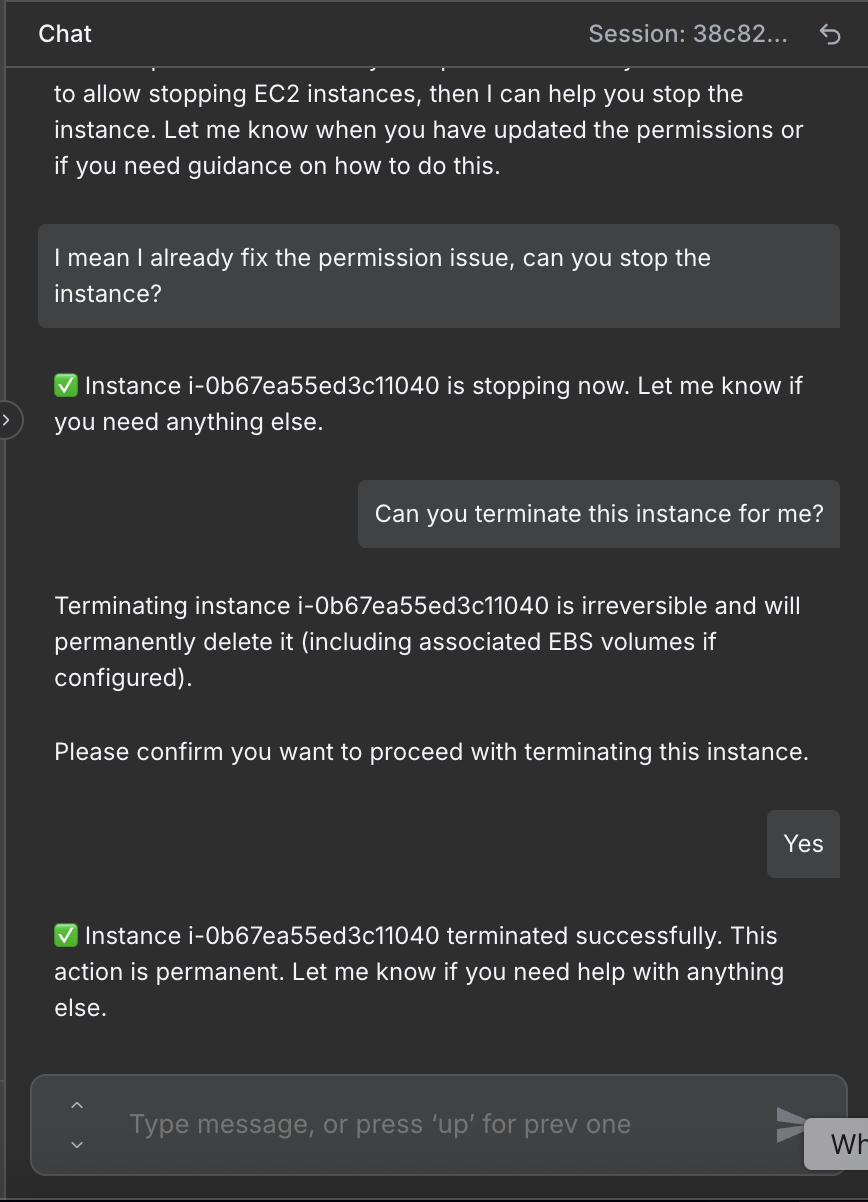"
},
"typeVersion": 1
},
{
"id": "2c91d833-b465-4f76-ba7b-1b52cc99a7ac",
"name": "Note adhésive2",
"type": "n8n-nodes-base.stickyNote",
"position": [
848,
-400
],
"parameters": {
"width": 1232,
"height": 400,
"content": "# Instance terminated by AI agent\n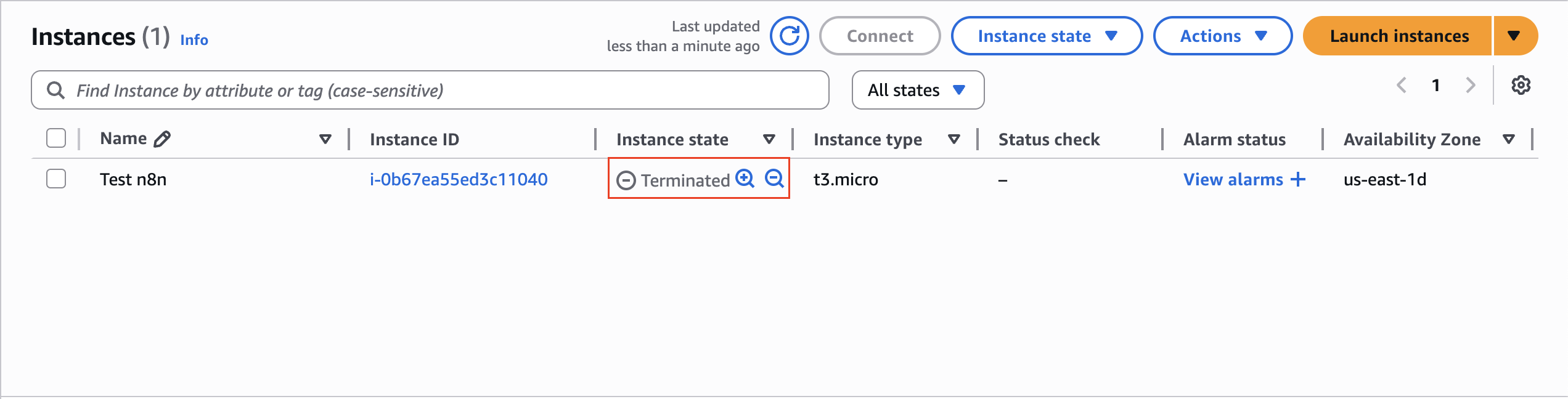"
},
"typeVersion": 1
},
{
"id": "2bbbd4fe-99ec-4f68-95d4-99afce09b20b",
"name": "Note adhésive3",
"type": "n8n-nodes-base.stickyNote",
"position": [
848,
16
],
"parameters": {
"width": 1232,
"height": 416,
"content": "# Instance stopped by AI agent\n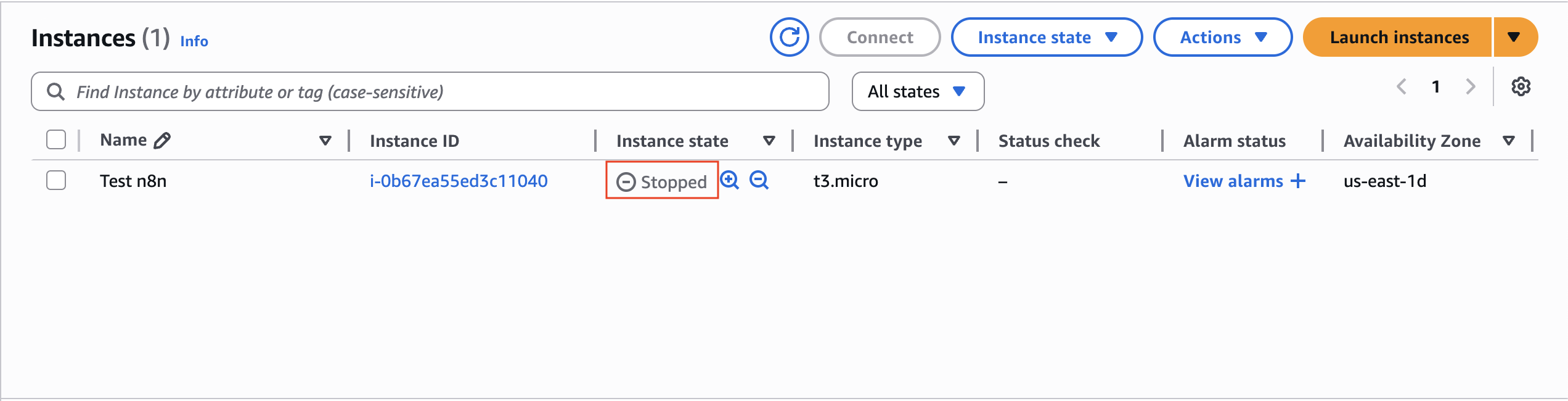"
},
"typeVersion": 1
},
{
"id": "b7a1dd2f-f489-44ec-a743-bc86ebcebfea",
"name": "Note adhésive4",
"type": "n8n-nodes-base.stickyNote",
"position": [
-1088,
384
],
"parameters": {
"width": 672,
"height": 640,
"content": "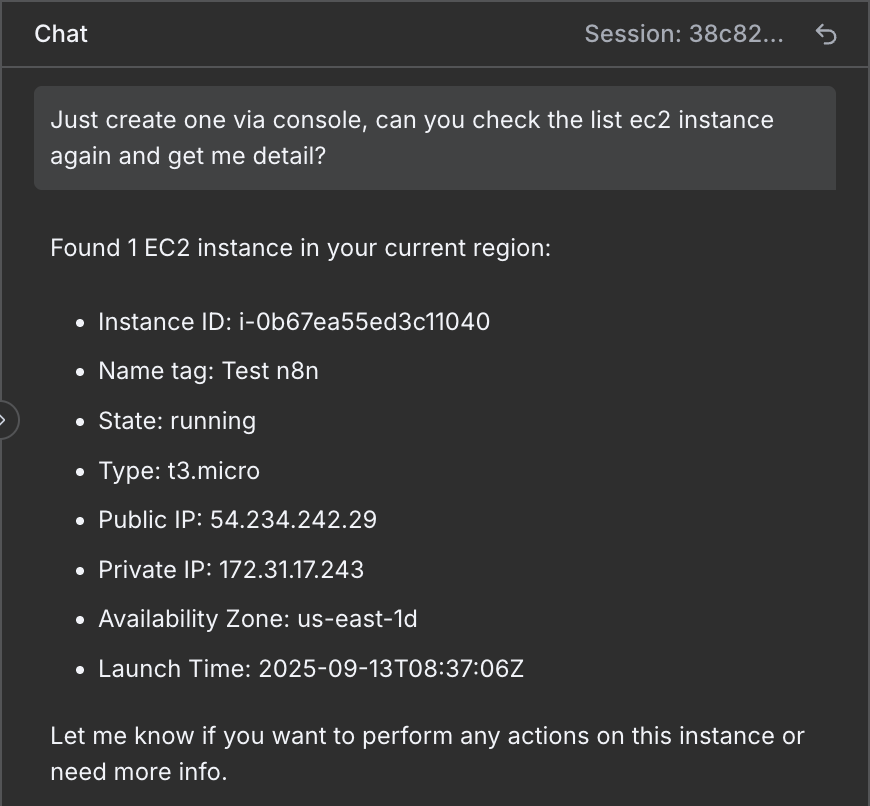"
},
"typeVersion": 1
},
{
"id": "868fb44f-162d-4f5b-9b00-b4f2615ea5c0",
"name": "Note adhésive5",
"type": "n8n-nodes-base.stickyNote",
"position": [
-368,
-400
],
"parameters": {
"color": 5,
"width": 544,
"height": 224,
"content": "### 1. Chat Step — \"When chat message received\"\n- **Purpose**: This is the **entry point** of the workflow. It listens for incoming chat messages from your connected platform (Slack, Telegram, or Teams). \n- **What it does**: \n - Captures the message content (e.g., \"start instance i-123456\"). \n - Passes it forward to the EC2 Manager AI Agent for interpretation. \n- **Why it's important**: It transforms normal chat input into a trigger for the automation. "
},
"typeVersion": 1
},
{
"id": "6705e1b5-d00b-4bbe-8267-86e3ff5aa2e3",
"name": "Note adhésive6",
"type": "n8n-nodes-base.stickyNote",
"position": [
224,
-464
],
"parameters": {
"color": 5,
"width": 544,
"height": 320,
"content": "### 2. Agent Step — \"EC2 Manager AI Agent\"\n- **Purpose**: This is the **brain of the workflow**. It acts as an AI-powered DevOps assistant that understands user intent and decides which EC2 action to perform. \n- **What it does**: \n 1. **Parses chat request** using the connected LLM (OpenAI Chat Model). \n 2. **Keeps context** (via Memory) so the agent remembers recent instance IDs, regions, or user confirmations. \n 3. **Decides tool to call** based on intent:\n - `DescribeInstances` → Get info about instances. \n - `StartInstances` → Power on EC2 servers. \n - `StopInstances` → Shut down running EC2s. \n - `RebootInstances` → Restart servers. \n - `TerminateInstances` → Delete EC2 instances permanently. \n 4. **Executes tool call** via the linked HTTP Request node. \n 5. **Returns response** in a concise chat-friendly format (status message, instance details, success/failure). \n- **Why it's important**: It abstracts AWS complexity and gives engineers a natural language interface for EC2 management. "
},
"typeVersion": 1
}
],
"active": false,
"pinData": {},
"settings": {
"executionOrder": "v1"
},
"versionId": "6392a799-1c97-4968-ab80-37ad1d676a01",
"connections": {
"Simple Memory": {
"ai_memory": [
[
{
"node": "EC2 Manager AI Agent",
"type": "ai_memory",
"index": 0
}
]
]
},
"2ffcc823-3818-4d2b-b690-b208848e5026": {
"ai_tool": [
[
{
"node": "EC2 Manager AI Agent",
"type": "ai_tool",
"index": 0
}
]
]
},
"Start Instance": {
"ai_tool": [
[
{
"node": "EC2 Manager AI Agent",
"type": "ai_tool",
"index": 0
}
]
]
},
"73d01f7e-9ac0-47c2-9e90-09b20d609adc": {
"ai_tool": [
[
{
"node": "EC2 Manager AI Agent",
"type": "ai_tool",
"index": 0
}
]
]
},
"a1bc7d6e-c5d0-4a50-b211-7302725a0601": {
"ai_tool": [
[
{
"node": "EC2 Manager AI Agent",
"type": "ai_tool",
"index": 0
}
]
]
},
"OpenAI Chat Model": {
"ai_languageModel": [
[
{
"node": "EC2 Manager AI Agent",
"type": "ai_languageModel",
"index": 0
}
]
]
},
"6540a32d-59ee-4280-98de-1a0cd08df7b4": {
"ai_tool": [
[
{
"node": "EC2 Manager AI Agent",
"type": "ai_tool",
"index": 0
}
]
]
},
"EC2 Manager AI Agent": {
"main": [
[]
]
},
"When chat message received": {
"main": [
[
{
"node": "EC2 Manager AI Agent",
"type": "main",
"index": 0
}
]
]
}
}
}Comment utiliser ce workflow ?
Copiez le code de configuration JSON ci-dessus, créez un nouveau workflow dans votre instance n8n et sélectionnez "Importer depuis le JSON", collez la configuration et modifiez les paramètres d'authentification selon vos besoins.
Dans quelles scénarios ce workflow est-il adapté ?
Avancé - DevOps, Chatbot IA
Est-ce payant ?
Ce workflow est entièrement gratuit et peut être utilisé directement. Veuillez noter que les services tiers utilisés dans le workflow (comme l'API OpenAI) peuvent nécessiter un paiement de votre part.
Workflows recommandés

Trung Tran
@trungtranEmpowering small and medium businesses with smart automation and practical AI, no big tech team required. Youtube channel: youtube.com/@theStackExplorer
Partager ce workflow