Gestionnaire AWS Lambda basé sur le chat et journalisation automatisée des audits (GPT-4.1 mini + Google Sheets)
Ceci est unDevOps, AI Chatbotworkflow d'automatisation du domainecontenant 15 nœuds.Utilise principalement des nœuds comme AwsLambdaTool, Agent, HttpRequestTool, GoogleSheetsTool, ChatTrigger. Gestionnaire AWS Lambda avec GPT-4.1 et journaux d'audit Google Sheets via chat
- •Access Key et Secret AWS
- •Peut nécessiter les informations d'identification d'authentification de l'API cible
- •Informations d'identification Google Sheets API
- •Clé API OpenAI
Nœuds utilisés (15)
Catégorie
{
"id": "8Hr1UiypOyXzJuXf",
"meta": {
"instanceId": "e145bfb15cacc90e0d1ae6ee743e6744f8fc7108de50458700cb2ae620dc5ca5",
"templateCredsSetupCompleted": true
},
"name": "Chat-Based AWS Lambda Manager with Automated Audit Logging (GPT-4.1 mini + Google Sheet)",
"tags": [
{
"id": "zVkByIt5M465W2a8",
"name": "aws",
"createdAt": "2025-09-12T06:14:33.823Z",
"updatedAt": "2025-09-12T06:14:33.823Z"
}
],
"nodes": [
{
"id": "616e9751-00a6-4313-a1ae-aa0ffb44430e",
"name": "Modèle de chat OpenAI",
"type": "@n8n/n8n-nodes-langchain.lmChatOpenAi",
"position": [
-160,
736
],
"parameters": {
"model": {
"__rl": true,
"mode": "list",
"value": "gpt-4.1-mini"
},
"options": {}
},
"credentials": {
"openAiApi": {
"id": "tnXtbK3d66hDjxXa",
"name": "OpenAi account"
}
},
"typeVersion": 1.2
},
{
"id": "a1dca496-5a02-45d4-b230-65a12d8a51d9",
"name": "Simple Mémoire",
"type": "@n8n/n8n-nodes-langchain.memoryBufferWindow",
"position": [
-32,
736
],
"parameters": {
"contextWindowLength": 10
},
"typeVersion": 1.3
},
{
"id": "cffff788-b047-4553-83cc-726d5028ebfb",
"name": "À la réception du message",
"type": "@n8n/n8n-nodes-langchain.chatTrigger",
"position": [
-384,
512
],
"webhookId": "c676ef51-4e8a-4d31-9b8b-7c05602edd32",
"parameters": {
"options": {}
},
"typeVersion": 1.3
},
{
"id": "73569e82-cc64-4435-a06c-c7b8eed1b453",
"name": "Note adhésive",
"type": "n8n-nodes-base.stickyNote",
"position": [
-1840,
-80
],
"parameters": {
"color": 6,
"width": 880,
"height": 1184,
"content": "# Chat-Based AWS Lambda Manager with Automated Audit Logging (GPT-4.1 mini + Google Sheet)\n> This workflow provides a chat-based AI agent to manage AWS Lambda functions. It allows users to list, invoke, get details, and delete Lambda functions, while automatically recording every action into Google Sheets for audit and compliance tracking.\n\n## **Who’s it for**\n- Cloud engineers and DevOps teams managing AWS Lambda functions. \n- Developers who want a simple chat interface to perform Lambda operations. \n- Compliance and operations teams needing automatic audit logs of AWS actions. \n\n## **How it works / What it does**\n1. A chat message triggers the **AWS Lambda Manager Agent**. \n2. The agent interprets user intent and calls one of the available tools: \n - **Invoke Lambda Function**: Runs a Lambda function with given payload. \n - **List Lambda Functions**: Shows all functions in the account. \n - **Get Lambda Function**: Retrieves details/configuration of a function. \n - **Delete a Function**: Removes a Lambda function permanently. \n3. After each action, the agent calls **Audit Logs (Google Sheets)** to record the operation type, function name, timestamp, and outcome. \n4. The agent confirms destructive actions (like delete) before execution. \n\n## **How to set up**\n1. Add a **Chat Trigger** node to start the workflow when a user sends a message. \n2. Connect it to the **AWS Lambda Manager Agent** node. \n3. Configure the agent with the provided system prompt to enforce rules and logging. \n4. Link the agent to the following tool nodes: \n - Invoke Lambda Function \n - List Lambda Functions \n - Get Lambda Function \n - Delete a Function \n - Audit Logs (Google Sheets with `appendOrUpdate` enabled) \n5. Deploy the workflow and test it with sample chat commands like “list functions” or “invoke testFunction”. \n\n## **Requirements**\n- AWS account with IAM credentials that have `lambda:ListFunctions`, `lambda:InvokeFunction`, `lambda:GetFunction`, and `lambda:DeleteFunction` permissions. \n- Google Sheets API connected for storing audit logs. \n- Proper region and function names configured when invoking or deleting. \n- n8n instance or automation platform that supports agent + tool integration. \n\n## **How to customize the workflow**\n- **Add new tools**: Extend with more AWS Lambda operations like Update Function Code or Publish Version. \n- **Enhance logging**: Include user ID, request payload, or execution results in Audit Logs. \n- **Access control**: Restrict delete actions to admins by adding role-based logic. \n- **Multi-cloud support**: Extend the agent to handle Azure/AWS/GCP serverless functions in one workflow. \n- **Custom responses**: Modify agent prompt to tailor tone (developer-friendly vs. business-friendly). "
},
"typeVersion": 1
},
{
"id": "40693ce3-331d-4164-bd28-1fbee18ec87b",
"name": "Note adhésive1",
"type": "n8n-nodes-base.stickyNote",
"position": [
-416,
368
],
"parameters": {
"color": 5,
"height": 128,
"content": "### Receive Chat Message\nThe workflow begins when a user sends a chat message. This acts as the trigger for the AWS Lambda Manager Agent."
},
"typeVersion": 1
},
{
"id": "bd9ce2c4-5637-4d1e-b5ed-5b11ed11e2ac",
"name": "Note adhésive2",
"type": "n8n-nodes-base.stickyNote",
"position": [
144,
320
],
"parameters": {
"color": 5,
"content": "### Interpret User Intent\nThe AWS Lambda Manager Agent analyzes the chat input to determine which Lambda operation is being requested (list, invoke, get details, or delete)."
},
"typeVersion": 1
},
{
"id": "bc5292ea-8e7b-4c3a-ae26-555861f7b8e7",
"name": "AWS Lambda Manager Agent",
"type": "@n8n/n8n-nodes-langchain.agent",
"position": [
152,
512
],
"parameters": {
"options": {
"systemMessage": "You are AWS Lambda Manager Agent, a chat-based assistant that helps users manage their AWS Lambda functions.\nYou are equipped with 5 tools:\n1. Invoke Lambda Function – Run a specific Lambda function with an input payload.\n2. List Lambda Functions – Retrieve all Lambda functions in the account/region.\n3. Get Lambda Function – Get configuration and details of a function.\n4. Delete a Function – Permanently delete a Lambda function.\n5. Audit Logs – Append every action performed into Google Sheets for tracking. The input must always be a simple log string (for example: \"Invoked function processOrders at 2025-09-16 10:30 UTC\").\n\nResponsibilities:\n- Parse user requests and determine intent.\n- Call the correct tool to execute the operation.\n- After any of the first 4 Lambda operations, always call Audit Logs to record action details (function name, action type, timestamp, requestor, and outcome).\n- If the request is unclear, ask clarifying questions before taking action.\n- Keep answers short and action-focused, but confirm important destructive actions like deletion.\nExamples of behavior:\n- User: “Show me all my Lambda functions.”\nAgent: Calls List Lambda Functions, then logs action with Audit Logs.\n- User: “Run my processOrders function with this JSON.”\nAgent: Calls Invoke Lambda Function with provided JSON, then logs action.\n- User: “Tell me details about paymentHandler.”\nAgent: Calls Get Lambda Function, then logs action.\n- User: “Delete the testFunction.”\nAgent: Confirms: “Are you sure you want to permanently delete testFunction?” If confirmed, calls Delete a Function, then logs action.\nRules:\n- Always log operations in Audit Logs as a single text string.\n- Never skip logging.\n- Confirm destructive actions like delete.\n- Respect the user’s natural language and support flexible phrasing such as “remove,” “run,” “show,” or “info.”"
}
},
"typeVersion": 2.2
},
{
"id": "9c1b9a0d-3152-459e-99ac-e5ef64fc5e66",
"name": "Invoke Lambda Fonction",
"type": "n8n-nodes-base.awsLambdaTool",
"position": [
96,
736
],
"parameters": {
"payload": "={{ /*n8n-auto-generated-fromAI-override*/ $fromAI('JSON_Input', ``, 'string') }}",
"function": "arn:aws:lambda:ap-southeast-1:984623028397:function:myFunction",
"invocationType": "Event"
},
"credentials": {
"aws": {
"id": "mx7x25MWVlUbEtd3",
"name": "ap-southeast-1"
}
},
"typeVersion": 1
},
{
"id": "ce85a47e-4828-4e7e-b3b6-ef2c0195510b",
"name": "List Lambda Fonctions",
"type": "n8n-nodes-base.httpRequestTool",
"position": [
224,
736
],
"parameters": {
"url": "={{ /*n8n-auto-generated-fromAI-override*/ $fromAI('URL', `Template: https://lambda.REGION.amazonaws.com/2015-03-31/functions\nREGION is parameter`, 'string') }}",
"options": {},
"sendHeaders": true,
"authentication": "predefinedCredentialType",
"toolDescription": "Description: Returns all Lambda functions in your account for the given region.",
"headerParameters": {
"parameters": [
{}
]
},
"nodeCredentialType": "aws"
},
"credentials": {
"aws": {
"id": "Q5gor70maeAQPEU4",
"name": "AWS account 2"
}
},
"typeVersion": 4.2
},
{
"id": "3e2516da-8d3f-4c82-8026-8d9fbd037906",
"name": "Get Lambda Fonction",
"type": "n8n-nodes-base.httpRequestTool",
"position": [
352,
736
],
"parameters": {
"url": "={{ /*n8n-auto-generated-fromAI-override*/ $fromAI('URL', `Format: https://lambda.region.amazonaws.com/2015-03-31/functions/FUNCTION_NAME\nRegion & function_name are params`, 'string') }}",
"options": {},
"sendHeaders": true,
"authentication": "predefinedCredentialType",
"nodeCredentialType": "aws"
},
"credentials": {
"aws": {
"id": "Q5gor70maeAQPEU4",
"name": "AWS account 2"
}
},
"typeVersion": 4.2
},
{
"id": "02700199-d4ab-499c-ad0f-6e2063d551a4",
"name": "Delete a Fonction",
"type": "n8n-nodes-base.httpRequestTool",
"position": [
480,
736
],
"parameters": {
"url": "={{ /*n8n-auto-generated-fromAI-override*/ $fromAI('URL', `Template: https://lambda.region.amazonaws.com/2015-03-31/functions/FUNCTION_NAME\nregion & FUNCTION_NAME are params`, 'string') }}",
"method": "DELETE",
"options": {},
"sendHeaders": true,
"authentication": "predefinedCredentialType",
"toolDescription": "Description: Deletes a Lambda function permanently.",
"headerParameters": {
"parameters": [
{}
]
},
"nodeCredentialType": "aws"
},
"credentials": {
"aws": {
"id": "Q5gor70maeAQPEU4",
"name": "AWS account 2"
}
},
"typeVersion": 4.2
},
{
"id": "65430de9-aadf-4af9-a755-3ed28ff84e25",
"name": "Audit Logs",
"type": "n8n-nodes-base.googleSheetsTool",
"position": [
608,
736
],
"parameters": {
"columns": {
"value": {},
"schema": [],
"mappingMode": "autoMapInputData",
"matchingColumns": [],
"attemptToConvertTypes": false,
"convertFieldsToString": false
},
"options": {},
"operation": "appendOrUpdate",
"sheetName": {
"__rl": true,
"mode": "list",
"value": "gid=0",
"cachedResultUrl": "https://docs.google.com/spreadsheets/d/1aaDJ9ZAt2LLpZDFcXjVaYW57JwyruCrl5UJWejG1ZTk/edit#gid=0",
"cachedResultName": "Sheet1"
},
"documentId": {
"__rl": true,
"mode": "list",
"value": "1aaDJ9ZAt2LLpZDFcXjVaYW57JwyruCrl5UJWejG1ZTk",
"cachedResultUrl": "https://docs.google.com/spreadsheets/d/1aaDJ9ZAt2LLpZDFcXjVaYW57JwyruCrl5UJWejG1ZTk/edit?usp=drivesdk",
"cachedResultName": "AWS S3 Audit Logs"
}
},
"credentials": {
"googleSheetsOAuth2Api": {
"id": "7zk8xcj4pNU6f1WM",
"name": "Google Sheets account"
}
},
"typeVersion": 4.7
},
{
"id": "a08f808b-1196-46dd-bac4-ae1b4682ff6d",
"name": "Note adhésive3",
"type": "n8n-nodes-base.stickyNote",
"position": [
80,
912
],
"parameters": {
"color": 5,
"width": 336,
"height": 256,
"content": "### Execute Lambda Operation\nBased on the intent, the agent calls one of the connected Lambda tools:\n- **Invoke Lambda Function** to run a function with payload. \n- **List Lambda Functions** to retrieve all available functions. \n- **Get Lambda Function** to fetch configuration details. \n- **Delete a Function** to permanently remove a Lambda function (requires confirmation)."
},
"typeVersion": 1
},
{
"id": "f445f4a6-9ff0-46c0-932a-7deee046648c",
"name": "Note adhésive4",
"type": "n8n-nodes-base.stickyNote",
"position": [
544,
912
],
"parameters": {
"color": 5,
"height": 176,
"content": "### Record Action in Audit Logs\nAfter executing any Lambda operation, the agent automatically calls the **Audit Logs** tool to append details (function name, action, timestamp, result) into Google Sheets for compliance tracking."
},
"typeVersion": 1
},
{
"id": "b84bbe70-1375-41e1-9e91-6b27cd707ed4",
"name": "Note adhésive5",
"type": "n8n-nodes-base.stickyNote",
"position": [
-928,
208
],
"parameters": {
"width": 480,
"height": 624,
"content": "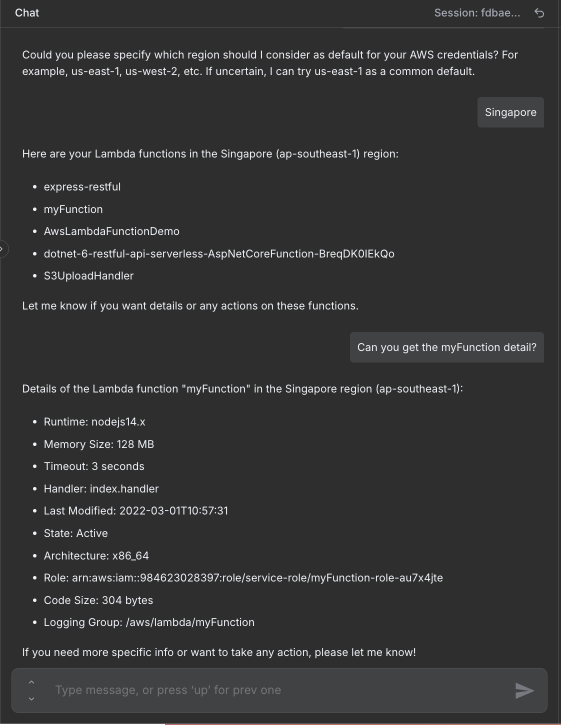"
},
"typeVersion": 1
}
],
"active": false,
"pinData": {},
"settings": {
"executionOrder": "v1"
},
"versionId": "72f00ce5-d7b4-4369-b869-48b6e73611ba",
"connections": {
"65430de9-aadf-4af9-a755-3ed28ff84e25": {
"ai_tool": [
[
{
"node": "bc5292ea-8e7b-4c3a-ae26-555861f7b8e7",
"type": "ai_tool",
"index": 0
}
]
]
},
"Simple Memory": {
"ai_memory": [
[
{
"node": "bc5292ea-8e7b-4c3a-ae26-555861f7b8e7",
"type": "ai_memory",
"index": 0
}
]
]
},
"Delete a Function": {
"ai_tool": [
[
{
"node": "bc5292ea-8e7b-4c3a-ae26-555861f7b8e7",
"type": "ai_tool",
"index": 0
}
]
]
},
"OpenAI Chat Model": {
"ai_languageModel": [
[
{
"node": "bc5292ea-8e7b-4c3a-ae26-555861f7b8e7",
"type": "ai_languageModel",
"index": 0
}
]
]
},
"Get Lambda Function": {
"ai_tool": [
[
{
"node": "bc5292ea-8e7b-4c3a-ae26-555861f7b8e7",
"type": "ai_tool",
"index": 0
}
]
]
},
"List Lambda Functions": {
"ai_tool": [
[
{
"node": "bc5292ea-8e7b-4c3a-ae26-555861f7b8e7",
"type": "ai_tool",
"index": 0
}
]
]
},
"Invoke Lambda Function": {
"ai_tool": [
[
{
"node": "bc5292ea-8e7b-4c3a-ae26-555861f7b8e7",
"type": "ai_tool",
"index": 0
}
]
]
},
"bc5292ea-8e7b-4c3a-ae26-555861f7b8e7": {
"main": [
[]
]
},
"When chat message received": {
"main": [
[
{
"node": "bc5292ea-8e7b-4c3a-ae26-555861f7b8e7",
"type": "main",
"index": 0
}
]
]
}
}
}Comment utiliser ce workflow ?
Copiez le code de configuration JSON ci-dessus, créez un nouveau workflow dans votre instance n8n et sélectionnez "Importer depuis le JSON", collez la configuration et modifiez les paramètres d'authentification selon vos besoins.
Dans quelles scénarios ce workflow est-il adapté ?
Intermédiaire - DevOps, Chatbot IA
Est-ce payant ?
Ce workflow est entièrement gratuit et peut être utilisé directement. Veuillez noter que les services tiers utilisés dans le workflow (comme l'API OpenAI) peuvent nécessiter un paiement de votre part.
Workflows recommandés

Trung Tran
@trungtranEmpowering small and medium businesses with smart automation and practical AI, no big tech team required. Youtube channel: youtube.com/@theStackExplorer
Partager ce workflow